Don’t Be An IT Dinosaur – Attend TechCamp 2014 On June 19/20

A monumental change is happing in IT right now. You can fight it all you want, but cloud is a disrupting force that will effect our entire environment. IT pros are scared of “the cloud” … but is their fear justified?

This is why a bunch of us are presenting on the IT pro aspects of the Microsoft Cloud OS on June 19th and 20th. It’s a 2 day event in Dublin Citywest, where you can register for the Hybrid Cloud stuff (infrastructure as a service or IaaS) on June 19th, the Office365/etc stuff (software as a service or SaaS) on June 20th, or even register for both days.

The content on June 19th will span on-premises IT, building private clouds, automation, and mixing your on-premise infrastructure with Microsoft Azure. On June 20th we move on to SaaS where there will be lots of Office 365, Windows Intune, and Power BI. All presenters have been instructed to present demo-heavy “here’s how to …” technical sessions.

Now is the time to learn and evolve. Don’t be a dinosaur; get on board with the cloud now and be the person who is employable in 5 years time. You can choose to cover your ears and close your eyes, but you’ll be dug up from an IT tar pit in a few million years time.

dinosaur (3)

IT pros that ignored the cloud as it made them extinct

This event WILL NOT BE REPEATED. This is a once-off collection of subject expert speakers. No roadshow, no Microsoft Ireland event, and no partner event will repeat what we’re doing at TechCamp.

And consultants … this message goes double for you.

Microsoft Announces “Windows 8.1 With Bing”

Microsoft just announced the coming of a new edition of Windows 8.1 for low cost devices called Windows 8.1 with Bing. The goal of this SKU is to reduce the overall cost of low price machines, making Windows PCs more accessible.

I talked with one of my colleagues who manages our consumer device market, spanning Windows, Chromebooks, Android, etc. He just told me that Chromebooks have 20 percent to 25 percent of the U.S. market for laptops that cost less than $300 – note that story was from 2013 so the Google gains might be larger now.

This is an important market – it’s where the education market resides. Ever hear the crude phrase: “get ‘em young and rear them as pets”? That’s what Google is trying to do … get kids into the ecosystem and keep them for life.

Microsoft has no choice but to react; they’re used to owning 90%+ of the PC market so losing an important demographic such as this is not good. Losing a large market to the Google ecosystem at such a young age makes it more difficult to win them back.

Many OEMs take payment to change the browser and search engine to something other than the default Microsoft services. Windows 8.1 with Bing will ship on devices with IE set as the default browser and Bing as the default search engine. In return, we believe that OEMs will get lower cost copies of Windows, and this will allow Windows laptops to compete against Google’s machines … and hopefully (for Microsoft) bring those young users into the Microsoft world of Bing, Outlook, and more.

Technorati Tags:

TechDays San Francisco June 5-6

Folks of the Bay Area and surrounding counties – if you want to learn about Microsoft commercial technology such as Azure, Lync, Hybrid Cloud, ADFS, OS deployment, and more, then you need to check out TechDays. If I lived in 49er country then I would register.

The speaker list is a whos-who from the west coast Microsoft community. The location is easy to find – it’s the MSFT office near the terminus of the Powell cable car. There’s loads of public transport routes in/out – I know this and I’ve only visited the Bay three times from Ireland.

So check out the agenda, register, attend, and learn something to advance your career.

Microsoft News Summary-23 May 2014

1,000,000 IOPS from Hyper-V VMs using a SOFS? Talk about nerd-vana!!! Here are the links I found interesting over the last 48 hours:

Microsoft Azure Available Through Open Licensing

I did not expect this announcement until WPC, but it’s come out today. Microsoft announced, via a video, that Microsoft Azure will be available for resellers to sell, and customers to buy, through Open licensing on August 1st 2014. Yes, Azure is coming to the channel. Previously Azure has only been available direct (credit card) or via Enterprise Agreements.

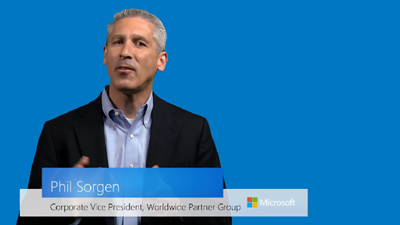
Phil Sorgen took to the webcam to record this message. A blog post was also written by Josh Waldo, Senior Directory, Cloud Partner Strategy. There is also a FAQ for Azure in Open licensing. There will be a “ramp up” online event on Microsoft Azure in Open Licensing on June 4th. Register here.

image

Sorgen starts off by saying that Microsoft believes in joint success with partners, and in making business with Microsoft easier for partners. These two pillars are central to an exciting new opportunity for partners.

He announces it: Azure will be available through the distribution channel via Open licensing for partners to resell to their customers.

Azure allows partners to serve more customers without increasing their footprint. Successful cloud partners have learned how to expand their services beyond basic deployments. Think business IT-enabled consulting. Partners have increased revenues, but they had to evolve their business models.

Personally, I know of one services business that automates to an incredible level and cloud services fits their model perfectly. Before the recession they shifted tin like everyone; they evolved and now they are flourishing, and taking business from legacy service providers.

“Moving to cloud is a process not an event”: true for partners and customers. Azure can become even moer compelling. Note that Azure contains many hybrid cloud services, enabling “on ramps” to services that extend the functionality of on-premises IT, making it easier for businesses to explore and adopt Microsoft’s public and hybrid cloud offering.

Azure in Open will be flexible, provide compliance manageability, and provide value for customers. The consumption based billing provides a low barrier to entry, making it easier for SMEs to deploy services without huge CapEx costs. “Consumption aligned billing” is one of the buzz phrases. Focus on services instead of tin.

There is a new licensing model with Azure in Open.

Moving over to the blog post:

The cloud is growing 5 times faster than traditional IT. Microsoft alone is thought to purchase 17% of all servers on the planet in a year. “Additionally, partners that are building strong cloud businesses have 1.6X of recurring revenue as a portion of total revenue versus other partners”.

How does this licensing model work?

When you resell Azure in Open Licensing, you purchase tokens from your preferred Distributor and apply the credit to the customer’s Azure Portal in increments of $100. The credits can be used for any consumption-based service available in Azure. To add more credit, you simply purchase new tokens and add them to the account. This gives you the opportunity to manage your customer’s portal, setup services, and monitor consumption, all while maintaining a direct relationship.

In other words, you will buy Azure credit in the form of $100 tokens (I guess there will be localized versions). You can then use that credit in any way on Azure. It will be up to you (the end customer) to have enough credit to do what you need to do or to keep your services online. The advantage here is that you’re controlling costs (unlike post-usage credit card) and you don’t need to pre-purchase a huge credit (like with EA) before you know what your services will cost. I suspect that if partners want to, they can operate a service to help customers manage their credit.

A token comes in the form of an Online Services Activation (OSA) key. If you want $1000 in credit, you buy 10 SKUs of $100 and get 1 OSA key for the sum credit. The value has a 12 month life, starting from when the customer redeems the OSA key online – this credit will not roll over so don’t over purchase for a year. A customer can top up at any time. If they cannot reach a reseller (weekend), the customer can top up using a credit card. The program will be available through:

  • Open commercial
  • Open Academic
  • Open Government

Partners can request co-administrator accounts on their customers’ accounts to help them manage their service. Alerts can be configured for when credit runs low and needs to be topped up.

image

IMO, this is great news for partners. They can now choose to resell Azure if they want, and keep the billing/customer relationship – something that caused fear in the past (“cloud vendor X is trying to steal my customers”). Some might not want billing overhead and might go with another option.

Also, this announcement reinforces Microsoft’s unique selling point in the cloud wars. They are the only company with a private/public hybrid cloud model that spans on-premises customer owned, hosting partners, and Azure. Microsoft is also the only cloud vendor with a partner-enabling model.

By the way, partners & customers in Ireland, if you want your techies to learn about Hybrid Cloud then you might want to send them to TechCamp 2014 in June.

Microsoft News Summary-21 May 2014

I took a break from these posts last week while I was at TechEd, and then had work catch up to do this week. Let’s get back a rockin’. There is a distinct tendency towards cloud and automation in the news of the last week. That should be no surprise.

The End Of An Era – Bye Bye TechNet Subscription

I wouldn’t be where I am today without the TechNet subscription. I signed up for it way back when I first decided to become a contractor and I started this blog. I needed content that I could use in a lab. I needed that content to be up to date and, most importantly, affordable. That was TechNet. It allowed me to install software from scratch, learn how it worked, and dive deeper than a canned lab could ever allow.

As we all know, the TechNet subscription was killed off by Microsoft, seen by many as a stab at the heart of IT pros.

This email came in to me over the past hour or so. It’s sad; we may never see IT pros gain the same access to on-premise software again for test and evaluation purposes.

image

Surface Pro 3 Launch – Same Old Surface

This was a live blog post that I wrote using the online feed.

Prologue: Some might say that this post is too snarky. I respond with The definition of insanity is “doing the same thing over and over again and expecting different results” – Albert Einstein.

Satya Nadella wants to talk about the next step of devices and clouds, which is devices. I guess talking about dreams of Surface making a profit are more important than courting the IT pros at TechEd? Empowering people to be more and do more is a unifying theme in MSFT, apparently. They want products and technologies that enable people to dream and get stuff done.

image

They are not making h/w for h/w’s sake. No fridges or toasters … hmm … someone been listening to me talk about MSFT sales strategies? MSFT want to create new categories and spark demand for their entire ecosystem.

Today is the start of dreaming the impossible – selling Surface? I jest! But they are in every show on CBS. That’s an accomplishment in product placement.

Here comes Panos Panay, the hardware guy that’s always out to talk Surface “design”. He’s cool cos he says “what’s up dude?” to a person in the audience. The work involved in “this device” spans many parts of Microsoft apparently. Panos is excited. I am sceptical.

Some people said nice things about Surface. They liked that. No mention of the bad things.

Seriously though – I recognize Steve Gleason in the promo video, a sufferer of ALS and former NFL New Orleans Saints player. He’s using a Surface to speak now.

image

96% of people using an iPad also own a laptop. The camera focuses in on a bunch of media types with MacBooks on their laps.

Tablets are consumed for you to sit back and watch movies, read books, surf the web, and snacking on apps. Laptops are designed to get stuff done – Panay.

Wide variety of laptops out there from sleek to clunky depending on the design point. Battery got better … and then laptops and tablets began to blur. People walk into a store (no matter what store) then there is a conflict for the purchaser – do you buy a tablet or laptop – “what am I supposed to buy?”. Sales rep will ask “what is it that you want to do?” – at least they should ask that and not respond with “buy an iPad”.

MSFT wants to take that conflict away so 96% of people don’t go home after buying a tablet and a laptop. A new device that spans both must offer best of both. All day battery life. Thin – but not too small that it can’t be used for productivity.

Today they introduce Surface Pro 3. It’s thin (9.1 mm). It uses the same floppy keyboard as the previous versions – sigh – it’s not a laptop replacement in my opinion. See the Dell Venue 11 Pro for a real laptop replacement.

image

This has a 12” diagonal screen instead of 10.6”. It’s still smaller than most ultrabooks, but it has a 3 x 2 screen ratio (new). Highest screen contrast on the market (a big deal in my opinion – even the Pro 1 has a great screen).

It is 800 grams. Remember that this is not an ARM tablet, it is an Intel Core i-powered machine, like an Ultrabook. Panay puts a Surface and a Macbook Air on a weighing scales:

image

He’s really pushing the “replace your laptop and tablet with Surface Pro 3” sales line. The new Core i7 is in this tablet. Thinnest machine of this kind, with 10% more performance than the Surface Pro 2. The device has a pressurised cavity to contain all of the pieces. Every tablet is custom machined to fit – allegedly.

He drops the tablet from head height to prove the build quality, despite being thinner.

image

He picks out a journalist with a Macbook and gives her the demo unit to keep. It was the one he just dropped.

Out comes the docking station – I wonder if it still scratches the surface of the docked … Surface. You can display to a 4K monitor.

Michael Goth (sp?) of Adobe is brought out to show off Photoshop on Surface Pro 3. He’s got a stylus in his hand. It seems that customers wanted Photoshop to take more advantage of touch and pen. He touts Creative Cloud’s advantage when it comes to speed of development. Some drawing and navigation is done.

Back to Panay to talk about the kickstand. To me, Surface has made a kickstand a mandatory feature of a tablet. He shows off the new angles. There is finally a fully adjustable full friction hinge, like in my €180 Yoga 8 Android tablet.

image

The myth of Surface lap-ability is brought out again. It does not work in my lap with the keyboard – I am not 7 foot tall. A new Surface Pro type keyboard. There is a new track pad – 60% bigger, better friction, etc. A necessary tool on a touch device without a mouse to point at stuff when doing productivity.

Try type with this sucker. Where are your hands? All T-rexed in front of your belly. The tablet will also move on the loose hinge while you type.

image

This is meant to stabilise the keyboard. It will not change a thing:

image

My hands will be curled up by my belly. The hinge will extend beyond my knees. The tablet will still move – too many points of contact. They should have gone the same way as Samsung and Dell with their pro tablets.

He moves on to the stylus to talk about pen and touch. A crossword demo. I wonder if the Surface stylus docks in the tablet … like in the Samsung ATIVs, the Toshiba i5 machine, or even my Yoga laptop? No? Ah – just what a business customer wants … hundreds of machines where users will be losing the peripheral because it does not securely dock – I do not count a magnet lock into the power supply port – that’s because I have to remove the very losable peripheral to power the tablet.

The Surface pen tip is closer to the “ink” because the glass is thinner. Writing has a low latency apparently. OneNote & SkyDrive is pushed (nothing new there – I live on that on my Yoga laptop). Apparently the stylus (Surface Pen) has a button that launches OneNote (1 click) and saves to SkyDrive (2 clicks). Now we get a OneNote demo that goes on for way too long.

Panay tries to sync a OneNote to the WSJ journalist that just got a free tablet. The camera pans to her, and she’s shaking her head!!!!! The camera gets off of her quickly.

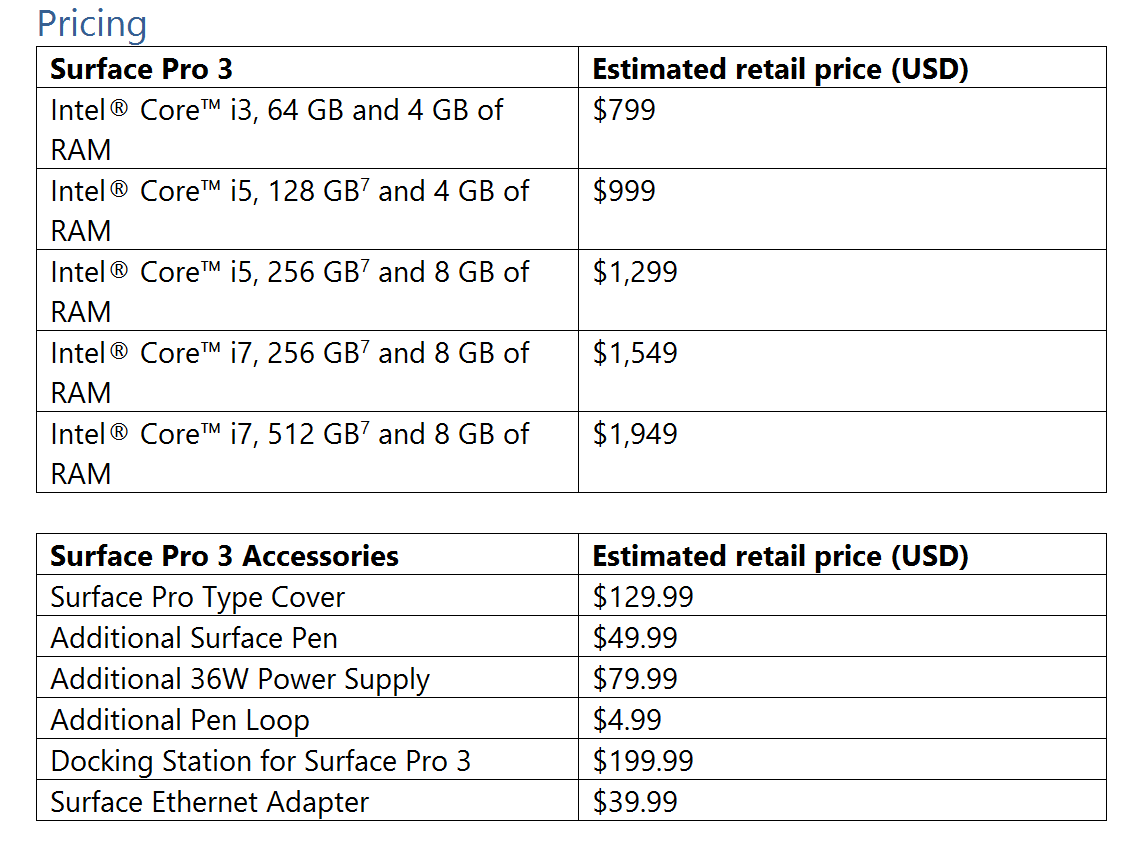
Sales start at $799 in 3 configs, with i3, i5, and i7.

The press in attendance get an “on loan” unit with keyboard and pen.

Summary – Surface Pro 3 is a little bigger and thinner. They’ve a new keyboard double hinge to try solve a problem that Microsoft has created by not offering a real keyboard. They push productivity, but do not sell Surface through a channel so it can be sold to business by system integrators. It’s new Surface, same old Surface. I’ll stick to my 8” Android tablet for consumption and my Windows Yoga Pro laptop for productivity, thanks very much. I don’t work for the Wall Street Journal, so I don’t expect Panos Panay to give me a Surface for free 🙂

Oh – and where was the Surface Mini? It was a no-show. I think there might have been some serious re-thinking. A device of that size relies on “Metro” apps like no other, and there is still a dearth of quality apps. Plus – I wonder if the new ARM version of Windows will be compatible with current hardware … or will Windows RT be able to upgrade to the new OS?

EDIT 1:

Mary Jo Foley tweeted that the Surface Pro 3 will go on sale on June 20th (I’d say probably USA only at first). The batter life is up to 9 hours.

image

EDIT 2:

Mary Jo went on to tweet a price list. Note that the stylus is included with the Surface Pro 3. They keyboard is not included. This is the same as before. Note that the last minute leaks had the correct pricing. Those stories also talked of a limited edition Surface Pro 3, and the possibility of getting it in 3 non-black colours.
Technorati Tags: ,

TechEd NA 2014–And The Winner Of Speaker Idol Is …

So I told you that I had qualified as a wildcard to the final of Speaker Idol in TechEd North America 2014. The judges also said I need to give them a tech talk rather than my tall tale based on photography. This would be a challenge. Other finalists would tweak existing decks that they’d worked on for ages. I had to start from scratch and get it right in less than a day. The most difficult thing is … it’s a 5 minute session and they time you. It’s one of the judging criteria. An hour long session is much easier to prepare.

So I got to the hotel on Wednesday night and started working. I knew what my topic would be: WS2012 R2 Live Migration. I had a demo script and a lab in Dublin … but there is no reliable speaker net at the podium so I would have to record my demo. VPN was too unreliable.

I built up my deck. No problem there. I knew the rules: the judges expect you to stick to a format. I went to build my demo but I had some problems with PowerShell modules in my VMM-deployed labs. It took some time, but I figured them out and got the demo ready. Then Camtasia did it’s thing … I remembered to record the video at eactly the screen resolution used by the big screen at the podium. One run through of the session and it was … nearly 9 minutes long. I needed to edit the deck, the demo, and me … brutally.

At 00:30 I was exhausted. I set the alarm for 06:00 and slept like a baby. It was the first morning that the alarm woke me. No jetlag on Thursday. I had a few hours to get myself ready for the final at 12:30. I rehearsed again and again, finally figuring that if I said certain things at the right time in the demo, and left out others, I could hit 4 minutes 45 seconds. Perfect!

So off I went to TechEd. I attended a session on Azure connectivity and thin skipped a fairly dull second slot, opting to go through my deck. I remembered something Mark Minasi told me last year – when he was not a judge. Speaker Idol judges and the audiences are a mixture of IT pros and devs. Give both audiences a hook. So I did: more service uptime and “your aps stay running while IT does stuff”.

The time came. I went to the area and waited. A crowd started to gather … and then people I knew started to arrive. The Hyper-V PM team from Redmond, the Irish MVP gang (John McCabe [ex-mvp, now MSFT]), Kevin Greene, Damian Flynn), readers of my blog and twitter followers, the gang from Petri, the Ferrills (father and son tech journalists, and so many more.

I was nervous. I do not get nervous when I speak. I really don’t. I’m comfortable speaking. I enjoy it – it’s a buzz when you’ve got something to share and you can see that the audience want to hear it. But damn I was nervous. I got on stage, and completely forgot that I had a clicker on the desk. I stood with Richard Campbell (the organizer, and famed for things like RunAs Radio) as I was introduced to the crowd.

WP_20140515_13_21_42_Pro

I realized how much of the audience were people rooting for me. I was amazed. These people took the time to come and support me. The view from the podium was so cool.

My plan might work. I had 5 minutes to impress … starting now!

First thing: “How is everyone? Is everyone enjoying Speaker Idol?”. And they whooped. Thankfully! That got things going well. I did my intro slides and completely let the fact that I had a clicker slip out of mind. I like to get out from behind a podium so I was walking back and forth, pressing the keyboard to progress. Yuk! I did my demo and screwed up my timing and included stuff that I shouldn’t have. I included the “It does stuff” line and people laughed. Damn, this was going OK.

I wrapped up and waited for comments. I went over 5 minutes, nearly hitting 6 minutes. Argh! I was toast. Maybe I should have trimmed the intro slide. Some comments about font and bullet points. But overall, great comments about delivery and inclusion of the audience. The dev outreach worked.

I thought the guy that did the Azure talk would win. I liked his pace (I was a bit rushed) and he seemed very polished to me. I was sure I was not winning. We were all called up for the results. The judges said this was a tough one, tougher than it used to be in past years because people know what to bring now.

WP_20140515_13_32_43_Pro

Mark Minasi (who recused himself of voting because we are friends) announced the results. It was a non-American (there was a presenter from Finland who also did a good job). And the winner of a speaking slot in TechEd North America 2015 is …

Aidan Finn.

Instantly pressure slid off. And the lack of stress left me … I was shattered. I think the stress was holding me up. Afterwards I talked for about an hour with people from all over. When it all died down I was ready to drop.

A few beers were had to celebrate 🙂

TechEd NA 2014–Extending Your Premises To Microsoft Azure With Virtual Networks And ExpressRoute

Speakers: Ganesh Srinivasan (Azure Networking), Jai Desai (StorSimple), Jon Ormond (MSIT).

Legacy Connections for Site-Site in Azure

  • Secure point-site VPN: for developers. POCs. Small scale deployments. VPN in from a machine. Based on STP.
  • Secure site-to-site VPN: This is for SMB and enterprises. Connect your business to Azure compute. IaaS and PaaS workloads. Configuration generally done on and on-rem edge device. Based on IPsec.

Now added: Private site-to-site called ExpressRoute. For SMB (with WAN) and enterprises. Mission critical workloads. Backup/DR, Media, HPC. Based on services provided by WAN ISP that are Azure networking partners.

Virtual Network Recap

Software defined private network in Azure. You carve out your own IP space/subnets. Can punch holes through Azure firewall for public presence. VPN connects to the virtual network via an edge subnet.

In-Region VNet to VNet

You want security between tiers or services so you put them in different virtual networks. In the same region, there are no data transfer costs. You can punch holes through firewalls to let services communicate.

Cross-region VNet to VNet

Need local presences across the glob but with interconnectivity. For HA/DR also. Can communicate securely using private IP addresses.

Multi-site VNet Connectivity

Up to 10 on-prem sites can connect into a single VNet in Azure. They may be geographically dispersed.

VPN Partners

Watchguard, OpenSwan, Cisco, Fortinet, Brocade, Sonicawall, Checkpoint, Juniper, F5, Allie Telesis, and Windows Server 2012 R2.

ExpressRoute

Other techs go via public internet so you have dependencies on many ISPs between you and Microsoft. Lots of chokepoints. It might be secure (IPsec), but you cannot build SLA on this. ExpressNetwork brings Azure VNets into your WAN. Now you connect to Azure via a private, SLA controlled WAN connection managed by your ISP, subject to your contract with them.

Enterprise Workloads

All services are made available, and not just VNets. VPN is limited to VPN. You also have controlled and predictable latency. This means there are lots more workloads that you can do over ExpressRoute:

  • Storage/backup/recovery
  • Dev/test lab
  • BI/big data
  • Media
  • Hybrid apps
  • Productivity apps

SharePoint has generated lots of interest as a service over ExpressRoute from customers.

Two Flavours

  • Depoy “on prem” at a colo facility such as provided by Equinox. You can route via colo facility to Azure. Probably requires lots of work for you and additional h/w.
  • Use an Azure ExpressRoute partner as your WAN provider. Then your sites connect direct to Azure. Almost a light switch. Probably no additional h/w.

Partners

Equinix, TelecityGroup, BT, AT&T, Level3, Verizon, SingTel

BT important for UK/Ireland. Telecity are important for Europe. If you are not with any of these, “talk to us” according to the speaker, and “we will figure it out”.

ExpressRoute Tiers

Unlimited inbound data transfer. You get some outbound data for free and above that there is a charge.

  • 200 Mbps + 3 TB Month free
  • 500 Mbps and 7.5 TB/month free
  • 1 Gbps + 15 TB/month free
  • 10 Gbps and 250 TB free/month

Customer Connectivity

If you do VPN then you can only access compute that runs in VNets. If you do ExpressRoute then you can access anything. And of course, if you punch holes in firewalls, then you can make services available publicly.

Common misconception: stuff you place in Azure is public. No: it’s only public if you make it that way. Your Azure services can be completely private if you want.

Customer Sign Up Experience

Talk to MSFT and ask for partners in a location. You get a key. Pass that on to the service provider. They query Microsoft and then they create a cross connection between you and Azure. You then set up BGP routes between you and Azure. And then you are connected.

In the case of a WAN provider, the routing is done for you.

Demo

He creates an ExpressRoute connection via the web ONLY using MSFT WAN and AT&T. The whole process is basically orchestrated. Should take no more than 5 minutes to complete after walking through the wizards.

He VPNs into Microsoft and can ping and Azure VM over the new WAN connection.

Another ping demo: between 1-2 MS latency between a MSFT office in California and a SharePoint farm in Azure over ExpressRoute (think he said US East region).

Fails over the SharePoint SQL database (guest OS install) from one region to another – takes about 3-4 seconds.

We now get Jon Ormond of MS IT to talk about how they are using ExpressRoute.

MSFT IT

LOTS of internal little apps that they have no interest in rewriting as PaaS apps. They use IaaS to run those VMs in Azure – doing that lift & shift now. Need a robust network connection. This is why they use ExpressRoute. They want to end up with 95% of VMs in “the cloud” both private (WAP) and public (Azure).

He does a demo using PowerShell to create the connection. Can also do this using REST API.

Jai Desai, a TSP takes over to talk StorSimple. I tune out here … a StorSimple talk.