The purpose of this post is to share what I’ve learned (through prompting through AI) about capacity issues in Azure regions in the EU.
The data in this presentation was gathered and assembled by Claude.AI using social media data from the last 6 months. This does not guarantee that the data is accurate, but I have to admit that the anecdotal evidence that I have observed coincides with many of the findings.
Background
We’ve all been there. Maybe you were deploying App Services. Maybe you tried to make your firewall available across availability zones. Maybe you tried to deploy Cosmos DB, Azure SQL Managed Instance, or even a small Azure SQL logical server. And you get greeted with something like:
{
"code":"DeploymentFailed",
"target":"xxxxx",
"message":"At least one resource deployment operation failed. Please list deployment operations for details. Please see https://aka.ms/arm-deployment-operations for usage details.",
"details":[
{
"code":"ResourceDeploymentFailure",
"target":"xxxxx",
"message":"The resource write operation failed to complete successfully, because it reached terminal provisioning state 'Failed'.",
"details":[
{
"code":"ProvisioningDisabled",
"message":"Provisioning is restricted in this region. Please choose a different region. For exceptions to this rule please open a support request with Issue type of 'Service and subscription limits'. See https://docs.microsoft.com/en-us/azure/sql-database/quota-increase-request for more details."
}
]
}
]
}
That’s a hard block. You do what you are told and open a (free) support ticket to request some/more quota, once you figure out the maze of options in the awful support ticket experience. And then you wait … and wait … and you get an email from support to say “we’re looking into this” and you wait … and wait … and you get an email from support to say “we’re engaging with engineering” … and you wait … and you wait … and you get an email from support to say “sorry, we can’t give you capacity, but there’s some free space at the other side of the planet where you have no other resources and latency will suck for you, and who cares that you already invested loads into infrastructure and applications in region X”.
Where Then?
Brownfield scenarios where you have existing resources – that’s a mess. But let’s look for a better location for new deployments.
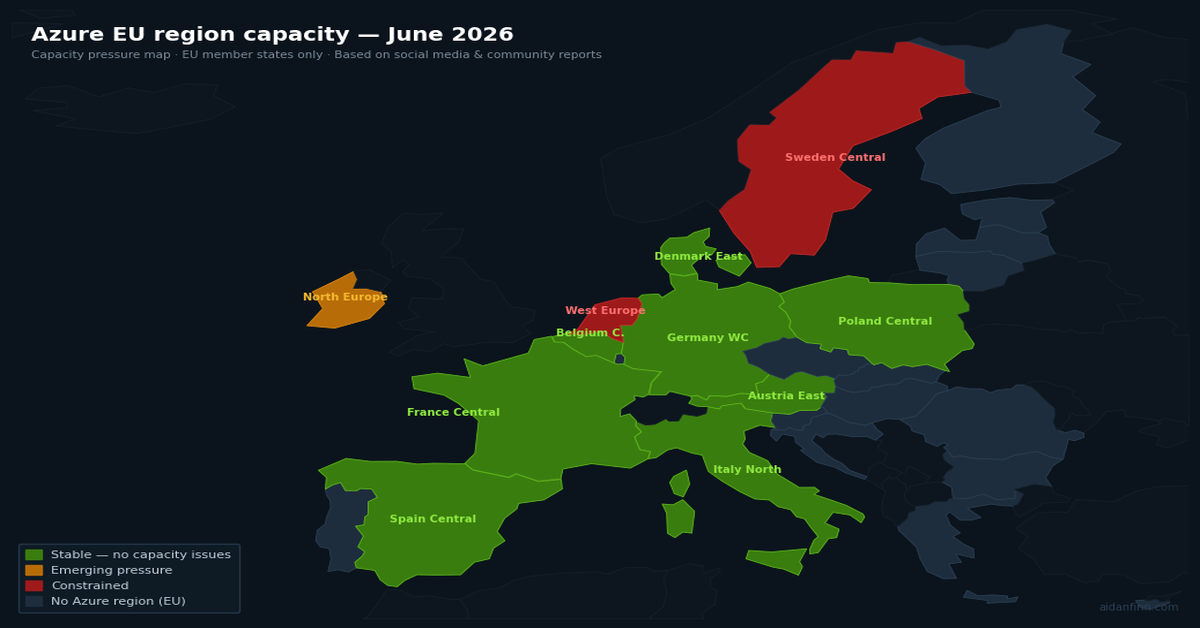
I use Claude.AI to inspect social media over the last 6 months and analyse Azure capacity reports across all EU-located regions. The following table was produced:
Region
GA
Capacity Status
Service Breadth
Resource Types with Reported Issues
France Central
2018
🟢 Stable
🟢 Full
Azure OpenAI Standard quota tighter than Global Standard; no VM AllocationFailed reports
Germany West Central
2019
🟢 Stable
🟢 Full
No capacity failures reported; Responses API and Foundry Agent Service supported
Poland Central
2023
🟢 Stable
🟢 Full
No capacity failures reported; Responses API supported
Italy North
2023
🟢 Stable
🟢 Full
No capacity failures reported; Responses API supported; limited community signal
Spain Central
2024
🟢 Stable
🟡 Growing
Service roadmap (Nov 2025) had several categories at H1/H2 2026 availability; no capacity pressure; 3 AZs available
Austria East
2025
🟢 Stable
🟡 Growing
Broadly available from August 2025; 3 AZs; service catalogue still filling in; no capacity issues reported
Belgium Central
2025
🟢 Stable
🟡 Growing
Opened 18 November 2025; 3 AZs; Log Analytics Workspace not yet available as of early 2026; no capacity pressure
Denmark East
2026
🟢 Stable
🔴 Limited
GA March 2026; no availability zones; newest and most limited region — service catalogue is minimal
North Europe
2009
🟡 Emerging pressure
🟢 Full
Reported alongside UK South in community threads as absorbing overflow demand; VM allocation concerns growing
Sweden Central
2021
🟠 Constrained
🟢 Full
Major Azure OpenAI outage 27 Jan 2026 (IRM/OOM failures, all-day impact); retry amplification overload 29 May 2026 from Microsoft 365 Copilot traffic; H100 GPU capacity tighter than North Europe; DataZoneStandard quota denied on new tenants
West Europe
2010
🟠 Constrained + feature gap
🟡 Partial
D-series VMs flagged ‘in high demand’; SkuNotAvailable across multiple AZs; Responses API absent with no Microsoft ETA; customers waited weeks for OpenAI quota only to find region unsupported; thermal event knocked multiple storage scale units offline late 2025
As I said, this is an EU table. Finland Central is not included because it is not GA – 5+ years after MS Finland were asking customers to sign up for it. Norway East and Switzerland North are excluded (not EU members). UK South and UK West are excluded (UK left the EU in January 2020).
The best of the lot appear to be:
France Central: Centrally located in the EU and capacity isn’t an issue thanks (maybe) to France increasingly abandoning non-EU cloud services.
Germany West Central: See France Central – Germans have mostly been sceptical of US-owned cloud services since day 1.
Poland Central: This region is brand new. Sharing a border with an aggressive neighbour might put it lower on the list for some.
Italy North: Another relatively new region – but there’s little public evidence of capacity issues.
You’ve got a valid certificate. It works in the browser. IIS is happy. Everything looks fine on the Windows server. You put Azure Application Gateway in front of the backend, enable end-to-end TLS, and the backend health probe goes red. The gateway won’t talk to your server.
Nothing changed. That’s the problem. Windows was lying to you the whole time.
Windows Is Too Helpful
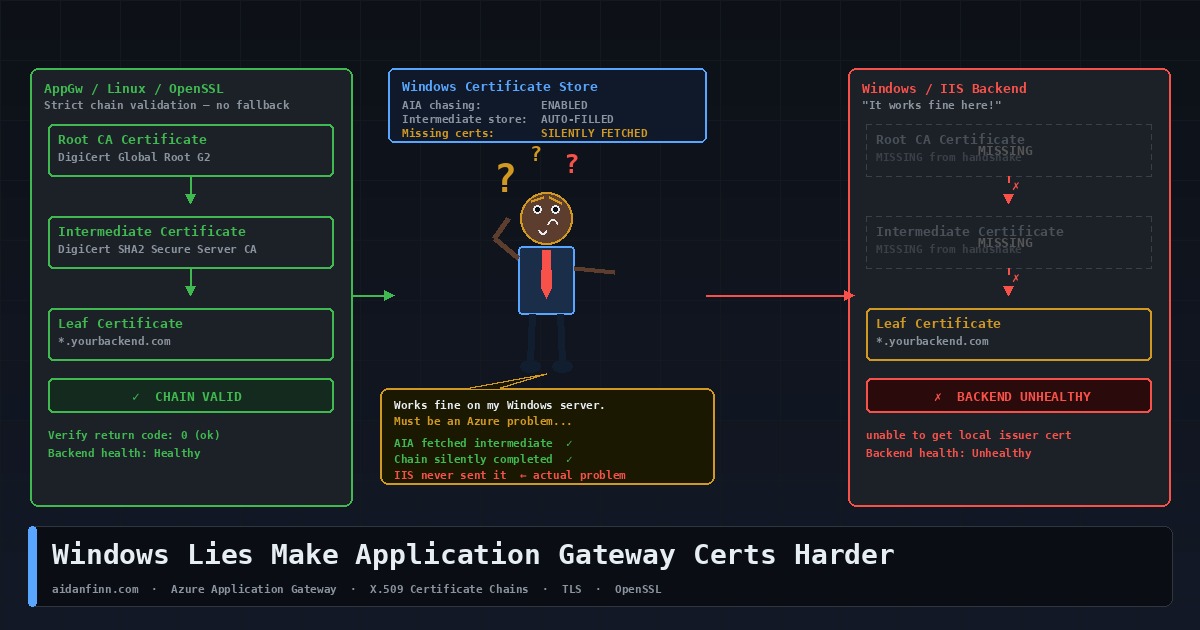
When Windows validates a TLS certificate, it doesn’t just look at what the server presented in the handshake. If it can’t build a complete trust chain from what it received, it checks the local machine certificate store. If intermediate certificates are installed there — and on any reasonably maintained Windows server, they usually are — Windows silently completes the chain and returns a clean result.
It goes further than that. x.509 certificates include an extension called Authority Information Access. The AIA field contains a URL pointing to the issuing CA’s certificate. If Windows still can’t build the chain, it quietly downloads the missing intermediate from that URL in the background, without telling anyone. Chain built. Handshake succeeds. No errors, no warnings, nothing to indicate the server was never presenting a complete chain in the first place.
This is why you can run a Windows server with an incomplete certificate for years … and never know. Every Windows client fills in the gaps for you. The problem only surfaces when something that isn’t Windows tries to connect.
Linux and Appliances Don’t Fill In the Gaps
OpenSSL doesn’t do AIA chasing by default. It doesn’t consult a well-stocked machine certificate store. It validates exactly what the server presented in the TLS handshake, and if the chain is broken, the handshake fails. No fallback. No retry. No silent download from the CA’s website.
That’s correct behaviour. A TLS handshake should succeed or fail based on what the server presents, not what the client can patch together from external sources. Relying on AIA chasing means your certificate validity depends on a runtime HTTP request to a CA endpoint, which may not be reachable in private networks, zero-trust environments, or anything running behind a restrictive firewall policy.
Application Gateway Is a Reverse Proxy
This is where the Application Gateway problem comes in, and it helps to be clear on the architecture.
AppGw is a Layer 7 reverse proxy. The client TLS connection terminates at the gateway. Your browser — or your API consumer — is talking to Application Gateway, not to your backend server. AppGw then makes its own separate outbound connection to the backend pool. That second leg is a fresh TLS handshake if end-to-end TLS is configured … Application Gateway is the client.
In that handshake, AppGw behaves like OpenSSL, not like Windows. It validates what the backend presents. When HTTPS is selected in the backend settings, Application Gateway performs a full TLS handshake validation, including verifying that the certificate chain is trusted. It has no access to a Windows certificate store. It doesn’t go off to fetch missing intermediates from AIA URLs. It checks the chain against what it received, and if the chain is broken, the backend is marked unhealthy.
The Microsoft documentation is explicit: the chain must start with the leaf certificate, then the intermediate certificates, and finally the root CA. Microsoft recommends installing the complete chain on the backend server including the root CA certificate.
Spotting the Problem
The first sign is a red backend pool in the portal. Go to your Application Gateway, open Backend Health, and look at the Details column. You’ll see messages like “The backend server certificate isn’t signed by a well-known Certificate Authority” or errors about the intermediate certificate not being signed by any uploaded root certificate. Microsoft has a full list of backend health error messages and their causes.
Before touching anything in the gateway, run this from Azure Cloud Shell or any Linux machine:
That’s what Application Gateway sees. If OpenSSL reports a chain verification failure, the server configuration is wrong. Fix the server first. The gateway problem is a symptom, not the cause.
Fixing It
Two scenarios, two different approaches.
Certificate from a public CA — DigiCert, Sectigo, Let’s Encrypt, and so on
In the backend HTTP settings, tick “Use Well Known CA Certificate”. Application Gateway maintains its own trust store of well-known root CAs and if your backend cert chains to one of them, you don’t need to upload anything. What you do need is the backend server presenting a complete chain — leaf plus all intermediates.
On Nginx, concatenate the leaf and intermediate into a single bundle file:
cat your_domain.crt DigiCertCA.crt >> bundle.crt
DigiCert’s Nginx installation guide covers this in full. Point your openssl s_client directive at the bundle. Restart Nginx and verify with openssl s_client before touching the gateway.
Uploading the root is only part of it. The backend server still needs to present the full chain, including all intermediates. The gateway matches the root you uploaded against the chain the backend presents — if the chain has a gap, the handshake still fails.
Before You Go to Production
Self-signed certificates are for lab use. Don’t take them to production and upload them to the gateway backend settings as a workaround. You’re trading a configuration problem for a certificate management headache that will bite you at renewal time.
When you renew certificates, check whether the intermediate has changed. CA intermediates do rotate, and a backend that was presenting a complete chain can silently break at renewal if the new intermediate isn’t installed on the server at the same time.
Check the CN. Application Gateway uses the hostname you configure in the backend HTTP settings as the SNI indicator in its connection to the backend. If the CN on the backend certificate doesn’t match, the handshake fails regardless of how clean the chain is. Make sure what you put in the backend settings matches the certificate. The end-to-end TLS configuration guide walks through all of this in detail.
Verify with SSL Labs or openssl s_client before going live, every time. If OpenSSL can validate the chain without needing any additional CA file flags, the backend is presenting correctly. If it can’t, fix the server — not the gateway.
The Short Version
Windows has been hiding incomplete certificate chains from you for years by filling in the gaps from local stores and downloading missing intermediates on the fly. Application Gateway doesn’t do either. It validates what it receives, and if what it receives is incomplete, the backend goes unhealthy.
The fix isn’t in Azure. It’s on your server. Present the full chain.
I see many people implementing classic network security designs in Azure. Maybe there’s DMZ and an internal virtual network. Maybe they split Production, Test, and Dev into three virtual networks. Possibly, they do a common government implementation – what Norway calls “Secure Zone”. I’m going to explain to you why these network designs offer very little security.
This post is part of a series that I’ve been writing over several weeks. If you have not read my previous posts then I recommend that you do. I can tell that many people assume certain things about Azure network based on designs that I have witnessed. You must understand the “how does it really work” stuff before you go any further.
Most of the designs that I have encountered in Azure, in my day job and as a community person who “gets around”, are very much driven by on-premises network designs. Two exceptions are:
What I see produced by my colleagues at work.
Those using Enterprise Scale from the Microsoft Cloud Adoption Framework – not that I recommend implementing this, but that’s a whole other conversation!
What I mostly observe is what I like to call “big VNets”. The customer will call it lots of different things but it essentially boils down to a hub-and-spoke design that features a few large virtual networks that are logically named:
Dev, Test, and Production
DMZ and private
Internal and Secure
Workload: A collection of resources that provide a service. For example, an App Service, some Functions, a Redis cache, and a database might make a retail system. The collection of resources is a workload, united in their task to provide a service for the organisation.
You get the idea. There are a few spoke virtual networks that are each peered to a hub.
The hub is a transit network, enabling connectivity between each of the big VNets – or “isolating them completely” – except for where they don’t (quite real, thanks to business-required integrations or making the transition from testing to production easier for developers). The hub provides routing to Azure/The Internet and to remote locations via site-to-site networking.
If we drill down into the logical design we can see the many subnets in each spoke virtual network. Those subnets are logically divided in some way. Some might do it based on security zones – they don’t understand NSGs. Some might have one subnet per workload – they don’t know that subnets do not exist. Each subnet has an NSG and a Route Table. The NSG “micro-segments” the subnet. The Route Table forces traffic from the subnet to the firewall – the logic here can vary.
Routing & Subnet Design
Remember three things for me:
Virtual networks and subnets do not exist – packets go directly from sender to receiver in the software-defined network.
Routing is our cabling when designing network security.
The year is 2025, not 2003 (before Windows XP Service Pack 2 introduced Windows Firewall to the world).
There might be two intents for routing in the legacy design:
Each virtual network will be isolated from the others via the hub firewall.
Each subnet will be isolated from the others via the hub firewall.
Big VNet Network Isolation
Do you remember 2003? Kid Rock and Sheryl Crow still sang to each other. Avril Lavigne was relevant (Canada, you’re not getting out of this!). The Black Eyed Peas wanted to know where the love was because malware was running wild on vulnerable Windows networks.
I remember a Microsoft security expert wandering around a TechEd Europe hall, shouting at us that network security was something that had to be done throughout the network. The edge firewall was like the shell of an egg – once you got inside (and it didn’t matter how) then you had all that gooey goodness without any barriers.
A year later, Microsoft released Windows XP/Windows Server 2003 Service Pack 2 to general availability. This was such a rewrite that many considered it a new OS, not a Service Pack – what the kids today call a feature update, a cumulative update, or an annual release. One of the new features was Windows Firewall, which was on by default and blocked stuff from getting into our machines unless we wanted that stuff. And what did every Windows admin do? They used Group Policy to turn Windows Firewall off in the network. So malware continued, became more professional, and became ransomware.
The goal here is to force any traffic that is leaving a subnet to use the hub firewall as the next hop. In my below example, if traffic wants to get from Subnet 1 to Subnet 2, it must first pass through the firewall in the hub. A Route Table is created with a collection of User-Defined Routes (UDR) such as shown below.
Each UDR uses Longest Prefix Match to force traffic to other subnets to route via the firewall. You don’t see it in the diagram, but there would also be a route to 0.0.0.0/0 via the firewall, including any prefix outside of this virtual network, except the hub (Longest Prefix Match selecting the System route created by peering with the hub).
Along comes the business and they demand another workload or whatever. A new subnet is required. So you add that subnet. It’s been a rough Friday and the demand came right before you went home. You weren’t thinking straight and .. hmm … maybe you forgot to update the routing.
Oh it’s only one Route Table for Subnet 4, right? Em, no; you do need to add a route table to Subnet 4 with prefixes to subnets 1-3 and 0.0.0.0/0. But that only affects traffic leaving Subnet 4.
What you forget is that routing works in two ways. Subnets 1-3 require a UDR each for Subnet 4, otherwise traffic from Subnets 1-3 will route directly to Subnet 4 and the deeper inspection of the firewall won’t see the traffic. Worse, you probably broke TCP communications because you set up an asynchronous route and the stateful hub firewall will block responses from Subnet 4 to Subnets 1-3.
Imagine this Production VNet with 20, 30, or 100 subnets. This routing update is going to be like like manual patching – which never happens.
One of the biggest lessons I can share in secure network design is KISS: keep it simple, stupid. Routing should be simple, and routing should be predictable when there is expansion/change, because routing is your cabling for enforcing or bypassing network security.
Network Security Group Design
As a consultant, I often have a kickoff meeting with a customer where they stress how important security is. I agree – it’s critical. And then I get to see their network or their plans. At this point, I shouldn’t be surprised but I always am. Some “expert” who passed an Azure certifcation exam or three implements a big VNet design. And the NSGs – wow!
What you’ll observe is:
They implement subnets as security zones, when the only security zoning in Azure is the NSG. NSG rules, processed on the NIC, are how we allow/deny incoming or outgoing traffic at the most basic level. In the end, there are too many subnets in an already crowded big VNet.
The NSG either uses lots of * (any) in the sources and destinations leading to all sorts of traffic being allowed from many locations.
They think that they are blocking all incoming traffic by default but don’t understand what the default rule 65000 does – it lets every routable network (Azure & remote) in.
They open up all traffic inside the subnet – who cares if some malware gets in via devops or a consultant who uploads it via a copy/paste in RDP?
And they’ll continue to stress the importance of security.
Shared Resources In The Hub
This one makes me want to scream. And to be fair, Microsoft play a role in encouraging this madness – shame on you, Microsoft!
The only things that should be in your hub are:
Virtual Network Gateways
Third-party routers and Azure Route Server
The firewall
Maybe a shared Azure Bastion with appropriate minmised RBAC rights
Don’t put DNS servers here. Don’t put a “really important database” in the hub. Don’t put domain controllers in the hub. Repeat after me:
I will not place shared resources in the hub
Everything is a shared resource. Just about every workload shares with other workloads. Should all shared resources go in the hub? What goes in the spokes now?
“Why?” you may ask. Remember:
By default, everything goes straight from source to destination
Routing is our way to force traffic through a firewall
When you peer two VNets, a new System route enables direct connectivity between NICs in the two VNets.
People assume that a 0.0.0.0/0 route includes everything, but Longest Prefix Match overrides that route when other routes exist. So, if you place a critical database in the hub, spokes will have direct connectivity to that database without going through the firewall and any advanced inspection/filtering services that it can offer – and vice versa. In other words:
You opened up every port on the critical resource to every resource in every spoke.
You created an open bridge between every spoke.
And the fact is that putting something in the hub doesn’t make it “more shared” (how is it less shared than something in a spoke?) or faster (software-defined networking treats two NICs in peered VNets as if they were in the same VNet).
Those clinging to putting things in the hub will then want more routes and more complexity. What happens when the organisation goes international and adds hub & spoke deployments in other regions? What should be a simple “1 peering & 1 route” solution between two hubs will expand into routes for each hub subnet containing compute.
Everything is shared – that’s modern computing. Place your workloads into spokes, whether they are file shares, databases, domain controllers, or DNS servers/Private Resolvers. They will work perfectly well and your network will function, be more secure, simpler to manage/understand, and the security model will be more predictable.
Wrapping Up
This is a long post. There is a good chance that I just spat in the face of your cute lil’ baby Azure network. I will be showing you alterantives in future posts, building up the solution a little at a time. Until then, KISS … keep it simple, stupid!
Here comes yet another “How does it work” post on Azure networking. I have observed many folks who assume that routing in Azure works one way, but are shocked to learn that there are more layers than they anticipated. In this post, I will explain how routing really works in Azure networking.
The challenge with the above architecture is to make traffic flow through the firewall. Most people will answer that User-Defined Routes (UDRs) via Route Tables are required. Yes, that is true. But they fail to understand that two (I would argue three) other sources of routes are also present in this diagram. The lack of that additional knowledge may impact this simple scenario. And I know for certain that if this scenario were the typical mid-large organisation, then the lack of knowledge would become:
An operational issue
A security issue
A troubleshooting issue
A connectivity issue
The NIC Is The Router
One of my first posts in this series was “Azure Virtual Networks Do Not Exist“. In that post, I explained that all traffic routes directly from the source NIC to the destination NIC. There is no subnet, no default gateway, and no virtual network. Instead, a virtual network is a mapping of a mesh connectivity between all NICs in that virtual network. When you peer virtual networks, the mapping expands to mesh all NICs in the peered virtual networks.
Where does routing happen if there is no default gateway or subnet? The answer (just like “where are NSG rules processed?” is the NIC is the router.
Remember that everything is a virtual machine, including “serverless computing”, somewhere in the platform.
If packets travel directly from source to destination, then there is no router appliance between the source and the destination. That means that the source must be its own router.
Some Basic Routing Theory
A route is an instruction: if you want to get to address A then go to place X. X might be the destination, or it might be the first hop to get to the destination.
For example, I might have a remote network of 192.168.0.0/16. I have an Azure App Service that wants to use a site-to-site connection to reach out to a server with an address of 192.168.1.10. A route might say:
Prefix: 192.168.0.0/16
Next Hop Type: Virtual Network Gateway (VPN or ExpressRoute)
The NIC of the App Service will learn that route (see BGP later). Packets from the App Service will go directly to the NIC(s) of the Virtual Network Gateway and then route over VPN/ExpressRoute to 192.168.1.10.
Maybe I will manipulate that route a little to force egress traffic through a firewall. My firewall will have an internal IP address of 10.0.1.4. I can introduce a route (see User-Defined Routes later) of:
Prefix: 192.168.0.0/16
Next Hop Type: Virtual Appliance
Next Hop IP Address: 10.0.1.4
Now packets to 192.168.1.10 will go to my firewall. It’s important now that the firewall has a route to 192.168.0.0/16 – normally it would by default in a hub & spoke design.
The second piece of knowledge to have is that there must be a route for the response. There is no implied return route. Either a human or the network must implement that return route. And it’s really important that the return route is the same as the egress route; stateful firewalls will block TCP responses when they have not permitted the requests – this is one of those “you’ll learn it the hard way” things when dealing with site-to-site connections and firewalls.
The Laws Of Azure Routing
I will revisit this at the end, but here’s what you need to know when you are designing/troubleshooting routing in Azure:
Route source priority
Longest prefix match
Law 1: Route Source Priority
You might know that User-Defined Routes (UDRs) exist. But there are two (or three) other sources of routes and they each have a priority.
System Routes
The first source of routes that is always there is System (or Default) routes. System routes are created when you create or configure a virtual network. For example, every subnet in a brand-new virtual network has many system routes out of the box. The major routes we are concerned with are:
Route(s) to the address prefix(es) of the virtual network to route directly (VirtualNetwork) to the destination NICs.
A route to send all other traffic to the Internet (including Azure).
Yes, I am leaving out a bunch of other system routes that are implemented to protect Microsoft 365 from hacking but I want to keep this simple.
Another important System route is what is created when you peer two virtual networks. A route is created in each of the peered virtual networks to state that the next hop to the new neighbour is via peering. This is a human-friendly message; what it means is that the NICs in the connected peer are now part of the local virtual network’s mesh – packets from local NICs will route directly to NICs in the peered virtual network.
BGP Routes
Border Gateway Protocol (BGP) is a mechanism where one routing appliance shares its knowledge of routes with neighbours. For example, a router in Dublin might say “If you want to get to any NICs in Dublin then come to me”. A router in Paris might hear that message and relay it by saying “I know how to get to Dublin so if you want to get to Dublin, come to me”. A router in Munich might pick up that relay from Paris and advertise locally that it knows how to get to Dublin. A PC in Munich wants to send a packet to a NIC in Dublin. The Munich network says that the route to Dublin is via the router in Munich, so the flow of packets will be:
Munich PC > Munich router > Paris router > Dublin Router > Dublin IP NIC
Azure implements BGP in two scenarios:
Site-to-site networking
Azure Route Server
You must configure BGP when using ExpressRoute for remote site connections. You optionally configure BGP when configuring a BGP tunnel. What most people don’t realise is that you will still have BGP routes with a BGP-less VPN tunnel thanks to the Local Network Gateway which generates BGP routes for the remote site prefixes. In the case of site-to-site networking, BGP routes are propagated from the GatewaySubnet and propagate to all other subnets in the virtual network and (by default) to all peered virtual networks/subnets.
The other scenario is Azure Route Server (ARS), which also includes Virtual WAN, where the router is Azure Route Server – Azure Route Server originated in Virtual WAN. ARS can peer with other appliances, such as a router Network Virtual Appliance (NVA), and share routes with it:
Routes of remote connected networks are learned from the NVA and propagated to the Azure hub/spokes. The hub/spokes now know that the route to the remote networks is to use the router as the next hop (not your firewall!).
The prefixes of the hub/spokes are shared with the NVA to enable remote networks to know how to get to them.
User-Defined Routes (UDRs)
This is the one kind of route that we can directly manage as Azure architects/administrators/operators. A resource called a Route Table is created. The Route Table is associated with a subnet and applies its settings to all NICs in the subnet. There are two important things we can use the Route Table for:
Disable BGP Propagation: We can disable inward BGP route propagation to the associated subnet. This means that we can prevent routes to remote sites from bypassing our firewall by using the Virtual Network Gateway/NVA as the next hop.
User-Defined Routes: We can implement routes that force traffic in ways that we want.
UDRs have several possible next hops for packets:
Virtual Appliance: A router or firewall – you additionally specify the IP address of the virtual appliance NIC to use.
Internet: Including the Internet and Azure
Virtual Network Gateway: An Azure site-to-site connection in the virtual network or shared with the virtual network via peering.
Virtual Network: Send packets to the same virtual network.
None: The packets are dropped at the source NIC and are never transmitted – a useful security feature.
Hidden Programmed Routes
You won’t find this one in any official documentation on routing but it does exist and you’ll learn about them either by accident or by educated observation of behaviour.
Microsoft will sometimes introduce a system route to fix an issue where if you do X, they will program a route to be generated. Unfortunately, this (probably a) type of System route cannot be visibly observed in any way because no diagnostics tools exist for that subnet.
One example of this is Private Endpoint. When you create a subnet, network policies for Private Endpoint are disabled by default. This causes a chain of things to happen:
UDRs are ignored by Private Endpoints in the subnet
Each Private Endpoint in the subnet will create its own /32 (the IP address of the Private Endpoint is the destination prefix) System Route in the virtual network and directly peered virtual networks. This means that a /32 route for the Private Endpoint is added to the GatewaySubnet of the hub/spoke depending on your design.
That GatewaySubnet System route has broken the spirit of many Azure admins over the years. You can’t see it and, from our perspective, it shouldn’t exist. The result was that traffic from on-premises to Private Endpoints went directly to the Private Endpoint, even if we set up a UDR to force traffic to the spoke virtual network to go via the firewall. This is because of the second law of routing: Longest Prefix Match.
Route Deactivation
We have established that there are three* sources of routes. What happens if two or three of them create routes to the same prefix? That can happen; in fact, you will probably make it happen if you want to force traffic through a firewall.
Let’s imagine a scenario where there are 3 routes to 192.168.0.0/16 from:
System
BGP
UDR
What happens? The fabric handles this automatically and applies a prioritisation rule to deactive the routes from lesser sources. The priority is as follows:
UDR: Routes that you explicity create in Azure will deactive routes from BGP & System to the same prefix. UDR beats BGP & System.
BGP: Routes that are created by admins/networks in other locations will deactivate routes from System to the same prefix. BGP beats System.
System: System routes are Azure generated and get beat by BGP and UDR routes to the same prefix.
Let’s consider a simple/common example. We have a virtual network with a subnet. If you want to see this in action, add a VM to the subnet, power it up, open the Azure NIC resource, and go to Effective Routes (wait 30 seconds). Withotu doing anything to the subnet/virtual network a System Route will be created for all NICs in the subnet:
Prefix: 0.0.0.0/0
Next Hop Type: Internet
What that means is that any traffic that doesn’t have a route will be sent to Internet.
Let’s say that I want to force that traffic through a firewall appliance with an IP address of 10.0.1.4. I can associate a new Route Table to the subnet and add a UDR to the subnet:
Prefix: 0.0.0.0/0
Next Hop Type: Virtual Appliance
Next Hop IP Address: 10.0.1.4
Two routes to 0.0.0.0/0 are present. Which one will be used? That decision is already made. The System route to 0.0.0.0/0 is automatically deactivated by the fabric as soon as a higher (BGP or UDR) route is added to the subnet. The only active route to 0.0.0.0/0 in that subnet is my UDR via the firewall.
Law 2: Longest Prefix Match
There is another scenario where there may be multiple route options. A packet might be destined to an IP address and multiple active routes might be applicable. In this case, Azure applies “Longest Prefix Match” – you can think of it as the best matching route. This one is best explained with an example.
Let’s say a packet is going 10.10.10.4. However, the source NIC has 3 possible routes that could apply:
System: 0.0.0.0/ via Internet
BGP: 10.10.10.0/24 via Virtual Network Gateway
UDR: 10.0.0.0/8 via a firewall
All of the routes are active because the prefixes are different. Which one is chosen? Tip: Route priority (UDR/BGP/System) is irrelevant now.
I don’t know the internal mechanics of this but I suspect that an AND operation is done using the destination address and the route prefix. Remember that each octet in a 32 bit IP address is 8 bits:
Here is the calculation for the System route, which sums to 0 bits:
Route Prefix
0
0
0
0
Destination
10
10
10
4
AND Bits
0
0
0
0
Here is the calculation for the BGP route, which sums to 24 bits:
Route Prefix
10
10
10
0
Destination
10
10
10
4
AND Bits
8
8
8
0
Here is the calculation for the UDR route, which sums to 8 bits:
Route Prefix
10
0
0
0
Destination
10
10
10
4
AND Bits
8
0
0
0
Which route is the best match? The BGP route is because it has the longest prefix match to the destination IP address.
Review: The Laws of Azure Routing
Now you’ve learned how Azure routes are generated, how they are prioritised, and how they are chosen when a packet is sent. Let’s summarise the laws of Azure routing:
Route Source Priority: When there are routes to the same prefix, BGP beats Sytem, and UDR beats BGP & System.
Longest Prefix Match: When multiple routes can be used to send a packet to a destination, the route with the longest bit match will be selected.
It’s Always DNS: Ask any Windows admin – when routing isn’t the cause of issues, then it’s DNS 🙂
You’re designing a new virtual network in Azure. You’re going to have three different security zones in your application. How many subnets do you need? I will help you understand why many of you gave the incorrect answer.
Back To Basics
In a previous post, I explained that virtual networks do not exist. Therefore, subnets do not exist. That’s why you cannot ping a default gateway. Packets do not leave a source NIC and route via default gateway to enter another subnet. Packets go from the source NIC, disappear in the physical network of Azure, and reappear at the destination NIC, whether it is on the same host, in the same data centre, in a neighbouring data centre, or on the other side of the world. Say it after me:
Subnets do not exist.
If packets go straight from source to destination, what is the logic of creating subnets to isolate resources?
Why Did We Segment Networks Using Subnets?
In the on-premises world, there are many reasons to segment a network. A common reason was to control the size of broadcast/multicast domains. That’s not an issue in Azure because virtual networks do not support broadcasts/multicasts.
From a security perspective, we segmented networks because we needed to isolate a firewall. The firewall is a central resource. A network runs from a top-of-rack switch to an ethernet interface in the firewall. That subnet uses the firewall to route to other subnets, possibly using the same cable (VLANs) or using different cables to other top-of-rack switches.
Earlier I asked you to imagine a workload with three security zones. Let’s call them:
Web
Application
Database
That’s not too crazy. My security model requires me to ensure:
Internet users can only reach the web servers on HTTPS
The Application server can only be talked to by the web servers.
The database servers can only be talked to by the application servers.
How would I create that? I’d set up three VLANs or subnets. Each VLAN would use a default gateway which is either the firewall or uses the firewall as a next hop to reach other VLANs. The firewall would then enforce my security intent, ensuring that only desired traffic could enter a VLAN to reach the required machines.
This design works perfectly well in on-premises cable-oriented networks because the networks (physical or virtual) are connected via cable(s) running to the firewall.
Bringing Cable-Oriented Designs To Azure
There is no finger-pointing here – I still have nightmares about an early Azure design I did where I created a VNet diagram with somewhere between 10-20 subnets. We all learn, and I’m hoping you learn from my mistakes.
Using the same requirements as before for our workload, we can produce the below design … based on cable-oriented patterns.
We create a single virtual network broken into 3 subnets. Each subnet has VMs for each role in the application. We then isolate each of the machines using NSGs.
That seems perfect, right? It is secure. Traffic will get from A to B. If we implement the rules correctly, then only the correct traffic will flow. But this design does display a lack of understanding.
Remember: packets go directly from source to destination. There is no default gateway. If an NSG that is processing rules on an Application Server NIC is allowing or denying traffic, then what is the point of the subnet? The subnet is not doing the segmentation; the NSG is doing the segmentation.
How Can We Segment Networks In Azure?
The most basic segmentation method in an Azure virtual network is the Network Security Group (NSG). While the previous Azure diagram is not technically wrong, the below diagram displays a better understanding of the underlying technology:
In this design, we are accepting that neither the virtual network nor the subnet exist. We are using rules in the NSG to isolate each tier of the application:
Look at the below NSG to see how this isolation can be done with a very simple example:
The NSG denies all traffic by default (rule 4000). Then the only traffic permitted is what we modeled previously using subnets. The rules are processed on the NICs, so the only way traffic enters a VM is if it is compliant with the above NSG.
Yes, I could use groups of IP addresses, or better, Application Security Groups that make the rules more readable and allow aggregation/abstraction of NICs & IP addresses.
So Why Do We Create Subnets In Azure
The primary reason is quite boring: technical requirements. Let me adjust my design a little. The database is going to be implemented using SQL Managed Instance instead of a VM. In the original VM-only design, there were no impediments to using a single subnet. SQL Managed Instance changes the technical requirements because it must be connected to a dedicated subnet.
That’s a simple example. A different example might be that I must use different address prefixes – see an older post by me on using a Linux VM as a NAT gateway where the VM has an internal NIC on a regularly addressed subnet and a second NIC in a subnet that is addressed based on NAT requirements.
Another example might be that you need to create custom routes for different NICs to the same prefix. For example, some NICs will go via your firewall to 0.0.0.0/0. Other NICs might go to “None” (a blackhole that drops packets) for traffic going to 0.0.0.0/0. The only way to implement that is to have one subnet for each Route Table. I’m not going to dive into routing here – let’s save that for another day.
Taking This Bigger
I am eventually going to explain enough things so I can show you why the classic Azure “big VNet” likely called production, test, or dev, is both an operational and security nightmare. But the above content, along with my other recent posts, are just part of the puzzle. Watch out for more content coming soon.
The Network Security Group (NSG) is the primary mechanism for segmenting a subnet in Microsoft Azure. NSGs are commonly implemented. Unfortunately, people assume quite a bit about NSGs, and I want to tackle that by explaining why you need to be aware of the default rules in Network Security Groups.
The Assumption
Let’s say I have an extremely simple workload consisting of:
A virtual machine acting as a web server.
A virtual machine acting as a database server.
Yes, this could be VNet-connected PaaS services and have the same issues, but I want the example to be as clear as possible.
I want to lock down and protect that subnet so I will create an NSG and associate it with the subnet. Traffic from the outside world is blocked, right? Now, I will create an inbound rule to allow HTTPS/TCP 443 from client external addresses to the web server.
Name
Source
Protocol
Port
Destination
Action
AllowWeb
<clients>
TCP
443
Web VM
Allow
The logic I expect is:
Allow web traffic from the clients to the web server.
Allow SQL traffic from the web server to the database server in the same subnet.
Everything else is blocked.
I check the Inbound Rules in the NSG and I can see my custom rules and the built-in default rules. This confirms my logic, right?
All is well, until one day, every computer in the office has a ransomware demand screen and both of my Azure VMs are offline. Now my boss is screaming at me because the business’s online application is not selling our products to customers.
Where It All Went Wrong
Take a look at the default rules in the above screenshot. Rule 65500 denies all traffic. That’s what we want; block all traffic where a higher priority rule doesn’t allow it. That’s the rule that we were banking on to protect our Azure workload.
But take a look at rule 65000. That rule allows all traffic from VirtualNetwork to VirtualNetwork. We have assumed that VirtualNetwork means the virtual network that the NSG of the subnet that it is associated with – in other words, the virtual network that we are working on.
The virtual network address space (all IP address ranges defined for the virtual network), all connected on-premises address spaces, peered virtual networks, virtual networks connected to a virtual network gateway, the virtual IP address of the host, and address prefixes used on user-defined routes. This tag might also contain default routes.
In summary, this means that VirtualNetwork contains:
The prefixes in your virtual network
Any peered virtual networks
Any remote networks connected by site-to-site networking
Any networks where you have referenced in a user-defined route in your subnets.
Or, pretty much every network you can route to/from. And that’s how the ransomware got from someone’s on-premises PC into the virtual network. The on-premises networks were connected with the Azure virtual network by VPN. The built-in 65000 rule allowed all traffic from on-premises. There was nothing to block the ransomware from spreading to the Azure VMs from the on-premises network.
Solving This Problem
There are a few ways to solve this issue. I’ll show you a couple. I am a believer in true micro-segmentation to create trust-noone networks. The goal here is that no traffic is allowed anywhere on any Azure network without a specific rule to permit flows that are required by the business/technology.
The logic of the below is that all traffic will be denied by default, including traffic inside the subnet.
I have added a low-priority (4000) rule to deny everything that is not allowed in the higher-priority rules. That will affect all traffic from any source, including sources in the same virtual network or subnet.
By the way, the above is the sort of protection that many national cyber security agencies are telling people to implement to stop modern threats – not just the threats of 2003.
I know that some of you will prefer to treat the NSG as an edge defence, allowing all traffic inside the virtual network. You can do that too. Here’s an example of that:
My rule at 3900 allows all traffic inside the address prefix of the virtual network. The following rule, 4000, denies everything, which means that anything from outside the network (not including the traffic in rule 100) will be blocked.
The Lesson
Don’t assume anything. You now know that VirtualNetwork means everything that can route to your virtual network. For example the Internet service tag includes The Internet and Microsoft Azure!
In this post, I want to share the most important thing that you should know when you are designing connectivity and security solutions in Microsoft Azure: Azure virtual networks do not exist.
A Fiction Of Your Own Mind
I understand why Microsoft has chosen to use familiar terms and concepts with Azure networking. It’s hard enough for folks who have worked exclusively with on-premises technologies to get to grips with all of the (ongoing) change in The Cloud. Imagine how bad it would be if we ripped out everything they knew about networking and replaced it with something else.
In a way, that’s exactly what happens when you use Azure’s networking. It is most likely very different to what you have previously used. Azure is a multi-tenant cloud. Countless thousands of tenants are signed up and using a single global physical network. If we want to avoid all the pains of traditional hosting and enable self-service, then something different has to be done to abstract the underlying physical network. Microsoft has used VXLAN to create software-defined networking; this means that an Azure customer can create their own networks with address spaces that have nothing to do with the underlying physical network. The Azure fabric tracks what is running where, and what NICs can talk to each other, and forward packets as required.
In Azure, everything is either a physical (rare) or a virtual (most common) machine. This includes all the PaaS resources and even those so-called serverless resources. When you drill down far enough in the platform, you will find either a machine with an operating system with a NIC. That NIC is connected to a network of some kind, either an Azure-hosted one (in the platform) or a virtual network that you created.
The NIC Is The Router
The above image is from a slide I use quite often in my Azure networking presentations. I use it to get a concept across to the audience.
Every virtual machine (except for Azure VMware Services) is hosted on a Hyper-V host, and remember that most PaaS services are hosted in virtual machines. In the image, there are two virtual machines that want to talk to each other. They are connected to a common virtual network that uses a customer-defined prefix of 10.0.0.0/8.
The source VM sends a packet to 10.10.1.5. The packet exits the VM’s guest OS and hits the Azure NIC. The NIC is connected to a virtual switch in the host – did you know that in Hyper-V, the switch port is a part of the NIC to enable consistent processing no matter what host the VM is moved to? The virtual switch encapsulates the packet to enable transmission across the physical network – the physical network has no idea about the customer’s prefix of 10.0.0.0/8. How could it? I’d guess that 80% of customers use all or some of that prefix. Encapsulation allows the pack to hide the customer-defined source and destination addresses. The Azure Fabric knows where the customer’s destination (10.10.1.5) is running, so it uses the physical destination host’s address in the encapsulated packet.
Now the packet is free to travel across the physical Azure network – across the rack, data centre, region or even the global network – to reach the destination host. Now the packet moves up the stack, is encapsulated and dropped into the NIC of the destination VM where things like NSG rules (how the NSG is associated doesn’t matter) are processed.
Here’s what you need to learn here:
The packet went directly from source to destination at the customer level. Sure it travelled along a Microsoft physical network but we don’t see that. We see that the packet left the source NIC and arrived directly at the destination NIC.
Each NIC is effectively its own router.
Each NIC is where NSG rules are processed: source NIC for outbound rules and destination NIC for inbound rules.
The Virtual Network Does Not Exist
Have you ever noticed that every Azure subnet has a default gateway that you cannot ping?
In the above example, no packets travelled across a virtual network. There were no magical wires. Packets didn’t go to a default gateway of the source subnet, get routed to a default gateway of a destination subnet and then to the destination NIC. You might have noticed in the diagram that the source and destination were on different peered virtual networks. When you peer a virtual network, an operator is not sent sprinting into the Azure data centres to install patch cables. There is no mysterious peering connection.
This is the beauty and simplicity of Azure networking in action. When you create a virtual network, you are simply stating:
Anything connected to this network can communicate with each other.
Why do we create subnets? In the past, subnets were for broadcast control. We used them for network isolation. In Azure:
We can isolate items from each other in the same subnet using NSG rules.
We don’t have broadcasts – they aren’t possible.
Our reasons for creating subnets are greatly reduced, and so are our subnet counts. We create subnets when there is a technical requirement – for example, an Azure Bastion requires a dedicated subnet. We should end up with much simpler, smaller virtual networks.
How To Think of Azure Networks
I cannot say that I know how the underlying Azure fabric works. But I can imagine it pretty well. I think of it simply as a mapping system. And I explain it using Venn diagrams.
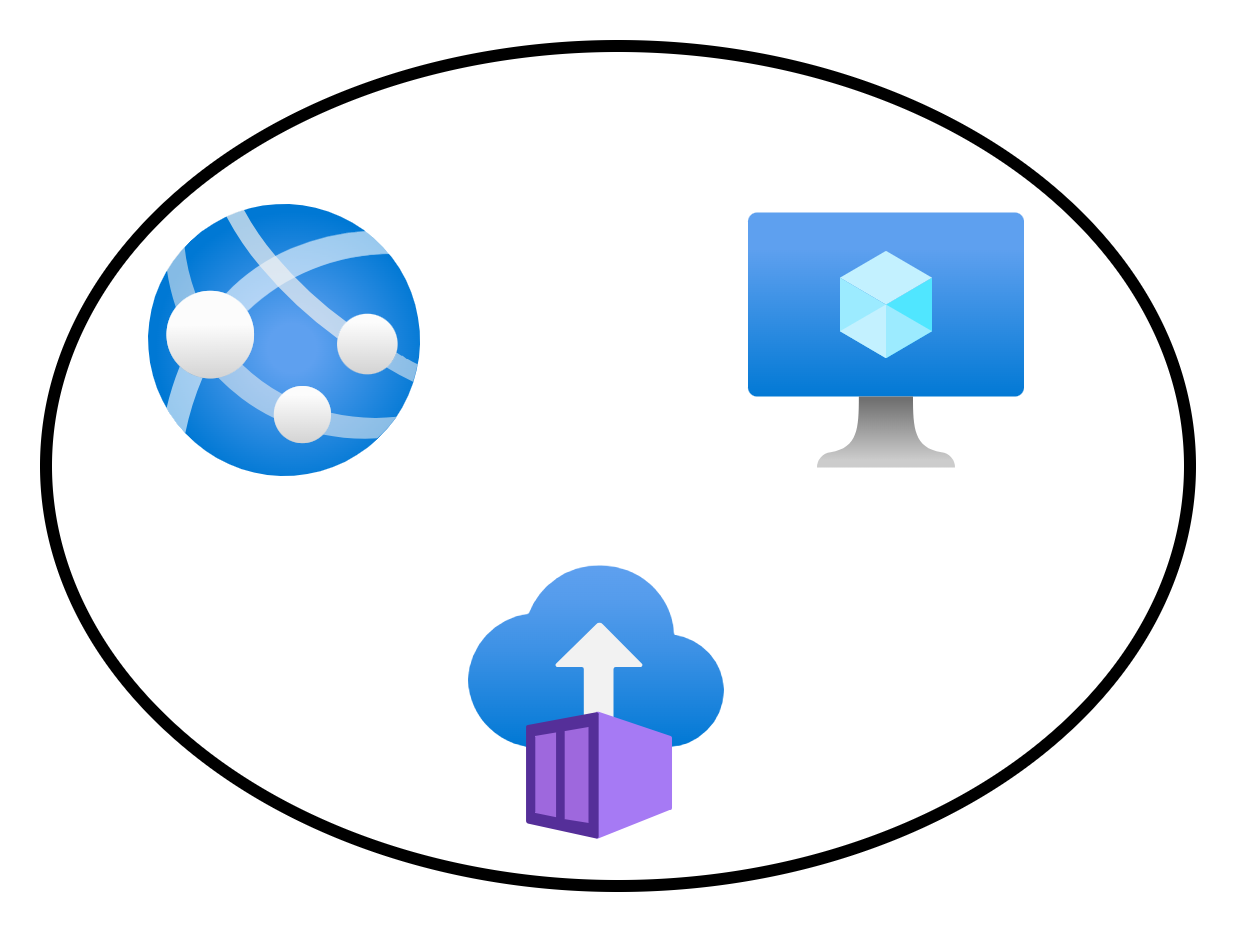
Here’s an example of a single virtual network with some connected Azure resources.
Connecting these resources to the same virtual network is an instruction to the fabric to say: “Let these things be able to route to each other”. When the app service (with VNet Integration) wants to send a packet to the virtual machine, the NIC on the source VM will send the packets directly to the NIC of the destination VM.
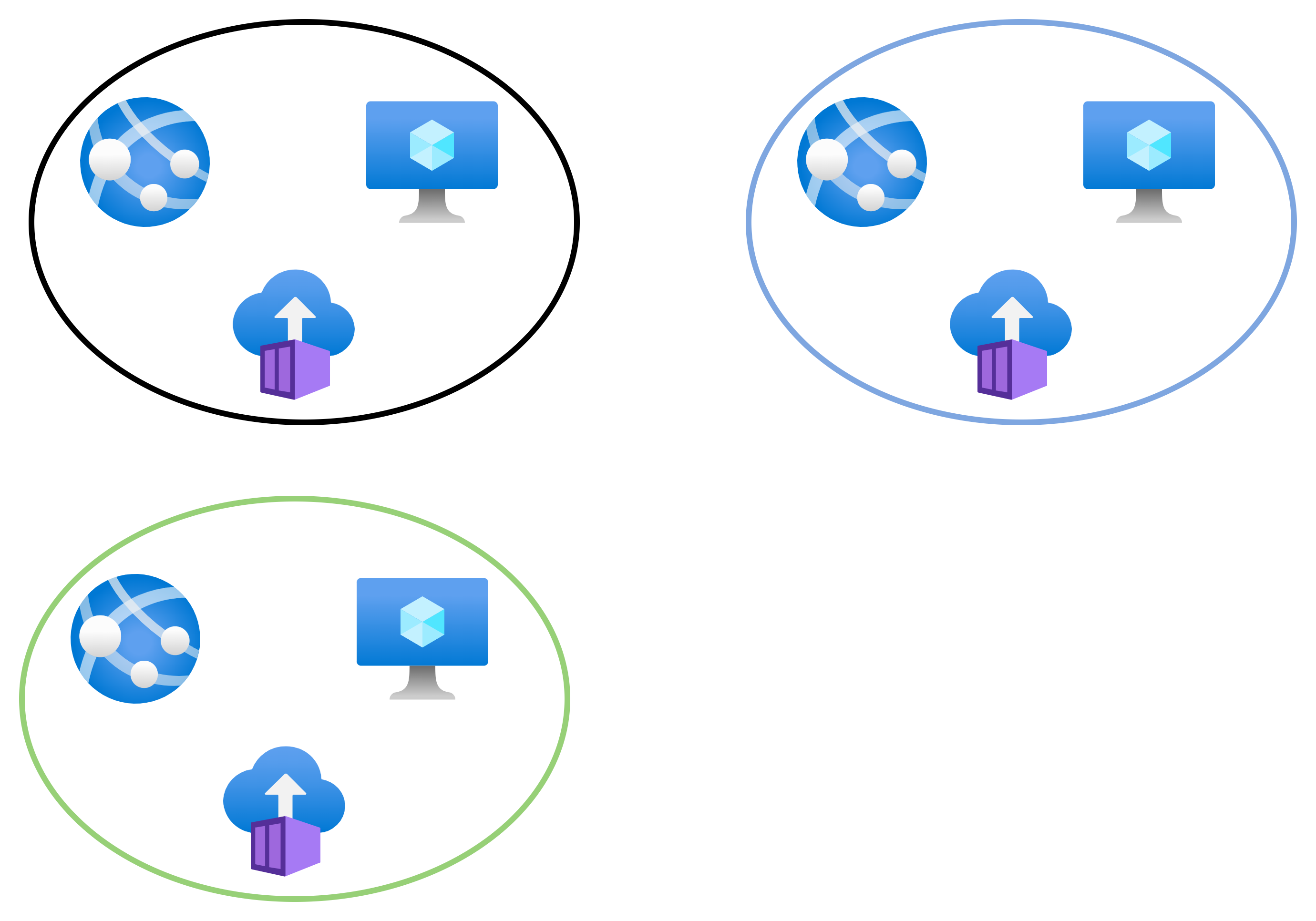
Two more virtual networks, blue and green, are created. Note that none of the virtual networks are connected/peered. Resources in the black network can talk only to each other. Resources in the blue network can talk only to each other. Resources in the green network can talk only to each other.
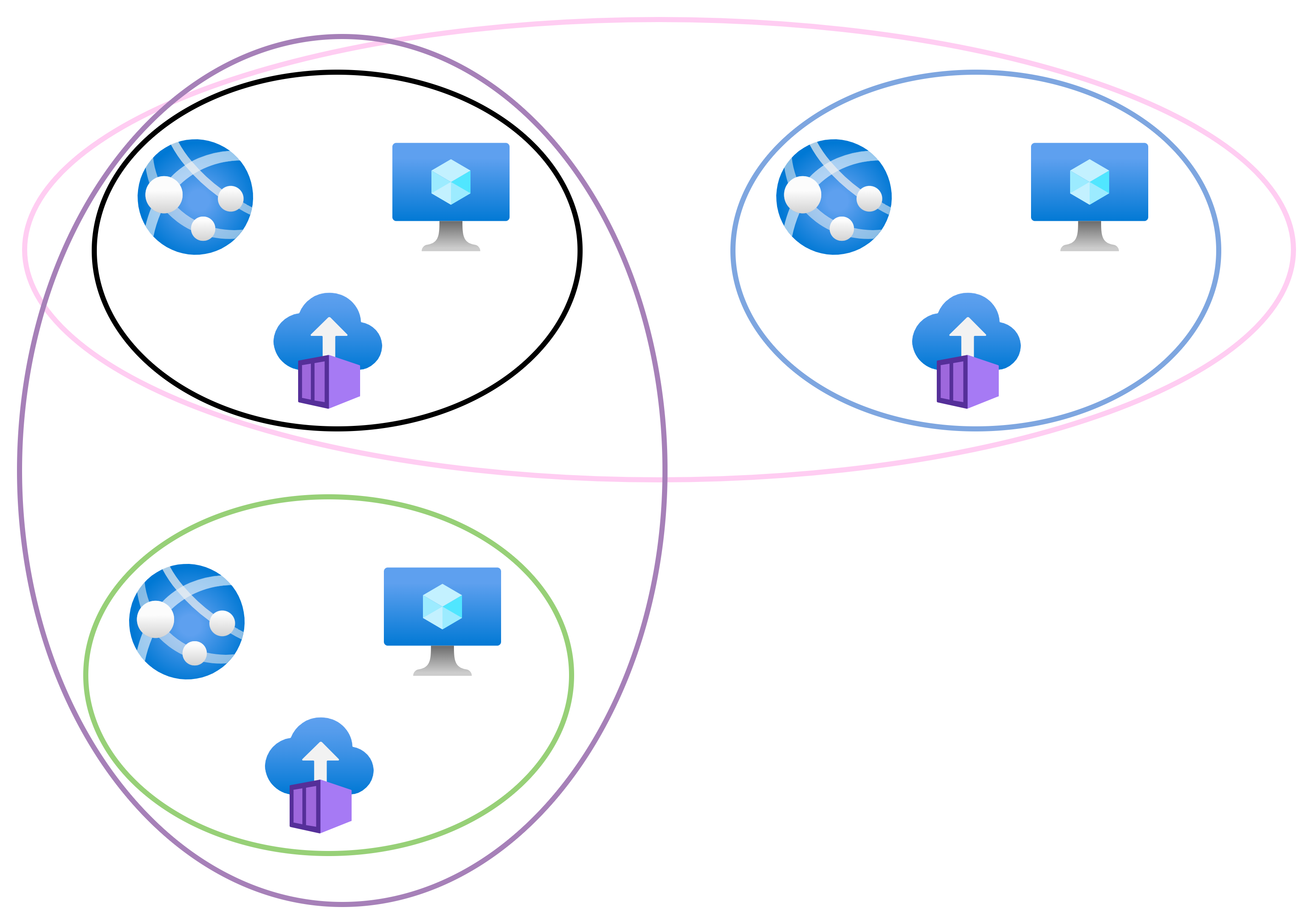
Now we will introduce some VNet peering:
Black <> Blue
Black <> Green
As I stated earlier, no virtual cables are created. Instead, the fabric has created new mappings. These new mappings enable new connectivity:
Black resources can talk with blue resources
Black resources can talk with green resources.
However, green resources cannot talk directly to blue resources – this would require routing to be enabled via the black network with the current peering configuration.
I can implement isolation within the VNets using NSG rules. If I want further inspection and filtering from a firewall appliance then I can deploy one and force traffic to route via it using BGP or User-Defined Routing.
Wrapping Up
The above simple concept is the biggest barrier I think that many people have when it comes to good Azure network design. If you grasp the fact that virtual networks do not exist and that packets route directly from source to destination and then be able to process those two facts then you are well on your way to designing well-connected/secured networks and being able to troubleshoot them.
If You Liked This Article
If you liked this article, then why don’t you check out my custom Azure training with my company, Cloud Mechanix. My next course is Azure Firewall Deep Dive, a two day virtual course where I go through how to design and implement Azure Firewall, including every feature. This two day course runs on February 12/13, timed for (but not limited to) European attendees.
You must have been hiding under a rock if you haven’t noticed how cloud computing has become the default in IT. I have started to wonder about the future of cloud computing. Certain international events have the potential to disrupt cloud computing in a major way. I’m going to play out two scenarios in this post and illustrate what the possible problems may be.
Bear In The East
Russia expanded their conflict with Ukraine in February 2024. This was the largest signal so far that the leadership of Russia wanted to expand their post-Soviet borders to include some of the former USSR nations. The war in Ukraine is taking much longer than expected and has eaten the Russian military, thanks to the determination of the Ukrainian people. However, we know that Russia has eyes elsewhere.
The Baltic nations (Lithuania, Latvia and Estonia) provide a potential land link between Russia and the Baltic Sea. North of those nations is Finland, a country with a long & wild border with Russia – and also one with a history of conflict with Russia. Finland (and Sweden) has recognised the potential of this expanded threat by joining NATO.
If you read “airport thrillers” like me, then you’ll know that Sweden has an island called Gotland in the Baltic Sea. It plays a huge strategic role in controlling that sea. If Russia were to take that island, they could prevent resupply via the Baltic Sea to the Baltic countries and Finland, leaving only air, land, and the long route up North – speaking of which …
Norway also shares a land border with Russia to the north of Finland. The northern Norwegian coast faces the main route from Murmansk (a place I attacked many times when playing the old Microprose F-19 game). Murmansk is the home of the Russian Atlantic fleet. Their route to the Atlantic is north of the Norwegian coast and south between Iceland and Ireland.
In the Artic is Svalbard, a group of islands that is host to polar bears and some pretty tough people. This island is also eyed up by Russia – I’m told that it’s not unusual to hear stories of some kind of espionage there.
So Russia could move west and attack. What would happen then?
Nordic Azure Regions
There are several Azure regions in the Nordics:
Norway East, paired with Norway West
Sweden Central, paired with Sweden South
One is “being built” in Espoo, Finland, just outside the capital of Helsinki.
Norway West is a small facility that is hosted in a third-party data centre and is restricted to a few customers.
I say “being built” with the Finish region because I suspect that its been active for a while with selected customers. Not long after the announcement of the region (2022) I had a nationally strategic customer tell me that the local Microsoft data centre salesperson was telling them to stop deploying in Azure West Europe (Netherlands) and to start using the new Finnish region.
FYI: the local Microsoft data centre salesperson has a target of selling only the local Azure region. The local subsidiary has to make a usage commitment to HQ before a region is approved. Adoption in another part of Azure doesn’t contribute to this target.
I remember this conversation because it was not long after tanks rolled into Ukraine and talk of Finland joining NATO began heating up. I asked my customer: “Let’s say you place nationally critical services into the new Finnish region. What is one of the first things that Russia will send missiles to?” Yes, they will aim to shut down any technology and communications systems first … including Azure regions. All the systems hosted in Espoo will disappear in a flaming pile of debris. I advised the customer that if I were them, I would continue to use cloud regions that were as far away as possible while still meeting legal requirements.
Norway’s situation is worse. Their local and central governments have to comply with a data placement law, which prevents the placement of certain data outside of Norway. If you’re using Azure, you have no choice, you must use Norway East, which is in urban Oslo (the capital on the south coast). Private enterprises can choose any of the European regions (they typically take West Europe/Netherlands, paired with North Europe/Ireland) so they have a form of disaster recovery (I’ll come back to this topic later). However, Norway East users cannot replicate into Norway West – the Stavanger-located region is only available to a select (allegedly) three customers and it is very small.
FYI: restricted access paired regions are not unusual in Azure.
Disaster Recovery
So a hypersonic missile just took out my Azure region – what do I do next? In an ideal world, all of your data was replicated in another location. Critical systems were already built with redundant replicas. Other systems can be rebuilt by executing pipelines with another Azure region selected.
Let’s shoot all of that down, shall we?
So I have used Norway East. And I’ve got a bunch of PaaS data storage systems. Many of those storage systems (Azure Backup recovery services vaults) are built on blob storage. Blob storage offers geo-redundancy which is restricted to the paired region. If my data storage can only replicate to the paired region and there is no paired region available to me, when there is no replication option. You will need to bake your own replication system.
Some compute/data resource types offer replication in any region. For example, Cosmos DB can replicate to other regions but that comes with potential sync/latency issues. Azure VMs offer Azure Site Recovery which enables replication to any region. This is where I expect the “cloud native” types to be “GitOps!” but they always seem to focus only on compute and forget things like data – no we won’t be putting massive data stores in an AKS container 🙂
Has anyone not experienced capacity issues in an Azure region in the last few years? There are probably many causes for that so we won’t go down that rabbit hole. But a simple task of deploying a new AVD worker pool or a firewall with zone resilience commonly results in a failure because the region doesn’t have capacity. What would happen if Norway East disappeared and all of the tenants started to failover/redeploy to other European regions? Let’s just say that there would be massive failures everywhere.
Orange Man In The West
Greenland is an autonomous territory of the Kingdom of Denmark. Being a Danish territory makes it a part of the EU. US president-elect, Donald Trump, has been sabre-rattling about Greenland recently. He either wants the US to take it over by economic (trade war) or military means.
If the USA goes into a trade war with Denmark, then it will go into a trade war with all of the EU. Neither side will win. If the tech giants continue to personally support Donald Trump then I can imagine the EU retaliating against them. Considering that Microsoft, Amazon, and Google are American companies, sanctions against those companies would be bad – the cost of cloud computing could rocket and make it unviable.
If the USA invaded Greenland (a NATO ally by virtue of being a Danish territory) then it would lead to very a unpleasant situation between NATO/EU and the USA. One could imagine that American companies would be shunned, not just emotionally but also legally. That would end Azure, AWS, and Google in the EU.
So how would one recover from losing their data and compute platform? It’s not like you can just live migrate a petabyte data lake or a workload based on Azure Functions.
The Answer
I don’t have a good answer. I know of an organisation that had a “only do VMs in Azure” policy. I remember bing dumbfounded at the time. They explained that it was for support reasons. But looking back on it, they abstracted themselves from Azure by use of an operating system. They could simply migrate/restore their VMs to another location if necessary – on-prem, another cloud, another country. They are not tied to the cloud platform, the location, or the hardware. But they do lose so many of the benefits of using the cloud.
I expect someone will say “use on-prem for DR”. OK, so you’ll build a private cloud, at huge expense and let it sit there doing nothing on the off-chance that it might be used. If I was in that situation then I wouldn’t be using Azure/etc at all!
I’ve been wondering for a while if the EU could fund/sponsor the creation of an IT sector in Europe that is independent from the USA. It would need an operating system, productivity software, and a cloud platform. We don’t have any tech giants as big or as cash rich as Microsoft in the EU so this would have to be sponsored. I also think that it would have to be a collaboration. My fear is that it would be bogged down in bureaucracy and have a heavy Germany/France first influence. But I am looking at the news every day and realsing that we need to consider a non-USA solution.
Wrapping Up
I’m all doom and gloom today. Maybe it’s all of the negativity in the news that is bringing me down. I see continued war in Ukraine, Russia attacking infrastructure in the Baltic sea, and threats from the USA. The world has changed and we all will need to start thinking about how we act in it.
After a quiet few pandemic years with no in-person events and the arrival of twins, my in-person presentation activity was minimal. My activity has started to increase, and there have been plenty of recent events and more are scheduled for the near future.
The Recent Past
Experts Live Netherlands 2024
It was great to return to The Netherlands to present at Experts Live Netherlands. Many European IT workers know the Experts Live brand; Isidora Maurer (MVP) has nurtured & shepherded this conference brand over the years, starting with a European-wide conference and then working with others to branch it out to localised events that give more people a chance to attend. I presented at this event a few years ago but personal plans prevented me from submitting again until this year. And I was delighted to be accepted as a speaker.
Hosted in Nieuwegein, just a short train ride from Schiphol airport in Amsterdam (Dutch public transport is amazing) the conference featured a packed expo hall and many keen attendees. I presented my “Azure Firewall: The Legacy Firewall Killer” session to a standing-room-only room.
TechMentor Microsoft HQ 2024
The first conference I attended was WinConnections 2004 in Lake Las Vegas. That conference changed my career. I knew that TechMentor had become something like that – the quality of the people I knew who were presenting at the event in the past was superb. I had the chance to submit some sessions this time around and was happy to have 3 accepted, including a pre-conference all-day seminar.
I worked my tail off on that “pre-con”. It’s an expansion of one of my favourite sessions that many events are scared of, probably because they think it’s too niche or too technical: “Routing – The Virtual Cabling of Secure Azure Networking”. Expanding a 1 hour session to a full day might seem daunting but I had to limit how much content I included! Plus I had to make this a demo session. I worked endless hours on a Bicep deployment to build a demo lab for the attendees. This was necessary because it would take too long to build by hand. I had issues with Azure randomly failing and with version stuff changing inside Microsoft. As one might expect, the demo gods were not kind on the day and I quickly had to pivot from hands-on labs to demos. While the questions were few during the class, there were lots of conversations during the breaks and even on the following days.
My second session was “Azure Firewall: The Legacy Firewall Killer” – this is a popular session. I like doing this topic because it gives me a chance to crack a few jokes – my family will groan at that thought!
My final session was the one that I was most worried about. “Your Azure Migration Project Is Doomed To FAIL” was never accepted by any event before. I think the title might seem negative but it’s meant to be funny. The content is based on my experience dealing with mid-large organisations who never quite understand the difference between cloud migration and cloud adoption. I explain this through several fictional stories. There is liberal use of images from Unsplash and opportunities to make some laughter. This have been the session that I was least confident in, but it worked.
TechMentor puts a lot of effort into mixing the attendees and the presenters. On the first night, attendees and presenters went to a local pizza place/bar and sat in small booths. We had to talk to each other. The booth that I was at featured people from all over the USA with different backgrounds. People came and went, but we talked and were the last to leave. On the second day, lunch was an organised affair where each presenter was host to a table. Attendees could grab lunch and sit with a presenter to discuss what was on their minds. I knew that migrations were a hot topic. And I also knew that some of those attendees were either doing their first migration or first re-attempt at a migration. I was able to tune my session a tiny bit to the audience and it hit home. I think the best thing about this was the attention I saw in the room, the verbal feedback that I heard just after the session, and the folks who came up to talk to me after.
A Break
I brought my family to the airport the day before I flew to TechMentor. They were going to Spain for 4 weeks and I joined them a few days later after a l-o-n-g Seattle-Las Angeles-Dublin-Alicante journey (I really should have stayed one extra night in Seattle and taken the quicker 1-hop via Iceland).
33+ Celsius heat, sunshine, a pool, a relaxed atmosphere in a residential town (we didn’t go to a “hotel town”) was a great place to work for a week and then do two weeks of vacation.
I went running most mornings, doing 5-7KMs. I enjoy getting up early in places like this, picking a route to explore on a map, and hitting the streets to discover the locality and places to go with my family. It’s so different to home where I have just two routes with footpaths that I can use.
Coming home was a shock. Ireland isn’t the sunniest or the warmest place in the world, but it feels like mid-winter at the moment. I think I acclimatised to Spain as much as a pasty Irish person can. This morning I even had to put a jacket on and do a couple of KMs to wait for my legs to warm up before picking up the pace.
I return to this Dutch city in a few days to do a new session “Azure Virtual Network Manager”. I’ve been watching this product develop since the private preview. It’s not quite ready (pricing is hopefully being fixed) but it could be a complete game changer for managing complex Azure networks for secure/compliant PaaS and IaaS deployments. I’ll discuss and demo the product, sharing what I like and don’t like.
Dublin (Ireland) October 7: Microsoft Azure Community & AI Day
Organised by Nicolas Chang (MVP) this event will feature a long list of Irish MVPs discussing Azure and AI in a rapid-fire set of short sessions. I don’t think that the event page has gone live yet so watch out for it. I will be presenting the “Azure Virtual Network Manager” again at this event.
TBA: Nordics
I’ve confirmed my speaking slots for 2 sessions at an event that has not publicly announced the agenda yet. I look forward to heading north and sharing some of my experiences.
My Sessions
If you are curious, then you can see my Sessionize public profile here, which is where you’ll see my collection of available sessions.
This post is about using either Network Rules or Application Rules in Azure Firewall for internal traffic. I’m going to discuss a common scenario, a “problem” that can occur, and how you can deal with that problem.
The Rules Types
There are three kinds of rules in Azure Firewall:
DNAT Rules: Control traffic originating from the Internet, directed to a public IP address attached to Azure Firewall, and translated to a private IP Address/port in an Azure virtual network. This is implicitly applied as a Network Rule. I rarely use DNAT Rules – most modern applications are HTTP/S and enter the virtual network(s) via an Application Gateway/WAF.
Application Rules: Control traffic going to HTTP, HTTPS, or MSSQL (including Azure database services).
Network Rules: Control anything going anywhere.
The Scenario
We have an internal client, which could be:
On-premises over private networking
Connecting via point-to-site VPN
Connected to a virtual network, either the same as the Azure Firewall or to a peered virtual network.
The client needs to connect to a server, with SSL authentication, to a server. The server is connected to another virtual network/subnet. The route to the server goes through the Azure Firewall. I’ll complicate things by saying that the server is a PaaS resource with a Private Endpoint – this doesn’t affect the core problem but it makes troubleshooting more difficult 🙂
NSG rules and firewall rules have been accounted for and created. The essential connection is either HTTPS or MSSQL and is implemented as an Application Rule.
The Problem
The client attempts a connection to the server. You end up with some type of application error stating that there was either a timeout or a problem with SSL/TLS authentication.
You begin to troubleshoot:
Azure Firewall shows the traffic is allowed.
NSG Flow Logs show nothing – you panic until you remember/read that Private Endpoints do not generate flow logs – I told you that I’d complicate things 🙂 You can consider VNet Flow Logs to try to capture this data and then you might discover the cause.
You try and discover two things:
If you disconnect the NSG from the subnet then the connection is allowed. Hmm – the rules are correct so the traffic should be allowed: traffic from the client prefix(es) is permitted to the server IP address/port. The rules match the firewall rules.
You change the Application Rule to a Network Rule (with the NSG still associated and unchanged) and the connection is allowed.
So, something is going on with the Application Rules.
The Root Cause
In this case, the Application Rule is SNATing the connection. In other words, when the connection is relayed from the Azure Firewall instance to the server, the source IP is no longer that of the client; the source IP address is a compute instance in the AzureFirewallSubnet.
That is why:
The connection works when you remove the NSG
The connection works when you use a Network Rule with the NSG – the Network Rule does not SNAT the connection.
Solutions
There are two solutions to the problem:
Using Application Rules
If you want to continue to use Application Rules then the fix is to modify the NSG rule. Change the source IP prefix(es) to be the AzureFirewallSubnet.
The downsides to this are:
The NSG rules are inconsistent with the Azure Firewall rules.
The NSG rules are no longer restricting traffic to documented approved clients.
Using Network Rules
My preference is to use Network Rules for all inbound and east-west traffic. Yes, we lose some of the “Layer-7” features but we still have core features, including IDPS in the Premium SKU.
Contrary to using Application Rules:
The NSG rules are consistent with the Azure Firewall rules.
The NSG rules restrict traffic to the documented approved clients.
When To Use Application Rules?
In my sessions/classes, I teach:
Use DNAT rules for the rare occasion where Internet clients will connect to Azure resources via the public IP address of Azure Firewall.
Use Application Rules for outbound connections to Internet, including Azure resources via public endpoints, through the Azure Firewall.
Use Network Rules for everything else.
This approach limits “weird sh*t” errors like what is described above and means that NSG rules are effectively clones of the Azure Firewall rules, with some additional stuff to control stuff inside of the Virtual Network/subnet.