You might have heard of “The Hyper-V Amigos” podcast – this is something that has a history that runs back quite a while with a number of us European Hyper-V MVPs. Carsten (Rachfahl) and Didier (Van Hoye) asked myself and Hans Vredevoort to join them in their latest show to talk about TechEd North America 2014.
Attending TechEd Europe Roundtable – Have You Got Feedback/Ideas?
Assuming that the bronchitis and tonsillitis that I was diagnosed with at 1:15 am this morning clears up, I will be attending the TechEd Europe roundtable meeting in Barcelona on Monday/Tuesday. The Microsoft folks in attendance are some of the planners of this massive event. My role: give feedback and discuss any ideas at the table.
Here’s your opportunity:
Do you have any feedback or ideas that you’d like me to bring to the table for TechEd Europe 2014? If so, post a comment below.
EDIT: Please keep the comments relevant to the TechEd event itself.
Microsoft News Summary-4 June 2014
A few bits and pieces from the last 24-48 hours:
- Steve Ballmer outbid Ellison, Oprah, and David Geffen to buy an NBA team for $2billion: He’s all in on the skyhook shot now. He’s not the first ex-Softie to buy a franchise. MSFT founder Paul Allen owns the Seattle Seahawks (*cough* *spit*) and the Portland Trailblazers NBA team. Both teams are in different divisions in the same conference. I can imagine what the bets will be like in some private room in Bellevue, WA or somewhere nearby.
- Step-by-Step: Configure VNet to VNet Connectivity in Azure: Learn how to implement the new Azure feature to connect two virtual networks.
- Volume licensing or SPLA? Should you use SPLA or volume licensing?
- Adding more external IP´s to your WAP NVGRE VM´s: Use PowerShell to add more public IP addresses to your SDN VMs
- Failing KB2919355 Update for Windows 8.1: How to force this update to install.
- Azure Guest OS Family 1 Retirement Information: W2008 images will be retired on September 2, 2014. There is no "upgrade"; you have to migrate your services to newer guest OSs.
- From Inside the Cloud: Who has access to your data within Office 365? Answering a question about security, procedure and compliance.
- Desktop virtualization deployment overview: Start of a 4-part series discussing hybrid Remote Desktop Services (RDS).
My New Work Laptop – A Toshiba KIRAbook Ultrabook
My work laptop for the last 3 years has been a modified HP EliteBook 8740w. It’s usefulness shrank pretty quickly as System Center grew bigger and my Hyper-V demos started to require more and more machines, 10 Gbps networking and JBODs. A lab has been built and I routinely access it remotely – and I’ve been known to record some demos using Camtasia when Internet access is dodgy.

An opportunity arose to replace my work laptop – I could move from “the best” to an Ultrabook. This would kill a few birds with one stone:
- Use a brand of machine in work presentations that my employers actually distribute (Toshiba)
- Use a lighter machine
- Donate “the beast” to the lap where it can be reused as a host, maybe as an NVGRE gateway host.
We ordered in some Toshiba KIRAbooks, Toshiba’s premium consumer ultrabook. This is a mad laptop; i7-4550U, 8 GB RAMM, 256 GB SSD, and …. a screen running at 2560 x 1440. It’s unusable without Windows 8.1 screen scaling.

First impressions: Very nice (touch) display. Nice functional build. It looks nice on the desk. Good keyboard. Nice big mouse pad. Slim. Obviously lighter than “the beast”. It has 3 x USB, 1 x SD, and 1 x full sized HDMI. Battery is listed at 9.16 hours (probably by using the custom ECO power profile). It came with Windows 8.1 Pro with the April 2014 update. There is no stylus. And yes, I had to uninstall some crapware from MuckAfee, Spotify, and others. I will have to get USB/VGA and RJ45 dongles (I already use those for my personal Lenovo Yoga).
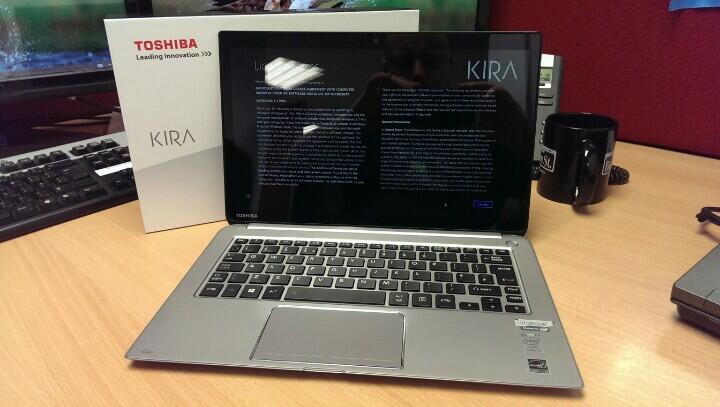
Price-wise, this seems to come in at $1,699,99 on Amazon.com. It’s just started shipping in Europe, and I didn’t see it on Amazon UK or Germany. AFAIK, Toshiba are selling to consumers via exclusive retailers.
I’ll write up a bit more when I have had time to work with it.
Technorati Tags: Windows 8.1,Hardware
Microsoft News Summary-3 June 2014
It was a bank (national) holiday weekend here in Ireland. I was also attending and speaking at E2EVC in Brussels, where I talked about designing and building Hyper-V over SMB 3.0 storage – that seemed to go down well to a full room.
Here’s a break down of the news from a slow weekend:
- 2012R2 iSCSI Target Settings for Configuring a Specific Network: A useful way to control which NIC the iSCSI target uses for iSCSI traffic.
- Automatic Start and Stop Actions for Hyper-V Virtual Machines: My post on Petri IT Knowledgebase
- 300 Level SPLA Licensing: Licensing scenarios that can literally drive you NUTS because if interpreted wrong, it can cost you and your company money.
- What’s new in Office 365 – May 2014: May has brought a slew of updates to both mobile apps, like OneNote and Lync, and web experiences, like optimizations for OneDrive for business, Office 365 admin experience, and developer APIs.
Microsoft News Summary-30 May 2014
Greetings from Belgium where I will be presenting a Hyper-V over SMB 3.0 session (designing & implementing a SOFS) at E2EVC, a community virtualization conference. Here is the Microsoft news of the last 24 hours. It appears that the momentum to signing up to support and partner with Azure is growing.
- KB: Configuring and Troubleshooting Operating System Deployment in System Center 2012 Configuration Manager: While there are no simple guides to implement something as powerful and complex as OSD, this article describes the step-by-step process for configuring System Center 2012 Configuration Manager (ConfigMgr 2012) to capture an existing Windows image, then walks you through creating a Client Package and Task Sequence to deploy and install that image.
- TechEd NA 2014 Interview: Microsoft GM Mike Shutz Discusses End User Computing and More: Part 2 of my interview with Mike Schutz, where I start of by asking “should IT pros fear the cloud” and then move into end-user management and mobile device management.
- Recreate a Virtual Machine in Microsoft Azure: Learn how to quickly recreate a virtual machine configuration in Microsoft Azure without having to reinstall or back up the virtual hard disk.
- Understand OData Services with Windows Azure Pack IaaS: This topic provides basic information about what OData is and how it works. This is extremely important because IaaS for Windows Azure Pack is offered through an OData service, specifically by Service Provider Foundation through the Service Management API. If you are new to OData, it would benefit you to read this entire topic.
- Microsoft Azure users to get access to Salesforce tools: Microsoft Azure users will soon get access to Salesforce.com’s customer management tools, following the announcement of a new strategic partnership between the two firms.
Storage Spaces Drives Do Not Show Physical Location
I was doing some work with some SSDs yesterday that had previously had some firmware issues. I wanted to verify that everything was OK, so I popped the disks into the DataOn 1640 JBOD that is in the lab at work. The firmware was upgraded, and the disks were eligible to join a storage pool, but they were not reporting a physical location.
A Storage Spaces certified JBOD (there is a special HCL category) must be able to report disk locations using SCSI Enclosure Services (SES). You can see my problem below; 4 SSDs are not reporting their enclosure or slot locations, but the other disks in the JBOD are just fine.

I contacted the folks in DataOn and had a near instant response. Run the following cmdlet twice:
Update-StorageProviderCache -DiscoveryLevel Full
I did that, refreshed Server Manager and … no change.
Ah … but this isn’t a simple Storage Spaces build. This is a clustered Storage Spaces installation. I jumped over to the other node in my SOFS, the “read-write server”, and ran the cmdlets there. One refresh later and everything was as it should be.

Now all of the disks are reporting both their enclosure and their slots.
Thanks to Rocky in DataOn for his help!
Microsoft News Summary-29 May 2014
Not much going on in the last 24 hours:
- General availability of SAP on Azure: SAP projects can now fail at cloud scales. Yay?
- Debugging performance issues with VMQ: Step-by-step guidance to troubleshoot VMQ. This will be no help if you’re using Emulex’s shite NICs
- How to Easily Assign a Static IP Address in Microsoft Azure: This can be done – using PowerShell.
- TechEd 2014 Interview: Microsoft General Manager Mike Shutz Discusses Azure, Hybrid Cloud: The first half of my interview with Microsoft GM, Mike Schutz. Read this if you want to know what Microsoft is thinking about when it comes to Azure, hybrid cloud, and mobile device/user management.
Cannot Delete A Storage Pool Because It Is Read Only
I do a lot of messing around with Storage Spaces. This can involve reusing disks that have been used in other pools – I want to erase the disks but I encounter an error:
Error deleting virtual disk: The storage pool could not complete the operation because its configuration is read-only.
This is easy to fix … with PowerShell. Get the name of the Storage Pool, also known as the friendly name – for example Pool1. Then run:
Get-StoragePool –FriendlyName “Pool1” | Set-StoragePool –IsReadOnly $false
Then if you are sure, you can delete the storage pool, thus cleaning the disks for reuse:
Get-StoragePool –FriendlyName “Pool1” | Remove-StoragePool
Microsoft News Summary-28 May 2014
It’s been a slow few days for news. Here’s what popped up overnight.
- Deploy a Windows 8.1 Image Using MDT 2013: This topic will show you how to take your reference image for Windows 8.1, and deploy that image to your environment using the Microsoft Deployment Toolkit (MDT), and MDT 2013 specifically.
- Microsoft Surface-branded Miracast dongle leaks: Unconfirmed rumour that MSFT is making a miracast device. I have a 3rd party one – could not make it work with Windows.
- Script Browser & Script Analyzer 1.2: The best way to learn scripting is to reuse examples. This add-on helps you browse and use such examples of PowerShell in the built-in ISE editor.
- How to create a hybrid deployment of RemoteApp: A solution where you can connect your on-premises network to the hosted RDS service via a site-to-site VPN.
- Scott Guthrie – Lots of Azure Stuff Launched: A list of the new features of Azure from the new head of Server & Tools, as launched at TechEd.
- Persisting connections to Microsoft Azure Files: This post will concentrate on how you can create a persistent connection to an Azure File share so that after a VM reboots, the share will be available for your scheduled tasks, applications, or logged in user.