5 Most Common Azure Review Findings

An Azure architecture review is something I’ve done many times. Some are focused on networking. Some take a broader look at governance, security, and disaster recovery. Some are urgent — a customer has a problem and needs to understand the full picture before they can fix it. Others are scheduled health checks. The nature of each engagement varies, but the findings? They’re remarkably consistent.

After completing several Azure architecture reviews across very different organisations – different sizes, sectors, and levels of Azure maturity – I’ve noticed the same issues surfacing time and again. I thought it was worth documenting them, because if these problems appear this consistently, they’re likely to appear in your environment too.

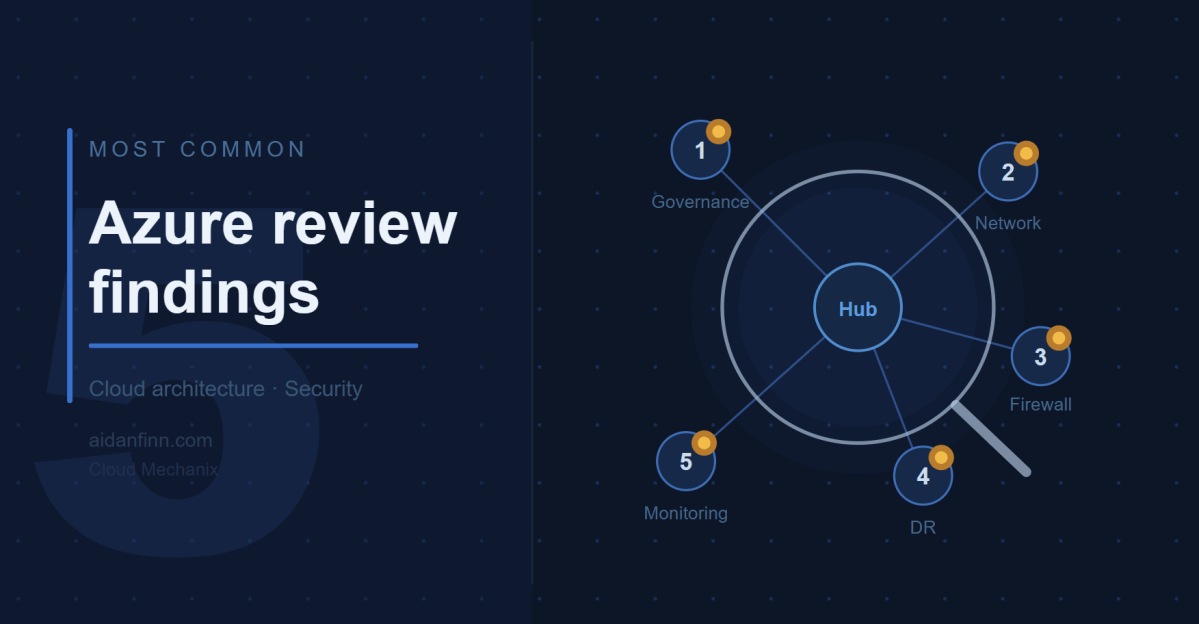
Here are the five most common findings.

1. Governance Is Either Missing or Broken

This one appears in every single review. Without exception.

The most common anti-pattern is the “everything in one subscription” model. I understand how it happens – an IT manager kicks off a cloud migration, picks up a subscription, and starts deploying things. It works, for a while. Then the environment grows, the resource groups multiply, and suddenly you have a sprawling mess where cost management is a nightmare, RBAC delegations are a headache, and nobody can tell which resources belong to which workload.

The Microsoft Cloud Adoption Framework (CAF) has a clear answer to this: Landing Zones. One subscription per workload. No cost. No catch. The result is a level of granularity that simplifies cost management, role assignment, quota management, naming, and troubleshooting in one move.

Beyond subscriptions, I typically find that Management Groups haven’t been set up correctly – or at all. Azure Policy is either absent or consists of a handful of default assignments nobody has reviewed. Naming standards are inconsistent, making the environment harder to read and operate at scale.

The fix isn’t a multi-year transformation project. The fix is a minimum viable product: get the right structure in place, assign sensible policies, and improve from there. I’ve designed starter governance architectures in a single afternoon that gave organisations a solid foundation to build on. I’ve written previously about how I interpret and apply the CAF with customers, and why it’s never too late to apply it – even if you’ve been in Azure for years.

My company, Cloud Mechanix, offers a Cloud Strategy consulting service built around the CAF that gets the right foundations in place without the overhead of a months-long engagement.

2. The Network Architecture Is Overly Complex and Doesn’t Enforce Zero Trust

The second finding is closely related to the first. When governance is weak, networks tend to be large, flat, and complicated.

The most common pattern I encounter is what I call the “big VNet” design. Everything lives in one or two large Virtual Networks. Multiple workloads share the same address space. Route Tables get bigger and bigger as more exceptions are added. The network becomes unpredictable. Nobody is entirely sure what path traffic takes from A to B.

The security implication of this is significant. Without workload isolation, without proper routing via a central firewall, and without meaningful NSG enforcement, the environment defaults to a “full trust” model. Every workload can, in principle, reach every other workload. That is the opposite of Zero Trust.

The right design is a proper hub-and-spoke architecture, with application Landing Zones providing the granularity needed to enforce isolation. Each workload gets its own small Virtual Network, peered with the hub. The hub contains the firewall, connectivity resources, and nothing else. Traffic between spokes goes through the firewall and is subject to rules and IDPS inspection. I covered this in more depth in There Is More To Azure Networking Than Connectivity & Security.

Azure Virtual Network Manager (AVNM) makes this scalable. Automatic peering, routing, and IP Address Management mean that a new workload Landing Zone can be connected correctly with minimal manual effort. Cloud Mechanix has published a Bicep module for AVNM if you want a head start. We also do a fixed-price 5 day review of your (selected) Azure networks.

3. The Firewall Has Significant Limitations

I review a lot of firewalls. Very few of them are doing the job that was intended when they were deployed.

The problems vary. In some environments, the firewall is only inspecting a fraction of the traffic. The rest bypasses it entirely because the Route Tables aren’t configured correctly, or because workloads are co-located in the hub where they communicate directly. In others, the firewall is a single instance in a single Availability Zone with no redundancy. One data centre issue and the organisation loses its primary security control.

Network Security Groups are another recurring issue. They are either missing from most subnets, configured with overly permissive rules, or duplicated inconsistently across the environment. In several environments I’ve reviewed, a single NSG was associated with just one subnet while all others had open traffic. That’s not a security boundary. That’s a gap.

WAF configurations also warrant attention. It’s not unusual to find a Web Application Firewall deployed in a way that places unnecessary load on the network firewall, or where the WAF itself has no high availability and is restricted to a single Availability Zone.

There is rarely a simple fix here. These issues tend to be symptomatic of a broader architectural problem – the network was built incrementally without a coherent design. The right answer, in most cases, is a rebuild using a proper hub-and-spoke design with a cloud-native, scalable firewall. If your team needs to get up to speed on how to design this correctly, Cloud Mechanix runs a Designing Secure Azure Networks course for exactly that purpose.

4. Disaster Recovery Is Backup-Based and Wouldn’t Survive a Real Incident

This one concerns me the most.

Almost universally, the disaster recovery capability I encounter in reviews is backup-based rather than replication-led. On the surface, this looks like disaster recovery – data is being backed up, and some of those backups are geo-replicated. But look at what would actually happen if a major incident occurred, and the picture changes quickly.

Recovery Time Objectives are measured in days or weeks rather than hours. Recovery Point Objectives are up to 24 hours because backups run once a day. Multiple backup solutions introduce complexity and inconsistency. Retention periods are short, meaning a ransomware attack that went undetected for several weeks could render the backups useless. Active Directory is being restored from backup, which is widely regarded as error-prone and risky. And in several environments, the disaster recovery region hasn’t been pre-built or secured to the same standard as production.

The regulatory stakes are rising. EU NIS2 makes clear that subject organisations must demonstrate tested recovery plans, reasonable recovery objectives, and appropriate governance. Backup-based disaster recovery will be difficult to defend to a regulator following a major incident. I explored the distinction between backup, resiliency, and genuine disaster recovery in Backup Versus Resiliency Versus Disaster Recovery – worth a read if you’re trying to explain the difference to stakeholders.

The right direction is a replication-led strategy with a warm secondary Azure region. Azure Site Recovery handles virtual machine replication. Azure Backup with geo-redundant replication handles retention and clean-room restores. Infrastructure-as-code ensures that the secondary environment stays consistent with production. And critically – it should be tested regularly, with documented, automated recovery plans.

Disaster recovery should be treated as a core business risk management capability, not an IT optimisation exercise.

5. Monitoring and Security Visibility Are Inadequate

The last finding is perhaps the least glamorous, but it enables everything else.

Across the environments I’ve reviewed, visibility is typically poor. Virtual Network Flow Logs are not enabled. Defender for Cloud is either unused or operating with a limited set of plans that don’t reflect the actual risk profile of the workloads. Subscription-level diagnostic logs and activity logs aren’t being forwarded to a central Log Analytics Workspace. Alerts – whether for threat intelligence signals, IDPS events, or operational anomalies – are either absent or minimal.

This matters for two reasons. First, without visibility, security incidents go undetected. The assumption that no alerts means no problems is dangerously wrong. The assumption should be the opposite. Second, troubleshooting complex connectivity issues without Flow Logs, firewall logs, or PaaS diagnostics is genuinely difficult. I’ve helped diagnose problems that should have taken minutes but took hours because the logging was never turned on.

The fix here isn’t particularly expensive. Virtual Network Flow Logs with Traffic Analytics, a centralised Log Analytics Workspace, Defender for Cloud with appropriate plans enabled, and a sensible set of alerts will transform the visibility of an Azure environment. These should be baseline requirements in any well-governed deployment, not optional extras.

A Pattern Worth Noting

Reading back through that list, there’s a common thread. Each of these findings is a consequence of deploying Azure without a framework. Without a governance strategy, without a landing zone architecture, without a security policy – teams make decisions in isolation, workloads accumulate, and complexity grows in ways that nobody fully intended.

The Cloud Adoption Framework exists precisely to avoid this. It’s not a lengthy consulting exercise. Done right, it provides a practical process for building Azure correctly – one that starts with business motivations, produces a clear architecture, and enables continuous improvement. Cloud Mechanix has developed its own interpretation of the CAF that keeps the process lean and focused on results rather than documentation.

If any of the above findings sound familiar, it may be worth taking stock.

Is Your Azure Environment on the Right Track?

If the findings in this post ring any bells, a structured Azure architecture review is the fastest way.

Cloud Mechanix offers a Fixed-Rate Cloud Environment Review – an expert-led review of your Azure environment, delivered in five business days. The scope is agreed upfront, access is read-only, and the output is a comprehensive report with clear, prioritised recommendations. No vague observations. No 200-page documents that nobody reads.

Whether the concern is security, governance, network architecture, disaster recovery, or the broader picture – get in touch and we can take it from there.

There Is More To Azure Networking Than Connectivity & Security

This post will explain how a well-designed, secured, governed and managed network design plays a foundational role in digital transformation and cloud enablement.

Cloud Adoption Versus Cloud Migration

What? Aidan – I thought this was a post about Azure networking!

Yes, it is … but you’ll have to join me on this journey. Lately, I’ve been using the “we need to step back and think about why we’re doing any of this” line quite a bit. The context of that line changes, but the message remains consistent.

Why did we go to The Cloud (Azure in our case)? For many, the reason is something like “I was told to”, “we were leaving our old hosting company”, or “our hardware support ended”. Those reasons triggered what I call a cloud migration project. I’ve done a LOT of those projects – thanks to scope limitations in the engagement, forced either by poorly advised customers (that lead to restricted tenders) or salespeople who refused to have a larger conversation.

Many organisations with internal developers that do a cloud migration end up in a situation 18-24 months later. Developers refuse to deploy into “IT’s cloud”. This is because IT has recreated its old data centre in Azure, along with the restrictions, controls, and lack of trust. We were told “cloud is how you work, not where you work”, but not many people heard that message. We end up with situations where businesses have paid for Azure, but developers don’t get the Cloud; they get IT-driven and IT-restricted virtualisation in Azure.

Cloud Adoption is a change journey, as documented by the Cloud Adoption Framework. We are supposed to:

  1. Understand why the business (not IT) wants to use the Cloud
  2. Create a cloud strategy for the organisation
  3. Define and enable a new way of delivering cross-functional digital services.
  4. Do all the other technical stuff that we focus on, with the architecture based on the above.

Steps 1 and 2 (CAF Strategy and Phase) are the keys to cloud adoption success. In theory, if we do everything correctly:

  1. The developers want to adopt the new cloud environment because it enables their mission.
  2. The business sees a return on the investment with faster innovation of digital services.

Where Does Networking Come Into This?

Pretty much every customer I’ve dealt with wants to improve their security for business protection or to meet compliance requirements. That typically results in larger usage of Virtual Networks. Many customers end up recreating their data centre networks in Azure; they create 1 Virtual Network (spoke) for each VLAN:

  • DMZ
  • Regular zone
  • Secure Zone

Or maybe they have:

  • Dev
  • Test
  • Production

Each of these networks shares various traits:

  • A big virtual network with many subnets
  • Managed by the central IT infrastructure

I can go into all the security and complexity flaws that result from this too-common design pattern. But my focus is on cloud adoption in this post:

  • Developers are actively prevented from having network access/control. They rely on helpdesk tickets to get anything done – what happened to the essential cloud trait of “on-demand self-service”?
  • Subscriptions are filled with dozens of resource groups. Access is granted on a per-resource group granularity, which complicates and slows things down.
  • The desire for more security is gradually eroded due to operational complexity and constant delegation of rights with complicated granularity.

So, believe it or not, Azure networking is our canary in the mine. I have used, and I continue to use this reliable little bird to smell out operational/security failures in customers’ Azure environments.

Now, you know how I can detect adoption problems from the floor up. Next I want to explain how I can architect the Azure network to solve these issues.

Landing Zones

Let’s bend some minds. 8-ish years ago, I started working on a new “standard design” for my employer (a consulting company) with a fellow principal consultant. We mutually came to the table with an alternative subscription strategy than usual. The norm was that each of the above traditional spoke VNets would be aligned with a subscription each. That results in very few subscriptions, with demands for complicated role delegations, tagging, cost management, and so on. We switched to a 1 subscription/workload (application/service) approach; this new level of granularity:

  • Required 1 small Virtual Network where networking is required
  • Developer/operator role delegations are done once per subscription
  • Cost management is done per subscription (Budgets) with much less tagging for metadata
  • Easier operations with fewer mistakes through subscription selection in Azure Portal/PowerShell/CLI/etc. The resource groups in the subscription are related to only that workload.
  • The security boundary is much smaller. The access boundary is the single workload. Any VNet-based workloads must route via the hub firewall to reach any other workload, subject to rules and IDPS inspection.

Microsoft introduced the concept of landing zones a few years ago, which uses the same subscription/workload approach:

  • Platform landing zone: A subscription that offers shared infrastructure, such as a hub, a shared Application Gateway/WAF, Active Directory Domain Controllers, DNS, etc.
  • Application landing zone: A subscription that hosts a single application/service/workload.

Like with my approach, each landing zone has a Virtual Network (if required) that is:

  • Sized according to the workload architecture with some spare capacity.
  • Peered with the hub, with the egress path from the workload being via the hub firewall.

Security & Governance

Let’s consider some things:

  • The business requires governance to manage IT and to ensure regulatory compliance.
  • IT security must protect the business, customers, vendors, etc.
  • We have many workloads/subscriptions.

We cannot have 1 policy for everything – sometimes we have business/operational reasons to have more-strict policies or less-strict policies. For example, we might require more Defender for Cloud features in some workloads or allow PaaS public endpoints in others.

Microsoft gave us Enterprise Scale around 5 years ago. This reference architecture (with supplied templated deployments) offers a subscription categorisation approach using Management Groups:

  • Corporate: Workloads that can connect to other networks.
  • Online: Workloads that have an online presence and should not connect to other workloads.

Azure Policy is used to enforce the standards for each Management Group.

I don’t know about you, but I have never seen such a binary requirement in the real world. I’ve seen many people discuss/use a third Management Group called Hybrid; they wonder how to build the policies to enforce the requirements.

In the real world, just about everything is shades of grey when it comes to connectivity. I’ve had ultra-secure workloads with web interfaces. I’ve had low-end workloads with high security. And I can guarantee you that sensitive workloads have compelling business reasons to be both online and integrated with traditional private-protocol connectivity.

I thought about this last year and came up with a different approach. We can use CAF’s operational methodologies to develop a tiered, documented, and implemented policy that aligns with the organisation’s governance, security, and management requirements. I suggested that we would have three tiers (names are irrelevant):

  • Gold: The strictest policies
  • Silver: Medium-level policies, containing the most workloads
  • Bronze: The most relaxed policies

The result is 3 Management Groups (above), each with Azure Policy automatically auditing/enforcing the designed and continuously improved requirements.

The new (CAF Plan) operational model would introduce a step to categorise the workload based on security risks, governance requirements, and management needs. Each workload would be placed in the correct Management Group with policies.

The policies give us automation and guardrails. For example, where appropriate, we can:

  • Restrict regions.
  • Ban public IP association with NICs
  • Disable public endpoints
  • Enable Defender for Cloud plans
  • Force VNet Flow Logging
  • Configure diagnostics settings
  • Enable VNet Flow Logs
  • And much more

The key to this is momentum. My approach is “minimum viable product” (MVP). For example, I had a 30-minute call with a customer last year and designed their starter policies. Now they (should) run regular reviews to assess the policies/risks/requirements and expand the policies/implementations. We didn’t freeze for 2 years to build a policy. We got some essentials in place and we carried on with getting results for the business.

Now, let’s get back to networking!

At-Scale Network Configuration And Enforcement

Developers, operators, and (rival) service providers are empowered to build in the Azure environment with a new guardrail-protected landing zone approach. How do we ensure that their Virtual Networks are built correctly?

We can use Azure Virtual Network Manager (AVNM).

Note that the horrid per-subscription pricing for AVNM was replaced a long time ago. Please go back and reassess the pricing before you run away.

AVNM gives us policy-driven:

  • Discovery and grouping of Virtual Networks for granular policy assignments
  • Peering with a hub and mesh capabilities
  • Route Table deployment/association with User-Defined Routes (UDRs)
  • Security Admin Rules that are processed before NSG rules with override capabilities
  • IP Address Management (IPAM) to provide approved, non-repeating IP prefixes for new networks and to manage their lifecycle

In short, if you deploy a VNet, I can:

  • Get an approved IP prefix for the Virtual Network
  • Use Azure Policy to automatically configure/enforce things like VNet Flow Logs and DNS settings
  • Use AVNM to correctly connect, route, and secure your VNet

To quote Van Halen: “they got you coming in, and they got you going out”. I always did prefer “Van Hagar” 🙂

Summary

A legacy, cable-oriented, on-prem network in Azure indicates that the organisation has not modernised how digital services are created, operated, and delivered to the business. In short, the business is paying for the cloud but is getting remotely hosted Hyper-V.

We can enable modern collaborative working processes by modernising our designs. Using application landing zones will create a new form of granularity for all aspects of infrastructure, security, governance, and management. We can use the governance features to create the guardrails and some of the autmations. We can use Azure Virtual Network Manager (AVNM) to ensure a good Virtual Network deployment.

If You Want To Learn More

Contact me via my consulting company, Cloud Mechanix, if you would like to learn how I can help you with this design pattern.

Interpretation of The Azure Cloud Adoption Framework

In this post, I will explain how I have interpreted the Cloud Adoption Framework for Microsoft Azure and how I apply it with my company, Cloud Mechanix.

Taking Theory Into Practice

In my last post, I explained two things:

  1. The value of the Cloud Adoption Framework (CAF)
  2. It is never too late to apply the CAF

I strongly believe in the value of the CAF, mostly because:

  • I’ve seen what happens when an organisation rushes into an IT-driven cloud migration project.
  • The CAF provides a process to avoid the issues caused by that rush.

The CAF does have an issue – it is not opinionated. The CAF has lots of discussion, but can be light on direction. That’s why I have slightly tweaked the CAF to:

  • Take into account what I believe an organisation should do.
  • Include the deliverables of each phase.
  • Indicate the dependencies and flow between the phases.
  • Highlight where there will be continuous improvement after the adoption project is complete.

The Cloud Mechanix CAF

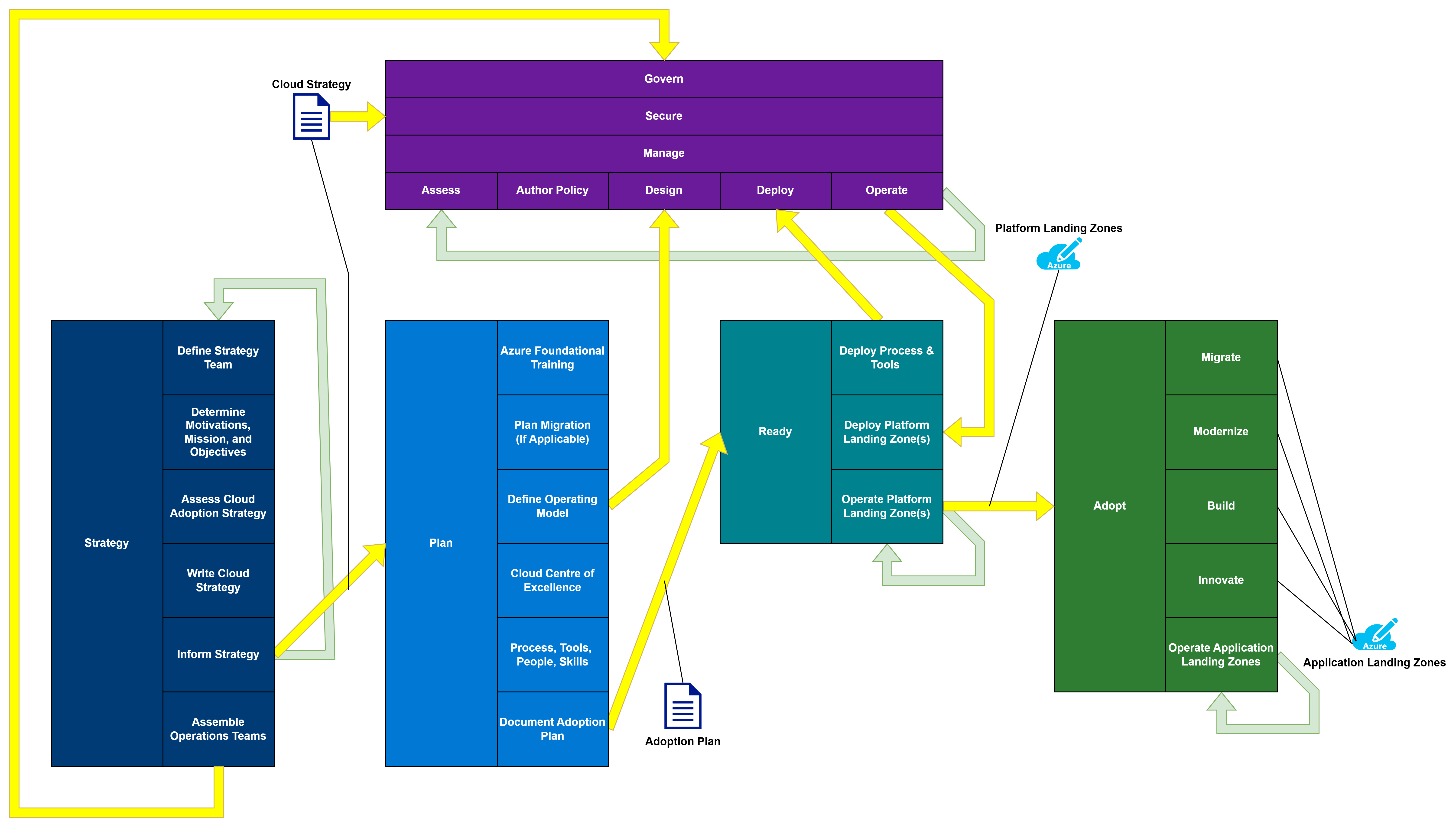
Here is a diagram of the Cloud Mechanix version of the Azure Cloud Adoption Framework:

Cloud Mechanix Azure Cloud Adoption Framework

There are two methodologies:

  • Foundational
  • Operational

Foundational Methodology

There are four phases in the Foundational Methodology:

  • Strategy
  • Plan
  • Ready
  • Adopt

Strategy

The Strategy phase is the key to making the necessary changes in the organisation. When an IT (infrastructure) manager starts a migration project:

  • They have little to no knowledge of the organisation-wide needs of IT services.
  • No influence outside their department – particularly with other departments/divisions/teams – to make changes.
  • Possibly have little interest in any process/organisational/tool changes to how IT services are delivered.

The process will run sequentially as follows:

TaskDescriptionDeliverable
Define Strategy TeamSelect the members who will participate in this phase. They should know the organisational needs/strategy. They must have authority to speak for the organisation.A team that will review and publish the Cloud Strategy.
Determine Motivations, Mission, and ObjectivesIdentify and rank the organisation’s reasons to adopt the cloud.
Create a mission statement to summarise the project.
Define objectives to accomplish the mission statement/motivations and assign “definitions of success”.
Ranked motivations.
A mission statement.
Objectives with KPIs.
Assess Cloud Adoption StrategyReview the existing cloud adoption strategy, if one exists.A review of the cloud strategy, contrasting it with the identified motivations, mission statement, and objectives.
Write Cloud StrategyA cloud strategy document will be created using the gathered information. This will record the information and provide a high-level plan, with timelines for the rest of the cloud adoption project.A non-technical document that can be read and understood by members of the organisation.
Inform StrategyThe Cloud Strategy will be published. A clear communication from the Strategy Team will inform all staff of the mission statement and objectives, authorising the necessary changes.A clear communication that will be understood by all staff.

Note that the steps to produce and publish this strategy will be repeated on a regular basis to keep the cloud strategy up-to-date.
Assemble Operations TeamsThe leadership of the Operational Framework tracks will be selected and authorised to perform their project duties.The team leaders will initiate their tracks, based on instructions from the Cloud Strategy.

The Cloud Strategy is the primary parameter for the tracks in the Operational Framework and the Plan phase of the Foundational Framework.

Plan

The Plan phase is primarily focused on designing the organisational changes to how holistic IT services (not just IT infrastructure) are delivered.

TaskDescriptionDeliverable
Azure Foundational TrainingThe entry level of Azure training should be delivered to any staff participating in the Plan/Ready phases of the project.The AZ-900 equivalent of knowledge should be learned by the staff members.
Plan MigrationAn assessment of workloads should begin for any workloads that are candidates for migration to the cloud. This is optional, depending on the Cloud Strategy.A detailed migration plan for each workload.
Define Operating ModelDefine the new way that IT services (not just infrastructure) will be delivered.An authorised plan for how IT services will be delivered in Azure.
The operating model will be a parameter for the Design task in the Govern/Secure/Manage tracks in the Foundational Methodology.
Cloud Centre of ExcellenceA “special forces” team will be created to be the early adopters of Azure. They will be the first learners/users and will empower/teach other users over time.A list of cross-functional IT staff with the necessary roles to deliver the operational model.
Process, Tools, People, and SkillsThe processes for delivering the new operational model will be defined.
The tools that will be used for the operational model will be tested, selected, and acquired.
People will be identified for roles and reorganised (actually or virtually) as required.
Skills gaps will be identified and resolved through training/acquisition.
The necessary changes to deliver the operational model will be planned and documented.
Skills will be put in place to deliver the operational model.
Document Adoption PlanA plan will be created to:
1. Deploy the new tools
2. Build platform landing zones
3. Prepare for Adopt
An adoption plan is created and published to the agreed scope.

The Adoption Plan will be the primary parameter for the Ready phase.

Ready

The purpose of Ready is to:

  1. Get the tooling in place.
  2. Prepare the platform landing zones to enable application landing zones.

There is a co-dependency between Ready and the Operational Methodology. The Operational Methodology will:

  • Require the tooling to deploy the governance, security and management features, especially if an infrastructure-as-code approach will be used.
  • Provide the governance, security, and management systems that will be required for the platform landing zones.

This means that there is a required ordering:

  1. Governance, Secure, and Manage must design their features.
  2. Ready must prepare the tooling.
  3. Governance, Secure, and Manage will deploy their features.
  4. Ready can continue.
TaskDescriptionDeliverable
Deploy Process & ToolsThe tools and processes for the operating model will be deployed and made ready.This is required to enable Govern, Secure, and Manage to deploy their features.
Deploy Platform Landing ZonesLanding zones for features such as hubs, domain controllers, DNS, shared Web Application Firewalls, and so on, will be deployed.The infrastructure features that are required by application landing zones will be prepared.
Operate Platform Landing ZonesEach platform landing zone is operated in accordance with the Well-Architected Framework.Continuous improvement for performance, reliability, cost, management, and functionality.

The platform landing zones are a technical delivery parameter for the Adopt phase.

Adopt

The nature of Adopt will be shaped by the cloud strategy. For example, an organisation might choose to do a simple migration because of a technical motivation. Another organisation might decide to build new applications in The Cloud, while keeping old ones in on-premises hosting. Another might choose to focus entirely on market disruption by innovating new services. No one strategy is right, and a blend may be used. All of this is dictated by the mission statement and objectives that are defined during Strategy.

TaskDescriptionDeliverable
MigrateA structured process will migrate the applications based on the migration plan generated during Plan.An application landing zone for each migrated application.
ModerniseApplications are rearchitected/rebuilt based on the migration plan generated during Plan.An application landing zone for each migrated application.
BuildNew applications are built in Azure.An application landing zone is created for each workload.
InnovateNew services to disrupt the market are researched, developed, and put into production.An innovation process will eventually generate an application landing zone for each new service.
Operate Application Landing ZonesEach application landing zone is operated in accordance with the Well-Architected Framework.Continuous improvement for performance, reliability, cost, management, and functionality.

Operational Methodology

The Operational Methodology must not be overlooked; this is because the three tracks, running in parallel with the Foundational Methodology, will perform necessary functions to design and continuously operate/improve systems to protect the organisation.

The three tracks, each with identical tasks, are:

  • Govern: Build, maintain, and improve governance systems.
  • Secure: Build, maintain, and improve security systems.
  • Manage: Build, maintain, and improve systems guidelines and management systems.

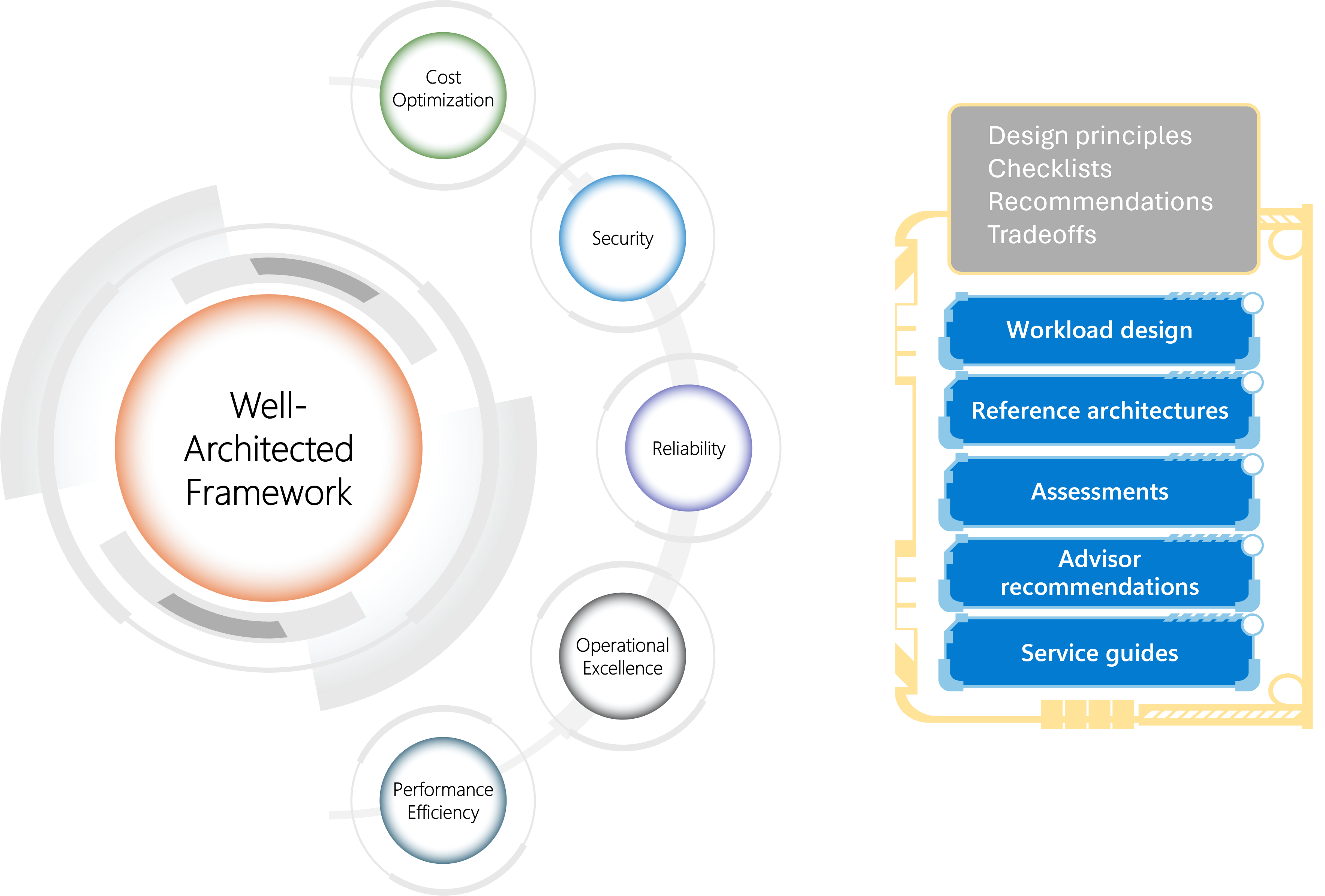
This approach assigns ownership of the Well-Architected Framework pillars to the three tracks.

  • Govern: Cost optimisation
  • Secure: Security
  • Manage: Reliability, operational excellence, and performance efficiency

Each track has a separate team with:

  • A leader
  • Stakeholders
  • Architect
  • Implementors

Each is a separate track, but there is much crossover. For example, Azure Policy is perceived as a governance solution. However, Azure Policy might be used:

  • By Govern to apply compliance requirements.
  • By Secure to harden the Azure resources.
  • By Manage to automate desired systems configurations.

The inheritance model for Azure Policy is Management Groups, so all three tracks will need to collaborate to design a governance architecture. For this reason, the architect should reside in each team. The implementors may also be common.

TaskDescriptionDeliverable
AssessPerform an assessment of the current/future requirements, risks, and requirements.A risk assessment with a statement of measurable objectives.
Author PolicyA new policy is written, or an existing policy is updated to enforce the objectives from the assessment.A policy document is written and published.
DesignA solution to implement the policy is designed. The goal is to automate as much of the policy as possible. Remaining exceptions should be clearly documented and communicated with guidelines.High-level and low-level design documentation for the technical implementation.
Clearly written and communicated guidelines for other requirements.
DeployThis depends on Deploy Process & Tools from Ready.
Deploy the technical solution.
The technical Azure (platform landing zones) and any third-party resources are deployed to implement governance, security, and management based on the published policies.
OperateThe systems are run and maintained.Continuous improvement for performance, reliability, cost, management, and functionality.
The Deploy Platform Landing Zone(s) in Ready can proceed.

Note that Govern, Secure and Manage should never finish. They should deliver a minimal viable product (MVP) to quickly enable Ready with a baseline of governance, security, and management best practices, as defined by the organisation. A regular review process will assess the policy versus new risks/requirements/experience. This will start a new cycle of continuous improvement.

This approach should be the method used for continuous risk assessment in IT Security or compliance. If this is true, then the new Azure process can be blended with those processes.

Final Thoughts

The partners of a 3-or 4-letter consulting franchise do not have to get rich from your cloud journey. The Cloud Adoption Framework does not have to be a process that generates tens of thousands of pages of reports that will never be read. The focus of this approach is to:

  1. Enable cloud adoption.
  2. Use a rapid light-touch approach that avoids change friction.

For example, a Cloud Strategy workshop can be completed in 1.5 days. A high-level design for a minimum viable security policy can be discussed in under 1 day. The Cloud Strategy will, and should, evolve. The IT Security policy will evolve with regular (risk) assessments.

If You Like This Approach …

As I stated, this is the approach that I use with Cloud Mechanix. The focus is on results, including speed and correct delivery. This process can be done during the cloud journey, or it can be done afterwards if you realise that the cloud is not working for your organisation. Contact Cloud Mechanix if you would like to learn how I can facilitate your experience of the Cloud Adoption Framework.

It’s Never Too Late For The Cloud Adoption Framework

I’m going to explain why the Cloud Adoption Framework can offer answers to Azure – even for organisations that have been in The Cloud for years.

Let Me Tell You Some Stories

As someone who started his professional career in IT back before Google was a thing, I have a few stories to tell.

The central IT department in a decentralised organisation spends months deploying an Azure infrastructure. Years later, they are puzzled as to why none of the other departments will use the cloud platform.

Another organisation spends a lot of money building a secure/flexible platform in Azure. 24 months later, the developers are still refusing to use this platform. They even seek out other ways to use Azure.

A very large organisation starts their cloud journey. A consultant asks them, “Have you done any preparation for the organisation?” The response is “We did that last week. Just get on with deploying stuff!”

These stories are based on truth. They are common stories – I know that anecdotally. Let’s figure out:

  1. What went wrong?
  2. How do we prevent it?
  3. What can you do if the above stories are similar to what you are experiencing?

Cloud Migration

Before big data, then IoT, and then AI, stole Microsoft’s focus, the corporation used to repeat this line:

Cloud is not where you work. Cloud is how you work.

Looking back on it, that oft-repeated marketing phrase genuinely had meaning, and it succinctly defines the problem.

Just about every (I’m being cautious, because I think it is every) cloud journey project that I was sent to work on as a consultant started this way:

  • An IT manager ran the project.
  • The reasoning was “get off of X, get out of Y” or some other technical reason that made sense to the IT manager.
  • The project was contracted as (1) build the platform, (2) migrate the applications, and (3) do a handover to the IT department.

This is what I call a “cloud migration”. Why is that? The IT department is leaving a hosting facility, a computer room, old hardware, VMware/Nutanix/etc. They are lifting & shifting the VMs to Azure. Some new tooling will be used, but no processes will change.

The IT department will then tell the devs, “We are in the cloud! Come use the company-approved cloud.” The devs get some level of access and here’s their first experience when the business assigns a new project:

  1. They design the application without interaction with IT/IT Security, as usual.
  2. They attempt to deploy the application in Azure, but they have no rights.
  3. After a helpdesk ticket, some resource groups will be set up with assigned rights.
  4. The developers start to work, seek out some assistance, and are told that the design is unsuitable for compliance/security reasons. They must start over again.
  5. The new design requires some networking features. The developer has no rights to Azure networks, so this requires several helpdesk tickets to eventually resolve.
  6. Weeks later, the application is nowhere near ready. The business is impatient. The developer is frustrated.

This is not the story of one organisation. This has happened and is happening worldwide. The reason for this is that the IT department moved the applications to a new location. Nothing else changed.

Cloud Adoption

The cloud adoption journey is one of change. Typically sponsored by the business, A strategy is defined and clearly communicated:

  • We are changing how we deliver IT services for the business
  • Old organisational structures will be broken down to create a cooperative process. This will involve new tools and training before we put everything into action.
  • A new method of working will empower on-demand self-service.
  • Guardrails will be put in place to protect the organisation, its customers/suppliers/partners, and ensure operational excellence.

As you can see, there is a lot more going on here than “let’s use Veaam or Azure Migrate to shove some VMs into The Cloud.”

Some questions should arise now:

  • Is there a canned process for doing this?
  • How long is all this going to take?
  • Is some 3-letter or 4-letter global consulting company going to be handing out ivory back scratchers as annual bonuses to their consultants at the end of this?

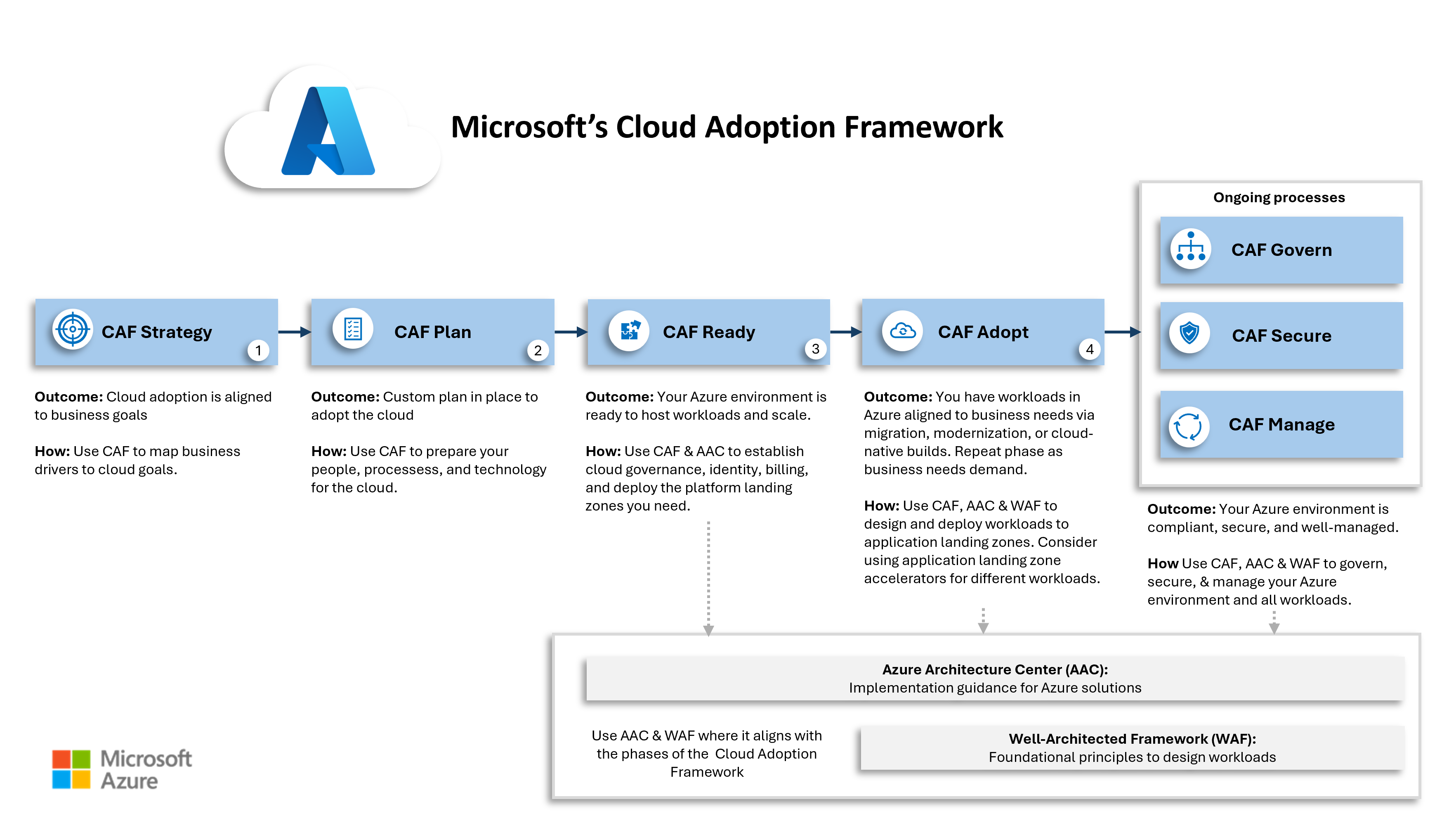
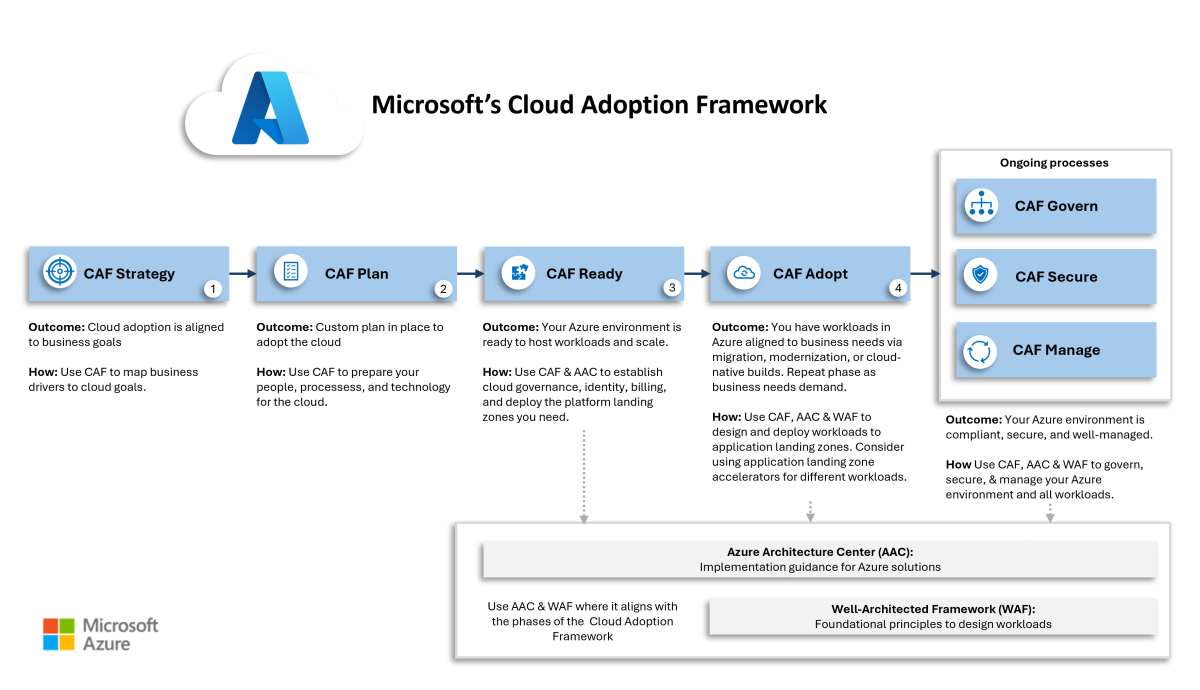
The Microsoft Azure Cloud Adoption Framework

The Microsoft Cloud Adoption Framework – let’s save my fingers and call it “the CAF” – was created and continues to be curated by Microsoft. The legend goes that Microsoft observed these issues and worked with Microsoft partners to create the CAF. The CAF contains a lot of information:

  • How to build things in Azure
  • How to operate Azure
  • But most importantly, how to do the cloud adoption journey:

The CAF has evolved gradually since the first release, but the substance remains the same:

There are two methodologies:

  • Core methodology: The core phases for a successful cloud adoption.
  • Operational methodology: Building and continuously improving the guardrails.

In summary, the core methodology has 4 phases:

  1. Strategy: Understand why the organisation’s leadership wants to start the cloud adoption journey. Translate those motivations into measurable objectives and a mission statement. Write and clearly communicate a cloud strategy for the entire organisation.
  2. Plan: Any migration assessments (see objectives) will be started now because they will take time. However, the main work is defining the new IT operations model, preparing the organisational changes, identifying the required tools, and filling skills gaps through training/acquisition.
  3. Ready: The technical work begins! The tooling is readied. The first platform landing zones (shared infrastructure such as hubs) are built. The goal is to be ready for the first application landing zones.
  4. Adopt: The organisation finally gets the new/old applications in the cloud through migration, new builds, and innovation (this last one is quite important to business leaders).

The operational methodology will have three parallel tracks, starting after the cloud strategy is communicated, and aiming to have their minimal viable products available before Ready starts:

  • Govern: Protections for the business are created, covering cost management/optimisation, compliance, and so on. This will be impacted, for technology reasons by Security and Manage.
  • Secure: This is where modern IT security processes should be in action. A cloud security policy is created, dictating the technical security build, putting in the processes, and regularly doing risk assessments to improve the holistic posture.
  • Manage: The more practical elements of running Azure are dealt with, including (but not limited to): disaster recovery, backup, patching, monitoring, alerting, and so on.

Each track will have a team with stakeholders (compliance officers, IT security, and so on) and technical staff that can architect and deploy the features. There will be a lot of crossover. For example, Azure Policy (seen as a governance product) can automate:

  • Governance features
  • Security audits/enforcements
  • Operational excellence.

Aidan, what about the Well-Architected Framework (WAF)? Good question, if I do say so myself. The WAF contains several pillars that guide you to good design and good management. If you look at the pillars, it is easy to see that each can be owned by either Govern, Secure, or Manage.

Not Just For New Azure Customers

The CAF is not just for customers who are starting their Cloud adoption journey. As I’ve made clear, many organisations have embarked on a migration to Azure without making organisational/process/tools changes. They can’t ignore the resulting problems forever. It makes sense that those organisations take the time to figure out what changes to make. The CAF shows them the methodologies to make that happen.

Those same phases, tracks and steps can be applied to correct the course and make the necessary changes. I have started working with some clients on this very process.

Cloud Mechanix

I am a big fan of the Cloud Adoption Framework (CAF) but it is not perfect. The CAF has a process, but a lot of the content is “you could do this, you could do that” without practical opinion. With Cloud Mechanix, I deliver a streamlined and opinionated version of the CAF, focused on results. This delivery can be for new cloud adoption journeys and for those who are struggling to get their business to adopt an existing Azure environment. You can learn more about Cloud Mechanix here.

DevSecOps Resolving IT Friction In The Cloud

In this post, I’m going to discuss how to solve an age-old problem that still hurts us in The Cloud with DevSecOps: the on-going friction between devs and ops and how the adoption of the cloud is making this worse.

Us Versus Them

Let me say this first: when I worked as a sys admin, I was a “b*st*rd operator from hell”. I locked things down as tight as I could for security and to control supportability. And as you can imagine, I had lots of fans in the development teams – not!

Ops and devs have traditionally disliked each other. Ops build the servers perfectly. Devs write awesome code. But when something goes wrong:

  • Their servers are too slow
  • Their architecture/code is rubbish

Along Came a Cloud

The cloud was meant to change things. And in some ways, it did. In the early days, when AWS was “the cloud”, devs got a credit card from somewhere and started building. The rush of freedom and bottomless resources oxygenated their creativity and they build and deployed like they were locked in a Lego shop for the weekend.

Eventually, the sober-minded Ops, Security, and Compliance folks observed what was happening and decided to pull the reigns back. A “landing zone” was built in The Cloud (now Azure and others are in play) and governance was put in place.

What was delivered in that landing zone? A representation of the on-premises data center that the devs were trying to escape from. Now they are told to work in this locked-down environment and the devs are suddenly slowed down and restricted. Change control, support tickets, and a default answer from Ops of “no” means that agility and innovation die.

But here’s the thing – the technology was a restricting factor when working on-premises: physical hardware means and 100% IaaS means that Ops need to deliver every part of the platform. In the cloud, technology wasn’t the cause of the issue. The Cloud started with self-service, all-you-can-eat capacity, and agility. And then traditional lockdowns were put in place.

Business Dissatisfaction

A good salesperson might have said that there can be cost optimisations but cost savings should not be a primary motivation to go with the cloud. Real rewards come from agility, which leads to innovation. The ability to build fast, see if it works, develop it if it does, dump it if it doesn’t, and not commit huge budgets to failed efforts is huge to a business. When Ops locks down The Cloud, some of the best features of The Cloud are lost. And then the business is unhappy – there were costly migration projects, actual IT spend might have increased, and they didn’t get what they wanted – IT failed again.

By the way, this is something we (me and my colleagues at work) have started to see as a trend with mid-large organisations that have made the move to Azure. The technology isn’t failing them – people and processes are.

People & Processes

Technology has a role to play but we can probably guesstimate that it’s about 20% of the solution. People and processes must evolve to use The Cloud effectively. But those things are overlooked.

Microsoft’s Cloud Adoption Framework (CAF) recognises this – the first half of the CAF is all about the soft side of things:

The CAF starts out by analysing the business wants from The Cloud. You cannot shape anything IT-wise without instruction from above. What does the business want? Do you know who you should not ask? The IT Manager – they want what IT wants. To complete the strategy definition, you need to get to the owners/C-level folks in the business – getting time with them is hard! Once you have a vision from the business you can start looking at how to organise the people and set up the processes.

Organisational Failure

Think about the structure of IT. There is an Ops team/department with a lead. That group of people has pillars of expertise in a mid-large organisation:

  • The Windows team
  • Linux
  • Networking
  • SAN
  • And so on

Even those people don’t work well in collaboration. There is also a Dev department that is made up of many teams (workloads) that may even have their own pillars of expertise – some/many of those are externals. There is no alignment or collaboration between all the parties involved in building, running, and continuously improving a workload.

DevOps

DevOps is a methodology that brings Ops and Devs together in actual or virtual teams for each workload. For example, let’s say that a workload requires the following skills from many teams/departments:

  • .NET developers
  • Application architect
  • Infrastructure architect
  • Azure operators

That might be skills from 4 teams. But in DevSecOps, the workload defines a virtual or actual team of people that will work on that application and its underlying infrastructure together. The application and infrastructure architects will design together. The devs and ops skills will work together to produce the code that will create the underlying platform (PaaS and/or IaaS) that will be continuously developed/improved/deployed using GitHub/DevOps actions/pipelines.

Agile methodologies will be brought into plan:

  • Work through epics, user stories, features and tasks (backlog)
  • That are scheduled to sprints (kanban board)
  • And are assigned to/pulled by members of the DevOps team (resource planning)

What has been accomplished? Now a team works together. They have a single vision through a united team. They share a plan and communicate through daily standup meetings and modern tooling such as Teams. By working as one, they can produce code fast. And that means they can fail fast:

  • Produce a minimally viable product
  • Test if it works
  • If it does, improve on it in sprints
  • If it doesn’t, tear it down quickly with minimal money lost

DevSecOps

In The Cloud, modern workloads are presented to clients over the Internet using TLS. The edge means that there is a security role. And in a good design, micro-segmentation is required, which means an expanded security role. And considering the nature of threats today, the security role should have some developer skills to analyse code and runtimes for security vulnerabilities.

If we don’t change how the security role is done then it can undo everything that DevOps accomplishes – all of a sudden a default “no” appears, halting all the progress towards agility and innovation.

DevSecOps adds the security role to DevOps. Now security personnel is a part of the workload’s team. They will be a part of the design process. They will be the ones that either implement in code and/or review firewall rules in the pull request. Elements of security are moved from a central location out to the repos for the workloads – the result is that the what and who don’t change; all that changes is the where.

Influence

Introducing the sort of changes that DevSecOps will require is not going to be easy or quick. We can do the tech pieces in Azure pretty easily, actually, but the people might resist and the processes won’t exist in the organising. Introducing change will be hard and it will be resisted. That’s why the process must be lead from the C-level.

Got Something To Add?

What do you think? Please comment below.