How Many Azure Route Tables Should I Have?

In this Azure Networking deep dive, I’m going to share some of my experience around planning the creation and association of Route Tables in Microsoft Azure.

Quick Recap

The purpose of a Route Table is to apply User-Defined Routes (UDRs). The Route Table is associated with a subnet. The UDRs in the Route Table are applied to the NICs in the subnet. The UDRs override System and/or BGP routes to force routes on outgoing packets to match your desired flows or security patterns.

Remember: There are no subnets or default gateways in Azure; the NIC is the router and packets go directly from the source NIC t the destination NIC. A route can be used to alter that direct flow and force the packets through a desired next hop, such as a firewall, before continuing to the destination.

Route Table Association

A Route Table is associated with one or more subnets. The purpose of this is to cause the UDRs of the Route Table to be deployed to the NICs that are connected to the subnet(s).

Technically speaking, there is nothing wrong with asosciating a single Route Table with more than one subnet. But I would the wisdom of this practice.1:N

1:N Association

The concept here is that one creates a single Route Table that will be used across many subnets. The desire is to reduce effort – there is no cost saving because Route Tables are free:

  1. You create a Route Table
  2. You add all the required UDRs for your subnets
  3. You associate the Route Table with the subnets

It all sounds good until you realise:

  • That individual subnets can require different routes. For example a simple subnet containing some compute might only require a route for 0.0.0.0/0 to use a firewall as a next hop. On the other hand, a subnet containing VNet-integrated API Management might require 60+ routes. Your security model at this point can become complicated, unpredictable, and contradictory.
  • Centrally managing network resources, such as Route Tables, for sharing and “quality control” contradicts one of the main purposes of The Cloud: self-service. Watch how quick the IT staff that the business does listen to (the devs) rebel against what you attempt to force upon them! Cloud is how you work, not where you work.
  • Certain security models won’t work.

1:1 Association

The purpose of 1:1 association is to:

  • Enable granular routing configuration; routes are generated for each subnet depending on the resource/networking/security requirements of the subnet.
  • Enable self-service for developers/operators.

The downside is that you can end up with a lot of subnets – keep in mind that some people create too many subnets. One might argue that this is a lot of effort but I would counter that by saying:

  • I can automate the creation of Route Tables using several means including infrastructure-as-code (IaC), Azure Policy, or even Azure Virtual Network Manager (with it’s new per-VNet pricing model).
  • Most subnets will have just one UDR: 0.0.0.0/0 via the firewall.

What Do I Do & Recommend?

I use the approach of 1:1 association. Each subnet, subject to support, gets its own Route Table. The Route Table is named after the VNet/subnet and is associatded only with that subnet.

I’ve been using that approach for as long as I can remember. It was formalised 6 years ago and it has worked for at scale. As I stated, it’s no effort because the creation/association of the Route Tables is automated. The real benefit is the predictability of the resulting security model.

Azure Back To School 2024 – Govern Azure Networking Using Azure Virtual Network Manager

This post about Azure Virtual Network Manager is a part of the online community event, Azure Back To School 2024. In this post, I will discuss how you can use Azure Virtual Network Manager (AVNM) to centrally manage large numbers of Azure virtual networks in a rapidly changing/agile and/or static environment.

Challenges

Organisations around the globe have a common experience: dealing with a large number of networks that rapidly appear/disappear is very hard. If those networks are centrally managed then there is a lot of re-work. If the networks are managed by developers/operators then there is a lot of governance/verification work.

You need to ensure that networks are connected and are routed according to organisation requirements. Mandatory security rules must be put in place to either allow required traffic or to block undesired flows.

That wasn’t a big deal in the old days when there were maybe 3-4 huge overly trusting subnets in the data centre. Network designs change when we take advantage of the ability to transform when deploying to the cloud; we break those networks down into much smaller Azure virtual networks and implement micro-segmentation. This approach introduces simplified governance and a superior security model that can reliably build barriers to advanced persistent threats. Things sound better until you realise that there are no many more networks and subnets that there ever were in the on-premises data centre, and each one requires management.

This is what Azure Virtual Network Manager was created to help with.

Introducing Azure Virtual Network Manager

AVNM is not a new product but it has not gained a lot of traction yet – I’ll get into that a little later. Spoiler alert: things might be changing!

The purpose of AVNM is to centralise configuration of Azure virtual networks and to introduce some level of governance. Don’t get me wrong, AVNM does not replace Azure Policy. In fact, AVNM uses Azure Policy to do some of the leg work. The concept is to bring a network-specialist toolset to the centralised control of networks instead of using a generic toolset (Azure Policy) that can be … how do I say this politely … hmm … mysterious and a complete pain in the you-know-what to troubleshoot.

AVNM has a growing set of features to assist us:

  • Network groups: A way to identify virtual networks or subnets that we want to manage.
  • Connectivity configurations: Manage how multiple virtual networks are connected.
  • Security admin rules: Enforce security rules at the point of subnet connection (the NIC).
  • Routing configurations: Deploy user-defined routes by policy.
  • Verifier: Verify the networks can allow required flows.

Deployment Methodology

The approach is pretty simple:

  1. Identify a collection of networks/subnets you want to configure by creating a Network Group.
  2. Build a configuration, such as connectivity, security admin rules, or routing.
  3. Deploy the configuration targeting a Network Group and one or more Azure regions.

The configuration you build will be deployed to the network group members in the selected region(s).

Network Groups

Part of a scalable configuration feature of AVNM is network groups. You will probably build several or many network groups, each collecting a set of subnets or networks that have some common configuration requirement. This means that you can have ea large collection of targets for one configuration deployment.

Network Groups can be:

  • Static: You manually add specific networks to the group. This is ideal for a limited and (normally) unchanging set of targets to receive a configuration.
  • Dynamic: You will define a query based on one or more parameters to automatically discover current and future networks. The underlying mechanism that is used for this discovery is Azure Policy – the query is created as a policy and assigned to the scope of the query.

Dynamic groups are what you should end up using most of the time. For example, in a governed environment, Azure resources are often tagged. One can query virtual networks with specific tags and in specific Azure regions and have them automatically appear in a network group. If a developer/operator creates a new network, governance will kick in and tag those networks. Azure Policy will discover the networks and instantly inform AVNM that a new group member was discovered – any configurations applied to the group will be immediately deployed to the new network. That sounds pretty nice, right?

Connectivity Configurations

Before we continue, I want you to understand that virtual network peering is not some magical line or pipe. It’s simply an instruction to the Azure network fabric to say “A collection of NICs A can now talk with a collection of NICs B”.

We often want to either simplify the connectivity of networks or to automate desired connectivity. Doing this at scale can be done using code, but doing it in an agile environment requires trust. Failure usually happens between the chair and the keyboard, so we want to automate desired connectivity, especially when that connectivity enables integration or plays a role in security/compliance.

Connectivity Configurations enable three types of network architecture:

  • Hub-and-spoke: This is the most common design I see being required and the only one I’ve ever implemented for mid-large clients. A central regional hub is deployed for security/transit. Workloads/data are placed in spokes and are peered only with the hub (the network core). A router/firewall is normally (not always) the next hop to leave a spoke.
  • Full mesh: Every virtual network is connected directly to every other virtual network.
  • Hub-and-spoke with mesh: All spokes are connected to the hub. All spokes are connected to each other. Traffic to/from the outside world must go through the hub. Traffic to other spokes goes directly to the destination.

Mesh is interesting. Why would one use it? Normally one would not – a firewall in the hub is a desirable thing to implement micro-segmentation and advanced security features such as Intrusion Detection and Prevention System (IDPS). But there are business requirements that can override security for limited scenarios. Imagine you have a collection of systems that must integrate with minimised latency. If you force a hop through a firewall then latency will potentially be doubled. If that firewall is deemed an unnecessary security barrier for these limited integrations by the business, then this is a scenario where a full mesh can play a role.

This is why I started off discussing peering. Whether a system is in the same subnet/network or not, it doesn’t matter. The physical distance matters, not the virtual distance. Peering is not a cable or a connection – it’s just an instruction.

However, Virtual Network Peering is not even used in mesh! It’s something different that can handle the scale of many virtual networks being interconnected called a Connected Group. One configuration inter-connects all the virtual networks without having to create 1-1 peerings between many virtual networks.

A very nice option with this configuration is the ability to automatically remove pre-existing peering connections to clean up unwanted previous designs.

Security Admin Rules

What is a Network Security Group (NSG) rule? It’s a Hyper-V port ACL that is implemented at the NIC of the virtual machine (yours or in the platform hosting your PaaS service). The subnet or NIC association is simply a scaling/targeting system; the rules are always implemented at the NIC where the virtual switch port is located.

NSGs do not scale well. Imagine you need to deploy a rule to all subnets/NICs to allow/block a flow. How many edits will you need to do? And how much time will you waste on prioritising rules to ensure that your rule is processed first?

Security Admin Rules are also implemented using Port ACLs but they are always processed first. You can create a rule or a set or rules and deploy it to a Network Group. All NICs will be updated and your rules will always be processed first.

Tip: Consider using VNet Flow Logs to troubleshoot Security Admin Rules.

Routing Configurations

This is one of the newer features in AVNM and was a technical blocker for me until it was introduced. Routing plays a huge role in a security design, forcing traffic from the spoke through a firewall in the hub. Typically, in VNet-based hub deployments, we place one user-defined route (UDR) in each subnet to make that flow happen. That doesn’t scale well and relies on trust. Some have considered using BGP routing to accomplish this but that can be easily overridden after quite a bit of effort/cost to get the route propagated in the first place.

AVNM introduced a preview to centrally configure UDRs and deploy them to Network Groups with just a few clicks. There are a few variations on this concept to decide how granular you want the resulting Route Tables to be:

  • One is shared with virtual networks.
  • One is shared with all subnets in a virtual network.
  • One per subnet.

Verification

This is a feature that I’m a little puzzled about and I am left wondering if it will play a role in some other future feature. The idea is that you can test your configurations to ensure that they are working. There is a LOT of cross-over with Network Watcher and there is a common limitation: it only works with virtual machines.

What’s The Bad News?

Once routing configurations go generally available, I would want to use AVNM in every deployment that I do in the future. But there is a major blocker: pricing. AVNM is priced per subscription at $73/month. For those of you with a handful of subscriptions, that’s not much at all. But for those of us who saw that the subscription is a natural governance boundary and use LOTS of subscriptions (like in Microsoft Cloud Adoption Framework), this is a huge deal – it can make AVNM the most expensive thing we do in Azure!

The good news is that the message has gotten through to Microsoft and some folks in Azure networking have publicly commented that they are considering changes to the way that the pricing of AVNM is calculated.

The other bit bad news is an oldie: Azure Policy. Dynamic network group membership is built by Azure Policy. If a new virtual network is created by a developer, it can be hours before policy detects it and informs AVNM. In my testing, I’ve verified that once AVNM sees the new member, it triggers the deployment immediately, but the use of Azure Policy does create latency, enabling some bad practices to be implemented in the meantime.

Summary

I was a downer on AVNM early on. But recent developments and some of the ideas that the team is working on have won me over. The only real blocker is pricing, but I think that the team is serious about fixing that. I stated earlier that AVNM hasn’t gotten a lot of traction. I think that this should change once pricing is fixed and routing configurations are GA.

I recently demonstrated using AVNM to build out the connectivity and routing of a hub-and-spoke with micro-segmentation at a conference. Using Azure Portal, the entire configuration probably took less than 10 minutes. Imagine that: 10 minutes to build out your security and compliance model for now and for the future.

Azure Virtual Network Manager – Routing Configuration Preview

Microsoft recently announced a public preview of User-Defined Route (UDR) management using Azure Virtual Network Manager. I’ve taken some time to play with it, and here are my thoughts.

Azure Virtual Network Manager (AVNM)

AVNM has been around for a while but I have mostly ignored it up to now because:

  • The connectivity configuration feature (centrally manage VNet connections) was pointless to me without route management – what’s the point of a hub & spoke in a business setting without a firewall?
  • I liked the Security Admin Rule configuration (same tech as NSG rules in the Hyper-V switch port, but processed before NSG rules) but pricing of AVNM was too much – more on this later.

Connectivity was missing something – the ability to deploy UDRs or BGP routes from a central policy that would force a next hop to a routing/firewall appliance.

AVNM is deployed centrally but can operate potentially across all virtual networks in your tenant (defined by a scope at the time of deployment) and even across other tenants via mutually agreed guest access – the latter would be useful in acquisition or managed services scenarios.

Routing Configuration Preview

Routing Configuration was introduced as a preview on May 2nd. Immediately I was drawn to it. But I needed to spend some time with it – to dig a little deeper and not just start spouting off without really understanding what was happening. I spent quite a bit of time reading and playing last week and now I feel happier about it.

Network Groups

Network Groups power everything in AVNM. A Network Group is a listing of either subnets or virtual networks. It can be a static list that you define or it can be a dynamic query.

At first, dynamic query looks cool. You can build up a dynamic query using one or a number of parameters:

  • Name
  • Id
  • Tags
  • Location
  • Subscription Name
  • Subscription ID
  • Subscription Tags
  • Resource Group Name
  • Resource Group Id

When you add members via a query, an Azure Policy is created.

When that policy (re)evaluates a notification is sent to AVNM and any policies that target the updated network group are applied to the group members. That creates a possible negative scenario:

  • You build a workload in code from VNet all the way through to resource/code
  • You deploy the workload IaC
  • The VNet is deployed, without any peering/routing configurations because that’s the job of AVNM
  • The workload components that rely on routing/peering fail and the deployment fails
  • Azure Policy runs some time later and then you can run your code.

Ick! You don’t want to code peering/routing if it’s being deployed by AVNM – you could end up with a mess when code runs and then AVNM runs and so on.

What do you do? AVNM has a very nice code structure under the covers. The AVNM resource is simple – all the configurations, the rules collections, and rules, and groups are defined as sub-resources. One could build the group membership using static membership and place the sub-resource with the workload code. That will mean that the app registration used by the pipeline will require rights in the central AVNM – that could be an issue because AVNM is supposed to be a governance tool.

Ideally, Azure Policy would trigger much faster than it does (not scientific, but it was taking 15-ish minutes in my tests) and update the group membership with less latency. Once the membership is updated, configurations are deployed nearly instantly – faster than I could measure it.

Routing Configuration

I like how AVNM has structured the configurations for Security Admin Rules and Routing Configurations. It reminds me of how Azure Firewall has handled things.

Rule Collection

A Routing Configuration is deployed to a scope. The configuration is like a bucket – it has little in the way of features – all that happens in the Routing Rule Collections. The configuration contains one or more Rule Collections. Each collection targets a specific group. So I could have three groups defined:

  • Production
  • Dev
  • Secure

Each would have a different set of routes, the rules, defined. I have only one deployment (the configuration) which automatically applies to the correct VNets/subnets based on the group memberships. If I am using dynamic group membership, I can use governance features like tags (which can be controlled from management groups, subscriptions, resource groups or at the resource level) for large-scale automation and control.

There are 3 kinds of Local Route Setting – this configures:

  • How many Route Tables are deployed per VNet and how they are associated
  • Whether or not a route to the prefix of the target resource is created
None SpecifiedDirect Routing Within Virtual NetworkDirect Routing Within Subnet
How Many Route Tables?One per VNetOne per VNetOne per subnet
AssociationAll subnets in the VNetAll subnets in the VNetWith the subnet
Local_0 RouteN/AYes > VNet PrefixYes > Subnet Prefix
Local Route Setting in a Rule Collection

The Route Tables are created an AVNM-managed resource group in the target subscription. If you choose one of the “Direct …” Local Route Setting options then a UDR is created for the target prefix:

Direct Routing Within Virtual NetworkDirect Routing Within Subnet
Address PrefixThe VNet PrefixThe subnet prefix
Next Hop TypeVirtual NetworkVirtual Network
Using the Direct Routing options

The concept is that you can force routing to stay within the target VNet/Subnet if the destination is local, while routing via a different next hop when leaving the target. For example, force traffic to the local VNet via the firewall while staying in the subnet (Direct Routing Withing Subnet). Note that the Default rules for VNet via Virtual Network are not deactivated by default, which you can see below – localRoute_0 is created by AVNM to implement the “Direct …” option.

You have the option to control BGP propagation – which is important when using a firewall to isolate site-to-site connections from your Azure services.

Some Notes

AVNM isn’t meant to be the “I’ll manage all the routes centrally” solution. It manages what is important to the organisation – the governance of the network security model. You have the ability to edit routes in the resulting Route Table. So if I need to create custom routes for PaaS services or for a special network design then I can do that. The resulting Route Tables are just regular Azure Route Tables so I can add/edit/remove routes as I desire.

If you manually create a route in the Route Table and AVNM then tries to create a route to the same destination then AVNM will ignore the new rule – it’s a “what’s the point?” situation.

If someone updates an AVNM-managed rule then AVNM will not correct it until there is a change to the Rule Collection. I do not like this. I deem this to be a failure in the application of governance.

Pricing

This is the graveyard of AVNM. If you run Azure like a small business then you lump lots of workloads into a few subscriptions. If you, like I started doing years ago, have a “1 workload per subscription” model (just like in the Azure Cloud Adoption Framework) then AVNM is going to be pricey!

AVNM costs $0.10/subscription/hour. At 730 hours per average month, AVNM for a single subscription will cost $73/month. Let’s say that I have 100 workloads. That will cost me $7300/month! Azure Firewall Premium (compute only) costs $1277.50/month so how could some policy tool cost nearly 6 times more!?!?!

Quite honestly, I would have started to use AVNM last year for a customer when we wanted to roll out “NSG rules” to every subnet in Azure. I didn’t want to do an IaC edit and a DevOps pull request for every workload. That would have taken days/hours (and it did take days). I could have rolled out the change using AVNM in minutes. But the cost/benefit wasn’t worth it – so I spent days doing code and pull requests.

I hear it again and again. AVNM is not perfect, but its usable (feature improvements will come). But the pricing kills it before customer evaluation can even happen.

Conclusion

If a better triggering system for dynamic member Network Groups can be created then I think the routing solution is awesome. But with the pricing structure that is there today, the product is dead to me, which makes me sad. Come on Microsoft, don’t make me sad!

Azure Firewall DevSecOps in Azure DevOps

In this post, I will share the details for granting the least-privilege permissions to GitHub action/DevOps pipeline service principals for a DevSecOps continuous deployment of Azure Firewall.

Quick Refresh

I wrote about the design of the solution and shared the code in my post, Enabling DevSecOps with Azure Firewall. There I explained how you could break out the code for the rules of a workload and manage that code in the repo for the workload. Realistically, you would also need to break out the gateway subnet route table user-defined route (legacy VNet-based hub) and the VNet peering connection. All the code for this is shared on GitHub – I did update the repo with some structure and with working DevOps pipelines.

This Update

There were two things I wanted to add to the design:

  • Detailed permissions for the service principal used by the workload DevOps pipeline, limiting the scope of change that is possible in the hub.
  • DevOps pipelines so I could test the above.

The Code

You’ll find 3 folders in the Bicep code now:

  • hub: This deploys a (legacy) VNet-based hub with Azure Firewall.
  • customRoles: 4 Azure custom roles are defined. This should be deployed after the hub.
  • spoke1: This contains the code to deploy a skeleton VNet-based (spoke) workload with updates that are required in the hub to connect the VNet and route ingress on-prem traffic through the firewall.

DevOps Pipelines

The hub and spoke1 folders each contain a folder called .pipelines. There you will find a .yml file to create a DevOps pipeline.

The DevOps pipeline uses Azure CLI tasks to:

  • Select the correct Azure subscription & create the resource group
  • Deploy each .bicep file.

My design uses 1 sub for the hub and 1 sub for the workload. You are not glued to this bu you would need to make modifications to how you configure the service principal permissions (below).

To use the code:

  1. Create a repo in DevOps for (1 repo) hub and for (1 repo) spoke1 and copy in the required code.
  2. Create service principals in Azure AD.
  3. Grant the service principal for hub owner rights to the hub subscription.
  4. Grant the service principal for the spoke owner rights to the spoke subscription.
  5. Create ARM service connections in DevOps settings that use the service principals. Note that the names for these service connections are referred to by azureServiceConnection in the pipeline files.
  6. Update the variables in the pipeline files with subscription IDs.
  7. Create the pipelines using the .yml files in the repos.

Don’t do anything just yet!

Service Principal Permissions

The hub service principal is simple – grant it owner rights to the hub subscription (or resource group).

The workload is where the magic happens with this DevSecOps design. The workload updates the hub suing code in the workload repo that affects the workload:

  • Ingress route from on-prem to the workload in the hub GatewaySubnet.
  • The firewall rules for the workload in the hub Azure Firewall (policy) using a rules collection group.
  • The VNet peering connection between the hub VNet and the workload VNet.

That could be deployed by the workload DevOps pipeline that is authenticated using the workload’s service principal. So that means the workload service principal must have rights over the hub.

The quick solution would be to grant contributor rights over the hub and say “we’ll manage what is done through code reviews”. However, a better practice is to limit what can be done as much as possible. That’s what I have done with the customRoles folder in my GitHub share.

Those custom roles should be modified to change the possible scope to the subscription ID (or even the resource group ID) of the hub deployment. There are 4 custom roles:

  • customRole-ArmValidateActionOperator.json: Adds the CUSTOM – ARM Deployment Operator role, allowing the ARM deployment to be monitored and updated.
  • customRole-PeeringAdmin.json: Adds the CUSTOM – Virtual Network Peering Administrator role, allowing a VNet peering connection to be created from the hub VNet.
  • customRole-RoutesAdmin.json: Adds the CUSTOM – Azure Route Table Routes Administrator role, allowing a route to be added to the GatewaySubnet route table.
  • customRole-RuleCollectionGroupsAdmin.json: Adds the CUSTOM – Azure Firewall Policy Rule Collection Group Administrator role, allowing a rules collection group to be added to an Azure Firewall Policy.

Deploy The Hub

The hub is deployed first – this is required to grant the permissions that are required by the workload’s service principal.

Grant Rights To Workload Service Principals

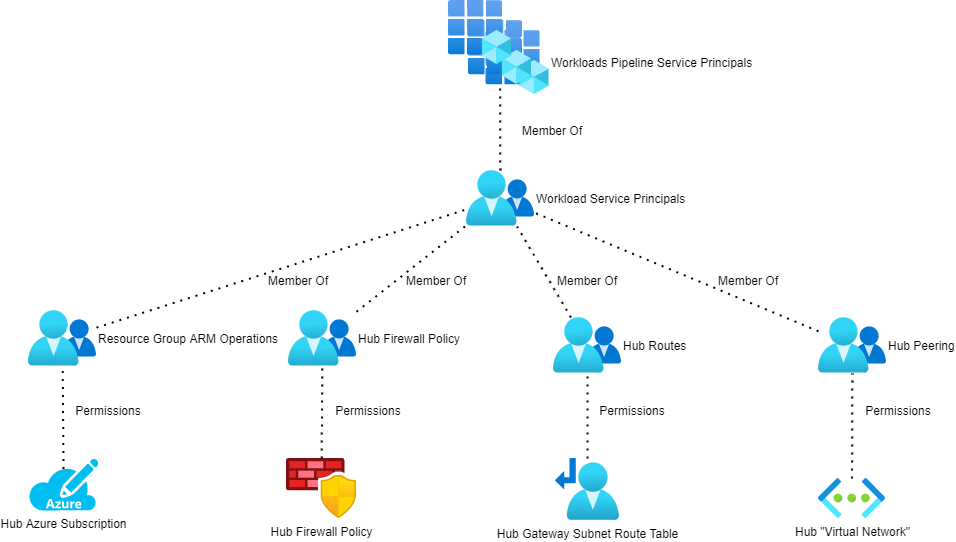
The service principals for all workloads will be added to an Azure AD group (Workloads Pipeline Service Principals in the above diagram). That group is nested into 4 other AAD security groups:

  • Resource Group ARM Operations: This is granted the CUSTOM – ARM Deployment Operator role on the hub resource group.
  • Hub Firewall Policy: This is granted the CUSTOM – Azure Firewall Policy Rule Collection Group Administrator role on the Azure Firewalll Policy that is associated with the hub Azure Firewall.
  • Hub Routes: This is granted the CUSTOM – Azure Route Table Routes Administrator role on the GattewaySubnet route table.
  • Hub Peering: This is granted the CUSTOM – Virtual Network Peering Administrator role on the hub virtual network.

Deploy The Workload

The workload now has the required permissions to deploy the workload and make modifications in the hub to connect the hub to the outside world.

Enabling DevSecOps with Azure Firewall

In this post, I will share how you can implement DevSecOps with Azure Firewall, with links to a bunch of working Bicep files to deploy the infrastructure-as-code (IaC) templates.

This example uses a “legacy” hub and spoke – one where the hub is VNet-based and not based on Azure Virtual WAN Hub. I’ll try to find some time to work on the code for that one.

The Concept

Hold on, because there’s a bunch of things to understand!

DevSecOps

The DevSecOps methodology is more than just IaC. It’s a combination of people, processes, and technology to enable a fail-fast agile delivery of workloads/applications to the business. I discussed here how DevSecOps can be used to remove the friction of IT to deliver on the promises of the Cloud.

The Azure features that this design is based on are discussed in concept here. The idea is that we want to enable Devs/Ops/Security to manage firewall rules in the workload’s Git repository (repo). This breaks the traditional model where the rules are located in a central location. The important thing is not the location of the rules, but the processes that manage the rules (change control through Git repo pull request reviews) and who (the reviewers, including the architects, firewall admins, security admins, etc).

So what we are doing is taking the firewall rules for the workload and placing them in with the workload’s code. NSG rules are probably already there. Now, we’re putting the Azure Firewall rules for the workload in the workload repo too. This is all made possible thanks to changes that were made to Azure Firewall Policy (Azure Firewall Manager) Rules Collection Groups – I use one Rules Collection Group for each workload and all the rules that enable that workload are placed in that Rules Collection Group. No changes will make it to the trunk branch (deployment action/pipelines look for changes here to trigger a deployment) without approval by all the necessary parties – this means that the firewall admins are still in control, but they don’t necessarily need to write the rules themselves … and the devs/operators might even write the rules, subject to review!

This is the killer reason to choose Azure Firewall over NVAs – the ability to not only deploy the firewall resource, but to manage the entire configuration and rule sets as code, and to break that all out in a controlled way to make the enterprise more agile.

Other Bits

If you’ve read my posts on Azure routing (How to Troubleshoot Azure Routing? and BGP with Microsoft Azure Virtual Networks & Firewalls) then you’ll understand that there’s more going on than just firewall rules. Packets won’t magically flow through your firewall just because it’s in the middle of your diagram!

The spoke or workload will also need to deploy:

  • A peering connection to the hub, enabling connectivity with the hub and the firewall. All traffic leaving the spoke will route through the firewall thanks to a user-defined route in the spoke subnet route table. Peering is a two-way connection. The workload will include some bicep to deploy the spoke-hub and the hub-spoke connections.
  • A route for the GatewaySubnet route table in the hub. This is required to route traffic to the spoke address prefix(es) through the Azure Firewall so on-premises>spoke traffic is correctly inspected and filtered by the firewall.

The IaC

In this section, I’ll explain the code layout and placement.

My Code

You can find my public repo, containing all the Bicep code here. Please feel free to download and use.

The Git Repo Design

You will have two Git repos:

  1. The first repo is for the hub. This repo will contain the code for the hub, including:
    • The hub VNet.
    • The Hub VNet Gateway.
    • The GatewaySubnet Route Table.
    • The Azure Firewall.
    • The Azure Firewall Policy that manages the Azure Firewall.
  2. The second repo is for the spoke. This skeleton example workload contains:

Action/Pipeline Permissions

I have written a more detailed update on this section, which can be found here. 

Each Git repo needs to authenticate with Azure to deploy/modify resources. Each repo should have a service principal in Azure AD. That service principal will be used to authenticate the deployment, executed by a GitHub action or a DevOps pipeline. You should restrict what rights the service principal will require. I haven’t worked out the exact minimum permissions, but the high-level requirements are documented below:


Trunk Branch Protection &  Pull Request

Some of you might be worried now – what’s to stop a developer/operator working on Workload A from accidentally creating rules that affect Workload X?

This is exactly why you implement standard practices on the Git repos:

  • Protect the Trunk branch: This means that no one can just update the version of the code that is deployed to your firewall or hub. If you want to create an updated, you have to create a branch of the trunk, make your edits in that trunk, and submit the changes to be merged into trunk as a pull request.
  • Enable pull request reviews: Select a panel of people that will review changes that are submitted as pull requests to the trunk. In our scenario, this should include the firewall admin(s), security admin(s), network admin(s), and maybe the platform & workload architects.

Now, I can only submit a suggested set of rules (and route/peering) changes that must be approved by the necessary people. I can still create my code without delay, but a change control and rollback process has taken control. Obviously, this means that there should be SLAs on the review/approval process and guidance on pull request, approval, and rejection actions.

And There You Have It

Now you have the design and the Bicep code to enable DevSecOps with Azure Firewall.