My Hyper-V Session At Ignite In Top 10 Most Viewed

I was awake early this morning. Normally that would leave me in a bad mood, but I checked my phone and I saw some news from Taylor Brown (the Hyper-V PM that is the public face of file-based backup and Windows Server Containers): my session at Ignite, The Hidden Treasures of Windows Server 2012 R2 Hyper-V, had made it into the top 10 of most watched sessions from the conference.

Wow! I am flattered. Thank you to everyone that has contributed to this. There were some great sessions at Ignite (my notes on some of those sessions can be found here) so I’m feeling pretty good right now … even if I did wake up one and a half hours before my alarm was set to ring 🙂

Ignite 2015 – Bringing Azure to your Datacenter

I am live blogging this session (or attempting to on this crappy wifi). Press F5 to see more.

Speakers: Jeffrey Snover and Mark Russinovich

image

Yesterday

It held back business. “Do you really need a server?”. IT slowed things down. Difficult to see the line between IT and business operations. IT was undervalued.

Today and tomorrow

  • People, cloud, apps are service-focused.
  • Industry standard low cost hardware
  • Fast and cost effective innovation and developer empowerment
  • Holistic strategic thinking
  • Standardised and automated processes & configurations

In other words, IT can operate at the speed of business instead of business operating at the speed of IT. Most IT is not optimized for the speed of operations, change, and agility. The goal is to bring those traits from Azure to on-premises where you can run private cloud at your own pace and under your control.

Things like “data gravity” can slow down public cloud migration. Compliance, trust, control, regulations all impact. Therefore private cloud is still critical.

“Is cloud going to save you money?”. Russinovich says that you might not. But cloud does give you flexibility and agility. Also OPEX versus CAPEX. So the cost savings might be there, but they are often not obvious bottom line figures. Companies become successful not by saving money, but by investing money.

Welcome To 3CX As A Site Sponsor

I would like to welcome a new sponsor on my site: 3CX (@3cx).

Who are 3CX?

3CX VoIP Phone System for Windows is an IP PBX / SIP proxy that completely replaces a traditional proprietary phone system. It uses standard SIP software or hardware phones, supports VoIP providers / SIP Trunks & phone lines and offers numerous benefits over a traditional PBX. The commercial editions offer enterprise grade support as well as a number of business features. A FREE edition is available. A demo license key allowing you to try all commercial features for two simultaneous lines will be sent to your email address.

image

image

There is also a nice list of awards on their banner page. And yes, there is support for Hyper-V Smile

Please pay 3CX a visit to check out what they might be able to do for you.

A Career Of T-Shirts

I was doing a major clean-out of the darker recesses of our house recently and found many nerd-shirt, most of which were thrown out. They brought back a lot of memories.

WP_20150320_16_42_48_Pro

My first job out of college had me working as a UNIX developer … can you believe that!?!?! The project ended, and some of my Linux-to-Windows porting work lead me to being transferred to our budding Microsoft consulting team. And it was there that I got training and certification from Citrix on WinFrame (now XenApp). That was the start of my journey to here.

WP_20150320_16_42_33_Pro

I spent most of my early days working with my employer’s brand of Intel servers (fridge-sized machines with 12 x 9 GB SCSI drives) and our storage system in the lab, setting up proof of concepts and demo labs.

WP_20150320_16_41_15_Pro

I left there after 4 years to spread my wings. That was the start of my many years of working with HP hardware.

WP_20150320_16_40_06_Pro

I lost my job a week after 9/11. The consulting company’s directors decided to re-launch as a “dot com”. I realized that my skills had not been developed and I struggled to find work. I was unemployed, and spent just about every waking hour getting a W2000 MCSE. A few weeks after that, I was employed again.

WP_20150320_16_41_59_Pro

I -hated- that job. Actually, hate might not be a strong enough word. I was doing field engineering. It was an awful experience. And I moved on a few months later.

WP_20150320_16_43_05_Pro

After some time contracting I got a job working for a German (but Irish headquartered) finance company, merging 9 international offices and upgrading them from Windows NT 4.0/Office 97 to Windows XP with a W2003 forest. I -loved- that job; the responsibility of designing and “owning” the global infrastructure (eventually 17 locations) was a rush. This was when I started working with virtualisation in work (Virtual Server and Virtual PC) and with pre-System Center (SMS and MOM) products, and was the start of my path to here.

WP_20150320_17_02_39_Pro

Unfortunately, the directors (who ended up being chased by German prosecutors) decided to move IT to Stuttgart, while making us redundant. That ended up backfiring big-time – we were state of the art and the German consultants both hadn’t a clue and were extremely expensive. I wore the above t-shirt for my exit interview. There’s a story behind that which I won’t tell, but the German HR executive looked like she had shat herself when I walked into the room Smile

WP_20150320_16_41_47_Pro

Oh yes, not only did I start off by programming on UNIX, but I worked happily on VMware before I switched to Hyper-V.

WP_20150320_16_42_15_Pro

The work that I was doing at the time lead to me being of interest to the local Microsoft office. I started to get involved in the local community, I had been blogging for a couple of years, and I was asked to present at the Irish launch of W2008.

WP_20150320_16_43_48_Pro

My community work grew and eventually led to me being awarded MVP status in … SCCM Smile A year later, I was switch to the Hyper-V expertise, reflecting what I was then working with and writing about.

WP_20150320_16_43_21_Pro

Books were written, travel to events was done, and I staffed a booth at TechEd in Berlin. I wore one of the blue “plastic” Microsoft shirts. Just 5 minutes in one of these and you had black armpits all the way down to your waist.

image

A couple of years ago I signed up with the Petri IT Knowledgebase to write about Microsoft virtualization and then my role expanded to write op-eds and other article types on other things. It’s been fun to branch out a little, and reach a bigger audience. Now the site has added Paul Thurrott (under his own URL) and more staff to cover other areas, and that audience is growing.

WP_20150320_16_40_31_Pro

Last year was a big one, career-wise. I recommended some new brands to distribute. One of those was DataON, and that has become quite a business for us, not just in Ireland, but across Europe. I took part in the TechEd North America Speaker Idol … and won a speaking slot at Ignite this year in Chicago. And I was awarded a speaking role at TechEd Europe, got one of the larger rooms, and came in as the 6th rate overall most effective speaker! And then I popped the question and got engaged at Christmas, finishing 2014 on a real high.

Disable Auto-Playing Video Adverts In Chrome

I HATE auto-playing video adverts. They’re loud, they interrupt what I do want to watch & listen to, and they are usually inappropriate. And worse: they are appearing EVERYWHERE.

I use the Chrome browser for my general stuff (IE for the Microsoft stuff). Thankfully, it’s not too hard to selectively disable video on those sites that cause offense, such as The Verge, CIO.com, and TheJournal.ie.

In Chrome, open the content settings by browsing to chrome://chrome/settings/content.

Scroll down the Content Settings dialog until you find Plug-Ins. I like to let plug-ins run automatically and manage the painful exceptions. Click Manage Exceptions.

image

Enter in the URL of the site that you are browsing that is running the offending advert (plug-in). You can use wildcards here, such as [*.]cio.com. You can allow, block (totally) or ask (block but allow you to start) any plug-ins on that site.

image

Back in the Content Settings dialog you also have the option to manage particular plug-ins. Maybe something is installed that you’d like to block. You can do that there by disabling the plug-in. You can also allow some plug-ins to always run.

But I’m of the preference of punishing those sites that put this shit on my screen and speakers, like The Verge, CIO.com and TheJournal.ie.

And for those of you who want to block video ads in IE or Firefox

My Top Articles in 2014

2014 was a fun year to be a blogger in the Microsoft world. Traffic to my site continued to grow, and eventually I was forced by my web hoster to move to a dedicated virtual machine. I stayed with them for a while before moving to Azure … and that’s when my traffic more than doubled! I don’t know if was the fact that I am now hosted on Azure or if it’s because I revisited all my WordPress plugins, including SEO.

Where are these people coming from?

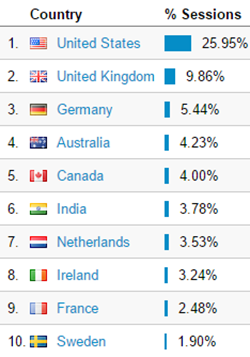
image

The USA dominates. And Ireland punches above it’s weight, probably because I’m Irish, of course. In the USA, California and Texas must be the hotbeds for Hyper-V:

image

Washington State isn’t far behind, and I always chuckle to see how much traffic comes out of Redmond 🙂

What OS are all these people using?

image

Obviously Windows desktop OS is the clear winner. I surprised that iOS beats Android. And considering the skewed percentage of Windows Phones used by people in our industry, I am very surprised that Windows Phone is less than 1% of the client OSs hitting my site.

OK, now on to what people are reading. Interestingly, it’s lots of old stuff!

If we look at how active people were on the pages, most have a minute or more of reading. But some folks were more active on some pages causing “events” as they are called in Google Analytics. The .Net page wins there. But after that it’s a different profile of page, with the content being much newer.

My “Microsoft News” pages aren’t huge aggregators of hits like the older “how to” articles, but they still create lots of interest every day. And to be honest, I use them as my own personal notebook to keep up with what’s going on 🙂

So how do I summarize all this? Interest in Hyper-V, etc continues to rise, based on my small sample. People are looking for information on the 2012/2012 R2 generation of products (that’s good!). But people are struggling with licensing and some techie things that are unwanted distractions.

Wrapping Up 2014

It’s dark outside, it’s raining, there’s Christmas songs on the radio, and there wasn’t much traffic this morning. It’s beginning to sound a lot like Christmas, and we’re coming to the end of another year.

Work at MicroWarehouse Ltd. (not the UK company of the same name) has been interesting. I’ve made a career for myself by being able & willing to take on new things. I started off as a C programmer and fell into Windows desktop/Server. I then discovered System Center before it was called that. And I jumped from VMware to Hyper-V in the early days and that worked out too. I started working with Azure back in January when it became obvious that Microsoft would have to bring it to our customer base via Open licensing. That investment worked out, and I’ve spent most of my time since August either preparing or delivering Azure-related training to sales or technical staff of Irish and Northern Irish resellers. I don’t see Azure as a Hyper-V replacement – far from it – but it is a great supplemental technology, and my experience with Hyper-V has been a great help. We’re starting to hear of fun-sounding Azure opportunities for our customers so the ball might be starting to pick up some momentum.

I brought a few products to the attention of my boss over the past 18 months. The DataOn business has exploded, and we’re selling loads of cluster-in-abox units and JBODs throughout Europe. We’ve just taken on 5nine Software, and conversations with some others have begun to heat up.

WP_20141219_17_36_41_Pro 9 DataOn JBODs going out to a customer that is deploying Scale-Out File Servers instead of HP 3Par SANs

Life as an MVP continued. There were fun online & in-person events and podcasts where I got to talk about Hyper-V, and Windows Server storage and networking. While the amount of material I could blog about on this site dried up a little, I was continuing to add content on Petri.com. And of course, we had the announcements on Windows 10 and Windows Server vNext, so there’s a whole new pool of content to write about, so my activity here has been renewed. I’ve also been buoyed by the fact that the traffic to this site has more than doubled over the past year. Thank you!

We MVPs get a great opportunity to interact with the product groups from Microsoft – that’s the biggest benefit as an MVP. Those who capitalize on this get a huge career boost. And this year has been especially rewarding. We MVPs give a lot of feedback to Microsoft. Some of us Euro-cloud MVPs have been especially impressed to see how this has impacted product over the past 12 months. I can’t talk specifics, but there are things that we have brought up that have turned into headline features.

One of the best bits of being an MVP is making lots of new friends. I get to meet up with lots of people who I’ve only gotten to know through this community, some are MVPs and some are not. We MVPs bump into each other a lot and it’s always great to hang. And there are others, be they co-writers, regular attendees, sponsors, Microsoft staff, or whatever, that I enjoy meeting up with too.

Career-wise there were two huge highlights for me. I was going to TechEd North America 2014 in Houston, but I wasn’t planning on competing in Speaker Idol (a multi-round speaking competition, like X Factor or American/Pop Idol, with 1st place overall winning a slot in the following year’s conference). The organiser, Richard Campbell, had invited me onto a podcast to talk and afterwards asked me to compete. I changed my mind right there – part of it was I knew who one of the judges was and I had the perfect idea to have a little fun. And then I qualified for the final. I wasn’t nervous, but now I was serious. But when I saw how many turned out to support me, I became nervous. In the end, I was honoured to win. That was frikin’ amazing. I was on cloud 9 until the exhaustion of preparing into the week hours the previous night on top of 5 days of jetlag kicked in.

Me warming up the crowd at the start of my final session at Speaker Idol

Another career highlight was also at TechEd, this time in Barcelona for the Europe 2014 event. For the first time ever, I was selected to be a speaker, talking about my favourite topic: Hyper-V. I love finding the nitty gritty bits, and I love explaining them to people. I was chuffed to see so many familiar faces from around Europe (and further afield) and to see how many people came to see me talk. Damn, I was nervous. The first slides (NUMA)  were tricky to explain to an audience where English is mostly the second language. I rehearsed those slides over and over and over. Once I was over the start, I was able to enjoy myself. And then it was cool that so many came up to ask questions when I was finished.

Speaking at TechEd (Europe) for the first time

For me, 2014 will be most remembered for what happened outside of “work”. It’s been a special year personally. Life is pretty damned great.

I hope 2014 was as kind to you as it was for me. If it wasn’t then I know from experience that a horrid year can turn into something special. Hold on, work hard, and give life a chance. Have a 2015!

Getting An Ultrabook To Boot From USB

Do you have a new laptop that refuses to boot from USB? You’re failing to get Windows to install from a removable device? Don’t have an RJ45 port to do PXE installs?

If so, I think I have a hack for you. This is what I used for my Toshiba KIRAbook when wiping Windows 10 Techniacl Preview to reinstall Windows 8.1 – it took a lot of Googling and experimentation to get the thing to boot from USB. My fix is not perfect because you sacrifice Secure Boot, but it works. And no, this page from Microsoft, which is copied endlessly on the Internet, is Bull$h1t.

The cause of the issue is UEFI, the successor to BIOS. You are going to have to configure 3 things:

1) Disable Secure Boot

Reboot your laptop into the UEFI setup (probably one of the function keys – this page is pretty good).

2) Enable CSM Boot/Disable UEFI Boot

In my Toshiba KIRAbook, I found this under Advance > System Configuration. The setting name changes depending on if it is enabled or not.

Note that this setting might be greyed out if you haven’t disabled Secure Boot yet.

3) Prepare a Boot Stick

I used a free tool called Rufus to prepare a USB stick from the Windows 8.1 with Update ISO file.

You can now install Windows on your laptop. You’ve lost Secure Boot and UEFI Boot (Windows 8.1 will not start when they are enabled), but you are able to install Windows. I’ll update this post if anyone comes up with something better.

Note: I hate this bolloxology. This stuff should be much easier.

New Features in Windows Server 2016 (WS2016) Hyper-V

I’m going to do my best (no guarantees – I only have one body and pair of ears/eyes and NDA stuff is hard to track!) to update this page with a listing of each new feature in Windows Server 2016 (WS2016) Hyper-V and Hyper-V Server 2016 after they are discussed publicly by Microsoft. The links will lead to more detailed descriptions of each feature.

Note, that the features of WS2012 can be found here and the features of WS2012 R2 can be found here.

This list was last updated on 25/May/2015 (during Technical Preview 2).


Active memory dump

Windows Server 2016 introduces a dump type of “Active memory dump”, which filters out most memory pages allocated to VMs making the memory.dmp file much smaller and easier to save/copy.


Azure Stack

A replacement for Windows Azure Pack (WAPack), bringing the code of the “Ibiza” “preview portal” of Azure to on-premises for private cloud or hosted public cloud. Uses providers to interact with Windows Server 2016. Does not require System Center, but you will want management for some things (monitoring, Hyper-V Network Virtualization, etc).


Azure Storage

A post-RTM update (flight) will add support for blobs, tables, and storage accounts, allowing you to deploy Azure storage on-premises or in hosted solutions.


Backup Change Tracking

Microsoft will include change tracking so third-party vendors do not need to update/install dodgy kernel level file system filters for change tracking of VM files.


Binary VM Configuration Files

Microsoft is moving away from text-based files to increase scalability and performance.


Cluster Cloud Witness

You can use Azure storage as a witness for quorum for a multi-site cluster. Stores just an incremental sequence number in an Azure Storage Account, secured by an access key.


Cluster Compute Resiliency

Prevents the cluster from failing a host too quickly after a transient error. A host will go into isolation, allowing services to continue to run without disruptive failover.


Cluster Functional Level

A rolling upgrade requires mixed-mode clusters, i.e. WS2012 R2 and Windows Server vNext hosts in the same cluster. The cluster will stay and WS2012 R2 functional level until you finish the rolling upgrade and then manually increase the cluster functional level (one-way).


Cluster Quarantine

If a cluster node is flapping (going into & out of isolation too often) then the cluster will quarantine a node, and drain it of resources (Live Migration – see MoveTypeThreshold and DefaultMoveType).


Cluster Rolling Upgrade

You do not need to create a new cluster or do a cluster migration to get from WS2012 R2 to Windows Server vNext. The new process allows hosts in a cluster to be rebuilt IN THE EXISTING cluster with Windows Server vNext.


Containers

Deploy born-in-the-cloud stateless applications using Windows Server Containers or Hyper-V Containers.


Converged RDMA

Remote Direct Memory Access (RDMA) NICs (rNICs) can be converged to share both tenant and host storage/clustering traffic roles.


Delivery of Integration Components

This will be done via Windows Update


Differential Export

Export just the changes between 2 known points in time. Used for incremental file-based backup.


Distributed Storage QoS

Enable per-virtual hard disk QoS for VMs stored on a Scale-Out File Server, possibly also available for SANs.


File-Based Backup

Hyper-V is decoupling from volume backup for scalability and reliability reasons


Host Resource Protection

An automated process for restricting resource availability to VMs that display unwanted “patterns of access”.


Hot-Add & Hot-Remove of vNICs

You can hot-add and hot-remove virtual NICs to/from a running virtual machine.


Hyper-convergence

This is made possible with Storage Spaces Direct and is aimed initially at smaller deployments.


Hyper-V Cluster Management

A new administration model that allows tools to abstract the cluster as a single host. Enables much easier VM management, visible initially with PowerShell (e.g. Get-VM, etc).


Hyper-V Replica & Hot Add of Disks

You can add disks to a virtual machine that is already being replicated. Later you can add the disks to the replica set using Set-VMReplication.


Hyper-V Manager Alternative Credentials

With CredSSP-enabled PCs and hosts, you can connect to a host with alternative credentials.


Hyper-V Manager Down-Level Support

You can manage Windows Server vNext, WS2012 R2 and WS2012 Hyper-V from a single console


Hyper-V Manager WinRM

WinRM is used to connect to hosts.


MS-SQOS

This is a new protocol for Microsoft Storage QoS. It uses SMB 3.0 as a transport, and it describes the conversation between Hyper-V compute nodes and the SOFS storage nodes. IOPS, latency, initiator names, imitator node information is sent from the compute nodes to the storage nodes. The storage nodes, send back the enforcement commands to limit flows, etc.


Nested Virtualization

Yes, you read that right! Required for Hyper-V containers in a hosted environment, e.g. Azure. Side-effect is that WS2016 Hyper-V can run in WS2016 via virtualization of VT-X.


Network Controller

A new fabric management feature built-into Windows Server, offering many new features that we see in Azure. Examples are a distributed firewall and software load balancer.


Online Resize of Memory

Change memory of running virtual machines that don’t have Dynamic Memory enabled.


Power Management

Hyper-V has expanded support for power management, including Connected Standby


PowerShell Direct

Target PowerShell at VMs via the hypervisor (VMbus) without requiring network access. You still need local admin credentials for the guest OS.


Pre-Authentication Integrity

When talking from one machine to the next via SMB 3.1.1. This is a security feature that uses checks on the sender & recipient side to ensure that there is no man-in-the-middle.


Production Checkpoints

Using VSS in the guest OS to create a consistent snapshots that workload services should be able to support. Applying a checkpoint is like performing a VM restore from backup.


Nano Server

A new installation option that allows you to deploy headless Windows Servers with tiny install footprint and no UI of any kind. Intended for storage and virtualization scenarios at first. There will be a web version of admin tools that you can deploy centrally.


RDMA to the Host

Remote Direct Memory Access will be supported to the management OS virtual NICs via converged networking.


ReFS Accelerated VHDX Operations

Operations are accelerated by converting them into metadata operations: fixed VHDX creation, dynamic VHDX extension, merge of checkpoints (better file-based backup).


RemoteFX

OpenFL 4.4 and OpenCL 1.1 API are supported.


Replica Support for Hot-Add of VHDX

When you hot-add a VHDX to a running VM that is being replicated by Hyper-V Replica, the VHDX is available to be added to the replica set (MSFT doesn’t assume that you want to replicate the new disk).


Replica support for Cross-Version Hosts

Your hosts can be of different versions.


Runtime Memory Resize

You can increase or decrease the memory assigned to Windows Server vNext guests.


Secure Boot for Linux

Enable protection of the boot loader in Generation 2 VMs


Shared VHDX Improvements

You will be able to do host-based snapshots of Shared VHDX (so you get host-level backups) and guest clusters. You will be able to hot-resize a Shared VHDX.

Shared VHDX will have its own hardware category in the UI. Note that there is a new file format for Shared VHDX. There will be a tool to upgrade existing files.


Shielded Virtual Machines

A new security model that hardens Hyper-V and protects virtual machines against unwanted tampering at the fabric level.


SMB 3.1.1

This is a new version of the data transport protocol. The focus has been on security. There is support for mixed mode clusters so there is backwards compatibility. SMB 3.02 is now called SMB 3.0.2.


SMB  Negotiated Encryption

Moving from AES CCM to AES GCM (Galois Counter Mode) for efficiency and performance. It will leverage new modern CPUs that have instructions for AES encryption to offload the heavy lifting.


SMB Forced Encryption

In older versions of SMB, SMB encryption was opt-in on the client side. This is no longer the case in the next version of Windows Server.


Storage Accounts

A later release of WS2016 will bring support for hosting Azure-style Storage accounts, meaning that you can deploy Azure-style storage on-premises or in a hosted cloud.


Storage Replica

Built-in, hardware agnostic, synchronous and asynchronous replication of Windows Storage, performed at the file system level (volume-based). Enables campus or multi-site clusters.

Requires GPT. Source and destination need to be the same size. Need low latency. Finish the solution with the Cluster Cloud Witness.


Storage Spaces Direct (S2D)

A “low cost” solution for VM storage. A cluster of nodes using internal (DAS) disks (SAS or SATA, SSD, HDD, or NVMe) to create a consistent storage spaces pools that stretch across the servers. Compute is normally on a different cluster (converged) but it can be on one tier (hyper-converged)


Storage Transient Failures

Avoid VM bugchecks when storage has a transient issue. The VM freezes while the host retries to get storage back online.


Stretch Clusters

The preferred term for when Failover Clustering spans two sites.


System Center 2016

Those of you who can afford the per-host SMLs will be able to get System Center 2016 to manage your shiny new Hyper-V hosts and fabric.


System Requirements

The system requirements for a server host have been increased. You now must have support for Second-Level Address Translation (SLAT), known as Intel EPT or AMD RVI or NPT. Previously SLAT (Intel Nehalem and later) was recommended but not required on servers and required on Client Hyper-V. It shouldn’t be an issue for most hosts because SLAT has been around for quite some time.


Virtual Machine Groups

Group virtual machines for operations such as orchestrated checkpoints (even with shared VHDX) or group checkpoint export.


Virtual Machine ID Management

Control whether a VM has same or new ID as before when you import it.


Virtual Network Adapter Identification

Not vCDN! You can create/name a vNIC in the settings of a VM and see the name in the guest OS.


Virtual Secure Mode (VSM)

A feature of Windows 10 Enterprise that protects LSASS (secret keys) from pass-the-hash attacks by storing the process in a stripped down Hyper-V virtual machine.


Virtual TPM (vTPM)

A feature of shielded virtual machines that enables secure boot, disk encrypting within the virtual machine, and VSC.


VM Storage Resiliency

A VM will pause when the physical storage of that VM goes offline. Allows the storage to come back (maybe Live Migration) without crashing the VM.


VM Upgrade Process

VM versions are upgraded manually, allowing VMs to be migrated back down to WS2012 R2 hosts with support from Microsoft.


VXLAN Support

The new Network Controller will support VXLAN as well as the incumbent NVGRE for network virtualization.


Windows Containers

This is Docker in Windows Server, enabling services to run in containers on a shared set of libaries on an OS, giving you portability, per-OS density, and fast deployment.