Ignite 2016 – Introducing Windows Server and System Center 2016

This session (original here) introduces WS2016 and SysCtr 2016 at a high level. The speakers were:

  • Mike Neil: Corporate VP, Enterprise Cloud Group at Microsoft
  • Erin Chapple: General Manager, Windows Server at Microsoft

A selection of other people will come on stage to do demos.

20 Years Old

Windows Server is 20 years old. Here’s how it has evolved:

image

The 2008 release brought us the first version of Hyper-V. Server 2012 brought us the same Hyper-V that was running in Azure. And Windows Server 2016 brings us the cloud on our terms.

The Foundation of Our Cloud

The investment that Microsoft made in Azure is being returned to us. Lots of what’s in WS2016 came from Azure, and combined with Azure Stack, we can run Azure on-prem or in hosted clouds.

There are over 100 data centers in Azure over 24 regions. Windows Server is the platform that is used for Azure across all that capacity.

IT is Being Pulled in Two Directions – Creating Stresses

  • Provide secure, controlled IT resources (on prem)
  • Support business agility and innovation (cloud / shadow IT)

By 2017, 50% of IT spending will be outside of the organization.

Stress points:

  • Security
  • Data centre efficiency
  • Modernizing applications

Microsoft’s solution is to use unified management to:

  • Advanced multi-layer security
  • Azure-inspired, software-defined,
  • Cloud-read application platform

Security

Mike shows a number of security breach headlines. IT security is a CEO issue – costs to a business of a breach are shown. And S*1t rolls downhill.

Multi-layer security:

  • Protect identity
  • Secure virtual machines
  • Protect the OS on-prem or in the cloud

Challenges in Protecting Credentials

Attack vectors:

  1. Social engineering is the one they see the most
  2. Pass the hash
  3. Admin = unlimited rights. Too many rights given to too many people for too long.

To protect against compromised admin credentials:

image

  • Credential Guard will protect ID in the guest OS
  • JEA limits rights to just enough to get the job done
  • JITA limits the time that an admin can have those rights

The solution closes the door on admin ID vulnerabilities.

Ryan Puffer comes on stage to do a demo of JEA and JITA. The demo is based on PowerShell:

  1. He runs Enter-PSSession to log into a domain controller (DNS server). Local logon rights normally mean domain admin.
  2. He cannot connect to the DC, because his current logon doesn’t have DC rights, so it fails.
  3. He tries again, but adding –ConfiguratinName to add a JEA config to Enter-PSSession, and he can get in. The JEA config was set up by a more trusted admin. The JEA authentication is done using a temporary virtual local account on the DC that resides nowhere else. This account exists only for the duration of the login session. Malware cannot use this account because it has limited rights (to this machine) and will disappear quickly.
  4. The JEA configuration has also limited rights – he can do DNS stuff but he cannot browse the file system, create users/groups, etc. His ISE session only shows DNS Get- cmdlets.
  5. He needs some modify rights. He browses to a Microsoft Identity Manager (MIM) portal and has some JITA roles that he can request – one of these will give his JEA temp account more rights so he can modify DNS (via a group membership). He selects one and has to enter details to justify the request. He puts in a time-out of 30 minutes – 31 minutes later he will return to having just DNS viewer rights. MFA via Azure can be used to verify the user, and manager approval can be required.
  6. He logs in again using Enter-PSSession with the JEA config. Now he has DNS modify rights. Note: you can whitelist and blacklist cmdlets in a role.

Back to Mike.

Challenges Protecting Virtual Machines

VMs are files:

  • Easy to modify/copy
  • Too many admins have access

Someone can mount a VMs disks or copy a VM to gain access to the data. Microsoft believes that attackers (internal and external) are interested in attacking the host OS to gain access to VMs, so they want to prevent this.

This is why Shielded Virtual Machines was invented – secure the guest OS by default:

  • The VM is encrypted at rest and in transit
  • The VM can only boot on authorised hosts

Azure-Inspired, Software-Defined

Erin Chapple comes on stage.

This is a journey that has been going on for several releases of Windows Server. Microsoft has learned a lot from Azure, and is bringing that learning to WS2016.

Increase Reliability with Cluster Enhancements

  • Cloud means more updates, with feature improvements. OS upgrades weren’t possible in a cluster. In WS2016, we get cluster rolling upgrades. This allows us to rebuild a cluster node within a cluster, and run the cluster temproarily in mixed-version mode. Now we can introduce changes without buying new cluster h/w or VM downtime. Risk isn’t an upgrade blocker.
  • VM resiliency deals with transient errors in storage, meaning a brief storage outage pauses a VM instead of crashing it.
  • Fault domain-aware clusters allows us to control how errors affect a cluster. You can spread a cluster across fault domains (racks) just like Azure does. This means your services can be spread across fault domains, so a rack outage doesn’t bring down a HA service.

image

24 TB of RAM on a physical host and 12 TB RAM in a guest OS are supported. 512 physical LPs on a host, and 240 virtual processors in a VM. This is “driven by Azure” not by customer feedback.

Complete Software-Defined Storage Solution

Evolving Storage Spaces from WS2012/R2. Storage Spaces Direct (S2D) takes DAS and uses it as replicated/shared storage across servers in a cluster, that can either be:

  • Shared over SMB 3 with another tier of compute (Hyper-V) nodes
  • Used in a single tier (CSV, no SMB 3) of hyper-converged infrastructure (HCI)

image

Storage Replica introduces per-volume sync/async block-level beneath-the-file system replication to Windows Server, not caring about what the source/destination storage is/are (can be different in both sites) as long as it is cluster-supported.

Storage QoS guarantees an SLA with min and max rules, managed from a central point:

  • Tenant
  • VM
  • Disk

The owner of S2D, Claus Joergensen, comes on stage to do an S2D demo.

  1. The demo uses latest Intel CPUs and all-Intel flash storage on 16 nodes in a HCI configuration (compute and storage on a single cluster, shared across all nodes).
  2. There are 704 VMs run using an open source tool called VMFleet.
  3. They run a profile similar to Azure P10 storage (each VHD has 500 IOPS). That’s 350,000 IOPS – which is trivial for this system.
  4. They change this to Azure P20: now each disk has 2,300 IOPS, summing 1.6 million IOPS in the system – it’s 70% read and 30% write. Each S2D cluster node (all 16 of them) is hitting over 100,000 IOPS, which is about the max that most HCI solutions claim.
  5. Clause changes the QoS rules on the cluster to unlimited – each VM will take whatever IOPS the storage system can give it.
  6. Now we see a total of 2.7 million IOPS across the cluster, with each node hitting 157,000 to 182,000 IOPS, at least 50% more than the HCI vendors claim.

Note the CPU usage for the host, which is modest. That’s under 10% utilization per node to run the infrastructure at max speed! Thank Storage Spaces and SMB Direct (RDMA) for that!

image

  1. Now he switches the demo over to read IO only.
  2. The stress test hits 6.6 million read IOPS, with each node offering between 393,000 and 433,000 IOPS – that’s 16 servers, no SAN!
  3. The CPU still stays under 10% per node.
  4. Throughput numbers will be shown later in the week.

If you want to know where to get certified S2D hardware, then you can get DataON from MicroWarehouse in Dublin (www.mwh.ie):

image

Nano Server

Nano Server is not an edition – it is an installation option. You can install a deeply stripped down version of WS2016, that can only run a subset of roles, and has no UI of any kind, other than a very basic network troubleshooting console.

It consumes just 460 MB disk space, compared to 5.4 GB of Server Core (command prompt only). It boots in less than 10 seconds and a smaller attack surface. Ideal scenario: born in the cloud applications.

Nano Server is not launched in Current Branch for Business. If you install Nano Server, then you are forced into installing updates as Microsoft releases them, which they expect to do 2-3 times per year. Nano will be the basis of Microsoft’s cloud infrastructure going forward.

Azure-Inspired Software-Defined Networking

A lot of stuff from Azure here. The goal is that you can provision new networks in minutes instead of days, and have predictable/secure/stable platforms for connecting users/apps/data that can scale – the opposite of VLANs.

Three innovations:

  • Network Controller: From Azure, a fabric management solution
  • VXLAN support: Added to NVGRE, making the underlying transport less important and focusing more on the virtual networks
  • Virtual network functions: Also from Azure, getting firewall, load balancing and more built into the fabric (no, it’s not NLB or Windows Firewall – see what Azure does)

Greg Cusanza comes on stage – Greg has a history with SDN in SCVMM and WS2012/R2. He’s going to deploy the following:

image

That’s a virtual network with a private address space (NAT) with 3 subnets that can route and an external connection for end user access to a web application. Each tier of the service (file and web) has load balancers with VIPs, and AD in the back end will sync with Azure AD. This is all familiar if you’ve done networking in Azure Resource Manager (ARM).

  1. A bunch of VMs have been created with no network connections.
  2. He opens a PoSH script that will run against the network controller – note that you’ll use Azure Stack in the real world.
  3. The script runs in just over 29 seconds – all the stuff in the screenshot is deploy and the VMs are networked and have Internet connectivity – He can browse the Net from a VM, and can browse the web app from the Internet – he proves that load balancing (virtual network function) is working.

Now an unexpected twist:

  1. Greg browses a site and enters a username and password – he has been phished by a hacker and now pretends to be the attacker.
  2. He has discovered that the application can be connected to using remote desktop and attempts to sign in used the phished credentials. He signs into one of the web VMs.
  3. He uploads a script to do stuff on the network. He browses shares on the domain network. He copies ntds.dit from a DC and uploads it to OneDrive for a brute force attack. Woops!

This leads us to dynamic security (network security groups or firewall rules) in SDN – more stuff that ARM admins will be familiar with. He’ll also add a network virtual appliance (a specialised VM that acts as a network device, such as an app-aware firewall) from a gallery – which we know that Microsoft Azure Stack will be able to syndicate from :

image


  1. Back in PoSH, he runs another script to configure network security groups, to filter traffic on a TCP/UDP port level.
  2. Now he repeats the attack – and it fails. He cannot RDP to the web servers, he couldn’t browse shared folders if he did, and he prevented outbound traffic from the web servers anyway (stateful inspection).

The virtual appliance is a network device that runs a customized Linux.

  1. He launches SCVMM.
  2. We can see the network in Network Service – so System Center is able to deploy/manage the Network Controller.

Erin finished by mentioning the free WS2016 Datacenter license offer for retiring vSphere hosts “a free Datacenter license for every vSphere host that is retired”, good until June 30, 2017 – see www.microsoft.com/vmwareshift

Cloud-Ready Application Platform

Back to Mike Neil. We now have a diverse set of infrastructure that we can run applications one:

image

WS2016 adds new capabilities for cloud-based applications. Containers was a huge thing for MSFT.

A container virtualizes the OS, not the machine. A single OS can run multiple Windows Server Containers – 1 container per app. So that’s a single shared kernel – that’s great for internal & trusted apps, similar to containers that are available on Linux. Deployment is fast and you can get great app density. But if you need security, you can deploy compatible Hyper-V Containers. The same container images can be used. Each container has a stripped down mini-kernal (see Nano) isolated by a Hyper-V partition, meaning that untrusted or external apps can be run safely, isolated from each other and the container host (either physical or a VM – we have nested Hyper-V now!). Another benefit of Hyper-V Containers is staggered servicing. Normal (Windows Server) Containers share the kernal with the container host – if you service the host then you have to service all of the containers at the same time. Because they are partitioned/isolated, you can stagger the servicing of Hyper-V Containers.

Taylor Brown (ex- of Hyper-V and now Principal Program Manager of Containers) comes on stage to do a demo.

image

  1. He has a VM running a simple website – a sample ASP.NET site in Visual Studio.
  2. In IIS Manager, he does a Deploy > Export Application, and exports a .ZIP.
  3. He copies that to a WS2016 machine, currently using 1.5 GB RAM.
  4. He shows us a “Docker File” (above) to configure a new container. Note how EXPOSE publishes TCP ports for external access to the container on TCP 80 (HTTP) and TCP 8172 (management). A PowerShell snap-in will run webdeploy and it will restore the exported ZIP package.
  5. He runs Docker Build –t mysite  … with the location of the docker file.
  6. A few seconds later a new container is built.
  7. He starts the container and maps the ports.
  8. And the container is up and running in seconds – the .NET site takes a few seconds to compile (as it always does in IIS) and the thing can be browsed.
  9. He deploys another 2 instances of the container in seconds. Now there are 3 websites and only .5 GB extra RAM is consumed.
  10. He uses docker run -isolation=hyperv to get an additional Hyper-V Container. The same image is started … it takes an extra second or two because of “cloning technology that’s used to optimize deployment of Hyper-V Containers”.
  11. Two Hyper-V containers and 3 normal containers (that’s 5 unique instances of IIS) are running in a couple of minutes, and the machine has gone from using 1.5 GB RAM to 2.8 GB RAM.

Microsoft has been a significant contributor to the Docker open source project and one MS engineer is a maintainer of the project now. There’s a reminder that Docker’s enterprise management tools will be available to WS2016 customers free of charge.

On to management.

Enterprise-Class Data Centre Management

System Center 2016:

  • 1st choice for Windows Server 2016
  • Control across hybrid cloud with Azure integrations (see SCOM/OMS)

SCOM Monitoring:

  • Best of breed Windows monitoring and cross-platform support
  • N/w monitoring and cloud infrastructure health
  • Best-practice for workload configuration

Mahesh Narayanan, Principal Program Manager, comes on stage to do a demo of SCOM. IT pros struggle with alert noise. That’s the first thing he wants to show us – it’s really a way to find what needs to be overriden or customized.

  1. Tune Management Packs allows you to see how many alerts are coming from each management pack. You can filter this by time.
  2. He click Tune Alerts action. We see the alerts, and a count of each. You can then do an override (object or group of objects).

Maintenance cycles create a lot of alerts. We expect monitoring to suppress these alerts – but it hasn’t yet! This is fixed in SCOM 2016:

  1. You can schedule maintenance in advance (yay!). You could match this to a patching cycle so WSUS/SCCM patch deployments don’t break your heart on at 3am on a Saturday morning.
  2. Your objects/assets will automatically go into maintenance mode and have a not-monitored status according to your schedules.

All those MacGuyver solutions we’ve cobbled together for stopping alerts while patching can be thrown out!

That was all for System Center? I am very surprised!

PowerShell

PowerShell is now open source.

  • DevOps-oriented tooling in PoSH 5.1 in WS2016
  • vNext Alpha on Windows, macOS, and Linux
  • Community supported releases

Joey Aiello, Program Manager, comes up to do a demo. I lose interest here. The session wraps up with a marketing video.

Ignite 2016 – Microsoft Azure Networking: New Network Services, Features And Scenarios

This session (original here) from Microsoft Ignite 2016 is looking at new networking features in Azure such as Web Application Firewall, IPv6, DNS, accelerated networking, VNet Peering and more. This post is my collection of notes from the recording of this session.

The speakers are:

  • Yousef Khalidi, Corporate Vice President, Microsoft
  • Jason Carson, Enterprise Architect, Manulife
  • Art Chenobrov, Manager Identity, Access and Messaging, Hyatt Hotels
  • Gabriel Silva, Program Manager, Microsoft

A mix of Microsoft  and non-Microsoft speakers. There will be a breadth overview and some customer testimonials. A chunk of marketing consumes the first 7 minutes. Then on to the good stuff.

High Performance Networking

A number of improvements have been made at no cost to the customer. Honestly, I’ve seen some by accident, and they ruined (in a good way) some of my demos Smile

  • Improved performance of all VMs, seeing VNet performance improve by 33% to 50%
  • More IOPS to storage – I saw IOPS increase in some demo/tests
  • For Linux and Windows VMs
  • The global deployment will be completed in 2016 – phased deployments across the Azure regions.

You have to do nothing to get these benefits. I’m sure that Yousef said that’ll we’ll be able to get up to 21 Gbps down depending on the VM SKU/size. Some of this is made possible thanks to making better utilization of NIC capacity.

Accelerated Networking

Azure now has SR-IOV (single-root IO virtualization), where a VM can connect directly to a physical NIC without routing traffic via the virtual switch in the host partition. The results are:

image

  • 10 x latency improvement
  • Increased packets per second (PPS)
  • Reduced jitter – great for media/voice

Now Azure has the highest bandwidth VMs in the cloud: DS15v2 and D15v2 can hit 25 Gbps (in preview). The competition can get up to 20 Gbps “on a good day”.

Performance sensitive applications will benefit. There is a 1.5x improvement for Azure SQL DB in memory OLTP transactions.

Microsoft are rolling this out across Azure over this and the next calendar years. Gabe (Gabriel) does a demo, doing VM to VM latency and bandwidth test. You can enable SR-IOV in the Portal (Accelerated Network setting). The demo is done in West Central US region. You can verify that SR-IOV is enabled for the vNIC in the guest OS – Windows, look for a virtual function (VF) network adapter in Devices. Interestingly, in the demo, we can tell that the host uses Mellanox ConnectX-3 RDMA NICs. The first demo does 100,000 pings on VMs, and this is 10 times lower than current numbers. They run a network stress test between two VMs.

image


The get 25 Gbps of connectivity between the 2 VMs:

image

This functionality will be coming “soon” to us.

Next there’s a demo with connection latency tests to a database, from a VM with SRIOV and one without. We see that latency is significantly lower on the accelerated VM. They re-run the test to make the results more tangible. The un-accelerated machine can query 270 rows per second while the accelerated one is hitting 664. Same VMs – just SRIOV is enabled on one of them.

image

The subscription must be enabled for this feature first (still rolling it out) and then all of your VMs can leverage the feature. There is no cost to turning it on and using the feature.

Back to Yousef.

The Network Big Picture

The following is an old slide full of old features:

image

On to the new stuff.

VNet Peering (GA)

A customer can have lots of isolated features with duplicated effort.

image

Customers want to consolidate some of this. For example, can we:


  • Have one VNet that has load balancing and virtual appliance firewalls/proxies
  • Connect other VNets to this?

The answer is yes, you can now using VNet peering (limited to connections in a single region) which just went GA.

image

Note that VM connections across a VNet run at the speed of the VMs’ NICs.

Azure DNS (GA)

You can host your records in Azure DNS or elsewhere. The benefit of Azure is that it is global and fast.

image

IPv6 for Azure VMs

We can create IPv6 IP addresses on the load balancer, and use AAAA DNS records (which you can host in Azure DNS if you want) to access VM services in Azure. This is supported for Linux and Windows. This is a big deal for IoT devices.

image

Load Balancing (Review)

Yousef reviews how load balancing can be done toady in Azure. A traffic manager profile (based on DNS records and abstraction) does load balancing/fail over between 2+ Azure deployments (across 1+ regions). A single deployment has an Azure Load Balancer, which uses Layer 4 LB rules to pass traffic through to the VNet. Within the VNet, Azure application gateways (can) the proxy/direct/load balance Layer 7 traffic to web servers (VMs) on the VNet.

image

Web Application Firewall

The web application gateway is still relatively unknown, in my experience, even though it’s been around for 1 year. This is layer 7 handling of traffic to web farms/servers.

image


A preview for web application firewall (WAF) has been announced – an extension of the web application gateway.

image

WAF adds security to the WAG. In current preview, it uses a hard set of rules, but custom rules will be coming soon. MSFT hopes to GA it soon (must be ready first).

WAF is an add-on SKU to the gateway. It can run in detection mode (great to watch traffic without intervening – try it out). When you are happy, you switch over to prevention mode so it can intervene.

image

Multiple VIPS for Load Balancer

This is a cost reduction improvement. For example, you needed to run multiple databases behind internal load balancers, with each DB pair requiring a unique VIP. Now we can assign multiple VIPs to a LB, and consolidate the databases to a pair of VMs instead of multiple pairs of VMs.

image

Back end ports can also be reused to facilitate the above.

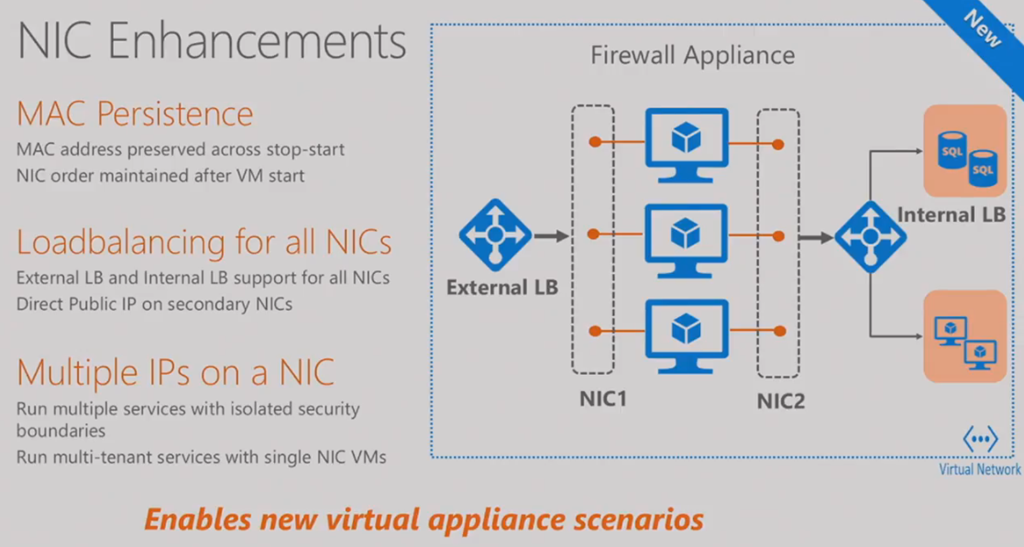
NIC Enhancements

These improvements didn’t get mentioned in any posts I read or announcements I heard. MAC addresses were not persistent. They have been for a few months now. Also, VM ordering in a VM is retained after VM start (important for NVAs) – there was a bug were the NICs weren’t in persistent order.

image

New virtual appliance scenarios are supported by adding functionality to additional NICs in a VM:

  • Load balancing
  • Direct public IP assignment
  • Multiple IPs on a single NIC

A marketing-heavy video is played to discuss how Hyatt Hotels are using Azure networking. I think that the jist of the story is that Hyatt went from a single data center in the USA, to having multiple PoPs around the world thanks to Azure networking (probably ExpressRoute).  The speaker from Hyatt comes on stage.

Yousef is back on stage to talk about connecting to Azure. I was ready to skip this piece of the video but Yousef did present some interesting stuff. The first is using the Azure backbone to connect disparate offices. Each office connects over “the last mile” to Azure using secure VPN. Then Azure VNet-VNet VPNs provide the WAN. I’d never thought of this architecture – it’s actually pretty simple to set up with the new VPN UI in the Azure Portal. Azure provides low latency and high bandwidth connections – this is a very cheap way to network sites together with lots of speed and low latency.

image

Highly Available Connections to Azure

We can create more than 1 connection to Azure VPN gateways, solving a concern that people have over reliance on a single link/ISP.

image

Most people don’t know it, but the Azure gateway was an active/passive VM cluster behind the curtain. You can now run the gateway in an active/active configuration, giving you greater HA for your site-to-Azure connections. And additionally, you can aggregate the bandwidth of both VPN tunnels/links/ISPs.

image

If you are interested in the expensive ExpressRoute WAN option, then the PoP locations have increased to 35 around the world – more than any other cloud, with lots of partners offering WAN and connection relay options.

image

ExpressRoute has a new UltraPerfromance gateway option: 5x improvement over the 2 Gbps HighPerformance gateway– up to 10 Gbps through to VNets

The ExpressRoute gateway SLA is increased to 99.95%.

More insights into ExpressRoute are being added: troubleshooting, BGP/traffic/routing statistics, diagnostics, alerting, monitoring, etc.

There’s a stint by the Manulife speaker to talk about their usage of Azure, which I skipped.

Monitoring And Diagnostics

Customers want visibility into the virtual networks that they are using for production and mission critical applications/services. So Microsoft has given us this in Azure:

image

More stuff will appear in PoSH, log extractions (for 3rd parties), and in the Portal in the future. And the session moved on to a summary.

Windows Server 2016 is Launched But NOT Generally Available Yet

Microsoft did the global launch of Windows Server 2016 at Ignite in Atlanta yesterday. But contrary to tweets about an eval edition that you can download (but is useless for production), neither Windows Server 2016 or System Center 2016 are actually generally available; they are on the October pricelists but won’t be GA until “mid October”. You won’t find WS2016 or System Center 2016 GA yet on:

  • Azure
  • MSDN
  • MVLS

So you’ll have to wait until mid-October? Why the wait? It’s obvious, if you think about the last 2 releases. What do you do after installing a new OS from media? You run Windows Update. And what got installed after deploying GA bits for WS2012 or WS2012 R2? Hundreds of GB of a monster update. Microsoft is probably hard at work on a monster cumulative update that they need to get right for the GA of WS2016. It must not be ready yet, and they aren’t 100% sure when, and that’s why the time of the GA mentioned in public is mid-October and not a specific date.

Azure Stack was previously announced for GA in mid-2017. TP2 (which has been in TAP for a while, I am lead to believe) was made public yesterday with a number of improvements.

It was a quiet launch … I think the OS was mentioned once in the keynote, and there were no demos (which are actually pretty stunning this time around). System Center 2016 was also launched. Some in the media might use this quiet launch to continue their theory that Windows Server is walking dead and being replaced by Azure. That could not be further from the truth. Microsoft very much pushed (the following session by Jason Zander)  the hybrid cloud message, powered by WS2016, saying that their unique selling point will continue for enterprises that can never move (some or all services) to a public cloud. And, of course, this is why Azure Stack has been developed and is getting a lot of attention. There are countless sessions on WS2016, System Center 2016, and Azure Stack during the week at Ignite. Don’t forget, also, that hybrid goes down to the code – the same people work on Azure and Windows Server because they are one and the same.

The cloud-cloud-cloud keynote was a call rather than a sales pitch. It’s time to start learning the cloud – your bosses and your customers want it so it’s pointless for you to fight yourself out of a job. Most of the cloud solutions they showed actually supplemented on-prem installations rather than replaced them.

Ignite 2016–Cloud Infrastructure with Jason Zander

These are my notes from watching the session online, presented by the man who runs Azure engineering. This high-level session is all about the hybrid cloud nature of Microsoft’s offerings. You choose where to run things, not the cloud vendor.

Data Centre

Microsoft expects a high percentage of customers want to deploy hybrid solutions, a mixture of on-premises, with hosting partners, or in public cloud (like Azure, O365, etc). IDC reckons 80% of enterprises will run hybrid strategy by 2017. This has been Microsoft’s offering since day 1, and it continues that way. Microsoft believes there are legitimate scenarios that will continue to run on-premises.

image

A lot of learning from Azure has fed back into Hyper-V over the years. This continues in WS2016:

  • Distributed QoS
  • Network Controller
  • Discrete device assignment (DDA)

Security

The threats have evolved to target all the new endpoints that modern computing have enabled. Security starts with the basics: patching. Once an attacker is in, they expand their reach. Threats are from all over – internal and external. Advanced persistent threats from zero days and organized & financed attackers are a legit threat. It takes only 24-48 hours for an attacker to get from intrusion to domain admin access, and then they sit there, undiscovered, stealing and damaging, for a mean of 150 days!

image

Windows Server philosophy is to defend in depth:

image

Shielded Virtual Machines

The goal is that even if someone gets physical access to a host (internal threat), they cannot get into the virtual machines.

  • VMs are encrypted at rest and in transit.
  • A host must be trusted by an secured independent authority.

image

Jeff Woolsey, Principal Program Manager, comes on stage to do a demo. Admins can be bad guys! Imagine your SAN admin … he can copy VM virtual hard disks, mount them, and get your data. If that’s a DC VM, then he can steal the domain’s secrets very easily. That’s the easiest ID theft ever. Shielded VMs prevent this. The VMs are a black box that the VM owner controls, not the compute/networking/storage admins.

Jeff does a demo … easy mount and steal from un-shielded VHDX files. Then he goes to a shielded VM … wait no those are VMware VMDK files and “these guys don’t have shielded virtual machines”. He goes to the write folder, and mounting a VHDX fails because it’s encrypted using BitLocker, even though he is a full admin. He goes to Hyper-V Manager and tries a console connection to a shielded VM. There’s no console thumbnail and console is not available – you have to use RDM. The shielded VM uses a virtual unique TPM chip to seal the unique key that protects the virtual disks. The VM processes are protected, which means that you cannot attach a debugger or inspect the RAM of the VM from the host.

This is a truly unique security feature. If you want secured VMs, then WS2016 Hyper-V (and it really requires VMM 2016 for real world) is the only way to do it – forget vSphere.

Software Defined

You get the same Hyper-V on-prem that Microsoft uses in Azure – no one else does that. Scalability has increased. Linux is a first class citizen – 30% of existing Azure VMs are Linux and they think that 60% of new virtual machines are Linux. The software defined networking in WS2016 came from Azure. Load Balancing is tested in Azure and running in the fabric for VMs in WS2016. VXLAN was added too. Storage has been re-invented with Storage Spaces Direct (S2D), lowering costs and increasing performance.

Management

System Center 2016 will be generally available with WS2016 in mid October (it actually isn’t GA yet, despite the misleading tweets). Noise control has been added to SCOM, allowing you to tune alerts more easily.

Application Platform

We have new cloud-first ways to deploy applications.

Nano Server is a refactored Windows Server with no UI – you manage this installation option (it’s not a license) remotely. You can deploy it quickly, it boots up in seconds, and it uses fewer resources than any other Windows option. You can use Nano Server on hosts, storage nodes, in VMs, or in containers. The application workload is where I think Nano makes the most sense.

image

Containers are native in WS2016, managed by Docker or PowerShell. Deploying applications is extremely fast with containers. Coupled with orchestration, the app people stop caring about servers – all compute is abstracted away for them. Windows Server Containers is the same kind of containers that people might be aware of. Hyper-V Containers takes regular kernels so that they don’t have a shared kernel and are isolated by the DEP-backed Hyper-V hypervisor. Docker provides enterprise-ready management for containers, including WS2016. Anyone buying WS2016 gets the Docker Engine, with support from both Docker and MSFT.

Ben Golub, CEO of Docker, comes out. Chat show time … we’ll skip that.

Azure

The tenants of Azure are global, trusted, and hybrid. Note that last one.

Global:

image


This is Amsterdam (West Europe). The white buildings are data centers. One is the size of an American Football field (120 yards x around 53 yards). This isn’t one of the big data centers.

image


1.6 million miles of fibre around the world, with a new mid-Atlantic one one the way. There are roughly 90 ExpressRoute (WAN connection) PoPs around the world. The platform is broad … CSP has over 5,000 line items in the price list. Over 600 new services and features shipped in the last 12 months.

Some new announcements are highlighted.

  • New H-Series VMs are live on Azure. H is for high performance or HPC.
  • L-Series VMs: Storage optimized.
  • N-Series (already announced): NVIDIA GPU enabled.

An in-demand application is SAP HANA. Microsoft has worked with SAP to create purpose-built infrastructure for HANA with up to 32 TB OLAP and 3 TB OLTP.

New Networking Capabilities

Field-programmable gate array (FPGA) has gone live in Azure, enabling network acceleration up to 25 Mbps. IPv6 support has been added. Also:

  • Web application firewall (added to the web application proxy)
  • Azure DNS is GA

Compliance

Azure has the largest compliance portfolio in cloud scale computing. Don’t just look at the logo – look at what is supported by that certification. Azure has 50% more than AWS in PCI. 300% more than AWS in FedRAMP. 3 more certs were announced:

image

Azure was the first to get the EU-US Privacy Shield certification.

Hybrid

Microsoft means run it on-prem or in the cloud when they hybrid (choice). Other vendors are limited to a network connection to hoover up all your systems and data (no choice).

image

SQL Server 2016 stretch database allows a table to span on-prem and Azure SQL. That’s a perfect example of hybrid in action.

Azure Stack Technical Preview 2 was launched. You can run it on-prem or with a partner service provider. Scenarios include:

  • Data sovereignty
  • Industrial: A private cloud running a factory
  • Temporarily isolated environments
  • Smart cities

The 2 big hurdles are software and hardware. This is why Microsoft is partnering with DellEMC, HPE and Lenovo on solutions for Microsoft Azure Stack. We see behind the HPE rack – 8 x 2U servers with SFP+ networking. There will be quarter rack stacks for getting started and bigger solutions.

Azure + Azure Stack

Bradley Bartz, Principal Group Program Manager, comes out on stage. He’s talking through a scenario. A company in Atlanta runs a local data center. Application are moving to containers. Dev/test will be done in Azure (pay as you go). Production deployment will be done on-prem. An Azure WS2016 VM runs as a container host. OMS is being used by Ops to monitor all items in both clouds. Ops use desired state configuration (DSC) to automate the deploy OMS management to everything by policy. This policy also stores credentials into KeyVault. When devs deploy a nwe container host VM, it is automatically managed by OMS. He now logs in as an operator in the Azure Stack portal. We are shown a demo of the Add Image dialog. A new feature that will come, is syndication of the Azure Marketplace from Azure to Azure Stack. Now when you create a new image in Azure Stack, you can draw down an image from the Azure Stack – this increases inventory for Azure Stack customers, and the market for those selling via the Marketplace. He adds the WS2016 with Containers image from the Marketplace. Now when the devs go into production, they can use the exact same template for their dev/test in Azure as they do for production on-prem.

When a dev is deploying from Visual Studio, they can pick the appropriate resource group in Azure, in Azure Stack, or even to a hosted Azure Stack elsewhere in the world. With Marketplace syndication, you get a consistent compute experience.

Hybrid Cloud Management

There’s more to hybrid than deployment. You need to be able to manage the footprints, including others such as AWS, vSphere and Hyper-V, as one. Microsoft’s strategy is OMS working with or without System Center. New features:

  • Application dependency mapping allows you to link components that make your service, and ID failing pieces and impacts.
  • Network performance monitoring allows you to see applications view of network bottlenecks or link failures.
  • Automation & Control. Path management is coming to Linux. Patch management will also have crowd sourced feedback on patches.
  • Azure Security Center will be converging with OMS “by the end of the year” – no mention if that was MSFT year or calendar year.
  • Backup and DR have had huge improvements over the last 6 months.

Jeff Woolsey comes back out to do an OMS demo. He goes into Alert Management (integration with SCOM) to see various kinds of alerts. Drills into an alert, and there’s nice graphics that show a clear performance issue. Application Dependency Monitor shows all the pieces that make up a service. This is prevent graphically, and one of the boxes has an alert. There is a SQL assessment alert. He drills into a performance alert. We see that there’s a huge chunk of knowledge, based on Microsoft’s interactions with customers. The database needs to be scaled out. Instead of doing this by hand, he makes a runbook to remediate the problem automatically (it was created from a Microsoft gallery item). He associates the runbook with the alert – the runbook will run automatically after an alert.

3 clicks in a new alert and he allows an incident to be created in a third-party service desk. He associates the alert with another click or two. The problem can now auto-remediate, and an operator is notified and can review it.

He goes into the Security and Audit area and a map shows malicious outbound traffic, identified using intelligence from Microsoft’s digital crime unit. Notable issues highlight actions that IT need to take care of (missing updates, malware scanning, suspicious logins, etc). Re patching, he creates an update run in Updates to patch on-prem servers.

Windows Server 2016 Launch in Ireland

I’m delighted to announce that my employers are running the community launch of Windows Server 2016 (WS2016) in Dublin, Ireland, on October 26th, starting promptly at 10:30.

You might have heard that Microsoft announced general availability yesterday at the Ignite conference in Atlanta, USA – actual GA is mid-October with the pieces being on the October price list. Unfortunately, this will be another Windows Server and System Center release that will not be publicly launched by Microsoft Ireland. In that absence, MicroWarehouse and a selection of expert speakers from around Europe will be gathering at the Marker Hotel in Dublin to share their knowledge.  These folks have been working with the technology since the first public preview nearly 2 years ago, and some have a deep knowledge that they’ve built up by working closely on testing the products, shaping their futures, and even running the previews in production!

Quite honestly, there has never been a panel of speakers put together like this before for a Microsoft event in Ireland. So far we have confirmed:

  • Carsten Rachfahl (MVP, Germany)
  • Didier Van Hoye (MVP, Belgium)
  • Damian Flynn (MVP, Ireland)
  • Kevin Greene (MVP, Ireland)
  • Me (another MVP, Ireland)

There will be a keynote followed by 2 tracks of breakout sessions. The two tracks are based on the fact that WS2016 + the new Azure Stack complete Microsoft’s hybrid cloud vision:

  • On premises track, focusing on Windows Server 2016 and Azure Stack
  • Hybrid cloud track, looking at how we can extend IT into Microsoft Azure

I cannot tell you how much new stuff there is in WS2016 – it’s a huge product, and there’s loads more to learn about in Azure! If you are paying attention, then it’s time to update awareness of what the new platforms can do, and this launch is the place to start.

Details

  • The Marker Hotel, Grand Canal Square, Docklands, Dublin 2, D02 CK38, Ireland
  • Registration opens at 10:00 on October 26th


REGISTER HERE.

Intended Audience

Anyone from anywhere that wants to increase their awareness of what Windows Server 2016, Azure Stack, and Microsoft Azure can do:

  • Technical, consultants, administrators, engineers
  • IT sales
  • Technical pre-sales & architects
  • Microsoft partners
  • Microsoft customers
  • Students who want to be ready for the real world

There is a small fee to ensure that those who register online intend to attend the event and to discourage the “muffin munchers” that are more interested in free snacks.

Online Options

The event will not be streamed online and will not be recorded.

Note: Microsoft Ignite 2016 Keynote

I am live blogging this session. Press refresh to see more.

I am not attending Ignite this year. I’m saving my mileage for the MVP Summit in November. I have actually blocked out my calendar so I can watch live streams and recordings (Channel 9).

Pre-Show

There was a preamble with some media types speculating about the future. I had that on mute while listening to a webinar. A countdown kicks the show off, followed by some interview snippets about people’s attitudes to cloud. The theme of this keynote will be work habits (continuous learning) and cloud.

Julia White

The corporate VP is the host of the keynote. In the pre-show, she acknowledge the negative feedback on Ignite 2015:

  • Over-long keynote – the session will be just 90 minutes long, instead of the 180 minute behemoths of the past.
  • Not enough “general” sessions

image

IT stands for “innovation & transformation” these days. Those that refuse to learn, adapt, change, and evolve, become as populous as the T-Rex. Change can be daunting, but it’s exciting and leads to new opportunities. We should embrace new and different, to figure out what is possible.

Scott Guthrie

image

Today will focus on solution to enable productivity, intelligent cloud platform, enable each of us to deliver transformational impact to our organizations and customers – making us IT heroes. Some blurby stuff now with business consulting terminology. I’ll wait for real things to be presented.

Some examples of BMW and Roles Royce (RR – aircraft engines) using Azure to transform their operations. Adobe is a cloud first company (SaaS) and are moving all of their solutions to Azure. Out comes a speaker from Adobe with Satya Nadella for a chat. It’s chat show time. I’ll skip this.

image

Something was said about digital transformation, I think – I was reading tweets. Guthrie comes back on stage. Now for a video of more customers talking about going to the cloud.

There are now 34 unique Azure regions, each with multiple data centres, around the world, more than twice what AWS offers. Here comes a video to show us inside a region. This is North Europe in Dublin (I’ve never been able to say exactly where due to NDA):

image

Hybrid cloud is more about connections. Hybrid is more than just infrastructure. It’s about consistency (psst, Microsoft Azure Stack). Use a common set of tools and skills no matter where you work. Microsoft leads in more magic quadrants than the competition combined, according to Gartner.

image

Guthrie starts to talk about Azure, what it is and it’s openness. You can use the best of the Linux and the best of the Windows eco-systems to build your solutions.

Donovan Brown

image

Demo time. Brown has a bunch of machines running in Azure and on-prem. He wants to manage them as a unified system. Azure Monitor is a new system for monitoring applications no matter where they are. Monitor in the nav bar shows us the items deployed in Azure and their resource usage. We can see Hyper-V and VMware resources too, using SCOM agent data (requires System Center). A lot of Monitor looks like duplication with Log Analytics (OMS). I’m … confused. We then see security alerts and recommendations in Azure Security Center.

Back to Guthrie.

Technical Preview 2 of Azure Stack is announced.

And we’re back to chat show time again. I’m completely tuning out this segment.

Windows Server 2016

This is a cloud platform, for a software defined data center. Just in time admin access, preventing DDOS attacks on a host by VMs, and Nano server offering new density. There is built-in support for containers, and Docker Engine is going to be available to all WS2016 customers, free of charge. Windows Serer 2016 and System Center 2016 general availability is announced. No dates mentioned, and no bits available on either MSDN or Azure. Yes, there’s an eval online, but that is meaningless.

I press pause here – I’ve a Skype Biz call I cannot get out of. Back later for more …

Conference call is over so I’m back watching the video on delay. Donovan is back on stage to talk DevOps – a big focus for MSFT, moving away from evangelizing IT pro stuff. He starts a demo with Team Services, and I check out Twitter. I fast forward past stuff that includes coding (!).

Yusuf Mehdi

image

There’s a video about Windows 10, with plenty of emphasis on ink/stylus and HoloLens/AR. It’s a classic Microsoft “future” video with things that are possible and others that are futuristic. By 2020, half the workforce will be millenials, so Microsoft needs to innovate on how people work and do. 44% of the workforce is expected to be freelancers (rubbish zero hour contracts?). There will 5 billion devices shipping annually – IDC predicts that Windows Phone will …. no; I’ll stop joking Smile Data growth will continue to explode (44 zettabytes). More devices and capabilities introduce more security challenges.

Microsoft product progress:

  • Windows 10 is on 400 million “monthly active devices”.
  • There are over 70 million monthly commercial users of Office 365.
  • I heard (from a player in this market) that EMS crushes MDM competition on seat sales in the EU. Azure AD protects over 1 billion logins.

Cortana demo is shown. That must be cool for the 10 countries that can use Cortana. Then there’s some inking in Office. And they do some ink sums/equations in OneNote. More Cortana – I’m not going to blog about this because it’s not relevant to 90% of us. Outlook now has Delve Analytics – so I can see who read my email and when. My Analytics in O365 is like Fitbit for your Office activity (meetings, email, multitasking, etc). Surface Hub demo (fast forward).

Another video – security threats and risks. It takes an average of 200 days to detect a breach and 80 days to recover (Source: Ponemon Institute – The Post Breach Boom, 2013). The average cost is $12m per incident. We are in an ever ending battle because every end point is under attack. End users and weaknesses in IT processes are the vulnerable targets.

Microsoft is spending over $1billion per year on security. Microsoft has the largest anti-malware system in the world, and they scan more email than anyone. They have the largest online services in the world (O365, Bing, Outlook.com, Azure, etc).

image

All this data gives Microsoft a great view of worldwide IT security, and the ability to innovate defences:

image

Microsoft announces protection for the browser (Edge first) in Windows Defender Application Guard. The Edge Browser is isolated using a hardware based container – that’s protection against malware, zero day threats, etc. So even if you browse an infected site, the infection cannot cross the security boundary to your machine, data, and network.

Ann Johnson

image

This section is all about security. Security is built from the base of the platform: Windows. Windows 10 (especially Enterprise edition) is the most secure version of Windows. We get a demo of Credential Guard. A machine with Windows 7 (no CG is running) as is a Windows 10 machine (with CG). The “hacker” launches attacks from both infected machines. The Windows 7 machine spits out password data to the hacker. The Windows 10 machine cannot retrieve passwords because they are secured in hardware by CG.

Nest up is Windows Defender Application Guard. This uses the same hardware tech as CG. Two browsers, one protected and one not, are run. The unprotected browser hits a “dodgy” website and we see that all of the Windows security features are turned off thanks to a silently downloaded payload. On another machine, nothing happens when the protected browser hits the malicious website – that’s because Application Guard isolates the browser session behind a hardware boundary.

Attacks will happen, it happens to everyone, so Microsoft is engineering for this. Windows Defender Advanced Threat Protection uses behavioural analytics to detect attacks across your network.  In a demo, an attack is opened. We can see how the attack worked. Outlook saved an attachment. This attachment is analysed. Office 365 Advanced Threat Protection is integrated with Defender ATP. We can see that this attachment attempted to send to 2 users, but O365 blocked the attachment because it received a signal from Defender that the attachment was malicious. A source is identified – a user whose identity might be compromised. The user is clicked and Microsoft Advanced Threat Analytics (ATA, a part of the EMS suite) tells us everything – the user’s ID was compromised from another user’s PC. So we have the full trace of the attack.

image

And other than more chat show, that was that. It was a keynote light on announcements. General sessions followed, so I guess that’s where all the news for techies will be.

Microsoft Azure & Office 365 Data Centres Go Live in UK

Microsoft has opened up the Azure data centres (centers for those of you in the USA) for Azure, Office 365, and more) in the UK. Azure has two new regions, UK West which is listed as Cardiff but is probably in Newport, and UK South which is listed as London but is probably near London. Office 365 (just Exchange Online and SharePoint Online at this time) is running out of “London” and Durham (northeast England).  More services will be added over time to the O365 locations – Dynamics CRM Online is due in H1 2017.

I have just deployed my first VM in Azure UK West.

image


This is a big step forward for Microsoft because it means that they can sell cloud services to government and business customers that are wary of foreign locations (Ireland and Netherlands are soooo dodgy Smile, but seriously, “Brexit” could cause issues otherwise) in one of the biggest markets in Europe.

Microsoft’s poor geography skills has been highlighted once again … by Mark Wilson (@markwilsonit).

image

The map shared by Microsoft Azure places UK West (Cardiff) in Edinburgh, which is several hundred miles north, and UK South in in the “west country”, several hours from London, and quite close to Cardiff! This is in addition to West Europe which is east of North Europe.

image

This sort of thing is serious because people do rely on this stuff to determine the best location to place services, and often use the wrong region.

It’s interesting to explore the Azure services available in the UK regions. Deprecated services like D-Series VMs (Dv2 is the successor) and RemoteApp (terminating next year) are not available in the UK. ExpressRoute isn’t there yet, even though POPs are present in the UK. The storage import/export service isn’t there yet either – I wonder if this is tied to the lack of this functionality (at this time) for ARM storage accounts. Also missing are a lot of the “new age” services like Azure AD, IoT, big data. Importantly for the SME market, ASR and Azure Backup are missing at this time. The regions are new, so it’s probably the usual cloud thing where they get core functionality live and earning revenue, before getting the other bits online.

So that’s now 26 Azure regions, live around the world with 4 in Europe. 6 more have been announced, with 2 of those being privately operated ones in Germany.

Podcast – Talking Azure Backup with MVP Carsten Rachfahl

I had the pleasure of recording a podcast with my CDM (Hyper-V) MVP colleague and friend, Carsten Rachfahl, a few weeks ago. We talked about a few things, but the focus of the talk was cloud or hybrid backups using Azure Backup. You can watch the recording here.

image

Webinar Recording: What’s New in Windows Server 2016 Hyper-V?

The good marketing folks at MicroWarehouse have edited and posted the recording of my recent webinar that focused on the new features of Windows Server 2016 (WS2016) Hyper-V. Lots of info in slide form and some demos too. We have also shared the slides of the presentation.

image

Most of the demos were live, but I needed a recording for one after a lab failure. Thanks to Subhasish of Microsoft for the donation of a demo video so I could show Storage Resilience in action.

This webinar had our biggest live audience to date. We’ve already announced a follow-up which is seeing an even larger level of interest. On September 22nd, 14:00 UK/Ireland, 15:00 CET, and 09:00 EST (I think) I’ll be doing a webinar on what’s new in WS2016 Failover Clustering and storage. Expect lots of stretch clustering, storage replica, and Storage Spaces Direct. You can register here.

image.png

How To Get DPM/Azure Backup Server To Use USB Drive As Backup Storage

If you are running a demo or test lab, and you need some additional economical storage for backups, then you might think “I’ll use a USB drive”. However, DPM (and therefore Azure Backup Server) do not support adding a disk on a USB controller as a backup target. I struggled with this, and then it hit me this morning.

Storage Spaces will abstract that the disk is connected via USB Smile

I connected the disk, made sure it was unformatted and offline, launched Server Manger and created a pool from the primordial pool. I then create a simple virtual disk from the pool, and chose not to format it. Back into Azure Backup Server, and I was able to add the disk as a backup target.