Microsoft News Summary-28 April 2014

And here’s the news from over the weekend:

Microsoft News Summary–25th April 2014

Here’s the Microsoft news from over the last 24 hours.

BTW, there’s now some thought that a Microsoft Surface Mini tablet might appear soon. Amazon accidentally put up an item for a 3rd party tablet cover for such a tablet. TechEd or the week after in May would be good timing for such a release. At TechEd they could probably have 3 hour lines and sell 5000+ of them.

GPT Protective Partition Prevents Creation Of Storage Spaces Storage Pool

I was working on a customer site today on a new JBOD & Storage Spaces installation. It should have been a pretty simple deployment, one I’ve done over and over.  But a simple step couldn’t be done. When we tried to build a new Storage Pool (an aggregation of disks for Storage Spaces) the primordial pool and the blank disks would not appear in Server Manager or in Failover Cluster Manager. PowerShell was no use either.

My first suspects were the LSI SAS cards. After much troubleshooting we found no solution. And then, I was mucking about in Disk Management when I saw something. I could bring disks online but they came up with strange behaviour, especially for new disks.

The disks came online as GPT disks, without any initialization being done by me. And the disks were … read only. They actually had a status of GPT Protective Disks.

A quick google later and I had a fix:

  • DiskPart
  • List Disk
  • Select Disk X
  • Clean
  • Repeat

With a bit of work I could have probably PowerShelled that up.

What do I think the cause was? The JBOD manufacturer supplied the disks. A part of their offer is that they’ll pre-assemble the kit and test the disks – no two disks from the same production run are made equal, and some are a lot less than capable. I think the tests left the disks in a weird state that Windows interpreted as being in this read only position.

The clean operation fixed things up and we were able to move on.

HP Determined To Commit Ritual Suicide

Remember when HP announced that they were considering selling their PC division? They felt the market was weak and they should focus more on servers & storage. That killed PC sales for HP, ensure Lenovo was the number one choice in business, and fired yet another HP CEO. Eventually the non-decision was reversed but at what we can only guess was a huge cost.

Meg Whitman, the current CEO, seems determined to kill off HP’s enterprise business completely. If you follow me on Twitter then you would have read a tweet I sent out on Feb 7th (while on vacation):

image

HP formally announced (we read rumours over a month ago) that they would be restricting access to firmware updates. You would need to maintain an active support contract on your hardware (a la Cisco) to have the right to download firmware for your servers and storage.

Huh!?!? Sure, HP, this firmware is your “intellectual property” as you asserted in the announcement. But I’m sure that people who bought the hardware with 3 years support expect, you know, support for 3 years. With new Linux variants out every few months, vSphere updated annually, and Windows versions appearing every 12-18 months, we kind of need those firmware updates for a stable platform. If HP doesn’t want to offer me stability, then why the hell would I consider using their out-of-date hardware? Seriously?!?!

It appears that Mary McCoy of HP felt like she needed to defend the boneheaded decision. There is no defence. This is about as stupid as changing the licensing of a virtualization product to be based on maximum VM RAM – and we saw how quickly that course got reversed.

image

HP is truly a Blackberry in the making, but just bigger. Ineptitude is the central quality you need to sit on the board or to be an executive. Cluelessness and a disconnection from reality are desirable skills. In my non-guru hands, 3Par underperforms against Dell Compellent (and much better people than me have proven this) and the Gen8 servers are now doomed.

I used to be a HP advocate. Their server hardware was my first choice every time for a decade. But that all changed with the release of WS2012 when I saw how Dell had taken the lead – or was it that HP stopped competing? And now HP wants to commit Seppuku at the hands of the samurais at the top. Bye bye HP.

In other recent news, Lenovo bought the X series server business from IBM. I HATE IBM’s products and support. But I do love what Lenovo has done to the IBM PC business. I wonder how or if they’ll repair the IBM server business to give Dell some competition that HP evidently doesn’t want to offer?

How Microsoft Windows Build Team Replaced SANs with JBOD + Windows Server 2012 R2

I’ve heard several times in various presentations about a whitepaper by Microsoft that discusses how the Windows build team in Microsoft HQ replaced traditional SAN storage (from a certain big name storage company) with Scale-Out File Server architecture based on:

  • Windows Server 2012 R2
  • JBOD
  • Storage Spaces

I searched for this whitepaper time and time again and never found it. Then today I was searching for a different storage paper (which I have yet to find) but I did stumble on the whitepaper with the build team details.

The paper reveals that:

  • The Windows Build Team were using traditional SAN storage
  • They needs 2 petabytes of storage to do 40,000 Windows installations per day
  • 2 PB was enough space for just 5 days of data !!!!
  • A disk failure could affect dozens of teams in Microsoft

They switched to WS2012 R2 with SOFS architectures:

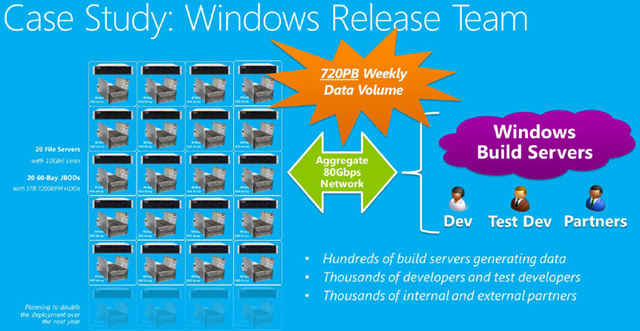
  • 20 x WS2012 R2 clustered file servers provide the SOFS HA architecture with easy manageability.
  • 20 x  JBODs (60 x 3.5″ disk slots) were selected. Do the maths; that’s 20 x 60 x 4 TB = 4800 TB or > 4.6  petabytes!!! Yes, the graphic says they are 3 TB drives but the text in the paper says the disks are 4 TB.
  • There is an aggregate of 80 Gbps of networking to the servers. This is accomplished with 10 Gbps networking – I would guess it is iWARP.

The result of the switch was:

  • Doubling of the storage throughput via SMB 3.0 networking
  • Tripling of the raw storage capacity
  • Lower overall cost – reduced the cost/TB by 33%
  • In conjunction with Windows Server dedupe, they achieved 5x increase in capacity wutg 45-75% de-duplication rate.
  • This lead to data retention going from 5 days to nearly a month.
  • 8 full racks of gear were culled. They reduced the server count by 6x.
  • Each week 720 petabytes of data flows across this network to/from the storage.

image

Check out the whitepaper to learn more about how Windows Server 2012 R2 storage made all this possible. And then read my content on SMB 3.0 and SOFS here (use the above search control) and on The Petri IT Knowledgebase.

Back To School 2015 – Windows 9

The company I work for is a distributor. We sell Microsoft licensing (retail, OEM, volume licensing), retail and business laptops, Apple, and much more. Every summer I see how busy our Apple sales folks get. Back-to-school is a huge season for them and Apple recognises this by getting product out in time for the shopping spree.

Meanwhile, Microsoft has been doing general availability releases in October, completely missing the season when parents go spend crazy on their precious darlings. Microsoft has effectively halved their seasons by only catching Christmas. Apple gets both the summer buzz and the winter holidays. Sure, Microsoft has gotten lots of biz from €400 laptops in this season, but we know how much that market has been shrinking thanks to the constant IDC headlines.

We know now that “Windows 9” (codename “threshold”) is coming out in April 2015 (or thereabouts). I suspect that is an RTM date. GA will probably be the end of May or start of June. That’s a good thing.

The releases of Windows 8 and Windows 8.1 have shown us that the interval between RTM and GA is not enough for OEMs to get product out onto shelves. We’ve seen October GAs and previously announced stuff has taken 4-6 months to appear in the retail channel where customers can buy it. I suspect there are two factors in the delay:

  • OEMs are slow to build and ship
  • Retailers are focusing on clearing old stock before ordering next generation stock

For Microsoft and the willing consumer that is a lose-lose perfect storm.

With GA possibly in June, that gives the channel a chance to get stock out in the market by August, the sweet spot in the back-to-school market, and even longer for products to mature for the Christmas shopping season (November onwards).

If this is what happens then I would hope that Microsoft sticks to April RTM dates.

Technorati Tags: ,

A Kit/Parts List For A WS2012 R2 Hyper-V Cluster With DataOn SMB 3.0 Storage

I’ve had a number of requests to specify the pieces of a solution where there is a Windows Server 2012 R2 Hyper-V cluster that uses SMB 3.0 to store virtual machines on a Scale-Out File Server with Storage Spaces (JBOD). So that’s what I’m going to try to do with this post. Note that I am not going to bother with pricing:

  • It takes too long to calculate
  • Prices vary from country to country
  • List pricing is usually meaningless; work with a good distributor/reseller and you’ll get a bid/discount price.
  • Depending on where you live in the channel, you might be paying distribution price, trade price, or end-customer price, and that determines how much margin has been added to each component.
  • I’m lazy

Scale-Out File Server

Remember that an SOFS is a cluster that runs a special clustered file server role for application data. A cluster requires shared storage. That shared storage will be one or more Mini-SAS-attached JBOD trays (on the Storage Spaces HCL list) with Storage Spaces supplying the physical disk aggregation and virtualization (normally done by SAN controller software).

On the blade versus rack server question: I always go rack server. I’ve been burned by the limited flexibility and high costs of blades. Sure you can get 64 blades into a rack … but at what cost!?!?! FlexFabric-like solutions are expensive, and strictly speaking, not supported by Microsoft – not to mention they limit your bandwidth options hugely. The massive data centres that I’ve seen and been in use 1U and 2U rack servers.  I like 2U rack servers over 1U because 1U rack servers such as the R420 have only 1 full-height and 1 half-height PCI expansion slots. That half-height slot makes for tricky expansion.

For storage (and more) networking, I’ve elected to go with RDMA networking. Here you have two good choices:

  • iWARP: More affordable and running at 10 GbE – what I’ve illustrated here. Your vendor choice is Chelsio.
  • Infiniband: Amazing speeds (56 Gbps with faster to come) but more expensive. Your vendor choice is Mellanox.

I’ve ruled out RoCE. It’s too damned complicated – just ask Didier Van Hoye (@workinghardinit).

There will be two servers:

  • 2 x Dell R720: Dual Xeon CPU, 6 GB RAM, rail kits, dual CPU, on-board quad port 1 GbE NICs. The dual CPU gives me scalability to handle lots of hosts/clusters. The 4 x 1 GbE NICs are teamed (dynamic load distribution) for management functionality. I’d upgrade the built-in iDRAC Essentials to the Enterprise edition to get the KVM console and virtual media features. A pair of disks in RAID1 configuration are used for the OS in each of the SOFS nodes.
  • 10 x 1 GbE cables: This is to network the 4 x 1 GbE onboard NICs and the iDRAC management port. Who needs KVM when you’ve already bought it in the form of iDRAC.
  • 2 x Chelsio T520-CR: Dual port 10 GbE SFP+ iWARP (RDMA) NICs. These two rNICs are not teamed (not compatible with RDMA). They will reside on different VLANs/subnets for SMB Multichannel (cluster requirement). The role of these NICs is to converge SMB 3.0 storage, and cluster communications. I might even use these networks for backup traffic.
  • 4 x SFP+ cables: These are to connect the two servers to the two SFP+ 10 GbE switches.
  • 2 x LSI 9207-8e Mini-SAS HBAs: These are dual port Mini-SAS adapters that you insert into each server to connect to the JBOD(s). Windows MPIO provides the path failover.
  • 2 x Windows Server Standard Edition: We don’t need virtualization rights on the SOFS nodes. Standard edition includes Failover Clustering.

Regarding the JBODs:

Only use devices on the Microsoft HCL for your version of Windows Server. There are hardware features in these “dumb” JBODs that are required. And the testing process will probably lead to the manufacturer tweaking their hardware.

Not that although “any” dual channel SAS drive can be used, some firmwares are actually better than others. DataOn Storage maintain their own HCL of tested HDDs & SSDs and HBAs. Stick with the list that your JBOD vendor recommends.

How many and what kind of drives do you need? That depends. My example is just that: an example.

How many trays do you need? Enough to hold your required number of drives 😀 Really though, if I know that I will scale out to fill 3 trays then I will buy those 3 trays up front. Why? Because 3 trays is the minimum required for tray fault tolerance with 2-way mirror virtual disks (LUNs). Simply going from 1 tray to 2 and then 3 won’t do because data does not relocate.

Also remember that if you want tiered storage then there is a minimum number of SSDs (STRONGLY) recommended per tray.

Regarding using SATA drives: DON’T DO IT! The available interposer solution is strongly discouraged, even by DataOn.  If you really need SSD for tiered storage then you really need to pay (through the nose).

Here’s my EXAMPLE configuration:

  • 3 x DataOn Storage DNS-1640D: 24 x 2.5” disk slots in each 2U tray, each with a blank disk caddy for a dual channel SAS SSD or HDD drive. Each has dual boards for Mini-SAS connectivity (A+B for server 1 and A+B for server 2), and A+B connectivity for tray stacking. There is also dual PSU in each tray.
  • 18 x Mini-SAS cables: These cables are used to connect the LSI cards in the servers to the JBOD(s) and to stack the trays. At least I think 18 cables are required. They’re short cables because the servers are on top/under the JBOD trays and the entire storage solution is just 10U in height.
  • 12 x STEC S842E400M2 400GB SSD: Go google the price of these for a giggle! These are not your typical (or even “enterprise”) SSD that you’ll stick in a laptop.  I’m putting 4 into each JBOD, the recommended minimum number of SSDs in tiered storage if doing 2-way mirroring.
  • 48 x Seagate ST900MM0026 900 GB 10K SAS HDD: This gives us the bulk of the storage. There are 20 slots free (after the SSDs) in each JBOD and I’ve put in 16 disks into each. That gives me loads of capacity and some wiggle room to add more disks of either type.
  • 18 x Mini-SAS Cables: I’m not looking at a diagram and I’m tired so 18 might not be the right number. There’s a total of 10U of hardware in the SOFS (servers + JBOD) so short Mini-SAS cables will do the trick. These are used to attach the servers to the JBODs and to daisy chain the JBODs. The connections are fault tolerant – hence the high number of cables.

And that’s the SOFS, servers + JBODs with disks.

Just to remind you: it’s a sample spec. You might have one JBOD, you might have 4, or you might go with the 60 disk slot models. It all depends.

Hyper-V Hosts

My hosting environment will consist of one Hyper-V cluster with 8 nodes. This could be:

  • A few clusters, all sharing the same SOFS
  • One or more clusters with some non-clustered hosts, all sharing the same SOFS
  • Lots of non-clustered hosts, all sharing the same SOFS

One of the benefits of SMB 3.0 storage is that a shared folder is more flexible than a CSV on a SAN LUN. There are more sharing options, and this means that Live Migration can span the traditional boundary of storage without involving Shared-Nothing Live Migration.

Regarding host processors, the L2/L3 cache plays a huge role in performance. Try to get as new a processor as possible. And remember, it’s all Intel or all AMD; do not mix the brands.

There are lots of possible networking designs for these hosts. I’m going to use the design that I’ve implemented in the lab at work, and it’s also one that Microsoft recommends. A pair or rNICs (iWARP) will be used for the storage and cluster networking, residing on the same two VLANs as the cluster/storage networks that the SOFS nodes are on. Then two other NICs are going to be used for host and VM networking. These two NICs could be 1 GbE or 10 GbE or faster, depending on the needs of your VMs. I’ve got 4 pNICs to play with so I will team them.

    • 8 x Dell R720: Dual Xeon CPU, 256 GB RAM, rail kits, dual CPU, on-board quad port 1 GbE NICs. These are some big hosts. Put lots of RAM in because that’s the cheapest way to scale. CPU is almost never the 1st or even 2nd bottleneck in host capacity. The 4 x 1 GbE NICs are teamed (dynamic load distribution) for VM networking and management functionality. I’d upgrade the built-in iDRAC Essentials to the Enterprise edition to get the KVM console and virtual media features. A pair of disks in RAID1 configuration are used for the management OS.
    • 40 x 1 GbE cables: This is to network the 4 x 1 GbE onboard NICs and the iDRAC management port in each host. Who needs KVM when you’ve already bought it in the form of iDRAC.
    • 8 x Chelsio T520-CR: Dual port 10 GbE SFP+ iWARP (RDMA) NICs. These two rNICs are not teamed (not compatible with RDMA). They will reside on the same two different VLANs/subnets as the SOFS nodes. The role of these NICs is to converge SMB 3.0 storage, SMB 3.0 Live Migration (you gotta see it to believe it!), and cluster communications. I might even use these networks for backup traffic.
    • 16 x SFP+ cables: These are to connect the two servers to the two SFP+ 10 GbE switches.
    • 8 x Windows Server Datacenter Edition: The Datacenter edition gives us unlimited rights to install Windows Server into VMs that will run on these licensed hosts, making it the economical choice. Enabling Automatic Virtual Machine Activation in the VMs will simplify VM guest OS activation.

There are no HBAs in the Hyper-V hosts; the storage (SOFS) is accessed via SMB 3.0 over the rNICs.

Other Stuff

Hmm, we’re going to need:

  • 2 x SFP+ 10 GbE Switches with DBC support: Data Center Bridging really is required to do QoS of RDMA traffic. If would need PFC (Priority Flow Control) support if using RoCE for RDMA (not recommended – do either iWARP or Infiniband). Each switch needs at least 12 ports – allow for scalability.  For example, you might put your backup server on this network.
  • 2 x 1 GbE Switches: You really need a pair of 48 port top-of-rack switches in this design due to the number of 1 GbE ports being used and the need for growth.
  • Rack
  • PDU

And there’s probably other bits. For example, you might run a 2-node cluster for System Center and other management VMs. The nodes would have 32-64 GB RAM each. Those VMs could be stored on the SOFS or even on a JBOD that is directly attached to the 2 nodes with Storage Spaces enabled. You might run a server with lots of disk as your backup server. You might opt to run a pair of 1U servers are physical domain controllers for your infrastructure.

I recently priced up a kit, similar to above. It came in much cheaper than the equivalent blade/SAN configuration, which was a nice surprise. Even better was that the SOFS had 3 times more storage included than the SAN in that pricing!

How Many SSDs Do I Need For Tiered Storage Spaces?

This is a good question.  The guidance I had been given was between 4-8 SSDs per JBOD tray.  I’ve just found guidance that is a bit more precise.  This is what Microsoft says:

When purchasing storage for a tiered deployment, we recommend the following number of SSDs in a completely full disk enclosure of different bay capacities in order to achieve optimal performance for a diverse set of workloads:

Disk enclosure slot count Simple space 2-way mirror space 3-way mirror space
12 bay 2 4 6
24 bay 2 4 6
60 bay 4 8 12
70 bay 4 8 12

Minimum number of SSDs Recommended for Different Resiliency Settings

2 Months + Christmas – How The Nokia Lumia 1020 Windows Phone Has Fared

I’ve been pleasantly surprised how well the Lumia 1020 has fared, reviewing it here and on the Petri IT Knowledgebase. How has the phone continued to work over time?

It’s not all been smooth sailing. There are times when there’s an app that I want to use that just is not there. I like to get my news with a sense of humour, and TheJournal.ie does sadly not have a Windows Phone app. That has me reaching for the browser or for my Lenovo Yoga 8 Android tablet where there is an app. I’ve also been doing some travel booking and there’s a distinct shortage of those apps on Windows Phone.

Over the holidays I did quite a bit of driving. And I like to drive safe, so I have a third-party Bluetooth hands free kit (Parrot CTK 3100) with recently upgraded firmware. Strictly speaking, the kit does not support the Lumia 1020, but it does support the 925 and 52x handsets. The experience was working well, but something went wrong over the holiday – I could make/answer calls but the audio failed to go over the kit. I did a little digging and eventually reset the phone. No joy. Then I “reset” the kit by removing all paired phones and that’s when I noticed something: My phone was registered twice, once under the default “Windows Phone” name and again with the unique name I had recently entered in the Windows Phone app. I made sure both entries were gone and I re-paired and tested. Everything was fine once again. Phew – I’d had to resort to using my HTC One for a couple of days so I could drive safely but now I am back on the Lumia 1020.

The real test for this phone was communications, especially on Christmas day. I was celebrating the day with family. My girlfriend was with her family and I have friends scattered all over. Windows Phone was designed from the ground up for social media integration. And that’s what I got … in one app. Facebook, LinkedIn, and Twitter are all added as accounts in the Windows Phone settings. That means I get integrated chat in the Messaging app, not just SMS texting. I was texting and Facebook IMing in one place on the phone. It worked really well, able to stay in contact, and I didn’t have to app switch.

There was some driving to be done too and Nokia’s Here Maps worked perfectly, even correcting me when I encountered a wrong road sign on New Years Eve!

The big feature (figuratively and literally) of the Lumia 1020 is the camera. Christmas means low light and the camera did get used. Microsoft got the physical reference interface of Windows Phone right: the dedicated camera button is so handy. I took photos in low light both with and without flash. Obviously the flash-less photos suffer with motion blur and/or camera shake and some grain, but what the Lumia produces beats what any compact camera might offer in the same circumstances, at least in my experience!

The other thing I’ve been doing is using the phone for music: be it while travelling or doing stuff around the house. The speaker quality is nowhere near what the HTC One offers (which might be best in class, including tablets) so I acquired a Creative (remember them!!!) portable Airwave HD Bluetooth/NFC speaker. Adding music to the phone is a breeze, and adding playlists from Windows Media Player is much easier than it is for Android. Tap the phone, pair, and music is playing via the speaker with volume control on the speaker and one the phone.  Nice!

41XLcw1GMqL[1]

The Creative Airwave HD is available from:

So Windows Phone 8 on the Nokia Lumia 1020 has had a real world, real user test and it’s passed, although there are still questions remaining about app availability.

Technorati Tags: ,

First Impressions: Lenovo ThinkPad Yoga S1

I ordered this Ultrabook from Lenovo to replace my 2-year-old (how time flies!) Asus UX31E.  The machine arrived in the office yesterday and I got my mitts on it this morning.

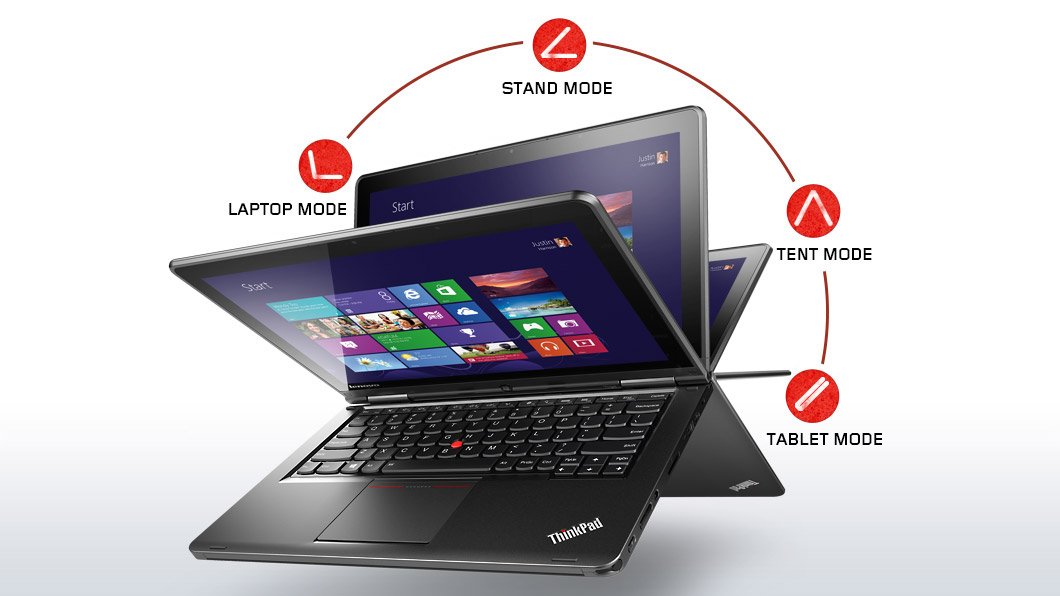
The major trick of the Yoga is that it is a touch-enabled Ultrabook first, with the normally great ThinkPad keyboard.  But push that screen back and the stiff double hinges allow it to go back into “stand mode” for drawing/touching on a table, “tent mode” for watching video, or “tablet mode” where you can hand hold the device.  The keyboard rises up to avoid accidental touch when the screen reaches a certain point.  I will probably use this machine as a laptop 99.99% of the time.  The Yoga just so happened to offer the best mix of features that I required in my next Ultrabook.

No, this device is not a tablet.  Anyone who reviews the Yoga Ultrabook as a tablet is a moron.  It’s a laptop that happens to offer some use options.  My Windows laptop is a Toshiba Encore and my Android machine for long distance entertainment is a Lenovo Yoga 8.  They are tablets and only a moron would review them as laptops.

The custom spec I went with is:

  • Intel Core i5-4200U Processor (3MB Cache, up to 2.60GHz)
  • Windows 8.1 64
  • Touch & Pen, FHD (1920 x 1080)
  • Intel HD Graphics 4400
  • 8GB PC3-12800 DDR3L on MB
  • ClickPad without NFC antenna & module
  • 720p HD Camera
  • 1TB Hard Disk Drive, 5400rpm
  • 16GB M.2 Solid State Drive Double
  • Battery (LiPolymer 47Wh)
  • Intel Dual Band Wireless 7260AC with Bluetooth 4.0

I wanted a digitizer pen.  In early tests, it works well with the Shared Whiteboard app.  That’s my alternative to using whiteboards or flipcharts, and it’s handy in OneNote for grabbing diagrams where a photo just won’t do.  The pen is one of the thin ones, allowing it to dock in the front-right corner of the Ultrabook’s base.  You hear that Surface, Sony, Toshiba, and a hell of a lot of others?

I upgraded the RAM to 8 GB so I could run Photoshop reliably.  That’s also why I switched from SSD to a 1 TB HDD with 16 GB SSD cache.  Now I have room to store photos while on a vacation, meaning that a USB 3.0 drive is there only as backup.

Port-wise, there is an SD card reader (nice for photography), Mini-HDMI (more reliable than micro-HDMI), and a pair of USB 3.0 ports.  There is also a Lenovo OneLink port for the OneLink dock.  There is no VGA port.  I have a USB – VGA adapter so that will continue to be used when connecting to projectors.

The power and volume buttons are on the side, cleverly placed if you go into “tablet mode”.  You’ll also find a Windows button on the base of the screen.

Touch works and works smoothly.  The build quality is solid.  I deliberately went with ThinkPad to get build quality to last for years.  The screen is nice and stuff, something that other touch Ultrabooks have gotten badly wrong by having too much wobble after being touched.

There’s not too much crapware onboard.  Some Lenovo stuff and Norton 30-day trial.  I was sad to see that the system update tool requires Adobe Air.  That is a mortal sin in my books.  I guess the Chinese military still wants easy access to everyone’s computers.

No review yet – I’ll need some time with the machine, and I’ll probably post something on the Petri IT Knowledgebase in the new year.

Technorati Tags: ,