San Francisco 49ers Are Using Windows Tablets & Microsoft Surface

The San Francisco 49ers (an NFL or American Football team) are based in Santa Clara, California. Nearby you will find Cupertino, the HQ location of Apple. Also nearby, you will find Mountain View, the HQ location of Google.

image

What tablet did I see the 49ers using on the side line in a preseason game against the Ravens last night?

image

Let’s take a closer look:

image

Hmm, that’s not the Apple square button and it sure aint Android. The announcers went on to mention that the NFL has a sponsorship agreement with Microsoft Surface. Note the stylus? I reckon that’s a Surface Pro (not the 3 based on the shape). Apparently the league only allows side line tech such as this for analysing still pictures (a full field shot is taken just before and after a play starts for later analysis by coaches and players).

Previously a junior staff member printed out booklets of black and white photos and ran them to the coaches/players on the side line. That took at least 30 seconds. They must be a mess to use and keep organised. Now colour images (see above) are transmitted straight to the Windows tablets and presented in a tiled touch interface. You can see below that some coaches like the new system, and some do not:

image

Interesting to see a team such as the Niners, who have just built the most technology centric stadium on the planet in the shadows of Apple and Google, are using Windows and the Surface.

Technorati Tags: ,

Storage Spaces – Not Just For SMEs

I read a comment today that Storage Spaces was great for small/medium deployments. And yup, it is. I use Storage Spaces to store my invaluable photo library at home (a pair of Toshiba USB 3.0 3 TB drives). At work, we use a single DataOn Storage DNS-1640 24 x slot JBOD that is dual SAS attached to a pair of 2U servers to create an economical Hyper-V cluster. And we have sold 2U DataOn Storage CiB-9220 “Cluster in a Box” units for similar deployments in SMEs.

But most of our sales of JBODs have actually been for larger deployments. Let me give you an example of scalability using an image from my software-defined storage slide decks:

image

In the above diagram there are 4 x DataOn Storage DNS-1660 JBODs. Each has 60 x 3.5” disk slots. Using 6 TB drives (recently certified by DataOn) that gives you up to 1440 TB or just over 1.4 petabytes of raw storage. That’s with 7200 RPM drives and that just won’t do. We can mix in some dual chanel SAS SSDs (using 3.5 to 2.5 adapters) to offer peak performance (read and write).

In the above design there are 4 SOFS cluster nodes, each having 2 x direct SAS connections to each JBOD – 4 JBODs therefore 8 SAS connections in each server. Remember that each SAS cable has 4 SAS ports. So a 6 Gb SAS cable actually offers 24 Gbps of throughput.

Tip from DataOn: If you’re using more than 48 drives then opt for 12 Gb SAS cards, even if your JBOD runs at 6 Gb; the higher spec cards circuitry performs better even with the lower speed SAS disks/JBODs.

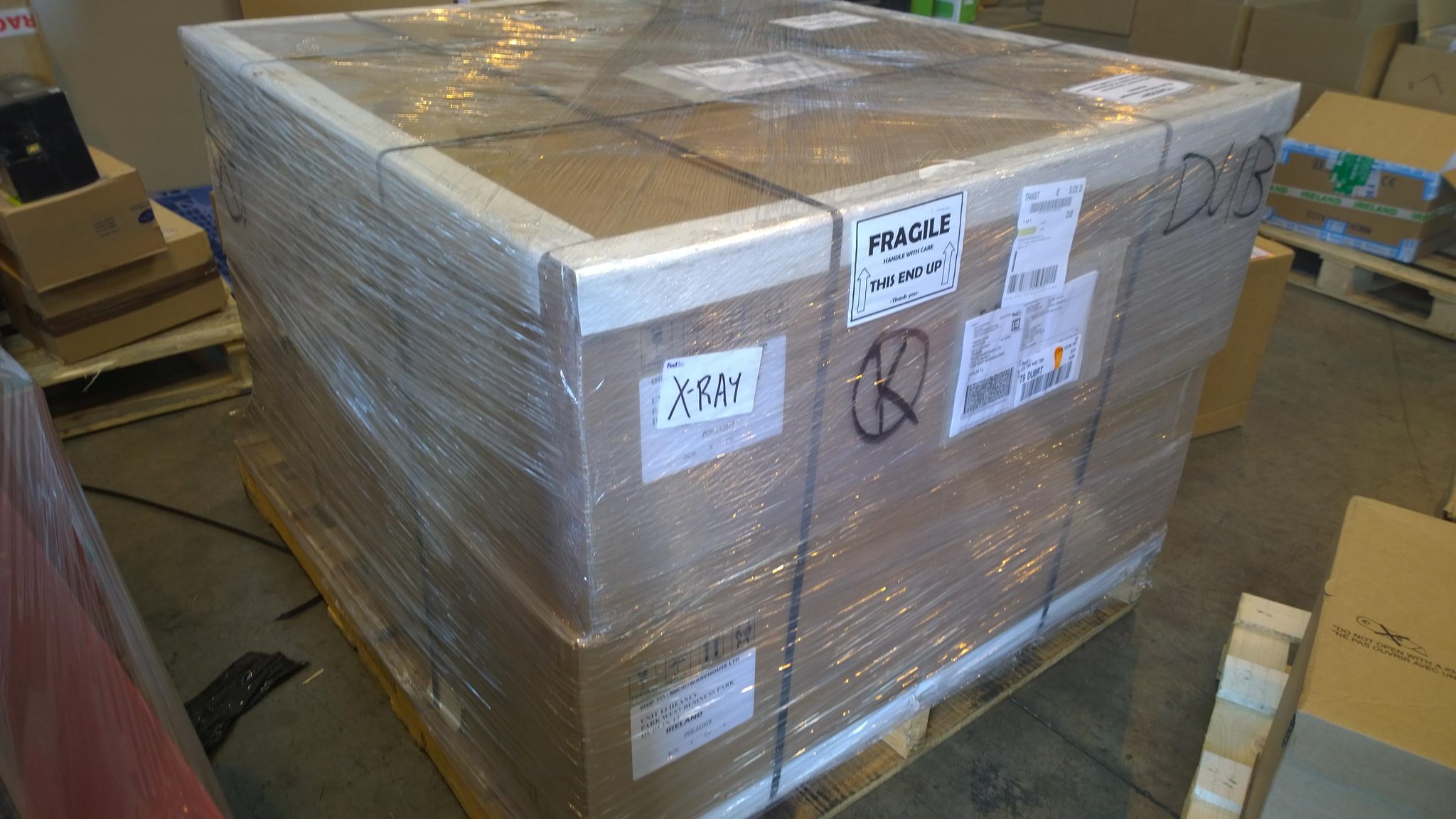
Now this is where you say that this is all great in theory but surely no one is doing this. And there you would be wrong. Very wrong. MVP Carsten Rachfahl has been deploying large installations since late 201 in Germany. The same is also true of MVPs Thomas Maurer and Michael Rüefli in Switzerland. At my job, we’ve been selling quite a few JBODs. In fact, most of those have been to replace more expensive SAN installations from legacy vendors. This week I took this photo of the JBODs in the above architecture while they were passing through our warehouse:

Yup, that’s potentially over 1 PB of raw storage in 16U of rack space sitting on one shipping pallet. The new owner of that equipment is building a SAS solution that will run on Hyper-V and use SMB 3.0 storage. They’ll scale out bigger and cheaper than they would have done with their incumbent legacy storage vendor – and that’s why they’re planning on buying much more of this kind of storage.

Microsoft News Summary – 8 August 2014

It looks like you will have to use the latest version of IE to be supported after January 2016. That’ll go down like the Hindenburg in businesses.

Microsoft News Summary – 7 August 2014

Very little happening. These quiet times are great for rumours.

Oh – and don’t use Generation 2 virtual machines on WS2012 R2 Hyper-V.

Microsoft News Summary – 6 August 2014

I’ve done photography in some of the most rural parts of the world, but I’ve never been without phone or Internet for 3 days before. *exaggeration alert*  Being in a dark valley in Scotland over a long weekend was like having an arm removed. Anywho, here’s the news from the last few days. Note that there is an “August Update for …” Windows 8.1 and Windows Server 2012 R2 coming out next week, what the media will probably called “Update 2 for …”.

Microsoft News Summary – 1 August 2014

Talk about crappy timing. A federal court in the USA has determined that emails are not actually emails, and therefore Microsoft must turn over emails business records stored on Email servers in the Dublin region to the FBI. One must wonder why the FBI didn’t contact the Irish authorities who would have jumped at once if the case was legitimate and issued an order locally. Maybe the case is not actually legitimate?

On the eve of Azure going big through Open licensing, a federal judge has stuck a stake through the heart of the American IT industry – this is much bigger than Microsoft, affecting Google, Apple, Oracle, IBM, HP, Dell, and more. Microsoft has already lodged an appeal.

Microsoft Azure Now Available Through Open Licensing

It is August 1st, and today is the very first day that you can buy credit for usage on Azure through Open Licensing. This includes Open, OV, and OVS, as well as educational and government schemes.

How Does It Work?

The process is:

  1. A customer asks to buy X amount of credit from a reseller – the next bit of stuff is normal licensing operations that the customer does not see.
  2. The reseller orders if from a distributor.
  3. The distributor orders the credit from Microsoft.
  4. A notification email is sent out to the customer with a notification to download an OSA (online services activation) key from their VLSC account (used to manage their Open volume licensing). The customer is back in the process at this point.
  5. The customer/partner enters the OSA key in the Azure Account Portal.
  6. The customer/partner configures Azure administrator accounts and credit alerts.

Credit is purchased in blocks of $100. I believe that it is blocks of €75 in the Euro zone. So a customer can request $5000 in credit. They don’t get 50 OSA keys: they get one OSA key with a value of $5000.

Who’s Account Should We Use?

If you are a customer and the MSFT partner wants to set you up under their Azure account, tell them to frak right off. The VMs will be THEIR property. The data will be THEIR property. We have seen this situation with Office 365. Customers have lost access to data for months while MSFT’s legal people try to determine who really owns the data. It is MESSY.

The MSFT partner should always set up the customer’s Azure deployment using a Microsoft Account that is owned by the customer. Additional administrators can be configured. Up to 5 alerts can be configures to send them to the reseller and the customer.

Using Credit

“How much will doing X in Azure cost?” and “How much Azure credit do I need to buy?” will be the two most common questions we distributors will hear in the next 12 months. Ask me and I’ll respond with one of two answers:

  • If I’m in a good mood I’ll tell a consultant to go do some frakking consulting. How the frak am I meant to know what your customer’s needs are? And that’s if I’m in a good mood 🙂
  • If I’m in a bad mood I might award you with a LMGTFY award and make you famous 😀

The answer is based on how credit is used. You buy credit, and everything you do in Azure “burns” that credit. It’s like having credit on a pay-as-you-go (aka “burner”) phone. If you do A then is costs X per minute. If you do B is costs Y per month. Go look at the Azure pricing calculator.

Not all “Azure” services can be purchased via credit. Examples include Azure AD Premium and AD RMS that are licensed via other means, i.e. SaaS like Office 365. Their branding under the Azure banner confuses things.

Credit Time Limits

Your credit in Azure will last for 12 months. It will not roll over. There are no cash-backs. Use it or lose it.

My advice is that you start off by being conservative with your purchasing, determine your burn rate and purchase for X months, rather than for Y years.

Topping Up Credit

You should have configured the email alerts for when credit runs low. If credit runs out then your services shut down. I hope you reserved VIP and server IP addresses!

When you get an alert you have two options:

  • Normal procedure will be to purchase additional credit via the above reseller model. With alerts, the MSFT partner can initiate the conversation with their customer. Obviously this takes a little while – hours/days  (I have no idea because I’m outside of the logistics of licensing).
  • If the customer runs out of credit and the reseller process will take too long or it’s a weekend, the customer can use a credit card to top up their account in the Azure Account Portal. This should be an emergency operation, adding enough credit for the time it will take to top up via the reseller.

Note that old credit is used first, to limit wastage because of the 12 month life of credit.

The Benefits of Open

For the customer, they can use Azure in a controlled manner. You don’t have to buy thousands of dollars of credit through a large enterprise EA license program. You don’t have unmanageable payment via a credit card. You buy up front, see how much it costs, and deploy/budget accordingly.

For the partner it opens up a new world of business opportunities. Resellers have a reason to care about Azure now, just like they did with Office 365 when it went to Open (and that business blew up overnight). They can offer the right solution for customers, private (virtual or cloud), hybrid cloud or public cloud. And they can build a managed services business where they manage the customers’ Azure installations via the Azure Management Portal.

Distributors also win under this scheme by having another product to distribute and build services around.

And, of course, Microsoft wins because they have a larger market that they can sell to. MSFT only sells direct to the largest customers. They rely on partners to sell to the “breadth market”, and adding Azure to Open gives a reason for those partners to resell Azure on Microsoft’s behalf.

KB2989384 – Hyper-V Best Practice Analyzer (BPA) Does Not Close

Microsoft published a KB article to help you when the Hyper-V Best Practice Analyzer (BPA) does not exit or appears to hang/crash.

Symptoms

Hyper-V Best Practice Analyzer (BPA) does not exit under the following conditions:

  • A virtual machine already exists.
  • The virtual machine is connected to a vhd or vhdx as the hard disk drive. However, the vhd or vhdx file itself is renamed or deleted, and does not exist in reality.

Cause

The PowerShell script as seen here runs internally when running the Hyper-V BPA:

C:\Windows\System32\BestPractices\v1.0\Models\Microsoft\Windows\Hyper-V\Hyper-V.ps1

However, due to a defect in the script, the information retrieval process goes into a loop, and the BPA does not exit until timeout.

Workaround

You need to delete the non-existing vhd or vhdx from the virtual machine settings, and then rerun BPA for Hyper-V by following these steps:

  1. Start Hyper-V Manager.
  2. Select the virtual machine that is connected to a non-existing vhd or vhdx, then right-click and open Settings.
  3. From the virtual machine settings window, click on the non-existing hard drive, and then click Delete.
  4. Click OK to close the virtual machine setting window.
  5. Rerun BPA for Hyper-V from Server Manager.

The article claims to apply to Windows Server 2012 (WS2012).

Microsoft News Summary – 30 July 2014

Very quiet 24 hours in the Microsoft world. The only bit of news I have for you is Microsoft’s newest (48 hours old) statements regarding the US government trying to spy on non-USA located emails.

Microsoft News Summary – 30 July 2014

The big news here for MSFT techies are the releases of update rollups for SysCtr 2012 SP1 and SysCtr 2012 R2. Please wait 1 month before deploying to avoid the inevitable issues (history indicates that I am probably right) and use that time to carefully review the installation instructions.