Yesterday the news was that Microsoft had cancelled Ignite 2016 in Chicago. The event was previously scheduled for May 2016. Last night, Microsoft announced that Ignite 2016 was rescheduled. Now the event will be held in Atlanta on September 26-30.
Microsoft also announced the rest of their big event schedule for 2016:
Note that you can register now for Ignite. If you register early then the price is $1920 USD. That’s just €1,677 at this morning’s exchange rate.
Why Hot-lanta?
Microsoft has a lot of experience of running large events in Atlanta. MGX is regularly held here, and this brings thousands of Microsoft’s sales staff from around the world to party hard at this internal event.
In my experience, Atlanta has an excellent international airport. I’ve transited trough Atlanta many times on the way to the west coast – there really is (or was) a leaf blower in the “do not try to bring one of these on board a plane” display case. The airport has large terminals with lots of services, unlike Chicago’s O’Haire which reminds me of a dungeon – narrow aisles with no seating, and angry shouty women staffing the teeny pre-packaged dodgy sandwich stalls (the international terminal).
I’ve never visited the city, but I get the feeling that there’s lots to see and do in this large southern city. Plus it’ll be September – maybe there’ll be an NFL game the weekend before – the Falcons are pretty good this year.
Why September?
One of my theories yesterday was that Microsoft was shifting the schedule to suit product releases. I’ve always thought that Windows Server was on track to be released for the original schedule of Ignite – the core features are pretty good in TPv3. There’s some bug fixing to do, some polishing for new features like SET, and Containers and nested virtualization need some work, but there’s a fair amount of time left.
The real issue fro Microsoft is that System Center appears to be way behind, with the most recent technical preview indicating that they have just gotten started. And we still haven’t seen a public preview release of Azure Stack, the strategic glue for all the new cloud features of Windows Server 2016, such as the network fabric or Azure-consistent storage.
I think part of the decision to delay Ignite was to wait for the release of System Center and Azure Stack. Microsoft really needs to get the messaging of these products out there, and having Ignite 6 months before their release would have been a huge missed opportunity.
Let’s not forget Windows 10. By next September, Microsoft will have released Threshold 2 (this November) and Redstone 1 (June 2016), and Redstone 2 is expected in November 2016. That means there will be a lot of stuff to cover then so the timing will be fortuitous for IT pros that are currently managing or planning to manage Windows 10.
Windows Server?
What does the schedule of Ignite mean to Windows Server? In case you’re unaware, Windows Server 2016 has adopted a similar development cycle to Azure, Office, and Windows 10. Windows Server will never be “finished”, but there will be interesting points in it’s life, as with Windows 10.
I think Microsoft will GA WS2016 in April. Some of the headline features that have been announced, or will be in coming months, might not be done yet, but they’ll come in later (let’s call them ..) Redstone updates and more (Glowstone or something else from Minecraft?!?!) in 2016 and beyond.
This will update System Center fans, but they should realize that a finished product is better than an unfinished one. And let’s get real here – updating WS2012 to WS2016 will be easy. Updating System Center is never easy, so they’re going to need time for planning, testing, and documenting the upgrade process of the elements of System Center that they use.
Anyway … Back to Ignite
It’s fantastic news that Ignite continues. We’re in an era of permanent constant change (perma-change?) now. There’s so many things for us IT pros to keep up with: Windows Server (and the plethora of features), System Center, Azure Stack, Azure IaaS, EMS, Windows 10, OS deployment, Azure AD, Office 365, … the list goes on an on. It’s impossible to keep up so an event like Ignite gives us a week to concentrate and a change to get a start on new stuff.
Thanks Microsoft – I’m looking forward to Ignite. And remember, even if you cannot go, you can watch the keynote live, many interesting sessions live, and every breakout session 24 hours later via stream or download.
One of the biggest hitting articles on my site, written in 2009 (!!!) is “Can You Install Hyper-V in a VM?”. The short answer has always been “yes, if you know how”, but the long/compelete answer continues with “the hypervisor will not start and you will not be able to boot any virtual machines”.
This was because Hyper-V did not support nested virtualization – the ability to run Hyper-V in a VM that is running on Hyper-V (yes, I know there are hacks to get Hyper-V to run in a VM on VMware). A requirement of Hyper-V is a processor feature, VT-x from Intel or AMD-V from AMD. Hyper-V takes control of this feature and does not reveal it to the guests running on the host. This means that a system requirement of Hyper-V is not present in the virtual machine, and you cannot use the virtual machine as a real host.
Microsoft released Build 10565 of Windows 10 to Windows Insiders this week and announced that the much anticipated nested Hyper-V virtualization is included. Yup, I’ve tried it and it works. Microsoft has made this work by revealing processor virtualization on a per-VM basis to VMs that will be Hyper-V hosts – let’s call these VM hosts to keep it consistent with the language of Windows Server Containers. This means that I can:
Install Hyper-V on a physical host
Create a VM
Enable nested virtualization for that VM, making it a VM host
Install a guest OS in that VM host and enable Hyper-V
Create VMs that will actually run in the VM host.
Applications of Nested Virtualization
I know lots of you have struggled with learning Hyper-V due to lack of equipment. You might have a PC with some RAM/CPU/fast disk and can’t afford more, so how can you learn about Live Migration, SOFS, clustering, etc. With nested virtualization, you can run lots of VMs on that single physical machine, and some of those VMs can be VM hosts, in turn hosting more VMs that you can run, back up, migrate, failover, and so on (eventually, because there are limitations at this point).
Consultants and folks like me have struggled with doing demonstrations on the road. At TechEd Europe and Ignite, I used a VPN connection back to a lab in Dublin where a bunch of physical machines resided. I know one guy that travels with a Pelicase full of of Intel NUC PCs (a “cloud in a case”). Now, one high spec laptop with lots of SSD could do the same job, without relying on dodgy internet connections at event venues!
A big part of my job is delivering training. In the recent past, we nearly bought 20 rack servers (less space consumed than PCs, and more NICs than NUC can do) to build a hands-on training lab. With a future release of WS2016, all I need is some CPU and RAM, and maybe I’ll build a near-full experience hands-on training lab that I can teach Hyper-V, Failover Clustering, and SOFS with, instead of using the limited experience solution that Microsoft uses with Azure VMs (no nested virtualization at this time). Personally I think this feature could revolutionize how Hyper-V training is delivered, finally giving Microsoft something that is extremely badly required (official Hyper-V training is insufficient at this time).
Real world production uses include:
The possibility of hosted private cloud: Imagine running Hyper-V on Azure, so you can do private cloud in a public cloud! I think that might be pricey, but who knows!
Hyper-V Containers: Expected with TPv4 of WS2016, Hyper-V Containers will secure the boundaries between containerized apps.
It’s the latter that has motivated Microsoft to finally listen to our cries for this feature.
Release Notes
Nested virtualization is a preview feature and not to be used in production.
AMD-v is not supported at this time. Intel VT-x must be present and enabled in the physical host.
You cannot virtualize third-party hypervisors at this time – expect VMware to work on this.
The physical host and the VM host must be running Build 10565 or later. You cannot use Windows 10 GA, WS2012 R2 or WS2016 TPv3 as the physical host or the VM host.
Dynamic Memory is not supported.
The following features don’t work yet: Hot-memory resize, Live Migration, applying checkpoints, save/restore.
MAC spoofing must be enabled on the VNIC of the VM host.
Virtual Secure Mode (VSM) / Virtualization Based Security (VBS) / Credential Guard (a Windows 10 Enterprise feature) must be disabled to allow virtualization extensions.
Enabling Nested Virtualization
1 – Install the Physical Host
Install Build 10565 of Windows or later on the physical host. Enable the Hyper-V role and configure a virtual switch.
2- Create a VM Host
Deploy a VM (static RAM) with Build 10565 or later as the guest OS. Connect the VM to the virtual switch of the physical host.
3 – Enable Nested Virtualization
Run the following, using an elevated PowerShell window, on the physical host to execute the enablement script (shared on GitHub):
Run the following on the physical host, targeting the VM host. This will enable MAC spoofing on the VM host. Modify this cmdlet to specify a vNIC if the VM will have NIC just for nested VMs to communicate on.
Set-VMNetworkAdapter -VMName <VMName> -MacAddressSpoofing on
5 – Enable Hyper-V in the VM Host
Enable the Hyper-V role in the VM host and configure a virtual switch on the vNIC that is enabled for MAC spoofing.
6 – Create Nested VMs
Create VMs in the VM host, power them up and deploy operating systems. Have fun!
And bingo, there you go!
How Useful is Nested Virtualization Now?
I won’t be rushing out to buy a new laptop or re-deploy the lab yet. I want to run this with WS2016 so I have to wait. I’ll wait longer for Live Migration support. So right now, it’s cool, but with WS2016 TPv4 (hopefully), I’ll have something substantial.
[EDIT] Microsoft later announced that Ignite 2016 was rescheduled from May to September and moved from Chicago to Atlanta.
The Chicago Tribune (hidden behind a pay-wall, but accessible via some apps on mobile platforms) is reporting that Microsoft has cancelled Microsoft Ignite for Chicago in 2016. I’ve not seen the news on any other reputable news sites, but the Tribune is one of the big newspapers in the USA. I’m guessing that they heard the news via a leak in one of the city offices in Chicago – a city with a *cough* certain reputation – the number of politicians, civil servants and union leaders that had to be on stage and have their say when Microsoft announced Chicago as the venue for 2015 was laughable.
The venue, McCormick Place, got awful reviews from people. The local staff at the venue screamed at delegates like they were prison guards. Note that the “MSFT” staff (in purple shirts) were actually very friendly and helpful. The venue was miles from most of the hotels. The bus service was irregular. Taxis ripped people off, charging $65 for $12 trips. The food was horrendous – the McDonalds in the venue ran out of food one day! And the party was a collection of 45 minute long queues to get a food sample that was single-bite sized.
Don’t get me wrong – I enjoyed the content. But the venue, McCormick Place, was rubbish. Opinions on Chicago seemed to depend on where you were from. Any Americans I spoke to didn’t like the city – some called it “a bit stabby”, but keep in mind that those issues were in other areas. Most foreigners liked the city. It’s easy to get to with lots of direct international (and national) connections via the dreadful international terminal at O’Haire airport. We arrived in on the Friday and enjoyed the sights of the city, despite some unfriendly locals, and our hotel room was simply a place to sleep.
Why did Microsoft cancel? The Tribune said that Microsoft declined to comment. Maybe the Tribune got the scoop before Microsoft is ready to talk.
Possibly:
Microsoft is done with in-person events? This would be a huge mistake. Online events are level 100-200. As someone who delivers training, I can tell you that training in the office does not work. You’re available, even if your calendar says you’re not, and the boss will re-task you.
Relocation? McCormick Place, therefore Chicago, was pretty bad. Maybe Microsoft wants a better location.
Rescheduled? Could Microsoft be rescheduling Ignite to suite the launch of Windows Server or System Center? Windows Server is pretty far along but System Center appears to be months behind. Could Microsoft bring Ignite forward for Windows Server, or push it back to suit their “private cloud” message?
Undoing the consolidation: Too many people, too much content. Many businesses didn’t like the idea that most of their IT staff were away on the same week. Before, lots of smaller (still 2,000-12,000 people each) offered more specialised content. This meant that your Office people were gone in Feb/March, the IT pros in May, and the devs at other times. It’s easier to manage both event-wise and delegate-wise. I hope this is what happens.
Whatever happens, Microsoft needs in-person technical events. These big events educate and excite, and despite all the negativity about McCormick Place, Ignite 2015 had a lot of material to keep me interested. There is simply no way that I could have spent that much time watching webcasts – I still have stuff I haven’t watched from the last 6 months because of lack of time.
I guess we’ll have to wait on Microsoft to make some kind of formal announcement/leak to find out what’s really going on.
Setting up a Nano Server VM requires running some PowerShell. The instructions that I found out there aren’t that clear for a non-PowerShell guru , are wrong, or are incomplete. So let me clear up everything by showing you exactly what I am using to deploy Nano Server as a Windows Server 2016 (TPv3/Technical Preview 3) Hyper-V virtual machine.
Note: The process will probably change after I published this post.
Step 1 – Make Folders
Create three folders on a computer with a fast disk. Note that I’ll use C: but maybe you should use a D: or something.
C:\Nano
C:\Nano\Base
C:\Scripts
Step 2 – Copy Scripts
Mount the WS2016 ISO – let’s assume that it mounts as E:. Copy two scripts from E:\NanoServer from the ISO to C:\Scripts:
new-nanoserverimage.ps1
convert-windowsimage.ps1
Step 3 – Dot The Scripts
Note that I missed out on this step because I had never encountered this sort of thing before – I’m an advocate of PowerShell but I’m no guru! If you do not run this step, New-NanoServerImage.ps1 will do nothing at all and wreck your head for 3 hours (it did for me!).
Open a PowerShell window with elevated privileges. Navigate to C:\Scripts. Run the following:
. .\convert-windowsimage.ps1
I know – it looks funny. Enter it exactly as above. This appears to load the contained script as a cmdlet that can later be executed.
Do the same again for New-NanoServerVHD.ps1:
. .\new-nanoserverimage.ps1
Now we can build a new VHD with Nano Server pre-installed.
Step 4 – Create a VHD
You can now run New-NanoServerImage. Here’s what I ran:
The above will prep a VHD with a VM called Nano1. I have configured the VM to join the prev.internal domain – note that this will require me to have suitable domain creds – a computer account is created in the domain. I enabled the Hyper-V guest drivers and allowed the IP of the VM to appear on the console. The VHD will be stored in C:\Nano\Nano1. Note that if this folder exists then the process will abort:
WARNING: The target directory already exists. If you want to rebuild this image, delete the directory first.
WARNING: Terminating due to an error. See log file at:
C:\Users\ADMINI~1.LAB\AppData\Local\Temp\2\New-NanoServerImage.log
Note that I had to specify EN-US because, at this time, my default region of EN-IE was not available:
WARNING: The ‘en-ie’ directory does not exist in the ‘Packages’ directory (‘g:\NanoServer\Packages’).
WARNING: Terminating due to an error. See log file at:
C:\Users\ADMINI~1.LAB\AppData\Local\Temp\2\New-NanoServerImage.log
I could have added other roles/packages to the VHD such as:
-Storage: For a SOFS cluster.
-Compute: To enable Hyper-V … useful when TPv4 (we guess) introduces guest virtualization.
-Clustering: To enable failover clustering in the VM.
-Defender: Adding security to the guest OS.
A minute or so later, a 439 MB was created in the newly created C:\Nano\Nano1.
Recreating a Nano Server VM
If you’re playing with Nano Server in a lab then you’ll create VMs with name reuse. If you do this with domain join then you might encounter a failure:
WARNING: Failed with 2224.
WARNING: Terminating due to an error. See log file at:
C:\Users\ADMINI~1.LAB\AppData\Local\Temp\2\New-NanoServerImage.log
Open the log and you’ll find:
Provisioning the computer…
Failed to provision [Nano1] in the domain [prev.internal]: 0x8b0.
It may be necessary to specify /REUSE when running
djoin.exe again with the same machine name.
Computer provisioning failed: 0x8b0.
The account already exists.
That’s one of those “ding-ding-ding aha!” moments. The computer account already exists in AD so delete the account and start over.
Creating Additional VMs
Once you have run the above process, C:\Nano\Base will be populated with files from the ISO (\NanoServer). This means that you can drop the -MediaPath flag and eject the ISO.
In AD, move the computer account for the new Nano server to the required OU so it get’s any requierd policies on the first boot – remember that this sucker has no UI so GPO and stuff like Desired State Configuration (DSC) will eventually be the best way to configure Nano Server.
Step 6 – Create a VM
The above process prepare a VHD for a Generation 1 virtual machine. Create a Generation 1 VM, and attach the VHD to the boot device. Connect to the VM and power it up. A couple of seconds will pass and a log in screen will appear:
Log in with your local admin or domain credentials and you’ll be greeted with the console. Note that I enabled the IP address to be displayed during the setup:
Step 7 – Manage the Nano Server VM
If you want to do some management work then you’ll need to:
Wait for the eventual remote management console that was quickly shown at Ignite 2015.
Use PowerShell remoting.
Use PowerShell Direct (new in WS2016).
If you have network access to the VM then you can use remoting:
Troubleshooting network issues with Nano Server can be a dog because there is no console that you can log into. However … you can use PowerShell Direct with no network access to the VM, via the Hyper-V guest OS integration components:
Tip: Most AD veterans start network troubleshooting with DNS – it’s nearly always the cause. In my lab, I have 3 domains, so 3 sets of DNS. My DHCP scope sets up on domain’s DNS server as the primary, and that can cause issues. Some PowerShell Direct to the VM with some Set-DnsClientServerAddress sorted things out.
Last week I wrote a story for Petri.com about the rumours of Dell buying EMC. Today, the New York Times, Bloomberg, and Fortune all have stories saying that an announcement could be released as soon as today. The purchase could cost as much as $65 billion.
Perspective
Let me paint you a picture. Let’s say I have a mortgage on a house, and the balance of that mortgage is €110,000. And to get that loan, I had to get funding from several banks. I’m doing OK, but my savings are small every month. Then I decide I want to buy a second home, and I need a loan of €650,000. After some analysis, it’s decided that the value of the second house is dropping and will never recover. What do you think the bank will say to my application?
I have a debt already
My savings are small – indicating that servicing larger debts would be a challenge
I want a huge loan in addition to the one I already have
If it all goes crash-bang-wallop, selling the second house will not recoup the €650,000.
You don’t have to be a financial wizard to figure out that the bank will run me out of their office.
And that’s the position Dell is in right now, with around $11 billion in debt, and possibly now looking for an additional $65 billion.
[EDIT] We later found out that the figure will be $67 billion. What’s $2 billion between friends – let’s ask Microsoft …
EMC
This storage giant was once a huge force, but their best days (the 1990’s and 2000’s) are behind them. That’s why EMC has been shopping themselves to anyone that will take a call – I declined last Monday. EMC faces huge challenges:
HP and Dell bought their way into enterprise storage. It cost Dell lest than $1 billion to get Compellent. These companies offer integrated solutions via a single vendor, which EMC (storage only) cannot do.
New arrivals have arrived on the scene with innovative and often more flexible/affordable solutions.
There are no SANs in the cloud. Enterprises are moving to the cloud, where software-defined storage based on commodity hardware (JBODs, SAS, SATA, NVMe) are the rule. RAID-based SANs are just too expensive and don’t scale well.
Dell & EMC
I don’t get why Dell wants to buy the Nokia of storage. They’d be picking up a huge company, with a shrinking presence. Sure, EMC has lots of corporate customers, but isn’t this acquisition an expensive as this.
Dell already has $11-$12 billion of debts from their privatisation. And now someone, some financial genius, is going to give Michael Dell another $65 billion to buy a failing storage company?
Dell is one of the companies killing EMC. Dell already has EquaLogic and Compellent SAN storage. Dell partners with Nutanix, one of those new arrivals. And Dell has solutions for software-defined storage.
VMware
EMC owns 80% of VMware, a very healthy company. Until a week ago, there were theories that VMware would acquire their parent, EMC! If Dell acquires EMC then they get 80% of VMware. Could that be the goal? if it is, then it might back fire.
Do you think that HP, IBM, Lenovo, or Cisco would be happy to partner with Dell on virtualization and private cloud? I sure don’t! I think we’d see more momentum for source cloud in Fortune 1000s and the Microsoft stack. Acquiring VMware would be not as rewarding as Dell might think – VMware was probably already concerned about the threat of public (Google, Microsoft, AWS) cloud and open source private cloud, and marginalization through acquisition by the #2 server vendor would not help.
Maybe Dell has promised his backers that he’ll sell EMC’s shares in VMware. That might help finance the $65 billion loan. But that leaves Dell just with the EMC portfolio, one that was once great, but has little place in a new world.
Watch this story develop. In two years, we could be reading about one of the biggest corporate write-downs in tech history.
In this article I want to explain how you can backup Azure virtual machines using Azure Backup. I’ll also describe how to price up this solution.
Backing up VMs
Believe it or not, up until a few weeks ago, there was no supported way to backup production virtual machines in Azure. That meant you had no way to protect data/services that were running in Azure. There were work-arounds, some that were unsupported and some that were ineffective (both solution and cost-wise). Azure Backup for IaaS VMs was launched in preview, and even if it was slow, it worked (I relied on it once to restore the VM that hosts this site).
The service is pretty simple:
You create a backup vault in the same region as the virtual machines you want to protect.
Set the storage vault to be LRS or GRS. Note that Azure Backup uses the Block Blob service in storage accounts.
Create a backup policy (there is a default one there already)
Discover VMs in the region
Register VMs and associate them with the backup policy
Like with on-premises Azure Backup, you can retain up to 366 recovery points, and using an algorithm, retain X dailies, weeklies, monthlies and yearly backups up to 99 years. A policy will backup a VM to a selected storage account once per day.
This solution creates consistent backups of your VMs, supporting Linux and Windows, without interrupting their execution:
Application consistency if VSS is available: Windows, if VSS is functioning.
File system consistency: Linux, and Windows if VSS is not functioning.
The speed of the backup is approximately:
The above should give you an indication of how long a backup will take.
Pricing
There are two charges, a front-end charge and a back-end charge. Here is the North Europe pricing of the front-end charge in Euros:
The front-end charge is based on the total disk size of the VM. If a VM has a 127 GB C:, a 40 GB D: and a 100 GB E: then there are 267 GB. If we look at the above table we find that this VM falls into the 50-500 GB rate, so the privilege of backing up this VM will cost me €8.44 per month. If I deployed and backed up 10 of these VMs then the price would be €84.33 per month.
Backup will consume storage. There’s three aspects to this, and quite honestly, it’s hard to price:
Initial backup: The files of the VM are compressed and stored in the backup vault.
Incremental backup: Each subsequent backup will retain differences.
Retention: How long will you keep data? This impacts pricing.
Your storage costs are based on:
How much spaces is consumed in the storage account.
If have 5 VMs in North Europe, each with 127 GB C:, 70 GB D:, and 200 GB E:. I want to protect these VMs using Azure Backup, and I need to ensure that my backup has facility fault tolerance.
Let’s start with that last bit, the storage. Facility fault tolerance drives me to GRS. Each VM has 397 GB. There are 5 VMs so I will require at most €1985 for the initial backup. Let’s assume that I’ll require 5 TB including retention. If I search for storage pricing, and look up Block Blob GRS, I’ll see that I’ll pay:
€0.0405 per GB per month for 1 TB = 1024 * €0.0405 = €41.48
€0.0399 per GB per month for the next 49 TB = 4096 * €0.0399 = €163.44
For a total of €204.92 for 5 TB of geo-redundant backup storage.
The VMs are between 50-500 GB each, so they fall into the €8.433 per protected instance bracket. That means the front-end cost will be €8.433 * 5 = €42.17.
So my total cost, per month, to backup these VMs is estimated to be €42.17 + €204.92 = €247.09.
I watched Microsoft’s Bryan Roper perform an awesome demo of Windows 10 Mobile’s Continuum feature yesterday, and it confirmed what I suspected: Windows 10 Mobile is for business users, and that’s because, it could be the phone that replaces the PC for a lot of users.
But there’s a problem. Microsoft has relied on the phone networks, such as Verizon (USA) and Vodafone (UK/Ireland/Europe), to sell there phones. And that has failed drastically.
There’s a thing you need to understand about sales people. They sell toasters. That’s my phrase for insulting a salesperson. Sales people typically know nothing about what they are selling. They learn some lines and pitch it. And sales people are often lazy. They’ll sell what they know, and they learn as little as possible. Walk into any store and you’ll be sold and iPhone, a Samsung S6, and whatever the bargain model is that month. They want the quick and easy sale so they can move on to the next customer and hit their target – understandable based on how sales people are measured (something Microsoft has only started to change internally and with partners).
So how does Microsoft work around these networks’ sales people to put their phone hardware and OS into the hands of the intended market?
I have a solution. Why don’t Microsoft sell “One Windows” via the same channel that sells the rest of Windows to business customer? Microsoft should say “screw you <insert network name here>!”, unlock the phones, and sell them via distribution/resellers to the business. This would allow Dell/HP to sell to Fortune 100/government (as was announced recently with Surface) and distribution to sell via authorised device resellers (as was also recently opened up for Surface) to everyone else.
Microsoft has made similar changes in the past. Office 365 was not sold via resellers to SMEs, but Open licensing was introduced after several years of doing nothing in the market. The same has happened with the Surface 3 generation this year (thousands of authorized device resellers being added worldwide) but it took Microsoft several years to realize that enterprises do not pay consumer rates to buy Surface off of some rather dodgy looking webpage.
I don’t think anyone would disagree that selling Microsoft phones via the reseller channel would be a bad idea. I’m not saying that this will solve the app-gap – but it would put more phones in the market and create more demand for universal apps that can run on any Windows 10 device. And right now, Windows 10 Mobile needs some momentum, that Microsoft has never gotten from the networks, and never will. If Microsoft does not make this necessary change now, then they’d save shareholders a lot of money just by killing of the Windows Phone program right now, and focusing on Android and iPhone apps.
[EDIT] I’ve just read that AT&T has an exclusive on the new phones in the USA. Bye-bye, Windows Phone.
A lot was made of the NVIDIA GPU in the launch. Note that the 2 cheaper models use Intel HD graphics instead of the NVIDIA GPU. Using the customizer on the US Microsoft store, the following models were available to me:
This machine is not priced to compete with a Dell Inspiron or a Lenovo Thinkpad. This is a high-end machine, targeting the same niche market as the MacBook Pro. I expect we’d see sales to artists, engineers, and management types. Asus’s CEO doesn’t need to complain.
Note that the Surface Book was designed to run Windows 10, not Windows 8.1.
[Edit]
Some notes:
The top/tablet is referred to as a clipboard by MSFT marketing
The battery is split; 4 hours in the top and 8 hours in the keyboard
The models with NVIDIA GPU place the GPU in the keyboard. There’s an Intel GPU in the clipboard/tablet.
The New Surface Pen
Included with the Surface Book
Aluminium
1024 levels of pressure with
1 year rechargeable battery
Compatible with Surface Pro 4, Surface Pro 3 and Surface book
The New Surface Dock:
Compatible with Surface Pro 4, Surface pro 3, and Surface Book
2 Mini DisplayPorts
1 Gigabit Ethernet port
4 USB 3.0 ports
1 Audio out port
5.12 x 2.36 x 1.18 in (130 x 60 x30 mm)
$199.99
Mini-Display Port adapters:
2 models: To-VGA and to-HA AV adapters
Compatible with Surface Pro 4, Surface Pro 3, and Surface Book
The US and Canada can get their hands on Surface Pro 4 on October 26th.
Everyone else will have to wait – For example the UK & Germany (and some other big markets) is November 12th and others will wait until November 19th. Check your local online Microsoft Store (some localised sites still have no mention of the new devices, e.g. Ireland).
Using the customizer on the US Microsoft store, the following models were available to me:
The onyx one features Fingerprint ID scanner for Windows Hello and costs $159.99 – this model is aimed at giving Windows Hello to Surface Pro 3 users because the Surface Pro 4 offers facial recognition.
The new Surface Pen
Aluminium
1024 levels of pressure with
1 year rechargeable battery
Compatible with Surface Pro 4, Surface Pro 3 and Surface book
The new Surface Dock
Compatible with Surface Pro 4, Surface pro 3, and Surface Book
2 Mini DisplayPorts
1 Gigabit Ethernet port
4 USB 3.0 ports
1 Audio out port
5.12 x 2.36 x 1.18 in (130 x 60 x30 mm)
$199.99
Mini-Display Port adapters
2 models: To-VGA and to-HA AV adapters
Compatible with Surface Pro 4, Surface Pro 3, and Surface Book
Microsoft is launching Surface Pro 4, the Lumia 950 & 950 XL phones, Band 2, and maybe more. Read on – here’s my live blog of the event.
Already, thanks to a snafu by Microsoft, we know the specs of the new Lumia flagship handsets:
We also know that there will be a dock for these handsets to leverage Windows 10 Mobile’s Continuum feature, basically turning your phone into a desktop device with a monitor and Bluetooth keyboard and mouse.
The Surface Pro 4 is expected to be an evolution of the Surface Pro 3 (which is defeating tablet trends by increasing sales quite a bit year on year), and now Microsoft has copped on and started sales through the partner channel.
Questions I have:
Will the phones be sold unlocked through the channel if business is the intended market, as we suspect (Continuum)?
Will Surface Pro 4 offer Hello, and if so will it be fingerprint or camera (the phone uses an Iris scan)?
Will Microsoft announce something else, maybe a bigger Surface or a laptop?
Will Joe Belfiore continue to try to convince us that the Surface is “lap-able”?
Will they have a new cool demo of HoloLens?
Will there be a demo of Windows 10 on Xbox One?
Will the challenge the Wallstreet Journal reporter (a big Apple fan) to take home and use a Surface again?
We do know that Windows 10 head honcho, Terry Myerson, is feeling confident:
Stay tuned and we’ll find out more …
Before the Show
Petri Executive Editor, Brad Sams, isn’t impressed by the wi-fi at the venue in downtown New York – so it’s no different to any recent Microsoft conference:
Paul Thurrott isn’t impressed either. Seriously, if you’re going to invite the tech press to a live event then don’t you want them to communicate about what your are showing?
The Intro
Here we go … it’s all about “moments” … “we live in one of those moments”. “Let’s inspire. Create new experiences and new possibilities. Let’s empower everyone to go further. To do great things. Changing how we touch. ”. And the stream died. Sorry.
Microsoft should look into building a cloud scale data center facility with content delivery networks and media streaming … oh … Seriously, why the frak do they use 3rd party streaming services?
Terry Myerson
Following Twitter, after 10 weeks there are 110 million activated Windows 10 machines. 8 million business PCs running Windows 10. There have been 1.25 billion Store visits on Windows 10. Devs making 4 times more money. Facebook is building new universal apps for Facebook, Instagram, and Messenger.
New devices are the next chapter of Windows 10. Features like Cortana and Continuum are software + hardware, Windows 10 + new hardware. Today is the “start” of that next generation hardware (MSFT is doing cooperative launches with OEMs in the coming weeks).
All Xbox One machines will get Windows 10. Some special editions and the pricey gaming controller coming for Christmas.
HoloLens
Next up HoloLens. They want to show us something different that they’ve developed internally … mixed reality gaming on HoloLens:
Turn every room into your house into a video game level. They show us Project X-Ray, he’s going to defend the stage from an alien invasion.
He has a wearable hologram – a hologram you can hold. FRAK!
Spatial sound so you can use sound/direction. The robots know the room and use it. Me want!
Starting today they are taking registrations for the developer kit, costing $3000 and shipping in Q1 2016.
That’s the audience warmed up.
Microsoft Band 2
Eh. The new prison band from the future from a movie of the past. Sorry, I’m checking my Twitter feed and checking my mail. At $249 it’s the same price as the top end FitBit – you can pre-order today. Hard to win against a brand like that if you’re the same price, even if you have more features.
Surface & Lumia
Surface is worth 3.5 billion dollars per year. Now on to Panos Panay, the new leader of the entire devices family.
Panos Panay
He feels blessed – HoloLens has him and the crowd excited – how new for a devices event at Microsoft!!!
Lumia
The Lumia 950 family:
Two antennas in the handsets to get “always on connectivity”. They will give you the best connection they can find. 950 5.2” is a hex core and the 950 5.7” XL is a octo core CPU. Liquid cooling was added from Surface to make these phones as powerful/productive as possible.
He is blowing through the specs – “you guys wrote about this already” and jokes with the media in the room.
He’s pushing the Windows 10 piece of the phones and how it uses the OLED to show info without unlocking the phone.
The camera is next (Lumia heritage). Triple LED natural flash (“no redye” and true colour). 20 MP sensor with Zeiss PureView lens. Optical stabiliser. And the usual dedicated camera button.
He’s a stickler for the little design details. He pushes the button (natural reflex)- 4K video, which goes straight to the cloud.
32 GB storage with SD expansion up to 256 GB, and it will support 2 TB when it eventually comes out – wow!
The connector is USB type C to support 5 Gbps transfers. In less than 30 minutes you get more than 50% charge – great in the morning when you forgot to charge it and you can get it topped up while getting ready.
All this power and cooling and Windows 10 … the phone is a PC. Office, Skype, OneDrive, Edge, … it’s the same package that you’ll use on your PC. Continuum baby.
Bryan Roper
Hello is blowing his mind and making some noise.
Unlocking the phone: you just look at it – the Hello beta.
The Microsoft Display Port is shown – how you connect the phone to your monitor, keyboard and mouse.
The phone is docked, and the start screen of the phone is the start menu on the desktop. He starts using Office and Outlook, using it with a mouse and keyboard. Welcome to the future.
The navigation experience is consistent with the desktop. He app switches, etc. He lifts the phone and he can still do all the phone stuff (texting, etc). Universal apps can scale between screen sizes (phone and monitor).
He does some productivity stuff, like editing a Word doc, copies a table, does Alt-Tab, goes to PowerPoint and pastes a table. It’s the same as the PC, just with the universal app version of Office.
The Display Dock supports removable media such as a USB stick. He inserts one with pictures on it and browses the photos on the monitor via the phone.
He has full audio and 1080p. He plays the Jurassic World trailer on the big screen with surround sound in the theatre. And that’s coming from the phone.
Panos Panay
Back on stage to wrap up. The 950 is $549 and and the 950 XL is $649.
Surface
They want to make these the most productive devices on the planet. Surface Pro 3 has grown. We’ve seen this (as distributors to resellers). There’s a video of a small CAD/CAM business using Surface to it’s potential (touch, pen, CPU, mobility).
“Competitors are chasing it; it’s pretty cool”.
Do they double down and bring the thunder? Yup. Thunderstruck.
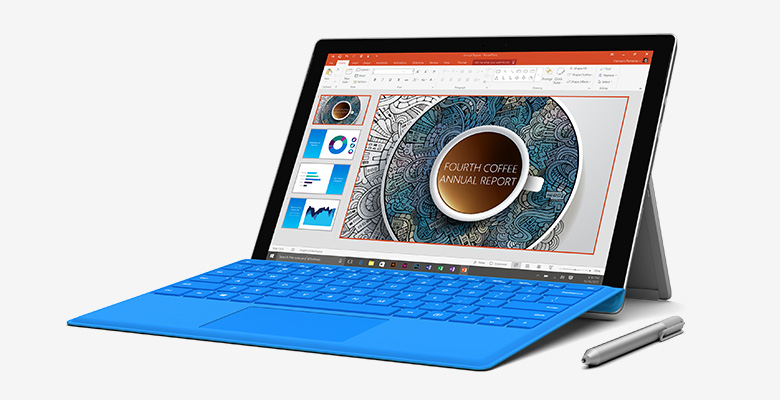
6th generation Intel SkyLake CPU that is 50% faster than the MacBook Air. Up to 16 GB RAM and 1 TB storage. It’s Surface Pro 4. Thinnest Core PC ever shipped. 12.3” diagonal screen (by reducing the size of the bezel so it’s the same size device). 267 PPI screen – 5 million pixels on screen, keeping the screen the best in the biz, IMO.
PixelSense technloogy. 0.4 mm gorilla glass. 1.1mm backlight. Custom chipset called G5 made by Microsoft. Takes the optical stack and brings “best pen & touch experience on any product”.
The pen has an eraser on the back. He jokes that there’s a pencil out there without an eraser, sorry Apple! 1024 levels of pressure. 1 year of battery life in the pen – rechargables break the flow of productivity. The pen connects to the Surface via a magnet by the looks of it – no loop required.
Office & OneNote are integrated. You can quickly launch OneNote and copy content to OneNote using clicks on the pen. An attempted Cortana demo tries to show off the new Microsoft Store in Manhattan – he doesn’t get a spoken result and looks like he was stumped for a second, before recovering.
Inter-changeable pen tips are being introduced. You can select a tip that suits how you work – pencil, ballpoint pen, felt-tip pen, etc.
Surface Pro 4 is 30% faster than the Pro 3. He compares it to the MacBook Air – 50% faster than the Apple.
They stopped thinning the device at 8.4mm so there’s still a USB port there! They demo the Surface Pro docking station – it also supports Surface Pro 3. Four USB 3.0 connectors, 2 x 4k display ports, Ethernet. It looks more like a hub, moving away from the big docking station of the past.
There is a new Surface Pro Type Cover. It is lighter, thinner, and stronger. There is a “pro key set” moving away from the older type keyset. This is also compatible with the Surface Pro 3. The touch pad is 40% larger.
On to Windows Hello:
He shows how his kids use Windows Hello on a Surface to get a unique experience for each of them. Parents will love this. There’s a finger print reader on the keyboard.
The front facing camera appears to support Windows Hello. The starting price is 899. You can pre-order now and it’s available on October 26th.
Catch the promo video on YouTube:
Surface Laptop
Oh yeah – I want this.
“We made the ultimate laptop – we made Surface Book”.
It’s … grey.
13.5” diagonal screen. 6 mp. 267 DPI. Pixel Sense. It has a pen and touch experience. Optically bonded screen. Top quality visuals. The typing experience was a big deal for them.
He jokes that we laughed about lap-ability. The typing is quiet. 1.6mm of travel – they’re using their 20+ years of keyboard experience. The trackpad is optimised by the Windows 10 team – it’s made of glass. 5 points of touch on the screen.
12 hours of battery. GDDR5 memory. Tuned NVIDIA GForce GPU – tuning via XBox team. This thing “is for the game than plays League of Legends”. This is not a $200 laptop. This is the “fastest 13 inch laptop ever made”. And remember – 12 hours of battery.
How does it compare to a MacBook Pro? It’s 2 times faster than the MacBook Pro. The Surface Dock also works with the Surface Book – one chord (the Surface Connector). He copies 3 GB of data from a drive to the desktop in around 3 seconds. They then show Gears of War playing on the Surface Book – It looks smooth. Some movie editing in Premier Pro – it’s happy doing it with full GPU rendering and no glitches.
They start with a case and machine it to 10s of microns – every Surface is unique because of this manufacturing process.
2 USB , SD, backlit keyboard.
Starts at $1,499, available for pre-order now, and also out on October 26th.
“We are relentless … and we can’t just stop”.
Surface Pro 4 was about bringing the thunder. This product is about reinventing categories. We re-watch the Surface Book video. Ah – the tablet undocks from the keyboard – and can be docked backwards. The Surface Book is a convertible, not a traditional laptop!!!!!
It weights 1.6 Lbs. It is 7.7mm thin. It is modelled on the A4 page for a natural feel. The expandability (USB etc) is in the keyboard. The GPU is in the base.
Muscle Wire is used instead of levers and clicks to lock in the screen. You simply pull off the screen from the base. It’s some sort of clever electrical charge thing.
Catch the Surface Book on YouTube:
Satya Nadella
Out comes the CEO.
“We’re making great progress” with the vision they shared in January. This is by far the fastest adoption of a Windows release. A new chapter of Windows 10 is beginning with new devices built for Windows 10 by Microsoft and partners – a new era of more personal computing that focuses on mobility of experience where you persist, not the device. No single device will be your hub forever – you are the hub so your apps, settings and data need to be mobile with you. This is why they built Windows 10 they way it is, a unified platform for people, developers and IT, on devices from the Raspberry Pi to the HoloLens.
They aren’t just building h/w for h/w’s sake. They consider new forms and functions simultaneously. They plan to invent new personal computers and new personal computing.
Microsoft is now building the most productive phone on the planet. And lots of caring, and envisioning, and … they should have wrapped up on a demo high IMO.
But overall – this was a very successful launch. I need to get our Surface manager to organise me some *cough* demo stock.