What I Want In A Windows 8.1 Touch Ultrabook

I’m shopping for a new Ultrabook at the moment to last me for the next 2 years and … well … I’m not very happy.  Let me list my requirements:

Haswell Processor

I want a 4th generation Intel Core i processor in my next computer.  I’m depressed by how many 3rd generation CPUs, Intel Celerons and even Pentiums are being sold on the market.  Seriously!?!?!  And OEMs wonder why their sales are falling?  They’re selling lots of shit!

I’m not even after an i7.  An i5 meets my requirements quite happily.

One of the benefits of Haswell: Miracast.

4-8 GB RAM

Nothing fancy there.  I don’t demo from my laptop any more because that’s impossible.

1920 * 1080 screen resolution

Unless you are a golden eagle, a 3200 * 1200 resolution screen will be pretty useless.  When you have to use Windows 8.1 scaling to make the screen usable, effectively bringing the screen resolution down, then mad screens make absolutely no sense to anyone but laptop bloggers and marketers.  Not to mention that the price of these mad Ultrabooks then gets pushed beyond an unrealistic €1800.

Touch

Yeah, I want a touch laptop.  I’ve ruled out otherwise superb machines as my next ultrabook because they don’t have a touch option.

Digitizer Support

Onenote is important to me.  But there are times when I need to draw … whiteboarding, or while taking notes.  No, the camera is not sufficient, otherwise I would, you know, use the camera.

Decent Keyboard

I write quite a bit.  Wet newspaper keyboards such as in the Acer S7 need not apply.

Full-Sized Touch Pad

I want a full sized touch pad with the buttons at the base.  Simple.  And I want a decent driver that is tuned by default to ignore accidental swipes while typing.  And I want the option to turn off Windows 8x gestures.

9+ Hours Battery

We were promised that Haswell processors would had 50% to battery life.  For the most part, the announced machines have not improved battery life.  It seems like the OEMs have cut corners to reduce costs, so 5-7 hours is often the advertised max.  Yes, there are exceptions, but they are exceptions. No need for you to contact me.

VGA

We live in a HDMI world.  Except we don’t.  I present for a living.  Only once have I had to option of connecting to a projector with something other than VGA – and that was because we especially brought in a high end projector to sell it at a trade show!  EVERY hotel and office I’ve been too only offers VGA.  Dongles cannot be depended upon, as I saw again yesterday when I had to borrow a laptop to present at E2EVC Rome.

Full-sized HDMI slot

Micro-HDMI slots are too loose.  Just give me a full sized slot so the cable doesn’t pop out if the dog next door barks.

256 GB SSD

128 GB is not enough.  No, I cannot live in the cloud because the cloud is not everywhere.

SD card slot

An absolute necessity for transfers from camera at speed.  I would love the card to be completely recessed into the machine, like in a camera.  That would make it almost like additional storage.

2 * USB 3.0

Why are companies putting USB 2.0 ports into their machines these days?

RJ45

Not a deal breaker, but I often have to connect to wired networks and once again, dongles cannot be relied upon.

Light & Thin

This is feasible, even with RJ45 and VGA as past Samsung models have shown.  My laptop needs to fit into my Airport Accelerator camera bag without catching the attention of cabin baggage size hawks at the airport.

TPM

I like to secure my laptop.

Support for Windows 8.1

Would you like to join me in the present?

SD card slot

An absolute necessity for transfers from camera at speed.  I would love the card to be completely recessed into the machine, like in a camera.  That would make it almost like additional storage.

Drivers

Share your drivers on your website.  Don’t make me install some crapware to download drivers.

Windows Product Key & Media

This one might be for MSFT.  I should have the right to create recovery media and install my machine.  Please include my product key either on the computer or on the PSU.  You listening Asus?

Other Stuff

After all that you can do your fancy screen twists, turns, disconnects, doo dads and all that jazz, but give me the option of a normal laptop too.

PRICE

How could I forget the price.  In an era when the APPLE MACBOOK AIR has become THE BUDGET OPTION for Ultrabook-style laptops, then you know that things are all messed up.  Nuff said.

I bet I am not alone in wanting the above.  But unfortunately, not one computer meets all those requirements.  Hell, it’s near impossible to even find a machine with Windows 8.1 and Haswell CPUs in the channel!!!  I know; I’ve looked!  I’ve gotten close.  Some otherwise great Ultrabooks fail my test for lack of touch.  It’s gotten so bad that I’ve considered a Macbook Air.  Right now, the Lenovo Yoga 2 is the best candidate, but it fails lots of my requirements too.
Technorati Tags: ,

Nokia Launches A Windows RT Tablet

In addition to 2 new Windows Phone tablets, Nokia launched “Sirius” which is officially called the Lumia 2520.  This is a Windows RT tablet.  On first impressions:

  • It looks much nicer than Surface 2
  • The camera looks impressive, even if it’s not a patch on what Nokia puts in the phones
  • Yes it is more expensive than Surface, but that’s because it includes an LTE modem, which usually adds $100 to the cost of a tablet.

All looks good but:

  • It runs Windows RT.  It might has well have a MIPS processor IMO.  I reckon Windows RT will be dead within 12-18 months of Ballmer leaving Microsoft, probably replaced by a rebranded Windows Phone on ARM devices (phones to 8” tablets).
  • It only has 32 GB storage.  Remember, that was the Surface RT that no one wanted, not that many wanted a Surface RT to begin with.  32 GB is just too small.  Nokia has a bad habit of screwing the pooch on storage, e.g. the Lumia 925 only has 16 GB.  And no, SkyDrive does not make up for this shortcoming.  LTE/3G is not omnipresent.
  • The keyboard cover is u-g-l-y.  Why the frak can’t they (Microsoft and Nokia) learn from the past and just do a clamshell keyboard that works, unlike the non-hinged unusable and space-inefficient stuff they repetitively throw at us?  The Nokia cover looks like one of those iPad covers from 3 years ago.
  • The Surface organisation will kill the Lumia tablet in a few months when MSFT gets the OK to take over Nokia.
Technorati Tags: ,

And Surface 2 Is GA … Sort Of

The second generation of Surface has gone live.  Surface RT becomes Surface 2 (Windows RT 8.1) and Surface Pro is Surface Pro 2 (Windows 8.1 Pro). 

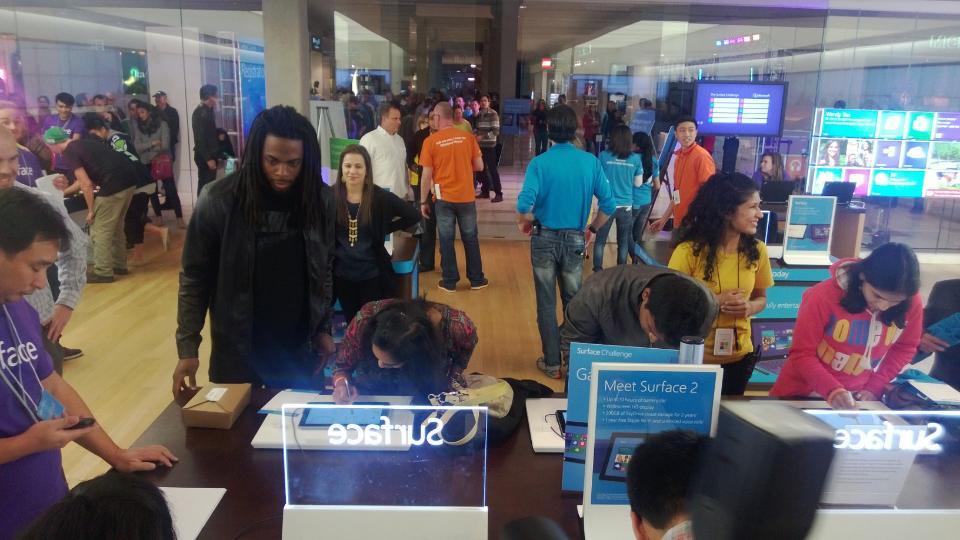
Apparently, Seattle Seahawks ace cornerback, Richard Sherman, wants one. This is him in the Bellevue WA Microsoft Store.  Now I must buy an iPad in revenge!!!

The various Microsoft online stores have updated their range.  Some of the talked about accessories such as the power cover aren’t out until next year.  And the rumoured Surface Mini might not be out until late Spring.

At least distribution is better than it was a year ago.  Yes, the Microsoft brick’n’mortar stores (US only) and online stores (international) are selling the Surface.  A few direct-distribution chains such as BestBuy and PC World (DSG) have rights (though I don’t know if they have the 2 today).  And 5 of the mega-distributors have rights (also don’t know if they have the 2 today).  Sadly, the distributors who have lots of reach in local markets do not have distribution of Surface yet.

This morning (writing this early AM) will also see the launch of the Nokia Windows RT “Sirius” tablet, which I find more interesting than Surface 2, based purely on leaked info.  The presence of cellular (which adds to the cost) makes it more interesting for business uses, I think.

However, the newswires are already filled with iPad-mania.  Apple timed their next-gen launch to crush Microsoft and Nokia.  And it’s working based on what I’m hearing on the radio so far this morning.

Technorati Tags: ,

Installing Windows 8.1 And Missing Drivers On Samsung ATIV 500T Tablet

Last week I tried twice to perform the online update of Windows 8.1 on my Samsung ATIV Smart PC 500T.  Twice it failed.  I had the commonly encountered (during the Preview!!!!) issue where the machine would perform the install, including device detection, and then hang on the final boot up with a black screen and busy mouse cursor.  From what I can tell, that’s a graphics drivers (Intel) issue that requires some McGuyver hacking to work around (not fix).  I wanted a clean working machine.

<<<< Here’s where I should say – Don’t be a moron, do the download drivers step that I mention later, BEFORE you wipe the machine.  You will also need a keyboard that physically plugs into the tablet >>>>

So I resorted to deploying Windows 8.1 from an ISO.  The first step was to prep a USB stick that a UEFI machine would like.  And remember, this machine has an x86 processor so a 64-bit build is useless.

The Windows 7 ISO Download Tool will prep a USB stick that only works with BIOS machines.  I needed a FAT32 stick

Next I needed to boot the tablet up with the stick.  Turn the machine off, hold in the Volume Up button, and power it up.  This brings you to an advanced startup menu.  I muddled around in here to get the command prompt, browsed to the USB drive (D:), and ran Setup.Exe.  Now I walked through the Windows setup, including wiping all of the existing volumes. 

The first clue that something was wrong was when I was asked to name a new user and set a password.  Huh!?!?  Where was the log into my Microsoft account?  Uh oh, I was missing drivers.  I touched the screen – nada!  I had no touch.  Thank f**k that I bought the keyboard or I’d be royally screwed.

I logged in, ran Device Manager and found, yes, I was missing LOTS of drivers.  Luckily I had a USB wired network adapter.  I plugged it in and went online.

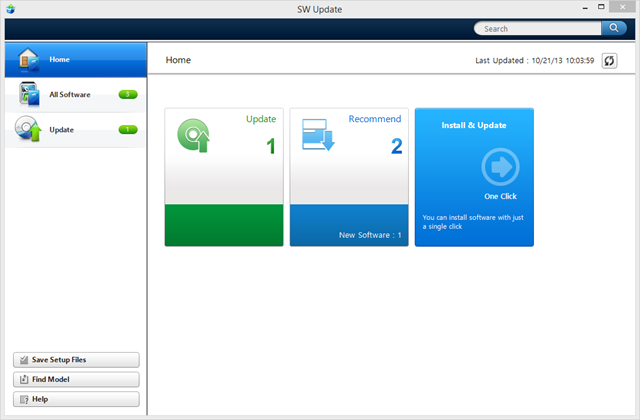
Samsung do not share drivers for this tablet on their site.  The support page had me fearing that I’d bricked the tablet.  But I remembered that the SW Update tool was available to download.  Maybe that would update my device?  I installed SW Update and check for updates.  All that was there were 2 bloatware apps and the touchpad software.  Hmm.

But there was a solution!  This is the solution that I should have run before rebuilding my machine.  It was a rookie mistake, but I’ve become so used to Windows having most, if not all, of drivers out of the box.  But it was a dumb rookie mistake.  Here’s the solution:

1) Run SW Update and click Find Model.

1 Find Model

2) Enter the SKU of the tablet.  A quick google and XE500T1C-A01US worked for me.

2 Find SKU

3) Do not select Windows Blue as the OS.  That only contained the SW Update tool.  Hopefully Samsung will replace that with a populated Windows 8.1 entry.  Instead, I selected Windows 8.

4) Select the drivers.  I did not select the bloatware. 

3 Select Windows 8 Drivers

6) Select a safe download location.  My drivers are now in my Drivers folder on my Storage Spaces share on a Windows 8 tower PC.  Pop them onto a USB stick for handy access after rebuilding your tablet.

7) Install the drivers after rebuilding the machine.

Let me remind you: PLEASE DOWNLOAD THE DRIVERS BEFORE REBUILDING THE MACHINE.

AND DO NOT REBUILD THE MACHINE WITHOUT A PLUGGED IN KEYBOARD, either USB or the clamshell keyboard that this machine sometimes is sold with.

The machine is fully working now.  I associated my Microsoft account, moved SkyDrive to the MicroSD card, and relocated My Documents to the same folder.

It’s such a pity that the online Windows 8.1 upgrade did not work.  I wonder how many retail consumers will get “bricked” by this?

Day 1 of General Availability – Windows 8.1 Is Not Here

A bit of link baiting never hurt anyone :)  While I suspect that Windows 8 to Windows 8.1 upgrades flew of the “shelves” in the Microsoft Store over the last 22 hours, it seems that the retail presence is … well …

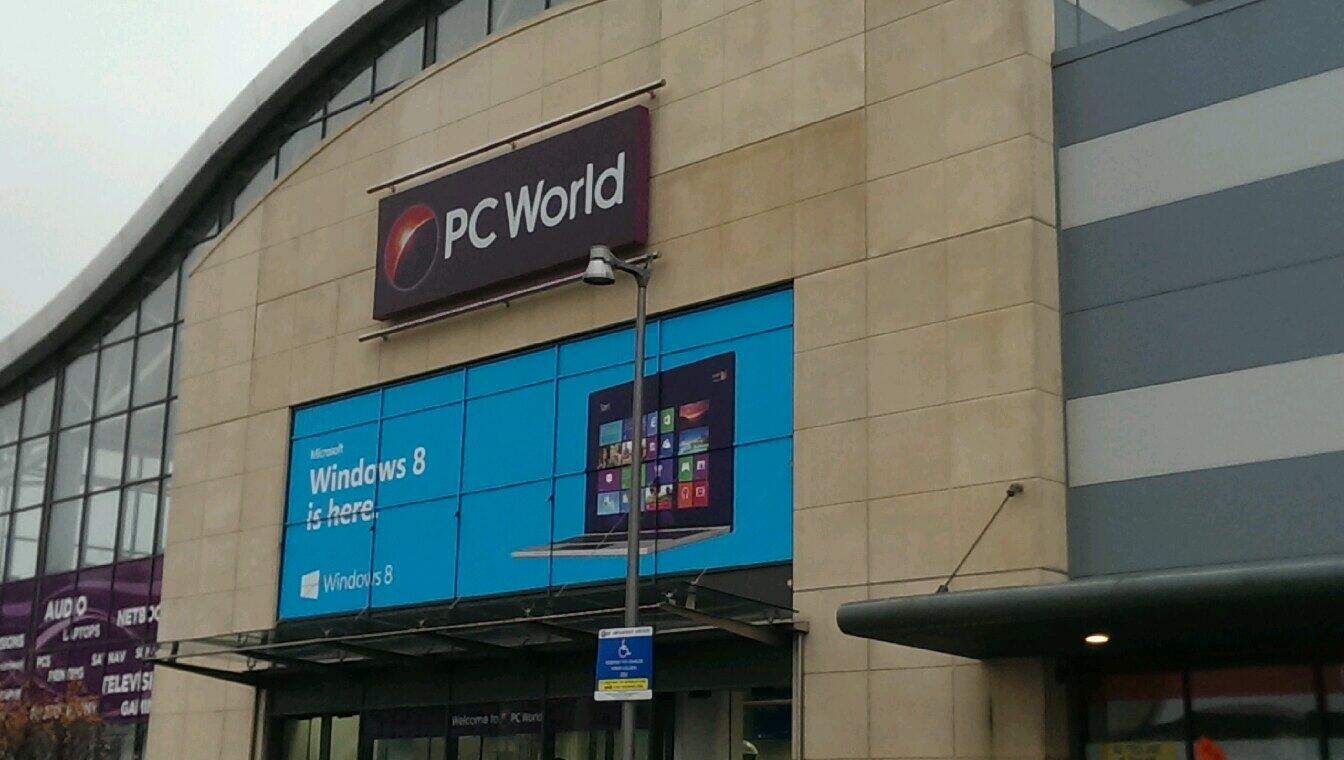
This morning at PC World, Carrickmines, Dublin, Ireland.

I decided that I’d start of at the PC World branch in south Dublin that opens at 9am.  This store is just 5 miles from the Microsoft European Operations Centre, also one of the locations where Windows/Office/Azure/etc are developed, and the office of Microsoft Ireland.  Last year, for Windows 8, the two stores (also “ChainB”) in this park had a Microsoft presence here.  I thought it would be a good place to start.

I drove in at about 09:15 and I was greeted by the above signage. 

Windows 8 is here.

Odds are Microsoft paid for that signage in some way.  That’s how these things are done in retail – it seems mad to me that a store will not advertise its own stock without being paid by the manufacturer but that’s how it is.  But at the very least, couldn’t they have painted a “.1” on this sign?!?!?!

OK, maybe it was a weather or timing thing.  I walked inside.  This is one of the better laid out electronics stores in the country so I had high hopes.  Lots and lots of … Windows 8 machines, most of which were launched at IFA over a year ago in 2012.  There was not a single Windows 8.1 device in the store.  OK, let’s have a look at the boxed Windows product … and it was all Windows 8.1.

Note: There are no SKUs for a Windows 8.1 “upgrade”.  That means you have two choices to get from Windows 7 to Windows 8.1:

  • Pay for the full priced Windows 8.1 media.
  • Buy the Windows 8 upgrade, upgrade your machine, and then use your free Windows 8-to-8.1 upgrade rights from the Windows Store to do a second upgrade.

I abandoned plans to visit ChainB because they have a reputation for stocking older stuff.

No lessons learned.  Here we go again.  Once again manufacturers will bitch about Windows.  Once again there will be no supply until February.  Sigh!

Technorati Tags: ,

Time To Revisit The Retailers To See If Things Have Changed

A year ago on the first day of Windows 8 general availability, I toured some outlets of two big electronic retail chain stores, which I anonymised as ChainA and ChainB.  They’re nearly always located beside each other so touring is easy.

ChainA typically had big 1.5 inch thick 17” screen laptops running Windows 7 and a bunch of no-name Android tablets.  ChainB was mostly stocking Windows 8, but there was little in the way of touch and there were no Windows 8 tablets to be found on this island (or the UK) outside of online stores which were ripping people off.

I will revisit these outlets tomorrow on their first day of being able to sell Windows 8.1 machines.  Here’s what I saw recently:

ChainA had a few Windows 8 devices but not much.  ChainB had stocked some Windows 8 tablets and Surface.  However, ChainB was recently running a sale to clear stock.  They did that with their Windows 7 stock before Windows 8 GA.  That makes me hope that they’ll have something interesting to sell tomorrow.

We’ll see!  I’ll be interested to hear what people in other countries experience tomorrow and over the first weekend of Windows 8.1 GA in the retail outlets.  Here’s what I saw in MediaMarkt Hamburg last year.

Technorati Tags: ,

A Toshiba Z10t “Convertible Ultrabook” (Pro Tablet) Just Landed On My Desk

Look what just arrived:

IMAG0084

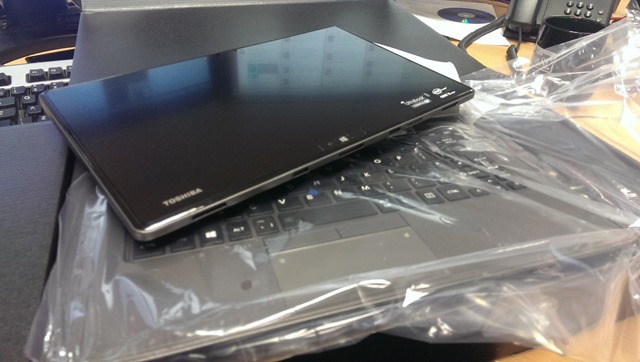
This is an Intel Core i5 processor powered Toshiba Z10t “tablet”, just like the Surface Pro is.  It docks into a clamshell rigid keyboard (no extra battery)

IMAG0086

Look Pa, no hands:

IMAG0088

And I don’t need to stand 6 foot 5 tall to get the thing to sit on my lap.  Yes, like all the pro tablets, it’s top heavy so it really needs a hand on the keyboard … but that’s where they coincidentally sit when I’m, you know, typing!

Toshiba don’t call this device a tablet.  I think that’s clever.  Say “tablet” to someone and they think $500 or less.  Put an i5, business level build, and a keyboard into a device and you’re talking $1000+.  That’s a big $500 (or more) psychological barrier to get over!

The tablet has a full-sized SD slot (handy for cameras) and USB 3.0 port.  The keyboard adds a USB 2.0 port, a full size HDMI port (they sit better than micro-HDMI), VGA (really needed for presenting at public venues), and RJ45.  It’s that last one that caught my eye when I played with one of these a while ago … that RJ45 means PXE BOOT!  And that means enterprise admin can deploy their Windows 8.1 Enterprise images to this machine using the network based tools that they are using for all other PC types.  This model that we got came with a digitizer stylus.  I find the stylus really useful for OneNote (drawing diagrams) and for using with the Isoboard app to white board via the projector (connected 99.9999% of the time via a VGA cable).

It came with Windows 8 Pro, so I’m upgrading it to Windows 8.1 Pro for demo purposes.

I reckon this is a good business offering for those looking for a hybrid tablet/laptop solution.  In my opinion, the true “lapability” of these device trounces the non-existence of this feature on Surface Pro and Surface Pro 2.

Hopefully I’ll get some time on this machine over the coming weeks/months so I can talk more about it.

Available on:

Surface 2 Package Versus Laptop & Tablet Combination

I read Paul Thurrot’s Surface 2 pricing article and I was startled when I started adding up the pieces for a solution I would want:

  • Surface Pro 2 (128 GB): $999
  • Docking station: $199.99
  • Power Cover: $199.99
  • Monitor: $250
  • Total: $1648.98

I have not included the cost of managing 1 device, for example, a System Center Client Management License, a Volume License “upgrade” for Windows. 

This solution is intended to be a single device solution: the Surface Pro 2 is:

  • The tablet: with the Power Cover providing somewhere between 10-12 total battery hours
  • The PC in the office: with docking station and monitor
  • The laptop: with the Power Cover providing the keyboard

Note: Windows Intune and Office Pro Plus (via Office 356) are per user licenses for up to 5 devices.  There’s no point in adding these because quantity of devices for comparison purposes does not matter – I am still one person requiring one license for Intune and one license for O365, whether I have 1 device or 5 devices.

How does the above package compare with a more traditional solution with a laptop/tablet package?

  • HP EliteBook Folio 9470m (500 GB / 8.5 hrs battery): $1049
  • Toshiba Encore (8” Windows 8.1 tablet): $329
  • Monitor: $250
  • Total: $1628

I went with a “thin and light” business laptop from HP and chose one of the more economic options.  Quite honestly, you could go for a traditional laptop and pay $649 or spec up and pay $1858.  I chose the Toshiba tablet because they were the only name I saw (without much search effort to be honest) that I would associate with business customers.

So how do we compare:

  • The Surface Pro 2 solution with the Power Cover has more battery life than the pre-Haswell HP laptop.  I’m sure a Haswell laptop could correct this, but it seems like lots of OEMs so far (based on IFA announcements) have been lazy or skimming the battery because advancements, more often than not, are not as good as expected.
  • The laptop/tablet person has twice as many chargers to lose, and stuff to carry.  If they leave the laptop behind then they have trouble typing.  Note: typing on the lap, even with the new kickstand, will continue to be impossible.  If the old kickstand went beyond my knees, then a kickstand that sticks out more solves that … exactly how?  Has Surface perfected the warping of space?  Can I use one near the Large Hadron Collider without causing a black hole?
  • The pricing is not that different in the package.  Spec down the laptop and the business spends less.  Spec up the laptop and the Surface package is more efficient – my gut tells me this is the more realistic scenario of the 3.
  • Sync has become an issue: One Surface = one set of files.  2 devices and I need to Sync.  Sure, I’ll have Skydrive … and Skydrive Pro, and Workplace Folders … and isn’t it confusing now?

As a business user, I like the “one Surface” option, economically speaking.  As a user, I’m probably going to go with PC (for photo editing), ultrabook for mobile productivity, and 8” tablet (of some OS kind, and leaning towards iPad Mini with Cellular) because I do like to use the right tool for the job rather than a generalist solution.

I don’t consider the Surface Pro as a solution for me.  The device cannot be used on a lap unless you are 6-5 tall.  I know I’ll get the usual tweet from the usual 1 or 2 Surface fans on this.  I’ve tried it (we have an RT and a Pro here).  The new hinge just cannot solve the typing with a keyboard issue – the laws of physics are pretty clear.  I want a detachable clamshell keyboard with a stiff hinge that gives me a laptop/hybrid solution.  And why oh why doesn’t the Surface keyboard stay shut with magnets?  Why do I have to hold it closed?

Anyway, while the Surface Pro 2 is not for me, I do see it being viable for many business users if they go down the 1 device for users, rather than the traditional “here’s a PC, here’s a laptop, and here’s a tablet” approach that has evolved.

Technorati Tags: ,,

Surface 2 Announcement Is Today – More Of The Same And A Future Prediction

The pre-release launch or announcement of the Microsoft Surface generation 2 is today at 10:30 EST or 15:30 GMT.  I don’t have a live stream link, if there will even be one.

At this point, “leaks” (personally I think they are deliberate drip feeds to generate interest) have given us a fairly good view of what’s coming in the second generation of Surface:

  • A mini 8” tablet that will be released in 2014
  • Surface RT (aka Surface 2) and Surface Pro (aka Surface Pro 2) will get a new processor and come with Windows 8.1.  No new chassis, etc.  The kickstand will have 2 positions.
  • Some new colours in the keyboards (uhhhh), a cover keyboard with a battery, and a dock-able keyboard.

In other words, mostly more of the same.  The worst rumour of all is that the Surface 2 and Surface Pro 2 will come in at the original release prices of the 1st generation Surfaces.  Yes, the price that everyone said was way too much.

And that’s why we’ve been seeing the Einstein insanity quote over and over and over and over for the last few weeks:

Insanity: doing the same thing over and over again and expecting different results.

This whole Surface thing makes me wonder if anyone in Redmond has realised that Surface just is not working.

Surface Pro 2

A $999 Surface Pro 2 is essentially an Ultrabook with no battery, a small (6 hours allegedly) battery life, and a now modest storage of up to 128 GB (easily consumed once you install a few programs and sync Skydrive).  Meanwhile entry level Ultrabooks are getting cheaper and the higher end devices leave the Surface behind.  But no, you cry, the Surface Pro 2 is a tablet!

OK, I can get the much-desired iPad 64 GB (to compare like with like) for $699.  But realistically, the 32 GB will be fine and that costs $599, has a 10 hour battery, has lots of apps (apps are more important than programs on a tablet), and has a thriving used market (buy one, use it, sell it, and not lose too much when you buy a newer generation o

ne a year or two later).  As a consumer buy the iPad is way more attractive.  And then there’s the Android tablets that are coming in at an even lower price.

Wait no, the Surface Pro 2 is a hybrid.  And there it fails again because it is unusable as a productivity device on your lap, on a plan in anything lower than business class, and in a train where tables are even smaller than in economy on a short-haul flight.  We’ll see if the new dock-able keyboard solves that, but I suspect it is a hack that will work as well as the third-party iPad keyboard solutions (which suck).

Surface 2

Windows on ARM is dead, it just doesn’t know it yet.  Every third party manufacturer has jumped of the platform – Nokia is effectively Microsoft now so we discount them.  MSFT marketing will scream that ARM is strategic and thriving but it has as much life in it as Windows NT on MIPS processors or Windows Server on Itanium.  And let’s face it, a low spec 32 GB tablet (with 10 GB usable) that costs $499 hasn’t a snowball’s chance in hell in selling.  Whey the hell would a person at home who wants a content consumption tablet ever buy a lower spec device when they can get a desirable 16 GB iPad for just $10 more?

Surface 2 needs to drastically increase in spec or cost $250 to have a chance, and even then, that will only work when the app market improves by 500%.  Note that improve is not a statement of quantity but it is a measure of substance and quality.

Dump ARM or Switch To “Sirius”

If I was running whatever the devices organization is called these days in Microsoft, I could trash all efforts on ARM right now.  It was tried and it failed miserably.  Intel Atom is the best bet for low end consumer consumption devices (Haswell Intel Core i is just too expensive and tablets are eating PC’s lunch in retail for the last 18 months).

If I couldn’t dump ARM then I’d stop Surface 2 and switch to the Nokia “Sirius”.  This is a nicer looking 10” tablet that Nokia was working on, also based on Windows RT and was due to be announced around now.  I’d make 2 changes to it:

  1. Increase the storage from 32 GB.  10 GB free space is NOTHING.  It’s $120 no-name Android device territory.
  2. Offer a model that does not include the LTE modem to have a cheaper model.
  3. Increase the screen resolution from the Windows 8 default of 1366 x 768, so the tablet isn’t immediately slammed by consumer reviewers.

The Sirius (codename) costs $499 because it comes with an LTE modem.  Some have said this is too expensive.  Note that adding a modem to an iPad adds $130.

Prediction

In Q3 next year (Q1 in the Microsoft financial year), Microsoft will announce a stock discount that will make the recent $900m write down look like a drop in the water.  Windows RT will be killed.  Heads will roll.  And all this will happen just after Ballmer steps down at WPC, giving the new CEO the opportunity to clean sweep.  And then someone will do what should have been done 3 years ago: Windows Phone, a non-hybrid OS, will be ported to support consumer (content consumption) ARM tablets.

Microsoft Agrees To Acquire Nokia

A few hours ago (early morning Irish time) Microsoft announced that:

… the Boards of Directors for both companies have decided to enter into a transaction whereby Microsoft will purchase substantially all of Nokia’s Devices & Services business, license Nokia’s patents, and license and use Nokia’s mapping services.

Due to all the usual legal mumbo jumbo the purchase hasn’t completed yet and won’t for some time:

The transaction is expected to close in the first quarter of 2014, subject to approval by Nokia shareholders, regulatory approvals and other customary closing conditions.

This is huge news and it isn’t.  In fact, people have been wondering “when” rather than “if”.  There were a few clues:

1) Devices and Services

Like it or not, Microsoft describes itself as a “devices and services” company now.  It’s hard to be a devices company if you don’t manufacture the most commonly used form of device on the planet, the phone, like your two main rivals do (Apple and Google/Motorola).

2) Dwindling Manufacturer Sentiment

Who makes Windows Phone handsets?  Nokia, obviously.  So do HTC and Samsung.  The rumour mill says that HTC is considering a big shakeup in their models, and the HTC One (great reviews if not sales) might be a factor.  Samsung’s ATIV SP8 handset is doing “so well” that you can pick it up for tap dancing in a store in the UK – it’s not really that bad but not far from it.  I know lots of people with Nokias, some with HTCs, and one with a Samsung.

So Microsoft would be naturally worried about a single third-party vendor ecosystem.  That must have turned into case of the shakes when Huawei started sniffing around in Finland to see if Nokia was worth buying.

There have been rumours of Microsoft building a Surface phone, and even rumours of one being manufactured in China.  Maybe the *ahem* success of the Surface tablet range forced a re-think if Surface Phone really did exist as a program? 

It just makes too much sense for Microsoft to acquire Nokia.  They already had an exclusive arrangement.  Nokia was living off of cash reserves.  Nokia is a company that can build to rival Apple’s design – no more chunky models with the battery life of a Mayfly please!  And Microsoft needs to start building Windows Phone handsets before the partners disappear.

My prediction for the future:  2 handsets per 12-18 months.  One will be high-end device in the €600-700 (or $ because that’s how manufacturers do currency conversions) range.  The other will be a lower price device for the mass market.  Both will be available via AT&T in the USA, and nowhere else in the world.  Cos that’s how Microsoft executive leadership rolls!

Sigh.

EDIT:

OH NO!  This means Nokia CEO Stephen Elop could be coming back to Microsoft.  The horror!  His name was widely being discounted by informed people as a candidate to replace Steve Ballmer.  The general media and bookmakers had him as a lead player.  I threatened on Twitter that I’d switch sides to VMware, Apple, and Google if he became CEO.  Now it’s … it’s … it’s a realistic possibility. 

I might have to buy this Mastering VMware vSphere 5 book by Scott Lowe soon:

On the other hand, let’s look at Stephen Elops big achievements:

  1. He emptied the room with his keynote presentation at TechEd Europe 2009.  I couldn’t even hear at one point because of the noise of people walking out of his bore-fest.  Being an executive on his board could be like catching sleeping sickness.
  2. Nokia’s share value … well … David D’Souza (@davidds) put it well:

image

Dear Mr. Gates, for all that is good and holy, please do not select Stephen Elop as the next CEO of Microsoft!!!!!