AzureCon – A Free Online Azure Conference

Microsoft is hosting a free online conference featuring Azure called AzureCon, starting tomorrow (Tuesday 29th) at 5pm UK/IE time, 9am PDT.

image

There is a mixture of level 200 and 300 content that is aimed at IT Pros, including:

  • Azure for IT implementors (Mark Russinovich): By now you will have heard of Azure and probably have been lost in a plethora of terminology: virtual networks, web apps, worker roles, virtual machines, Azure Active Directory, compute, REST APIs, blobs—the list goes on and on. Doesn’t it just make your head hurt? Come to this session and understand what Azure is, what can be done with it, and what role you can take as an IT pro. Gain a thorough understanding of the components of Azure. Learn how you can integrate on-premises and cloud services, creating solutions for the future. The session is packed with demos.
  • Azure IaaS: proper sizing and cost (Robert Davis): Two of the most frequently asked questions about moving to Azure IaaS are “How do I size it?” and “What will it cost me?” These questions aren’t easy to answer. Many tools will tell you how to move an on-premises computer to an Azure virtual machine assuming that what you have now is exactly what you need in Azure. In this session, you’ll learn that it is possible to accurately determine what size Azure virtual machines you need and how to calculate the most cost-effective way to move to Azure. You’re moving to better, faster hardware, so why would you need the exact same number of virtual machines with the exact same memory and CPUs? Servers can be consolidated and sized appropriately when the recommendations are based on analysis of the actual performance of the existing servers with a mind for consolidation using very precise calculations of the performance capabilities of the Azure environment. In addition to performance, you can accurately determine your best options based on costs for Azure in terms of storage, storage transactions, networking, and Microsoft SQL Server licensing. Would you be better off moving 5 on-premises servers on a standard A7 virtual machine or would 3 servers on a standard A5 and the other 2 on a basic A3 be more cost effective? This can be calculated.
  • Deciding between different virtual machine sizes (Kenaz Kwa): Azure provides a wide range of virtual machine sizes for any workload that you might want to run. Trying to decide which size is right for your workload can seem challenging. Join this session to find out about some of the considerations for selecting virtual machine sizes and learn the differences between different virtual machine size families and their regional availability.
  • Bring Azure to your datacenter with Azure Stack (Anant Sundaram): Modernization of on-premises infrastructure, hybrid approaches, and new models for application delivery all make it possible for IT to help drive business value and transformation. Learn how, with the recently announced Azure Stack, to bring the innovation from our hyper-scale datacenters into yours, enabling agility and productivity for application owners, with flexibility and control for IT.
  • Increase productivity and enhance security with enterprise mobility (Adam Bresson): The rapid growth of mobile devices combined with ubiquitous access to cloud services is changing the way people use devices to get work done. In this session, learn how to deliver enterprise mobility with consistent experiences that enable users to work on the devices they choose, while providing a unified infrastructure for managing applications and protecting corporate data.

This event is starting late for us Europeans. I wish MSFT would repeat this at Euro time zones. Note that the upcoming cloud road show has an audience reach that is too limited.

Register & tune into this event and catch what you can – it should prove to be a learning experience.

Speaking At Experts Live 2015 in The Netherlands

An awesome looking event called Experts Live 2015 will be running in The Netherlands (CineMex, Ede), covering many aspects of Microsoft infrastructure solutions:

  • Azure
  • Office 365
  • OMS (and more Azure)
  • Azure Stack and Windows Azure Pack
  • Hyper-V
  • Windows

I’ll be speaking as a part of the Hyper-V track:

  • Less known Hyper-V best practices: Mike Resseler, MVP
  • SMB Direct – The Secret Decoder Ring: Didier Van Hoyw, MVP
  • Notes from your Program Manager: Jeff Woolsey, Microsoft/Redmond
  • What’s New in Hyper-V 2016: Aidan Finn (Me!), MVP
  • Storage Spaces Direct and Hyper-V – The Perfect Couple?: Carsten Rachfahl, MVP
  • Would you like Nano Server with Containers?: Thomas Maurer, MVP

In other words, it’s a whole bunch of Hyper-V MVPs from around Europe plus one of the senior Windows Server PMs from Redmond; that’s quite a cast of characters! I would register if I wasn’t one of the speakers.

I had a great time the last time I presented at a Dutch community event during the lead-up to WS2012, so I’m really looking forward to this trip. Hopefully I’ll see you there!

Event: Taking The “Disaster” Out of “Disaster Recovery”

I’m going to be presenting another webcast for Petri.com, sponsored by Infrascale. In this event we’ll be talking about disaster recovery, how you can do it yourself, and how you can leverage cloud services, i.e. Disaster Recovery-as-a-Service (DRaaS).

The live webcast runs for an hour, starting at 13:00 EDT (18:00 UK/Ireland time).

image

Technorati Tags: ,,,

Microsoft News – 7 September 2015

Here’s the recent news from the last few weeks in the Microsoft IT Pro world:

Hyper-V

Windows Server

Windows

System Center

Azure

Office 365

Intune

Events

  • Meet AzureCon: A virtual event on Azure on September 29th, starting at 9am Pacific time, 5pm UK/Irish time.

WPC 2015–Day 1 Keynote

A video about YouthSpark. Way to talk to partners. promote YouthSpark where there’s free licensing and partners get zip. Then there’s a performance with people drumming on ladders.

Phil Sorgen

He comes out wearing a brand new partner scarf. Congrats go out to the partner of the year winners. Oooh it’s like the Olympics!!!!

IDC says that cloud business will be $200 Billion by 2018. There’s the agenda. Cloud. Get with it or get out. They’re sharing 20 scenarios with best practices for Azure/cloud deployment.

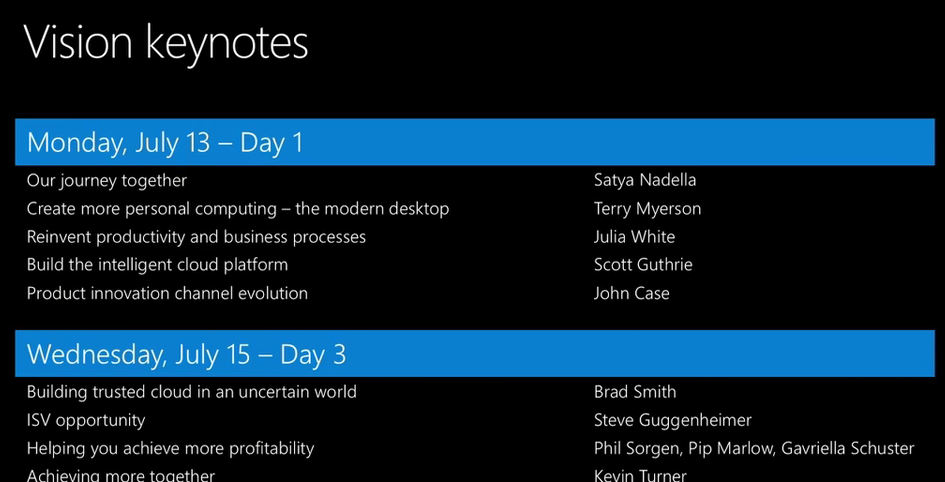
Here is the keynote agenda for this week:

image

User/cloudiness/mobility fluff. Then Windows 10. Then speed dating with Office 365. Red Shirts talking about Azure, and then something about productizing the cloud.

Now on to a Cortana video. Everyone outside the USA can sleep now. Zzzzzz ….

Bt seriously, they do stress the change in partnership and public opinion of Microsoft under Satya Nadella.

image


Satya Nadella

What makes Microsoft unique is the partner ecosystem.

image

Customer expectations and technologies have changed, but Microsoft uses WPC to reaffirm their commitment to partners. He wants to set out the mission and strategy with an anchoring ambition.

Mission: Empowering every person in every organisation to achieve more. They went back into their history to discover a sense of purpose (a PC on every desk in every home, etc). Now it’s … mobile first cloud first world. There is no other ecosystem that is solely built to enable customers to achieve greatness through digital technologies. They care about individuals and organisations, and they view the intersection of these as critical.

Some key attributes to mobile first, cloud first. We’ve heard this stuff before so I’ll get something to drink.

Ambition 1: Reinventing productivity and business process: bring together collaboration, communications, etc. This is O365, Dynamics, etc, an integrated set of extensible tools. Current solutions on-premises have created barriers to productivity. Microsoft wants you to use their tools in work and in life.

Julia White

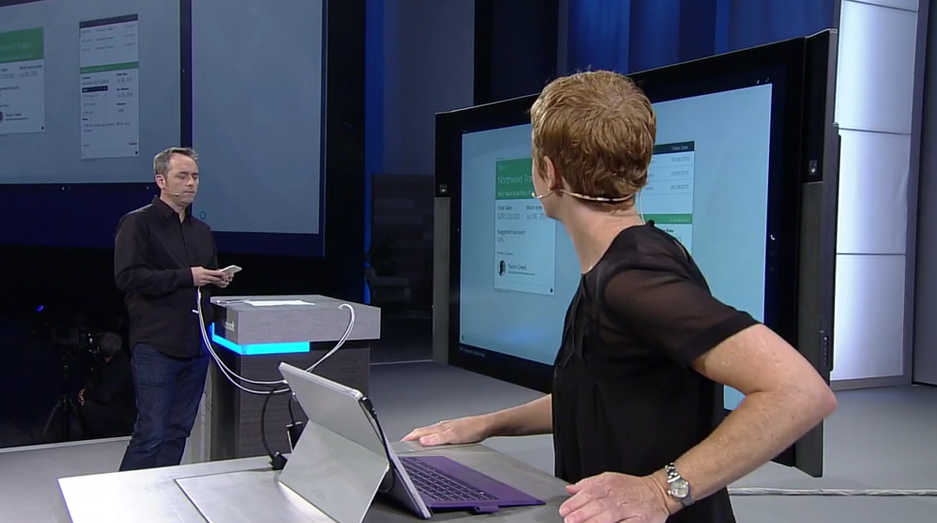
Scenario: customer might be leaving. Julia needs to work with Steve. Julia opens Gigjam to an empty Canvas. Cortana integration for the USA. They query information on the customer. They pull in emails with the customer onto the canvas. She draws a circle around stuff on the canvas, and draws an X on stuff she doesn’t want to share. Julia can see her entire data, and Steve can only see the selected subset. They share stuff on Surface Hub and on iPhone.

image


Demo gods kick them a bit, and eventually they get stuff shared properly to the iPhone. Steve “loves his iPhone” – yes, a Microsoft person said that. Steve shares some of the product roadmap from another service with Julia. She is seeing information from an app she doesn’t have access to. On a Surface Hub, all their shred data is on screen so they can collaborate. Julia shares stuff with another guy, who is automatically called on Skype. He shares some info and gets out of the call/meeting. Julia delegated stuff to another person. That person generated information, Julia review it, and shares it.

This was something new. It wasn’t communications; it was work sharing. There was no screen sharing; it was data distributed by an app.

Satya Nadella

Ambition 2: Building an intelligent cloud.

image


Usual message here. There’s more Cortana shite for the 4% of the world that lives in the USA. There’s talk about “any organization on the planet” but Cortana works in 1-10 countries only.

Ambition 3: Personal computing. Windows 10 will usher in a new eara of more personal computing. Continuum will transform our usage of devices. I 100% agree. The phone is already the #1 personal device. Windows Mobile 10 can make that device your PC …. but will people end up using iOS or Android instead when similar features arrive there? Microsoft needs to put Windows Phone handsets into business users, IMO, and that means serious changes to their channel.

Lorraine Badeeen

Here’s a demo of how AutoDesk 3D modelling can work on HoloLens. To test a design they normally create a slow and expensive 3D print. Now they can use HoloLens with their same design workflow with the same tools. On goes a HoloLens. There’s a small motorbike on Dan’s desk. He can change the bike directly on the model using his mouse. He can make it small or big with the wheel. He moves the  bike around. They have a real bike on the stage. They overlay a new design onto that bike. They change the colour schemes.

image

Above is the overlaid bike. He adjusts the mirror sizes.  The image is incredible. A remote team leaves notes on the bike, requesting design changes.

Satya Nadella

Satya winds up his presentation. Some intellectual property is shown for a couple of minutes, and we are shown a video of Sea Otters. I am not kidding.

image

Terry Myerson

Myerson says that “this video” is why we are here today. Sea Otters! Winking smile

July 29 when Windows 10 becomes broadly available is just a few weeks away. On that day, around the world, people will not get to use Cortana. Oh, sorry, Microsoft will be asking the world “what will you upgrade” and by that, they mean community efforts. They want to celebrate the people who empower others.

Sea otters.

Lots of old stuff rehashed. Out comes Bryan Roper with a hat. I guess he’s Cajun or something. He’s very cheerful. Laissez les bon Windows rollez. Less than 6% of users use ALT + TAB. Who is this dude and where has Microsoft been hiding him? This is much better than the usual dull Windows 10 demo. Real time co-authoring in Word 2016. This will be even great for partners when writing a proposal with multiple authors. Oh it all goes wrong when he demos Cortana. I tune out.

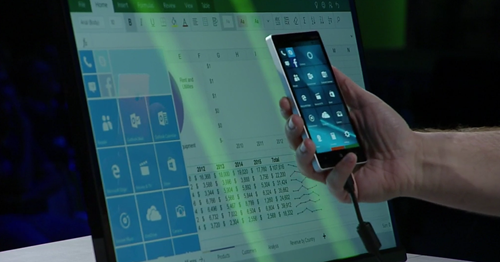
Now there’s a live demo of Phone & Continuum. He’s editing an Excel spreadsheet on a monitor using keyboard and mouse, off Excel running on a phone. That’s made possible by the Universal Apps platform.
image

A familiar HoloLens holographic apartment appears. The demo is identical to what we’ve seen before.

On to security. Virtual Secure Mode (Enterprise edition) of Windows 10 secures secrets using silicon and Hyper-V. Modern hardware enables modern security features. Roanne Sones comes out to talk devices. She starts off on IoT. There’s a demo of DeviceGuard, preventing a USB drive being put into a POS system that policy only allows to use USB retail hand scanners. Another demo: a micro-kiosk – the things used in the USA for credit card signing. To “hack” it, you open it up and steal the system media card. She pops it into a PC card reader and the drive is encrypted using BitLocker – the software cannot be compromised via out-of-band. She’s created her own malicious card instead. She plugs it into the micro-kiosk, and the boot fails. Secure boot has locked down the boot process so only signed images that the business owns can boot up.

The Anomaly console in Azure shows that there were problems in the micro-kiosk. The IT pro can investigate the device.

image

Back to Terry. He starts talking about selective patching. A new solution is needed. Windows 10 has a “flexible” update model that works with all kinds of devices. Windows as a Service provides continuous security and feature updates. Users can opt into rings. Some want to be first, some want to be cautious. Those who go first will be the “testers”. Windows 10 Enterprise will have the “long term servicing branch” for things like industrial devices. Here you want just security fixes, and lock down features for stability. End user devices at work want the innovation they see at home and IT pros need control. Windows Update for Business will offer this balancing act… handling rings, blackout periods (for sensitive times) for free – feature and security updates.

That’s a wrap from him. Now a video about the word changing and innovation.

Julia White

I have not a hope of keeping up here.

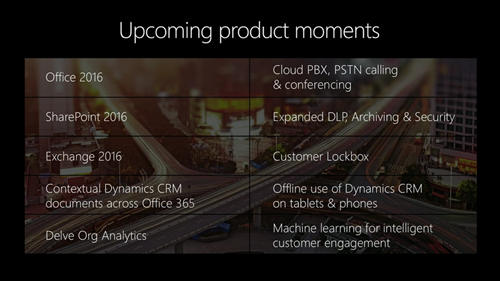
There is an E5 plan of Office 365 coming, along with a cloud PBX. Bring-your-own key is coming to O365. SharePoint 2016 is code from the cloud, and is being designed for hybrid solutions. OneDrive for Business … lots of new stuff – I hope that includes the sync engine. Ah – there is apparently, along with auditing, reporting, and DLP. The OneDrive consumer experience is coming to it. All this in H2.

image


A demo of Delve, and content from external services like SalesForce is present there. Delve is based on Office Graph. Seems quite similar to what we saw at Ignite. New stuff coming in the next year:
image

Scott Guthrie

Here comes a barrage of new Azure features in a red shirt. He’s going to talk about Satya’s 2nd ambition to build an intelligent cloud platform.

image

Customers will look to SaaS for faster time to value. IaaS and PaaS will offer opportunities to re-engage with customers and improve business processes.

There will be 5 more Azure regions opening in the next few months. Over 3200 solutions in the Azure Marketplace.

image

Great numbers, but remember that adoption are not sales. Some partners are brought out to talk about the different kinds of solution they are deploying for customers in the Microsoft cloud: open source in the Azure Marketplace, PowerBI, and cloud reselling (Rackspace). I catch up on lost sleep. We’re over 3 hours now. The coffee just isn’t strong enough.

They’re pushing the CSP program, which isn’t a surprise.

We have just crossed the 3 hour mark. 1 more presentation left.

John Case, Corp VP Office Division

He has 4 major announcements in 10 minutes. I bet he goes over. It is 4:49pm right now.

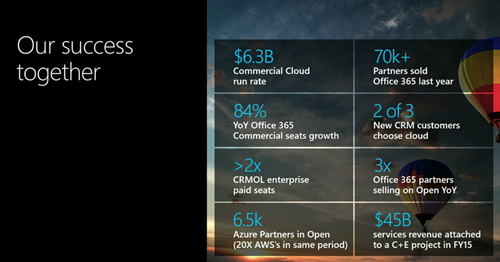
Some stats on Office, CRM, and Azure:
image

Azure has 20x more customers in Open than AWS has in their similar program. Azure in Open launched August 1st of last year. The channel is in upheaval. The best partners in O365 are at 1.5x revenue over standard partners, and have higher margins, etc.

  • Announcement 1: CSP is expanding. It launched last year. It now includes O365 (as it did originally) and now includes Azure, EMS, and CRM Online. It’s going to 131 countries, and includes commerce APIs.
  • Announcement 2: New incentives to drive active usage. Cloud competencies are shifting to usage from sale – similar to what MSFT did internally with sales. Being involved with a sale is not good enough anymore – partners must deploy technology and drive usage. Customers will get dashboards for O365 and Azure to see per-workload usage of customers.
  • Announcement 3: A new hybrid cloud competency –  “Azure certified for hybrid solutions”.
  • Announcement 4: A new Office 365 E5 suite is coming in the next year. Cloud PBX, Skype PSTN, lockbox, etc are all coming in E5. E3 sales are a tiny percentage of O365 sales, so this should be interesting. E4 is pointless in most countries because of lack of telecoms support. So E5 … hmm … I think SKUs might get merged sometime down the road.

I guess lots of people left before now. He thanked people that stayed. And he wraps up at 5:02 PM, 13 minutes after he started, and 3 minutes over the promised 10 minutes.

John announces that WPC 2016 will be in Toronto. Lead balloon. No applause. Why? The reviews on the venue from the last time were terrible. The rooms at the venue were too small and feedback from people I know was that they wasted a week there because they got into so few sessions. I wonder if Microsoft can tear up that contract?

And that’s a wrap.

WPC – The Conference That Shapes Your World That You Don’t Know About

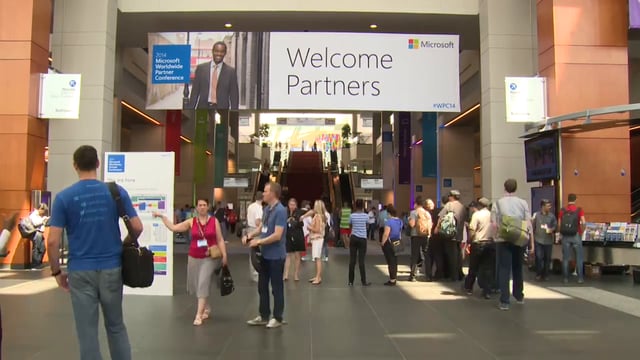
Today is day 1 of Microsoft’s annual conference for partners, WPC, aka Worldwide Partner Conference. At 1:45 PM (UK/Irish time) the day 1 keynote will begin and Microsoft will lay out their agenda for the coming year.

Events such as Build and conferences such as Ignite are where Microsoft talk technology. WPC (for Microsoft partners) and MGX (for MIcrosoft sales employees) are where they talk business. Today, we can expect Satya Nadella to take the stage and talk fluff about mobility of user experience, productivity, and services for several hours.  Tomorrow, COO Kevin Turner will fire up the troops and talk numbers and competition. He’s the guy overseeing the score charts that dictate Microsoft’s subsidiary business, so his voice is pretty important. There’s usually little news here, but sometimes there are interesting market share facts.

But in the midst of all the usual catchphrases, rapidly delivered demos by Julia White (breath!) and at various breakout sessions this week, Microsoft will talk about some important stuff. And this is the stuff that affects company strategy, licensing, and what Microsoft/partners will be talking to your boss about in the coming year. This is what I expect to be pushed:

  • Adoption, adoption, adoption: Microsoft used to recognise and measure sales of products. But in the era of the cloud, adoption is more important. There’s been many sneaky includes of cloud services in volume licensing deals to make red lights green, and Microsoft is stopping this.
  • Azure: It’s still really early days for Azure in the partner market. Will they sort out some of the pricing issues and deal with partner concerns like central management, and transitioning from MOSP (direct) billing subscriptions to Open?
  • Office 365: It’s been a huge success in Ireland, but not so in the rest of Europe, or in the USA I hear. Again, lots of people “bought” it but didn’t buy into it.
  • CSP: Microsoft will be putting a big push on Cloud Solution Provider as a new means to resell and distribute cloud services via “tier 1” and “tier 2” partners. There are serious issues with CSP, such as partner-provided 24*7 technical support and lack of subscription transitioning.
  • Surface & devices: What news will there be? Will Microsoft finally fix the one business problem that Surface has? Answer: a viable channel to business. You wouldn’t believe how much Surface business we turn away because of Microsoft’s own stupid rules.
  • Windows 10: This one will be tricky. As a distributor, Windows 10 is bad news for us (free is bad when you’re in the business of selling). I think Microsoft will encourage partners into selling deployment projects. I think partners will be looking for ways to block Windows 10 until business owners say they want it. BYOD is an American thing (source: IDC).

Don’t expect anything of value on Windows Server or System Center.

BTW, this would be a nice time to announce the RTM of Windows 10. But really, I expect this to be a blog post, maybe on Friday morning (10-11am) Redmond time.

Technorati Tags:

5nine Webinar on Hyper-V Security Best Practices

5nine, an advertiser on this site, is running a webinar this week on implementing Hyper-V security best practices for  Hosting and VDI and Service Providers.

image

The content:

Many hosting, VDI and service providers have embraced virtualization and now see its incredible benefits! However, they often trust their tenants too much and lack appropriate security protection for viruses, malware, and other types of distributed attacks.

Do you know the best way to avoid these security breaches?


The speakers:

Join 5nine’s virtualization expert Symon Perriman (5nine Software’s VP of Business Development and former Microsoft worldwide virtualization lead), and Alex Karavanov (5nine Software’s Director of Solutions Engineering) to learn the best practices for providing multi-layered and multi-tenant protection and compliance for Hyper-V, System Center Virtual Machine Manager (SCVMM) and Azure Pack (WAP).

Hyper-V Amigos Chatting At Microsoft Ignite 2015

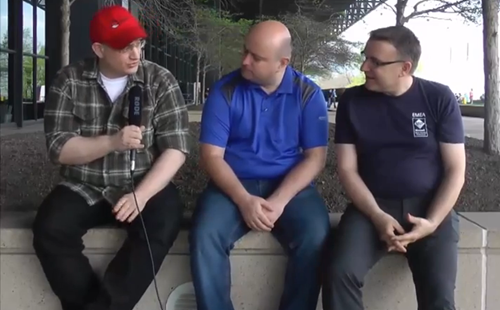
Didier Van Hoye, myself and Carsten Rachfahl (all Hyper-V MVPs) were at Microsoft Ignite last week and we met up at the end to record a chat between the 3 of us, where we discussed some of our highlights from the conference. You can catch this video on the Hyper-V Amigos site.

image

Oh yeah, it was painful watching myself in this video 🙂 That was the last time Carsten will let me hold a microphone!

Looking Back on Microsoft Ignite 2015

I’m back from Chicago and, damn, am I jet lagged. I slept from 05:30 until the alarm went off at 07:00 this morning, and I’m sitting here in work, dying. But it was worth it. Ignite was a huge event, in more ways than one.

The public claims was that 23,500 delegates attended this conference. It sure felt like it at times:

  • The keynote was nuts and I’m glad we went in early.
  • Getting food was … more on this later.

Satya Nadella set the tone immediately in the keynote. This was a time of hybrid solutions and Microsoft needed IT pros to be the agents of change, be it on premises, in the public cloud, or both. It’s been years since Microsoft reached out to IT pros like this, and it was good to see. And then the announcements came flooding out. Unfortunately, the keynote clocked in at around 3 hours, and that was 1.5 hours too long. The content was good and, IMO, was right to focus on integrated solutions instead of products, but it was just too long. I’d say 60% of the audience left the main hall before the end. There was a queue to get out with around 40 minutes to go.

Windows Server 2016 and System Center 2016 were the main pieces for me, along with lots of Azure-ness. Of great interest is Azure Stack, which is very early in development, but is the on-premises/hosted version of Azure that will be able to directly manage WS2016 without System Center, although System Center will be required for HNV, etc. Lots of what I’ve known for some time was made public and I can finally talk about those things 🙂 Storage Spaces Direct (S2D) and virtual TPM are right up there for me. And finally Microsoft started to talk about the enterprise story for Windows 10.

I attended as many sessions as I could, with some meetings here and there. I mostly attended Windows Server sessions which I found very interesting. I’m always working with the latest or vNext so the content suited me perfectly. However, I can understand why some folks might have been disappointed by the low amount of vCurrent information. I understand Microsoft talking a lot about vNext (the repetition of contained content might be questioned), because there is a lot to get ready for, and as I said, this is the information I am after when I go to an event because it prepares me for my teaching and writing.

The Wi-Fi was terrible. I know; it’s always bad at these events but this was just shocking. If I was the manufacturer of the WAPs then I’d be begging the organisers not to advertise my brand. Speakers normally have a dedicated network, but from what I could tell, this didn’t help. Many of the demos I saw failed because of remote access issues.

I spoke twice at the conference. My first session was The Hidden Treasures of Windows Server 2012 R2 Hyper-V. I managed to fill the room, and I was told that there was a queue to get in (very cool!). I was very worried about my 13 demos, all of which were remotely accessed from Dublin. I had bought a USB 3.0 to Ethernet adapter in Best Buy the night before and that appeared to sort out any issues. I really enjoyed this session. I was nervous when I spoke in Barcelona at TechEd Europe 2014, but I was comfortable this time around, and I even threw in a few jokes that weren’t rehearsed – some folks even laughed! Thankfully, the scores and comments have been good (so far) in the feedback.

imageThe view from where I presented 

After that I went to the Petri meetup and writers dinner. That was a fun night out with the gang from Petri.com and Thurrott.com. Thanks to Stephen and Paul for the lift!

I spoke again on Thursday afternoon in one of the community theatres. I was scheduled to talk at 12:05, and I was there early to set up. Just as I was about to start talking, some dude came up and claimed he had the same slot on the same stage to talk about Skype. He complained to the staff, and he was let speak instead of me. So I removed my stuff as most of the audience left. Someone wondered why he didn’t do his session using Skype instead. After quite some ordeal, I was rescheduled and the Ignite team let everyone who had enrolled for my slot about the new time – very efficiently too, I should add. I got going later in the day and had a great time talking about using Azure Site Recovery to create DR solutions for small to mid-size businesses. Thank you to those who helped sort out the double-booking (very professionally) and to those who made the time to come listen – I think I went up against some of the big hitters in that time slot!

Part of attending an event like this is networking. I got to meet lots of old friends which was awesome. It’s always good to chat with Microsoft product group members, the folks from Channel 9, fellow MVPs, and delegates who are there to learn like me.

We enjoyed the city too. I was at Ignite with my fiancée and we wandered Chicago the weekend before the conference, making the most of the citypass vouchers we bought online. Our feet were falling off of us by Sunday night, and we saw quite a bit. We were in a really nice location on N. Michigan Avenue so we were surrounded by lots to do and see. There was the obligatory trip to The Cheescake Factory, an awesome experience at the Gibsons steakhouse, and a yum breakfast with fab service at The Original Pancake House.

Logistics-wise, this was a conference of two tales. On the positive side, the Microsoft staff (purple shirts) were both friendly and efficient. They stood in strategic locations helping delegates find their rooms. At each room the teams were quick to smile and say hi. They were in great spirits too after the party when they were running the baggage check. For me, the buses ran fine, and the private road to the conference centre bypassed the worst of the traffic – we were probably in one of the furthest hotels, about 35 minutes away.

On the negative side, (I’ve already talked about the shocking Wi-Fi) was the food and everything about it. The local staff treated delegates like prisoners. My fiancée was screamed at for trying to go to the loo, accused of breaking a line for food that she had no intention of eating. The local staff were horrible, as was the supplied conference food. I know these are protected unionised people but Microsoft needs to do something. We chose to eat at the McDonalds in the centre instead. Yes, the queues were mental but the staff were quick – there was a rumour that they ran out of food one day!!!

Would I do Ignite again in 2016 in Chicago? Yes. I was there for the content which was there for me in great amounts (I have lots of videos to watch), I enjoyed the company and the city. Are there things I would like to see improved? Sure there are, and hopefully they will be fixed. I can confirm that everyone in Microsoft that I talked to had heard the complaints, including that article. But you know what, the reason I go to a conference is to get content and that content was there for me.

Before I wrap up, there are some thanks to give:

  • Ben, Sarah and Rick who helped out with getting my Hyper-V session organized.
  • Manoj who helped sort out the schedule conflict with my ASR session.
  • Those very generous people who offered me their phones for Wi-Fi access to do my remote demos when I was worried about the demo network.
  • My fiancée for here support and critique as I rehearsed and paced in our hotel room on Monday night.

So … when does registration for Ignite 2016 start?

All The Details On My Two Ignite Sessions

Thanks (I think!!!) to John at MicroWarehouse (my employer) for sticking this on the company website:

image

I think he even Photoshop slimmed me Smile

Here’s the details of both my sessions:

The Hidden Treasures of Windows Server 2012 R2 Hyper-V

  • When: 5:00PM – 6:15PM, Tuesday, May 5th
  • Where: E451A
  • Session code: BRK3506

My first session is a 75 minute level 300 session focusing on lesser known features of the version of Hyper-V that you can deploy now, and leaves you in the best position to upgrade to vNext. Don’t worry if you’ve seen by TEE14 session; this one is 50% different with some very useful stuff that I’ve never presented on or blogged about before.

It’s one thing to hear about and see a great demo of a Hyper-V feature. But how do you put them into practice? This session takes you through some of those lesser-known elements of Hyper-V that have made for great demonstrations, introduces you to some of the lesser-known features, and shows you best practices, how to increase serviceability and uptime, and design/usage tips for making the most of your investment in Hyper-V.


End-to-End Azure Site Recovery Solutions for Small & Medium Enterprises

  • When: 12:05PM – 12:25PM, Thursday, May 7th
  • Where: EXPO: Lounge C Theater
  • Session Code: THR0903

My second session is 20 minutes on Azure DR solutions for SMEs in the community theatre. I’ve done lots of lab and proof-of-concept work with ASR in the SME space and this presentation focuses on the stuff that no one talks about – it’s easy to replicate VMs, but what about establishing services, accessing failed over VMs, and more?!?!?

In this session I will share some tips and lessons that I have learned from working with Azure Site Recovery services to provide a complete disaster recovery solution in Azure for Hyper-V virtual machines in a small/medium enterprise.