Build 2015 Notes

Mobility of the experience is what is paramount, not the mobility of the device.

That’s the big quote from Satya Nadella from Build 2015. Various Microsoft developer people spoke for the previous 90 minutes, sending me to sleep. The cheer of the audience in response to “Windows 10” woke me up.

It’s built with everyone in mind

That’s consumers and business: keyboard, mouse, touch, and hologram. Yes, Satya, said hologram.

Terry Myerson, Executive VP of Operating Systems, came out to talk Windows 10. It’s build, so he’s speaking to developers, trying to get them to create apps on Windows. They’re targeting more types of devices than ever: PCs, TVs, laptops, IoT, and Hololens. Universal apps will enable devs to code for all of these at once, via one Windows Store. I’m guessing the Windows Store was burned down and rebuilt overnight – I wasn’t able to find the app for Ignite for my phone on it last night – the store promises that apps are “easy to find”.

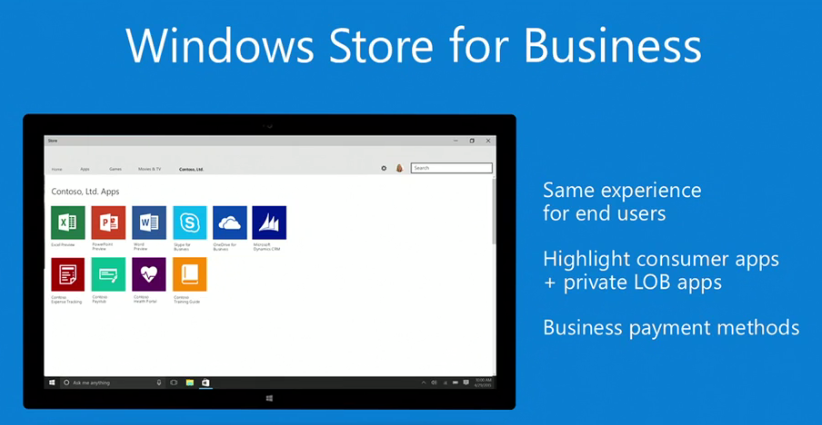
Windows Store for business was announced. Developers can sell apps via purchase orders (PO).
image

They want Windows 10 to be easy to adopt, not just free. Within 2-3 years they want 1 billion devices to run Windows 10. No other platform has gotten close – Android KitKat is on 500 million devices. Breadth like this will make Windows more attractive to developers, and more apps makes Windows 10 more attractive to customers: chicken and egg.

He demo’s a news app – USA Today. He opens an article. The app uses cloud-based shared state. He opens the same app on a phone – and the article is right there where he left it. USA Today spent 1 hour porting the app to Xbox One, tuning it to just present video instead of text + video. That’s universal apps for you.

Interesting: webdevs can take their existing code and package it via Windows Store. Users can “install” the website as an app. The website can detect if it’s running as an app or as a website. One scenario is that the app version can offer embedded sales via Windows Store.

Win32 apps will be available via App-V through the Windows Store. This allows users to get apps that don’t mess up their system – the sw never installs on the PC. Adobe are putting PhotoShop Elements and Premier Elements in the store in this way.

Java and C++ code from Android apps will be able to run on Windows 10. Windows 10 will include an Android subsystem.

And iOS code (Objective C) support are coming to Windows too. Wo-fucking-ow! He demonstrated an iPad app running on Windows! And the game was extended to offer Xbox Live achievements!

The freebie for Build attendees are getting a brand new HP Spectre 2-in-1. Thinner, lighter and more battery life than a Macbook Pro, and has touch. And there’s a joke about conference Wi-Fi.

Mr. Hair comes on stage to do some demos of the Start Menu. Live tiles are animated. The menu is translucent. Jump lists are there. Hmm – the Windows Store is suggesting apps in the menu. The lock screen is updated with “Spotlight” that you can choose to add. You can get a stream of personal information on the screen. If you like the image, there’s a hotspot to train the service which lock screen images you like.

Lots of Cortana talk – which is irrelevant if you’re not living in the privileged small number of countries that it supports.

And Project Spartan will be called: …. …. ….

image

Other stuff was said about the Continuum adaptive UI.

HoloLens. There is a live demo. There’s a Holographic start menu and he opens Skype. He pins the app to a wall!!!!! There are various other screens and pictures on the wall. THere’s a robot on the table and a virtual puppy on the floor. A weather app on the table is presented in the form of a beach/sea and weather info. He launches a video app to start watching a movie on the wall – instant 200” TV me thinks! He says “follow me” and the video player stays in front of him, he re-pins it to the wall, and scales it to FILL the wall. Every Windows app has these abilities.

And my Twitter feed just went WILD.

Here’s a cadaver anatomy app that they showed live:

image

Microsoft have started to learn more ways to use holograms through this device and can’t wait to get the device out in the real world. Note: all the apps shown were universal apps.

The device looks quite nice.

image

They show a holographic robot overlaid on a physical one that I think was powered by Windows 10 IoT running on Raspberry Pi. The presenter airtaps a path on the floor and the robot follows it. There’s room understanding from the sensors of HoloLens – the robot can be sent around an obstacle.

And back comes Satya to wrap up. That’s all folks!

Microsoft News – 23 April 2015

I’ve been really busy either preparing training, delivering training, on customer sites, or prepping my two sessions for Ignite. Here’s the roundup of recent Microsoft news for infrastructure IT pros:

Hyper-V

Windows Server

Windows 10

Azure

Office 365

Intune

Miscellaneous

Microsoft News – 8 April 2015

There’s a lot of stuff happening now. The Windows Server vNext Preview expires on April 15th and Microsoft is promising a fix … the next preview isn’t out until May (maybe with Ignite on?). There’s rumours of Windows vNext vNext. And there’s talk of open sourcing Windows – which I would hate. Here’s the rest of what’s going on:

Hyper-V

Windows Server

Windows Client

Azure

What Are Microsoft “Flights” And “Flighting”?

There is a term that I’ve heard for a while when talking to Microsoft program managers, and it has started to be used publicly by Microsoft staff. I read it on a post by Ben Armstrong:

If you are already on 10049 and have not yet enabled Hyper-V, you can either follow the above steps, or hang tight while we work on the next flight!

Rick Claus also used the term in the latest episode of the Ignite Countdown show.

Like all cloud services, in case you don’t know, this is what we’re doing with regards to flighting new things into it.

Microsoft’s Gabe Aul also explained the term in a Blogging Windows post on March 18th:

… we’ll have some weeks where we expect builds to flow out (we call them “flighting windows”) and some where we’ll hold back

And the term was also used by Aul when he explained the frequency of builds for Windows Insiders:

… we’d have a candidate build, and we’d flight that out broadly within MS to make sure we could find any gotchas …

So what are they talking about? You’ve probably heard that Windows 10, when it RTMs, isn’t “finished”. In fact, it’ll probably never be a finished product in the view of Microsoft until they release Windows 11 (if there is one). Microsoft will be updating this OS on a regular basis, adding new functionality. I know we’ve heard that sort of thing before, but it’s real this time. Windows Insiders are seeing it now, and the reality is that Microsoft development process was changed quite a bit after Windows 8.1 to make this possible. We know from TEE14 that the same happened to Windows Server to make it work more seamlessly with Azure.

This approach is taken from cloud computing and lightweight phone/tablet OSs:

  • You release a block of code that is developed and tested to a stable point.
  • There is a stack rank of additional features and changes that you wanted to implement but didn’t have the person-hours to complete.
  • You get feedback and that modifies the stack rank.
  • The market changes and more features are added to the stack rank
  • You code/test some new stuff over a short period and release it

This release is a flight and the process is flighting. It’s just another way of saying “release”. I guess, “release” in a devs mind is a big irregular event, whereas a flight is something that happens on a regular basis.

In the Microsoft world, we see flights all the time with Azure and quite frequently with SaaS such as O365 and Intune. Windows is moving this way too. The result is you get a regular improvement of the product instead of every 1,2, or 3 years. Microsoft can be more responsive to feedback and change. Consumers will love this. Businesses will get control over the updates, but I suspect, as we saw with the April 2014 update (AKA “Update 1”) that came into force in August 2014, there will be a support baseline update every now and then to ease the difficult for Microsoft on supporting Windows.

Technorati Tags: ,

Microsoft News – 13 March 2015

Quite bit of stuff to read since my last aggregation post on the 3rd.

Windows Server

Hyper-V

Windows Client

Azure

Office 365

Intune

Miscellaneous

Microsoft News – 16 February 2015

I was away on vacation for a little bit, photographing eagles in Poland. And then I came back and had to dive deep into Azure Site Recovery to prep a training class.

I’m back in the normal swing of things so here we go …

Hyper-V

Windows Server

Windows Client

System Center

Azure

Office 365

Intune

  • How to Set Up Per-App VPN using Microsoft Intune: IT Professionals can specify which managed apps can use VPN on an Intune managed iOS device and makes the connection experience seamless for the user by abstracting the steps taken to connect to a VPN server when accessing corporate documents.
  • February update to Microsoft Intune: New Intune standalone (cloud only) features were made available as part of this service.

Miscellaneous

Microsoft News – 2 February 2015

The big news of the last few days was the announcement that the next version of “Windows Server and System Center” won’t be released until 2016. This is quite disappointing.

Windows Server

Windows Client

Azure

Licensing

  • IaaS Gotchas: Compliance gotchas as it pertains to providing infrastructure as a service.

Microsoft News – 28 January 2015

Things have quietened down after the Windows 10 and HoloLens news, and Azure is back to dominating this post.

Windows Server

Windows Client

Azure

Intune

Security

Miscellaneous

Windows 10 Technical Preview (Build 9926 January) is Released

Microsoft made the latest Technical Preview release available to the public on Friday evening. Note that this is the edition for PCs/laptops/hybrid devices, and not the phone/small tablet build which will be coming in February.

A blog post by Microsoft goes into more details on this preview release. Highlights include:

  • Updated start menu
  • Cortana (US and English only – aka The Curse of Zune)
  • Continuum adaptive UI for different form factors
  • New Settings app
  • New experience for connecting to audio/video streaming devices, e.g. Miracast
  • New Photos and Maps apps
  • Windows Store beta
  • Xbox app

There are issues with Build 9926:

  • A boot selection menu always appears
  • Xbox Live games that require sign-in won’t start
  • Battery icon always shows on the lock screen, even on non-battery devices
  • Remote desktop is a bit rough
  • Connected Standby enabled machines will have shorter battery life
  • Cortana reminders cannot be edited
  • The Music app will close if minimized within first 16 seconds of launch
  • Sometimes the start menu will fail to launch

Remember that this is a PREVIEW release and not the finished product. Microsoft reminds you that:

    • Remember, trying out an early build like this can be risky. That’s why we recommend that you don’t install the preview on your primary home or business PC. Unexpected PC crashes could damage or even delete your files, so you should back up everything.
    • After you install Windows 10 Technical Preview, you won’t be able to use the recovery partition on your PC to go back to your previous version of Windows.

There is also an ISO that you can download (the Windows 10 preview product key is also on this page).

If you’re limited in hardware and are scared about wiping your existing production install, then you can still try out Windows 10 by installing it in a VHD file via Native VHD.

And for those of you folks who want to deploy using the Microsoft Deployment Toolkit, here’s a post on Deploying Windows 10 Build 9926 using MDT 2013 Lite Touch.

And no, there is no new release of Windows Server yet. No; I do not have any further information that I can share.

Technorati Tags:

What is Windows-as-a-Service? FAQ

I heard “Windows as a Service” or WaaS being mentioned twice at an event on Wednesday. Straight away, as a blogger/speaker, I knew what questions people would ask. Here’s what this means:

Windows as a Service is a mindset from Microsoft. You don’t use an OS; your use apps and content. The OS should be a transparent enabler. However, the OS should be kept up to date with fixes, etc, and functionality can be added. Microsoft intends to offer free upgrades to the OS via updates once you are on Windows 10.

The Free Upgrade Offer

For one year, anyone running Windows 7, Windows 8, or Windows 8.1 can avail of a free upgrade to Windows 10. After that point, it is likely that you will have to pay to upgrade to Windows 10.

Is Windows Moving to a Subscription Model?

No*. Once you are on Windows 10 you will get the continuous improvement updates for free. You will not be charged a monthly/yearly fee.

* Note that some business licensing (OVS and ESA) are actually already subscriptions.

What about Businesses?

Here’s what is explicitly stated (in a mail I received):

The upgrade offer does not apply to Windows 7 Enterprise, Windows 8.1 Enterprise and Windows RT; it also does not it cover XP and Vista. Active SA customers may of course upgrade as part of their SA benefits.

Note that Enterprise customers have SA (Ent is an SA benefit) so they have a free upgrade even without this one-year offer.

I suspect that the other SKUs in businesses (without SA) will have upgrade entitlements in that first year but that has not been explicitly stated. To be honest, there would be no way to enforce it because lots of consumer machines actually do have Windows 8 or Windows 8.1 Pro. And let’s face it, Microsoft wants businesses to upgrade.

When Does the First Year Start?

When Windows 10 is “commercially available”. That is probably the Generally Available (GA) date, which can be several months after the Release To Manufacturing (RTM) date. In other words, when Windows 10 appears in stores either as boxed product or pre-installed machines.

How Long Will You get Windows 10 for Free For?

If your machine was legitimately licensed for Windows 7 or later, you get Windows 10 for free until:

  • The device the OS is installed on stops working
  • Microsoft stops supporting Windows 10

What about Windows RT?

It sounds like there is an “update” for Windows RT, but it might not be an upgrade to Windows 10. Sorry!

What About [Something Else]?

I don’t know yet.

Technorati Tags: ,