Dell Releases vOPS Server Explorer 6.3 For Hyper-V and VMware – And There Is A Free Version

Last week, I (and a few others) was lucky to be offered a demonstration of vOPS Server Explorer 6.3, a product of vKernel (now a part of Dell).  This product, launched today, adds to the management functionality of System Center or vCenter.  vOPS Server Explorer also supports Red Hat Enterprise Virtualization.

What I saw was a very interesting intelligence system.  It gathered data from your management system, combined it, analysed it, and gave you a better view of how your infrastructure is operating, resources, are being used, and virtual machines are performing.  You’ll also find very nice features such as Zombie VMs (to control VM sprawl – maybe relocate them to the VMM Library and delete at a later point), and Rightsizing Savings (over allocating resources to VMs is costly in resources and can actually reduce overall host performance).

There is a free version which will alert you to issues.  If you “upgrade” it to a trial of the paid-for version then you can use vOPS Server Explorer to fix the issues.  You get a time-limited trial, which you can pay for to complete the upgrade or downgrade again to the free product.

One of the features which I think larger or change-controlled organisations will like was the change log (Change Explorer).  Configuration changes are tracked and associated with the person responsible.  And there’s an undo option!

image

You can learn more about the release here and download it here.  The release information site includes a bunch of youtube videos with demonstrations of vOPS Server Explorer in action.  The installation and configuration guide is here.

Installation is easy: vOPS Server Explorer is delivered as a virtual machine, and the guide will walk you through getting it running.

Note that the Hyper-V requirements are:

  • Systems Center Operations Manager 2007 R2 and Systems Center Virtual Machine Manager 2008 R2
    Or
    Systems Center Operations Manager 2012 and Systems Center Virtual Machine Manager
    2012

Java 1.6 or higher is required.

Technorati Tags: ,,

My Interview About Windows Server 2012 Hyper-V Changing The Market On SearchServerVirtualization

I recently did an interview with Nick Martin of SearchServerVirtualization about how Windows Server 2012 Hyper-V is affecting the virtualization and cloud market. You can read it now and see why I brought up the topic of Monty Python …

What Gartner Says Of Windows Server 2012 Hyper-V Versus vSphere 5.1

I previously did a comparison of Windows Server 2012 Hyper-V versus vSphere 5.1 and the response I got from VMware made me laugh out loud so much that my colleagues thought I’d gone crazy. I was told by a well informed person that VMware formed a team to attack me Smile Seriously guys!?!? Little ol’ me, a blogger?

So what will VMware do to attack Gartner?  This is what Gartner vice-president and distinguished analyst Carl Claunch said, according to Computer Weekly:

If you are beginning to move to the cloud then Hyper-V is worth a serious look

That’s because we know that VMware’s management is inferior and is integrated if you consider a rename and change of icon as integration, like CA did with their Unicenter TNG framework back in the 1990s.  VMware has nothing that comes any way close to touching System Center, and Windows Server 2012 Hyper-V is “built from the cloud up”.

Windows Server 2012 is more advanced than VMware

Woops! Smile We know that a big reason that people use virtualization is flexibility. How do they compare here in Gartner’s opinion?

Hyper-V is much more flexible

That’s gotta hurt if you once touted vMotion as the best thing since sliced bread. But vMotion is inferior to Live Migration now.

Hyper-V is a viable alternative to VMware. Microsoft has improved the product’s position

Hey Tad, are you and your minions going to attack Gartner in your blog and on Twitter now?

VMLimited Special Forces Go To War

I had a very good laugh yesterday.  I was sitting in a conference room, waiting for the first session to start when this happened:

The guy (who is pretty well connected in business) that is sitting in front of me turned around and said:

I’m guessing by the Irish accent that you’re Aidan Finn.

I respond that I am … waiting cautiously for what comes next …

I want to shake the hand of the guy that caused VMware to create a team to attack him.

Oh did I laugh!  To think that Tad and his dark army of the past had to form a special forces team to misquote my blog, take facts out of context, put it all in their “independent” blog, and spam Twitter with their propaganda and trolling “you suck” tweets.  By the way, boys, this only shows how weak you feel right now.

Unlike Tad who works in VMware’s marketing and compete unit, I don’t work for Microsoft.  I’ll call Microsoft on the bad stuff they do, and trust me, I get lots of interesting emails and phone calls as a result of that.  I am independent.  You might disagree with my comments or assessments, but at least they are not those that my employer told me to post Smile

Technorati Tags: ,

Hyper-V Sales Overtake The Competition In Q2 2012– IDC

I saw some tweets this morning that referred to a Turkish article.  I opened it, ran the translator and read.  According to IDC:

Server virtualization is an important successes in the market, Hyper-V virtualization market in the second quarter of 2012, according to research, was the market leader in 11 countries, including Turkey.

This is where a defensive snob will say “it’s just Turkey” or “it’s just Europe”.  That, quite honestly, would be a sad excuse.  Save that crap for your racism club meeting.  This is an industry trend.  Look at the charts:

image

They show that Hyper-V started at zero.  We know from IDC’s global data that Hyper-V market penetration was increasing.  It was only inevitable that Hyper-V started to take a lead.  I’ve seen it locally, even since the GA of WS2012, with Hyper-V beating VMware in head-head feature-based sales competition.

Hyper-V Virtualization Host 3.2 per cent market share of the nearest competitor with a market share rose to 41.9 percent.

Is that champagne I hear being popped in Redmond?

Technorati Tags: ,,

This Announcement Comes To You From The Department of Virtualisation Disinformation

I have to admit, I have a big ol’ belly laugh on Wednesday as:

  1. I hit a whole new high in blog hits for the second day running after my Windows Server 2012 Hyper-V vs vSphere 5.1 feature compare post
  2. The childish reactions from vFanboys and VMware employees (including public facing VMware evangelists)
  3. Eric Gray declaring that more IOPS for VMs is ba-ad, mmmkay!?!?

When the pro-vSphere arguments are the equivalent of “You suck!” then you know you can stick a fork in ‘em cos they are done.

I especially loved the comments that I should read someone else’s post on the same subject because it was “fair and balanced”.  I LMAO at that one because anyone who declares Hyper-V only fit for SME environments, despite the fact that it is more feature rich and more scalable, has well and truly drunk the beyond-the-sell-by-date Kool-Aid:

image

Let’s deal with some other objections that came my way:

  • Balancing storage consumption for VMs: System Center PRO management packs more than deal with that.  In fact, one vendor’s MP gives us a hardware level view so that we can proactively balance work.  Next!
  • A rich eco system for DR: Hyper-V Replica is hardware agnostic.  Clustered host, non clustered, SMB 3.0, DAS, iSCSI, SAS, HP, NetApp, Dell, EMC … it does not care.  If anything, it makes expensive partner solutions irrelevant, making DR more affordable for all.   Next!
  • vMotion over long distance: What are you smokin’ there, cowboy? That’s just networking.  You still thinking Live Migration is unique to VMware?  Who says Crack doesn’t mess up your head?
  • Support for metrocluster:  Like Nancy Reagan says: just say NO.  People have been building multi-site, geo metro, whatever-the-hell-you-want-to-call-em clusters with Hyper-V for years, son.

This is the sort of crap that I’m talking about when I mention VMware FUD.  Either biased opinions or ignorance.  I can’t wait for the “You can’t run Linux on Hyper-V” argument Smile

Oh – and no one wanted to debate the actual feature comparison where Hyper-V is clearly in the lead, offering more, doing more, and doing it with full support for the flexibility of Live Migration.

My counter arguments:

  • How many VMs can you run in your cluster?  Only 3,000?  So you want me to have more clusters, more units of administration, and spend more time doing work?  Huh!
  • What happens when you Live Migrate SR-IOV enabled VMs?  Oh you can’t!
  • How many nodes in your public cloud solution?  Only 32?
  • Your VMDK is only how big and has what fundamental break out security flaw?  Ssssh!  Don’t mention the war!
  • ODX is only available in what version?
  • Even the most basic of virtual switch security features require what?  Oh more spending, right.
  • How small is your partner eco system to replace the VMware disposable virtual switch?  Does VMware not have enough faith in their own switch?  What good is it if it must be replaced to make it enterprise ready?
  • How much CPU do you waste by enabling IPsec in your VMs?  I forgot, security isn’t important in that solution.  Who cares about the app anyway, eh?
  • You can only do how many simultaneous vMotions on enterprise datacenter networking?  That’s not very good at all.  Sure, if more was bad, then why would Enterprise Plus bother with just 8?  Everyone loves waiting around for their 2 TB RAM ESXi hosts to pause so they can do some essential maintenance.  The risk of the h/w failure killing everything is a thrill ride like Russian Roulette.
  • Software Defined Networking isn’t built in?  Didn’t everyone just declare this essential after VMware spent over $1 billion to play catch up with WS2012 Hyper-V?  Maybe cloud is just a fad, eh?
  • The VMware Tools aren’t built into the Linux kernel?  Strange that, cos “evil community hatin'” Microsoft had the Hyper-V Linux Integration Services rubber stamped and included by Linus himself.
  • What is the VMware service deployment mechanism?  Ahhh, VMware is all about servers.  I get ya now.  I prefer managing service and SLA.
  • Wait … seriously …. how much do you want me to spend on vSphere?

VMware makes a good hypervisor.  It’s just now, WS2012 Hyper-V is more suited to the enterprise, and Microsoft gets it – the cloud is all about service, and not servers.  This era is about beyond virtualisation and the hypervisor.  Microsoft designed the solution for that.  Their experience in providing cloud services way before that term was coined really shows through, even more so now with their exposure to Azure.  It was clear which way things were going when I had the option to choose between Hyper-V and VMware back in 2008 after deploying/running a successful VMware deployment previously.  I cared more about app performance and availability than chocolate kettle doo-dads like FT, or their vSphere power optimisation feature which was included but not supported in production at the time.

Am I biased towards Hyper-V?  Absolutely, because I believe it and System Center are the superior solution.  Nuff said.

Go ahead punk, make me laugh.

Comparison of Windows Server 2012 Hyper-V Versus vSphere 5.1

Time to kick another wasp nest!  I got so many nice comments after the last time Smile

In a previous post, I documented the comparison of Windows Server 2012 Hyper-V with vSphere 5.0 as it was back at TechEd 2012 in June.  Of course, things have changed since then.  Hyper-V has scaled out again, and VMware has announced vSphere 5.1.

I’m not going to foolishly declare vSphere are only being suitable for SMEs.  Given the facts, you have to question that sort of opinion.

Instead, let’s just compare numbers and features.  Actually, Microsoft has already done quite a bit of that for us with a new comparison document that was released overnight.  Keep in mind that the Hyper-V features and scalability are identical across all of the 2012 editions:

  • The free Hyper-V Server 2012
  • Windows Server 2012 Standard edition Hyper-V, with it’s 2 free VOSEs on the licensed hosts (which can be stacked on that host via over-licensing)
  • Windows Server 2012 Datacenter edition Hyper-V, with it’s unlimited free VOSEs on the licensed host

Host/Cluster Scalability

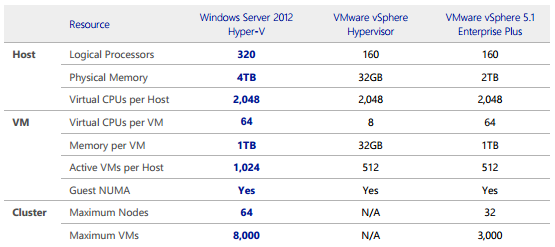
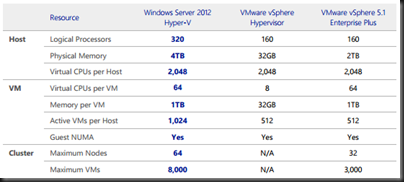
Microsoft made a huge investment in WS2012 Hyper-V to achieve these scale up/out numbers; it wasn’t just a matter of editing some spreadsheet.  For example, you can’t just let a VM have lots of vCPUs; you need to make the VM’s guest OS aware of the NUMA of the underlying hardware, which is what Microsoft has done.
image

vSphere 5.1 Enterprise supports up to 32 vCPUs in a VM.

Hyper-V scales out to over twice the cluster size/capacity of vSphere.  A host can have twice the number of VMs and physical RAM.  That’s makes Hyper-V much more scalable for public/hosting and private clouds.  And remember that ESXi free does not include Failover Clustering; you must have vSphere to have failover (application up time).

I haven’t seen best practices, but I’d probably want the equivalent of 4 failover hosts in a 64 node cluster.  I’d really have all 8,000 VMs balanced across the 64 nodes, but there would be the equivalent of 60 nodes active.  That would mean there would be 133-134 VMs on each host in the cluster.  That’s quite dense.

Expect some FUD that goes like “having 133 VMs on a host is too risky”.  In fact, I’m already seeing that.  OK, I dare VMware to reduce their max specs down to a max of 20 VMs per host.  The fact is that you save money (hardware, licensing, power, space) by scaling up first, and then out.

You minimize risk by using guest clusters.  Speaking of which, WS2012 Hyper-V supports guest clusters with up to 64 nodes with iSCSI, SMB 3.0, and Fibre Channel storage.  vSphere maxes out at 2 nodes in a quest cluster that uses Fibre Channel storage.

You can choose which solution scales out to be the best enterprise or cloud solution.

Storage

A massive piece of the investment for Microsoft was storage, trying to scale out, offer new solutions, and to alleviate problems that exist in all sizes of business.
image

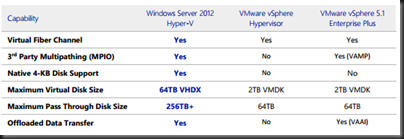
All versions of Hyper-V support guest MPIO by using the SAN manufacturer’s own DSM/MPIO solution, just as they would with a physical server, but by using NPIV.  vSphere requires VAMP, a feature only in Enterprise and Enterprise Plus.

In a cloud, you need scalable (for big data) and flexible storage solution.  Using passthrough or RDM disks is an oxymoron in the cloud because it completely removes the element of self-service.  Microsoft’s VHDX scales out to 64 TB whereas the VMware VMDK is limited to 2 TB.  The Hyper-V VHDX is more suited to bigger applications.

VHDX is also the only 4K aligned virtual hard disk.  That has a big impact on storage performance, and therefore the performance of guest services/applications.

And don’t forget that hackers now have a way to use the architecture of VMDK to break out from the guest OS, something that is a genuine threat in hosting or cloud computing (FACT).

Even though Hyper-V has the edge on physical LUNs, I’m going to ignore it because I hate passthrough/RDM disks.

ODX greatly reduces the time required for file operations on compatible SANs.  It is supported by all versions of Hyper-V, but only in the Enterprise/Plus editions of vSphere 5.1.

Enhanced Resource Management

There is some text in the MSFT document but it there’s so little difference here that it’s negligible.  The memory optimization approach is one of:

  • Do you prefer memory over-commitment where you sacrifice performance of VMs by blindly paging at the host level when there is contention and the host must provide the promised memory to VMs (vSphere)
  • Do you allow VMs to scale up/down their memory based on demand but only offer what the host/cluster has to provide, thus not blindly paging (Hyper-V)

In a cluster, both systems will Live Migrate/vMotion VMs to more suitable hosts so it’s up to you if you want to split hairs on this subject.

The only other difference is QoS for networking.  It’s in all features of WS2012 Hyper-V and only in the Enterprise Plus version of vSphere 5.1.  That impacts the ability to do converged fabrics with SLA when you don’t have DCB enabled networking.

Virtual Switch

This is the virtual device that maps VM virtual network cards to the physical/virtual network.

image

Hyper-V has a clear advantage.  Microsoft probably had the advantage here because they did come at this later in the game.  Looking at how they designed the virtual network (previous to the virtual switch) in Hyper-V, you can see that there was a long term vision.  The new virtual switch is a layer 2, programmatically managed device with lots more functionality than was in the older virtual network.

One of the key features is extensibility.  Rather than replacing the virtual switch, we can stack third party extensions on the switch.  VMware has 2 partners 3 partners, including the heralded Cisco solution, that replace the VMware virtual switch.  Cisco has 2 solutions for WS2012 Hyper-V.  We already know of solutions from 5Nine, NEC, and InMon, and I’ve heard whispers of more (no; I won’t share).

Note: I was informed soon after posting that VMware “recently added a 3rd partner for their ‘disposable switch’”. Heh … a dinosaur like IBM (who still thinks Lotus Notes is king of the email world) with dreadful support as a partner.  Make of that what you want Smile

Through the chart, you can see that Hyper-V has more functionality, and it is built-in, ready to use, with no additional licensing.  vCNS is an additional purchase in the vSphere Enterprise Plus (already the most expensive virtualisation around) world.

Network Performance Enhancements

More work went into this by Microsoft, to improve existing features and to also make the most of new available hardware.

image

VMware does offer DVMQ functionality (the ability to process VM networking across multiple physical processor cores, scaling up and down to meet demand), but it is only on “some” 10 GbE NICs.  Microsoft supports DVMQ on any NIC with DVMQ functionality in the hardware/driver, including 1 GbE.

IPsec if a CPU hungry network security feature that you can enable in your VM guest OSs.  Anyone who wants network security for their applications will want to turn it on.  Only WS2012 Hyper-V supports offloading IPsec to dedicated functionality on the NIC, thus saving CPU cycles for the applications that are running in the guests.

SR-IOV bypasses Management OS (host) networking for virtual machine traffic handling, thus reducing CPU overhead and reducing latency.  vSphere does have SR-IOV support, but only in the distributed virtual switch which is only in vSphere 5.1 Enterprise Plus.  However, you might give networking performance to a vSphere VM using SR-IOV, but you sacrifice vMotion.  Hyper-V does not include features that prevent Live Migration.  SR-IOV can be turned on for a VM, and it can be Live Migrated thanks to a clever zero-downtime switching process that does not assume that the destination host supports SR-IOV.

Security

My cousin works in the IT security world, often doing some very weird things.  When I first got into virtualisation, he had an interesting observation: Virtualisation assumes you have amazing physical security and you can trust your operators.  VHD(X) and VMDK are portable, therefore being easy to steal or copy.  That means that data in the computer room is easier to steal than ever.

Windows Server 2008/R2 Hyper-V supported BitLocker (AES disk encryption) on non-clustered hosts.  That means the data is only visible to anyone who can log into the hosts.  You can steal those disks all you want; if I have a backup then I can recover and you’ll have no access to my encrypted VHD(X) files and the data contained within.

WS2012 Hyper-V supports encrypting clustered disks too.  That means everything in a CSV can be safely encrypted when I have a cluster in a location that I can’t entirely trust, or if I just want to be sure.

Enterprises value data security, right?

VM Mobility

WS2012 Hyper-V has the ability to move VMs anywhere between WS2012 Hyper-V hosts/clusters in the same domain with:

  • Live Migration – aka vMotion
  • Live Storage Migration – aka Storage vMotion
  • Shared-Nothing Live Migration

vSphere 5.1 has done some catch-up to add Shared-Nothing Live Migration.

image

Hyper-V offers more flexibility, the number 2 reason (cost savings is number 1) for companies to adopt virtualisation, and a key requirement for a cloud.

Eric Gray, who poses as an independent blogger on his vCritical blog, but is actually a marketing employee of VMware working for their compete group, has tried in the past to belittle the simultaneous Live Migration features of WS2012 Hyper-V.  I had a read, and some of the commentators on the post called him out nicely.  I especially loved the one that said I was getting under the skin of VMware Smile

Eric, let’s teach you a little about enterprise virtualisation and cloud computing.  Big hosts have lots of memory and lots of VMs.  When an admin wants to do some host maintenance, they don’t want to wait a weekend while 2-3 TB of virtual machine RAM (the max physical RAM in a vSphere host is 2 TB) is synchronized to other hosts by vMotion.  Maybe we can limit it to 8 vMotions on 10 GbE.  But enterprise datacenters might want to use bigger networking.  I’ve happily hit a sweet spot of 20 VMs in my current lab setup.  I can see how it might be much bigger with more network capacity … in the sorts of large enterprise data centres that would embrace Infiniband.  Eric, you might be all about getting your customers to spend or waste more money, but Hyper-V’s ability to to vacate a host more quickly means that admins don’t have to wait around for a weekend when they need to change out some hardware and the company has less risk and less waste.

Fact: Hyper-V supports more simultaneous Live Migrations and offers more flexibility than vSphere 5.1.

Software Defined Networking

A multi-tenant public cloud (hosting) must support the migration of VMs and software defined networking (SDN).  This is a built-in feature in WS2012 Hyper-V.  VMware are playing catching by recently acquiring yet another point solution to add to their 1990’s style framework.  I don’t know if they’ve bundled this into anything yet, or how “integrated” it is beyond a rename.

High Availability

Bigger clusters = fewer units of administration = easier management = less overhead and cost.

image

The table says it all.

VMware FT (Fault Tolerance)

This is the old reliable that the Clint Eastwood’s of virtualisation rant about to an empty conference room chair when trying to deny Hyper-V and every other fact has them befuddled.  FT is nothing but a chocolate kettle; it’s nice to look at but totally useless:

  • 4 FT VMs per host with no memory overcommit: expensive because of low host density
  • 1 vCPU per FT VM: Surely VMs that require FT would require more than one logical processor (physical thread of execution)?
  • EPT/RVI (SLAT) disabled: No offloaded memory management.  This boosts VM performance by around 20% so I guess this FT VM doesn’t require performance.
  • Hot-plug disabled: no hot adding devices such as disks
  • No snapshots: not such a big deal for a production VM in my opinion
  • No VCB (VSS) backups: This is a big deal, because now you have to do a traditional “iron” backup of the VM, requiring custom backup policy, discarding the benefits of storage level backup for VMs

DR Replication

Hyper-V has Hyper-V Replica for free.  VMware now include some sort of replication that I know zip about.  SRM does the vSphere orchestration.  As for orchestration of Hyper-V Replica, I can easily do that in just a few lines of PowerShell code for Hyper-V Replica.  I know a certain book that will teach you all about that.  Otherwise, System Center 2012 SP1 will do what you need if you require a GUI.

Beware the FUD on this one.  The vFanboys are all about the orchestration right now and they are quite simply wrong because I can orchestrate Hyper-V Replica right now.  In fact, I can do some really nice things with it, which I’ll be happy to share for the cost of a book in the new year Smile

Cost

No competition here.  Hyper-V is free.  If you run Windows Server in your VMs then you’re already buying Standard or Datacenter edition at the host level and using the virtualisation rights.  If that’s not how you’re doing it then please send me your company/customers name(s) so I can make some easy money.

You can learn how to license Windows Server VMs legally using my recent post.

That means you get all of what Hyper-V does for free.  Choosing to run vSphere 5.1 with Windows Server VMs means you are adding the cost of vSphere.  OK, but for less than that cost I can license myself for a System Center SML and have all of System Center’s private cloud and integrated enterprise systems management functionality.  Of course, you can choose to spend more money for a collection receently acquired confusing VMware point solutions.  But that’s just my opinion of it.

EDIT: Scripting

WS2012 Hyper-V has complete PowerShell support, an easy to pick up (I only started in March) high level scripting language.  You can do just about everything in PowerShell, enabling easy and rapid deployment or configuration change without rampant time consuming and mind numbing hammering of a mouse.  You can do PowerShell CLI or scripting, with lots of error checking and decision making built-in.  I’ve been showing consultants in my crash course classes how they can take a few scripts from client site to client site and rapidly deploy customers with very little tweaking/engineering.  And I know a certain book … Smile

vSphere does have a CLI.  I had to Google it.  I never hear it being talked about.  I know nothing about it other than it looked very basic compared to the power of PowerShell in my quick glimpse.  Yes, there’s an API, but that’s for software developers, not consultants, engineers, or administrators.

I have to give a significant decision in favour of WS2012 Hyper-V here because of the ability to rapidly change or manage an environment with a few or with thousands of virtual machines from a single line of PowerShell.

Summary

The facts speak for themselves.  WS2012 Hyper-V does more, scales out more, is build as the foundation for an enterprise cloud, and is effectively free.  You can go ahead and use vSphere 5.1 if you want, but why would you wan to pay more for less?

Please read the original Microsoft document that I took the tables from where you will find much more detail.

EDIT:

You’ve read what I have to say. Now go take a look at what Gartner thinks.

8000 VMs Per Hyper-V Cluster

Yup, that’s what Jeff Woolsey (overall PM for Hyper-V) said in the launch videos.  We can now have up to 8,000 virtual machines in a Windows Server 2012 Hyper-V cluster.  That’s double the 4,000 that was previously announced for the RC release.  I guess the clustering group got some new toys to play with Smile

What will VMware think of this?

Mike Resseler (Cloud and Datacenter MVP) tweeted:

image

I responded:

image

Rumour was that up to a month or two ago, VMware’s field offices were ignoring WS2012 Hyper-V.  I guess VMware’s people look something like this picture this afternoon:

VMware choking on their own FUD

Hey Tad Eric Grey, did you see 120 virtual machines live migrate at the same time?  Wow, but you think 8 VMs is enough.  How long do you think it’d take to put a vSphere 5.1 host with 1TB RAM into maintenance?  In a real Fortune 500 data center, I’d guess they’d be using big fast Infiniband networking.  8 vMotions at a time over that might take a while, eh?  But who’d want that?  IT from the year 2000 should suffice. 

VMlimited marketing meeting

I’d hate to be the short sighted fool to blog today that Windows Server 2012 Hyper-V was only fit for SMEs.

I’m having way too much fun with this.  What a nerd!

Technorati Tags: ,,

Easily Convert Your VMware Virtual Machines to Hyper-V Using Virtual Machine Converter Solution Accelerator

The Microsoft Virtual Machine Converter Solution Accelerator is RTM and available to download.  This will allow you to easily convert VMware vSphere 4.1 and 5.0 virtual machines to Windows Server 2008 R2 and Windows Server 2012 Hyper-V virtual machines.  MVMC also supports conversion of virtual machines from VMware vSphere 4.0 if the host is managed by vCenter 4.1 or vCenter 5.0.

The Microsoft Virtual Machine Converter (MVMC) Solution Accelerator is a Microsoft-supported, stand-alone solution for the IT pro or solution provider who wants to convert VMware-based virtual machines and disks to Hyper-V®-based virtual machines and disks.

Converts and deploys virtual machines from VMware hosts to Hyper-V hosts including Hyper-V on Windows Server® 2012. As part of the machine conversion MVMC converts the virtual disks attached to the source virtual machine. It also migrates configuration such as memory, virtual processor and so on from the source virtual machine to the converted virtual machine deployed on Hyper-V. It adds virtual network interface cards (NICs) to the converted virtual machine on Hyper-V.

Offers fully scriptable command-line interfaces for performing virtual machine and disk conversions that integrates well with data center automation workflows and Windows PowerShell scripts.

Has a wizard-driven GUI, making it simple to perform virtual machine conversion.

Uninstalls VMware tools prior to conversion to provide a clean way to migrate VMware-based virtual machines to Hyper-V.

Supports Windows Server guest operating system conversion, including Windows Server 2008 R2, Windows Server 2008 and Windows Server 2003 SP2.

Enables conversion of Windows® client versions including Windows 7.

Installs integration services on the converted virtual machine if the guest operating system is Windows Server 2003 SP2.

So why stay VMlimited?  Start converting now to a true enterprise and scalable private cloud based on Windows Server 2012 Hyper-V.

Technorati Tags: ,,

It’s Easy To See That VMware Is Scared Of Hyper-V

Not only are they reversing the virtual RAM vTax that “would have no effect” on customers and help them to “right-size their clouds” but now their marketing mouthpiece is saying that concurrent live migrations are bad. LMFAO Smile

I love that he tries to make a point that the default maximum live migrations is 2, and that it must be sooo hard to change that number in the GUI.

This is a last grasp at trying to score points that only the most blinkered fanboy could agree with makes Novell Netscape VMware look really bad.  I love it Smile

And don’t forget, VMware storage is insecure too.

Hey Eric, while you’re blogging, can you let the VMware customers who paid memory vTax over the last year to right-size their clouds know how they can get a refund to return to their “VM sprawl” once again?

EDIT:

I just realised that by reading that post, VMware seem very unsure of using vMotion to migrate VMs with production workloads. Oooh, is vMotion that fragile?  I guess it might be seeing as it is allegedly based on Legato Replistor code and we all know how reliable Replistor was … oh .. right … it wasn’t that reliable at all.  Don’t worry vFanboys, Live Migration always leaves your VM running, even if something bad happens.  No bridges are burned; If the VM can’t migrate, it stays where it originally was, completely unharmed and uninterrupted.

Technorati Tags: ,