First Impressions of the Windows 8 Slate … with Hyper-V

I have powered up the Build Windows slate PC that is running Windows 8.  It features a 64 GB SSD, 4 GB of RAM, and an Intel i5-2467m dual core CPU (with Hyperthreading enabled).

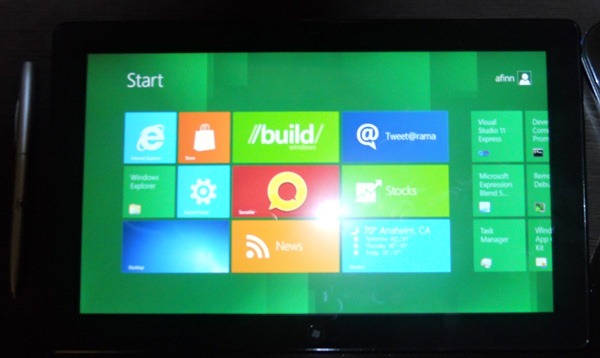
It does boot up near instantly thanks to the new Windows 8 fast boot and UEFI hardware.  The setup was pretty simple.  Navigation takes a couple of minutes to get a grip of (the dark bits of the screen are where you swipe for Charms or to go back).

DSCN8176

The pen at the side gives you a sense of the size of the machine.  It is around 10 mm thick.

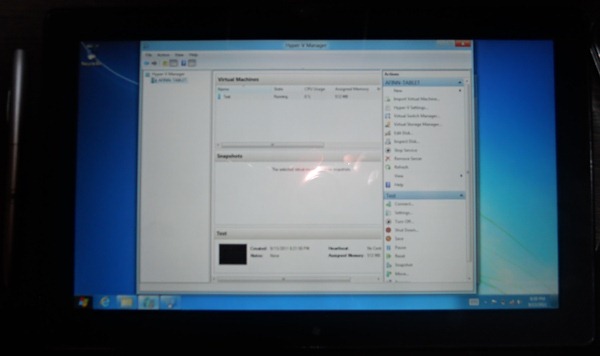
A pressing question: can you enable Hyper-V on this hardware?  Yes.  A picture paints a thousand words:

DSCN8177

Here I have a single VM running on an external virtual network that is natively connected to the wifi NIC.  No more manually mucking around with bridging, or proxies!  Dynamic Memory is also enabled.  The SSD only gives you 54 GB of usable storage, with 36 GB free, so there won’t be too many VMs installed on this machine.  I don’t see a way to open the case so I guess I won’t be upgrading the SSD anytime soon either.  But … it’s a pretty nice machine that might put my iPad to rest for a while.  We shall see in the coming weeks and months!

Technorati Tags: ,

Why So Angry?

I was reading some tweets and Facebook posts, and then I saw this tweet by Paul Thurrott:

Haters come crawling out of the woodwork when they feel threatened. I find it both funny and sad.

There are a lot of Apple fans out there who really want Windows 8 to fail.  They are taking every opportunity to criticise something they’ve only seen on a webcast, or maybe only seen screenshots of.  I’m too jetlagged to bother much with them.

I’m a big Windows nerd.  But I’m not even 100% convinced that it’s right – yet.  I’ll find out in about 1 hour when I try the developer preview build for the first time

The way I see it, Microsoft are making the right moves.  A touch first GUI has been needed for a year.  Windows 8 does what the iPad does, but it does more.  And if the last 12 months has taught us anything, Office is uber important.  It sells sells sells.  And business are buying it because of features that are being used.  Windows 8, “Office 15”, and “SharePoint 15” all share a dev platform in Javascript and HTML5.  I know that business software developers will love that.  They sure liked it in the auditorium.  Having a common platform like that just makes business app integration so much easier.

Anyway, we haven’t even seen the business side of Windows 8 yet, and we have yet to see the Server stuff.  I’ll be focusing on Hyper-V and private cloud sessions.  There’s so much IT Pro content, I reckon I’ll be watching some on video on the flight home.

Technorati Tags:

Download the Windows 8 Developer Preview

Steven Sinofsky posted that Windows 8 will be available for download tonight at 8pm (PST) or 4am Dublin/London time.  This will be for x86 and x64.  The ARM release won’t be for some time.  Be aware that a lot of people are going to want to download this developer preview; the download site is going to get hammered.

A few points about this release:

  • It is a developer preview.  It is pre-beta.  This is the first general public test build and there will be bugs. In fact, they want you to find and report those bugs.  This build should not be used in production.  Some of us geeks will use it on our primary PCs …  but we should acknowledge that there will inevitably be issues.  That’s the nature of this type of release.  I wouldn’t criticise it.  This is the same process we had with Windows 7 and that worked out very well.
  • This is a very different OS.  Read my earlier posts where I talked through a lot of stuff.  I also recommend a post that Paul Thurrott just blogged.  It’s a glossary of terminology and changes.

As an IT pro, I think it’s important to start learning a new OS as soon as possible.  The final product will be different; some features may be added or even withdrawn.  But the sooner you start to learn, the easier any future implementation or migration will be.  And to be honest, the more bugs we log, the better the product will be.  Sinofsky did say today that the focus for Windows 8 was on quality, not on schedule.  The last time I heard that was Windows Server 2003.  I personally believe that was a great release.  Here’s hoping!

Technorati Tags:

Build Windows 2011: 8 Traits of Great Metrol Style Apps

Speaker: Jensen Harris

The Start Screen is very personalized. It is a huge opportunity for developers to create apps to fill that space. Windows Store is not available in the developer preview. The apps that will succeed and earn lots of money will be good Metro apps.

BuildAuditorium

1) Metro Style Design

The Metro style app has “less chrome” than the traditional MMC style app. Think of the silhouette. Things should be spaced identically as you move between apps. There is a lot of emphasis here on UI design and aesthetics. I can’t say I’ve heard this from MSFT before, but I’m not a dev.

Get rid of the scroll stuff, etc, where you can. Example of exception: Photoshop requires it. It is a tool. Basically you make better use of the pixels so content can be better displayed or has more space.

Left and right edges are for system UI. Left edge is for “back”. Right edge is for “charms”.

The UI was designed based on the comfort of the reach of peoples hands (they got people with different sized hands to finger paint with their thumbs based on levels of comfort and then measured hands to scientifically design). That’s where the touch first concept comes in. This is why system UI features are on the sides. That’s why there is a split virtual keyboard (one of the options).

Needless lines are gone. Navigation bits are gone. Commands are moved to the App Bar. Anything like a charm moves to the Charms bar. All that remains is content, which is re-aligned to a grid, leading with a pleasant or descriptive image. Content leads the way.

2) Fast and Fluid

Touch is direct and feedback is visceral. App lag is not acceptable with this UI.

Interesting comment: we already use mouse for touch. We point, we hold and drag, etc. However, multi touch is actually a quicker. It offers more because we have two hands VS one mouse.

Touch commands need to be consistent, restricted in number, feature direct manipulation, be reversible, a limit the number of timed gestures (e.g. hold something for x seconds).

Semantic Zoom is used not just for zooming objects but also for navigation, e.g. zoom out the Start Screen and scroll a small distance, and select or zoom in again. Should be a feature of apps as well.

Don’t create a different UI for mouse/keyboard. Many of the lessons are transferable. And screens with touch will be the norm in a few years. Apps should be ready.

Snap and Scale Beautifully

Beware of different screen sizes for scaling. Really high DPI screens are on the way as the norm. Devs need to design for small screens, current large screens, and future high res/DPI screens (100%, 140%, and 180%).

Smallest res you need to support is 1024*768. Widescreen is 1366*768 and gives side by side. The app is required to have snap and portrait views. Snap is when the app is taking up just 1/3 or 1/4 of the screen. It’s a condensed view of the app in side-by-side.

Contracts
They are the glue that bind apps together. Two apps that complete a contract can work together to complete a scenario. The contract shows up as a Charm. You should enable sharing from your app. Not every app should be a target – relevance. Social and collaboration apps are good targets. The search contract allows your app to be searched from the search UI. This allows content to be searched and filtered via its UI.

Note that apps like Photo will include content from many sources such as online or network/homegroup. I LIKE that. This is via a Picker Contract. Files stay in their source location, rather than locally cahced "turds" of files clinging on.

Tiles
Icons are yesterdays non interesting and not alive ways of representing apps. Tiles are much more, alive and informing. They represent and should draw in the user. They should make the app interesting. Or like weather, they should tell you enough that you can avoid going in there needlessly. They are an extension of your app. You can publish results or features of apps as tiles on you Start Screen, e.g. weather for a city, a stock, a social network contact.

Windows is Alive With Activity
This is about bringing the activity of the net into Windows. It’s not a static screen full of icons. Live Tiles and notifcations is the concept. A tile is updating, refreshing, scrolling between recent events, etc. More alive tiles will be featured on the first page of the Start Screen. There are no folders like on IOS. Hides apps and hard to name. Instead we have groups. Groups don’t have to be named. Don’t use ads as the live content. Users will place those at the back.

Notifications allow an urgent message to popup. There isn’t a system tray. The notification appars in bottom right. Will disappear after a certain time. User can hide it. User can disable all notifications. Apps should be silent by default, and users can opt-in for notifications. Notifications are interruptions, so be polite.

Roam to the Cloud
When you leave an app, it should be the same when you come back to it. You should never have to replay a level of a game, even on a different device. When you change a setting, you shouldn’t have to change it again. Same experience across all of your devices. The cloud is what makes this possible: Live ID. Every app gets limited storage for settings and user data.

Embrace Metro Principles
– Price in craftsmentship

– Be fast and fluid

– Authentically digital

– Do more ith less

– Win as one

Build Windows 2011: Keynote

Live from Anaheim … it’s Build Windows!  Ok, not so live, but I reckon reading this might be easier than getting a migraine from reading a #bldwin feed on Tweetdeck.  There’s 14 minutes to go (as I write this introduction) and my laptop is having a seizure trying to keep up with the tweets.

Note: CNET posted some leaked photos/videos of a Samsung slate PC that we delegates are supposed to be getting.  Nice!  Won’t believe it until I see it.  It’s a £999 i5 with 128 GB SSD and 4 GB RAM.

The stage has two desks.  One is the typical facing the speaker desk for demos.  The other is facing the hall and features a series of PCs and “devices” that appear to be running Windows 8.

The pre-keynote video has started.  Lots of talk about the easy to use GUI, managing _apps_ (not applications), and integration of Windows Live with login – imagine Live as your domain!  New lingo: Start Screen is the first thing you see when you’ve logged in (Metro UI).  The video was a teaser .. the show “starts soon”.

Out comes Steven Sinofsky, the man in charge of Windows.  Today is the launch of a “new opportunity for developers” to make the most of PCs no matter what size or shape.

450,000,000 copies of “Windows 7” sold (SA included).  Consumer usage is greater than XP, as of today apparently.  542,000,000 signing into Windows Live.

Changing World of Computing

Very different since 1995, the last major overhaul of Windows.  Lots of new form factors.  Whoah,,,, Sinofsky just said “we call them Windows tablets”.  Slip?  They’ve always said Slate PCs.  Once you try touch, you want touch on all your devices.  Once you try touch on Windows 8, you’ll want it.  Now you want devices that you use while carrying, rather than carry to then use.  Developers want richer connectivity and sharing capabilities.  And services are intrinsic of all software.  Apps connect to some back end for some reason, either to consume or to share information/data.

Windows 8

Took Windows 7, and made it better.  Everything that runs on Windows 7 should run on Windows 8.  They have “re-imagined” Windows from the ground up, including ARM chipsets, tablets, and touch.

Note: power of this statement is that MSFT can support lots of varied hardware, allowing some very unique or niche business implementation.  Windows = flexibility.

Demos

  • Windows 8 experience – GUI
  • Metro style platform and tools – development
  • Hardware platform – devices and form factors
  • Cloud Services – Windows Live

Delivering Fundamental Performance Gains

Bloatware?  he holds up a 3 year old netbook with 1 GB RAM and atom CPU that was used in PDC 3 years ago.  It is running Windows 8.  He demos it now.  Task Manager from Windows 7 is shown.  Then Windows 8 is shown.  The new one is using the CPU less and only 281 MB RAM (versus 404 MB).  It is also using 3 less processes (32 down to 29).

Windows 8 Experience

Julie Larson-Green comes out.  We get a lock screen like on WP7.  That’s a good add; it shows some quick highlight info about your status.  We get a demo of a picture password – no keyboard, you touch key points of the screen.  The start screen is the heart of the GUI.  It is tile based like WP7.  You can slide left and right.  Each tile = an app.  Each tile displays current info from that app.  You can do the usual pinch to zoom in and out.

Meanwhile: “Starting at 8PM today, Seattle time, you can download all of the code that attendees at BUILD received. This includes 32 or 64 bit x86 builds, with or without development tools. The releases also include a suite of sample/SDK applications and the SDK (please note these are merely illustrations of potential apps, not apps that we intend to ship with Windows 8). The ISOs are linked to from http://dev.windows.com. You download with a Windows Live ID (which you might want to use to test out some of the new roaming features)”.

Ohh XBox Live appears to be built in, just like with Windows Phone 7.  We see a news app and how you can read using scroll.  Then we see video play and how to use touch and swipe to manage it.  This is the same paragliding video as in the online video from a few months ago.  Now we navigate through a few apps, and dock a running app using the side-by-side feature (requires high res screen not on many slate PCs at the moment).  This docking shows of Windows multitasking.

IE9 is metro based.  It has the touch interface, bringing it up with the competition.  There is no “window”.  Sinofsky cracks a “chrome free browsing experience” joke.  Delayed laugh as people get it.  Selecting text looks smoother than I’m used to on iPad.  You can pop out “charms” (new lingo) on the right to get your app to do other things, like interact with another app, e.g. select text and IM it to a friend.  Apparently the apps can use “contracts” to do this.

Spell checking has been added to all of Windows now, apparently.

Search is up next.  This is kind of like the iPad experience.  You can search the local device, or expand into Bing.  I guess that can be changed using a plugin to keep the DOJ and the EU happy.  We see how internet searches can be filtered, e.g. Tweets … might be something to do with a recent search contract between MSFT and Twitter. 

We see how pictures are presented.  Kind of like Media Center scrolling.  We can browse photos on the cloud too.  I wonder if Flickr will integrate?  It would be a good move.  And we just saw a tweet from Windows 8 with no apparent Twitter app. 

We see an unmarked ARM based tablet with the whole touch interface, and we can see that the changes that were made on the first demo PC are synced via the cloud (Live).

  • Fast and fluid: move quickly, touch/keyboard/mouse
  • Immersive and full screen.  It’s Windows with no windows.
  • Touch-first with full keyboard and mouse.  You choose the UI you want.
  • Web of apps working together
  • Experience for all PC devices and architectures: no compromises across new platforms: slate, PC, laptop, or tablet.

Building Apps for Windows 8

This is for the devs.  HTML, Javascript, C, C++, C#, and VB are the development languages.  I’ll leave it at that Smile  I’m taking a quick break from blogging while Visual Studio 11 is demonstrated.

Note: The press got a sneak peek of Windows 8 and some briefings over the previous weekend.

Nice demo of sharing a picture to a social website.  Again, it’s just by using a Charm.  The dev did this with 4 lines of code.

If you develop an app and want to sell it on Marketplace, you can give people an X day trial if you want.  Publishing an app is “like ordering pizza” online.  You can see the process and where your app is in it.

The marketplace is called Windows Store.  Designed to be simple.  There is a spotlight section to highlight new or noteworthy apps or themes (of apps).  Then you have app categories.  You can browse, search, filter (paid, free, etc), and sort.  Looks better than WP7 marketplace.  Looking at an app is like in iTunes: descriptions and screenshots.  The app is installed with a click.  Now we see Quicken, a traditional app, that is available on the Store.  You don’t have to rewrite apps for Metro to sell them on the Store.

They get across the “reuse your knowledge” message by showing a quick “port” of code to a Metro style Windows 8 app, and then get it running on Windows Phone 7.  Any HTML/Javascript/C#/XAML app will run on x86, x64, and ARM.

This could be a 400,000,000 market by the time Windows 8 launches.

Hardware Platform

Michael Anguilo

Battery life and fast boot are the big wants.  We have everything from slim ARM tablets to big powerful x64 workstations.  UEFI full boot is almost quicker than the fans in the PC or the monitor.  We see an in-market Windows 7 PC boot up Windows 8 in 8 seconds.  A UEFI machine checks the boot volume, and sees if there’s a root kit.  If there is, you are warned.  Defender gives built in anti-malware including antivirus. 

We now see some ARM hardware.  We can see a live power measurement of a “connected standby”.  It’s like it’s on but it’s not, saving power when not being used by the user.  Power on is like an iPad, and see the power jump up.  And you “power it off” the same way.  ARM Windows 8 looks just as fast to me.  We also see an Intel Atom tablet too.  Intel get some warm fuzzy love Smile  We are shown the new file file with USB 2.0 and USB 3.0 to get a comparison.  Now we see a ninja with water cooling and 3 Nvidia GPUs, with some massive computing power in the terraflop range.  This PC is friggin huge.  Everything in Windows has h/w accelerated graphics now, taken from the concept of IE9. 

16*9 screen ration is the way to go for Windows 8, e.g. 1366*768 for side-by-side, with no compromises.  You can use less than this, but you lose functionality.

In a tablet we see accelerometer and gyro for all sorts of interaction, e.g. games.  The demo app uses 3 lines of code for this.  The near field sensor (NFD) uses an antenna to allow a tablet/PC to quickly interact with other devices or transfer data, e.g. a swipe card.  A lot of work done to improve the 3G wifi and hotspot wifi experience. 

The Intel Ultrabook can wake from sleep as quick as you can open the lid.  Core Intel processor and thin.  We see a Toshiba super light machine too, 2.5 lbs.  Toshiba had to put bumps in for RJ45 and VGA connectors because it is so slim.  A slate is opened, and we can see the battery is bigger than the computer by about 10%.

Samsung slate machine is shown.  We know about the CNET leak by now …. waiting … waiting … 5,000 of them were made to share with the delegates Smile

  • i5 CPU
  • 1366 *768 display
  • UEI BIOS
  • 4 GB DDR3
  • 64 GB SSD
  • Sensors,USB, micro SD, HDMI, Pen
  • Dock w/ USB, HDMI, Ethernet
  • 11.6” diagonal, 909 gram, 12.9mm thick

Images with the developer preview of Windows 8, tools, and recovery environment.  Can run dual monitor from the dock, which also charges.

Integrated support for a broad range of new mobile peripherals.

Professional Platform

Dual monitors, mouse, keyboard, etc.  Is Windows 8 still relevant?  Yes.  You can enter a PIN to log in.  On the lock screen, there is a subtle warning about when your machine will reboot to install updates.  We see the whole Metro UI via mouse.  A new Task Manager is shown by Sinofsky.  It looks like a SysInternals tool.  Much more information right up front.  Processes is finally the first tab.  The Windows Key allows you to snap between Explorer (old Windows UI) and the Start Screen.

You can refresh your PC to reset the OS.  The PC settings will be reset.  You apps and data are kept.  Nasty plugins and toolbars are bye-bye.  It’s like a factory reset that keeps your customisations.  You can prep your machine, and baseline it too.  That’s now a reset point.

Windows Assessment Console is like a more usable perform.  You can compare a machine from one baseline to current, or one machine to another. 

There is a Metro style Remote Desktop app.  The demo remotes into the Start Screen of another PC.  Touch is available over RDP.  Remote Charms are available, and you have a virtual keyboard too. 

Hyper-V on the client … requires a SLAT capable x64 processor.  Dynamic Memory is there.  We can mount an ISO or a VHD file in Explorer. 

Big applause for the addition of an “up” button in Windows Explorer to help us bypass the dreaded breadcrumb trail.  Your desktop background can span multiple monitors.  Needs some big megapixel pictures!!!  You can make apps in monitor 2 showing in the taskbar on monitor 2.  Quite clever.  New instances of an app appear in the same window as the current one.  The Start Screen appears on your main monitor.  Explorer appears on the other screen.  I must admit that this is peculiar looking.  You can just type CMD to search for CMD.EXE.  Already seeing my first desired change request on the right-click to elevate.  CTRL K to clone an IE10 tab, CTRO T to create a new tab.  You can go to the traditional desktop frame (window) in IE 10.

There are different styles of virtual keyboard for tablets, and there is an ink interface that knows the difference between a pen and your hand.  You can sync your PC settings using your Live ID.  This is a welcome feature of the OS.  An app can request to roam its settings.

Cloud Services

Chris Jones to talk about Windows Live for Windows 8.  They rewrote all of their apps for Windows 8 Metro UI.  All of your mail accounts can be visible in one place.  Metro style calendar looks really nice.  Might be the best I’ve seen yet.  Very clear.  Shared calendars appear here too.  It has a connected address book, like on Windows Phone 7.  LinkedIn, Facebook, home email, all contacts appearing in one place and merged.  Photos is a cloud powered app.  It appears to know about SkyDrive, Facebook, and Flickr because they were configured for Live, not just for Photo.  The nice Metro UI allows you to browser through all of them.  I like this (being an amateur photographer).  I wonder if/how they will merge this with Windows Home Server?  Wow, he traverses firewalls to browse photos on his work PC via the Live cloud.  No sign-ins in the demo.  The charms process makes it a snap to select and email photos.  Sinofsky pushes the idea of the devs leveraging SkyDrive storage.  SkyDrive browsing of remote files is handy.  Any Live ID connected device can be browsed.  Security officers: you can crap yourselves now Smile

A photo is taken on WP7.  It is connected to SkyDrive.  The photo is now (supposed to be) visible on a PC (demo Gods didn’t smile). 

The Live stuff isn’t being released yet.  Understandable; they’ll have to wait for Windows to reach a certain stage before they can code/test for it.

There are hundreds of other features we didn’t see today. 

Windows 8 Developer Preview –> Beta –> RC –> RTM –> GA.  More updates along the way.  Same path as Windows 7, which worked very well.  The project is “driven by quality, not a date”.  The developer preview will be updated as it goes along.  We get bug and security fixes, and MSFT gets to test their update mechanism. 

Developers: Windows 8 is not a secret now.  It is up to you to stay relevant with your customers.  Keynote over.

Now I want to know if I can get VLC and Kindle to work on Windows 8 for my plane ride home next weekend.  The challenge to Microsoft: keep my iPad powered down Smile
Technorati Tags: ,

Press Release by The Great Big Hyper-V Survey from #bldwin on Windows 8 Replica

The following press release has just been posted on The Great Big Hyper-V Survey site … oh yes, we now have a site Smile

Build Windows Conference, Anaheim, CA, 2011: Hours before the keynote to announce the features of Windows 8, The Great Big Hyper-V Survey of 2011 has released its findings. The results related to disaster recovery and business continuity were of great interest:

  • Over 73% of organizations do not replicate their virtualized IT and application infrastructure to a secondary site for disaster recovery.
  • Over 91% of respondents were already greatly interested in Hyper-V Replica.

The Great Big Hyper-V Survey was conducted by three Microsoft Valuable Professionals (MVPs), Aidan Finn (Virtual Machine) in Ireland, Hans Vredevoort (Failover Clustering) in The Netherlands, and Damian Flynn (Virtual Machine) also in Ireland. It asked a series of questions to determine how people deployed Microsoft’s enterprise virtualisation technology and IT/application management solutions.

“It is clear that many small to medium business acknowledge the need to protect their business against a disaster”, said Aidan Finn. “Disasters like those in New Orleans can damage a larger business, but they can destroy a smaller one. The issue has been the complexity and cost of implementing the technology for a business continuity solution. The demonstration of Windows 8’s Hyper-V Replica has generated a substantial amount of interest because it takes advantage of virtualization’s decoupling of the application from hardware, not to mention that it will be a built in feature of Windows Server at no extra cost”.

It is expected that more details of this solution will be announced this week at Microsoft’s Build Windows Conference in Anaheim (CA) and in the coming weeks and months.

The findings of the Great Big Hyper-V Survey can be found at www.greatbighypervsurvey.com.

This press release can be downloaded from here, a report is available for download. You can also download the raw data.

Blogging For IT Pros Here at Build Windows #bldwin

In case you’ve been hiding under a rock over the past 2 years, Windows 8 is on the way.  There’s been no end of speculation as we get closer to the feature announcements and revelations at the Build Windows Conference in Anaheim (LA), USA, next week.  The hype has truly started, and the giddiness by geeks (like me) has been fuelled by the blog posts giving us little snippets of information.

Next week is when we Windows nerds go into overdrive.  Build Windows will be the venue when all sorts of Windows 8 information will be officially revealed to the public.  It’s primarily aimed at developers (replacing PDC) and hardware vendors, but it will also be the site of a bunch of reveals for us IT Pros.  The agenda is secret, and only a few of the speakers are publicly known.

I am lucky – I am going.  My job is to work with Irish Microsoft partners on System Center, Forefront, and virtualisation (Hyper-V).  And I am also involved in a lot of more general Windows work, e.g. working with partners selling Windows 7.  And the powers that be decided it would be good for business for me to go to Build.

There will be a lot of tweeting from people that are there, who are watching sessions online (keynotes streamed live, sessions online after 1 day), or who are re-tweeting.  I might do the occasional tweet but I figure the twitterverse will be flooded by #bldwin material, and it will be impossible to follow.  So my ambition is this: I am going to try blog as much as possible, posting session notes after each session.  That will mean I’ll have a (hopefully) easy to read and complete (as much as I can) set of notes.  I’ll be attending sessions that the IT Pro will be itnerested in – you won’t see much in the way of javascript from me 🙂 I know; some of you with blue badges are now worried.  Don’t be; I’ll be doing factual recording only.

You will be able to find all of my blog posts from Build here.

Technorati Tags: ,,

It’s Official: Hyper-V on Windows 8 Desktop

Steven Sinofsky just posted this:

“… we will support virtualization on the Windows client OS”

Now we’re cookin’ with diesel … as some rednecks say around here.

There is the first mention of .VHDX files (an alternative to VHD) and “Live Storage Move”.  On the latter he says:

“With this, you could move the VM’s storage from one local drive to another, to a USB stick, or to a remote file share without needing to stop your VM”.

And “you can also create large VMs with 32 processors and 512GB RAM”.

There is a video on the post about Hyper-V on Windows 8.

Windows 8 will natively support wifi NICs in the host machine by building in a bridging process similar to what we do manually now.

This is bloody great news for those of us who choose to use Hyper-V to demo, and for IT admins, devs, testers, and those thinking about app-compat via VMs.

78.68% of those surveyed will be very happy about this announcement.

EDIT#1:

Ben Armstrong later confirmed that Windows 8 Hyper-V would support sleep/hibernate.  Excellent!

Results & Report on The Great Big Hyper-V Survey of 2011

FIND THE RESULTS & REPORT HERE

I am pleased to present the results and a report on The Great Big Hyper-V Survey of 2011, that was conducted by myself, Hans Vredvoort, and Damian Flynn.  We conducted this report over the last few weeks, asking people from around the world to answer 80 questions on:

  • Their Hyper-V project
  • Their Hyper-V installations
  • Systems management
  • Private cloud
  • Their future plans

Note that this survey had no outside influences.  Microsoft found out about this survey by reading blog or twitter posts at the same time as the respondents.  I have deliberately chosed not to try get a sponsor for my report to further illustrate its independence.

Some of the results were as expected, and some of them were quiet an education.  Thank you to all who completed the survey, and to all who helped to spread the word.  And now, here’s what you have been waiting for:

  • Here is a report that I have written over the last 2 days.  I dig into each of the 80 questions, analysing the results of each and every question that we asked.
  • For those of you who want to dig a little deeper, here is a zip file with all of the raw data from the survey.  You will find reports and spread sheets with different views and selections of data.  I also created an additional spread sheet that was used to create the report.

Whether you are a sales person, a Hyper-V customer, a potential customer, or an enthusiast, I think there is something here for you.

Now the conversations and debates can begin.  Have a read of the report and then go over to see what Hans Vredvoort, and Damian Flynn thought of the data.  We have deliberately not shared our opinions with each other; this means we can all have unique view points, and possibly see something that others don’t.  For example, I work in the software sales channel with a background in consulting and engineering, Damian is an enterprise systems administrator/engineer, and Hans is an enterprise consultant.  We each have a different view of the IT world.  And after you read their opinions, it’ll be your turn: we want to hear what you think.  Post comments, tweet (#GBHVS2011), blog, or whatever.

Do the HP & RIM Tablet Failures Impact on Windows 8?

Considering the failure of HP’s WebOS powered TouchPad, and RIM’s Blackberry tablet, one could consider that there is no space for other contenders behind Apple’s iPad and Google’s Android OS.  I’m not sure that I agree.

The executives of HP and RIM were naive at best, and plain stupid at worst.

RIM’s tablet could do basic functions like email and calendar without being paired with a Blackberry phone.  That shrunk the market radically.  Version 2 would be better was the promise, then why the hell did you release version 1?  I listened to The Guardian’s Tech Weekly webcast last week and a RIM executive was being hammered by a fairly mild journalist.  Even RIM’s employees are rebelling against the morons who are drunkenly steering that ship.

Then over in HP land we have a who other class of maroon.  HP went and bought WebOS, the successor to PalmOS and declared to the world that it would be their tablet and phone OS.  Hello?  Is anyone there in 1996?  Is the Macarena still number 1 in the music charts back there?  WebOS went on “sale” and it turns out that no one wanted it.  The Pre3 phone was unwanted by any of the networks, and went on sale this week in Europe with no announcements.  Sales were so bad that HP terminated WebOS operations last night.

Where did it go wrong?  Both HP and RIM were convinced that they could use their corporate and government market penetration to drive huge sales.  There’s 2 issues with that.

Consumerisation of IT

The IT department is not driving the sale of tablets in the business.  IT admins hate supporting them because they don’t fit in with anything.  The end consumer is driving the use of the iPad at work; they want something friendly, light, and an experience that they can share with their friends/family.  Some stodgy business tool is not in their buying plans.

Applications

Imagine you bought a PC and could not run any applications.  How would doing business with Notepad work for you?  Not well, I’d expect.  But HP and RIM expected you to use their platforms with no app ecosystem.  They didn’t encourage an app developer community.  That impacts things generally.  But let’s dig deeper.

Are Microsoft Discouraged?

Hell no!  If anything, this proves something:  if the business is going to embrace tablet technology then they want an application platform, and they want it to be hardware agnostic.  If I develop and use some app on a Toshiba tablet, I want to make sure that my colleague in Paris that has a Sony tablet can work with me.  If I use a Toshiba OS and they use a Sony OS, then we cannot collaborate.  Sure there’s “the cloud” and web based apps, but we no that things aren’t really that simple; they should be but they aren’t.  And the PC isn’t dead; I sure don’t want to use a tablet 8 hours a day, 5 days a week.  If I run a PC then I also want to use the same apps.

Windows 8 accomplishes this.  It will be hardware manufacturer agnostic.  It will give us the same HTML5 and Javascript OS platform across laptop, PC, tablet, and even netbook.  Wave 15 (Office and SharePoint vNext) even will support HTML5 and Javascript.

I think (this morning) that true tablet PCs will go through an evolution process.  Evolution looks unkindly at specialists.  When the environment changes, the specialist dies out.  Windows is like a fox; it is a true generalist, found almost everywhere, always able to adapt because it runs on so many vendors hardware and platforms, and suits the needs of so many.

RIM’s and HP’s tablets were true evolutionary mistakes.  What I do find surprising it that the executives or designers of either corporation were deluded, drunk or stoned enough to think that either of these tablets had a snowball’s chance in hell to succeed.  If I was a shareholder, I’d be considering suing them for negligence and demanding my money back.

EDIT:

I should have wrapped this up.  I believe that if Microsoft doesn’t screw up Windows 8 on ARM, in other words, if it is good enough to keep users happy, then it’s manageability and it’s shared application platform with the PC will make it the winner in the business that HP and RIM desired and failed to achieve with their Dodos.

Technorati Tags: ,