Microsoft News Summary – 14 August 2014

There’s a new craze out there with famous people called the Ice Bucket Challenge. A person is dared to take a bucket of ice water over the head (and post the video online) or donate to charity, in in of of “raising awareness” of a disease called ALS. Nadella and Zuckerberg have done it. Gates has been challenged.

ADFS Authentication Via Azure

I’ve recently started doing lots of presentation on Azure thanks to the release of Azure via Open licensing. People wonder what the scenarios ate where an SME would deploy machines in Azure and on premises. Here’s one I came up with this morning (an evolution of one I’d looked at before).

I was chatting with one of my colleagues about a scenario where a customer was looking deploying ADFS to provide Office 365 authentication for a medium-sized multinational company. I wondered why they didn’t look at using Azure. Here’s what I came up with.

Note: I know SFA about ADFS. My searches make me believe that deploying a stretch ADFS cluster with a mirrored SQL backend is supported.

image

The company has two on-premises networks, one in Ireland and one in the USA. We’ll assume that there is some WAN connection between the two networks with a single AD domain. They have users in Ireland, the USA, and roaming. They want ADFS for single sign-on and they need it to be HA.

This is where companies normally think about deploying ADFS on-premises. Two issues here:

  • You need local infrastructure: Not so bad if you have spare license and hardware capacity on your hosts, but that’s not a given in an SME.
  • Your ISP becomes a risk: You will place ADFS on premises. Your office has a single Internet connection. A stray digger or ISP issue can put the entire business (not just that office) out of action because ADFS won’t be there for roaming/remote users to authenticate with O365.

So my original design was to stretch the network into Azure. Create a virtual network in an Azure region that is local to your Office 365 account (for example, an Irish O365 customer would deploy a virtual network in Azure Europe North). Create a site-to-site VPN network to connect the on-premises network to the Azure VNet. Then deploy an additional DC, in the same domain as on-premises, in the Azure VNet. And now you can create an ADFS cluster in that site. All good … but what about the above multi-national scenario? I want HA and DR.

Deploy an Azure VNet for Ireland office (Azure Europe North) and for the USA office (Azure USA East) and place virtual DCs in both. Connect both VNets using a VPN. And connect both on-premises networks to both VNets via site-to-site VPNs. Then create an ADFS stretch cluster (mirrored SQL cluster) that resides in both VNets. Now the company’s users (local, roaming and remote) have the ability to authenticate against O365 using ADFS if:

  • Any or both local on-premises networks go offline
  • Either Azure region goes offline

As I said, I am not an ADFS person, so I’ll be interested in hearing what those how know ADFS think of this potential solution.

Microsoft News Summary – 13 August 2014

Overnight, Microsoft released the August 2014 Update Rollup for WS2012 R2 and Windows 8. Lots of hotfixes!

KB2970215 – Microcode Update For WS2012 and WS2012R2 Running On Intel CPUs

Microsoft released a hotfix that includes a microcode update for Intel processors to improve the reliability of Windows Server. It affects Windows Server 2012 R2, Windows Server 2012 and Windows Server 2008 R2 Service Pack 1 (SP1). The fix also solves a reliability problem for Hyper-V running on Ivy Bridge, Ivy Town, and Haswell processors.

A supported hotfix is available from Microsoft.

Note hotfix for Windows Server 2008 R2 SP1 will be available in September, 2014.

This update reminds me of a similar update that was released soon after the RTM of W2008 R2 to deal with issues in the Nehalem CPU. Without the fix, there were random BSODs. I got tired of telling people, so called expert consultants, to install the fix. Note this fix, test it if you want to deploy immediately, or wait one month and then install it. But make sure you install it – set something in your calendar NOW to remind yourself.

KB2976884 – "Access denied error" When HVR Broker Goes Online In WS2012 or WS2012 R2 Cluster

A new KB by Microsoft covers a scenario where you get a "Access denied error" when Hyper-V Replica Broker goes online in a Windows Server 2012 or Windows Server 2012 R2 cluster.

Symptoms

Consider the following scenario:

  • You have a Windows Server 2012 R2 or Windows Server 2012 failover cluster that is in a domain, and the domain has a disjoint namespace. 
  • You set the primary Domain Name Service (DNS) suffix of the Windows Server 2012 failover cluster to the disjoint domain name.
  • You create a Hyper-V Replica Broker in the failover cluster, and then you bring the Hyper-V Replica Broker online.

In this scenario, this issue occurs, and an error message that resembles the following is logged in the cluster log:

Virtual Machine Replication Broker <Hyper-V Replica Broker BROKER>: ‘Hyper-V Replica Broker BROKER’ failed to register the service principal name: General access denied error.

The fix is included in the August 2014 update rollup.

KB2980661 – August 2014 Update Rollup for WS2012 R2 Added Tiered Storage Spaces Performance Metrics

This KB informs us that Microsoft added much needed performance counters to Windows Server 2012 R2 for monitoring tiered Storage Spaces. You can find more details here. The new perfmon metrics are:

  • Avg. Tier Bytes/Transfer
  • Tier Transfer Bytes/sec
  • Avg. Tier Queue Length
  • Avg. Tier sec/Transfer
  • Tier Transfers/sec
  • Current Tier Queue Length
  • Avg. Tier Bytes/Write
  • Tier Write Bytes/sec
  • Avg. Tier Write Queue Length
  • Avg. Tier sec/Write
  • Tier Writes/sec
  • Avg. Tier Bytes/Read
  • Tier Read Bytes/sec
  • Avg. Tier Read Queue Length
  • Avg. Tier sec/Read
  • Tier Reads/sec

Microsoft News Summary – 12 August 2014

Welcome to the SMB 3.02 edition of this update. Jose Barreto has been very busy!

Nanu nanu!

Microsoft News Summary – 11 August 2014

I think we can call today’s issue “What’s New in Azure”:

San Francisco 49ers Are Using Windows Tablets & Microsoft Surface

The San Francisco 49ers (an NFL or American Football team) are based in Santa Clara, California. Nearby you will find Cupertino, the HQ location of Apple. Also nearby, you will find Mountain View, the HQ location of Google.

image

What tablet did I see the 49ers using on the side line in a preseason game against the Ravens last night?

image

Let’s take a closer look:

image

Hmm, that’s not the Apple square button and it sure aint Android. The announcers went on to mention that the NFL has a sponsorship agreement with Microsoft Surface. Note the stylus? I reckon that’s a Surface Pro (not the 3 based on the shape). Apparently the league only allows side line tech such as this for analysing still pictures (a full field shot is taken just before and after a play starts for later analysis by coaches and players).

Previously a junior staff member printed out booklets of black and white photos and ran them to the coaches/players on the side line. That took at least 30 seconds. They must be a mess to use and keep organised. Now colour images (see above) are transmitted straight to the Windows tablets and presented in a tiled touch interface. You can see below that some coaches like the new system, and some do not:

image

Interesting to see a team such as the Niners, who have just built the most technology centric stadium on the planet in the shadows of Apple and Google, are using Windows and the Surface.

Technorati Tags: ,

Storage Spaces – Not Just For SMEs

I read a comment today that Storage Spaces was great for small/medium deployments. And yup, it is. I use Storage Spaces to store my invaluable photo library at home (a pair of Toshiba USB 3.0 3 TB drives). At work, we use a single DataOn Storage DNS-1640 24 x slot JBOD that is dual SAS attached to a pair of 2U servers to create an economical Hyper-V cluster. And we have sold 2U DataOn Storage CiB-9220 “Cluster in a Box” units for similar deployments in SMEs.

But most of our sales of JBODs have actually been for larger deployments. Let me give you an example of scalability using an image from my software-defined storage slide decks:

image

In the above diagram there are 4 x DataOn Storage DNS-1660 JBODs. Each has 60 x 3.5” disk slots. Using 6 TB drives (recently certified by DataOn) that gives you up to 1440 TB or just over 1.4 petabytes of raw storage. That’s with 7200 RPM drives and that just won’t do. We can mix in some dual chanel SAS SSDs (using 3.5 to 2.5 adapters) to offer peak performance (read and write).

In the above design there are 4 SOFS cluster nodes, each having 2 x direct SAS connections to each JBOD – 4 JBODs therefore 8 SAS connections in each server. Remember that each SAS cable has 4 SAS ports. So a 6 Gb SAS cable actually offers 24 Gbps of throughput.

Tip from DataOn: If you’re using more than 48 drives then opt for 12 Gb SAS cards, even if your JBOD runs at 6 Gb; the higher spec cards circuitry performs better even with the lower speed SAS disks/JBODs.

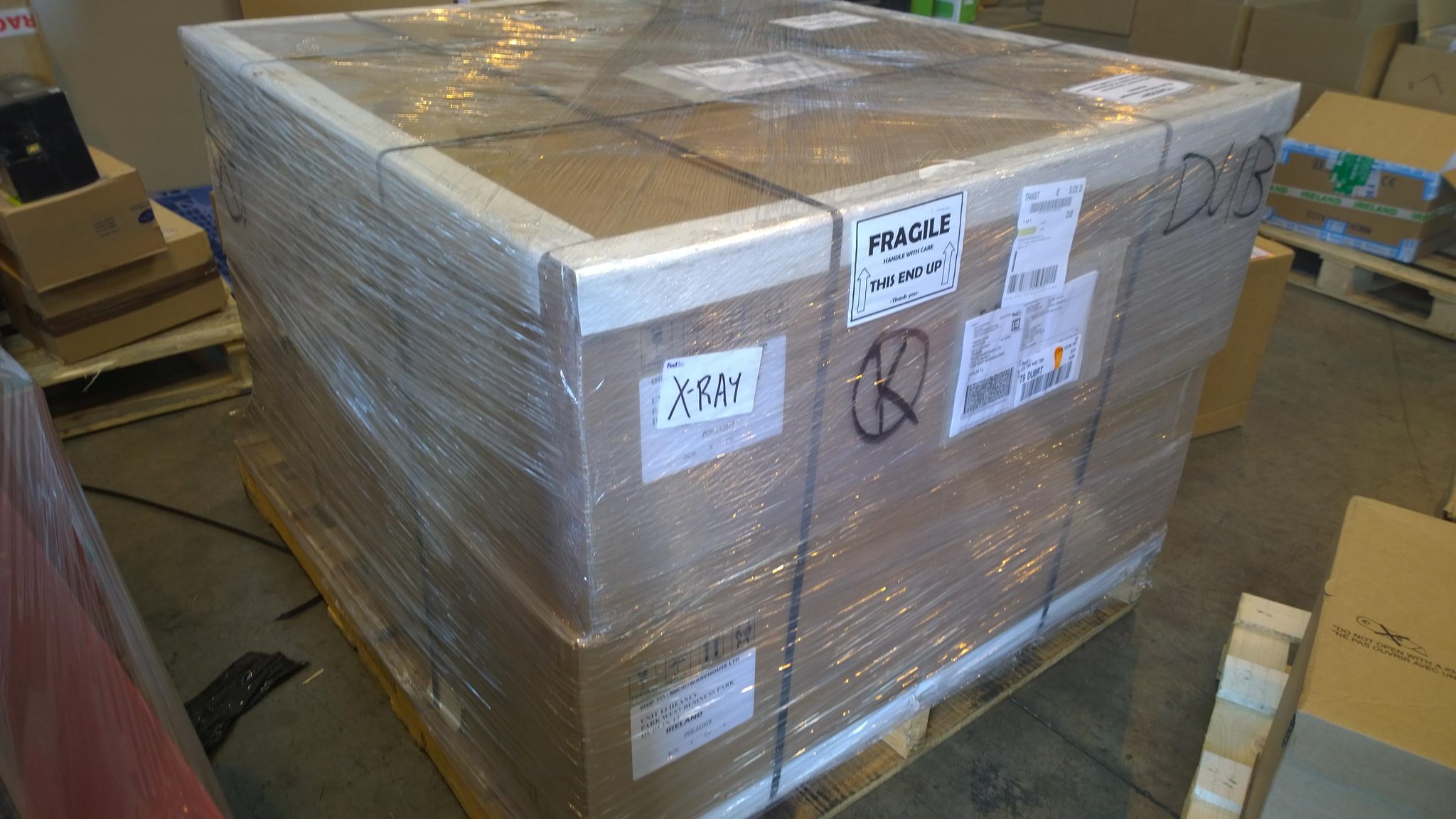
Now this is where you say that this is all great in theory but surely no one is doing this. And there you would be wrong. Very wrong. MVP Carsten Rachfahl has been deploying large installations since late 201 in Germany. The same is also true of MVPs Thomas Maurer and Michael Rüefli in Switzerland. At my job, we’ve been selling quite a few JBODs. In fact, most of those have been to replace more expensive SAN installations from legacy vendors. This week I took this photo of the JBODs in the above architecture while they were passing through our warehouse:

Yup, that’s potentially over 1 PB of raw storage in 16U of rack space sitting on one shipping pallet. The new owner of that equipment is building a SAS solution that will run on Hyper-V and use SMB 3.0 storage. They’ll scale out bigger and cheaper than they would have done with their incumbent legacy storage vendor – and that’s why they’re planning on buying much more of this kind of storage.