Configuring Jumbo Frames Using PowerShell

Another new version of Windows Server, more features, and another set of PowerShell scripts to write Smile  My host design will be taking advantage of the fact that I have 4 * 10 GbE NICs in each host to play with, and I’ll be implementing my recent converged networks design for SMB 3.0 storage (use the search tool on the top right).

A key in the design is to use the full bandwidth of the NICs.  That means configuring the packet or payload size of each NIC, aka configuring Jumbo Frames.  You can do this by hand, but that’s going to:

  • Get pretty boring after a couple of NICs.
  • Be mistake prone: please send €10 to me every time you get this setting wrong if you disagree with me and continue to do it by hand.

Untitled

You can configure this setting using PowerShell.  It’s not immediately discoverable, but here’s how I discovered it for my NICs.

I ran Get-NetAdapterAdvancedProperty, targeting a 10 GbE NIC.  That returned the advanced settings and their values of the NIC.  These aren’t the traditional attributes.  Each setting has two values:

  • DisplayName: The NIC setting name
  • DisplayValue: The NIC setting value

I knew from the GUI that the DisplayName was Packet Size and that the desired DisplayValue would be 9014.  Now I could configure the setting:

Set-NetAdapterAdvancedProperty <NIC Name> –DisplayName “Packet Size” –DisplayValue “9014”

I could run that command over and over for each NIC.  Consistent Device Naming (CDN) would make this easier, if my servers were new enough to have CDN Smile  I want to configure all my 10 GbE NICs and not configure my still-enabled 1 GbE NIC (used for remote management).  Here’s how I can target the NICs with the setting:

Get-NetAdapter * | Where-Object { $_.TransmitLinkSpeed –EQ “10000000000” } | Set-NetAdapterAdvancedProperty –DisplayName “Packet Size” –DisplayValue “9014”

The first half of that line finds the 10 GbE NICs, thus filtering out the 1 GbE NICs.  Now I can use that line as part of a greater script to configure my hosts.

KB2867302–Clustered File Share Resource Fails With “Status 5. Tolerating …” Cluster Log Error

Microsoft posted a KB article for when you have a situation on W2008, W2008 R2 or WS2012 where a cluster fileshare resource fails on a failover cluster node and the cluster log contains "status 5. Tolerating…".

Symptoms

Consider the following scenario:

  • In Windows Server 2008, 2008 R2 or 2012 you set up a Windows failover cluster with a highly available file server.
  • The cluster nodes are configured with a disjointed namespace in which the computer’s primary DNS suffice does not match the DNS domain of which it is a member.

In this scenario, you may notice that the highly available file server works fine on some of the cluster nodes but consistently fails on others. In examining the cluster log, you see something similar to the following entries with the first entry referring to "status 5. Tolerating…":
00001b6c.000008c8::2013/01/23-04:00:13.797 WARN [RES] File Server <FileServer-(yoel-cluster)(Cluster Disk 6)>: Failed in NetShareGetInfo(yoel-cluster, share2), status 5. Tolerating…
00001b6c.000008c8::2013/01/23-04:00:13.797 ERR   [RES] File Server <FileServer-(yoel-cluster)(Cluster Disk 6)>: Not a single share among 1 configured shares is online
00001b6c.000008c8::2013/01/23-04:00:13.797 ERR   [RES] File Server <FileServer-(yoel-cluster)(Cluster Disk 6)>: File system check failed, number of shares verified: 1, last share status: 5.
00001b6c.000008c8::2013/01/23-04:00:13.797 ERR   [RES] File Server <FileServer-(yoel-cluster)(Cluster Disk 6)>: Fileshares failed health check during online, status 5.

Cause

One or more nodes of the failover cluster may contain mismatched entries in the DNS suffix search list.

Resolution

To resolve the issue, verify all cluster nodes are configured with the same DNS suffix search list and the entries are listed in the same order. The DNS suffix search list can be modified using the following steps:

  1. Open the properties page for the network adapter.
  2. Open the properties page for Internet Protocol Version 4 (TCP/IPv4).
  3. Select the Advanced button under the General tab.
  4. Select the DNS tab.

This is a configuration issue and there is no hotfix.

Building Storage Spaces On My PC

Currently at home I use a HP MicroServer with Windows Home Server on it to store all my media (music, video, and photos).  I do all my photo editing on a HP tower PC with a nice Samsung monitor.  My camera is a 16 MP DSLR so the RAW files that I am editing are pretty big (around 21 MB each).  It takes quite a while for the thumbnails to load when I browse a folder, and it takes an age to open a RAW file or to save an edited PSD file over the network to the WHS.

I’ve decided to migrate my content from the WHS to my PC.  But the PC only has a 465 GB drive.  That’s too small and it’s a single point of failure.

What I’ve decided to do is deploy Storage Spaces using USB 3.0 drives on the tower PC.  The PC doesn’t have USB 3.0 ports.  So what I did was use some Amazon.co.uk store credit and bought some USB 3.0 ports.  I bought 2 * StarTech.com 2 Port PCI Express SuperSpeed USB 3.0 Card Adapter, available from:

That gives me a total of 4 * USB 3.0 ports on the back of the tower PC.  The cards come with optional power supply leads for devices that draw power from the ports.  They are plugged into the hard drive power lead in the PC. 

Next I’ll be getting myself 2 * 3TB USB 3.0 drives, and plugging one into each USB 3.0 card.  With 2-way mirroring I’ll get just under 3 TB of storage, enough to keep me going for a while, and with room to expand again in the future.

Data access will be much faster than it currently is and I can look at recycling the WHS, possibly turning it into SMB 3.0 storage for my home lab.

Technorati Tags: ,

Adding A Disk To A SOFS Clustered Storage Pool

Say you need to add a disk to a Scale-Out File Server where you are using Storage Spaces on a JBOD.  You add some disks to the JBOD … and then what?  You browse into Failover Clustering and there’s no way to add a disk there.

Instead, open up Server Manager, connected to on of the SOFS nodes:

  1. Browse to File And Storage Services > Volumes > Storage Pools.
  2. You should see the new disks here as Primordial devices.  Right-click on the storage pool you want to expand, not the primordial devices.  Select Add Physical Disk.
  3. Select the disks and choose the allocation (hot spare, etc). 

image

That’s that.  There’s no painful expansion process as in RAID.  You now have new raw space that the storage pool will use as required.

Remote Desktop Settings For A Hyper-V VM

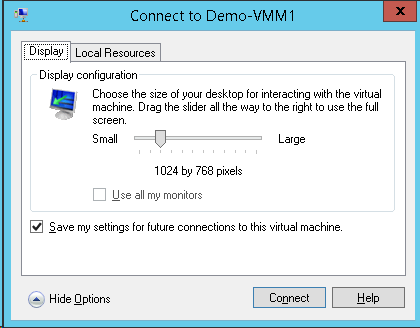
You are prompted for your connection settings when you first connect to a virtual machine using Enhanced Session Mode on WS2012 R2 (Windows Server 2012 R2) Hyper-V.  The below dialog will appear.  You can configure:

  • The screen resolution of the VM connection
  • Whether or not it should use more than one of your PCs monitors
  • If it should save the settings for future usage, so you’re not prompted (this requires you to Show Options.

image

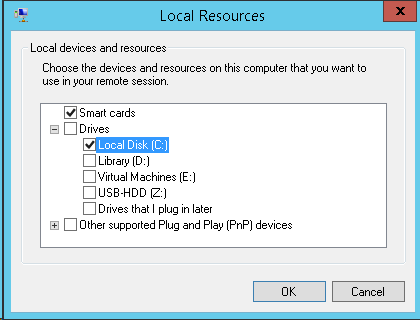
If you do expand Show Options then you get some other … options.  You can configure:

  • How remote audio in the VM is redirected to your PC
  • How local devices are mapped to your VM, including any USB devices (via RemoteFX USB redirection)

image

image

And no, you do not need to enable any RemoteFX stuff or Remote Desktop policies in your VM.  This all works via the Integration Components (via the VMBus).  You just need to enable Enhanced Session Mode in the host settings of the VM’s host.

You can change the Enhance Session Mode settings for a specifiby:

  • Closing any open connection you might have to the VM
  • Right-click on the VM in Hyper-V Manager, and select Edit Session Settings

This will open the above dialog so you can change the settings.  You appear to need to Connect to save the changed settings (at least in the Preview release).

Year 6 As An MVP – Thank You To My Parents

Today was my renewal date for my Microsoft Valuable Professional (MVP) award. It’s a day when I’m normally quite tense because I don’t take this recognition for granted. Sure, I work hard, but I do rub a few people the wrong way too. It’s a day when I’m tense, and even though my profile might get updated on the MVP site, I stay agitated until I get the notification email. And then it’s all smiles. Today was different.

Looking back, I’m only here where I am, like many people, thanks to my parents who struggled and sacrificed while I was growing up.

My Dad lost his father when he was young, and never had to opportunity to go secondary school. Instead he went to work to support his mother and younger sisters. Later he joined the army, worked with horses, and became a pretty good shot. Later in life he had a check-box on his license to qualify him to drive just about any kind of vehicle on the road. He went to night schools, learned electric and car mechanic skills. While Dad might not have been a stockbroker or doctor, I never wanted for anything growing up. Unfortunately I never got to know Dad as an adult; he died when I was 18. But I did pick up something from him: never stop learning.

Mom also left school young as was the norm at the time, before having an opportunity to sit her Leaving Cert (a state exam at the age of 17/18). She moved to Dublin, worked in bookmakers (able to quote and understand all their numeric language), and it was in Dublin that she and Dad met. Both my Mom and Dad were products of 1950s Ireland, a time when our country was an agriculture-first, third-world nation. Government policy was to encourage emigration because there was no future here for most people, and the nation could not sustain our meagre population. They emigrated to England and that’s where my sister and I were born.

One of my earliest memories is learning to read. I was reading books before I went to school, thanks to Mom. I have this vague recollection of picking out books in a local store when I was really young, or walking to the local library with her, and always coming home with a pile of books. Later on, I was reading books on BASIC programming years before I would ever own a computer. Only a few weeks ago Mom told me how my first school teacher thought I would be bored in school. I was constantly encouraged to learn and discover; apparently I was one of those kids who sat on the bus asking “Why? Why? Why?”. When I wanted to do something because the other kids were, the lesson was to think independently; would I jump into a fire because everyone else was? I was taught to be tolerant … in the early 1980s when (according to The Commitments) the north-siders of Dublin were the racially downtrodden of Ireland. I was taught the value of an education, at a time in Ireland when going “on the dole” was the destiny of everyone who stayed in the country, and most of my class dropped out when they were 16. I was taught not to be afraid of standing out from the crowd, in an area where being different (and in my area, that was trying to be something) was frowned upon.

That’s my memory of my Mom. Dad provided, and a lot of what I am came from him. Mom taught me. I am what I am, not just because of genetics, but because of the environment I was raised in. I’m a MVP because my parents gave me a chance. They told me to try, to learn, be independent. I could have jumped into the fire with everyone else. I could have shut down the computer at 17:30 every weekday. No, I worked late or studied at home.  I could have accepted my “fate” in 2001 when I was made redundant.  I studied, sat exams, and got my first MCSE instead. I could have said “no” when I was asked if I’d be interested in presenting at the Irish launch of Windows Server 2008.  That was my first presentation in Ireland in years, and set me off down the community and MVP track.  I could have chosen the same product as everyone else when something new and interesting came along. I think regular readers know how that went.  By the time I left home, I was wired to be who I am today.

I never got to thank my Dad in person. Knowing him, he’s cobbled together a computer of some kind, and had fun doing it, in the great big cloud in the sky & read this. Mom is still with us.  She’s struggling at the moment.  It’s been a particularly rough day.  I might not be as productive as normal in the next few weeks.  She might not get this whole me, Hyper-V, and Microsoft thing, but she knows that … well … things are good.  Thank you, Mom.

A Snapshot Is Now A Checkpoint

I’ve previously blogged about the Confusion Over Hyper-V and “Snapshots”.  Well, Microsoft listened to the feedback.  A snapshot is now called … a checkpoint.  The benefits of this name change:

  1. It matches VMM
  2. This should end the confusion with VSS snapshots and SAN snapshots … and hopefully stop people from thinking that a Checkpoint is for backup …. IT IS NOT A BACKUP MECHANISM!  (Yes, there are people who think this).

image

There is a PowerShell cmdlet called Checkpoint-VM to create a checkpoint … the thinking in the Hyper-V team in WS2012 was that you checkpointed a VM.  I can’t say I agreed with that thought process Smile  There are other PowerShell cmdlets too:

image

They still use the term “snapshot”.  I don’t know if that will be changed or aliases will be used (for script backwards compatibility).  I hope something is done to keep things consistent but I doubt there’s much time left for anything to be done in the R2 release.

Surface RT Office & Blurring The Licensing Lines

As usual, don’t bother emailing or commenting with licensing questions. They will be deleted and ignored, no exceptions, and this includes you with your special situation.  Please ask you reseller – that’s why they exist.

As you may be aware, Windows RT (the OS installed on the Surface RT and a few other Windows tablets) comes with a copy of what is effectively (features, license-wise, and rights-wise) Office Home & Student 2013.

Office 2013 has a peculiar limitation because of its relatively low price: you cannot use it in the workplace.  To use Office Home & Student at work, it needs to be “upgraded” to a business version via a license purchase.  This isn’t actually a feature limitation – the versions of Word, Outlook (Windows 8.1 RT has Outlook), etc, all will connect to Exchange, Sharepoint, etc just fine without any upgrades.  What you need is an additional license … something you record that you’ve purchased for that device in a spread sheet (like we need more of those!).

Is there a way to mark a Windows RT device as licensed?  Nope.  I was about to write “Use a custom GPO to add a registry value” but I remembered that Windows RT cannot join a domain.  Is there a way to detect unlicensed machines?  Nope.  Can you stop end users connecting to services with their Windows RT … only if you put in networking measures (NAP, NAQ, etc) to actually prevent BYOD.

Ooooooookay then.  I guess Microsoft are pretty clear on this?  Ehhhhhh actually it’s quite the opposite.  When talking heads go on podcasts they’re saying things like “Surface RT is great in the office because you don’t need to buy additional expensive software like Office”.  That line isn’t uncommon from MSFT out in the world.

This reinforces or reminds a few things:

  • Never EVER listen to a Microsoft person when it comes to licensing Microsoft software.  If that person is allowed to talk to the public then they clearly do not work hands-on with Microsoft licensing policies (read the PUR to understand what I mean).  Taking that person’s word as policy will get you audited, stung, penalised, and fired.
  • Windows RT has no place in business.  It’s a consumer device.  In the long run it’ll be cheaper to buy an Atom tablet (yes, it’s not as powerful as a laptop, but it you want a laptop, buy a laptop instead of a tablet) + Office for business (that can also run other programs) than Surface RT + Office for business + other “paper"-based” licensing controls.
  • Microsoft licensing is a mess.  While things like Server and System Center are pretty easy (if you can’t count then may I suggest a career in drooling?) the new licensing that was added for Windows 8 is a complete and utter cluster-f**k – and yes, that is the official licensing term.

As usual, don’t bother emailing or commenting with licensing questions. They will be deleted and ignored, no exceptions, and this includes you with your special situation.  Please ask you reseller – that’s why they exist.