My Top 5 Features in System Center Data Protection Manager 2016

Microsoft’s System Center Data Protection Manager (DPM) has undergone a huge period of transition over the past two years. Significant investments have been made in hybrid cloud backup solutions, and DPM 2016 brings many improvements to this on-premises backup solution that all kinds of enterprise customers need to consider. Here are my top 5 features in DPM 2016.

5: Upgrading a DPM production server to 2016 doesn’t require a reboot

Times have changed and Windows Server & System Center won’t be released every 3-5 years anymore. Microsoft recognizes that customers want to upgrade, but fear the complexity and downtime that upgrades often introduce. Upgrading DPM servers and agents to 2016 will not cause production hosts to reboot.

4: Continued protection during cluster aware updates

The theme of continued protection during upgrades without introducing downtime continues. I’ve worked in the hosting business where every second of downtime was calculated in Dollars and Euros. Cluster-aware updates allow Hyper-V clusters to get security updates and hotfixes without downtime to applications running in the virtual machines. DPM 2016 supports this orchestrated patching process, ensuring that your host clusters can continue to be stable and secure, and your valuable data is protected by backup.

3: Modern Backup Storage

Few people like tapes, first used with computers in 1951! And one of the big concerns about backup is the cost of storage. Few companies understand software-defined storage like Microsoft, leading the way with Azure and Windows Server. DPM 2016 joins the ranks by modernizing how disk storage is deployed for storing backups. ReFS 3.0 block cloning is used to store incremental backups, improving space utilization and performance. Other enhancements including growing/shrinking storage usage based on demand, instead of the expensive over-allocation of the past.

2: Support for Storage Spaces Direct

While we’re discussing modern storage, let’s talk about how DPM 2016 has support for Microsoft’s software-defined hyper-converged infrastructure solution, Storage Spaces Direct. In recent years, these two concepts, inspired by the cloud, have shaken up enterprise storage:

  • Software-defined storage: Customers have started to realize that SAN isn’t the best way to deploy fast, scalable, resilient, and cost-effective storage. Using commodity components, software can overcome the limitations of RAID and the expense of proprietary lock-in hardware.
  • Hyper-converged infrastructure: Imagine a virtualization deployment where there is one tier of hardware; storage and compute are merged together using the power of software and hardware offloads (such as SMD Direct/RDMA), and turn cluster deployments into a simpler and faster process.

Windows Server 2016 took lessons from the previous two versions of Storage Spaces, Azure, and the storage industry and made hyper-converged infrastructure a feature of Windows Server. This means that you can deploy an extremely fast (NVMe, SSD, and HDD disks with 10 Gbps or faster networking) storage that is cost effective, using 1U or 2U servers, and with no need for a SAN, external SAS hardware, or any of those other complications. DPM 2016 supports this revolutionary architecture, ensuring the protection of your data on the Microsoft on-premises cloud.

1: Built for the Cloud

I’ve already discussed the cost of storage, but that cost is doubled or more once we start to talk about off-site storage of backups or online-backup solutions. While many virtualization-era backup products are caught up on local backup bells and whistles, Microsoft has transformed backup for the cloud.

Combined with Azure Backup, DPM 2016 gives customers a unique option. You get enterprise-class backup that protects workloads on cost effective (Modern Backup Storage) storage for on-premises short term retention. Adding the very affordable Azure Backup provides you with a few benefits, including:

  • A secondary site, safeguarding your backups from localized issues.
  • Cost effective long-term retention for up to 99 years.
  • Encrypted “trust no-one” storage with security mechanisms to protect you against ransom-ware and deliberate attacks against your backups.

In my opinion, if you are not using DPM, or have not looked at it in the past two years, then I think it’s time to re-evaluate this product.


My Hands-Off Review of Surface Studio

I don’t have a Surface Studio. My access to one was limited to a 10 minute play in a Microsoft Store in Bellevue, WA last month. But I did have that limited hands-on, I know the specs, and I’ve listened to & read other reviews. So I have my opinions on this headline-making PC from Microsoft and here they are.

Styling & Form

If it was possible to give a 12 out of 10 score, then I’d do it. The Surface Studio is a beautifully engineered machine, making all those beige and black cuboid PCs of the past look like dumpster fires. I love the form-factor – I was a fan of a similar machine that Lenovo launched several years ago with Windows 8, the A730, which often appears in TV shows such as The Flash.

Image result for lenovo all in one


The Lenovo A730

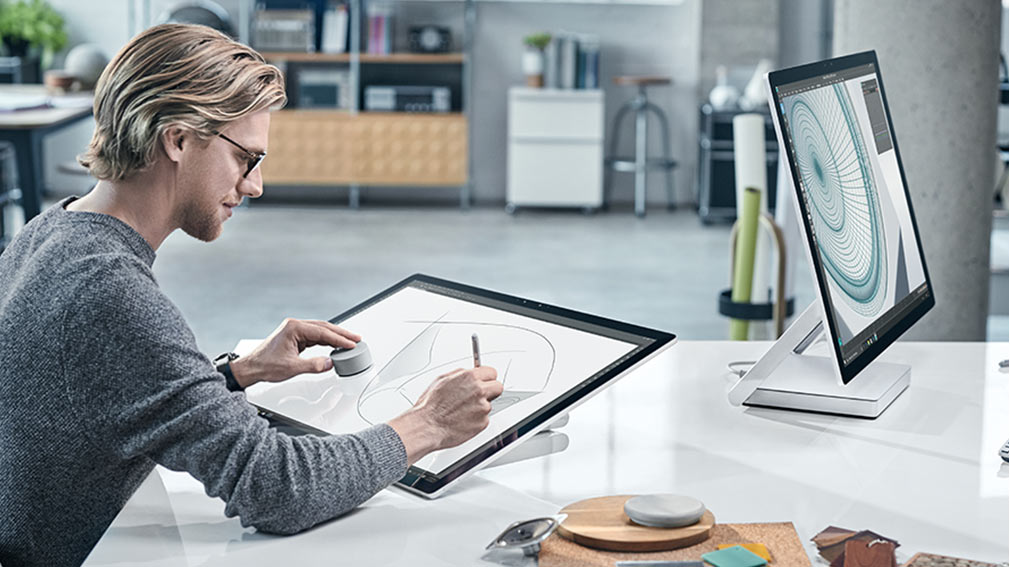
When word of a Microsoft PC leaked, I hoped it would look something like the Lenovo. And Microsoft exceeded that, with a machine that is perfectly designed on the exterior. The screen tilt is perfectly balanced; you can pull down or push up the screen with just one finger, and the motion is smooth. That quality makes you think of a €300,000 hand-made car. In “draft mode” with the screen at a low angle, the Studio is perfect for drawing on. The stylus experience is as you’d expect, fluid and responsive.
The Screen

In my opinion, this is the star feature of the Studio: a big bright, contrasty, colour-popping 28” screen that makes all others look like rubbish. I actually went up the escalator to the Apple store to do an eyeball comparison after playing with the Studio. Apple’s stock paled in comparison in my untrained and un-calibrated opinion. As a hobbyist photographer, the Studio’s monitor would be my choice. Now, there are pros out there that will point out some niche editing monitors with better contrast, colour ranges, hoods for blocking reflections, and all that jazz, but those things cost a freaking fortune, and few creatives ever use them. And the Studio’s big win … you don’t need some drawing pad from the likes of Wacom (professional ones can cost in excess of $1500) because the PixelSense monitor on the Studio is a touch screen that supports a stylus, and the screen tilts down to a suitable angle for editing and drawing.

The Peripherals

The keyboard and mouse are stylish and match the design of the machine. The choice of mice/keyboards is usually a personal thing; I hate small keyboards and flat mice so I would prefer to use something like the 2000 combo from Microsoft – which I use at home. Yes, I would “ruin the styling” at my desk, but these devices suit me better.
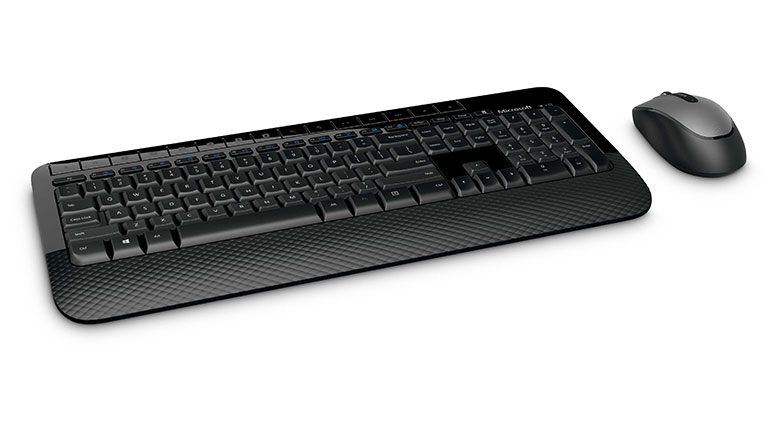
 

The 2000 keyboard/mouse from Microsoft which I prefer

Of course, the talking point peripheral is the Dial. The Dial is revolutionary. You press down to activate a menu, twist and select and option, and then twisting the dial impacts how much/little or forward/back the current editing does. For a righty, you have the stylus in your right hand, and the dial in your left on the screen (so you can see your press-down menu options), and editing is just a natural process. If you are editing, you can draw while resizing the brush, changing the tone, lightening/darkening the mask, or undoing/redoing your changes. It’s an extremely natural device to use, and the news that it works with other devices is great for all you graphic artists or photo editors that want a faster way to work.

The Spec

This is where things aren’t 12/10. I’m a big fan of the idea, the styling, the screen and the interaction with the Studio. But the spec has some issues. The first of these is the graphics card. I’m no PC gamer, so graphics cards aren’t something I pay attention to. But I sit beside two graphics artists at work. They LOVED the appearance of the Studio when it was announced, but then they saw the card spec, and were disappointed. The Studio includes a mobile GPU, not a PC one, so performance was sacrificed for form. I would have not been upset if the machine was a few millimetres thicker or wider to get a better card in there.

The other issue is that the machine has a 5400 RPM hard drive (!!!!) with an M2 SSD cache; in other words, a hybrid drive. The prices of flash storage have plummeted. There is no excuse for putting such a dreadful storage solution into a premium machine like the Studio. Hybrid drives, in my opinion, are a waste. The cache just doesn’t impact performance enough to matter – I know, because I replaced a similar 1 TB hybrid drive in my Lenovo Yoga with a 1 TB Samsung Evo SSD. And the reason was identical to what Leo LaPorte of TWiT reported on Windows Weekly a couple of weeks ago.

I might take 1,000 photos on a successful day of wildlife photography – not that similar to what a wedding or news photographer might do. A 36 megapixel photo might be around 60 MB in size. 1000 of those is 58 GB – well beyond the 32 GB SSD cache of a hybrid drive. Let’s say I import those 1000 photos into Adobe Lightroom on my imaginary Surface Studio. The first thing that a photography creative will do is browse through the photos, rate them, and remove what they don’t want to keep. Each photo is pretty large, so loading it from a 5400 RPM HDD will be tedious … 4-8 seconds for each photo! Yes; that’s what Leo LaPorte reported on Windows Weekly, and that’s what I’d expect from such a drive.

Microsoft should never have put such a cheap storage solution into a PC for creatives – that’s like putting a 1 litre engine from a Fiat Punto into a Rolls Royce. If you’re getting a Studio then allow for a couple of hundred dollars to replace the drive (which can be done) with an SSD.

Everything else is great … lots of memory in the choices, and fast CPUs. It’s a pity that the memory is not expandable, but as Apple have realized, that’s creating manufacturing costs and complexity for the 1% of your target market, and it just isn’t worth it.

The Price

There are 3 available specs of Surface Studio:

  • $2,999 plus tax: 1 TB / Core i5 / 8 GB RAM / 2 GB GPU
  • $3,499 plus tax: 1 TB / Core i7 / 16 GB RAM / 2 GB GPU
  • $4,199 plus tax: 2 TB / Core i7 / 32 GB RAM / 4 GB GPU

Your first reaction: whoah! But you need to realize that this is not a PC for everyone. Microsoft is aiming this machine at creating professionals that view their PC as a tool. And like all tool-using professionals, the quality of the tool impacts the effectiveness of their work processes, so professionals are willing to pay for better equipment. Let’s do a comparison with that these people have been purchasing up to now, that offers a similar solution:

  • Apple Mac Pro, the Apple PC that hasn’t been improved in 3 years: 256 GB SSD / Quad Core Intel Xeon / 12 GB RAM / 2 x 2 GB GPU …. $2,999 plus tax.
  • Apple Mac Pro, the Apple PC that hasn’t been improved in 3 years: 256 GB SSD / 6Core Intel Xeon / 16 GB RAM / 2 x 3 GB GPU …. $3,999 plus tax.

The graphics adapters are an advantage for Apple. I think the CPU is a wash because Apple has old hardware verus the Studio’s newer Core i7 (creatives shouldn’t bother with the entry level machine from Microsoft). Apple includes pathetically small storage and the screens neither tilt nor support touch/stylus. This means you need additional capacity:

  • Professional NAS: $1,000 plus Tax for a Netgear device on Amazon.com that came up first in my search for “Apple NAS”.
  • A professional Wacom stylus solution: The Cintiq 27QHD 27” costs $2,550 plus tax on Amazon.com.

So the entry level option from Apple will cost: $2,999 + $1,000 + $2,550 = $6,549 plus tax. The top model from Microsoft will cost $4,199 plus an SSD, plus tax. Hmm, that’s around a $2,000 saving, plus I get a cleaner working experience, modern hardware, and tools (Dial and tilt screen) designed for how I work.

The Impact of Surface Studio

My employer (one of the few authorized Surface distributors in the world) got calls about supplying Surface Studio the morning after the launch. The sad news is that the Studio is limited to the USA and it doesn’t look like that will change anytime soon. My personal opinion is that Microsoft accomplished exactly what they wanted with the Studio. The Studio was a concept, much like a Bugatti Veyron or similar. This was an “ultimate machine” designed not to be a profit center, but a highlight, and example of what can be accomplished. By launching a desktop PC, Microsoft risked further angering their OEM partners like Dell, HP, Acer, Asus, and so on. But by making this a very expensive, niche (creatives), and relatively unavailable (tiny supply to a single market) machine, Microsoft created a light in the dark instead of a competitor to their partners.

The Surface Studio is a lighthouse. It has shone a light on what can be done with Windows 10, and most importantly, made the media and the customer aware that Microsoft still exists and is still relevant. That plan was a complete success. Even the most ardent Apple-fanboys in the media were convinced that Microsoft has won the title of “most cool” versus Apple, especially after the poorly timed and underwhelming Apple MacBook Pro “touch” launch. Apple customers were all over forums and social media saying that Microsoft has scored a huge win. Share values of Microsoft have stayed high. And hopefully, the OEM partners have seen what can be done, and will mimic the Studio with cheaper clones (with SSD storage!).

Podcast Recording: Talking WS2016 on AnexiPod

I recently recorded a podcast with Ned Bellavance of Anexinet, where we talked about Windows Server 2016 for nearly an hour. Tune in and hear what’s up with the latest version of Microsoft’s server operating system, Hyper-V, storage, cloud, and more!

image

WatchGuard Now Supported by Azure for Dynamic/Route-Based VPN

Microsoft now supports WatchGuard’s firewalls with the 11.12 firmware (fireware) for dynamic or route-based VPN.

There are two kinds of VPN gateway in Azure:

  • Static / policy-based: 1:1  connections, don’t support point-to-site VPN, or VNet-to-VNet VPN, website-to-VNet VPN, and really only good for the simplest of designs.
  • Dynamic / route-based: Multiple simultaneous connections, supports all of Azure’s VPN features, and enables complicated designs.

I always prefer route-based VPNs, because they don’t restrict what I can do in Azure. Up to recently, though, that caused a complication for me at work. My employer distributes WatchGuard’s Firebox (XTM) unified threat management firewall devices, and those devices were restricted to policy-based VPN. Good news!

  • WatchGuard released 11.12 of their software (which works on all devices) and this added policy-based (aka Dynamic) VPN support.
  • Microsoft just listed WatchGuard’s devices as being supported by Azure for route-based VPN.

You can find WatchGuard’s instructions for configuring a route-based VPN here.

FYI, the notable devices that still don’t have route-based support are:

  • Cisco ASA (!!!)
  • Barracuda NextGen Firewall X-series
  • Brocade Vyatta 5400 vRouter
  • Citrix NetScaler MPX, SDX, VPX

I guess you can get fired for buying Cisco after all!

Technorati Tags: ,,

My Azure Load Balancer NAT Rule Won’t Work (Why & Solution)

I’ve had a bug in Azure bite me in the a$$ every time I’ve run an Azure training course. I thought I’d share it here. The course that I’ve been running recently focuses on VM solutions in a CSP subscription – so it’s all ARM, and the problem might be constrained to CSP subscriptions.

When I create a NAT rule via the portal, most of the time, the NAT rule fails to work. For example, I create a VM, enable an NSG to allow RDP inbound, and create a load balancer NAT rule to enable RDP inbound (TCP 50001 –> 3389 for a VM) It appears like there’s a timing issue behind the portal, because eventually the NAT rule starts to work.

There’s actually a variety of issues with load balancer administration in the Azure Portal:

  • The second step in creating a NAT rule is when the target NIC is updated; this fails a high percentage of the time (note the target being set to “–“ in the rule summary).
  • Creating/updating a backend pool can fail, with some/none of the virtual machines being added to the pool.

These problems are restricted to the Azure Portal. I have no such issues when configuring these settings using PowerShell or deploying a new resource group using a JSON template. That’s great, but not perfect – a lot of general administration is done in the portal, and the GUI is how people learn.

Understand Azure’s New VM Naming Standards

This post will explain how you can quickly understand the new naming standards for Azure VM sizes. My role has given me the opportunity to see how people struggle with picking a series or size of a VM in Azure. Faced with so many options, many people freeze, and never get beyond talking about using Azure.

Starting with the F-Series, Microsoft has introduced a structure for naming the sizes of virtual machines. This is welcome, because the naming of the sizes within the A-Series, D-Series, etc, was … … random at best.

The name of a size in the F-Series, the H-Series and the soon-to-be-released Av2 series is quite structured. The key is the number in the size of the machine; this designated the number of vCPUs in the machine.

Let’s start with the new Av2 series. The name of a size tells you a lot about that machine spec. For example, the A4v2 (note this is an A4 version 2), paying attention to the “4”:

  • 4 vCPUs
  • 8 GB RAM (4 x 2)
  • Can support up to 8 data disks (4 x 2)
  • Can have up to 4 vNICs

Let’s look at an F2 VM, paying attention to the “2”:

  • 2 vCPUs
  • 4 GB RAM (2 x 2)
  • Can support up to 4 data disks (2 x 2)
  • Can have up to 2 vNICs

You can see from above that there is a “multiplier”, which was 2 in the above 2 examples. The H-Series, is a set of large RAM VMs for HPC workloads, 8 GB RAM is pretty useless for these tasks! So the H-Series multiples things differently, which you can see with a H8, the smallest machine in this series:

  • 8 vCPUs
  • 56 GB RAM (8 x 7)
  • Can support up to 16 data disks (8 x 2)
  • Can have up to 2 vNICs

The RAM multiplier changed, but as you can see, the name still tells us about the processor and disk configuration.

Some sizes of virtual machine are specialized. These specializations are designated by a letter. Here are some of that codes:

    • S (is for SSD) = The machine can support Premium Storage, as well as Standard Storage
    • R (is for RDMA) = The machine has an additional Infiniband (a form of RDMA that is not Ethernet-based) NIC for high bandwidth, low latency data transfer
    • M (is for memory) = The machine has a larger multiplier for RAM than is normal for this series.


Let’s look at the A4mv2, noting the 4 (CPUs) and the M code:

  • 4 CPUs, as expected
  • Can support up to 8 data disks (4 x 2), as expected
  • Can have up to 4 vNICs, as expected
  • But it has 32 GB RAM (4 x 8) instead of 8 GB RAM (4 x 2) – the memory multiplier was increased.

The F2s VM, we know has 2 vCPUs, 4 GB RAM, and can have up to 4 data disks and 2 NICs, but it differs slightly from the F2 VM. The S tells us that we can place the OS and data disks on a mixture of Standard Storage (HDD) and Premium Storage (SSD).

Let’s mix it up a little by returning to the HPC world. The H16mr VM does quite a bit:

  • It has 16 vCPU, as expected.
  • It has a lot of RAM: 224 GB RAM – the M designated that the expected x7 multiplier for 112 GB RAM was doubled to  x14 (16 x 14 = 224).
  • It can support 32 data disks, as expected (16 x 2)
  • It can support up to 4 vNICs.
  • And the VM will have an additional Infiniband/RDMA NIC for high bandwidth and low latency data transfers (the R code).
Technorati Tags: ,,

Wrapping Up MVP Summit 2016

I’ve spent the last week at Microsoft head quarters in Redmond, WA, staying at the nearby Bellevue, WA, with 1000-2000 other MVPs from around the world. I can’t share specifics – the first rule of Summit is that you don’t talk about Summit – but I can tell you that it’s always an important calendar entry for me. My customers and followers might not realise it, but not long after, it becomes important for them too because eventually I can share some of what I learn when things go public.

I’m sittings in San Francisco International Airport now, waiting for some Irish colleagues to join me for our flight back to Dublin – yeap, I’m drinking $10 beers, thanks to the economic impact of Google and Apple on the region.

WIN_20161111_15_44_32_Pro


The best bits about the MVP Summit for me are when I learn about futures, allowing me to prep for articles and my customers, and interacting with my peers and the Microsoft program managers. That PM feedback leads to changes – meetings in my past have lead to improvements in Windows Server that I can associate with me, Didier Van Hoye, Carsten Rachfahl, and other names you might be familiar with. This year I branched out (I can’t talk about that either) and I shared what I’ve learned from you (from comments, conversations at events, interacting with my customers, and market observations) – who knows how this will impact the future for us.

What’s in that future?

All I can say is that Microsoft is very different to what it was in 2012. This is a company that loves feedback. This is a company that wants to be relevant in 5-10-15 years. This is a company that believes that on-prem and hybrid deployments are what you want (as well as pure public cloud, obviously) and wants to be give you the best offerings, whether you are using Apple, Windows, Android, Hyper-V, vSphere, WIndows Server, or Linux. And yes, the innovations and improvements continue.

I’m proud to represent my customers and readers when I attend the Summit. I was stunned that I was sought out by PMs for feedback – my … honesty … is refreshing for some of them I think. I know I’m not alone – some great people from all over the world represented you at this NDA event. I saw people stand up for large enterprises and small, IT pros, developers, and devops, on-prem, hybrid, and public cloud. And Microsoft listened.

Soon I’ll be on my last flight home, and I’ll sleep. I had a great time in Bellevue/Redmond, even though I missed my family an awful lot. I can’t wait to get home and give them a hug in the airport. And soon, we might see what results from the Summit Smile

No – I’m not telling Smile

Seeding Azure Backup Using Secure Disk Transfer

Microsoft’s online backup service, Azure Backup, was recently updated to greatly improve how the first big backup is done to the cloud. These improvements impacted the Azure Backup MARS agent, Microsoft Azure Backup Server, and System Center Data Protection Manager (DPM). I recently recorded a short video to explain the problem, the soluition, and I show how you can use it – the process is the same across each of the 3 products.


Microsoft Increasing Prices in the UK

Microsoft announced late last week that prices will be increasing in the UK from January 1st. This has been expected for a while in the channel after the crash of Sterling versus the Euro and the US Dollar (the currency that Microsoft is based on).

FYI, Microsoft has price lists in different currencies for different markets. Those pricelists are based on what Microsoft expects the local currency to do versus the Dollar in the coming period, and Microsoft tries to keep things steady for as long as possible. But every now and then, something happens and a currency crashes and Microsoft starts to lose money, and they need to rectify things. June 23rd was that day.

The UK voted (insanely in my opinion) to leave the EU (I might think the EU has strayed wildly from what citizens want but I wouldn’t leave). On June 22nd, £1 = $1.467790822 USD. Today, £1 = $1.22280, roughly a 16% drop. Let’s put that in some real terms.

A licensed host (the minimum of 16 cores) running Windows Server Datacenter costs roughly £5,200 on Open NL, the most commonly quoted pricing method for MSFT software. On June 22nd, Microsoft earned, in US Dollars, $7,632.51 from that sale. Today, Microsoft makes $6,358.60 from that sale. That’s a drop in revenue of of $1,273.95 from a single sale.

So what’s happening? Microsoft is increasing prices as follows:

  • On-premises software: 13%
  • Cloud services: 22%

Before you start screaming at Microsoft, I’d recommend that you redirect your blame elsewhere. Microsoft did not sabotage UK Sterling and Microsoft is not a charity. Instead, look at those who did burn the Bank of England, namely the politicians, those who voted for Brexit, and those that were too lazy to vote.

How To Use Docker To Stop And Remove All Windows Server Containers

I’ve been playing around with Containers on Windows Server 2016 GA. I can’t say I’m enthralled with Docker being the default interface for Containers now, but I understand Microsoft’s motivation.

I needed a way to quickly:

  • Stop all running containers on a host
  • Remove all containers from the host

If this was PowerShell, it would have been easy. But dragging open source onto Windows causes issues …. they do things inconsistently and all the docs are for Linux. Grep! Really!?!?

Eventually I found 1 variation of a solution that worked. The first line stops all running containers:

docker stop (docker ps –qa)

The second line removes all running containers:

docker rm (docker ps –qa)