Deploying My Sites On Azure App Services

I’ve started redeploying my websites on Azure App Services. In this post, I’ll explain the rather simple architecture and how I am going through my own little digital transformation or cloud transformation.

For the last few years, this site (https://aidanfinn.com) has been hosted on an Azure virtual machine running Windows Server 2012 R2 and an aging copy of MySQL. Once upon a time, before having a family, that was fine. I had lots of time, and a willingness to “muck in”. These days, I prioritise my time and my time is limited. I want to focus on content, not on admin … and isn’t that the point of the cloud?

That’s why I made the decision to switch from an IaaS virtual machine in Azure to Azure PaaS in the form of App Services, a part of Azure that has consumed a good bit of 2018 for me so far. This decision included this site, and I decided to build a new WordPress site for my Azure training business, Cloud Mechanix, on http://www.cloudmechanix.com.

The architecture is pretty simple:

image

Azure Database for MySQL Server

Both of my sites run on WordPress and that means MySQL – something that I know nothing about and have had problems with in the past – resulting in a complete VM restore back in the preview days of Azure Backup for IaaS VMs. If you want to know nothing about installing/running/backing up a database, then Azure Database services are for you! Many IT pros will have heard of Azure SQL, but there are also MySQL and PostgreSQL implementations of the service.

I deployed 1 instance of MySQL Server for each website. I tried to deploy 1 instance only, with multiple databases, but the second WordPress site just wasn’t having it. I’ve used the Basic tier and so far, the size seems to be OK.

A storage account was also created, and I configured diagnostics exports of both database instances to blob storage using Azure Monitor.

App Service Plan

A single app service plan hosts both websites. I decided to go with the Standard tier because I wanted backup functionality, not just custom domains that the Basic tier would offer. I offset this by being a little clever with the sizing. The plan is using a single instance (Windows Server 2016 IIS virtual machine under the covers), with content stored on a back-end SMB 3.0 share (also under the covers). I deployed the small S1 instance, keeping the costs down. However, aidanfinn.com is running on a decent spec D2s_v3 VM with 2 cores and 4 GB RAM. To offset the drop in resources and to enable peak demand, I’ve enabled autoscaling, supporting 1-2 instances. The autoscaling is configured to go to 2 instances if CPU or RAM exceeds certain thresholds for 10 minutes, and to drop to 1 instance if CPU or RAM drops back down below those thresholds.

The Cloud Mechanix site is running on App Services now, and AidanFinn.com will follow soon.

App Services

There is one app service for each website. I have deployed a storage account for backing up the websites every morning (at different times), including their databases – you can’t have enough backups!

Making The Deployment Easy

it sounds like I deployed a lot of stuff, right? Actually the WordPress, published by WordPress, template in the Azure Marketplace for App Services & Azure Database for MySQL Server made it really easy! It created the app service plan (first deployment only), the app service, and the database instance/database. Then I ran the template again, using the existing app service plan, and creating a second piring of app service and database instance/database. Then I logged into the default WordPress page of each site, and configured my credentials.

Changing the WordPress Settings URL

The default URL of the WordPress site in Settings will be configured and greyed out to use the default Azure domain name, even after you associate your own domain name with the site. The trick to changing the URL is to:

  1. Configure the FTP password for the app service
  2. Get the FTP username and server name from the app service properties
  3. Connect to the app service using FTP
  4. Browse to the /site/wwwroot folder
  5. Download wp-config.php and edit it

Look for a line with define(‘WP_DEBUG’, false);

Straight after that, add the following line:

define(‘RELOCATE’,true);

image

Now:

  1. Upload the wp-config.php file back to the site.
  2. Browse to the new URL of the site, e.g. http://www.mynewdomain.com/wp-login.php, and sign in. This will update the WordPress URL settings of the site.
  3. Re-download the wp-config.php file, remove the above line that you added, and upload the file again.

You’re done!
Lots of New Region News in Azure

One of the most important things in a cloud service is location. Everyone cares where they put their data. Sometimes it is for compliance reasons. Sometimes it is for performance. Sometimes the reasons are even fictional!

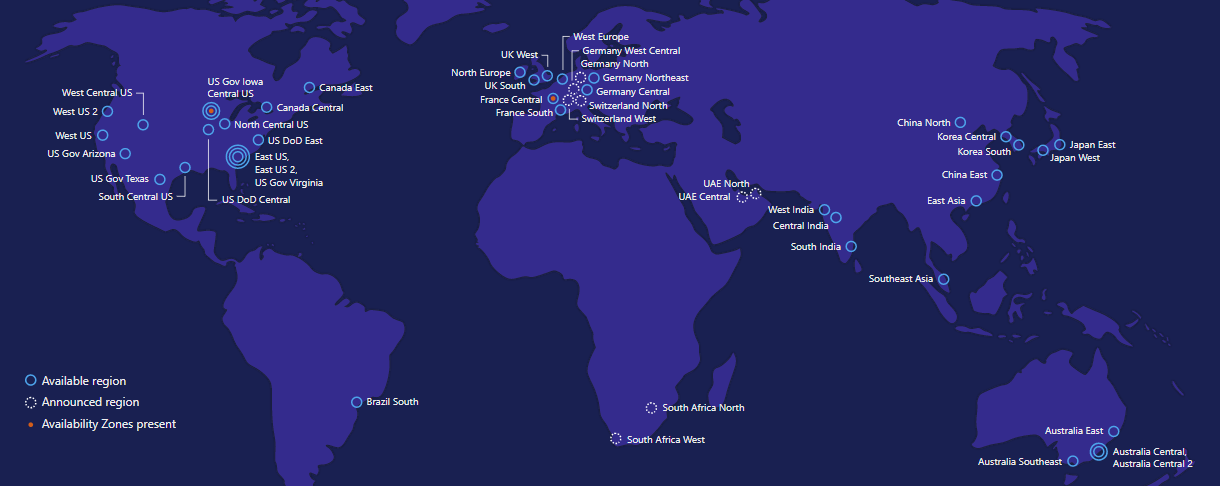
Azure now has 50 (announced) regions around the world, including:

  • “Public” regions that anyone can use
  • Government-only regions in the USA
  • The German trustee regions, requiring a dedicated tenant
  • The Chinese trustee regions, also requiring a dedicated tenant

And now some different ones have joined the list.

Microsoft just launched two new regions in Australia, that are designed for anyone requiring certification for Australian government service, like the Australian government. These regions, Asutralia Central and Australia Central 2 (both in southeast Australia!) are co-located in another company’s (Canberra Data Centres) two data centers and are connected to Azure via ExpressRoute.

Also launched are France Central (with generally available availability zones for 99.99% SLA) and France South, joining the two UK and two Europe regions.

Microsoft has also announced more Azure regions:

  • Germany West Central and Germany North, joining the which are not joining the trustee regions of Germany Central and Germany Northeast. These regions are surprisingly going to be a part of the European cluster of regions.
  • Switzerland North and Switzerland West, giving Swiss companies something local in Geneva and Zurich.
  • UAE North and UAE Central in Abu Dhabi and Dubai in the United Arab Emirates.

The previously announced South Africa regions still are not generally available.

Video–Azure File Sync

I’ve produced and shared a short video (12:33 minutes) to explain what Azure File Sync is, what it will do for you, and there’s a quick demo at the end. If you want to:

  • Synchronise file shares between offices
  • Fix problems with full file servers by using tiered storage in the cloud
  • Use online backup
  • Get a DR solution for file servers, e.g. small business or branch office

… then Azure File Sync is for you!

Was This Post Useful?

If you found this information useful, then imagine what 2 days of training might mean to you. I’m delivering a 2-day course in Amsterdam on April 19-20, teaching newbies and experienced Azure admins about Azure Infrastructure. There’ll be lots of in-depth information, covering the foundations, best practices, troubleshooting, and advanced configurations. You can learn more here.

Faster & Bigger Azure Backup for Azure VMs

Azure Backup recently rolled out an update to their service for protecting Azure VMs to improve backup speed, restore performance, and to add support for larger disks.

Support for Large Disks

Azure Backup didn’t support disks that were larger than 1 TiB (1 TB is the marketing measure of 1000 GB, and 1 TiB is the computer science measure of 1024 GiB). Those large disks must be popular – I know that people couldn’t get their head around the idea of a volume being spread across disk aggregation (they never heard of RAID, I guess) and wouldn’t touch Azure VMs because of this.

Today, Azure Backup, once upgraded by you, does support the large disks that Azure can offer (over 1 TiB).

Snapshot-Based Backup

People who deploy large VMs have seen that the traditional process of protecting their machines has been slow. Historically Azure Backup would:

  1. Create a snapshot of the virtual machine.
  2. Transfer the backup data from the storage cluster to the recovery services vault (standard tier block blob storage) over a network.

The snapshot was then dispensed with.

The backup was slow (the process of calculating changes, the network transfer and the write to standard storage), and restores were just as slow. It’s one thing for a backup to be slow, but when a restore is a 12 hour job, you’ve got a problem!

Azure made some changes, and now the process of a backup is:

  1. Create a snapshot of the virtual machine and keep 7 snapshots (7 backups).
  2. Use the previous snapshot to speed up the process of identifying changes.
  3. Transfer the backup data from the storage cluster to the recovery services vault (standard tier block blob storage) over a network.

Two things to note:

  • The differencing calculation is faster, speeding up the end-to-end process.
  • But after you upgrade Azure Backup, you can do a restore once the snapshot is complete, and while the backup job (transfer) is still happening!

Capture

7 snapshots are kept, and you can restore a virtual machine from either:

  • A snapshot from the last 7 backups)
  • A recovery point in the recovery services vault from up to the last 99 years, 9999 recovery points, depending on your backup policy.

AzureVMBackupRestoreUsingSnapshot

Restoring from a snapshot should be much quicker, and this will benefit large workloads, such as database servers, where a restore is usually from as recent a backup as possible.

Distributed Disks Restore

The last new feature is that when you restore a virtual machine with un-managed disks (storage account disks) then you can opt to distribute the disks to different storage accounts.

Accessing the Features

A one-time one-way upgrade must be done in each subscription to access the new Azure Backup for IaaS VM features. When you open a (single) recovery services vault, a banner will appear at the top. Click the banner, and then read the blade that opens. When you understand the process, click Upgrade. A quick task will complete and approximately two hours later, your entire subscription will be upgraded and able to take advantage of the features described above.

Was This Post Useful?

If you found this information useful, then imagine what 2 days of training might mean to you. I’m delivering a 2-day course in Amsterdam on April 19-20, teaching newbies and experienced Azure admins about Azure Infrastructure. There’ll be lots of in-depth information, covering the foundations, best practices, troubleshooting, and advanced configurations. You can learn more here.

Windows Server 2019 Announced for H2 2018

Last night, Microsoft announced that Windows Server 2019 would be released, generally available, in the second half of 2018. I suspect that the big bash will be Ignite in Orlando at the end of September, possibly with a release that week, but maybe in October – that’s been the pattern lately.

LTSC

Microsoft is referring to WS2019 as a “long term servicing channel release”. When Microsoft started the semi-annual channel, a Server Core build of Windows Server released every 6 months to Software Assurance customers that opt into the program, they promised that the normal builds would continue every 3 years. These LTSC releases would be approximately the sum of the previous semi-annual channel releases plus whatever new stuff they cooked up before the launch.

First, let’s kill some myths that I know are being spread by “someone I know that’s connected to Microsoft” … it’s always “someone I know” that is “connected to Microsoft” and it’s always BS:

  • The GUI is not dead. The semi-annual channel release is Server Core, but Nano is containers only since last year, and the GUI is an essential element of the LTSC.
  • This is not the last LTSC release. Microsoft views (and recommends) LTSC for non-cloud-optimised application workloads such as SQL Server.
  • No – Windows Server is not dead. Yes, Azure plays a huge role in the future, but Azure Stack and Azure are both powered by Windows, and hundreds of thousands, if not millions, of companies still are powered by Windows Server.

Let’s talk features now …

I’m not sure what’s NDA and what is not, so I’m going to stick with what Microsoft has publicly discussed. Sorry!

Project Honolulu

For those of you who don’t keep up with the tech news (that’s most IT people), then Project Honolulu is a huge effort by MS to replace the Remote Server Administration Toolkit (RSAT) that you might know as “Administrative Tools” on Windows Server or on an admin PC. These ancient tools were built on MMC.EXE, which was deprecated with the release of W2008!

Honolulu is a whole new toolset built on HTML5 for today and the future. It’s not finished – being built with cloud practices, it never will be – but but’s getting there!

Hybrid Scenarios

Don’t share this secret with anyone … Microsoft wants more people to use Azure. Shh!

Some of the features we (at work) see people adopt first in the cloud are the hybrid services, such as Azure Backup (cloud or hybrid cloud backup), Azure Site Recovery (disaster recovery), and soon I think Azure File Sync (seamless tiered storage for file servers) will be a hot item. Microsoft wants it to be easier for customers to use these services, so they will be baked into Project Honolulu. I think that’s a good idea, but I hope it’s not a repeat of what was done with WS2016 Essentials.

ASR needs more than just “replicate me to the cloud” enabled on the server; that’s the easy part of the deployment that I teach in the first couple of hours in a 2-day ASR class. The real magic is building a DR site, knowing what can be replicated and what cannot (see domain controllers & USN rollback, clustered/replicating databases & getting fired), orchestration, automation, and how to access things after a failover.

Backup is pretty easy, especially if it’s just MARS. I’d like MARS to add backup-to-local storage so it could completely replace Windows Server Backup. For companies with Hyper-V, there’s more to be done with Azure Backup Server (MABS) than just download an installer.

Azure File Sync also requires some thought and planning, but if they can come up with some magic, I’m all for it!

Security

In Hyper-V:

  • Linux will be supported with Shielded VMs.
  • VMConnect supported is being added to Shielded VMs for support reasons – it’s hard to fix a VM if you cannot log into it via “console” access.
  • Encrypted Network Segments can be turned on with a “flip of a switch” for secure comms – that could be interesting in Azure!

Windows Defender ATP (Advanced Threat Protection) is a Windows 10 Enterprise feature that’s coming to WS2019 to help stop zero-day threats.

DevOps

The big bet on Containers continues:

  • The Server Core base image will be reduced from 5GB by (they hope) 72% to speed up deployment time of new instances/apps.
  • Kubernetes orchestration will be natively supported – the container orchestrator that orginated in Google appears to be the industry winner versus Docker and Mesos.

In the heterogeneous world, Linux admins will be getting Windows Subsystem on Linux (WSL) for a unified scripting/admin experience.

Hyper-Converged Infrastructure (HCI)

Storage Spaces Direct (S2D) has been improved and more changes will be coming to mature the platform in WS2019. In case you don’t know, S2D is a way to use local (internal) disks in 2+ (preferably 4+) Hyper-V hosts across a high speed network (virtual SAS bus) to create a single cluster with fault tolerance at the storage and server levels. By using internal disks, they can use cheaper SATA disks, as well as new flash formats don’t natively don’t support sharing, such as NVME.

The platform is maturing in WS2019, and Project Honolulu will add a new day-to-day management UI for S2D that is natively lacking in WS2016.

The Pricing

As usual, I will not be answering any licensing/pricing questions. Talk to the people you pay to answer those questions, i.e. the reseller or distributor that you buy from.

OK; let’s get to the messy stuff. Nothing has been announced other than:

It is highly likely we will increase pricing for Windows Server Client Access Licensing (CAL). We will provide more details when available.

So it appears that User CALs will increase in pricing. That is probably good news for anyone licensing Windows Server via processor (don’t confuse this with Core licensing).

When you acquire Windows Server through volume licensing, you pay for every pair of cores in a server (with a minimum of 16, which matched the pricing of WS2012 R2), PLUS you buy User CALs for every user authenticating against the server(s).

When you acquire Windows Server via Azure or through a hosting/leasing (SPLA) program, you pay for Windows Server based only on how many cores that the machine has. For example, when I run an Azure virtual machine with Windows Server, the per-minute cost of the VM includes the cost of Windows Server, and I do not need any Windows Server CALs to use it (RDS is a different matter).

If CALs are going up in price, then it’s probably good news for SPLA (hosting/leasing) resellers (hosting companies) and Azure where Server CALs are not a factor.

The Bits

So you want to play with WS2019? The first preview build (17623) is available as of last night through the Windows Server Insider Preview program. Anyone can sign up.

image

Would You Like To Learn About Azure Infrastructure?

If you found this information useful, then imagine what 2 days of training might mean to you. I’m delivering a 2-day course in Amsterdam on April 19-20, teaching newbies and experienced Azure admins about Azure Infrastructure. There’ll be lots of in-depth information, covering the foundations, best practices, troubleshooting, and advanced configurations. You can learn more here.

Thank You Mark Minasi @mminasi

A friend of mine, and a man who has influenced many IT careers around the world, is retiring. This week, Mark Minasi was at the Microsoft MVP Summit in Bellevue/Redmond to say farewell to many of his friends from across the globe. I’m taking this opportunity to say “thank you”.

I’m in a position to be able to write this post partly because of Mark. I’ve written before that 5 years into my IT career I found myself at a point where had to reinvent myself. I realised that relying on my employer to educate me was hopeless. I had to educate myself and put in the extra effort. I learned that continuous learning was the key to continued success. A few years later, in 2003, I landed a dream job, with the opportunity to design a Microsoft infrastructure that would span sites across North America, Europe, and Asia. I had a good idea of what I wanted, but I wanted more information, especially because I had decided to base everything on the just-released Windows Server 2003.

I believe in being prepared, so I went to a local book store and picked up two Windows Server 2003 books, including the infamously huge (1800 pages) Mastering Windows Server 2003 by Mark Minasi. I poured over his book for a weekend, pulling the pieces that were relevant and building out a design. A few months later, we went live, and it was gooooood.

There’s always Q&A about new things or problems, so I went online to find a place to ask questions. Mark ran a forum at the time and I joined. At first, I asked questions, but over time, that moved from asking questions to answering questions.

In 2004, my boss asked how I wanted to spend my training budget. I didn’t want to sit in Microsoft training classes because I knew that stuff. Instead, I wanted deeper information. I found a conference called Windows IT Connections that was running in Lake Las Vegas, and I signed up. There I saw great speakers like Jeremy Moskowitz (I bought his GPO book from him there, and it was amazingly detailed), and Mark Minasi. Mark’s sessions were interesting because he delivered information and entertainment all at once. His consulting work lead to more interesting topics, like understanding how AD replication worked in multi-site environments, the process of password changing, account lockouts, etc. These were all things I had to engineer around, and the information was more than one could find anywhere else.

I arrived early for one session, and sat in the fourth row. I was early and minding my own business. Mark came in, got himself set up, and then started to visit with the early birds. He came over to me and said hi. We talked about his one previous visit to Ireland, when he did some training in Galway. I didn’t tell him that I was “joe elway” on his forum – I thought that was being a bit weird.

A few years later, the membership on the forum became more and more friendly. The regulars were getting to know each other and chat about non-IT things. Some even knew each other from attending conferences. I don’t remember exactly how it started, but it was decided to arrange a meetup, which evolved into a mini-conference ran in Mark’s home town of Virginia Beach. That mini-conference saw some great minds attend, and share their knowledge. It was here that I got to know Mark personally, and he became a friend and great influence.

Myself, Mark Minasi, and Nathan Winters, on my “stag” photography trip to the Saltee Islands [Credit: Jimi Vigotty]

Mark had a genuine desire to see the attendees excel in all ways, whether it was at their techie job, or in the community as writers, speakers, etc. He freely shared his knowledge and experience.

One year, Mark taught a class on how to deliver a technical presentation. He talked about the preparation, the delivery, how to speak, etc. In technical audiences, there can sometimes be a difficult person: an ego that must prove itself as the best, a desire to be disruptive, or a hater of what you are saying. Mark shared his technique for dealing with that person – identify them while you are setting up before the presentation, and then go down to visit with them. Disarm the person by being friendly before the presentation … hmm 😊

When I think back to that mini-conference and the forum, the collection of people was impressive. One is leading huge Office 365 migration projects around the world. Another is at the tip of the spear on Microsoft’s global push of Azure Stack. A few of them were the best minds in Active Directory, inside or outside of Microsoft.  Another was a PowerShell guru, another a Small Business Server genius, and many of them became conference/user group speakers, and eventually became Microsoft MVPs.

A few of us discovered that we shared the hobby of photography and we start to go on trips together. We started by doing these trips before/after the conference in Virginia Beach and that became dedicated trips. I started to blog and do presentations. One year, Mark commented on my writing and encourage me to do more. And that became an offer to contribute to his latest Mastering Windows Server book – I was going from reading this series to writing this series! I wrote a number of chapters and my name was in the cover. That was a wow moment in my career. From that came other offers, and then I went to being the lead author on a few books, including the two Hyper-V books.

Mark’s advice on writing was to assume nothing about the reader. Explain the subject at a high level, introduce it, add some advanced content, and then cover the monitoring & troubleshooting. That’s the approach that was used in the Master series of books, and it’s something I adopted for my writing style.

My writing eventually lead to an offer to write for Petri.com. The editor back then came from Windows IT Connections (it’s a small world) and he wanted me to use my style or writing to explain Microsoft’s often confusing messaging in the Hyper-V and Windows Server context, and that migrated into Azure subject matter.

The offers for speaking kept coming, and Mark was always offering advice. He thought I should speak at, what was then, TechEd. There’s a longer story, but I eventually did get into TechEd Europe and the first Microsoft Ignite and, thanks to Mark’s advice over the years, I got great scores. I’ve spoken at many events and webinars. At work, I found myself writing and delivering larger and more complex training, eventually becoming 1-, 2-, and 3-day courses.

For years, Mark has been telling me to start doing my own thing. He reckoned that I should have been travelling Europe and the US, teaching Hyper-V classes. I didn’t really have the confidence that I could make that work but he always told me that I was silly to lack the required confidence. He was certain that people would attend. Last year, my wife said the same thing. Last year, I started Cloud Mechanix, and last month I taught my first Azure training course to a full room in London. Next month, I teach my second class in Amsterdam.

Mark’s influence on me changed my career. He’s always been a supporter, and encouraged me to do more. I know I’m not alone in that either. What he’s done for me lead to me asking him to be one of my groomsmen when I got married and I was honoured when he said yes.

That’s just my story. I’m certain that probably dozens of other people have similar stories of how Mark Minasi has impacted them. Mark has attended the Microsoft MVP Summit this week to say farewell to many friends because he has retired. I’ve seen some of that – people are coming up to say “hi” and “thank you”. I don’t think he can walk down a hallway without someone stopping him – it’s a nod to his impact on so many of us working with Microsoft products.

Mark, if you ever read this, thank you on behalf of me and the many that you have helped or influenced at your classes, the events you have spoken at, or via the books and articles you have written over the last 4 decades.

Aidan 2, Vodafone 0

If you follow me on social media, you might have noticed my escalation (phase 2) against Vodafone Ireland to get my issues resolved or my contract cancelled. I wrote a post, which was a diary of my costs and difficulties in trying to get a normal phone service from the telecoms company; I’d been without mobile data or text services for 10 days (11 including today). I tweeted Vodafone Ireland, to let them know what was to come. This morning, I escalated:

  • I posted to the Vodafone Ireland forum on Boards.ie (a huge forum in Ireland), and responded to every relevant article with my story.
  • I repeated that process on Vodafone Ireland’s own support forum.
  • I replied to every tweet by Vodafone Ireland, including their support tweets – I was about to configure Microsoft Flow to do that for me … that sort of makes this a tech story, right?

By 10:45, things started to happen.

I got the complaint reference number that I’d first asked for on the 19th of Feb (today is the 26th).

By the way, Vodafone blocked me on Twitter straight after that message. That was pointless – I can easily see every message using a second account (I have a few for various things). That was effectively an admission that I had an impact, and would only cause me to escalate.

Armed with the complaint reference number, I opened an official case on the Vodafone site, and then contacted Comreg. They normally have to wait 10 days after a complaint case starts, but after explaining the delay by Vodafone (I have all the screenshots, as you can see in these posts), the regulator offered to backdate the 10 days.

While I was talking to Comreg, a DM arrived in from Vodafone, at 10:54. Apparently some engineers had finished the break they’d started 11 days ago, and were able to look at my case. I rebooted my phone and …. tah dah! … I have data and text services once again.

So what’s the lesson here? Good customer service is cheaper than what a motivated and pissed off customer will do to you. I’d say at least 20,000 people saw what I did, and that stuff will stay on the Internet forever. And that was only phase 2 of my 3-phase plan. I was willing to purchase Google Adwords and advertise on Facebook to do more damage! I’ve bent Vodafone to my will twice, Eircom (now Eir) wrote an apology letter to me once, a debt collector (sent illegally by Eircom for a non-existing contract) apologised to me on the phone, saying I’d never hear from him again, and I made a camera store in the UK apologise and refund me after some dodgy payment practices. Be willing to use the voice that you have, and punish bad customer service. Poor customer service works for bad companies while they save money and you are willing to live with it. When you cost them money by damaging their reputation with the truth, they have to capitulate.

First Cloud Mechanix Azure Course Completed

Last week, I delivered my first ever Cloud Mechanix Azure training course, to a full room in the Lancaster Gate area of London, UK.

It was a jam-packed full 2 days of Azure storage, networking, virtual machines, backup, DR, security, and management, with lots of hands-on labs. Half the attendees were from the UK, the rest from countries such as Denmark, Netherlands, Belgium, and even Canada! I had a lot of fun teaching the class – there were lots of questions and laughs. And as often happens in these classes, the interactions lead me to picking up a couple of ideas from the attendees.

In my class, everyone gets hands-on labs a few days before the event. That allows them to get their laptops ready. On the day, they get copies of the slides so they can follow/along or make notes on their laptops – the labs and slides are updated with the latest information that I have. The goal of the class isn’t to teach you where to click, but why to click. In the cloud, things move and get renamed so detailed instructions age very quickly. But what lasts is understanding the why. Not everyone got to finish the hands-on labs, but I am available to help the attendees complete the labs.

If this course sounds interesting to you, then we have another class running in Amsterdam in April. Some tweaks are being made the labs/slides (which the London class will be getting too) and, as always, the April class will be getting the latest that I can share on Azure.

How Bad is Vodafone Ireland’s Mobile Phone Service?

Let me tell you a tale … a tale of a contracted-for and paid-for service mobile phone Internet & SMS/Text data services that Vodafone Ireland is failing to provide me with.

The Outage

This tale of woe starts on Thursday 15th February. I was on the road to visit a client in Limerick (I live in northern Kildare). I’d pulled into a service station and wanted to check to see what podcasts or audio books I had to listen to on the long drive. And I found that I had no Internet access. It’s not unusual to have blackspots so I ignored the inconvenience. Near the client site, I pulled in and opened my phone to navigate my way there because they had recently moved. And now, in Limerick City, I had no data services, even though I had a full 4G or 3G signal. Hmm! I made my way there anyway, and texted my wife … and the text failed to send. So I had lost all data services: Internet and SMS. Maybe it was a network glitch.

I left 5 hours later and I still had no service. I drove home, verified that I could browse on my wi-fi. I still had no data services when just on the Vodafone Ireland network. I made my first call.

Vodafone Interaction #1 (Day 0)

I got home and called “Customer Care”. I explained the issue clearly and patiently. I rebooted my fairly new iPhone 8 several times as requested. After about half an hour, I was told that either my phone was broken or the SIM needed to be replaced. There was “nothing else” that could be done.

My wife, also with an iPhone and also on Vodafone, came home. We swapped SIMs. My SIM (my Vodafone Ireland account) in her phone wouldn’t work. Her SIM (Vodafone Ireland account) in my phone did work. That meant:

  • My phone was fine.
  • Either my SIM or my Vodafone Ireland account was at fault.

Replace The SIM (Day 3)

On Sunday 18th February, I finally had time to visit a Vodafone Ireland store – a 1 hour round trip. I walked in and quickly got a replacement SIM. I got home, swapped the SIM, rebooted and …

The problem was still there. The services that Vodafone Ireland are contracted to offer and paid to do were still not available:

  • Data
  • Mobile.

Costs that will be invoiced to Vodafone Ireland:

  • Mileage: 42 miles * €0.75 = €31.50
  • Hourly rate: €350

Vodafone Interaction #2 (Day 3)

Immediately, after that, still on Sunday 18th February, I called “Customer Care”. I must have spent 45-60 minutes explaining the problem and rebooting the phone as requested. Eventually the agent said there was nothing more he could do for me.

Finally, I thought, my case would be escalated to an engineer. Remember now, this is Sunday. This is when the agent informed me that, yes, my case would be escalated, but an engineer wouldn’t be looking at my problem until Wednesday at the earliest. 3 days!

My problem here is that I needed my phone on Wednesday. My business, Cloud Mechanix, was running a training class in London on Thursday/Friday and I would be travelling on Wednesday. This just was not going to be good enough.

This is when I told the “care” agent that at this time, Vodafone Ireland was no longer offering me the service I had contracted for and paid for. I demanded a release from my contract. I needed a service, and if Vodafone Ireland would not offer me my mobile broadband and texting services, then I would have to get these services that my business needs from elsewhere.

The agent flipped. I repeated myself several times. Eventually I hung up. He called me back. I demanded to speak to a manager, and I was told that was not possible. If you read my previous posts about Vodafone Ireland, then you’ll know the truth about manager callbacks.

By the way, those posts remained on the first page of search results for “Vodafone Ireland Home Broadband” for several years – fixing my technical problem efficiently would have been much cheaper than the SEO damage that I caused this company.

I ended up hanging up again. And he called again, and again, and probably more. I stopped answering.

Workaround (Day 3)

I ended up having to drive 30 minutes, each way, to an Eir store to buy a pay-as-you-go SIM. After unlocking the SIM and paying credit, I had instant text and data services on the Eir network. At least I would have a phone service for my work trip to London.

Costs that will be invoiced to Vodafone Ireland:

  • Mileage: 42 miles * €0.75 = €31.50
  • Hourly rate: €350
  • SIM cost: €20
  • PAYG data: €20

Vodafone Interaction #3 (Day 4)

I tweeted my displeasure on Monday 19th February, making sure that @VodafoneIreland was mentioned. Eventually, they (“Aoife”) asked me to DM my details. I did.

Vodafone Ireland Interaction #4 (Day 4-5)

I waited several hours, and nothing had happened. I warned them that I would be blogging about this, and doing some SEO damage. I also demanded a complaint ID so I could open a case with COMREG, the Irish telecoms regulator. Here was the response, on Tuesday 20th February:

Sunday 25th February (Day 10)

The promised contact from the “tech team” didn’t happen. I’ve been to London and back, using my Eir SIM, even though I’ve paid my contracted €60 for this month’s Vodafone Ireland services including:

  • Voice
  • Data
  • Text

Two thirds of those essential services have been unavailable for 10 days now.

So up to now Vodafone Ireland also owes me: €13.01 for services paid that have not been provided. That amount owed back to me increases by ~€1.30 per day for each day that the contracted for and paid for services are not supplied by Vodafone Ireland.

What I Expect

I expect the following:

  • An official complaint ID to be provided to me by Vodafone Ireland so I can file a complaint with COMREG.
  • The paid-for and contracted-for services to be provided to me immediately, or my contract to be cancelled, at no fault or costs to me, by Vodafone Ireland – an admission of their fault.
  • The above costs to me, including my costs to Eir, myhourly rates, and the refunds owed for unprovided services, to be paid in full.

If you work for Vodafone Ireland social media/marketing, then be aware that this will escalate. I’ve done it to you before. I’ve done it to Eircom. I’ll do it to you. It will be cheaper to make me happy than to undo the damage I will incur.

You have until 17:30 on Monday 26th February to agree to my terms.

Update

I won. I also got a refund via credit to my account.

Delivering My First “Cloud Mechanix” Azure Training Course Today

I’m in London right now, preparing to deliver my first Azure training course by my very own company (co-owned/run with my wife, Nicole), Cloud Mechanix. I actually wrote this post yesterday and scheduled it for release, because I predicted that I’d be busy.

The class is sold out, 20 people from around the world are attending, from the UK, continental Europe, and from as far away as Canada! I’m blown away that our first course sold like this. I have 2 days to teach as much Azure infrastructure as I can. The goal is to give people the foundations and best practices for building, securing, managing, and protecting stable and well performing systems in the cloud. There’s lots of tips in the class, and I’ve build a set of hands-on exercises so there’s a practical side to the theory – the attendees will build a sample reference architecture for VM-based solution.

I can’t teach everything in two days, but I can teach what you need to know, so learning more is easy. As I’ve found with a different Azure VM class that I developed & teach for my employer in Dublin, this class is a foundation for Azure. Once you know this material, you have the bits to move on to other hybrid or PaaS-based solutions in Microsoft’s cloud.

I’m so excited! A certain friend of mine who retired recently has been telling me to do this for the last 5 years. Last year, Nicole told me I needed to do this. I made the decision to start writing the course. If I was up early with our youngest daughter, I’d sit down in the office once she fell back asleep and I’d write. Or when I brought my eldest daughter to gymnastics class, I’d wait outside in the car, writing. Pretty much every free moment of the last month went into updating the content – and I’ll probably still do an update or two (on managed disks) early on Thursday morning. So here I am (or will be) in London, counting down the minutes until the attendees walk in the door, we make introductions, and we sit down to start a learning experience together.

London is sold out, but we have another class running in Amsterdam on April 19-20. The venue is a hotel near Schiphol airport, making it very easy to get to – it’s not too central in Amsterdam, and Schiphol is one of the best connected airports in Europe. Half of the seats are already gone so, if you are interested, you will need to move quick.