You Can Buy Windows Intune Through Volume Licensing As Of Today

Windows Intune was originally launched to the sound of silence. This was because it was too expensive and it didn’t really do what it needed to in the market that Microsoft was pushing it to.

How the market originally reacted to Windows Intune

The product gained features as a mobile device management (MDM) solution that is integrated into your on-premise network. The packaging and pricing were also restructured to make Intune much more attractive.

But one problem remained. Intune was sold only directly to customers, and not through the channel. This is a huge deal breaker for partners … the people who actually implement Microsoft solutions in the majority of cases for small, medium, and large customers.

Today is the first day that you can buy Windows Intune through volume licensing. That means a partner can buy the software/service from a distributor (at a reduced price) and sell it to their customer (at the regular price). Now the partner has a reason to care about Intune (cold reality: sales people sell toasters at a profit and don’t give a flying monkey’s you-know-what about solutions).

Will availability help Intune? In my opinion: yes. We have been getting calls from partners over the past few weeks about this. History (Office 365) tells us that availability through VL not only gave MSFT a new VL sales income, but it increased MOSPA (direct) sales – that’s because the partners were invested in the ecosystem and sometimes a direct sale is best for a customer scenario.

Learn about Windows Intune now:

BTW, this is another product I expect will be renamed to Microsoft Intune. It does cover Windows, Windows RT, Windows Phone, but also iOS (phone and tablet) and Android (phone and tablet). And long term, it would make sense if it merged or consumed System Center Configuration Manager with just proxy/auditing/distribution points placed on-site.

Technorati Tags: ,

How is Office for iPad Licensed?

Some questions are flying around the net at the moment. Is Office for iPad free? How do I buy Microsoft Office for iPad? Which Office 365 plans include Office for iPad? Let’s answer them all here.

image

Is Office for iPad Free?

Yes, but ..

This is what we would call Free-mium software. You can quite happily download Microsoft Office for iPad from iTunes without paying a penny. And the four products will allow you to view/present your documents … and nothing more.

To create or edit content you will need to pay for a suitable Office 365 plan, which you can buy online or in a retail store (basically a key code).

How do I buy Microsoft Office for iPad?

You will need to buy a suitable Office 365 plan. Right now, those plans allow for 5 installs on PCs & Macs, and 5 installs on tablets. A new Personal plan will allow for 1 install – I don’t know the precise details but I suspects one install on PC/Mac and one on tablet.

Which Office 365 plans include Office for iPad?

As stated by Microsoft, the plans are:

  • Office 365 Home
  • Office 365 Small Business Premium
  • Office 365 Midsize Business
  • Office 365 E3 (Enterprise and Government)
  • Office 365 E4 (Enterprise and Government)
  • Office 365 Education A3
  • Office 365 Education A4
  • Office 365 ProPlus
  • Office 365 University
  • Office 365 Personal – when it becomes available later this spring

Basically, if the Office 365 plan includes Office for install on PC/Mac, then it includes Office for iPad. Microsoft has been hinting this since Office 365 was launched. Most of the Microsoft media talked about the following text from the plans comparisons site back then, suggesting that touch versions of Office for cross-platforms was coming:

image

So my advice: if there’s any chance that your users/customers will require office on cross platform devices, then buy an M plan (medium biz) or an E3/E4 plan (larger biz or fully featured). Or choose the appropriate education plan or consumer plan for those markets.

BTW, the education plans are REALLY attractive to institutions now. Associate with and talk to a cloud distributor to learn more.

Note that if you did buy an E1 plan then you can upgrade to an E3 or E4 plan. If you bought Small Business then you have lots of options.

EDIT#1

I was talking with the Office 365 licensing guru of Ireland, Nicole Sheridan of MicroWarehouse, tonight about this topic and she corrected me on something. Customers can only upgrade their plan if they bought direct (MOSPA). Upgrades are not available via other channels.

EDIT#2

If you obtain your Office for iPad licensing via a non-commercial plan, i.e. Home or Personal, then you may not use that license for commercial work. Doing so is a breach of the terms of licensing (you need a  license upgrade). BTW CIOs, this is impossible to audit.

Technorati Tags: ,,

Windows 8.1 ENTERPRISE To Be Available For Purchase

Way back when Windows 7 was first announced, I got into a wee bit of trouble for criticising Microsoft’s bundling of the differentiating features of the new desktop OS into just the Enterprise edition. Why? That was because only those who licensed the Pro edition via Volume Licensing with Software Assurance would be entitled to the Enterprise edition. If you couldn’t buy all the cool features, then why would a business consider jumping from Windows XP to Windows 7? Sure, there were lots of good stuff in Windows 7 Pro, but all the cool business features were in the Enterprise edition.

Hmm, turns out that lots of businesses don’t actually buy SA. Large enterprises get SA with their Enterprise Agreements. Larger businesses with Select or Select Plus only get SA at extra cost – they choose this program to avoid annuity programs. In the SME world, those with OVS rather than pure Open do get SA. That leaves lots of businesses without SA, and without the benefits of the Enterprise edition that make an upgrade so appealing. And they just were not able to pay for the Enterprise edition because it was only available as an VL+SA benefit.

Well it seems that some backtracking is occurring. Mary Jo Foley reported overnight that Microsoft is to release the Enterprise edition of Windows 8.1 (and therefore lower editions via downgrade rights) as a standalone product via Select, Select Plus and Open – the two programs without SA. Going forward you will be able to buy the Enterprise + SA option through any VL program.

I think that’s a good news story to get March kicked off!

Technorati Tags: ,

My Most Popular Articles In 2013

I like to have a look at what people are reading on my blog from time to time.  It gives me an idea of what is working, and sometimes, what is not – for example, I still get lots of hits on out-dated articles.  Here are the 5 most viewed articles of the last year, from 5 to 1.

5) Windows Server 2012 Hyper-V Replica … In Detail

An oldie kicks off the charts … this trend continues throughout the top 5.  At least this one is a good subject that is based on WS2012 and is still somewhat relevant to WS2012 R2.  Replica is one, if not the, most popular features in WS2012 (and later) Hyper-V.

4) Rough Guide To Setting Up A Hyper-V Cluster

I wrote this article in 2010 for Windows Server 2008 R2 and it’s still one of my top draws.  I really doubt you folks still are deploying W2008 R2 Hyper-V; I really hope you folks are not still deploying W2008R2 Hyper-V!!!!  Join us in this decade with a much better product version.

Please note that the networking has change significantly (see converged networks/fabrics).  The quorum stuff has changed a bit too (much simpler).

3) Windows Server 2012 Licensing In Detail

Licensing!!! Gah!

2) Comparison of Windows Server 2012 Hyper-V Versus vSphere 5.1

There’s nothing like kicking a hornets nest to generate some web hits Smile  We saw VMware’s market share slide in 2013 (IDC) while Hyper-V continued the march forward.  More and more people want to see how these products compare.

And at number one we have … drumroll please …

1) Windows Server 2012 Virtualisation Licensing Scenarios

Wow! I still cannot believe that people don’t understand how easy the licensing of Windows Server on VMware, Xen, Hyper-V, etc, actually is.  Everyone wants to overthink this subject.  It’s really simple: It’s 2 or unlimited created Window Server VMs per assigned license to a host people!!!  This page accounted for 2.8% of all views in the last 12 months.

Sadly, not a single post from the last year makes it into the top 10.  I guess that folks aren’t reading about WS2012 R2.  Does this indicate that there is upgrade fatigue?

How Do I Plan And Size A Hyper-V Deployment – MAP 9.0

You measure and assess.  And Microsoft gives you a tool to do that called MAP.  They’ve been giving us this tool for many years, and it’s now on version 9.0 (just released).

When planning a traditional Hyper-V conversion (not a new bare-metal cloud) you can run MAP to identify the physical or virtual (VMware) servers that you want to convert to Hyper-V, measure their resource utilization, enter in potential Hyper-V host specifications, and then MAP will produce reports that size your environment.  It’s something you kick off, let it measure, and run the reports after (maybe – you choose) a week while you’ve been doing something else.

There’s some new stuff in MAP 9.0:

    • New Server and Cloud Enrollment scenario helps to simplify adoption: Server and Cloud Enrollment (SCE) is a new offering under the Microsoft Enterprise Agreement that enables subscribers to standardize broadly on one or more Microsoft Server and Cloud technologies.  The MAP Toolkit 9.0 features an assessment scenario to identify and inventory SCE supported products within an enterprise and help streamline enrollment.
    • New Remote Desktop Services Licensing Usage Tracking scenario creates a single view for enterprise wide licensing: With an increase in enterprises deploying Remote Desktop Services (RDS) across wider channels, RDS license management has become a focus point for organizations.  With the new RDS Licensing scenario, the MAP Toolkit rolls up license information enterprise-wide into a single report, providing a simple alternative for assessing your RDS licensing position.
    • Support for software inventory via Software ID tags now available: As part of the Microsoft effort to support ISO 19770-2, the MAP Toolkit now supports inventory of Microsoft products by Software ID (SWID) tag.  SWID enhanced reports will provide greater accuracy and assist large, complex environments to better manage their software compliance efforts by simplifying the software identification process and lowering the cost of managing software assets.
    • Improved Usage Tracking data collection for SQL Server Usage Tracking scenario: As part of our ongoing improvement initiatives, Usage Tracking for SQL Server 2012 has been enhanced to use User Access Logging (UAL).  UAL is a standard protocol in Windows Server 2012 that collects User Access information in near real time and stores the information in a local database, eliminating the need for log parsing to perform Usage Tracking assessments.  UAL vastly improves the speed and helps to eliminate long lead times for environment preparation associated with running Usage Tracking assessments.

If you want to plan and size desktop deployment, Office deployment, RDS, Azure, Hyper-V, SQL Server, and more, then you need to be checking out the FREE (yes FREE!!!!) MAP 9.0.

Windows Server & System Center 2012 R2 Can Be Bought … Now

Generally available (GA) doesn’t mean quite what it used to either.  Although Windows Server 2012 R2 (WS2012 R2) and System Center 2012 R2 were available on the Microsoft Volume Licensing Service Center (VLSC) for Software Assurance (SA) customers, the products could not be purchased.  They can now, as long as you’re in a time zone where it is November 1st 🙂

Windows 8.1 Availability For Business

Microsoft has clarified the availability situation of Windows 8.1 in businesses.

Beginning today, TechNet and MSDN subscribers will now have access to Windows 8.1 Enterprise RTM. This also includes access for Volume License (VL) customers with an active Software Assurance (SA) agreement, as you receive a TechNet subscription as part of SA.

Over and over in the article they talk about evaluation.  And that is correct, while businesses with SA on their licensing get free TechNet licenses, TechNet is for evaluation only. 

… the primary objective in making Windows 8.1 RTM bits available on TechNet and MSDN is so developers and businesses can continue testing the latest version of the operating system … And once GA bits are available, you will be ready to conduct final testing and begin your deployment of Windows 8.1.

Using TechNet media for anything other than evaluation is illegal, no matter what licensing or rights you think you have.  It is a binary thing; there is no grey area; there is no “if” or “but”; there are no ways around it no matter what your imagination might come up with.

Those with SA should be deploying the Enterprise edition of Windows 8.1 because it is the business feature-rich edition of the OS. 

For all devices currently running Windows 8 and for those of you who are testing Windows 8.1, use Windows 8.1 Enterprise RTM as another opportunity to evaluate the operating system so you can start your official migration when Windows 8.1 Enterprise GA becomes available on October 18.

EDIT: Windows 8.1 Enterprise was added to MSDN/TechNet overnight.  Please keep reading.

Microsoft reminds us again about the rights limitations of TechNet and MSDN media.  You will soon have access to the Enterprise edition via those evaluation and test/dev programs but for production usage:

… you must have active SA for the Windows desktop operating system to have rights to Windows 8.1 Enterprise licenses.

VLSC (where customers with Windows 8 licensing can download Windows 8.1) will be updated with the GA bits of Windows 8.1 (what you can deploy for production) on:

… October 18 and for new customers to purchase through Microsoft Volume License Resellers beginning November 1.

Technorati Tags: ,

Windows Server 2012 R2 Licensing

As usual, I am not answering any questions about licensing. That’s the job of your reseller or distributor, so ask them.

Microsoft released the updating licensing details for WS2012 R2 several weeks ago.  Remember that once released, you will be buying WS2012 R2, even if you plan to downgrade to W2008 R2.  In this post, I’m going to cover the licensing for “core” editions of Windows Server.

The Core Editions

There aren’t any huge changes to the “core” editions of Windows Server (Datacenter and Standard).  As with WS2012, the two editions are identical technically, having the same scalability and features … except one.

Processors

Both the Standard and Datacenter edition cover a licensed server for 2 processors.  Processors are CPUs or sockets.  Cores are not processors.  A server with 2 Intel Xeon E5 processors with 10 cores each has 2 processors.  It requires one Window Server license.  A server with 4 * 16 core AMD processors has 4 processors.  It needs 2 Windows Server licenses.

This applies no matter what downgraded version you plan to install.

Downgrade Rights

According to Microsoft:

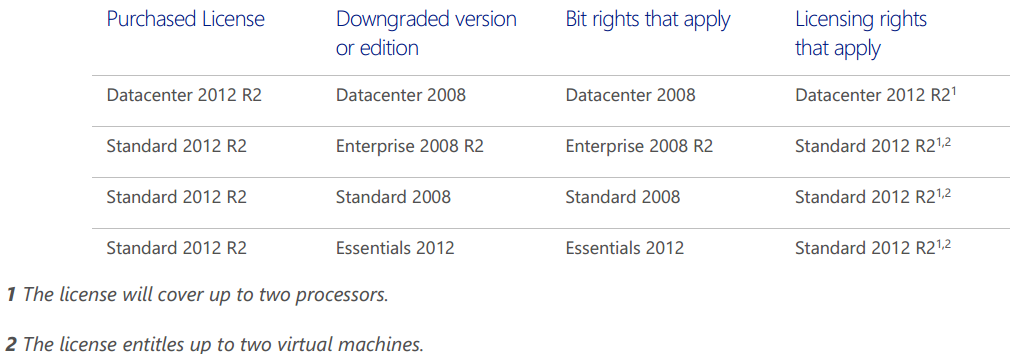
If you have Windows Server 2012 R2 Datacenter edition you will have the right to downgrade software bits to any prior version or lower edition. If you have Windows Server 2012 R2 Standard edition, you will have the right to downgrade the software to use any prior version of Enterprise, Standard or Essentials editions.

image

The One Technical Feature That Is Unique To Datacenter Edition

Technically the Datacenter and Standard editions of WS2012 R2 are identical.  With one exception, which is really due to the exceptional virtualization licensing rights granted with the Datacenter edition.

If you use the Datacenter edition of WS2012 R2 (via any licensing program) for the management OS of your hosts Hyper-V then you get a feature called Automated Virtual Machine Activation (AVMA).  With this you get an AVMA key, that you install into your template VMs (guest OS must be WS2012 R2 DC/Std/Essentials) using SLMGR.  When that template is deployed on to the WS2012 R2 Datacenter hosts, then the guest OS will automatically activate without using KMS or online activation.  Very nice for multi-tenant or Network Virtualization-enabled clouds.

Virtualization Rights

Everything in this section applies to Windows Server licensing on all virtualization platforms on the planet outside of the SPLA (hosting) licensing program.  The key difference between Std and DC is the virtualization rights.  Any host licensed with DC gets unlimited VOSEs.  A VOSE (Virtual Operating System Environment) is licensing speak for a guest OS.  In other words:

  1. Say you license a host with the DC edition of Windows Server.
  2. You can install Windows Server (DC or Std) on an unlimited number of VMs that run on that host.
  3. You cannot transfer those VOSEs (licenses) to another host.
  4. You can transfer a volume license of DC (or Standard for that matter) once every 90 days to another host.  The VOSEs move with that host.

The Standard edition comes with 2 VOSEs.  That means you can install the Std edition of Windows Server in two VMs that run on a licensed host:

  1. Say you license a host with the Std edition of Windows Server.
  2. You can install Windows Server Standard on up to 2 VMs that run on that host.
  3. You cannot transfer those VOSEs (licenses) to another host.
  4. You can transfer a volume license of Standard (or DC for that matter) once every 90 days to another host.  The VOSEs move with that host.

You can stack Windows Server Standard edition licenses to get more VOSEs on a host:

    1. Say you license a host with 3 copies of the Std edition of Windows Server.  This is an accounting operation.  You do not install Windows 3 times on the host.  You do not install 3 license keys on the host.
    2. You can install Windows Server Standard on up to 6 (3 Std * 2 VOSEs) VMs that run on that host.
    3. You cannot transfer those VOSEs (licenses) to another host.
    4. You can transfer a volume license of Standard (or DC for that matter) once every 90 days to another host.  The VOSEs move with that host.

There is a sweet spot (different for every program/region/price band) where it is cheaper to switch from Std licensing to DC licensing for each host.

If you need HA or Live Migration then you license all hosts for the maximum number of VMs that can (not will) run on each host, even for 1 second.  The simplest solution is to license each host for the DC edition.

Upgrade Scenarios

WS2012 CALs do not need an upgrade.  WS2012 server licenses require one of the following to be upgraded:

  • Software Assurance (SA)
  • A new purchase

In my opinion anyone using virtualization is a dummy for not buying SA on their Windows Server licensing.  If you plan on availing of new Hyper-V features (assuming you are using Hyper-V) or you want to install even 1 newer edition of Windows Server, then you need to buy the licenses all over again … SA would have been cheaper, and remember that upgrades are just one of the rights included in SA.

Pricing

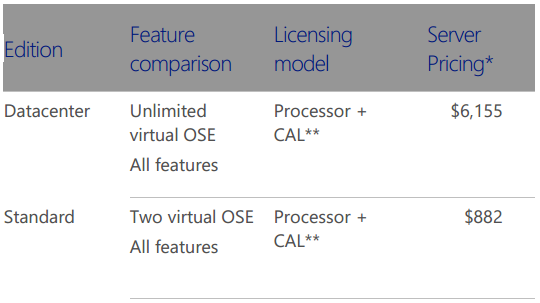
This is what everyone wants to know about!  The $US Open NL (the most expensive volume license) pricing is shown, as it’s the most commonly used example:

image

The Standard edition went up a small amount from W2008 R2 to WS2012.  It has not increased with WS2012 R2.

The Datacenter edition did not increase from W2008 R2 to WS2012.  It has increased with the release of WS2012 R2.  However, think of how much you’re getting with the DC edition: unlimited VOSEs!

Reminder: There is no difference in Windows Server pricing no matter what virtualization you use.  The price of Windows Server on a Hyper-V host is the same as it is on a VMware host.  Please send me the company name/address of your employer or customers if you disagree – I’d love an easy $10,000 for reporting software piracy Open-mouthed smile

Calculating License Requirements

Do the following on a per-server basis.  This applies whether you are using virtualization or not, and no matter what virtualization you plan to use.

Step 1: Count your physical processors

If you have 1 or 2 physical processors in a server then your server needs 1 copy of Windows Server.  If your server will have 4 processors then you need 2 copies of Windows Server.  If your server will have 8 processors then you will need 4 copies of Windows Server.

Step 2: Count your virtual machines

How many virtual machines running Windows Server will possibly run on the host.  This include VMs that normally run on another host, but could be moved (Quick Migration, Live Migration, vMotion) manually or automatically, or failed over due to cluster high availability (HA).

You have 2 hosts in a cluster.  Each is running 2 VMs normally but could run 4 VMs, then you need to license each host for 4 VMs.  A copy of Windows Server Standard gives you 2 VOSEs.  Each host will need 4 VOSEs because 4 VMs could run on each host.  Therefore you need 2 copies of Standard per host.

When is the sweet spot?  That depends on your pricing.  Datacenter costs $6,155 and Standard costs $882 under US Open NL.  $6,155 / $882 = 6.97.  7 copies of Windows Std = the price of Windows DC.  Therefore the sweet spot for switching is 14 VMs per host.  Once you get close to 14 VMs that could run on a host, you would be better off economically by buying the DC edition.

Windows Server 2012 R2 & Windows 8.1 RTM Are Available On MSDN and TechNet

I have just confirmed that the news is true; Windows Server 2012 R2 and Windows 8.1 were in fact legitimately posted by Microsoft onto:

  • MSDN
  • And yes … TechNet

Microsoft blogged about it a little while ago, Mary Jo Foley posted about it, and I got an official email while here in the airport, on my way to London, where I’m demo-ing the Preview build Sad smile

I have personally logged into all 3 services and the media is there.  Woohoo!

Remember:

  • MSDN licenses are for test & dev
  • TechNet is for evaluation
  • The only legit production source is for those who have Software Assurance on their server licenses, and that source is MVLS …. this will not be updated until October 18th when Windows 8.1 and Windows Server 2012 R2 are generally available (GA – available to buy)

You cannot buy WS2012 R2 or Windows 8.1 yet.  Windows 8.1 Enterprise won’t be out for a little while.  System Center 2012 R2 (2012 does not support the new OS) is not out yet either – all will be out at the previously announced GA date.

Windows Server 2012 R2, System Center 2012 R2, Windows 8.1, and Windows Intune Release Dates

I was on vacation for a few days, but as was predicted by some in the media, the release date of WS2012R2, SysCtr2012R2, Win8.1, and Intune “Wave E” was announced during the week in two announcements, one for the desktop and one for the server & cloud products.

Windows 8.1 will be available online through the Windows Store to Windows 8 customers starting at 00:00 New Zealand time on October 18th – I think that is midday UK/Irish time on October 17th.  October 18th is the GA date, so that’s when you should be able to walk into stores and buy devices with Windows 8.1 already on them.  Ideally those will be designed-for-Windows 8.1 devices.  However, the Windows 8 release was underwhelming in retail stores around the world so I’m not holding my breath this time around – screw the political correctness, the manufacturers (including Microsoft Surface) did a shite job for the release of Windows 8.  The new devices listed in the Windows 8 announcement are already on the market (some less-so than others).

There is no news of TechNet & MSDN release dates for Windows 8.1 but I suspect Windows 8.1 will be made available universally on Oct 18th.  That’s because that is also the release plan for WS & SC 2012 R2 and Windows Intune “Wave E”.  Everything is happening all at once on Oct 18th.

Note that new VL purchases will be possible on November 1st when the price list is updated.