Toshiba 8” Encore 2 Windows 8.1 Tablet

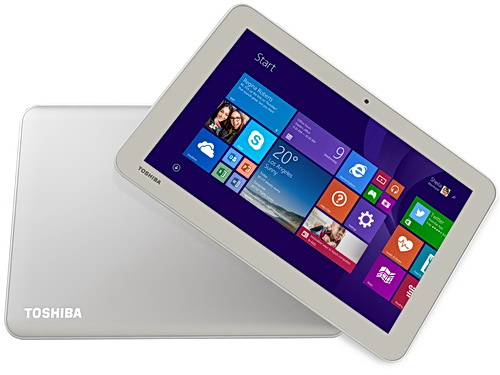
I work for a Toshiba distributor so every now and then they let me put my hands on something new … or sometimes something that isn’t coming out for quite a while. A few months ago I got to hold and play with the new Toshiba 8” and 10” Encore 2 tablets. Both were pre-production models. I just got my hands on a production version of the 8” Toshiba Encore 2 (WT8-B-102), running Windows 8.1 with April 2014 Update.

To be precise, this is running Windows With Bing, the free (to OEMs) edition of Windows that is hard coded with Bing as the search engine. The idea is that instead of OEMs paying for Windows and then taking money from another search engine to set them up as the default, the OEM gets a free copy of Windows, and this brings down the cost of the h/w for the consumer.

Capture

This is a consumer tablet. It has an Atom processor so it does not run the doomed Windows RT. It’s running a 32-bit copy of Windows 8.1. There is 1GB RAM and 32 GB of storage … don’t fret! This is the April 2014 version of Windows so it features the new magic installation that consumes a lot less space. This tablet has just over 20 GB free out of the box. That’s a big improvement over the original 32 GB Encore which I own. And 1 GB is enough for the light weight consumer stuff that you’ll do with this tablet: apps.

The tablet is slimmer than the Encore 1 and has a smooth back. It is grey instead of “gold”. Also, the Windows button has moved to the top edge, instead of a capacitive button on the front-bottom; I guess that reduces costs.

image

The Micro-HDMI port of the Encore 1 is gone – cost savings for the masses, I guess. It’s not a big deal; Windows 8.1 defaults to portrait mode on 8” devices and that’s incompatible with a TV. There is an audio jack on the top and an open Micro-SD port on the side for easy access. On the base there is actually a place to tie a wrist cord if you should want one.

There is a normal micro-USB 2.0 port, unlike the dodgy one you get in a Dell Venue 8, which breaks if you do plug in a normal USB cable “upside down” – which the Dell unfortunately allows you to do. One teeny design thing I don’t like: the included power chord is angled and obstructs easy access to the Windows button. You can use any old (Windows or Android) phone charger cable and that solves the issue. The box also includes a USB dongle; with this you can plug in your USB stick/drive into the tablet and it also has an additional micro-USB port so you can continue to power the tablet while using a USB device.

The cameras are 1.2 MP on the front and 5 MP on the back. There is no 3G/LTE option – the thinking here is that people already have mobile phone plans and can enable a hotspot. There is no stylus (above you see a normal pen for a sense of scale) – this is a consumer machine.

I am told that the retail price in Ireland will be around €220 – I only see our buy price as distributors. I have seen this tablet for sale for under €250 on Irish online stores. Amazon.com has it on sale for under $240. Amazon UK has it for under £180. It’s not on Amazon.de yet.

It’s a nice tablet at an affordable price, and has made form factor improvements over the first version. The biggest improvement, though, is the additional free storage capacity in the 32 GB model, thanks to Windows 8.1 April 2014 Update. The only real concern is apps – which is outside of Toshiba’s (Lenovo, Dell, Asus, etc) control, and it’s something that Microsoft must do a better job at sorting out. Either the apps suck (Kindle reader for Windows) or don’t exist, and there are still too many cra-apps in the hard-to-navigate Windows Store.

I hopefully will get to play with the new 10” Encore 2 (under $270 on Amazon.com) in the near future.

Technorati Tags: ,

Microsoft “Cloud in a Box” – Who Can Sell This?

Mary Jo Foley has the scoop on this story on ZDNet, about how Microsoft will sell packaged on-premises Azure (Hyper-V, System Center, and Windows Azure Pack) private or hosted (private or public) clouds through hardware partners. She asks a question: which vendors can offer this solution, which uses Storage Spaces for the Hyper-V VM storage. That is easy enough to answer, as of right now, thanks to the limited number of traditional server PLUS storage vendors in the Storage Spaces HCL category. This includes:

  • Fujitsu: who are not exactly a big player outside of government (at least here in Ireland)
  • Super Micro: A company that builds specifically to order, and doesn’t seem to understand channel sales like a HP, Dell, Fujitsu, etc – mainly a data center player and not a packaged solution vendor.
  • Dell

And that’s where I think we’ll see Microsoft make a play. Microsoft invested billions into Dell. Dell has 2 JBOD models for Storage Spaces. They sell the types of servers that Microsoft envisions for use in a cloud (half U servers). And Dell is the sort of company that sells packaged solutions.

And before you comment: No; I have not mentioned HP. HP has no certified Storage Spaces JBODs, as you can clearly see in the Storage Spaces HCL category. And anyway, HP want to push other things that are not in the Cloud OS vision and compete with Windows Server, System Center, and Azure.

But who knows – it’s just bang on 4 years since Microsoft announced that there would be third-party Azure appliances and they never appeared. Maybe nothing will happen of this – it’s hard to package up a Microsoft solution now because their Cloud OS products are upgrading way too quickly for a big company like Dell to keep up with.

Microsoft News Summary – 14 July 2014

After a week’s break in Finland, I am back with news from the last 10 or so days. It was a busy period!

Microsoft News Summary-2 July 2014

It’s been a long times since I posted one of these! I’ve just trawled my feeds for interesting articles and came up with the following. I’ll be checking news and Twitter for more.

TechCamp 2014 Presentation – Windows Server 2012 R2 Software-Defined Storage

This is my presentation from TechCamp 2014 where I showed attendees how to build the Hyper-V on SMB 3.0 storage known as a Scale-Out File Server (SOFS) based on JBODs/Storage Spaces, Windows Server 2012 R2 (WS2012 R2) Failover Clustering, and SMB 3.0 networking.

My New Work Laptop – A Toshiba KIRAbook Ultrabook

My work laptop for the last 3 years has been a modified HP EliteBook 8740w. It’s usefulness shrank pretty quickly as System Center grew bigger and my Hyper-V demos started to require more and more machines, 10 Gbps networking and JBODs. A lab has been built and I routinely access it remotely – and I’ve been known to record some demos using Camtasia when Internet access is dodgy.

image

An opportunity arose to replace my work laptop – I could move from “the best” to an Ultrabook. This would kill a few birds with one stone:

  • Use a brand of machine in work presentations that my employers actually distribute (Toshiba)
  • Use a lighter machine
  • Donate “the beast” to the lap where it can be reused as a host, maybe as an NVGRE gateway host.

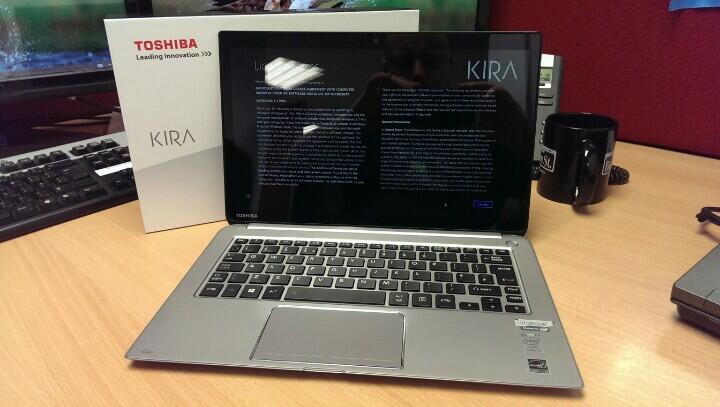
We ordered in some Toshiba KIRAbooks, Toshiba’s premium consumer ultrabook. This is a mad laptop; i7-4550U, 8 GB RAMM, 256 GB SSD, and …. a screen running at 2560 x 1440. It’s unusable without Windows 8.1 screen scaling.

image

First impressions: Very nice (touch) display. Nice functional build. It looks nice on the desk. Good keyboard. Nice big mouse pad. Slim. Obviously lighter than “the beast”. It has 3 x USB, 1 x SD, and 1 x full sized HDMI. Battery is listed at 9.16 hours (probably by using the custom ECO power profile). It came with Windows 8.1 Pro with the April 2014 update. There is no stylus. And yes, I had to uninstall some crapware from MuckAfee, Spotify, and others. I will have to get USB/VGA and RJ45 dongles (I already use those for my personal Lenovo Yoga).

Price-wise, this seems to come in at $1,699,99 on Amazon.com. It’s just started shipping in Europe, and I didn’t see it on Amazon UK or Germany. AFAIK, Toshiba are selling to consumers via exclusive retailers.

I’ll write up a bit more when I have had time to work with it.

Technorati Tags: ,

Storage Spaces Drives Do Not Show Physical Location

I was doing some work with some SSDs yesterday that had previously had some firmware issues. I wanted to verify that everything was OK, so I popped the disks into the DataOn 1640 JBOD that is in the lab at work. The firmware was upgraded, and the disks were eligible to join a storage pool, but they were not reporting a physical location.

A Storage Spaces certified JBOD (there is a special HCL category) must be able to report disk locations using SCSI Enclosure Services (SES). You can see my problem below; 4 SSDs are not reporting their enclosure or slot locations, but the other disks in the JBOD are just fine.

image

I contacted the folks in DataOn and had a near instant response. Run the following cmdlet twice:

Update-StorageProviderCache -DiscoveryLevel Full

I did that, refreshed Server Manager and … no change.

Ah … but this isn’t a simple Storage Spaces build. This is a clustered Storage Spaces installation. I jumped over to the other node in my SOFS, the “read-write server”, and ran the cmdlets there. One refresh later and everything was as it should be.

image

Now all of the disks are reporting both their enclosure and their slots.

Thanks to Rocky in DataOn for his help!

Surface Pro 3 Launch – Same Old Surface

This was a live blog post that I wrote using the online feed.

Prologue: Some might say that this post is too snarky. I respond with The definition of insanity is “doing the same thing over and over again and expecting different results” – Albert Einstein.

Satya Nadella wants to talk about the next step of devices and clouds, which is devices. I guess talking about dreams of Surface making a profit are more important than courting the IT pros at TechEd? Empowering people to be more and do more is a unifying theme in MSFT, apparently. They want products and technologies that enable people to dream and get stuff done.

image

They are not making h/w for h/w’s sake. No fridges or toasters … hmm … someone been listening to me talk about MSFT sales strategies? MSFT want to create new categories and spark demand for their entire ecosystem.

Today is the start of dreaming the impossible – selling Surface? I jest! But they are in every show on CBS. That’s an accomplishment in product placement.

Here comes Panos Panay, the hardware guy that’s always out to talk Surface “design”. He’s cool cos he says “what’s up dude?” to a person in the audience. The work involved in “this device” spans many parts of Microsoft apparently. Panos is excited. I am sceptical.

Some people said nice things about Surface. They liked that. No mention of the bad things.

Seriously though – I recognize Steve Gleason in the promo video, a sufferer of ALS and former NFL New Orleans Saints player. He’s using a Surface to speak now.

image

96% of people using an iPad also own a laptop. The camera focuses in on a bunch of media types with MacBooks on their laps.

Tablets are consumed for you to sit back and watch movies, read books, surf the web, and snacking on apps. Laptops are designed to get stuff done – Panay.

Wide variety of laptops out there from sleek to clunky depending on the design point. Battery got better … and then laptops and tablets began to blur. People walk into a store (no matter what store) then there is a conflict for the purchaser – do you buy a tablet or laptop – “what am I supposed to buy?”. Sales rep will ask “what is it that you want to do?” – at least they should ask that and not respond with “buy an iPad”.

MSFT wants to take that conflict away so 96% of people don’t go home after buying a tablet and a laptop. A new device that spans both must offer best of both. All day battery life. Thin – but not too small that it can’t be used for productivity.

Today they introduce Surface Pro 3. It’s thin (9.1 mm). It uses the same floppy keyboard as the previous versions – sigh – it’s not a laptop replacement in my opinion. See the Dell Venue 11 Pro for a real laptop replacement.

image

This has a 12” diagonal screen instead of 10.6”. It’s still smaller than most ultrabooks, but it has a 3 x 2 screen ratio (new). Highest screen contrast on the market (a big deal in my opinion – even the Pro 1 has a great screen).

It is 800 grams. Remember that this is not an ARM tablet, it is an Intel Core i-powered machine, like an Ultrabook. Panay puts a Surface and a Macbook Air on a weighing scales:

image

He’s really pushing the “replace your laptop and tablet with Surface Pro 3” sales line. The new Core i7 is in this tablet. Thinnest machine of this kind, with 10% more performance than the Surface Pro 2. The device has a pressurised cavity to contain all of the pieces. Every tablet is custom machined to fit – allegedly.

He drops the tablet from head height to prove the build quality, despite being thinner.

image

He picks out a journalist with a Macbook and gives her the demo unit to keep. It was the one he just dropped.

Out comes the docking station – I wonder if it still scratches the surface of the docked … Surface. You can display to a 4K monitor.

Michael Goth (sp?) of Adobe is brought out to show off Photoshop on Surface Pro 3. He’s got a stylus in his hand. It seems that customers wanted Photoshop to take more advantage of touch and pen. He touts Creative Cloud’s advantage when it comes to speed of development. Some drawing and navigation is done.

Back to Panay to talk about the kickstand. To me, Surface has made a kickstand a mandatory feature of a tablet. He shows off the new angles. There is finally a fully adjustable full friction hinge, like in my €180 Yoga 8 Android tablet.

image

The myth of Surface lap-ability is brought out again. It does not work in my lap with the keyboard – I am not 7 foot tall. A new Surface Pro type keyboard. There is a new track pad – 60% bigger, better friction, etc. A necessary tool on a touch device without a mouse to point at stuff when doing productivity.

Try type with this sucker. Where are your hands? All T-rexed in front of your belly. The tablet will also move on the loose hinge while you type.

image

This is meant to stabilise the keyboard. It will not change a thing:

image

My hands will be curled up by my belly. The hinge will extend beyond my knees. The tablet will still move – too many points of contact. They should have gone the same way as Samsung and Dell with their pro tablets.

He moves on to the stylus to talk about pen and touch. A crossword demo. I wonder if the Surface stylus docks in the tablet … like in the Samsung ATIVs, the Toshiba i5 machine, or even my Yoga laptop? No? Ah – just what a business customer wants … hundreds of machines where users will be losing the peripheral because it does not securely dock – I do not count a magnet lock into the power supply port – that’s because I have to remove the very losable peripheral to power the tablet.

The Surface pen tip is closer to the “ink” because the glass is thinner. Writing has a low latency apparently. OneNote & SkyDrive is pushed (nothing new there – I live on that on my Yoga laptop). Apparently the stylus (Surface Pen) has a button that launches OneNote (1 click) and saves to SkyDrive (2 clicks). Now we get a OneNote demo that goes on for way too long.

Panay tries to sync a OneNote to the WSJ journalist that just got a free tablet. The camera pans to her, and she’s shaking her head!!!!! The camera gets off of her quickly.

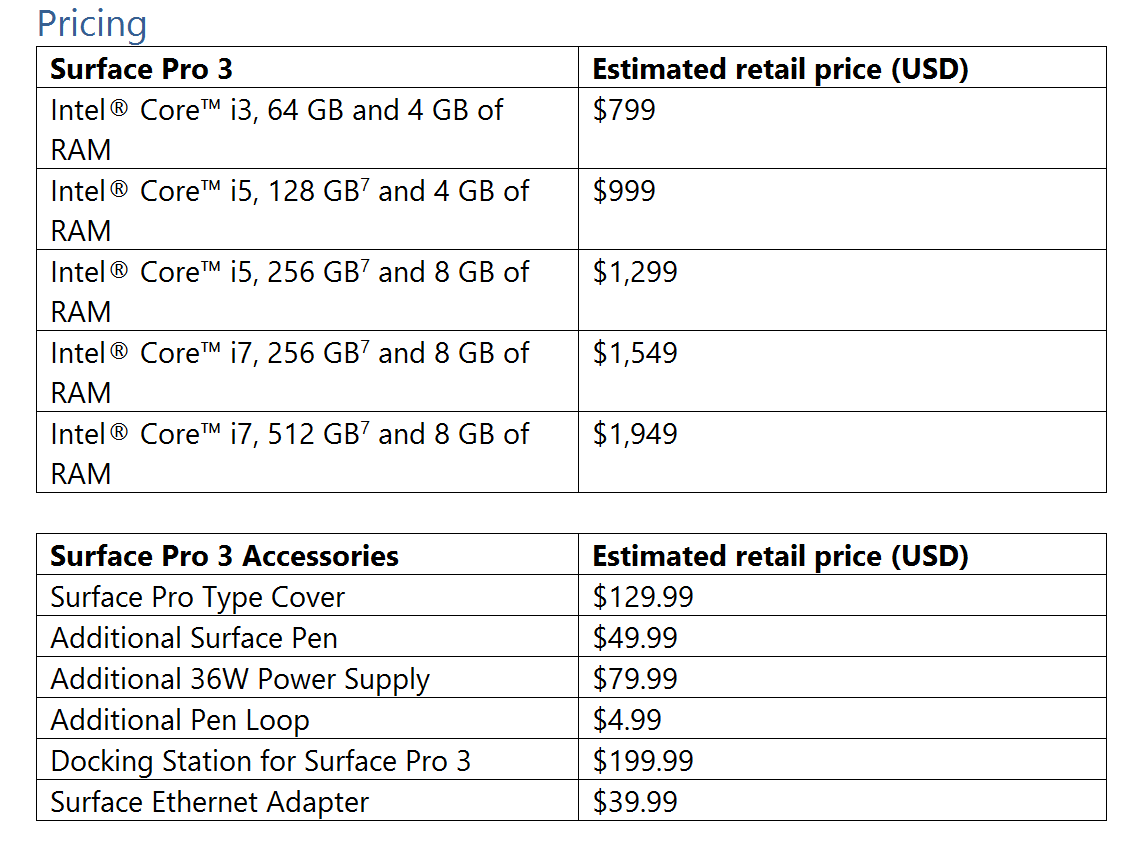
Sales start at $799 in 3 configs, with i3, i5, and i7.

The press in attendance get an “on loan” unit with keyboard and pen.

Summary – Surface Pro 3 is a little bigger and thinner. They’ve a new keyboard double hinge to try solve a problem that Microsoft has created by not offering a real keyboard. They push productivity, but do not sell Surface through a channel so it can be sold to business by system integrators. It’s new Surface, same old Surface. I’ll stick to my 8” Android tablet for consumption and my Windows Yoga Pro laptop for productivity, thanks very much. I don’t work for the Wall Street Journal, so I don’t expect Panos Panay to give me a Surface for free 🙂

Oh – and where was the Surface Mini? It was a no-show. I think there might have been some serious re-thinking. A device of that size relies on “Metro” apps like no other, and there is still a dearth of quality apps. Plus – I wonder if the new ARM version of Windows will be compatible with current hardware … or will Windows RT be able to upgrade to the new OS?

EDIT 1:

Mary Jo Foley tweeted that the Surface Pro 3 will go on sale on June 20th (I’d say probably USA only at first). The batter life is up to 9 hours.

image

EDIT 2:

Mary Jo went on to tweet a price list. Note that the stylus is included with the Surface Pro 3. They keyboard is not included. This is the same as before. Note that the last minute leaks had the correct pricing. Those stories also talked of a limited edition Surface Pro 3, and the possibility of getting it in 3 non-black colours.
Technorati Tags: ,

Microsoft News Summary – 9 May 2014

Another quiet 24 hours ahead of TechEd:

Microsoft News Summary – 7 May 2014

Between a bank holiday and some travel, I’ve been unable to post, but I’ve saved up the headlines from those days: