Azure AD Domain Services


Options when Moving to The Cloud

  • Switch to using SaaS versions of the s/w
  • Rewrite the app
  • Lift and shift: the focus today.

How Organizations Handle AD Requirements Today

  • They set up site-site VPN and deploy additional domain controllers in the cloud.
  • They deploy another domain/forest in the cloud and provision a trust, e.g. ADFS.

Imagine a Simpler Alternative

  • Simpler
  • Compatible
  • Available
  • Cost-effective

Introducing Azure AD Domain Services

  1. You provision a VNet.
  2. Then you activate Azure AD Domain Services in Azure AD on that VNet
  3. You can manage the domain using RSAT.
  4. You can optionally sync your Windows Server AD with Azure AD to share accounts/groups.

Managed Domains

  • Domain controllers are patched automatically.
  • Secure locked down domain, complaint with AD deployment best practices
  • You get 2 DCs, so fault tolerant
  • Automatic health detection and remediation. If a DC fails, a new one is provisioned.
  • Automatic backups for disaster recovery.
  • No need to monitor replication – done as part of the managed service.

Sync

If you deploy sync, e.g. Azure AD Connect, then it flows as follows: Windows Server AD <-> Azure AD <-> Azure AD Domain Services

Features

  • SIDs are reused. This means things like file servers can be lifted and shifted to Azure without re-ACLing your workloads.
  • OUs
  • DNS

Pricing

Based on the number of objects in the directory. Micro-pricing.

Decisions

27-09-2017 16-13 Office Lens

New Features

  • Azure Portal AD Experience is GA
  • ARM virtual network join is GA

Demo

He creates an AADS domain. THere are two OUs by default:

  • AADC Users
  • AADC Computers

Back to the PowerPoint

Notes

  • You cannot deploy AADDS in the classic Azure portal any more.
  • The classic deployment model will be retired – the ARM deployment is better and more secure.
  • The classic VNet support is ending (for new domains) soon.
  • Existing deployments will continue to be supported

Questions

  • Is there GPO sync? No. This is a different domain, so there is no replication of GPO from on prem to AADDS
  • Can you add another DC to this domain? No. There will be (in the future) the ability to add more AADDS “DCs” in other VNets.
  • What happens if a region goes down? The entire domain goes down now – but when they have additional DC support this will solve the problem
  • Is there support in CSP? No, but it’s being worked on.

Manage Azure IaaS VMs

You can join these machines to AADDS. You can push GPO from AADDS. You’ll sign into the VMs using AADDS user accounts/passwords.

GPO

Members of AADDC Administrators can create OUs. You can target GPO to OUs.

Move Servers to the Cloud

Sync users/passwords/SIDs to the cloud, and then lift/shift applications/VMs to the cloud. THe SIDs are in sync so you don’t need to change permissions, and there’s a domain already for the VMs to join without creating DC VMs.

LDAP over SSL

I missed most of this. I think you can access applications using LDAP over SSL via the Internet.

Move Server Applications To Azure

User AADDS to provision and manage service accounts.

Kerberos Constrained Delegation

Cannot work with AADDS using old methods –  You don’t have the privileges. The solution is to use PowerShell to implement resource-based KCD.

Modernize Legacy Apps with Application Proxy

You can get users to sign in via AAD and MFA into legacy apps. A token is given to the app to authorize the user.

SharePoint Lift and Shift

A new group called AAD DC Service Accounts. Add the SharePoint Profile sync user account to this group.

Domain Joined HDIsnight Cluster

You can “Kerber-ize” a HD cluster to increase security. This is in preview at the moment.

Remote Desktop Deployments

Domain-join the farm to AADDS. The licensing server is a problem at the moment – this will be fixed soon. Until then, it works, but you’ll get licensing warnings.

Questions

  • Schema extensions? Not supported but on the roadmap.
  • Logging? Everything is logged but you have to go through support to get at them at the moment. They want to work on self-service logging.
  • There is no trust option today. They are working on the concept of a resource domain – maybe before end of the year.
  • Data at rest, in ARM, is encrypted. The keys (1 set per domain) are managed by MS. MS has no admin credentials – there’s an audited process for them to obtain access for support. The NTLM hashes are encrypted.

Deciding When to DIY Your Own AD Deployment

27-09-2017 16-39 Office Lens


Features Being Considered

  • Cloud solution provider support – maybe early 2018.
  • Support for a single managed domain to space multiple virtual networks
  • Manage resource forests
  • Schema extensions – they’ll start with the common ones, and then add support for custom extensions.
  • Support for LDAP writes – some apps require this

Any questions/feedback to aaddsfb@microsoft.com

Windows Server Fall Release (1709) Technical Foundation

Speaker: Jeff Woolsey, Principal Program Manager

WS2016 Recap

Design points

  • Layered security for emerging threats:  Jeff has been affected by 4 of the big, well publicised hacks. CEOs are being fired because of this stuff now.
  • Build the software-defined data centre
  • Create a cloud-optimized application platform

Security in WS2016

  • Long laundry list of features: Defender, Control Flow Guard, Devices Guard, Credential Guard, Remote Credential Guard.
  • Shielded VMs – you don’t trust the operators
  • vTPM – encrypt the disks
  • JIT Administration

Software-Defined

  • Compute: rolling upgrades with no downtime, hot/add remove, more resilient to transient storage, compute, network issues.
  • Network: Azure code brought to Windows Server 2016: SDN scale and simplicity. L4 load balancer, distributed data centre firewall.

He tells a very funny story on RAM support: 24 TB physical, and 12 TB RAM in Hyper-V VMs.

  • Storage: Hyper-Converged, Storage Replica, cluster wide QoS
  • RDS: Lots there too.

Hyper-Converged Infrastructure

Built into WS2016 Datacenter edition: Storage Spaces Direct (S2D). Uses SATA, SAS, SSD, and NVME, Working with storage industry to add new flash types.

  • Cloud design points: used in Azure Stack
  • RDMA at the core for performance and latency benefits.
  • Simplifying the datacenter: Add servers to add compute and storage capacity. No more SAN network. Storage controller is s/w.

Working on adding NVDIMMS: Intel Persistent Memory. Not as fast as real memory, but you can add lots of it in, e.g. 100 TB of “RAM”. Supported in WS2016 and SQL Server 2017 and later.

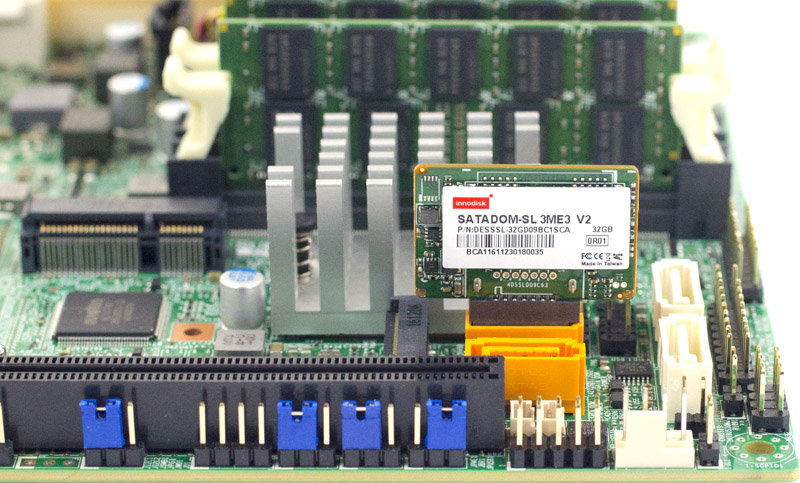
SATADOM is supported in WS2016 and later. It’s flash but its attached to a SATA connector (see image below). The idea is to do the “boot from USB” to free up a drive bay. This tiny drive plugs directly onto the SATA controller on the motherboard. Faster than USB/SD boot and more reliable.

Cloud Ready Application Platform

  • Windows Server Containers: The next generation of compute, following virtualization. Both are different techs, and going forward, both will probably exist. But containers will be the tech of choice for deploying applications: speed, ease of deployment, better densities, and more performance.
  • Nano Server: Ideal for the microkernal in Hyper-V Containers
  • Automation: PowerShell 5.0 and DSC

Now on to the new stuff

Azure File Sync

Klaas Langhout comes on stage.

I’ve covered this in depth already.

Back to Jeff. He asks Klaas if customers access the shares any differently on prem. Nope – it’s the same old file share and any Azure connectivity/tiering/sync is hidden.

Windows Defender Advanced Threat Protection (WDATP)

Using cloud intelligence to protect Windows.

  • Built into Windows Server
  • Behaviour-based, cloud-powered breach detection
  • Best of breed investigation experience
  • And more

You can sign into the Windows Defender Security Center to analyse activity to do forensics on an attack or suspicious activity, and learn how to remediate the attack.

Modern, Remote Management for Windows Server

I covered Project Honolulu earlier today.

Honolulu will remain a free download outside of Windows Server – expect updates every month.

FAQ on Honolulu

  • Price: Free
  • Edge, Chrome, Safari on Mac and more to be tested.
  • Installs on WS2012 R2 and later, Windows 10.
  • Manages Hyper-V Server 2012 and later and WS2012 and later.
  • Azure is not required.
  • AD is not required either.
  • Security: HTTS LAPS, Delegation
  • Configuration: No IIS, Agents not required. SQL not required. If you are pre-2016. you have to install WMF 5.1.
  • Positioning: Evolution of “in-box” tools. Does not replace System Center. Complementary to SycCtr, OMS, RSAT. Hopefully will eventually replace MMC-based RSAT.
  • Feedback: Via Windows Server UserVoice.
  • Extensions: It’s plugable, with alpha SDK today.

1709

On to the next release of Windows Server, coming in October.

Application Innovation

  • Container-optimized Nano Server image increase container density and performance.
  • .NET Core 2.0
  • SMB Support for containers
  • Linux Containers with hyper-V isolation
  • Windows Subsystem for Linux – to manage the above primarily

Where to Start With Containers

  • Containerize suitable existing applications. GUI-based apps aren’t suitable.
  • Transform monoliths into microservices, with new code and transforming existing code.
  • Accelerate new applications with cloud-app development.

What’s Next

Windows Server Insiders is a program to beta test and learn the new stuff in the semi-annual channel.

Post 1709 Improvements

Compute:

  • Honolulu integration
  • Shielded Linux VMs
  • Guest RDMA

Network:

  • Honolulu integration
  • Encrypted virtual networks
  • NTLM no longer required
  • SMB1 Disabled by default
  • and more

Software-Defined:

  • S2D Support for NVMe
  • S2D support for NV-DIMMs
  • Dedupe for ReFS
  • Cluster Sets to enable large scale HVI
  • Storage Replica test failover
  • Scoped volumes
  • Something on multi-resilient volumes

Overview of the Microsoft Azure Serverless Platform

Speakers:

  • Chris Anderson, Senior Program Manager
  • Raman Sharma, Senior Product Marketing Manager

Evolution of Application Platforms

We used to build applications on-premises. Find h/w, find someone to set it up, and then the bits, networking, etc. Counter to productivity.

IaaS meant that a VM could be provisioned faster, but still left with some delays, and still required on-going management. The current wave of SaaS is probably mostly built on IaaS.

Along came PaaS. VMs were abstracted, hiding the on-going management of the VM and guest OS. But we still have the same per-VM paradigm.

Serverless ideally reduces infrastructure to zero. There is really a server, but it’s not yours and there’s no hint of it. The app still has to run on something, but you never acknowledge its existence.

Traits of Serverless

  • Abstraction of servers
  • Event-driven start-up triggers/instant scale out or in.
  • Micro-billing instead of per-hour/month billing.

Benefits

  • Manage apps, not servers. Look after the thing you care about: the app and the code.
  • Reduced DevOps: there are no servers to fix/patch. You don’t have to scale out traditional PaaS.
  • Faster time to market

Your business can sell a service, consume data, seize an opportunity quicker than ever with serverless.

Serverless Application Platform Components

  • Functions: Execute your code based on events you specify.
  • Logic Apps: Design workflows and orchestrate processes. It’s the original serverless feature in Azure. Logic Apps tie together different things inside and outside of Azure in workflows made up of different steps.
  • Event Grid: A relatively new service in Public Preview. Manages all events that can trigger code or logic. A single interface for all such events. Manage where those events come from, and decide what you will do with those events (start Functions, Logic Apps, etc)

26-09-2017 16-18 Office Lens

  • Database: store the data
  • Storage: store data in blob/queue/NoSQL
  • Security services
  • IoT for massive numbers of devices inputing data
  • Analytics to process data realtime
  • Intelligence to use AI models to understand/action on data

Demo: Event Grid & Logic Apps (Chris)

In the Logic Apps Designer. Looks like Flow. When an event occurs to a storage account and is sent in from Event Grid, a post is sent to Teams. The body of the message is dumped into Teams, which is ugly JSON. They want to parse the JSON before posting it. A function is written in JavaScript. The function will do the required parsing of the JSON and create human-friendly output.

He adds an action between the two existing actions in the logic app designer. This will trigger the Function. The Function is passed the body of the JSON. The Function will return a response, and that is used as an input to the Teams action. That input is given a condition. If verbosity = ignore then the Teams action can be bypassed.

Now he deletes a storage account and Event Grid starts the logic app. He traces the logic app in the Portal job history – the trace shows that Team received the message from Logic Apps. After some debugging, the formatted event appeared in Teams. Quite a bit was accomplished in that process without a VM and with very little JavaScript.

Scenarios for Serverless

Short: Anything that is based on events.

  • Real-time stream processing, e.g. IoT. You have no idea when data is coming in, and how much will come in.
  • Time-based processing. E.g. collect logs and process them once per week. Why dedicate VMs/PaaS for that? Pay for the few seconds of compute that is required for the task.
  • Back-ends for mobile/IoT/web. E.g. someone uploads an image to a site, a function stores the image in a storage account, and another function processes the image (thumbnails, metadata, etc) and stores that data somewhere.
  • Real-time bot messaging. Use Logic Apps to workflow the processing of a question from a bot in Cortana Analytics and then send the result back to the bot.

Event Grid

26-09-2017 16-36 Office Lens

The list of services will grow – it’s only been in preview for a month and a half at this point.

It delivers at massive scale:

  • Sub-second end-to-end latency in 99th percentile
  • 10,000,000 events per second per region.
  • 24-hour retry with exponential back off for events not delivered

Logic Apps

  • A visual design experience without writing any code, no matter how complex it is.
  • Multiple connectors to Azure, third-party, or your own services/functions.
  • Uses a declarative definition format to work with CI/CD.

There are over 170 (and growing) connectors to orchestrate, e.g. Slack, SalesForce, Twitter, Box, Facebook, GitHub, DropBox, Pintrest, WordPress, etc.

Functions

An evolution of WebJobs from PaaS.

  • Develop locally using best of class developer tools
  • Boost productivity through triggers and bindings.
  • Choose from a variety of programming languages
  • Integrate with existing DevOps processes.

Lots of triggers: schedule, HTTP (REST or webhook), Blob storage, events, queues, queues and topics, storage tables, SQL tables, NoSQL DB, Push Notifications, Wwilio SMS Text … and one I missed.

What’s New in Functions

  • You can develop locally on Linux, MacOS, and Linux
  • Monitor serverless applications using Application Insights (now GA)
  • Trigger a function on changes in Cosmos DB
  • Securely provide access to information in Microsoft Graph through a function.
  • Trigger a function from a real-time analytics pipeline in Stream Analytics

Demo

Four volunteers go on stage. There are two IoT buttons. When they are pressed, they’ll send a message to Azure IoT, and will trigger Functions. Fastest to answer questions get most points, last gets least points. And then questions on Serverless tech come up. The scores are processed by Serverless compute using Functions. In this case, the functions were actually running on a local host (WS2016).

Customer Stories

  • Fujifilm: Online service handling 1 TB data per day. Monolithic design where code change was hard. Cosmos DB and Functions reduced latency by 95%. Development time reduced by 75%. Higher reliability. Ability to add new features and release faster and more frequently.
  • Quest: Uses serverless for a SaaS application. Able to manage millions of objects. Cut time-to-market by 2/3. No costly on-premises h/w.
  • Plexure: Service to help retailers understand “signals” from their stores to optimize sales. Built serverless with functions, even hubs, IoT, machine learning and Cosmos DB. Reduced efforts and scales on demand. Used to build infrastructure for each retailer. Now they just publish APIs.

Azure Compute: New Features & Roadmap

Speaker: Corey Sanders, Director of Compute, Azure, Microsoft

Lots of stuff that hasn’t been talked about yet.

Compute Through The Ages

Some old PCs, aa rack, a video of Monkey Boy doing developers developers developers, tablets, the cloud, and an alien (Quantum Computing).

Digital Transformation

Drink!

  • Engage customers
  • Transform products
  • Empower employees
  • Optimize operations

What’s Important to You?

  • Security
  • Availability
  • Cost savings
  • Automation
  • Infrastructure – sounds like a dev audience based on the boos.
  • Application PaaS
  • Management

VM – Compute

  • ND (new) and NCv2 (next few weeks) have launched with P100 and P40 GPUs.
  • Partial Core Alternatives for SQL/Oracle. You can reduce the number of cores that you can see/use in large VMs to get the other features of that VM, e.g. lots of RAM.
  • B-Series burstable VMs with a baseline low CPU capacity. Earn credits by using under the baseline, and burn those credits by getting more CPU capacity.
  • SAP system has 20 TB of RAM, 960 CPUs, 60 TB multi-node, bare-metal performance because these are bare metal machines.

VM Scale Sets

Up to 1000 VMs in a single manageable unit. Adding auto-OS update by the end of the year. IPv6 load balancer support. Zone redundant VMSS (availability zone automation).

Managed Disks

Abstract away the underlying storage. Data always encrypted at rest. Coming:

  • Incremental snapshots
  • Larger disk sizes
  • Cross-subscription/region sharing
  • Private repository

Security

  • Unified visibility and control
  • Adaptive threat detection
  • Intelligent threat detection and response
  • Investigation into security risks

Announcements:

Missed all this because of speaker speed.

Demo:

An alert of a suspicious process being executed. We can run a playbook from a list. They’re logic apps under the covers. The playbook designer looks like Office Flow. Example shows message being posted in Teams and a ticket being posted in ServiceNow in the event of a high priority alert. He shows that he could post a message in Slack.

Accouncements

Confidential computing which uses Intel silicon to run bits of processes with secure data. This is built on WS2016 Hyper-V technology. This should be small bits of code because you cannot debug it because it’s … secure.

Governance and Management

Lock down who/what/when.

New policy management is announced this week. JSON policy is a lot easier now. CloudDyn is free in Azure.

  • Azure Policy Center
  • Management groups
  • Managed Apps GA
  • Update and Configuration Management
  • Azure Policy Center

Policy Center is in the Azure Portal. under Policy – Compliance. You can do things like “Deny Hybrid Use Benefit” or control VM extensions, control managed disk usage, restrict image creation, etc.

Sample JSON policies are shard in GitHub.

Management Groups

Organizational alignment for Azure subscriptions. Targeted resource policy, access control and budgets. Compliance, security, and reporting by team.

Update, Configuration, And Change Tracking

Windows and Linux, Azure and non-Azure.

Collect and search inventory. Track changes to each system. Autocorrect configuration.

Schedule patching and check compliance.

Application Service Catalog GA

Turnkey for managed workloads. Sealed for simplified usage. Managed by central IT.

Availability

Different tiers: single VM, availability sets, availability zones, and DR.

Availability Zones

PowerShell in the Cloud Shell

Azure Automation with Python.

Availability Zones

Physically separated unlike fault domains. Still in a single region. A zone is one or more data centres. Redundant power, network, and cooling. Reduce single points of failure in the platform. At GA, will offer 99.99% SLA over the 99.95% SLA with availability sets, or 99.9% SLA on single VMs with Premium-only storage.

And then there is DR, to give you replication of VMs using Azure Site Recovery to another region.

Cosmos DB, MySQL/SQL/PostGres, Blob storage, and VMs all have inter-region DR solutions.

Backup and DR

Backup in a single click with VMs. DR with Azure-to-Azure Site Recovery. Recovery Plans, with Automation, offer single-click orchestrated failover.

Maintenance

Currently it typically takes under 30 seconds to do maintenance on hosts in Azure – warm reboot of Hyper-V called in-place migration. They actually replace the entire host OS during patching!

On-demand maintenance. 2-4 week notice window. You can do the reboot on your own schedule. Full reboot updates only. Demo.

A notice appears (also email) to say a VM will be rebooted for host maintenance. You can click Start Maintenance, to move (reboot) the VM to a host that is already updated. It’s in preview in West Central US.

Cost Savings

  • Track usage and cost trends (CloudDyn)
  • Detect spending anomalies
  • Allocate usage to business units
  • Reduce cost of services

Batch:

  • Reserved instances on the way.
  • B-Series VMs
  • Batch VMs – all sizes in all regions, and mixe low and high priority VMs
  • Pre-emptible VMs with up to 80% fixed – for non-critical VMs where MS can take resources back from you.

Future: Serial Console

This is experimental at the moment. A Serial Console is connected to a VM (RHEL). This is an interactive console, not just the screenshot of Diagnostics today. He is logged into RHEL in the VM. He then runs a reboot and watches the entire process, which we wouldn’t have seen via SSH.

This is Linux focused, but they’re working with Windows to find a solution.

Containers & Microservices

Azure Container Instances (ACI) are on the same level as VMs in Azure. Service Fabric and Kubernetes sit above them in management layer. Containers with Kubernetes are “managed containers”.

Announcing: ACI on Windows and ACI on Service Fabric.

40% of Service Fabric customers today are also deploying on-prem, and containers are the perfect compatible solution.

He does a demo to deploy IIS on Nano Server in an ACI (normal Windows container) with a public IP address.

Now a demo of ACI in service fabric. There’s a JSON that specifies the container spec. He’s using a tool called Service Fabric Explorer. He deploys a Linux container in the Service Fabric.

Service Fabric Ga for Linux

You can deploy Linux service plans. You can orchestrate on Linux or Windows. Run a million containers on a single cluster.

Azure Container Service for Kubernetes

You can provision Kubernetes very quickly and easily on Windows and Linux.

Some investments on tooling – an acquisition of a company that sounds like Deus.

Lots of partner solutions from the likes of Dicker Enterprise to manage on-prem and in the cloud with one experience. RedHat OpenShift to manage Kubernetes & RHEL ACI hosts. Pivotal is designed to lift and shift Java applications to containers – Azure, on-prem, and other clouds.

App Services and Serverless

This is a layer above Service Fabric and Kubernetes. We can do this cluster-less (App Services) and server-less (Functions) or Logic Apps.

Web Apps and Linux Containers are GA. You can integrate with Docker Hub and VSTS, and SSH into them.

Azure Event Grid

Treat events as first class objects. Things like Logic Apps and Functions start because of events. Many platforms don’t treat events as first class. As first-class, the events can go anywhere, e.g. from Azure Storage to AWS Lambda. Your apps can listen for events, e.g. WebHooks, Azure Automation, Logic Apps, Functions.

When an event happens, it goes into Event Grid. Then it can be directed to one of the above 4 services in Azure.  From Logic Apps, you can integrate into lots of things like Twitter, Slack, SalesForce, etc, via Logic Apps’ ability to do workflows.

This is “event-driven computing”.

More Announcements

  • Cosmos DB Trigger
  • Microsoft Graph Bindings
  • MacOS and Linus Local Development
  • App Insights GA

Scott Guthrie Keynote Ignite

Scott Guthrie is presenting on Azure and server solutions.

Defining aspect: ability to release new features at scales and speed that were never possible before, e.g. IoT. Lots of cool stuff, but it’s often overwhelming. Expectations by employers is super-high. There’s worries about hackers/security, while trying to become/stay an expert. Having lots of features is not enough – it has to enable you to use it. There needs to be a cross-cloud end-to-end experience, that is hybrid, intelligent, and trusted.

90% of Fortune 500 companies use Microsoft Cloud. A video comes up with Mars. Their SAP installation and 150 other workloads are on Azure, growing to over 500 in the next year. Next Games can produce game content faster on Azure with support they don’t get elsewhere. GEICO have all the capacity they ever need from Azure.

Back to Scott to talk about end-end management. Corey Sanders comes out.

Corey Sanders

He wants to show how easy Azure is in is integrated management demo. He starts on infrastructure. He says there’s lots of scale out there, including the 128 vCPU M-Series machine with 3.8 TB RAM with nested virtualization. He’s doing “inception mode” virtualization. Next there’s Powershell in the Azure Portal, in preview today. That gets an applause. You can also use this in the mobile app (Android and iPhone). He says you can create a VM with 1 parameter (machine name) … must be storing all the other config somehow. The –whatif flag is useful now.

He’s got a VM running. There’s new stuff in the Operations section in the VM blade. Update Management shows updates that have been installed or need to be installed in the guest OS. You can schedule, include/exclude updates. You also have a centralized view of Linux and Windows machines guest OS updates. This can also be used with on-premises updates – Azure Automation hybrid workers.

Change tracking is there for file, registry, settings changes on machines or the entire environment, Windows or Linux.

The above was all Log Analytics stuff.

On to DR with Azure Site Recovery. There’s a demo of Azure to Azure Site Recovery. Replication is easy. He shows a test failover to a sandbox in the secondary region. Use recovery plans to orchestrate.

Log Analytics is now built into the Azure Portal instead of some mysterious OMS portal. He shows a SQL-style query to produce a CPU utilization chart. He then expands that to show IIS requests VS CPU utilization for a SharePoint farm.

Scott Guthrie

HSBC is using Azure – one of the 10 largest banks. Another video plays. They had a shared platform for 150 sites that aged and couldn’t scale. They adopted Azure and the previous limitations aren’t there anymore – 10x expansion of used resources versus legacy. Overtime is down and staff more relaxed.

An exciting time to be a developer with apps, bots, mixed reality, and more. Visual Studio 2017 with .NET Core 2.0 work best with Azure. Xamarin is built into Visual Studio for Android and iOS clients.

James Montemagno

He shouts his excitement coming out. Lots of templates for ASP.NET Core backends and mobile apps. He demos debug in VS while the app is “simulated” on a real iPhone. VS updates to show the code running. He also shows live code updates. He updates code in VS, and the screen changes on the iPhone over local wifi.

There’s Docker integration for backend systems – one click required to create a Docker image. Now when he debugs the code, VS spins up a container and deploys the app into the container. The Docker image is portable – it’s a simple publish to Azure (Compose and File for Docker were automatically created). When he clicks publish, VS pushes it into the Azure container registry to create an App Service.

Scott Guthrie

UPS use .NET Core, Xamarin and Azure: video. On to the DevOps topic. Visual Studio Team Services makes it easier to set up a DevOps model.

Donavan Brown

Shipping code frequently requires adoption of DevOps best practices. He shows a VSTS dashboard with schedule, bug, and review tasks for the day. Bugs, tasks, and code in one place, in priority order. One board shows status of what everyone is doing. Git usage means there’s lots of branches. You can associate a branch with a work item in VSTS. A pool request brings branches together. This can be done via a social network. VSTS integrates the dev and the IT Pro via Azure. Continuous delivery in Web Apps allows code to be easily deployed into the service, supporting lots of languages (incl Ruby and Python) on Windows or Linux app services.

Scott Guthrie

He returns to talk about the Microsoft unique selling point: a complete hybrid cloud: AD, services, data and security. Azure Stack started shipping today – the same management API, portal, and developer services as in Azure but running in your site. Ships, factories, regulatory requirements are some scenarios.

EY is using Azure. They use Azure Stack for storing some sensitive stuff in some countries, e.g. Russia. Video comes up. Super easy to use and 100% consistent with Azure.

Natalia Mackevicius

From the Azure Stack team. Good ol’ Northwind Traders is using Azure Stack *cough*. Azure is used to consume data from ships worldwide. On the ships, Azure Stack is being used. Functions are being used to parse data on the ship before sending it to Azure. A VS demo. She deploys using VS to Azure Stack.

Scott Guthrie

Azure Stack is shipping from Dell, Lenovo, and HPE, and you can order from Cisco. You can deploy Azure anywhere in a matter of hours. Dealing with data in hybrid or pure cloud can be complex. Azure allows consistent use of SQL Server. SQL Server 2017 runs on Windows, Linux, and Docker – available Oct 2. A new adaptive query processing system for faster-than-ever queries. Built-in AI functionality is there too. A financial services startup called dv01 decided to switch to SQL Server – video. This was controversial because they are an open-source shop. Queries went from 10s of seconds to seconds.

Lara Rubbelke

She has a Mac on stage. She pulls the latest SQL image via Docker and deploys it in about 2-3 seconds. It supports PHP, Phython, Ruby, etc. A Node.JS program is used to test client connectivity. A table with 5 million rows is created. An app is used to test performance of queries – 231 MS. She enables a “clustered column store index”, a feature unique to SQL Server. It orders data storage on disk and enables better compression. Performance is now 6 milliseconds (39x faster).  Today lots of features are being added to every edition, including SQL Server Express.

Scott Guthrie

He announces GA of SQL Server 2017. A new data migration service offers a fully automated workflow for Oracle and on-prem migration to Azure SQL without changing code. DocuSign chose Azure as their preferred cloud platform: video. They moved things to Azure SQL with minor modifications.

Lara Rubbelke

We’re losing the audience at this point – people starting to leave. I guess the PaaS focus is losing people who came looking for IaaS content.

Lara shows an app that connects to 2 local SQL 2008 R2 databases. She is using the Azure Database Migration Service. She enters the name of the target and details of the source: Oracle, MySQL, or supported SQL Server. The databases “restore” to Azure. This can be small databases or multi-TB databases. The databases are now running in the cloud. In the app code, the connection string is changed to the Azure Managed Instance DB. The app is refreshed in Edge and we see that it’s working and connecting to Azure SQL DB Managed Instance.

This is a managed PaaS SQL service – no VMs, no OS, no machine performance management, no patching, no upgrades.

Scott Guthrie

Cosmos DB is a globally distributed database with 1 MS latency, giving lightning performance no matter where users are (except China, thanks to the Great Firewall of China). It can scale to any need. You can run serverless code in Functions in response to data change in Cosmos DB. Asos is using this: video.

Rimma Nehme

Comes out to talk about Cosmos DB. She talks about the requirements of a planet scale app.

The trickle of departures is a steady flow now. They’ve lost a chunk of the audience who are here for other content.

Creating Cosmos DB instances is easy in the Azure Portal: name, resource group, etc. You can pick an API, e.g. SQL, Mongo, Gremlin (graph), and Table. You click create, and you have a globally distributed database. She already has a demo DB that she visualizes as a graph of all the nodes – in 10 regions. She can easily add more nodes (regions) by selecting them on a map and clicking save. Data is replicated to those regions and those nodes go live: global distribution turnkey capability.

Azure functions is natively integrated now. Serverless apps have low latency access to globally available data. Scaling and managing compute resources aren’t a consideration any more. In the demo, Cosmos DB is storing Marvel data from online events. Functions triggers AI Cognitive Services to analyse data and calculate sentiment. A web app shows tweets on a wiki with calculated sentiment.

Scott Guthrie

Azure Machine Learning is next. You can build your own algorithms. Workbench is a Windows/Mac client for AI engineering.

That flow is now a river. I suspect the grumbling about lack of on-prem content will be very loud this week. There’s almost no Windows Server/System Center content this week.

There’s a broad ecosystem of AI services. You can integrate with Docker for Azure, on-premises and edge devices AI.

Danielle Dean

A company called Jabil is using AI in their circuit board manufacturing process. Pictures are taken of boards for humans to ID errors. They have a couple of seconds for each image. AI can analyze the pictures to do the pass/fail checks, and speed up manufacturing and reduce errors.

Azure Machine Workbench (AML) is a set of tools with a GUI and command line support for building a model, training it, and deploying it.

A collection of photos is stored. Results of the tests are stored: pass or fail. This is training. This is synthesized as a program. A Jupyter workbook is open to develop a model’s code. the data preparation from earlier is used. The code is running on an ND-Series VM in Azure. It runs and can analyse individual photos in debug mode.

The model is packaged up into a container for Docker deployment to Azure, or anywhere that supports Docker containers. Images are sent to the container and results are immediate.

Scott Guthrie

Azure Machine Learning and Azure Machine Learning Workplace are available..

Azure Vms with NVIDIA P40 and P100 GPUS are available today for machine learning.

Azure has more compliance than any other cloud today. Azure Security Center is getting more features this week. Hybrid threat detection and issue remediation.

Sarah Fender

An Azure Security Center demo.

We’ve lost around half the huge room at this time.

Best practices recommendation is shown. She clicks a recommendation to see details. You can limit remote access to VMs. Security Center JIT VM Access is shown. Advanced analytics (Machine Learning) are used to monitor your security. A new investigation experience is introduced today. A brute-force RDP attack has given an attacker access to a machine. We can see that a user has added themselves as an administrator. There’s a sign-in from a remote location – a suspected RDP compromise. The account then logged into another machine and ran a suspicious process – probably malware or a hacking tool.

Azure Security Center can now analyse things outside of Azure. No more details on that – I wonder if it’s Log Analytics.

Julia White

This is based on the CloudDyn acquisition – built-in free into Azure. It goes live later today. Long story short: you can analyse Azure spending.

Reserved Instances VMs are coming (back) to Azure.

And that was that.
Microsoft Ignite 2017 Keynote Notes

I’m live blogging from Microsoft Ignite in Orlando. Hit refresh to read more.

Before the Keynote

The score so far:

  • Orlando: 10
  • Chicago: Minus 5 trillion

This place is huge and the crowds are huge. But getting here was easy. My hotel is a good bit up “I-Drive” in Orlando, but it took less than 10 minutes to get here, from walking out the hotel door to walking into one of the conference buildings. I got in at 08:25, but the main keynote hall was already full and we were being redirected. I ended up on the “community hall” to watch the keynote on some big screens. Sounds like a downer, but I’m sitting at a table and I can easily type on my laptop.

We’re counting down to Julia White, the “host” of Ignite, before Satya Nadella takes command. That’ll be two hours of intelligent edge, mobile user experience, and his new book (I guess).

Roll the music … a video plays to show us highlights from the last year. Microsoft tech changing business, enabling someone to write again, saving a baby’s life. They really do this type of media well, but they need to share it on TV, not just at conferences.

Julia White

The “host” of Ignite takes the stage and talks about how hurricane Irma could have ended all this. Donation stations, kit assembly stations, and blood donation stations are throughout the conference centre.

We are “change agents” apparently – this week’s buzz phrase? There’s real-time translation in 12 subtitled languages, powered by MS AI.

Satya Nadella

The CEO takes the stage. He thanks the local community for helping with ensuring the conference could run. He offers words of support for the Texas and Florida communities.

The Ignite conference has a diverse range of attendees. Generations of Microsoft customers, with diverse roles from end user devices to back end. Envision is also on here, and this includes the business/C-level customers. “Digital Transformation”. 1 Drink. Continuous change and renewal is the theme of the two conferences.

Technology shouldn’t degrade humanity. Big chrome robots won’t crush your skinless skull after AI machine learning/deep learning launches nukes at us.

It’s hard to keep up with this. It’s lots of words, but it’s fluff. I’ll pause until the salad is finished and the meat is served.


Quantum Computing

Think about the limitations of a classic computer. It would try/fail/try to solve a maze – a brute force system. Instead of doing 1 or 0, a quantum computer does 1 and 0 simultaneously. It can try every path in the maze at the same time. Sounds easy, but it’s not. It starts with a world-class team, lead by Craig Mundie. Physics, computer science, and math must be put together.

Dr. Michael Freedman (maths), Dr. Charie Marcus and Dr. Leo Kouwaenhovern (physics) and Dr. Krysa Svore (computer science) come on stage for The Early Early Show with Satya Nadella. Seriously, these people are smart. I haven’t a clue – that’s not a complaint, they’re just incredibly intelligent.


Going to Ignite 2017 & Azure Architect Bootcamp

Not only is H2 of 2017 insanely busy at work, but I’m going to be travelling for the next 2 weeks. I’ll be one of over 20,000 attendees at Ignite 2017 in Orlando, starting on Monday. Ignite is Microsoft’s biggest tech event, focusing on the business technology solutions.

There will be lots of announcements and lots of new things to learn. Not only will I be trying to keep with my on-premises and Azure infrastructure knowledge, but my plan is to grow what I know in the PaaS space too.

I plan to do a lot of live blogging from the conference so make sure you check out my site next week.

Then on the following Sunday, I fly up to Bellevue, which lies between Seattle and Redmond. Work has enrolled me in an Azure Architect Bootcamp for Microsoft Partners. This event, for MS Partners only, offers three level 300-400 tracks on infrastructure, platform, and data. You might expect me to attend the infrastructure track, but my focus will instead I registered for the the platform track.

image

If you’re at either of these events then don’t be afraid to say “hi” if you see me about. I’m in the Bellevue area from Oct 2 to 6th, and if anyone is looking for a user group speaker in the general area then I’d be happy to do something in the Azure IaaS area – I’ve got lots of content so just email me and all I ask for is a coke or a coffee.

Speaking At European SharePoint, Office 365 & Azure Conference 2017

I will be speaking at this year’s European SharePoint, Office 365, and Azure Conference, which is being held in the National Conference Center in Dublin between 13-16 November. I’ll be talking about Azure Site Recovery (ASR):

image

It’s a huge event with lots of tracks, content and speakers from around the world.


For those of you in Ireland, this is a rare opportunity to attend a Microsoft-focused conference of such a scale here in Ireland.

Talking Hyper-V & Azure At Upcoming Community Events

The last 12 months of my existence have been a steady diet of Azure. My focus at work has been on developing and delivering a set of bespoke Azure training courses aimed at our customers (MS partners) working in the Cloud Solutions Provider (CSP) channel. As of last week, my calendar became a lot more … reasonable. Don’t get me wrong, I’ve got meetings up the hoo-hah, but I’m not under the same deadline pressure as I was. And that frees up some time for some community stuff.

I’ve got three things coming up in April and May.

Lowlands Unite (Netherlands) – April 11th

A collection of MVPs from around Europe will be here for this 2-track event. I’ll be there presenting an updated version of the session that I did at TechEd Europe and Ignite 2015, The Hidden Treasures of Windows Server 2016 Hyper-V. This is a session where I like to talk and demonstrate the features in Hyper-V (and related) that don’t get the same coverage as the big ticket items, such as Storage Spaces Direct or Nano Server. And while these features don’t get those headlines, I often find that they are more useful for more customers.

Hyper-V Community (Munich) – May 3rd

This is a special pre-event day being organized by Hyper-V (Cloud & Datacenter Management) MVP, Carsten Rachfahl. Starting at midday, sessions will be presented by Ben Armstrong, Allesandro Pilotti, Didier Van Hoye, and myself. My session is a progression of the “When Disaster Strikes” session, moving into a more technical session on using Azure as a DR site for Hyper-V. I have a demo rig all set up, and am looking forward to showing it off with lots of practical advice.

Cloud & Datacenter Conference Germany (Munich) May 4th/5th

image

I spoke at this event last year, and it was easily the best run conference I’ve been to in Europe, the one with the best speakers & content, and the event with the best food (ever & anywhere). If you’re working in the Microsoft space (Windows, Server, Azure, Office, and more) and you can speak German then this is definitely the event for you. It’s an all-star cast of speakers, encouraged to talk and demonstrate tech, over 4 tracks spanning 2 days. I will be speaking on day 2 (Friday) and doing my new The Hidden Treasures of Windows Server 2016 Hyper-V session.

Future Decoded: My Session Is “Azure Site Recovery – Be A Super Hero!”

I’m going to be talking about Azure’s DR-as-a-Service or DR-site-in-the-cloud solution, Azure Site Recovery (ASR) at Future Decoded, a fantastic IT event by Microsoft UK beside London City Airport, on November 1/2.

“Remember; when disaster strikes, the time to prepare has passed” , Stephen Cyros.

We all think that disasters never happen near us; bushfires, earthquakes and flying cows are things that happen elsewhere. But the truth is very different, disasters strike every day without making headlines, sometimes wiping out a company or just that one critical server, and the cruel thing about disasters is that they tend to strike those that are unprepared; it’s those times that the business needs a hero. Unfortunately, a hero needs to be prepared, and during a disaster is not the time to prepare. IT Pros know that we need to have DR solutions, but often they’ve proven to be too costly or too difficult to implement. Times have changed; cloud computing has democratized and simplified DR. ASR’s low cost OPEX model makes replication of physical, vSphere, or Hyper-V servers to Azure more … more so now, thanks to recent price cuts. Large and small enterprises benefit from ASR’s orchestration which makes failover easy and reliable – you can order failover of machines and build in scripted extensions, and test your orchestrated failover without impacting production systems.

TW_FD-Register-banner_1024x512px (002)

Future Decoded will have lots of great content from a variety of speakers with different backgrounds, and come along to my session to learn how you can be the super hero, and get your business back operational when everyone else is panicking.