Rebuilt the UX31E Ultrabook

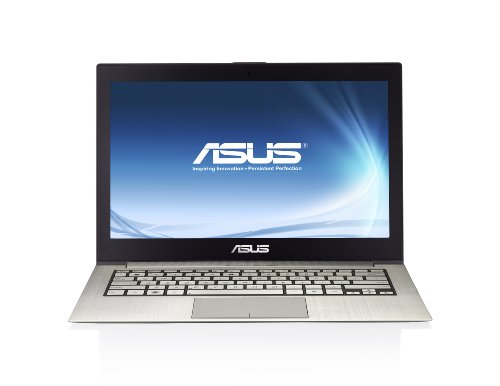
I rebuilt my Asus ultra-slim laptop over the weekend.  I’ve never been the biggest fan of OEM builds because of the 3rd party stuff that gets included.  On went Windows 7 Ultimate with the intention of migrating from my Latitude which will probably be rebuilt with some Hyper-V version (it has more RAM and eSATA).

After dealing with the drivers (conveniently placed on the hard disk by Asus) and putting on the usuals (thanks to ninite) I installed a few bits of the Asus software, including power stuff and a boot accelerator.

Some info:

  • The power stuff customises the power options.  The battery saving one boosts Windows 7 battery life to around 7 hours.
  • The machine starts in around 2 seconds from cold, then hits the boot loader.
  • A cold boot & logon takes 24 seconds, with things like Office 2010 installed.
  • Wake from sleep (open the lid) is less than 1 second.  The hardest bit here is finding the gap between the lid and the keyboard because the machine is so thin.

All this will only get better with Windows 8.  I already see that on my old netbook and the DevPrev release from last September.

Glad I didn’t toss the Asus packaging yet – I found two dongles:

  • A USB one for adding a NIC
  • A micro VGA converter for connecting a VGA lead. 

Some manufacturers have native VGA and NIC ports in the chassis but have to sacrifice thickness to fit them in.

Technorati Tags: ,

The Era Of The Windows Device Is Here?

I wasn’t able to keep up with my usual feeds and sources of news and gossip during the week with all the meetings I was attending, travel, presenting, and catching up in the office.  But one thing I noticed was the re-emergence of some Linux people moaning about secure boot, and more comments (positive, negative and speculation) about Windows 8 ARM tablets.

On ARM tablets, other than the fact that we’ve seen them at Build (behind glass cases) and that they will eventually appear on the market, we know nothing else.  There’s no end of pointless speculation.  We can’t criticise them because we don’t know what they are.  If you are knocking them then I’d love to learn about your hands on experience with these Windows 8 devices … mainly because the manufacturers haven’t put any on the market or released any specs yet.  So shut the frak up!

As for the Linux folks, I don’t always agree with him but Paul Thurrot got it right on.  When Apple make it easy for you to install Linux on an iPad or on an iPhone, then come talk to us.

The truth is that Windows devices are changing.  When I got in the business in the mid 90’s it was the norm for an IT person or an enthusiast to not buy a home PC.  Machines from Gateway 2000 (their abandoned factory in Dublin is still sitting there, with the alleged drug rehab clinic inside!) or Dell were so restrictive and overpriced.  Change was happening at incredible rates.  In Dublin we would have gone to a place like Peats to buy a case, motherboard, and all the other gubbins to build a machine to meet our requirements.  Later we’d order from Komplett.  But most gamers switched to the PS2 (and PS3) or Xbox (and Xbox 360) to get consistent and easy to access games.  Switching out graphics cards every year to be able to play the latest game was not cool.  In fact, I felt like the price of a custom build went up and way beyond the factory PC.

Customisation seems to be dying.  Take the slate PCs (the “flat laptop with a touch screen” precursor to the Windows tablet that) that are on the market now.  The one we got at Build 2011 has a small SSD.  I’ve love to upgrade it but I can’t.  The chassis is sealed.  There’s no obvious way to open it.  It’s probably a safe bet that if it was a retail model, even opening the chassis would void the warrantee.  The new ultrabook I got is similar.  It has tiny screws that require an Allen key that you’d find only in the best of PC toolkits (lucky I got one from MSFT a few years ago) or a jewellers.  But again, opening that chassis will probably void the warrantee. 

I think we are moving from the customisable Windows PC era to the era of the Windows device.  Most BSODs I have encountered have been caused by device drivers.  If Microsoft can dictate device specifications, as they do with Windows Phone, then they can improve the user’s experience of Windows stability.  That’s one of the things Apple gets praise for, but they can control the hardware, driver, and OS to guarantee a better experience.  Microsoft has to deal with an incredible breadth of internal devices and drivers, made of manufacturers of varying skills and professionalism. 

My desire to customise has reduced over the years.  Buying components by myself is expensive.  The likes of Asus or HP can bulk buy and sell on to me as a part of a machine at a much better price.  Maybe I’m alone in this but I like this change.  A simple, pick it up and just use it appliance is what I want.  And I really don’t care if it can’t dual boot Linux.  Let the penguin shaggers go buy Linux devices instead Smile

Why Would Xbox Need Virtualisation? Here’s My Theory …

Mary Jo Foley mentioned on TWiT Windows Weekly that Dave Cutler, the Microsoft man who helped create Windows NT and Windows Azure, had moved to Xbox along with a senior hypervisor architect.  Why would Microsoft want that to happen?  My mind went racing and one of the live listeners thought the exact same thing as me.

There’s not been much innovation in the life of the gaming console in it’s long history.  We went from twisting paddles, to joysticks, to controllers.  Not something big.  We went from cartridges to DVD.  Not a huge leap either.  Wii and Kinect really were big changes but I feel we’re only at the start of that evolution.

An interesting thing happened sometime in the last couple of years (don’t ask me when precisely).  A service called OnLive kicked off.  It was a cloud based game streaming service.  The game executes in a remote data centre and the gamer connects to it via their local machine.  The restrictions are based on latency, meaning that the gamer must be relatively close to the data centre, e.g. not playing in London with a data centre in Sydney.

What I instantly thought when I heard the above was that maybe Xbox Live was thinking of doing something similar, but by taking advantage of the Microsoft Global Foundation Services data centres that are located globally and host services such as Windows Azure, Office 365, and so forth.  Imagine it, games running in optimized virtual machines on specifically designed gaming virtualisation hosts.  If you could design the hardware and write the hypervisor from scratch, and take advantage of a network of globally dispersed data centres with huge bandwidth capabilities, well you could do something cool.  Then combine that with technology similar to Windows 8 RemoteFX (design for the WAN) and the availability of Xbox Live on Windows Phone, Xbox, and Windows 8 … hmm … and throw into the mix the reported incredibly high numbers of people who subscribe to Xbox Live Gold.  This could be really interesting. 

Imagine the possibilities.  You finish up work.  On the bus or train you take out your Windows Phone, you start up a game that is streamed from a “local” data centre.  You arrive at your stop and pause the game.  In the sitting room you power up your Xbox, connect and un-pause the game.  You want to go upstairs so you wake up your Windows 8 tablet and transfer the game connection to there.  Seamless. 

At this point, the gaming device becomes less important.  It’s all about the service and the subscription.  Actually, that’s kind of true right now.  Xbox is sold at a loss or cost price so you can get the machine, subscribe to Live Gold, and buy the games.  It’s the “attach” that Microsoft makes money from.  If Microsoft could take the Xbox out of the mix and focus entirely on the service then they can remove device churn from the equation and eliminate consumer hardware as a limiting factor to gaming/entertainment  innovation.

That’s my mad theory on it anyway.  It could be really cool if something like this happened.

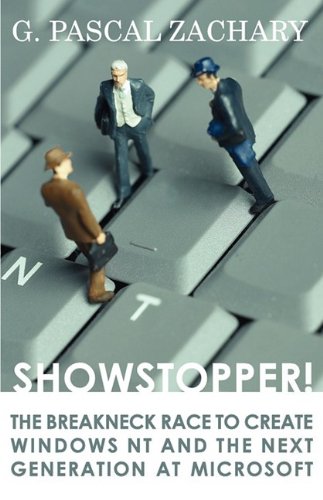
Showstopper Looks Like Good Read, a History of Windows NT Development

I was listening to TWiT Windows Weekly on the drive this morning and Mary Jo Foley declared a book to be the best book about Microsoft company history around.  I was intrigued.

Showstopper is by G. Pascal Zachary.  It tells the story of how a team developed Windows NT, the original version of what would become Windows XP/Vista/7/8. 

I’ve just bought it and sent it to my iPad.  I’m in the middle of reading another book at the moment.  This one will be next on my reading list.

Hyper-V.nu Community Event, January 2012

If you read this blog or you follow me on Twitter then there is a very strong chance that you also read Hyper-V.nu and follow the crew from there on Twitter too.  They run a great online community that covers Hyper-V and System Center in the Netherlands.  A few months ago they asked if I would come over to speak about Windows 8 Hyper-V Networking at a day-long event they were hosting in the Microsoft offices in Amsterdam.  Well, of course I would.  They’re good guys and Hans Vredevoort was the tech reviewer on Mastering Hyper-V Deployment and is a major contributor to Microsoft Private Cloud.

The guys advertised the event, and within 2 days they’d filled all the seats.  Registrations came from the Netherlands, Belgium, Germany, and UK, and there might be other countries I don’t know about.  It was a good day with technical content, demos, and laughs.

Jaap Wesselius and Peter Noorderijk kicked things off with the keynote, touching on some of the highlights of Windows Server 8 and the history, growth and success of their community.  Then it was me. 

Hans did a good session that went into detail on a small bit of the storage story.  There’s a lot to that story!  His demo was brave and it worked.  With a mix of PowerShell and GUI, he provisioned a storage pool and some spaces, demod a active/active file server cluster, created and permissioned a share, created a VM on a share, and did a live storage migration of a running VM from one share to another. 

Ronald Beekelaar did a deep dive on disk deduplication, talking about this new storage feature, explaining along the way the different methods and technologies that have been used up to now to get more data on disks.  “Chunking” seems to be the way forward!

Maarten Wijsman wrapped up the technical side of things with VMM 2012, talking about the pillars, creating a bare metal host, and explaining some of the features of service deployment.

Robert Bakker of Microsoft Netherlands wrapped the formal side of the event up talking about System Center 2012 and the licensing that was announced on Tuesday.

For me, the best bit was meeting a lot of people I’d not met in person before but “talk” to regularly on Twitter, and spending some time with some of the European community at dinner the night before.  I also got to meet some interesting people and heard what they are doing and experiencing.  That’s the great thing about community events … it’s content and people.  All in all, an excellent event.  I’m sure the guys will do more – you should register as soon as you can!

Put My Money Where My Keyboard Is – Bought An Ultrabook

Back in December 2011, I blogged about the variety of Intel-based Ultrabooks on the market and how they offer a cool, slim, light, and still powerful Windows based alternative to the MacBook Air.  I had hands-on with the cracking (that’s good) Toshiba Z830 and Sony VPCZ21M9E.

Yesterday, as I returned from the Hyper-v.nu event in Amsterdam, I made my way into the electronics store near the E terminal, often a place with bargains (compared to Irish costs).  And there I found the i5 version of the Asus UX31E (also comes in i7).  After a quick double check online of the spec on airport’s the free Wi-Fi, I decided to buy it for the price (under €1,000).

It’s a 128 GB SSD, 4 GB RAM, HDMI out, USB 3.0, 7 hour battery life, very slim machine.  It is silent.  It boots up so quickly.  It wakes from sleep instantly.  The chassis is brushed aluminium and it looks very classy.

My main reason to get it was to get a light normal usage machine.  It’ll fit beautifully in my camera bag without adding bulk to prevent the bag being carried onto a flight.  With USB 3.0 I can strap on an external drive for additional data (photos) and do Windows To Go for Windows 8 beta and RC when they come out.  RTM will go on immediately to further extend battery life.

Technorati Tags: ,,

System Center 2012 Licensing

Now you have pre-ordered your Microsoft Private Cloud book *cough*, you’ll want to figure out the licensing for System Center 2012.  Those details were announced tonight in the “transforming IT” webcast.

The good news: licensing for System Center is getting easier:

image

A big change is that you cannot buy individual SML products by themselves.  You must buy SML suites.  To be honest, people who run virtualisation have been typically buying a System Center Management Suite because it was cheaper than buying individual “2007” management licenses (MLs), so this isn’t a big deal (or a little on either).

You will now license it using one of two System Center 2012 suite editions, Datacenter and Standard.  They are referred to as Server Management Licenses or SMLs.  Datacenter gives you unlimited management rights for licensed hosts.  That’s perfect for virtualisation and private clouds.  The Standard edition is aimed at very small virtualisation deployments or physical servers. 

image

It is per-processor licensing based on physical (host) processors.  You can over-license a host, e.g. assign multiple Standard SMLs to a host.  You can see some examples here:

image

All System Center licensing with SA can upgrade to System Center 2012 SMLs.  Note that the System Center Management Suites include SA. 

image

Remember that you can also manage clients with System Center.  There is new licensing for these as well:

image

Microsoft has published a datasheet on System Center 2012 licensing.  There is also a System Center 2012 licensing FAQ.  Please contact your reseller, distributor, or LAR if you have any questions on this licensing.

Announcing the Microsoft Private Cloud Computing Book

Considering that Microsoft has just started their Microsoft Private Cloud/System Center 2012 campaign with their “transforming IT” production, it was thought that this was the perfect time to announce a new book, Microsoft Private Cloud Computing:

Untitled

“Written by a team of expert authors who are MVPs and leaders in their respective fields, this one-of-a-kind book is an essential resource for IT administrators who are responsible for implementing and managing a cloud infrastructure. You’ll quickly learn how cloud computing offers significant cost savings while also providing new levels of speed and agility. Serving as a how-to guide, Microsoft Private Cloud Computing walks you through building a secure, internal cloud and delivering it as a service to your company suing Microsoft Windows Server Hyper-V and Microsoft System Center Virtual Machine Manager 2012.

  • Discusses fabric management with System Center Virtual Machine Manager (VMM)2012
  • Examines how to provide network and storage with VMM 2012
  • Looks at the VMM library configuration
  • Discusses private cloud and cloud service management with Microsoft App Controller

Microsoft Private Cloud Computing is a must-have comprehensive resource that covers all aspects of implementing a private cloud”.

And just who are these “expert authors”.  Let me introduce them to you:

There’s a long story behind the book.  It started out with one concept that was talked over initially via email and a chat.  Then when we started to get to grips with the concept … well … everything took a left turn at Dundalk and went a different direction.  The size and complexity of the project literally blew up as we figured out what we really needed to write about.  That’s when we needed to add more expertise … and boy did we do that in style! 

Credit where credit’s due, after the initial concept development and planning, I stepped back a wee bit and took care of the intro chapters.  I had a l-o-n-g period of writing in 2010 and I wanted to take a break from it in 2011.  The meat of this book has been written by Patrick, Damian, and Hans.  Technical reviewing is being handled by Cloud and Datacenter Management MVP, Kristian Nese (@KristianNese), helped by the fact that he has already published a book called Cloud Computing in Norwegian.

FYI, the cover that’s available now is a preliminary artwork … hence my cloning out the author listing. It will be updated to reflect the work done by Hans, Damian, and Patrick.

It is estimated that Microsoft Private Cloud Computing will be available on May 22nd, 2012.  And yes, I would expect there to be ebook editions – just don’t ask me when.

Hyper-V Immersion Coming To Belfast on Feb 7th

Due to popular demand and the massive success of the three Dublin events, Microsoft Ireland has decided to bring the day-long Hyper-V Immersion event to Belfast, Northern Ireland.

Come along and find out why; Hyper-V has grown up a lot over the last three years and now includes the core functionality you need to meet your business and technical requirements.

This session is a unique presentation that builds on your existing experience with virtualisation (regardless of hypervisor) and will equip you with up to date skills through in-depth, advanced, real world training that is not available anywhere else!

As a standalone, one day immersion into Hyper-V or as the first step towards certification from Microsoft Ireland, this is a not to miss opportunity!

Agenda

  • A history of Hyper-V and a glimpse into the future
  • Hyper-V Architecture and Features
  • Building a stable and reliable Hyper-V infrastructure
  • Advanced topics: High Availability, Live Migration, Dynamic Memory & Linux Guests

Presenters: Aidan Finn (MicroWarehouse) and Dave Northey (Microsoft Ireland)

Audience: Infrastructure Specialists, IT Decision Makers, IT Generalists, IT Implementers, Administrators, Consultants, Technical Support.

Timing: We will run the workshop from 9.30am until 5.00pm – please aim to be there for 9:00 for registration, tea & coffee.

Location: BMC Titanic Quarter Campus is located in central Belfast on the banks of the River Lagan, within walking distance of the City Centre. The Campus can be easily accessed by foot, road and rail. Parking is available in the basement car park for a fee of £1 per hour.

Registration: http://hypervimmersion.eventbrite.com/

The 3 events in Dublin were interesting, with a lot of Q&A.  What I enjoyed was that the questions were very different from day to day.  I’ve no doubt that Belfast will be fun based on past experience.  There’s always a lot of back-and-forth and the audience makes it different for the speaker.  I’m looking forward to the day.

My advice: register early if you’re serious about attending.  The Dublin events booked out in near record time (only the Windows 7 launch events beat it, I reckon).

Technorati Tags: ,,

Office 365 / Outlook / iTunes Wiped My Contacts – And How I Rescued Them

My main e-mail was had been Gmail since I joined the beta way back when.  I never really used it for storing contacts because of how Gmail can figure out email addresses from the contents of the inbox.  My repository was the phone.  When I got an iPhone, it became phone & Outlook (synced by iTunes).  Then I got an iPod and it was in sync with them … when ever I would connect it up to the laptop (rare enough to be honest because I charge it separately).

Last night I made a big change to my email habits.  I switched from Gmail and Hotmail to Office 365.  I connected up Outlook and set Office 365 as my primary mail account.  This morning, I hooked up my phone to sync up some podcasts for the commute to work.  After work I came home, synced the iPhone again (which backed up the phone and erased the previous iTunes data backup), and I got a call (the first of the day).  No name came up … but it was my Mom.  Hmm, she hadn’t changed numbers or phone.  Why the frak did that happen.  Then I checked my contacts … well …  I checked the now empty repository of contacts.  Yoiks!

Panic stations.  No one likes every one of their contacts being blasted away and the lot being synced as zip.  Somehow, the Outlook switch over decided that my contacts should not merge my contacts between the phone and my new mail account, but should in fact reset them to zero.  Well I suppose it would be interesting to make a whole new set of friends and family Winking smile

I had an idea to rescue my contacts.  My iPad hadn’t been synced.  I fired it up and there were the contacts sitting pretty.  iCloud would rescue me.  I’ve never used it before.  I’ve never even tried it before. 

  1. Did an iCloud backup of the iPad.
  2. Configured iCloud to sync my calendar and my contacts.
  3. Logged into iCloud and verified that they were all there.
  4. Disabled iCloud sync on the iPad (to keep the data safe) and left the data on the iPad (no delete)
  5. Disconnected my iPhone, and configured it to sync with iCloud.  My contacts and calendar entries were back.
  6. Removed all trace of my now redundant Gmail account (IMAP) from Outlook and from the iPhone.
  7. Closed and restarted Outlook and iTunes.
  8. Disabled iCloud sync on the iPhone, leaving the data on the phone.
  9. Connected up the iPhone to the laptop and let iTunes sync with contacts (verify this is set up in the Phone – Info area).
  10. Dismissed the dozens of meeting alerts that appeared for past reminders.
  11. Checked Outlook Contacts and there they were … rescued.

Phew!

Technorati Tags: ,