What the Heck is the Microsoft Private Cloud?

There’s been lots of terms thrown around by Microsoft over the past 5 years.  Dynamic systems initiative (DSI) was one.  It focused on using System Center and Active Directory to manage an optimized infrastructure, or an IT infrastructure that was centrally managed with as much automation as possible.  A few years ago the term Dynamic Datacenter started to appear in the form of the Dynamic Datacenter Toolkit.   That was a beta product aimed at the normal internal network.  A hosting variant of that was also in the works.  Eventually the term was split giving us:

  • The Private Cloud and
  • The Dynamic Datacenter

Confused yet?  Yes?  That’s to be expected.  Some theorise that there is a team of people in a basement in Redmond that is paid in two ways:

  • Cause as much confusion as possible: the best are headhunted to rename products in Citrix.
  • Paid by the letter: you’ll see what I mean by that in a few minutes.

The private cloud is a variation on the public cloud – makes sense right?  The public cloud is what you’ve always called the cloud.  In other words, the public cloud is something you subscribe to on the Internet like Salesforce, Google Apps, Office365, and so on.  It could be an application, it could be an application platform, or it could be a set of virtual machines.  You don’t care about the underlying infrastructure, you just want instant access with no delays caused by the service provider.  You pay, you get, you activate your service. Simple.

The private cloud takes those concepts and applies them internally into your internal network.  Why the hell would you want to do that?  Well, maybe you do, and maybe you don’t.  But your business might very well want to.  And here’s why:

The business does not give a damn about servers, SANs, network cards, virtualisation, or any of the other stuff that we IT pros are concerned with.  They are only concerned with applications and information.  Applications allow business to happen and information allows decisions to be made.  Compare the salary of a Windows admin with that of an equal grade .NET dev.  The developer will be driving the nicer car and living in the nicer house.  That’s your proof.

Here’s how the business sees us.  They go and buy some new LOB application or the MIS department develops something.  They come to us to deploy it.  We’re busy.  We want to go through various processes to control what’s deployed.  From their point of view, we are slowing things down.  What they think should happen in a matter of hours may end up taking weeks.  That really happens – I’ve heard of helpdesk calls taking 6 weeks in one corporation in Munich.  And I’ve met countless developers who think we IT pros are out to sabotage their every effort (OK, who told them?  The first rule of being an IT pro is we don’t tell developers that we are out to get them.  The second rule of being an IT pro is we don’t tell developers that we are out to get them).

So something has to give.  That’s where the private cloud comes in.  It shifts the power of deploying servers from the IT pro to the business (typically application admins, faculty admins, developers, and so on … not the end user).  This is all made possible by hardware virtualisation.  Let’s face it: we don’t want to open up physical access to the computer room or data centre to just anyone who says they need it.

The Microsoft private cloud is made possible by the System Center Virtual Machine Manager Self-Service Portal (SCVMM SSP – lots of letters there, eh?) 2.0.  That’s a free download that sits in front of SCVMM.  It has it’s own SQL database and allows for a layer of abstraction above the virtualisation management tool.

Now the role of the IT pro changes.  You now take care of the infrastructure.  You manage the Hyper-V compute cluster.  That’s the set of virtualisation hosts that VMM manages.  You manage VMM: preparing and patching (VMST 3.0) templates, loading ISOs, and so on.  You monitor systems using OpsMgr (and enable delegated operator access/notifications for application owners).  You manage backups.  You do not deploy virtual machines anymore. 

In SCVMM SSP 2.0, you will add the ability for people to get access to SANs, network load balancer appliances, and gain access to VM templates in the VMM library.  You also will define networks.  This allows you to optionally define static IP ranges that can be automatically assigned to VMs that are placed in those networks.

The business user (the dev, etc) can access the private cloud by logging into the SCVMM SSP 2.0 web portal.  There they can create a business unit (requiring admin approval).  That allows you to verify this super cloud user (super as in they are the overall admins of their business unit which will contain virtual machines).  You might also have a cross charging process and set up a process via Accounts.  The business unit owner now creates one or more services.  A service is an application architecture.  Each service has service roles.  The best way to describe them is to think of them as a tier in an n-tier application.  For example, a web application may have web servers (one service role with an associated network), application servers (a second service role with a different network), and database servers (a third service role with a third network).  Any VM created for a service role will be automatically placed in the appropriate network and have TCP/IP configured as required.  Nice!  No admin work to do!  Fewer helpdesk calls!  The admin gets the chance to review the service architecture before approving/denying/modifying.

Once the service is approved, the business unit owner, or any delegated admins (that they delegate from existing AD users) can create VMs, and manage them.  They get remote console access via the portal.  They can log in and install software as required.  No administrator (you) involvement is required to deploy, delete, shut down, install, etc.  You’re off monitoring, backing up (there’s a place where they can tell you what they need backed up in the service creation request), and adding hosts to the cluster.

Things will evolve more with SCVMM 2012 … but there’ll be more on that later.

From the business’s point of view, they feel empowered.  The blocker (us) is removed from the process and they get the cloud experience they’ve had from the public cloud with the associated instant gratification.  From your point of view, you are less stressed, able to spend more time on systems management, and don’t have pestering emails looking for new servers.  Sounds like a win-win situation to me.

Except …

For you folks in the SME (small/medium enterprise) market there will be no change.  Who manages those applications in your environment?  You do.  There are no application admins.  It makes little sense to implement this cloud layer on top of SCVMM because it’s just more process for you.  Sorry!

OK, what about this dynamic datacenter thingy?  Well, that’s the addition of System Center to manage everything in the compute cluster (hardware, virtualisation and operating systems): monitor everything from hardware to applications, backup, deploy, patch, automate process, manage compliance, and so on.  In other words, build automated expertise and process into the network.  But that’s a whole other story.

Opalis & How Something Isn’t Finished Until It’s Documented

I mentioned in a blog post last night that I started out my career as a dev (eek!).  One of the things that was drilled into us in college was that something was not finished until it was documented.

I recently tried to get System Center Opalis up an running in a lab.  The newest release, 6.3, added support for Windows Server 2008 R2 so I thought I’d fire it up in a lab.  It did not go well.

It appears (assuming I understood the v6.3 documentation correctly) that you install v6.3 by installing v6.2 and hacking it with some files from the 6.3 zip file.  OK!  You then install two types of agent.  One coordinates tasks that run on various machines, and another runs the tasks on those various machines.  The management agent deployed OK.  But the other one … all I could get was a useless error telling me that it failed to install.  No codes, nothing to check, etc.  I did the usuals like very domain admin rights, and disabling firewalls but still no joy.  I checked online and there was nothing to help.  Seeing as it was just a lab that I was trying to do something quickly on, I didn’t bother hitting the TechNet forums.

And there-in lies the problem.  I know that most customers don’t search too hard for solutions.  If they try something, and it doesn’t do the basics cleanly, then it’s on to the next alternative.

To me, Opalis is an unfinished product.  And that’s a pity.  Because the idea of Opalis is pretty damned good.  But it fails at the final hurdle.  I wonder if this is why there’s lots of talk about the MS acquisition of the Novel PlateSpin resources?  Opalis is so un-MS-like as a product.  It’s like MOM 2000 … nice idea but maybe some of us will wait until the recently added Microsoft logo actually means something more than IP ownership.

By the way, here’s a step-by-step video for Opalis.

Technorati Tags: ,

Hyper-V Cluster: Be Careful With Your Protocol Bindings

Failover clustering isn’t exactly fussy about what networks it uses.  That can be troublesome, especially when people are buying servers with lots and lots of NICs.  Document everything, and only use what you need.  Here’s just a few tips:

Tip #1

Label your network connections with something descriptive such as “Parent”, “CSV”, “VM1”, “LM”, or “iSCSI1”, instead of the useless “Local Area Connection 2”.  This allows you to track what is doing what.

Tip #2

Disable unused NICs.  They just clutter up stuff all over the place.  And they can cause a nightmare in when they are patched into DHCP networks.

Tip #3

Do not disable IPv6, even if you have no IPv6 on your network.  MS will support you, but it’s recommended that IPv6 is left bound to all the physical NICs in your cluster nodes.  I recently had that discussion with MCS on a customer site.  A reach out to Redmond gave us this recommendation.

Tip #4

Disable everything except for the Hyper-V switching protocol on the host NICs that are used for VM networking once you verify that they are patched into the right network(s).  This is to prevent the host being a n accidental participant on a guest’s network if that VLAN has a DHCP scope.  It also keeps things tidy.

Tip #5

Unbind everything except for TCP on the iSCSI network (which should be a dedicated network for iSCSI with dedicated switches).  I found that you can get some weird funnies like CSV suddenly not cooperating if you don’t.

The Good Ol’ Days

I just saw on Facebook that Sega are celebrating the 20th birthday of Sonic the Hedgehog this year.  Oh, how the time flies.  Back in college, me and my housemates used to play this, EA Hockey, and Madden football, almost non-stop … during our final exams!

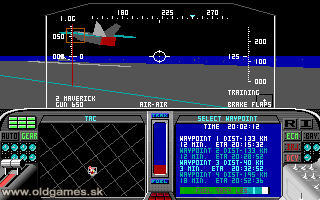
Flashbacks!  When I was still in secondary school I was hooked on Microprose simulators.  The F-19 (what we all used to think the name of the eventual F-117 was before it was revealed) Stealth Fighter was my drug of choice, followed by a lot of M1 Tank Platoon (“Heat Up!”).  I blasted a lot of commies back then.  And I just couldn’t get away from them during my Leaving Cert exams. 

What I loved about those Microprose games was the level of detail.  The gaming strategy and how you moved your platoons was based on real American doctrine for fighting an invading Soviet force in central Europe – a rolling defence, a probing attack, distract, hit them with Apaches and Warthogs, smoke them out, and penetrate the rear guard.  You can see the gunners view in the above.  You could use the keyboard (I had an Atari 520 ST-FM back then) or the mouse to use any of those controls that you can see.  Laser targeting was down?  Estimate the range instead, plug it in, aim the gun, and fire.  The manuals were works of art; there was so much to learn from them you would return over and over to pick up on some extra detail that would improve your play.  I still remember what Chobham and reactive armours are.

F-19 Stealth Fighter had the same level of detail.  I spent so many hours sneaking through Soviet radar installations, strategically downing AWACS with a Phoenix from long range, avoiding SAMs, and blowing up submarine bases with a laser guided weapon, before heading home to some Norwegian airbase.  Detected by the enemy?  Ouch: you failed the mission.  It was the Cold War after all.

In first year in college, we had one small room of PCs.  Obviously IT services banned all forms of games on college machines.  But me and a good friend used to sneak this one into that lab and play a sneaky game or two.

Look at how crude those graphics are!  Basic, but the games were amazing.

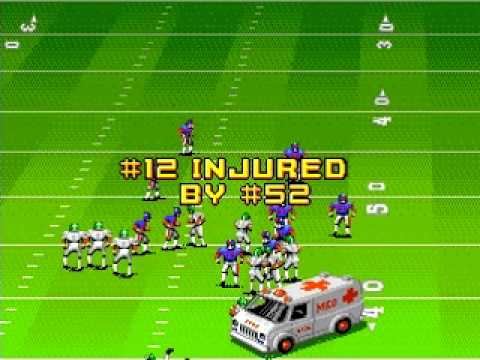
Then it was onto college and the Sega Megadrive.  That’s where John Madden got his hooks into me. 

This game taught me about the NFL.  I would play it non-stop for weeks when given the opportunity.  I got to the point where I would use the then-pitiful New England Patriots against the Pro-Bowl squads.  There were some nail biting finishes that would grab the attention of NFL Film’s Steve Sabol, I tell ya!

EA hockey was a great head-to-head game in the house, winner stays on!  I don’t know who figured it out, but we found that there was a sweet spot on the ice in the lower third where if you spinned the player a certain way, you could nearly always score a slapshot goal.  That kind of ruined the game for us after a while.  But I guarantee you that there was lots of shouting until then Smile

After third year I had 6 months of work experience and I bought my first PC (a Gateway 486 DX2 running DOS 6.22 and Windows 3.11) to enable me to work on my 4th year project.  My team developed [yes, I was a dev back then] a modular encrypted messaging system using Visual C++ 2.0 which came on 20+ floppies.  Can you imagine installing that thing?  Can you imagine how freaked I was the day the hard disk crashed towards the end of our project and I had to reinstall everything?  Luckily I had backups of the code.

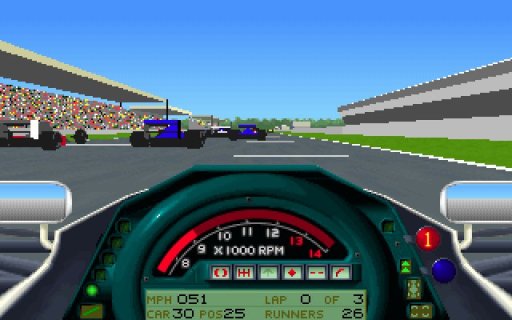
Having a PC meant I stepped up the graphics quality.  Once again I was back to Microprose … this time in the form of F1.

It was addiction time once again.  This time it wasn’t all about detail in manuals or huge amounts of learning.  It was about “realism”.  It was rumoured that Jacques Villeneuve used this game to learn the F1 tracks when he left Indycart.  Me and my flatmate at the time played this thing so much that we knew every track on the F1 circuit, the gears that the drivers needed to be in, and the breaking points.  We knew where to overtake.  Both of us had a PC and we used a pair of daisy chained serial cables to connect our two PCs which were in different rooms.  That way we raced head-to-head without being able to see what each other was doing.  That was fun.

After college there were lots of games.  I played Madden on the PC and then a PS2 made its way into the house.  That was traded in when the shoebox XBox arrived.  Madden was played on both of those consoles.  The Xbox360 arrived but I never bought Madden for it … I’ve always been afraid of spending too much time playing it instead of meeting various deadlines outside of work in the last few years.  On the PC I played lots of games like the Rainbow 6 series, Rome:Total War, and Rise of Nations.  Rise of Nations got played a lot in one job when we were being made redundant … a lab network and a private network made its way to many desks Smile  Nukes away! 

Now, I have Empire:Total War on the laptop (via Steam), UFC Undisputed on the Xbox 360, and the Kinect Sports game.  Modern racing games I usually find boring and difficult to control.  I liked Colin McCrae on the PC when using a steering wheel.  There was a PC game where you drove around Chicago like a loonie getting chased by cops that was a good laugh.  And I like the idea of some test drive game that is a free demo on the Xbox360. The run-amok first person shooters I find boring too.  Halo and Gears of War are OK because there is only one-way-through but I hate the puzzle levels and I usually tire of them … I’m playing to relax and get away from the usual brain-strain of the day world.  But you know what, I just wish someone would pick up the Microprose rights and get me a successor to M1-A1 Tank Platoon (a later sequel to the above which was pretty good) and maybe an F-22 Raptor game.  I can then break out that big ol’ joystick (kids, a joystick is a game controller that looks like an airplane controller.  We used to play games on them before console controllers were invented) that’s been gathering dust for a long, long time.

Thinking About iDevices

I was talking to a friend on the phone last night and the topic of where end user computing is going came up.  He said something that I found interesting.  He’s using his PC less and less.  In fact, he only uses it now because it does two things that his iPad cannot: virtualisation (for labs) and handling of RAW files (from a DSLR camera) for processing in Adobe Lightroom.  All the web stuff, email, and so on, are handled nicely on his iPad. 

Hmm, I’m finding the same thing.  I use my iPhone more and more, instead of using a laptop/netbook.  When I’m lazing on the couch, the phone works well for Facebook or Twitter.  When I’m travelling, I use it for music, and watching videos and podcasts.  When waiting, I can surf the net or use carious apps for getting the news or weather.  The PC is becoming less of a factor in my life.  In fact, if I had an iPad (which I won’t pay for) I think I would only use a PC for work.

But then my friend mentioned something that I’ve also wondered about.  iDevices don’t have a concept of storage like in a PC.  There is no C: drive so to speak.  Storage of user data like music, videos, and so on, is handled by the apps in question.  Many people seem to consider Dropbox to be a mandatory add-on to iDevices.  It appears to me that Apple has taken the view that everything is centred on the app.  I’d argue that everything is centred on information.

Maybe this is the stumbling block right now for the iPad being a true end user, business appliance for the masses.  Sure, some apps can live in the cloud, with data warehouses in the back end, out of sight from the end user.  Maybe Office can live in the cloud with online SharePoint and an app-managed local replica.  But there are times when that isn’t enough.  Maybe we need a complete rethink of how we use data.  But then I come back to one scenario that I’m familiar with … a day of wildlife photography could generate 12 GB of RAW photos to upload, and then I’ll process some of those into 100+ MB PSD files.  That’s a lot of data going up to the cloud.

I’ll be sure to patent the solution when I think of it 🙂

Meanwhile … out on the farm …

Rumblings about Windows Phone 7 continue.  We’re still waiting to see the copy-paste patch that was promised back at the underwhelming launch.  And Paul Thurrot (and commentators on his blog) have been reporting that WP7 handsets are eating up data allowances for no apparent reason.  I listen to a Thurrot podcast this morning and he reckons that WP7 handsets are sometimes using 3G instead of an available and joined wifi connection, e.g. you start a download on wifi, “hibernate” the phone, wifi is powered down, and the phone continues the download over 3G.  Ouch!  And there are also grumbles that Zune is still quite region limited so even podcast distribution is restricted.  Not good … but that’s always been a big issue for Zune.  It killed the Zune device from day zero.  For example, in Ireland, we could not even access the Zune website without using a USA-based proxy.

A beta for Apple iOS 4.3 has emerged for developers to test.  It’s going to add mifi functionality.  That’s where you use your phone are a wireless access point, put it somewhere with a strong signal, and wirelessly access it’s Net access from your laptop/tablet.  Nice!  I’m told Android already has this.

More on Private Cloud Academy

I presented session 2 in the Private Cloud Academy series last Friday in Microsoft Ireland.  That event focused on SCVMM 2008 R2 with SP1, Virtual Machine Servicing Tool 3.0, and Operations Manager 2007 R2 with PRO integration (with SCVMM).  It was a very demo driven session.  I had 25 slides but I probably only used half of them.  And as usual, there were lots of questions.

The next event was originally scheduled for March 18th but it has been rescheduled to March 25th.  Session 3 will focus on System Center Data Protection Manager 2010 and how you can use it in a virtualised environment.

I’ll start off with a high level view of backup and virtualisation.  For example, VM’s are usually “just” files making them easier to backup, restore, and replicate.  One of the biggest things people need to understand when backing up a Hyper-V cluster is how redirected I/O affects operations when using CSV.  And that means spending quite a bit of time on how a cluster should be designed.  That leads to backup strategy.

Once the theory is done we’ll get into the usual end-to-end demos.  I’ll be backing up VM’s on a CSV, backing up SQL workloads, and so on.  Then we move onto site-site replication of DPM, and maybe even automated restoration of VM’s in a secondary site.

If time permits, I’ll go on to talk about DR design possibilities, seeing as it is a related subject.

Sound interesting?  If so, go ahead and register if you can make it to Dublin (Ireland) on the day.

Bob Muglia Fired?

Steve Ballmer sent an email to employees to say that Bob Muglia, the executive in charge of cloud, server and tools, was no longer employed by Microsoft. You might be able to read that as the latest of the Nero-esque executive firings. And I guess that it’s another division that Ballmer will take direct control over?

If you are a division lead (any left now?) it might be a good time to prepare your alternative plans.

I really don’t think that Microsoft shareholders will tolerate this for very much longer.

I’ll miss the “Bob Muglia cloud drinking game”; it beats being told that MS wants nothing to do with you if you’re not interested in the cloud.

OpsMgr Integration with VMM 2008 R2 SP1 Beta

I’m wrapping up the setup of a demo environment for tomorrow’s Private Cloud Academy, focusing on VMM, OpsMgr, Virtual Machine Servicing Tool, and SCE 2010.

I am using Windows Server 2008 R2 SP1 Dynamic Memory on the managed cluster, and I’m using Virtual Machine Manager 2008 R2 SP1 as well.  The final piece of the PRO integration between VMM and OpsMgr is when you specify the OpsMgr server in VMM in Administration.  I went to do that and I was told that I did not have current VMM management packs in OpsMgr.  For the SP1 beta, it looked for version 2.0.4516.0.

After about 5 seconds of blinding panic (the demo is tomorrow morning) I checked the SP1 media and found the management packs in amd64virtualizationMP.  Phew!  I did an import from disk in OpsMgr and the management packs were updated.

74% Of Workers Plug Personal Devices Into Work Network

I’ve just read a story on techcentral.ie that discusses a Virgin Media (UK-based ISP) report.  It says that 74% of company employees are bringing personal devices into work and plugging them into the company network.  This is the sort of thing I was talking about in my previous millenials post.  It’s also the sort of thing that has impacted decision making by corporates: personal preferences for a better appliance or utility can improve the working experience, and the corporate decision making process.  We have to decide how we respond?

Do we try to block everything?  We can try.  Group Policy and utilities like DeviceLock can lock down what is plugged into PCs.  Network Access Protection (Windows)/Network Access Control (Cisco) can control what is allowed to connect to the network.  I’ve taken the device lock approach before.  But a valid business case always overrules global policy, and you might be surprised how many people come up with “valid” business cases.  Soon the policy resembles swiss cheese, only affecting the minority of users.  The result is that IT is disliked – it’s a blocking force once again.

The user-centric approach that we’re seeing with private cloud, App-V, and System Configuration Manager 2012 is an example of how we need to think.  My millenials post also suggests a way forward.  Maybe we need to allow personal appliances, but use those policy tools like Network Access Control to place the appliances into networks that are not central, kind of like the guest network that is often used.  Or maybe we need to change how we think about the PC altogether and treat the entire PC network as a guest network. 

The latter approach might work very well with the user-centric approach.  If end users are using their own PCs, tablets, and phones, then we cannot apply corporate policy to them.  Maybe we just provide user-centric self-service mechanisms and let them help themselves.  Or maybe things like VDI and/or RemoteApp are the way forward for LOB client delivery.  If everythign was cloud (public/provate) and web-client based then application delivery would be irrelevant.  Maybe it’s a little bit from column A and a little from column B?

It’s a big topic and would require a complete shift in thinking … and a complete re-deployment of the client network, including LOB application interfaces.

Asus Windows 7 Slate at CES 2011

Once again, this is nothing personal.  It’s just looking at the facts and replaying them.  For those who might get upset: you win some, you lose some.  Trying the same approach when you’re losing leads to more losing.  You can only start winning by taking what works and applying it in different ways to win.

I saw on Mark Wilson’s twitter feed (virtualisation MVP and blogger) today that ASUS announced a range of slate PC’s, one of which runs Windows 7.

As a laptop alternative it sounds like a nice machine.  It’s got an Intel i5 CPU, 4 GB RAM, and USB sockets.  You can use your fingers, a pen, or a Bluetooth keyboard to interact with it.  But there are a couple of problems.

Mark has been saying for months now that MS needs to focus on battery life.  The big players are the Apple iPad and Samsung/Google Android tablets.  They’ve had huge sales numbers by selling mobile devices.  Unfortunately the Asus machine is running a non-optimised OS in Windows 7, with the required traditional laptop hardware.  That means battery life is around 3.5 hours, which compares poorly with the reported 10-12 hours of alternative OS appliances.  The Windows 7 Asus machines is also over twice the price of the Android alternatives from Asus because of the higher h/w requirements.

If Microsoft wants to be a real player in the tablet market then they need to supply an OS that is optimised for mobile devices, not PCs and laptops.  As I’ve said before, they have an OS now that could be tweaked for a tablet, in the form of Windows Phone 7.  It meets the requirements in having light hardware requirements and being designed for a touch interface.  Mark recently commented about how he found Windows 7 to be not as good at touch as designed-for-touch OSs because of the approach it takes (accuracy versus close enough). 

Unfortunately, it seems that the decision makers in Microsoft don’t agree.  We’re hearing loads of rumours that a Windows 8 edition will add support for ARM chips.  That will allow a lighter weight appliance with lower costs and better battery life, comparable to the competition.  The problem with this is that I wouldn’t expect to see Windows 8 until at least 12-18 months after any initial public demonstration.  That means we’re already waiting for 2012.  That gives Apple/Samsung/Google a lot more time to build up their appliance sales and to further develop their online services and application portfolios.  In the meantime, we have Windows 7 driven slates at twice the price and an almost zero 3rd party application portfolio from Microsoft.

This sounds awful like what happened with Windows driven phones.  Apple and Google were years ahead of Windows Phone 7.  They captured the market.  Microsoft came in too late with an incomplete product, and a tiny app portfolio.  We got some claim of big sales of Windows Phone handsets.  The truth is, the number was really the number of handsets shipped by manufacturers.  How many Windows phones do you see on the bus or train, versus Android or iPhone handsets?  The ratio around here is 0/100.

I saw another article (retweeted by Mark) that really drives the stake in.  The strategy from Microsoft regarding mobile devices (phones and tablets) is wrong.  The market has decided that.  Maybe I was right about Steve Ballmer’s future?

By the way, Steve Ballmer is doing the keynote at CES later today (18:30 PST) in Las Vegas.  It’s rumoured (strongly) that he’ll be talking about slate PCs (Windows 7) and (grasping at straws) that he’ll have Windows 8 on show in public for the first time.  Windows 8 (based on leaks last year) may look very different with a new approach to user interaction.