Windows Server vNext Technical Preview is Available

You can see the features of the next version of Hyper-V (and related parts of Windows Server) here.

I just checked and you can find:

  • Windows Server (Standard) Technical Preview
  • Windows Server Datacenter Technical Preview
  • Hyper-V Server Technical Preview

The Windows 10 technical previews are also there.

image

An image is available in the Azure gallery for the Windows Server Technical Preview. I deployed it in Europe North and it works fine.

image

You can also get the Remote Server Administration Tools for Windows 10 Technical Preview.

What’s New in the Windows Server Technical Preview

The System Center preview (minus SCCM) is also available to download from MSDN. Note that App Controller no longer exists, and Windows Azure Pack should be used instead.

Edit#1

Microsoft has released the Windows Server & System Center previews to the general public.

RunAs Radio – Software Defined Storage with Aidan Finn

I recorded an episode of the RunAs Radio podcast as a guest with MVP Richard Campbell a couple of of weeks ago, where we talked about using Windows Server in conjunction with commodity hardware to build software-based storage solutions:

Richard talks to Aidan Finn about Software Defined Storage. Picking up he left off in April talking about Microsoft’s Scale-Out File Server, the whole concept of Software Defined Storage is abstracting the details of the storage hardware away from the actual storage process. Aidan digs into how mixtures of SSD and spinning drives to optimize performance using Windows 2012 R2 Storage Spaces reduces costs and simplifies getting significant amounts of storage without any custom gear. And as Aidan says, in the end, it’s all just Windows. Storage continues to evolve, and not just for the big enterprise folks – there are clustered storage solutions for small and medium businesses too!

Here is the whitepaper that I refer to where 1,000,000 IOPS was achieved with a single JBOD tray. Here is the video that I produced that Richard mentions.

You can subscribe to the podcast (RSS here) via all the usual means, and you can download the MP3 here.

Or maybe you would like to see how a new 2U Cluster-in-a-Box (for cloud, branch office and SME deployments) model from DataOn has hit over 2 MILLION IOPS?

BEWARE! Microsoft Released September 2014 Update Rollups For Windows Server

Both Windows Server 2012 and Windows Server 2012 R2 (as well as their desktop OS and RT variants) received update rollups last night.

You know the drill: only install these updates before they are one month old if you want to shut down your business, get fired, and become an IT pariah. Let some other mug do the testing for you. You can do your own pilot testing and approve after that.

The WS2012 release includes a fix for SMB troubleshooting (including other fixes):

  • 2980749 Event log data for troubleshooting SMB in Windows 8 and Windows Server 2012

The WS2012 R2 release highlights for me are:

  • KB2984324 Clussvc.exe or cluster node crashes when a node sends a message to another node in a Windows Server 2012 R2 cluster
  • KB2982348 Broadcast storm occurs after a virtual switch duplicates a network packet in Windows 8.1
  • KB977219 Updates to improve the compatibility of Azure RemoteApp in Windows 8.1 or Windows Server 2012 R2

KB2990170 – MPIO Identifies Different Disks As The Same Disk

Microsoft posted a fix for Windows Server 2012, Windows 8, Windows Server 2012 R2, Windows 8.1, Windows Vista, Windows Server 2008, Windows 7, and Windows Server 2008 R2 for when multipath I/O identifies different disks as the same disk in Windows.

Symptoms

The code in Microsoft Windows that converts a hexadecimal device ID to an ASCII string may drop the most significant nibble in each byte if the byte is less than 0x10. (The most significant nibble is 0.) This causes different disks to be identified as the same disk by Multipath I/O (MPIO). At the very least, this may cause problems in mounting affected disks. And architecturally, this could cause data corruption.

Resolution

When you apply this hotfix, the conversion algorithm is fixed. Disks that were masked by this issue before you installed the hotfix may be raw disks that still have to be partitioned and formatted for use. After you apply this hotfix, check in Disk Management or Diskpart for previously hidden disks.

A supported hotfix is available from Microsoft Support.

Video – Introducing Windows Server Software-Defined Storage

This is a video that I recorded for my employers, MicroWarehouse, a distributor in Dublin Ireland (nothing to do with a similarly named UK company). In it, I introduce the software-defined storage techs of Windows Server 2012 R2, focusing on Storage Spaces, Scale-Out File Server, Cluster-in-a-Box and Hyper-V on SMB 3.0, all built using hardware by DataOn Storage. There are some sample designs, and some indicative RRP pricing.

Note that this is strictly a high-level video that is intended to introduce concepts.

image

KB2980661 – August 2014 Update Rollup for WS2012 R2 Added Tiered Storage Spaces Performance Metrics

This KB informs us that Microsoft added much needed performance counters to Windows Server 2012 R2 for monitoring tiered Storage Spaces. You can find more details here. The new perfmon metrics are:

  • Avg. Tier Bytes/Transfer
  • Tier Transfer Bytes/sec
  • Avg. Tier Queue Length
  • Avg. Tier sec/Transfer
  • Tier Transfers/sec
  • Current Tier Queue Length
  • Avg. Tier Bytes/Write
  • Tier Write Bytes/sec
  • Avg. Tier Write Queue Length
  • Avg. Tier sec/Write
  • Tier Writes/sec
  • Avg. Tier Bytes/Read
  • Tier Read Bytes/sec
  • Avg. Tier Read Queue Length
  • Avg. Tier sec/Read
  • Tier Reads/sec

Storage Spaces – Not Just For SMEs

I read a comment today that Storage Spaces was great for small/medium deployments. And yup, it is. I use Storage Spaces to store my invaluable photo library at home (a pair of Toshiba USB 3.0 3 TB drives). At work, we use a single DataOn Storage DNS-1640 24 x slot JBOD that is dual SAS attached to a pair of 2U servers to create an economical Hyper-V cluster. And we have sold 2U DataOn Storage CiB-9220 “Cluster in a Box” units for similar deployments in SMEs.

But most of our sales of JBODs have actually been for larger deployments. Let me give you an example of scalability using an image from my software-defined storage slide decks:

image

In the above diagram there are 4 x DataOn Storage DNS-1660 JBODs. Each has 60 x 3.5” disk slots. Using 6 TB drives (recently certified by DataOn) that gives you up to 1440 TB or just over 1.4 petabytes of raw storage. That’s with 7200 RPM drives and that just won’t do. We can mix in some dual chanel SAS SSDs (using 3.5 to 2.5 adapters) to offer peak performance (read and write).

In the above design there are 4 SOFS cluster nodes, each having 2 x direct SAS connections to each JBOD – 4 JBODs therefore 8 SAS connections in each server. Remember that each SAS cable has 4 SAS ports. So a 6 Gb SAS cable actually offers 24 Gbps of throughput.

Tip from DataOn: If you’re using more than 48 drives then opt for 12 Gb SAS cards, even if your JBOD runs at 6 Gb; the higher spec cards circuitry performs better even with the lower speed SAS disks/JBODs.

Now this is where you say that this is all great in theory but surely no one is doing this. And there you would be wrong. Very wrong. MVP Carsten Rachfahl has been deploying large installations since late 201 in Germany. The same is also true of MVPs Thomas Maurer and Michael Rüefli in Switzerland. At my job, we’ve been selling quite a few JBODs. In fact, most of those have been to replace more expensive SAN installations from legacy vendors. This week I took this photo of the JBODs in the above architecture while they were passing through our warehouse:
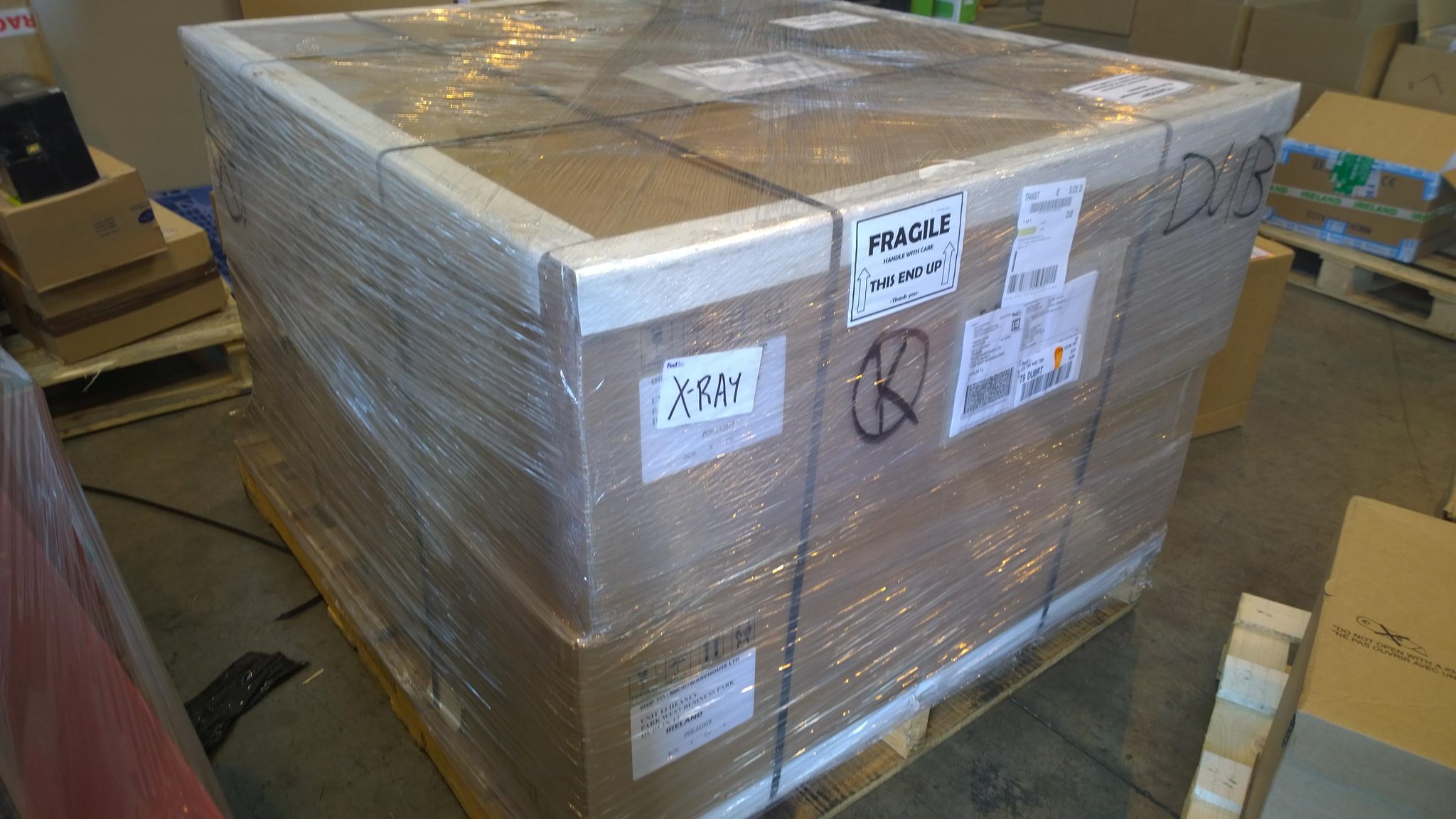
Yup, that’s potentially over 1 PB of raw storage in 16U of rack space sitting on one shipping pallet. The new owner of that equipment is building a SAS solution that will run on Hyper-V and use SMB 3.0 storage. They’ll scale out bigger and cheaper than they would have done with their incumbent legacy storage vendor – and that’s why they’re planning on buying much more of this kind of storage.

The Pressure Builds On End Of Support For W2003/R2

The end of support for Windows Server 2003 (W2003) and Windows Server 2003 R2 (W2003 R2) is July 14, 2015. This includes Small Business Server (SBS) 2003 R2. That gives you one year to get off of these server operating systems before all security updates stop. This date will NOT be extended.

image

Why won’t it be extended? Microsoft wants you to do one of three things:

  • Upgrade to Windows Server 2012 R2
  • Upgrade via deploying Hyper-V
  • Upgrade/migrate to Microsoft Azure

And to be honest, you’re using a server operating system that is currently 11 years old. The features you’ve been asking for are probably in newer versions of Windows Server.

Upgrading will not be easy. You have AD’s to upgrade, LOB applications that are dependent on server resources. And most W2003 installs were 32-bit, there are no more 32-bit server operating systems, and you cannot upgrade x86 to x64. You will have to perform migrations.

So NOW is the time to start planning.

For Microsoft partners that are service providers:

  • We estimate that over 50% of servers in Ireland are of the W2003/R2 generation
  • 92% of Irish business are SME’s and a large percentage of those were SBS customers. Consider deploying Office 365 to replace SBS, and maybe put in Server Essentials if they still require a local server for bulk data/printer sharing.
  • Microsoft (WPC 2014) said that there are 22,000,000 W2003/R2 servers worldwide. That equates to an estimated $6,000,000,000 of business.

Start having the conversations now. Start planning now. Waiting until 2015 will be a fools errand. BTW, there are no stupid questions, only stupid people.

TechCamp 2014 Presentation – Windows Server 2012 R2 Software-Defined Storage

This is my presentation from TechCamp 2014 where I showed attendees how to build the Hyper-V on SMB 3.0 storage known as a Scale-Out File Server (SOFS) based on JBODs/Storage Spaces, Windows Server 2012 R2 (WS2012 R2) Failover Clustering, and SMB 3.0 networking.

Storage Spaces Drives Do Not Show Physical Location

I was doing some work with some SSDs yesterday that had previously had some firmware issues. I wanted to verify that everything was OK, so I popped the disks into the DataOn 1640 JBOD that is in the lab at work. The firmware was upgraded, and the disks were eligible to join a storage pool, but they were not reporting a physical location.

A Storage Spaces certified JBOD (there is a special HCL category) must be able to report disk locations using SCSI Enclosure Services (SES). You can see my problem below; 4 SSDs are not reporting their enclosure or slot locations, but the other disks in the JBOD are just fine.

image

I contacted the folks in DataOn and had a near instant response. Run the following cmdlet twice:

Update-StorageProviderCache -DiscoveryLevel Full

I did that, refreshed Server Manager and … no change.

Ah … but this isn’t a simple Storage Spaces build. This is a clustered Storage Spaces installation. I jumped over to the other node in my SOFS, the “read-write server”, and ran the cmdlets there. One refresh later and everything was as it should be.

image

Now all of the disks are reporting both their enclosure and their slots.

Thanks to Rocky in DataOn for his help!