Windows Server 2012 Hyper-V Lab On A “Budget”

If you’ve read more than a few posts from here over the last few months then you know I have a pretty nice lab at work.  In fact it’s so nice, that Microsoft Ireland has asked us to start a training program for MSFT partners.  So most of the next month will have me prepping crash courses on System Center 2012 and WS2012 Hyper-V.  Then I’ll be delivering training for quite some time.  And that means the lab will be tied up.

Problem: I’m starting on a new project where I need a lab.  I’ve configured the lab at work to flip around in a decent amount of time but it’s painful having to do that … I can get quite a bit of work done during lunch and I don’t want to lose 20 minutes of that while 2 servers POST at the start and the end of the hour.

Circumstances have forced me into buying a small lab for home.  I’ve talked about this for years, and I kept avoiding it … rather successfully Smile  But the time has come, and luckily some recent work will cover the costs, and I work for a distributor so I got parts at trade price.

Here’s the pieces I’ve bought:

  • 2 * HP Elite 8200 tower PCs: i5 Processors and take a max of 16 GB RAM.  I don’t need much VM capacity.
  • 2 * 4 port GB NIC cards: can’t remember the manufacturer.  With the on-board NIC I have 5 NICs to play with.
  • 8 * 4 GB Kingston RAM: Cheaper than HP and I’ll max out the PCs.
  • Netgear 24 port switch

I have a very old home build PC that will get some extra networking to become my SAN.  It might also double as a host for a few other things.  And it will double as a domain controller and RDS Gateway (my ISP won’t allow VPN traffic but inbound HTTPS is OK).

I’ve also added some recycled Netgear wifi NICs into the two HP PCs.

Like in the lab at work, I plan to make the hosts very flexible:

  • Windows 7 Ultimate/Enterprise will go onto the machines.  This will allow me to power them up for normal day-day stuff.
  • They will boot from VHD as well.
  • This will allow me to slip in VHDs for Windows Server 2012 to (a) get very quick clean OS deployments and (b) multipurpose the hardware with multiple builds that I can swap in/out.

HP ProLiant Gen8 Servers Launched

HP has launched their Gen8 (not G8) line of ProLiant servers.  The machine I was most interested in was the DL380p Gen8 because that’s the model I’d most encounter in virtualisation.  Some highlights:

  • 2 CPU sockets handling up to 8 cores each
  • 24 DIMM slots (requires HP SmartMemory for warrantee and performance) with a maximum of 768 GB (!!!) RAM using 32 GB RDIMM.
  • Choice between 4 * 1 GbE or 2 * 10 GbE NICs on board.
  • iLO 4

On board management has taken a bit of a leap forward:

  • HP iLO: The HP iLO management processor is the core foundation for HP iLO Management Engine. HP iLO for HP ProLiant servers simplify server setup, engage health monitoring, power and thermal control, and promote remote administration for HP ProLiant ML, DL, BL and SL servers. Furthermore with the new HP iLO is the ability to access, deploy, and manage your server anytime from anywhere with your Smartphone device.
  • HP Agentless Management: With HP iLO Management Engine in every HP ProLiant Gen8 server, the base hardware monitoring and alerting capability is built into the system (running on the HP iLO chipset) and starts working the moment that a power cord and an Ethernet cable is connected to the server.
  • HP Active Health System: HP Active Health System is an essential component of the HP iLO Management Engine. It provides: Diagnostics tools/scanners wrapped into one; Always on, continuous monitoring for increased stability and shorter downtimes; Rich configuration history; Health and service alerts; Easy export and upload to Service and Support.
  • HP Intelligent Provisioning (previously known as SmartStart): HP Intelligent Provisioning offers the ability for out-of-the box single-server deployment and configuration without the need for media”.

On the blade front, there is a new BL460c Gen8:

  • 2 CPU sockets handling up to 8 cores each
  • 16 DIMM slots (requires HP SmartMemory for warrantee and performance) with a maximum of 512 GB RAM using 32 GB RDIMM.
  • One (1) HP FlexFabric 10Gb 2-port 554FLB FlexibleLOM
  • iLO 4

There’s crazy big scalability in each host if you can justify it.  To counter that you have the “too many eggs in one basket” argument.  I wonder how much a 32 GB SmartMemory DIMM costs Smile  To reach the densities that this hardware can offer, you will absolutely need to install the very best of networking such as 10 GbE.  I’d even start wondering about InfiniBand!

Rebuilt the UX31E Ultrabook

I rebuilt my Asus ultra-slim laptop over the weekend.  I’ve never been the biggest fan of OEM builds because of the 3rd party stuff that gets included.  On went Windows 7 Ultimate with the intention of migrating from my Latitude which will probably be rebuilt with some Hyper-V version (it has more RAM and eSATA).

After dealing with the drivers (conveniently placed on the hard disk by Asus) and putting on the usuals (thanks to ninite) I installed a few bits of the Asus software, including power stuff and a boot accelerator.

Some info:

  • The power stuff customises the power options.  The battery saving one boosts Windows 7 battery life to around 7 hours.
  • The machine starts in around 2 seconds from cold, then hits the boot loader.
  • A cold boot & logon takes 24 seconds, with things like Office 2010 installed.
  • Wake from sleep (open the lid) is less than 1 second.  The hardest bit here is finding the gap between the lid and the keyboard because the machine is so thin.

All this will only get better with Windows 8.  I already see that on my old netbook and the DevPrev release from last September.

Glad I didn’t toss the Asus packaging yet – I found two dongles:

  • A USB one for adding a NIC
  • A micro VGA converter for connecting a VGA lead. 

Some manufacturers have native VGA and NIC ports in the chassis but have to sacrifice thickness to fit them in.

Technorati Tags: ,

The Ultrabook – A Windows Laptop To Match The MacBook Air

Let’s face it, the MacBook Air is a sexy wee thing compared to the usual Windows laptop.  It’s slim, it’s light, it’s got long battery life, and it’s airline carry on baggage friendly.  Yes you can run Windows 7 on one of those, but it’s a pricey way to go, and I guess there would be complexity issuesif you needed a h/w repair (I really don’t know).

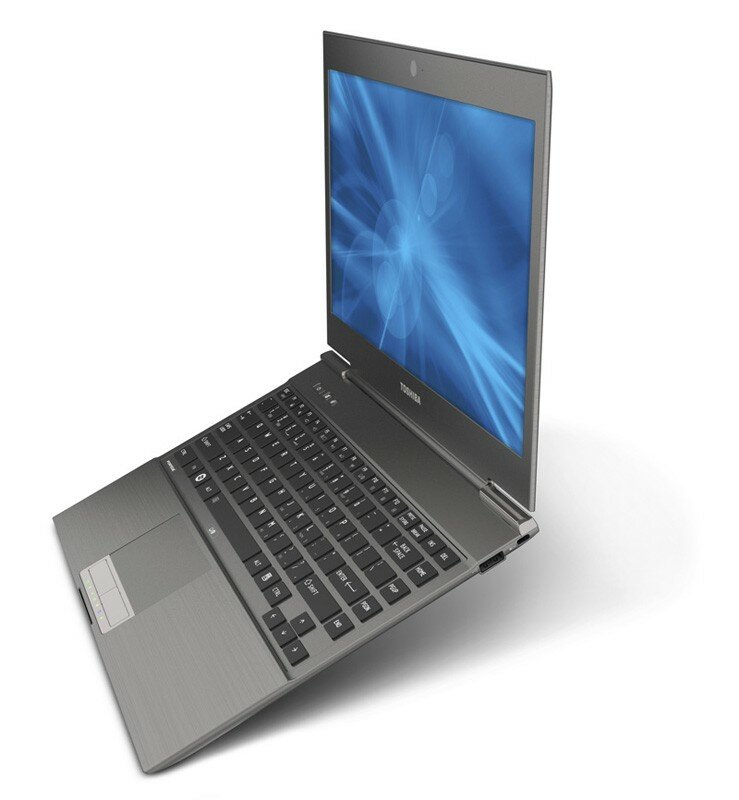
Until recently we haven’t had a true Windows laptop alternative to compete with the MacBook Air.  That changed this year with Intel’s Ultrabook standard.  The one I’ve gotten to see is the Toshiba Z83X (disclaimer: at work we distribute Toshiba and Sony mobile devices).  This 13.3” machine comes with i3, i5 or i& CPUs, 128 GB SSD, USB 2.0 and USB 3.0 ports and HDMI video output.  And, it is as thin and light as a MacBook Air.  It’s a native Windows machine, and it’s cheaper than a MacBook Air. 

Toshiba Z83X

Reviews have been good on that machine, giving a balance between power (claimed up to 7 hours), battery life, and price.

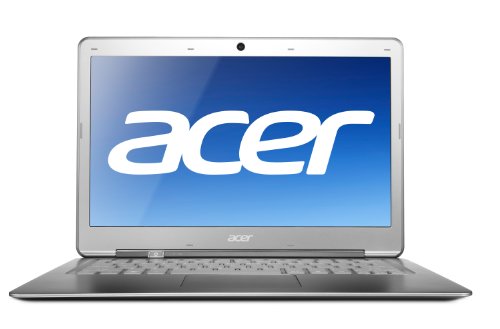
I like the look of the Acer Aspire S3 Ultrabook too.  The S3-951-6828 has an i5 CPU, 4 GB RAM, and a 240 GB SSD.  There is also a claim of up to 7 hours battery life, possibly enough to do a transatlantic hop without charging.

Reviews have been mixed on the S3, but it comes with a nice spec at a competitive price.

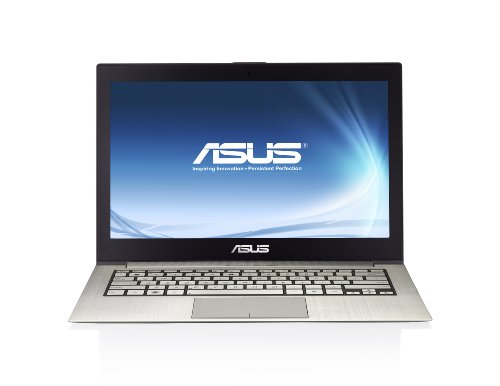
If you want to go nuts then have a look at the ASUS UX31 Zenbook.  This has an i7 CPU, 4 GB RAM, and a 256 GB SSD, but all this comes at a higher price.

The reviews has been flattering for this machine, but it is more expensive than the previous machines.

Most people have not heard of Ultrabooks yet.  And they haven’t sold all that well either.  Why?  Well, in Ireland, they are typically starting at around €1200 for an i5 machine with a 128 GB SSD.  Without any scientific searching, I can get a normal i5 laptop with a 500 GB traditional drive for under €600.  So the Ultrabook loses on price.

And when a person is paying €1200 or more for a laptop, then they’re probably looking at a MaxBook Air.  Apple products have a certain prestige that Windows machines do not.  It’s more of a fashion statement than anything else.  The person with more disposable cash wants the trendy item, and they see a Windows Ultrabook as being an overpriced laptop, even if the Ultrabook is the same, if not more, is more manageable in the business, and has more/cheaper software available for it.

I think the future for the Ultrabook is not good if the prices don’t come down.  That might happen after the new year (2012) when they are no longer as new as they once were.  I certainly would stump up the cash for one if the price came down so I could tuck it into my carry on camera bag and not have to hide a traditional laptop in my check-in bag (my camera bag is rather large and full with camera gear).

EDIT:

One of the guys in work gave me a demo Sony Vaio VPCZ21M9E to play with for a little while.  Carbon fibre body, i5 CPU, 4 GB RAM (expandable at order time to 8 GB), 128 GB SSD, 1.2 KG weight, VGA and full HDMI video output, USB 2.0 and USB 3.0 ports.   It feels incredibly light.  Apparently it is 17 mm at the thickest point.  Looking at it, I think they are including the rubber feet.  This thing is so thin you could shave with it.  However, it appears to be twice the price of the competition.  But is a very nice piece of kit and it hurt to give it back.

Technorati Tags: ,


Windows 8 Slate PC, HDMI, Samsung 40” LED TV, and NFL Gamepass

If you follow me on Twitter then you know that I’m a fan of American Football and the San Francisco 49ers.  Outside of the USA, NFL is a minority sport, and if it is shown, only 1-2 games are shown by the broadcaster.  I really wanted to watch as many 49ers games as possible, and the best solution for that was to subscribe to NFL Gamepass – basically an online subscription to all NFL games and the NFL network that is only available outside of the USA.  It’s great because if I am travelling I can watch games live or recorded (latter without adverts) on a PC, laptop, iPhone or iPad.

Watching it on the laptop from the couch grew tiresome.  That small screen is just too small.  I bought my TV in 2005 and it’s a 32” CRT.  It works fine but there was not way to connect a PC to it.  I needed a change.

I did a bit of research and decided upon the Samsung UE40D5000 40" Full HD (1080p) LED TV.  It has 4 * HDMI, 1 VGA, composite, and 1 * SCART sockets (and some others).  The reviews were good; reasonably priced and the blacks are really black (great contrast).  I picked one up today at lunch.  And when I say “pick” I mean it … damn these are so light compared to my CRT TV.  Next I picked up a HDMI lead.

I got the TV home and set it up.  Then I propped up the Build Windows slate PC that is running the Windows 8 developer preview build.  The base (docking station) has a full sized HDMI socket.  I ran a lead between the base and the TV.  Then I did the Windows + P trick to tell the slate to extend the display to a projector.  IE was fired up (on the desktop for Flash), I logged into NFL Gamepass, and then I expanded the stream to fill the TV.

Oh .. baby yeah!  It isn’t as good as native 1080p, but it isn’t far off, to be honest.  Next up, streaming media from my Windows Home Server 2011 machine via the Xbox 360.

EDIT #1:

I swapped out my Xbox 360 lead for the MSFT supplied HDMI lead and have media streaming from the WHS.  Nice!

What Hardware Would I Buy in 2011/2012?

In the past I’ve always said that I pick manufacturers based on:

  1. Support for System Center (Operations Manager management packs, Configuration Manager/SCE plug-ins, PRO management packs, etc)
  2. Price/quality/met requirements/etc

HP and Dell always top the chart there, and I’ve tended to prefer HP because:

  1. I know their stuff
  2. The build quality and SupportPack support are excellent

IBM is always bottom of my hardware charts Smile

Ask me last week what servers and storage I’d recommend and I’d have said HP ProLiant rack/blade servers and either P4000 or EVA storage.  Now that has changed.

The announcements of last week leave me thinking that HP is a headless chicken.  They are the number 1 PC maker and they’re getting out of the market.  The morons on the board spent over $1 billion on Palm so they could spend billions more on a tablet that they pulled after 1.5 months of sales, and a phone that was “on sale” (or in warehouses) in Europe for less than a week.  I’d hate to invest in server and/or storage system from HP to find that suddenly they decided to focus on the manufacturing on ice cream – I wouldn’t put it past the former CEO of SAP to do this:

  • SAP effectively fired him by not renewing his contract according to the BBC
  • When you say SAP to me I think of over priced, overrun, and failed projects – funnily enough, HP went through this in 2003 when it was taking up to 6 months just to get a monitor from them, allegedly thanks to a new SAP installation

So now I look to Dell.  I’m not a fan of their build quality compared to HP desktops/laptops.  Storage-wise, the Compellent has been getting great reviews.  The R-series servers are mature – and in the end they use the same NICs, CPUs, and memory as everyone else.  And Dell are “all in” on System Center.

Technorati Tags:

HP WebOS Going Away (Already) and Trying to Sell PC Biz

HP have decided that Google have had too much news headlines this week.

WebOS

Fresh on the awful news of sales for their WebOS (Palm) TouchPad tablets, it’s just been announced by HP that they are ending operations of WebOS.  And that’s a day or two after they started selling their Pre3 WebOS powered phone in Europe! 

The news of tablet sales were awful.  It didn’t have a chance.  Apple dominates.  Business is waiting for Windows 8.  Android tablets (an open OS) aren’t selling that well.  RIM proved that a new closed device with no app environment would have the lifespan of a fat Turkey in December.  And HP fattened up and walked straight into the butcher shop.

Bye bye HP WebOS!

PC/Consumber Division

HP has announced that they are looking to “spin off” the PC business.  That’s business and consumer stuff on the desk.  Personally speaking, I prefer HP desktops/laptops because of their build quality and ease of management in relation to software and drivers in the business.  I hate Lenovo (quite poor here compared to what I hear from American friends), and although Dell has a good business, I think the build quality of PC’s’/laptops isn’t as good – which is important for devices that users are bashing about. 

On TWiT Windows Weekly, Mary-Jo Foley suggested that maybe Samsung would buy the division.  Maybe.  And maybe it’ll be spun off/IPO’d as a new Compaq.

Oh – HP are also buying some UK software company called Autonomy.  I guess they want to be the next IBM.  Eeek!

EDIT:

Last year there were rumours about HP’s tablet plans.  Originally, the tablet was to run Windows.  Then HP “knew better” and went exclusively with WebOS.  Well, Windows 7 tablets … you know my opinion on that – wait for 8.  But investion millions/billions of dollars on WebOS, a no app OS, I think everyone knew that had no future.  Shareholders should be furious.

And as for HP in the phone market … oh come on!  I evaluated one of those back around 2004.  We had to clip a keyboard onto the bottom of it to use a “keyboard” Smile  We ended up buying XDA (remember them?) III’s instead.

Kensington Bluetooth Keyboard for iPad or iPad 2

I’ve blogged before how much I love my iPad.  I read from it (Kindle for ebooks and Zinio for emagazines), I watch TV and movies on it, and it’s a handy lightweight browser when just lounging in the house.  But despite all that, the real reason I bought it was so I could take notes (Evernote) at conferences.  The battery life is simply amazing.  Unlike with a netbook or laptop, I can last all day long without searching for that lost city of gold AKA a free power socket at an IT conference.

But the sucky thing about note taking with the iPad is the keyboard.  I got used to typing on the screen, but I just cannot get used to the constant need to frequently shift through lower case letters, upper case letters, character set 1, and character set 2.  I mentioned to one of my colleagues that I’d be going to the Build conference and that I’d want to take lots of notes on my iPad.  And that’s when he introdoced me to the Kensington Bluetooth Keyboard for iPad (1).  We (work) happen to distribute these in Ireland so that made it easy for me; I swapped it out for my usual cover and gave it a go.

Yes, it adds weight and thickness to the iPad.  Not a big deal.  It gives me a functional QWERTY keyboard.  That is a big plus.  I can type away with no issue.  I was told that the keyboard would be a little spongy.  It’s like that to protect the screen when folded up.  It’s a little weird at first but doesn’t slow me down.  It does require charging via a USB lead so that must be remembered.

Note that there is different model of keyboard for the iPad 2.

My personal review: well worth the money if you want to take lots of notes or write a lot on the iPad.

Hooked on iPhonics

It’s been a few months since I bought an iPhone 4.  I’ve been using it more than any phone I’ve ever used before, not as a phone but as a smartphone.

The feature I’m using the most is that of media playback.  Through iTunes, I’m downloading subscriptions to podcasts.  I’ve got 3 subscriptions at the moment.  Two of them are photography podcasts and the third is the BBC Wildlife monthly recording.  They come in handy when I’m sitting on the train, lying in bed, etc.  I’m even listening to them in the car thanks to a FM transmitter dongle which transmits the iPod player to the FM radio in my car.  That beats listening to the endless moaning or Cowell-music on the radio.  There is a huge and ever growing library of podcasts and they’ll keep me entertained and educated for a very long time.

Games have been entertaining too.  Angry Birds is a must have for any iDevice owner.  It’s a simple game, and it’s addictive.  I’ve tried a free sniper game where you move the rifle by moving the phone.  That’s pretty cool.  And I’ve downloaded a trial for a Star Wars first-person-shooter.  The controls for it are very fiddly but the graphics are impressive.  I never would have thought that a phone could provide better game graphics than PCs of 15 years ago.

I’ve found the map feature to be pretty handy.  In the car, I stick to my Garmin GPS.  But if I’m walking to somewhere that I don’t know, the Google map (once I allow for the usual Google map mistakes) gets me to where I need to go while tracking my position.  I’ve even used the “locate me” feature while on the train to map a location that I want to walk to as a prospect for wildlife photography.

Speaking of which, regulars will know I am into photography, in particular, wildlife photography.  That requires endless hours of waiting around for a few seconds of an animal or bird sighting when you try to capture a good photo.  That waiting can be difficult.  I turned to the iPhone recently while out in the snow waiting for a Fox to cross my lens.  The Twitter, Facebook, and Flickr apps kept me entertained, and I did some surfing on the excellent Safari browser … it does suck that Flash isn’t approved of by Apple.

And that brings me to the camera.  I own one DLSR.  When I’m out doing wildlife, it’s paired up with a big lens which isn’t suitable for landscapes.  During last week’s snow, I used the camera to take a few landscapes.  It’s got a tiny sensor which means that it is susceptible to digital noise (detail and colour grain) even at very low ISO (quality control for shutter speed).  That won’t matter to most people but it will do serious shooters.  I’ve taken images into Photoshop and cleaned then up (using the Imagenomic plugin).

IMG_0125

It won’t match a DSLR or even an advanced compact camera but the iPhone will happily replace a basic compact camera for most people.  5MP is more than enough for most people – the “megapixie” chase that most people get trapped in is irrelevant these days.  Megapixies don’t define quality, they define maximum print size.  2MP is enough for your typical 6*4 prints.  5MP that’s in your Windows Phone 7 or iPhone is enough for A4 prints.

It’s not a bad device for showing people photos.  I keep a folder of my favourite images on my laptop and I sync that to the phone using iTunes.  Now when I’m chatting with someone (usually in the nature or photography world) I can quickly show them an image that I’ve taken.

Combined with the free Flickr or Facebook apps, I can easily take an image I’ve taken (still in the camera roll) and upload it to the net.  I rarely do that seeing as I like to post-process in Photoshop (all digital photography requires digital processing, just like all film photography requires lab processing) but I can if I want.

Thanks to the VLC app, I’ve even been watching movies on my phone.  I know – it’s a tiny screen.  But I’d rather carry a phone in my pocket while commuting on the train than a laptop bag over my shoulder.

Other utility apps prove useful.  One of the things I’ve found annoying while travelling was getting an idea of what something was going to really cost me after the exchange rate conversion.  I’ve no got an app from xe.com to tell me just that.  Now when I’m standing in a store in the USA or Norway, I can quickly convert and decide if I should buy or not.

I started wondering about where phones can go in the future.  The big leap we’ve seen was the OS becoming more interactive and the content going from stale (see Symbian) to rich (see Android and iPhone, not sure about WP7 yet).  I wonder if the next big challenge is integration into the other devices in our lives.  We’ve started using smartphones more for email, web browsing, consuming content, and using apps.  You might argue that we use them as much, if not more, than our PCs; we just use them differently.  Apple has made the first attempt with integration into some type of Apple TV.  I think the latest iOS update gave us wifi printing.  That’s a start but I want more.  I do the odd presentation here and there.  I’d love to integrate my phone with a projector.  Given some time, I think there’s loads of things we could think up.

I watched a BBC News show back in the Summer that talked about the “undiscovered country” when it comes to smartphones.  Smartphones are not suitable for older people at the moment.  Whether it is small graphics (short sight) or tiny “buttons” (arthritic hands), the show reported that older people were sticking to the older mobile phones because they were easier to use.  Maybe the 7 inch tablet will give the older generation something that they can use … but the OS will need to be lower resolution than for younger people so that the controls are larger.

Anyway, I’m hooked on iPhonics at the moment.  I could be sitting at home, watching a TV show on my laptop and I reach to my phone to check up on Facebook or Twitter.  I might use Safari to refresh the news sites to see what’s happening in the world.  My content consumption has definitely changed.

Microsoft Launches Windows Phone 7 – And I Buy An iPhone

Windows Phone 7 handsets have been available here for a couple of weeks now.  They look good and interesting.  I would have bought one too … but my operator hasn’t launched them.  The other operators went live on MS’s launch day, btw.

I’ve had an LG Windows Mobile 6.5 handset for nearly a year.  At first it was good.  But then all the little things started to get to me.  The LG shell was awful.  Alarms?  Forget about setting them.  The GUI would jump-scroll when I clicked on something so I couldn’t enable or set an alarm.  As for clicking, it needed a stylus which hung from the phone by a string – that looks really cool, kids.  The screen just couldn’t handle and adult finger.  My car has built-in bluetooth for hands free calling.  When the screen is locked on a Windows Mobile 6.5 phone then it will not accept an incoming call.  Rubbish! 

Moving on with the basics of a phone … answering a phone call was a gamble.  It required sliding a control on the screen.  Most of the time, it would jump back and the call would continue ringing.  I wouldn’t dare press the green button because that would hang the call up.  And as for apps … what apps?  I’m convinced most of the problems were because of LG.  The handset itself had a bad screen and the LG shell/apps were awful.  I would love to have installed a pure/clean MS OS like I do with a PC.  OEM installs are the cause of most issues.

Anyway … I needed a phone.  I went into the shop with an open mind.  I knew I couldn’t get a Windows Phone 7 handset so I was considering Android or iPhone.  I’ve seen many people were happy with Samsung Galaxy phones with Android.  The girl in the shop was really helpful and spent a good bit of time with me, allowing the try the sets.  The Samsung screen was good and nice to use.  Android is very popular and a huge library of apps is building up.  But here’s the thing … the OEM’s are putting a shell on Android.  Would this put me in OEM build hell once again?  I was fearful that it would.

So I went with an iPhone 4 16GB.  I thought “I’ll never use 16GB”.  Hah!  But more on that later.  First impressions – this beats the hell out of my old LG phone.  It’s smooth, simple, intuitive, etc.  Second impression: Apple gives you zero documentation for setting up your phone.  I had to google to find out that I had to activate it using iTunes.  Luckily a mate who is an Apple nut walked me through things.  And iTunes is not intuitive at all.  It took an evening to get myself set up with copying movies and photos onto the phone.  I’m not impressed with how that works.

On to the apps.  That’s the magic of iPhone.  Obviously the library is massive.  Things like Tweetie, Facebook and VLC went on there straight away.  VLC is great because I can watch AVI movies on the train while commuting to work.  Tweetie is a tidy Twitter app client.  Angry Birds is a seriously addictive game.  I also got some sniper game with impressive graphics, moving the handset to aim the rifle!  I was in London last weekend and the app library was extremely useful.   I loaded the Underground map which was a lifesaver because most of the city routes were closed and the system was in chaos on Saturday night.  A cheap street map made it easy to find underground stations and places I wanted to visit, without having to enable data for the built-in maps service.

One of the nice features is the mute button.  I often find myself in meetings where I need to mute my phone.  This can be done with a few clicks on my work Blackberry.  It could be done with a LOT of clicks (some successful and some not so) on my old LG.  There is a dedicated button on the side of the iPhone 4 to mute my phone.  I can slide that, and bang, the phone is muted or un-muted.  This was clearly designed for professionals.  It’s also handy when I’m playing Angry Birds on the tram in the city 🙂

Finally, the camera.  I’m a serious enthusiast photographer.  I have some big kit but there’s times when a pocket camera is desirable.  The camera in the iPhone is pretty damned good.  I was amazed to find a HDR mode.  HDR is when you merge multiple exposures of a single scene to capture dark and bright parts and to recreate what the brain interprets as the eye moves around and compensates.  I took some shots in the foyer of the Natural History Museum and the hall of the British Museum and was very impressed.  With a DSLR I would have to set up a tripod to do the same and that’s a no-no in those places – as security informed me :-)  The video mode is pretty good too.  I recorded the kickoff of the Broncos/49ers game (go Niners!) at Wembley and the picture and sound are pretty good.  I would have loved a zoom feature but what can you expect from a phone!

BTW – I wasn’t affected by the DST alarms bug.  I’m lucky that I chose to sleep in on Sunday morning instead of setting an alarm to go out early with the camera bag.