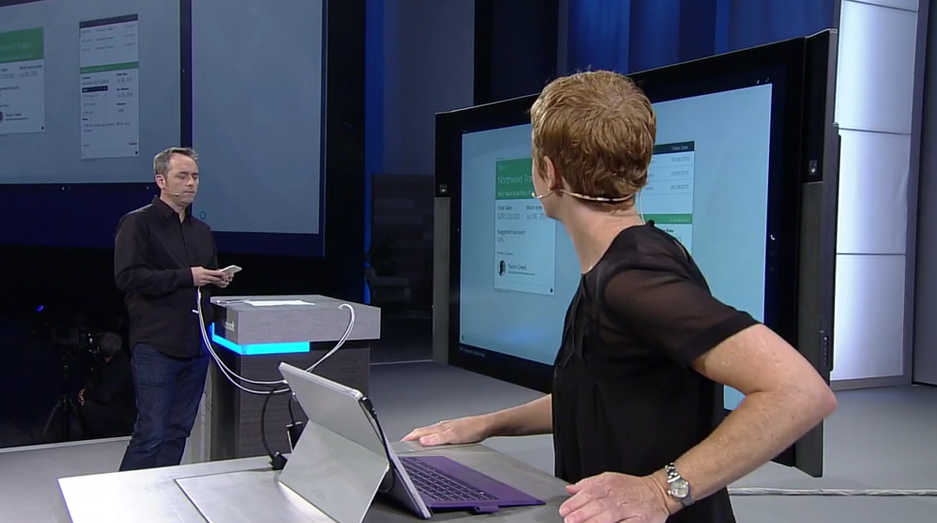
WPC 2016 Day 3 Keynote

Welcome to the Wednesday keynote at WPC, the Microsoft partner conference. This keynote is usually very business, strategy and competition based. It was usually the stage for COO (and head of sales) Kevin Turner, who recently left Microsoft to become the CEO of a finance company. We’ll see how his replacements handle this presentation in the fuzzier warmer world of the new Satya Nadella Microsoft.

image

Gavriella Schuster

The corporate vice president worldwide partner group kicks things off by thanking repeat attendees and welcomes first-timers too.

image

Washington DC will be the venue in 2017. There’s a bunch of speakers today at the keynote. Gavriella hands over and will return later.

Brad Smith

The chief lawyer comes on stage.

image

I like him as a a blogger/speaker … very plain spoken which is unusual for a legal person, especially for someone of his rank, and strikes me as being honestly passionate.

He starts to talk about the first industrial revolution which was driven by steam power. We had mass manufacturing and transport that could start to replace the horse. In the late 1800s we had the second revolution. He shows a photo of Broadway, NY. That time, 25% of all agriculture was taken to feed horses … lots of horse drawn transport. 25 years later, Broadway is filled with trams and cars and no horses. And then we had the PC – the 3rd revolution. We are now at the start of the 4th:

  • Advances in physical computing: machines, 3D printing, etc.
  • Biology: Genomes, treatment, engineering.
  • Digital: IoT, Blockchain, disruptive business models.

Each revolution was driven by 1 or 2 techs. The 4th revolution has one connection between everything: The Cloud, which explains MIcrosoft’s investments in the last decade: over 100 data centres in 40 countries, opening the world to new possibilities.

Toni Townes-Whitley

image

While there’s economic opportunity, we also need to address societal impact. Growth of business doesn’t need to be irresponsible. 7.4 billion people can be positively impacted by digital transformation – just not by Cortana at the moment. There’s a video on how Azure data analytics is used by a school district to council kids.

Back to Smith.

What do we need to do?

  1. Build a cloud that people can trust. People need confidence that rights and protections that they’ve enjoyed will persist. Microsoft will engineer to protect customers from governments, but Microsoft will assist governments with legal searches, e.g. taking 30 minutes to do searches after the Paris attacks. More transparency. Microsoft is suing the US government to allow customers to know that their data is being seized. Protect people globally. The US believes that US law applies everywhere else. They play a video of a testimony where a questioner rips apart a government witness about the FBI/Microsoft/Ireland mailbox case.We need an Internet that is governed by good law. We need to practice what we preach. Cloud vendors need to respect people’s privacy.
  2. A responsible cloud. The environment – Azure consumes more electricity than the state of Vermont. Soon it could be the size of a mid-size European country. This is why Microsoft is going to be transparent about consumption and plans. R&D will be focused on consuming less electricity. They are going to use renewable electricity more – I think that’s where Europe North is sourced (wind).
  3. An inclusive cloud. It’s one of the defining issues of our time. Humans have been displaced from so many jobs of 100 years ago. What jobs will disappear in the next 10, 20, 50 years? Where will the new jobs come from and where will those people come from? Business needs to lead – and remember that the western population is getting older! Coding and computer science needs to start earlier in school. Broader bridges are better than higher walls – diversity is better for everyone. We need to reach every country with public cloud.

Cool videos up. One about a village in rural Kenya that gets affordable high-speed Internet via UHF whitespace. A young man there works tech support for a US start up. Next is a school where OneNote is being used for special needs teaching. A kid with dyslexia and dysgraphia goes from reading 4 words per minute and called himself stupid – one year later he reads way better and knows he’s not stupid, he just needed the right help.

Gavriella Schuster

Back to talk to us again. The only constant in life is change … welcome to IT 🙂 It is not only constant, but faster, and self-driven.

image

Cloud speeds drive the pace of change faster than ever before. Industries have changed faster than ever: Air BnB, Netflix and Uber. Customers change too. More than 1 cloud feature improvement per day last year in MSFT.

The greater cloud model will top $500B by 2020. Cloud is the new normal. IDC says that 80% of business buyers have deployed or fully embrace the cloud. You need to be quick to capture this opportunity: embrace, innovate and be agile … or be left behind.

Triple growth on Azure this year. 17,000 partners are transacting CSP. 3 million seats sold. In May alone, CSP sales exceed that of Open, Advisor, and syndication.

Microsoft asked their most profitable partners what it is that they do to be so profitable.

image

65% of buyers make their decision before talking to a sales person. I see that in the questions I get asked. Often the wrong question is being asked. Microsoft partners need to be where their customers are, and influence that decision/question earlier in the process.

In the next 2 years, customer cloud maturity will go from 10% to 50%. In the next 3 years, 60% of CIOs expect themselves to be the chief innovation (not just IT) officer. Now is the time to invest in new ways of doing business, not just “sell some cloud”.

Steve Guggenheimer

I guess he’s a fan of New Zealand’s All Blacks. I wonder if we’ll get a Microsoft Haka?

clip_image002

The chief dev evangelist and owner of the MVP program comes out. This will be dev-centric, I’m guessing, so I might tune out.

He announces Microsoft Professional Degree. Some sort of mixture of self- and class-based learning to become a data scientist (huge industry shortage).

There is an “intellectual property” 5 minute break here.

Judson Althoff

Freshly promoted to partly replace Kevin Turner as COO, now the Executive Vice President Worldwide Commercial Business.

image

He reaffirms the message that Microsoft will continue to be lead by partners. CSP is their preferred channel, and CSP is an exclusively partner-sold and -invoiced channel.

Very interesting video where MSFT partnered with a smart-glasses company to make a vision assistant for visually impaired people, that is paired with a phone, and driven by the cloud. For example, it guides him to take a photo of a menu, and then reads out the items. He can get descriptions of people around him, including facial expressions – “a 40 year old man with a surprised expression”.

6 priorities that MSFT sales force will work with partners on over the next year:

image

86% of CEOs think digital is their number 1 priority. You have to speak in the vernacular of business outcomes, not tech features.

I like a line from Judson in a video: We can’t do this stuff ourselves. This is a joint opportunity.

You have to rethink your own customer engagement, and not live on the old transactional engagement of the past. Embrace the cloud and move forward. Focus on customer lifetime value, not just a sale ( love this line, and it applies to a lot of partners who really mis-understand the capabilities of the cloud).

Now for the fun: competition 🙂 First, Azure.

image

The number 1 reason that customers are leaving AWS, not considering Google, and coming to Azure is the partner-ability with Microsoft.

Office 365:

image

True-cross platform capability. Office 2016 was out on the Apple platforms before Windows!

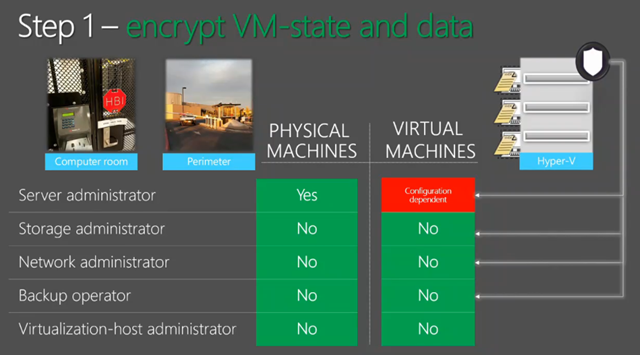
Microsoft is differentiating with security from the device/user to the data center (a unique selling point):

image

“Data is the new black”. Microsoft does everything from relational data on-prem to unstructured data in the cloud. Data is the ticket to the C-suite (the board).

And that’s all folks!
image

Technorati Tags: ,

Webinar Recording – An Introduction to Enterprise Mobility + Security (EMS)

I recently presented a webinar, hosted by my employer MicroWarehouse, on an introduction to Microsoft EMS. The timing worked out pretty sweetly – Microsoft had just announced:

  • The renaming of EMS from Enterprise Mobility Suite to Enterprise Mobility + Security, emphasising that security is most of what EMS does.
  • The new E5 EMS bundle that will be released in Q4 of 2016.

image

We have posted the recording of the session on learn.mwh.ie, along with the PowerPoint deck, and some follow up links for reading and learning. EMS is a great suite to learn about, and a great package to consider adopting for securing the endpoints (devices and users) against attack. And you’d be amazed how often the elements of EMS are the answers to security questions.

Speaking of security, our next webinar is coming on July 21st at 2PM UK/Irish time, 3PM CET or 9AM Eastern:

Technorati Tags: ,,,

WPC 2016 Day 2 Keynote

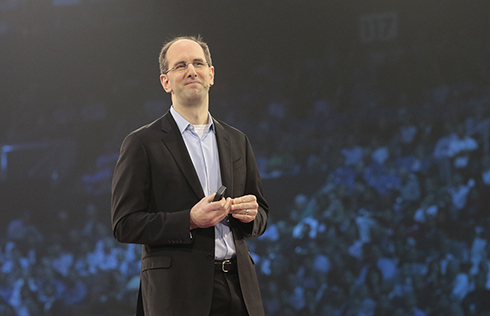
Scott Guthrie

I join this session late, and Guthrie is talking about the growth of Azure’s data platform before segwaying to EMS, renamed to Enterprise Mobility + Security.

Julia White

She is showing off features from the new E5 plan (Q4 2016).

Azure Information Protection adds classification to the protection of Azure RMS (being upgraded to AIP). Julia creates a document. AIP automatically classifies the document. She wants to reduce the classification and she’s prompted to justify this (audited). The document is secured for safe sharing, no matter who gets it or where it goes.

Cloud App Security is next. 512 cloud apps are discovered in a demo organization. Each app gets a score from 0-10, measuring the security profile of that SaaS application – 13,000 apps are profiled in CAP. She browses one and sees that files are shared publicly. She opens up policies and opens a PCI compliance one. It shows two hits in that app – and she can see where credit card info is being shared in a doc in OneDrive. She can secure it straight from the CAP portal by making the file private, without going into OneDrive.

Back to Scott Guthrie.

OMS

OMS is a server management solution, now available via the CSP program – it was restricted to EA customers only.

Kirk Koenigsbauer

Employees work on double the number of teams that they did 5 years ago. Working remotely has quadrupled. Millenials will make up 50% of all US workers – they’re biased to multi-tasking, working in teams, and working remotely .. and they work differently. 90% of the world’s data was generated in the last 2 years … making information overload worse. 87% of senior managers admit to uploading docs to personal file sharing/sync systems to get stuff done, shadow IT bypassing the restrictions of old IT.

image

The focus here is re-inventing productivity for the way we work – digital transformation. 4 pillars.

image

Office 365 is used by more than 70+ million work users, with growth being 57% year over year. The email workload has been a driver. Gartner says Microsoft has 80% share in enterprises for cloud email. With the E5 SKU, partners make 1.8x revenue … and a sustained managed service business that you’ll never get from stopping after email migration where most partners opt to stop.

Facebook uses Office 365. It makes sense, especially when you look at features like Yammer, Planner, Groups, Graph, Delve, which are all about collaborative flexi-teams, supported by information, self-service management with Azure AD Premium. “Move fast” is the most important factor in Facebook culture and Office 365 supports this.

Yusuf Mehdi

Now on to Windows and devices – the breakthrough to more personal computing. There’s a demo video of Microsoft devices in action.

image

We have challenges:

  • New security threats.
  • Pen and voice provide new user interfaces.
  • 2D screens are restrictive. Mixed reality (HoloLens) can break the barrier.

There are more than 350,000,000 monthly active Windows 10 devices. 96% of enterprises are testing Windows 10 and will need deployment skills in the next year.

Security threats are real. They take over 200 days to discover and 70 days the recover from. Hackers are targeting endpoints: weaknesses in IT processes and users. The FBI says there are two kinds of companies: those that have been hacked and those that don’t know it yet.

Windows 10 could have prevented the Home Depot, Target (both pass the hash attacks) and Sony attacks, apparently. Passwords are a problem. 1 in 9 have gone to a website and not used it because they cannot remember the password. In 2.5 weeks in the anniversary update, you will be able to log into websites and apps using Windows Hello (face or finger scan). Credential Guard protects against pass the hash attacks. We see demos of Windows 7 versus Windows 10 – Windows 7 is compromised but Windows 10 is safe. Device Guard hardens a system so that malware cannot run. In a demo, the firewall is up and Defender is running. He opens a “Contoso Expense app” and the security features are turned off, but on Windows 10, Device Guard blocks the malware from running. In the anniversary update, a new feature adds more security. Advanced Threat Protection dashboard can be used to monitor machines by security professionals. You can even go back in time to investigate penetrations.

Pen, Cortana, HoloLens, and Xbox gaming all get updates in the anniversary update. Out comes demo god, Bryan Roper, straight from the set of Dexter.

image

First, Windows Ink, a platform. Visual Studio demo – 4 lines of code to link enable an app. Now a BridgeStone demo, and he has a tyre, and drills a screw into it. Then he gets a hole in the side wall.

image

And then a larger hole.

image

He gets his surface and starts taking ink notes on the tyre inspection. He takes evidence by using the Surface camera, and starts highlighting things in the photo using the pen.

image

And he’s done. Back to Yusuf.

Windows 10 Enterprise E3 is coming to the cloud (starting in the fall). SMEs can get the latest Windows 10 security features for $7/month per user (not per device) via Cloud Service Provider (CSP) resellers.

Surface-as-a-Service will be sold by CSP Tier 2 distributors that are also authorized device distributors. This is a leasing service … so they can get cloud (Office 365, EMS, Azure, etc), Surface, Windows 10, all on a per-user per month basis.

On to HoloLens for mixed reality. The PGA is working with HoloLens. The following demo was created in 8 weeks by 3 developers using an universal app. There’s a huge hologram of a golf course that they browse around using voice and gestures. They put up a heat map of PGA player shots on a hole. They switch to showing the route to an eagle by a single player.

image

Back to Yusuf, who wraps up this keynote.

WPC 2016 Monday Keynote

Welcome to day 1 of the Microsoft WPC 2016, Microsoft’s sales motivation/education event for partners of Microsoft (ISVs, system integrators, OEMs, ODMs, hosting/cloud, distributors, resellers, etc), being held in Toronto, Canada. I’m in the office in Dublin, watching the stream – I don’t attend WPC because it is a sales event, but sometimes there can be relevant news for techies in the partner world.

Opening Presentation

A young woman from El Salvador talks about how she’s used Microsoft cloud technologies to work in a community torn by gang violence, doing more to empower people’s lives … something along the lines of Microsoft’s mission statement.

Then on to some “poet/performer” singing something cheesy. BTW, does Canada still have a rule to forces media to play a large percentage of Canadian artists? Singing children in colourful t-shirts. My teeth hurt.

Gavriella Schuster

image

Gavriella Schuster, Corporate Vice President forMicrosoft’s Worldwide Partner Group (WPG), sings the praises of the global partner of the year winners.

Today is all about “where we are going”. Satya Nadella will be on stage. Gavriella will be back with Judson Althoff, Executive Vice President for Worldwide Commercial Business, on Wednesday.

Satya Nadella

Satya opts again for the quiet entrance during a video (Cortana).

clip_image002

Microsoft will always be a partner-lead company, says Nadella, reaffirming that promise that is tangible with the push on cloud via the partner-lead CSP model.

Microsoft is the only ecosystem that cares about people and organizations, enabling systems to outlast them. Microsoft was the original democratizing force (in IT because of Windows and the PC). The last bit of the statement (below) is about customer results, which isn’t exclusive to MSFT tech – this includes partner and competitor tech.

clip_image004

What do CEOs mean by digital transformation? Lots of comments from different industries. More efficiencies via digital delivery, more opportunities with every customer contact, etc. Satya summarises it as changing business outcomes.

image

Where there is OPEX there are increased efforts on efficiencies, decision making and productivity. This, and the COGS expenses (Cost of goods sold – IoT, retail, etc), provide huge opportunities for partners.

I’m going to pause here.

Satya talks about conversation-based-computing being the next big platform. It must not be, if the platform (Cortana) only works in 10 countries. Moving on to Azure.

Satya puts the sales push on Azure. It’s in more places and has more security and trust than anything else – see China and Germany where the same platform runs on locally-owned infrastructure. And then it’s talk show time with GE. I’m pausing here again.

There’s some Cortana stuff which is irrelevant for all but 10 countries, On to Windows 10. No transformations will be complete without having the right devices at the edge. More personal computing are shaped by category creation moments. We are at one such moment with mixed reality – HoloLens, which MSFT is pushing as a work device long before (or ever) it’s a consumer device. Example, train aircraft engineers without purchasing a jet engine or taking a plane out of operation, and in complete safety. Here’s a demo by Japan Airline JAL.

image

And at full engine scale:

image

They hologram a throttle control from a cockpit to see how fuel flows through the engine and start it.

image

It is now available as a developer and an enterprise edition.

And to be honest, that was that.

WPC 2015–Day 1 Keynote

A video about YouthSpark. Way to talk to partners. promote YouthSpark where there’s free licensing and partners get zip. Then there’s a performance with people drumming on ladders.

Phil Sorgen

He comes out wearing a brand new partner scarf. Congrats go out to the partner of the year winners. Oooh it’s like the Olympics!!!!

IDC says that cloud business will be $200 Billion by 2018. There’s the agenda. Cloud. Get with it or get out. They’re sharing 20 scenarios with best practices for Azure/cloud deployment.

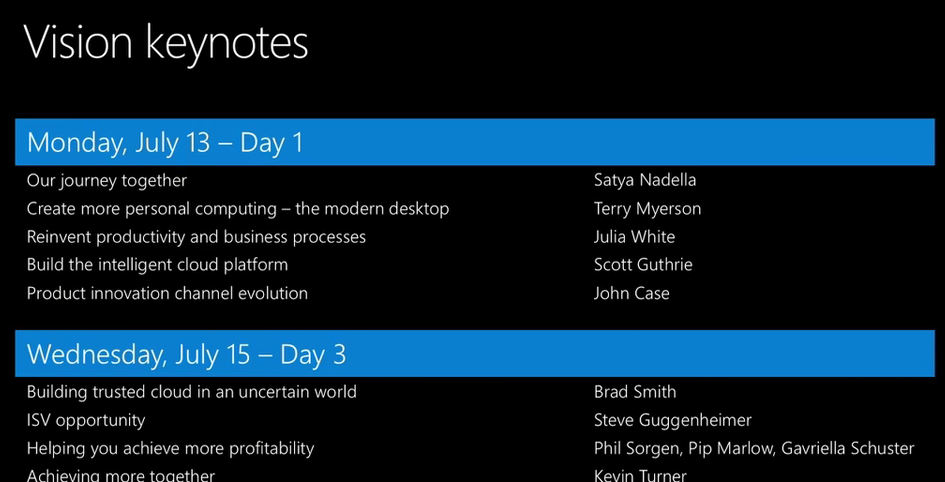
Here is the keynote agenda for this week:

image

User/cloudiness/mobility fluff. Then Windows 10. Then speed dating with Office 365. Red Shirts talking about Azure, and then something about productizing the cloud.

Now on to a Cortana video. Everyone outside the USA can sleep now. Zzzzzz ….

Bt seriously, they do stress the change in partnership and public opinion of Microsoft under Satya Nadella.

image


Satya Nadella

What makes Microsoft unique is the partner ecosystem.

image

Customer expectations and technologies have changed, but Microsoft uses WPC to reaffirm their commitment to partners. He wants to set out the mission and strategy with an anchoring ambition.

Mission: Empowering every person in every organisation to achieve more. They went back into their history to discover a sense of purpose (a PC on every desk in every home, etc). Now it’s … mobile first cloud first world. There is no other ecosystem that is solely built to enable customers to achieve greatness through digital technologies. They care about individuals and organisations, and they view the intersection of these as critical.

Some key attributes to mobile first, cloud first. We’ve heard this stuff before so I’ll get something to drink.

Ambition 1: Reinventing productivity and business process: bring together collaboration, communications, etc. This is O365, Dynamics, etc, an integrated set of extensible tools. Current solutions on-premises have created barriers to productivity. Microsoft wants you to use their tools in work and in life.

Julia White

Scenario: customer might be leaving. Julia needs to work with Steve. Julia opens Gigjam to an empty Canvas. Cortana integration for the USA. They query information on the customer. They pull in emails with the customer onto the canvas. She draws a circle around stuff on the canvas, and draws an X on stuff she doesn’t want to share. Julia can see her entire data, and Steve can only see the selected subset. They share stuff on Surface Hub and on iPhone.

image


Demo gods kick them a bit, and eventually they get stuff shared properly to the iPhone. Steve “loves his iPhone” – yes, a Microsoft person said that. Steve shares some of the product roadmap from another service with Julia. She is seeing information from an app she doesn’t have access to. On a Surface Hub, all their shred data is on screen so they can collaborate. Julia shares stuff with another guy, who is automatically called on Skype. He shares some info and gets out of the call/meeting. Julia delegated stuff to another person. That person generated information, Julia review it, and shares it.

This was something new. It wasn’t communications; it was work sharing. There was no screen sharing; it was data distributed by an app.

Satya Nadella

Ambition 2: Building an intelligent cloud.

image


Usual message here. There’s more Cortana shite for the 4% of the world that lives in the USA. There’s talk about “any organization on the planet” but Cortana works in 1-10 countries only.

Ambition 3: Personal computing. Windows 10 will usher in a new eara of more personal computing. Continuum will transform our usage of devices. I 100% agree. The phone is already the #1 personal device. Windows Mobile 10 can make that device your PC …. but will people end up using iOS or Android instead when similar features arrive there? Microsoft needs to put Windows Phone handsets into business users, IMO, and that means serious changes to their channel.

Lorraine Badeeen

Here’s a demo of how AutoDesk 3D modelling can work on HoloLens. To test a design they normally create a slow and expensive 3D print. Now they can use HoloLens with their same design workflow with the same tools. On goes a HoloLens. There’s a small motorbike on Dan’s desk. He can change the bike directly on the model using his mouse. He can make it small or big with the wheel. He moves the  bike around. They have a real bike on the stage. They overlay a new design onto that bike. They change the colour schemes.

image

Above is the overlaid bike. He adjusts the mirror sizes.  The image is incredible. A remote team leaves notes on the bike, requesting design changes.

Satya Nadella

Satya winds up his presentation. Some intellectual property is shown for a couple of minutes, and we are shown a video of Sea Otters. I am not kidding.

image

Terry Myerson

Myerson says that “this video” is why we are here today. Sea Otters! Winking smile

July 29 when Windows 10 becomes broadly available is just a few weeks away. On that day, around the world, people will not get to use Cortana. Oh, sorry, Microsoft will be asking the world “what will you upgrade” and by that, they mean community efforts. They want to celebrate the people who empower others.

Sea otters.

Lots of old stuff rehashed. Out comes Bryan Roper with a hat. I guess he’s Cajun or something. He’s very cheerful. Laissez les bon Windows rollez. Less than 6% of users use ALT + TAB. Who is this dude and where has Microsoft been hiding him? This is much better than the usual dull Windows 10 demo. Real time co-authoring in Word 2016. This will be even great for partners when writing a proposal with multiple authors. Oh it all goes wrong when he demos Cortana. I tune out.

Now there’s a live demo of Phone & Continuum. He’s editing an Excel spreadsheet on a monitor using keyboard and mouse, off Excel running on a phone. That’s made possible by the Universal Apps platform.

image

A familiar HoloLens holographic apartment appears. The demo is identical to what we’ve seen before.

On to security. Virtual Secure Mode (Enterprise edition) of Windows 10 secures secrets using silicon and Hyper-V. Modern hardware enables modern security features. Roanne Sones comes out to talk devices. She starts off on IoT. There’s a demo of DeviceGuard, preventing a USB drive being put into a POS system that policy only allows to use USB retail hand scanners. Another demo: a micro-kiosk – the things used in the USA for credit card signing. To “hack” it, you open it up and steal the system media card. She pops it into a PC card reader and the drive is encrypted using BitLocker – the software cannot be compromised via out-of-band. She’s created her own malicious card instead. She plugs it into the micro-kiosk, and the boot fails. Secure boot has locked down the boot process so only signed images that the business owns can boot up.

The Anomaly console in Azure shows that there were problems in the micro-kiosk. The IT pro can investigate the device.

image

Back to Terry. He starts talking about selective patching. A new solution is needed. Windows 10 has a “flexible” update model that works with all kinds of devices. Windows as a Service provides continuous security and feature updates. Users can opt into rings. Some want to be first, some want to be cautious. Those who go first will be the “testers”. Windows 10 Enterprise will have the “long term servicing branch” for things like industrial devices. Here you want just security fixes, and lock down features for stability. End user devices at work want the innovation they see at home and IT pros need control. Windows Update for Business will offer this balancing act… handling rings, blackout periods (for sensitive times) for free – feature and security updates.

That’s a wrap from him. Now a video about the word changing and innovation.

Julia White

I have not a hope of keeping up here.

There is an E5 plan of Office 365 coming, along with a cloud PBX. Bring-your-own key is coming to O365. SharePoint 2016 is code from the cloud, and is being designed for hybrid solutions. OneDrive for Business … lots of new stuff – I hope that includes the sync engine. Ah – there is apparently, along with auditing, reporting, and DLP. The OneDrive consumer experience is coming to it. All this in H2.

image


A demo of Delve, and content from external services like SalesForce is present there. Delve is based on Office Graph. Seems quite similar to what we saw at Ignite. New stuff coming in the next year:

image

Scott Guthrie

Here comes a barrage of new Azure features in a red shirt. He’s going to talk about Satya’s 2nd ambition to build an intelligent cloud platform.

image

Customers will look to SaaS for faster time to value. IaaS and PaaS will offer opportunities to re-engage with customers and improve business processes.

There will be 5 more Azure regions opening in the next few months. Over 3200 solutions in the Azure Marketplace.

image

Great numbers, but remember that adoption are not sales. Some partners are brought out to talk about the different kinds of solution they are deploying for customers in the Microsoft cloud: open source in the Azure Marketplace, PowerBI, and cloud reselling (Rackspace). I catch up on lost sleep. We’re over 3 hours now. The coffee just isn’t strong enough.

They’re pushing the CSP program, which isn’t a surprise.

We have just crossed the 3 hour mark. 1 more presentation left.

John Case, Corp VP Office Division

He has 4 major announcements in 10 minutes. I bet he goes over. It is 4:49pm right now.

Some stats on Office, CRM, and Azure:

image

Azure has 20x more customers in Open than AWS has in their similar program. Azure in Open launched August 1st of last year. The channel is in upheaval. The best partners in O365 are at 1.5x revenue over standard partners, and have higher margins, etc.

  • Announcement 1: CSP is expanding. It launched last year. It now includes O365 (as it did originally) and now includes Azure, EMS, and CRM Online. It’s going to 131 countries, and includes commerce APIs.
  • Announcement 2: New incentives to drive active usage. Cloud competencies are shifting to usage from sale – similar to what MSFT did internally with sales. Being involved with a sale is not good enough anymore – partners must deploy technology and drive usage. Customers will get dashboards for O365 and Azure to see per-workload usage of customers.
  • Announcement 3: A new hybrid cloud competency –  “Azure certified for hybrid solutions”.
  • Announcement 4: A new Office 365 E5 suite is coming in the next year. Cloud PBX, Skype PSTN, lockbox, etc are all coming in E5. E3 sales are a tiny percentage of O365 sales, so this should be interesting. E4 is pointless in most countries because of lack of telecoms support. So E5 … hmm … I think SKUs might get merged sometime down the road.

I guess lots of people left before now. He thanked people that stayed. And he wraps up at 5:02 PM, 13 minutes after he started, and 3 minutes over the promised 10 minutes.

John announces that WPC 2016 will be in Toronto. Lead balloon. No applause. Why? The reviews on the venue from the last time were terrible. The rooms at the venue were too small and feedback from people I know was that they wasted a week there because they got into so few sessions. I wonder if Microsoft can tear up that contract?

And that’s a wrap.

Ignite 2015 – Protecting Your VMware and Physical Servers by Using Microsoft Azure Site Recovery

These are my notes from the recording of this session by Gaurav Daga at Microsoft Ignite 2015. In case you don’t know, I’ve become of a fan of Azure Site Recovery (ASR) since it dropped SCVMM as a requirement for DR replication to the cloud. And soon it’s adding support for VMware and physical servers … that’s going to be a frakking huge market!

This technology currently is in limited preview (sign-up required). Changes will probably happen before GA.

Note: Replication of Hyper-V VMs is much simpler than all this. See my posts on Petri.com.

What is in Preview

Replication from the following to Azure:

  • vSphere with vCenter
  • ESXi
  • Physical servers

Features

  • Heterogeneous workload support (Windows and Linux)
  • Automated discovery of vSphere ESXi VMs, with or without vCenter
  • Manual discovery of physical machines (based on IP address)
  • Near zero RPOs with Continuous Data Protection (they’ll use whatever bandwidth is available)
  • Multi-VM consistency using Protection Groups. To have consistent failover of n-tier applications.

You get a cold standby site in Azure, consuming storage but not incurring charges for running VMs.

  • Connectivity over the Internet, site-site VPN or ExpressRoute
  • Secure data transfer – no need for inbound ports on the primary site
  • Recovery Plans for single-click failovers and low RTOs
  • Failback possible for vSphere, but not possible for physical machines
  • Events and email notifications for protection and recovery status monitoring

Deployment Architecture

  • An Azure subscription is required
  • A Mobility Service is downloaded and installed onto all required VMware virtual machines (not hosts) and physical servers. This will capture changes (data writes in memory before they hit the VMDK) and replicates them to Azure.
  • A Process Server sits on-premises as a DR gateway. This compresses traffic and caching. It can be a VM or physical machine. If there is a replication n/w outage it will cache data until the connection comes back. Right now, the PS is not HA or load balanced. This will change.
  • A Master Target runs in your subscription as an Azure VM. The changes are being written into Azure VHDs – this is how we get VMDK to VHD … in VM memory to VHD via InMage.
  • The Config(uration) Server is a second Azure VM in your subscription. It does all of the coordination, fix-ups and alerts.
  • When you failover, VMs will appear in your subscription, attach to the VHDs, and power up, 1 cloud service per failed over recovery plan.

image

Demo

The demo environment is a SharePoint server running on vSphere (managed using vSphere Client) that will be replicated and failed over to Azure. He powers the SP web tier and the SP website times out after a refresh in a browser. He’s using Azure Traffic Manager with 2 endpoints – one on-premises and one in the cloud.

In Azure, he launches the Recovery Plan (RP) – and uses the latest application consistent recovery point (VSS snapshot). AD starts, then SQL, app tier, web tier, and then an automation script will open an endpoint for the Traffic Manager redirection. This will take around 40 minutes end-to-end with human involvement limited to 1 click. The slowness is the time it takes for Azure to create/boot VMs which is considerably slower than Hyper-V or vSphere. #

Later on in the session …

The SharePoint site is up and running thanks to the failed over Traffic Manager profile. What’s happened;

Now, back to setting this up:

First you need create an ASR vault. Then you need to deploy a Configuration Server (the manager or coordinator running in an Azure VM). This is similar to the new VM dialogs – you pick a name, username/password, and a VNET/subnet (requires site-site n/w configuration beforehand). A VM is deployed from a standard template in the IaaS gallery (starts with Azure A3 for required performance and scale). You download a registration key and register it in your Configuration Server (CS). The CS should show up as registered. Then you need to deploy a Master Target Server. You need a Windows MTS to replicate VMs with Windows and you need a Linux MTS to replicate VMs with Linux. There are two choices: Std A4 or Standard D14 (!). And you associate the new MTS with a CS. Again, a gallery image is deployed for you.

Next you will move on-premises to deploy a Process Server. Download this from the ASR vault quick start. It is an installation on WS2012 R2.

Are you going to use a VPN or not? The default is “over the Internet” via a public IP/port (endpoint to the CS). If you select VPN then a private IP address will be used.

Now you must register a vCenter server to the Azure portal in the ASR vault. Enter the private IP, credentials and select the on-premises Process Server. All VMs on vSphere will be discovered after a few minutes.

Create a new Protection Group in the ASR vault, select your source, and configure your replication policy:

  • Multi-VM consistency: enable protection groups for n-tier application consistency.
  • RPO Threshold: Replication will use what bandwidth is made available. Alerts will be raised if any server misses this threshold.
  • Recovery Point Retention: How far back in time might you want to go during a failover? This retains more data.
  • Application consistent snapshot frequency: How often will this be done?

image

Now VMs can be added to the Protection Group. There is some logic for showing which VMs cannot be replicated. The mechanism is guest-based so VMs must be powered on to replicate. Powered off VMs with replication enabled will cause alerts. Select the server, select a Process Server, select a MTS, and a storage account for the replicated VHDs. You then must enter credentials to allow you to push the Mobility Service (the replication agent) to the VMs’ guest OSs. Alternatively, use a tool like SCCM to deploy the Mobility Service in advance.

Monitoring is shown in the ASR events view. You can configure e-mail notifications here.

There’s a walk through of creating a RP.

image

Prerequisites

These Azure components must be in the same region:

  • Azure VNET
  • Geo-redundant storage account
  • ASR vault
  • Standard A3 Configuration Server
  • Standard A4 or Standard D14 Master Target Servers

Source machines must comply with Azure VM requirements:

  • Disc count: maximum of 32 disks per protected source machine
  • Individual disk capacity of no more than 1023 GB
  • Clustered servers not supported
  • UEFI/EFI boot not supported
  • BitLocker encrypted volumes not supported

Make sure your Azure subscription can fire up enough virtual processors for a failover – the limit is quite low by default so you will probably have to open an Azure account support call (free as a part of your subscription).

On-premises you need VMware with:

  • vCenter Server or ESXi 5.1/5.5 with latest updates
  • VMs with VMware tools installed & running
  • All vCenter Server resource names in English

The Process Server:

  • WS2012 R2 physical or virtual machine
  • Same network/subnet as the source VMs
  • VMware vSphere VLI 5.5 for automatic discovery of VMs

Network Connectivity:

  • Bandwidth – don’t you dare ask me how much! That’s what you’re paid to figure out.
  • Firewall rules to allow outbound connections to Azure
  • Upfront decision on whether you’re connecting via public Internet, site-site VPN, or ExpressRoute.

Windows Server Source (Physical or Virtual) Machine Requirements:

  • W2008 R2 SP1, WS2012, WS2012 R2
  • No dynamic disk support
  • Single or multiple NICs (Azure VM spec must support the number of NICs)

Linux Source (Physical or Virtual) Machine Requirements (64-bit only):

  • CentOS 6.5/6.5/6.6
  • Oracle Linux 6.4/6.5
  • SLES 11 SP3
  • File systems: EXT3/EXT4/ReiserFS/XFS
  • Multipath software: Device Mapper-Multipath
  • Volume Manager: LVM2
  • Physical servers with HP CCISS controller storage not supported
  • Only 1 NIC can be assigned to an Azure VNET – working to fix this.

Common Source Machines Requirements

  • They must be turned on
  • Remote Desktop or Secure Shell must be turned on if you need access after failover.
  • English naming for: machine name, system path, mount points, device names, and file/folder names

Capacity Planning

In Azure:

  • An A3 CS will protect around 750 source machine volumes – this assumes 3 volumes per source machine, which is around 250 source machines
  • MTS: They offer a Std A4 (16 data disks) and a Std D14 (32 data disks).

One disk on every MTS reserved for retention. This leaves you with:

  • Maximum protected disks per Std A4 = 15
  • Maximum protected disks per Std D14 = 31

Better scale out  with multiple A4 MTS’s. This means you can replicate VMs with 40 volumes to 3 x A4 MTSs. A single source machine cannot replicate to multiple MTS’s (N:1 replication only). Only use a D14 if a single source machine has more than 15 total disks. Remember: use Linux MTS for Linux source machines and Windows MTS for Windows source machines.

Storage Accounts

  • Single MTS can span multiple storage accounts – one for it’s OS and retention disks, one or more for replicated data disks
  • ASR replication as approx a 2.4 IPS multiplier on the Azure subscription. For every source IO, there are 2 IOs on the replicated data disk and .5 IO on the retention disk.
  • Every Azure Storage Account support a max of 20,000 IOPS. Best practice is to have 1 SA (up to 100 in a subscription) for every 8,000-10,000 source machine IOPS – no additional cost to this because you pay for Azure Storage based on GB used (easy to predict) and transactions (hard to predict micropayment).

On Premises Capacity Planning

This is based on your change rate:

image

Migration from VMware to Azure

Yup, you can use this tool to do it. Perform a planned failover and strip away replication and the on-premises stuff.

Technorati Tags: ,,

Ignite 2015 – Windows Server Containers

Here are my notes from the recording of Microsoft’s New Windows Server Containers, presented by Taylor Brown and Arno Mihm. IMO, this is an unusual tech because it is focused on DevOps – it spans both IT pro and dev worlds. FYI, it took me twice as long as normal to get through this video. This is new stuff and it is heavy going.

Objectives

  • You will now enough about containers to be dangerous 🙂
  • Learn where containers are the right fit
  • Understand what Microsoft is doing with containers in Windows Server 2016.

Purpose of Containers

  • We used to deploy 1 application per OS per physical server. VERY slow to deploy.
  • Then we got more agility and cost efficiencies by running 1 application per VM, with many VMs per physical server. This is faster than physical deployment, but developers still wait on VMs to deploy.

Containers move towards a “many applications per server” model, where that server is either physical or virtual. This is the fastest way to deploy applications.

Container Ecosystem

An operating system virtualization layer is placed onto the OS (physical or virtual) of the machine that will run the containers. This lives between the user and kernel modes, creating boundaries in which you can run an application. Many of these applications can run side by side without impacting each other. Images, containing functionality, are run on top of the OS and create aggregations of functionality. An image repository enables image sharing and reuse.

image

When you create a container, a sandbox area is created to capture writes; the original image is read only. The Windows container sees Windows and thinks it’s regular Windows. A framework is installed into the container, and this write is only stored in the sandbox, not the original image. The sandbox contents can be preserved, turning the sandbox into a new read-only image, which can be shared in the repository. When you deploy this new image as a new container, it contains the framework and has the same view of Windows beneath, and the container has a new empty sandbox to redirect writes to.

You might install an application into this new container, the sandbox captures the associated writes. Once again, you can preserve the modified sandbox as an image in the repository.

What you get is layered images in a repository, which are possible to deploy independently from each other, but with the obvious pre-requisites. This creates very granular reuse of the individual layers, e.g. the framework image can be deployed over and over into new containers.

Demo:

A VM is running Docker, the tool for managing containers. A Windows machine has the Docker management utility installed. There is a command-line UI.

Docker Images < list the images in the repository.

There is an image called windowsservercore. He runs:

docker run –rm –it windowsservercore cmd

Note:

  • –rm (two hyphens): Remove the sandbox afterwards
  • –it: give me an interactive console
  • cmd: the program he wants the container to run

A container with a new view of Windows starts up a few seconds later and a command prompt (the desired program) appears. This is much faster than deploying a Windows guest OS VM on any hypervisor.  He starts a second one. On the first, he deletes files from C: and deletes HKLM from the registry, and the host machine and second container are unaffected – all changes are written to the sandbox of the first container. Closing the command prompt of the first container erases all traces of it (–rm).

Development Process Using Containers

The image repository can be local to a machine (local repository) or shared to the company (central repository).

First step: what application framework is required for the project … .Net, node.js, PHP, etc? Go to the repository and pull that image over; any dependencies are described in the image and are deployed automatically to the new container. So if I deploy .NET a Windows Server image will be deployed automatically as a dependency.

The coding process is the same as usual for the devs, with the same tools as before. A new container image is created from the created program and installed into the container. A new “immutable image” is created. You can allow selected people or anyone to use this image in their containers, and the application is now very easy and quick to deploy; deploying the application image to a container automatically deploys the dependencies, e.g. runtime and the OS image. Remember – future containers can be deployed with –rm making it easy to remove and reset – great for stateless deployments such as unit testing. Every deployment of this application will be identical – great for distributed testing or operations deployment.

You can run versions of images, meaning that it’s easy to rollback a service to a previous version if there’s an issue.

Demo:

There is a simple “hello world” program installed in a container. There is a docker file, and this is a text file with a set of directions for building a new container image.

The prereqs are listed with FROM; here you see the previously mentioned windowsservercore image.

WORKDIR sets the baseline path in the OS for installing the program, in this case, the root of C:.

Then commands are run to install the software, and then run (what will run by default when the resulting container starts) the software. As you can see, this is a pretty simple example.

image

He then runs:

docker build -t demoapp:1 < which creates an image called demoapp with a version of 1. -t tags the image.

Running docker images shows the new image in the repository. Executing the below will deploy the required windowsservercore image and the version 1 demoapp image, and execute demoapp.exe – no need to specity the command because the docker file specified a default executable.

docker run –rm -it demoapp:1

He goes back to the demoapp source code, compiles it and installs it into a container. He rebuilds it as version 2:

docker build -t demoapp:2

And then he runs version 2 of the app:

docker run –rm -it demoapp:2

And it fails – that’s because he deliberately put a bug in the code – a missing dependent DLL from Visual Studio. It’s easy to blow the version 2 container away (–rm) and deploy version 1 in a few seconds.

What Containers Offer

  • Very fast code iteration: You’re using the same code in dev/test, unit test, pilot and production.
  • There are container resource controls that we are used to: CPU, bandwidth, IOPS, etc. This enables co-hosting of applications in a single OS with predictable levels of performance (SLAs).
  • Rapid deployment: layering of containers for automated dependency deployment, and the sheer speed of containers means applications will go from dev to production very quickly, and rollback is also near instant. Infrastructure no longer slows down deployment or change.
  • Defined state separation: Each layer is immutable and isolated from the layers above and below it in the container. Each layer is just differences.
  • Immutability: You get predictable functionality and behaviour from each layer for every deployment.

Things that Containers are Ideal For

  • Distributed compute
  • Databases: The database service can be in a container, with the data outside the container.
  • Web
  • Scale-out
  • Tasks

Note that you’ll have to store data in and access it from somewhere that is persistent.

Container Operating System Environments

  • Nano-Server: Highly optimized, and for born-in-the-cloud applications.
  • Server Core: Highly compatible, and for traditional applications.

Microsoft-Provided Runtimes

Two will be provided by Microsoft:

  • Windows Server Container: Hosting, highly automated, secure, scalable & elastic, efficient, trusted multi-tenancy. This uses a shared-kernel model – the containers run on the same machine OS.
  • Hyper-V Container: Shared hosting, regulate workloads, highly automated, secure, scalable and elastic, efficient, public multi-tenancy. Containers are placed into a “Hyper-V partition wrap”, meaning that there is no sharing of the machine OS.

Both runtimes use the same image formats. Choosing one or the other is a deployment-time decision, with one flag making the difference.

Here’s how you can run both kinds of containers on a physical machine:

image

And you can run both kinds of containers in a virtual machines. Hyper-V containers can be run in virtual machine that is running the Hyper-V role. The physical host must be running virtualization that supports virtualization of the VT instruction sets (ah, now things get interesting, eh?). The virtual machine is a Hyper-V host … hmm …

image

Choosing the Right Tools

You can run containers in:

  • Azure
  • On-premises
  • With a service provider

The container technologies can be:

  • Windows Server Containers
  • Linux: You can do this right now in Azure

Management tools:

  • PowerShell support will be coming
  • Docker
  • Others

I think I read previously that System Center would add support. Visual Studio was demonstrated at Build recently. And lots of dev languages and runtimes are supported. Coders don’t have to write with new SDKs; what’s more important is that

Azure Service Fabric will allow you to upload your code and it will handle the containers.

Virtual machines are going nowhere. They will be one deployment option. Sometimes containers are the right choice, and sometimes VMs are. Note: you don’t join containers to AD. It’s a bit of a weird thing to do, because the containers are exact clones with duplicate SIDs. So you need to use a different form of authentication for services.

When can You Play With Containers?

  • Preview of Windows Server Containers: coming this summer
  • Preview of Hyper-V Containers: planned for this year

Containers will be in the final RTM of WS2016. You will be able to learn more on the Windows Server Containers site when content is added.

Demos

Taylor Brown, who ran all the demos, finished up the session with a series of demos.

docker history <name of image> < how was the image built – looks like the dockerfile contents in reverse order. Note that passwords that are used in this file to install software appears to be legible in the image.

He tries to run a GUI tool from a container console – no joy. Instead, you can remote desktop into the container (get the IP of the container instance) and then run the tool in the Remote Desktop session. The tool run is Process Explorer.

If you run a system tool in the container, e.g. Process Explorer, then you only see things within the container. If you run a tool on the machine, then you have a global view of all processes.

If you run Task Manager, go to Details and add the session column, you can see which processes are owned by the host machine and which are owned by containers. Session 0 is the machine.

Runs docker run -it windowsservercore cmd < does not put in –rm which means we want to keep the sandbox when the container is closed. Typing exit in the container’s CMD will end the container but the sandbox is kept.

Running ps -a shows the container ID and when the container was created/exited.

Running docker commit with the container ID and a name converts the sandbox into an image … all changes to the container are stored in the new image.

Other notes:

The IP of the container is injected in, and is not the result of a setup. A directory can be mapped into a container. This is how things like databases are split into stateless and stateful; the container runs the services and the database/config files are injected into the container. Maybe SMB 3.0 databases would be good here?

Questions

  • How big are containers on the disk? The images are in the repository. There is no local copy – they are referred to over the network. The footprint of the container on the machine is the running state (memory, CPU, network, and sandbox), the size of which is dictated by your application.
  • There is no plan to build HA tech into containers. Build HA into the application. Containers are stateless. Or you can deploy containers in HA VMs via Hyper-V.
  • Is a full OS running in the container? They have a view of a full OS. The image of Core that Microsoft will ship is almost a full image of Windows … but remember that the image is referenced from the repository, not copied.
  • Is this Server App-V? No. Conceptually at a really really high level they are similar, but Containers offer a much greater level of isolation and the cross-platform/cloud/runtime support is much greater too.
  • Each container can have its own IP and MAC address> It can use the Hyper-V virtual switch. NATing will also be possible as an alternative at the virtual switch. Lots of other virtualization features available too.
  • Behind the scenes, the image is an exploded set of files in the repository. No container can peek into the directory of another container.
  • Microsoft are still looking at which of their own products will be support by them in Containers. High priority examples are SQL and IIS.
  • Memory scale: It depends on the services/applications running the containers. There is some kind of memory de-duplication technology here too for the common memory set. There is common memory set reuse, and further optimizations will be introduced over time.
  • There is work being done to make sure you pull down the right OS image for the OS on your machine.
  • If you reboot a container host what happens? Container orchestration tools stop the containers on the host, and create new instances on other hosts. The application layer needs to deal with this. The containers on the patched host stop/disappear from the original host during the patching/reboot – remember; they are stateless.
  • SMB 3.0 is mentioned as a way to present stateful data to stateless containers.
  • Microsoft is working with Docker and 3 containerization orchestration vendors: Docker Swarm, Kubernetes and Mesosphere.
  • Coding: The bottom edge of Docker Engine has Linux drivers for compute, storage, and network. Microsoft is contributing Windows drivers. The upper levels of Docker Engine are common. The goal is to have common tooling to manage Windows Containers and Linux containers.
  • Can you do some kind of IPC between containers? Networking is the main way to share data, instead of IPC.

Lesson: run your applications in normal VMs if:

  • They are stateful and that state cannot be separated
  • You cannot handle HA at the application layer

Personal Opinion

Containers are quite interesting, especially for a nerd like me that likes to understand how new techs like this work under the covers. Containers fit perfectly into the “treat them like cattle” model and therefore, in my opinion, have a small market of very large deployments of stateless applications. I could be wrong, but I don’t see Containers fitting into more normal situations. I expect Containers to power lots of public cloud task -based stuff. I can see large customers using it in the cloud, public or private. But it’s not a tech for SMEs or legacy apps. That’s why Hyper-V is important.

But … nested virtualization, not that it was specifically mentioned, oh that would be very interesting 🙂

I wonder how containers will be licensed and revealed via SKUs?

Ignite 2015 – Storage Spaces Direct (S2D)

This session, presented by Claus Joergensen, Michael Gray, and Hector Linares can be found on Channel 9:

Current WS2012 R2 Scale-Out File Server

This design is known as converged (not hyper-converged). There are two tiers:

  1. Compute tier: Hyper-V hosts that are connected to storage by SMB 3.0 networking. Virtual machine files are stored on the SOFS (storage tier) via file shares.
  2. Storage tier: A transparent failover cluster that is SAS-attached to shared JBODs. The JBODs are configured with Storage Spaces. The Storage Spaces virtual disks are configured as CSVs, and the file shares that are used by the compute tier are kept on these CSVs.

The storage tier or SOFS has two layers:

  1. The transparent failover cluster nodes
  2. The SAS-attached shared JBODs that each SOFS node is (preferably) direct-connected to

System Center is an optional management layer.

image

Introducing Storage Spaces Direct (S2D)

Note: you might hear/see/read the term SSDi (there’s an example in one of the demos in the video). This was an old abbreviation. The correct abbreviation for Storage Spaces Direct is S2D.

The focus of this talk is the storage tier. S2D collapses this tier so that there is no need for a SAS layer. Note, though, that the old SOFS design continues and has scenarios where it is best. S2D is not a replacement – it is another design option.

S2D can be used to store VM files on it. It is made of servers (4 or more) that have internal or DAS disks. There are no shared JBODs. Data is mirrored across each node in the S2D cluster, therefore the virtual disks/CSVs are mirrored across each node in the S2D cluster.

S2D introduces support for new disks (with SAS disks still being supported):

  • Low cost flash with SATA SSDs
  • Better flash performance with NVMe SSDs

image

Other features:

  • Simple deployment – no eternal enclosures or SAS
  • Simpler hardware requirements – servers + network, and no SAS/MPIO, and no persistent reservations and all that mess
  • Easy to expand – just add more nodes, and get storage rebalancing
  • More scalability – at the cost of more CPUs and Windows licensing

S2D Deployment Choice

You have two options for deploying S2D. Windows Server 2016 will introduce a hyper-converged design – yes I know; Microsoft talked down hyper-convergence in the past. Say bye-bye to Nutanix. You can have:

  • Hyper-converged: Where there are 4+ nodes with DAS disks, and this is both the compute and storage tier. There is no other tier, no SAS, nothing, just these 4+ servers in one cluster, each sharing the storage and compute functions with data mirrored across each node. Simple to deploy and MSFT thinks this is a sweet spot for SME deployments.
  • Converged (aka Private Cloud Storage): The S2D SOFS is a separate tier to the compute tier. There are a set of Hyper-V hosts that connect to the S2D SOFS via SMB 3.0. There is separate scaling between the compute and storage tiers, making it more suitable for larger deployments.

image

Hyper-convergence is being tested now and will be offered in a future release of WS2016.

Choosing Between Shared JBODs and DAS

As I said, shared JBOD SOFS continues as a deployment option. In other words, an investment in WS2012 R2 SOFS is still good and support is continued. Node that shared JBODs offer support for dual parity virtual disks (for archive data only – never virtual machines).

S2D adds support for the cheapest of disks and the fastest of disks.

image

Under The Covers

This is a conceptual, not an architectural, diagram.

A software storage bus replaces the SAS shared infrastructure using software over an Ethernet channel. This channel spans the entire S2D cluster using SMB 3.0 and SMB Direct – RDMA offers low latency and low CPU impact.

On top of this bus that spans the cluster, you can create a Storage Spaces pool, from which you create resilient virtual disks. The virtual disk doesn’t know that it’s running on DAS instead of shared SAS JBOD thanks to the abstraction of the bus.

File systems are put on top of the virtual disk, and this is where we get the active/active CSVs. The file system of choice for S2D is ReFS. This is the first time that ReFS is the primary file system choice.

Depending on your design, you either run the SOFS role on the S2D cluster (converged) or you run Hyper-V virtual machines on the S2D cluster (hyper-converged).

image

System Center is an optional management layer.

Data Placement

Data is stored in the form of extents. Each extent is 1 GB in size so a 100 GB virtual disk is made up of 100 extents. Below is an S2D cluster of 5 nodes. Note that extents are stored evenly across the S2D cluster. We get resiliency by spreading data across each node’s DAS disks. With 3-way mirroring, each extent is stored on 3 nodes. If one node goes down, we still have 2 copies, from which data can be restored onto a different 3rd node.

Note: 2-way mirroring would keep extents on 2 nodes instead of 3.

Extent placement is rebalanced automatically:

  • When a node fails
  • The S2D cluster is expanded

How we get scale-out and resiliency:

  • Scale-Out: Spreading extents across nodes for increased capacity.
  • Resiliency: Storing duplicate extents across different nodes for fault tolerance.

This is why we need good networking for S2D: RDMA. Forget your 1 Gbps networks for S2D.

image

Scalability

  • Scaling to large pools: Currently we can have 80 disks in a pool. in TPv2 we can go to 240 disks but this could be much higher.
  • The interconnect is SMB 3.0 over RDMA networking for low latency and CPU utilization
  • Simple expansion: you just add a node, expand the pool, and the extents are rebalanced for capacity … extents move from the most filled nodes to the most available nodes. This is a transparent background task that is lower priority than normal IOs.

You can also remove a system: rebalance it, and shrink extents down to fewer nodes.

Scale for TPv2:

  • Minimum of 4 servers
  • Maximum of 12 servers
  • Maximum of 240 disks in a single pool

Availability

S2D is fault tolerance to disk enclosure failure and server failure. It is resilient to 2 servers failing and cluster partitioning. The result should be uninterrupted data access.

Each S2D server is treated as the fault domain by default. There is fault domain data placement, repair and rebalancing – means that there is no data loss by losing a server. Data is always placed and rebalanced to recognize the fault domains, i.e. extents are never stored in just a single fault domain.

If there is a disk failure, there is automatic repair to the remaining disks. The data is automatically rebalanced when the disk is replaced – not a feature of shared JBOD SOFS.

If there is a temporary server outage then there is a less disruptive automatic data resync when it comes back online in the S2D cluster.

When there is a permanent server failure, the repair is controlled by the admin – the less disruptive temporary outage is more likely so you don’t want rebalancing happening then. In the event of a real permanent server loss, you can perform a repair manually. Ideally though, the original machine will come back online after a h/w or s/w repair and it can be resynced automatically.

ReFS – Data Integrity

Note that S2D uses ReFS (pronounced as Ree-F-S)  as the file system of choice because of scale, integrity and resiliency:

  • Metadata checksums protect all file system metadata
  • User data checksums protect file data
  • Checksum verification occurs on every read of checksum-protected data and during periodic background scrubbing
  • Healing of detected corruption occurs as soon as it is detected. Healthy version is retrieved from a duplicate extent in Storage Spaces, if available; ReFS uses the healthy version to get Storage Spaces to repair the corruption.

No need for chkdsk. There is no disruptive offline scanning in ReFS:

  • The above “repair on failed checksum during read” process.
  • Online repair: kind of like CHKDSK but online
  • Backups of critical metadata are kept automatically on the same volume. If the above repair process fails then these backups are used. So you get the protection of extent duplication or parity from Storage Spaces and you get critical metadata backups on the volume.

ReFS – Speed and Efficiency

Efficient VM checkpoints and backup:

  • VHD/X checkpoints (used in file-based backup) are cleaned up without physical data copies. The merge is a metadata operation. This reduces disk IO and increases speed. (this is clever stuff that should vastly improve the disk performance of backups).
  • Reduces the impact of checkpoint-cleanup on foreground workloads. Note that this will have a positive impact on other things too, such as Hyper-V Replica.

Accelerated Fixed VHD/X Creation:

  • Fixed files zero out with just a metadata operation. This is similar to how ODX works on some SANs
  • Much faster fixed file creation
  • Quicker deployment of new VMs/disks

Yay! I wonder how many hours of my life I could take back with this feature?

Dynamic VHDX Expansion

  • The impact of the incremental extension/zeroing out of dynamic VHD/X expansion is eliminated too with a similar metadata operation.
  • Reduces the impact too on foreground workloads

Demo 1:

2 identical VMs, one on NTFS and one on ReFS. Both have 8 GB checkpoints. Deletes the checkpoint from the ReFS VM – The merge takes about 1-2 seconds with barely any metrics increase in PerfMon (incredible improvement). Does the same on the NTFS VM and … PerfMon shows way more activity on the disk and the process will take about 3 minutes.

Demo 2:

Next he creates 15 GB fixed VHDX files on two shares: one on NTFS and one on ReFS. ReFS file is created in less than a second while the previous NTFS merge demo is still going on. The NTFS file will take …. quite a while.

Demo 3:

Disk Manager open on one S2D node: 20 SATA disks + 4 Samsung NVMe disks. The S2D cluster has 5 nodes. There is a total of 20 NVMe devices in the single pool – a nice tidy aggregation of PCIe capacity. The 5 node is new so no rebalancing has been done.

Lots of VMs running from a different tier of compute. Each VM is running DiskSpd to stress the storage. But distributed Storage QoS is limiting the VMs to 100 IOPs each.

Optimize-StoragePool –FriendlyName SSDi is run to bring the 5th node into the cluster (called SSDi) online by rebalancing. Extents are remapped to the 5th node. The system goes full bore to maximize IOPS – but note that “user” operations take precedence and the rebalancing IOPS are lower priority.

Storage Management in the Private Cloud

Management is provided by SCOM and SCVMM. This content is focused on S2D, but the management tools also work with other storage options:

  • SOFS with shared JBOD
  • SOFS with SAN
  • SAN

Roles:

  • VMM: bare-metal provisioning, configuration, and LUN/share provisioning
  • SCOM: Monitoring and alerting
  • Azure Site Recovery (ASR) and Storage Replica: Workload failover

Note: You can also use Hyper- Replica with/without ASR.

image

Demo:

He starts the process of bare-metal provisioning a SOFS cluster from VMM – consistent with the Hyper-V host deployment process. This wizard offers support for DAS or shared JBOD/SAN; this affects S2D deployment and prevents unwanted deployment of MPIO. You can configure existing servers or deploy a physical computer profile to do a bare-metal deployment via BMCs in the targeted physical servers. After this is complete, you can create/manage pools in VMM.

File server nodes can be added from existing machines or bare-metal deployment. The disks of the new server can be added to the clustered Storage Spaces pool. Pools can be tiered (classified). Once a pool is created, you can create a file share – this provisions the virtual disk, configures CSV, and sets up the file system for you – lots of automation under the covers. The wizard in VMM 2016 includes resiliency and tiering.

Monitoring

Right now, SCOM must do all the work – gathering a data from a wide variety of locations and determining health rollups. There’s a lot of management pack work there that is very hardware dependent and limits extensibility.

Microsoft reimagined monitoring by pushing the logic back into the storage system. The storage system determines health of the storage system. Three objects are reported to monitoring (PowerShell, SCOM or 3rd party, consumable through SMAPI):

  • The storage system: including node or disk fails
  • Volumes
  • File shares

Alerts will be remediated automatically where possible. The system automatically detects the change of health state from error to healthy. Updates to external monitoring takes seconds. Alerts from the system include:

  • Urgency
  • The recommended remediation action

Demo:

One of the cluster nodes is shut down. SCOM reports that a node is missing – there isn’t additional noise about enclosures, disks, etc. The subsystem abstracts that by reporting the higher error – that the server is down. The severity is warning because the pool is still online via the rest of the S2D cluster. The priority is high because this server must be brought back online. The server is restarted, and the alert remediates automatically.

Hardware Platforms

Storage Spaces/JBODs has proven that you cannot use just any hardware. In my experience, DataON stuff (JBOD, CiB, HGST SSD and Seagate HDD) is reliable. On the other hand, SSDs by SanDisk are shite, and I’ve had many reports of issues with Intel and Quanta Storage Spaces systems.

There will be prescriptive configurations though partnerships, with defined platforms, components, and configuration. This is a work in progress. You can experiment with Generation 2 VMs.

S2D Development Partners

I really hope that we don’t see OEMs creating “bundles” like they did for pre-W2008 clustering that cost more than the sum of the otherwise-unsupported individual components. Heck, who am I kidding – of course they will do that!!! That would be the kiss of death for S2D.

image

FAQ

image

The Importance of RDMA

Demo Video:

They have two systems connected to a 4 node S2D cluster, with a sum total of 1.2 million 4K IOPS with below 1 millisecond latency, thanks to (affordable) SATA SSDs and Mellanox ConnectX-3 RDMA networking (2 x 40 Gbps ports per client). They remove RDMA from each client system. IOPS is halved and latency increases to around 2 milliseconds. RDMA is what enables low latency and low CPU access to the potential of the SSD capacity of the storage tier.

Hint: the savings in physical storage by using S2D probably paid for the networking and more.

Questions from the Audience

  • DPM does not yet support backing up VMs that are stored on ReFS.
  • You do not do SMB 3.0 loopback for hyper-convergence. SMB 3.0 is not used … Hyper-V just stores the VMs on the local CSVs of the S2D cluster.
  • There is still SMB redirecting in the converged scenario, A CSV is owned by a node, with CSV ownership balancing. When host connects to a share, it is redirected to the owner of the CSV, therefore traffic should be balanced to the separate storage tier.
  • In hyper-convergence, the VM might be on node A and the CSV owner might be on another node, with extents all over the place. This is why RDMA is required to connect the S2D nodes.
  • Which disk with the required extents do they read from? They read from the disk with the shorted queue length.
  • Yes, SSD tiering is possible, including write-back cache, but it sounds like more information is yet to be released.
  • They intend to support all-flash systems/virtual disks

Ignite 2015 – Harden the Fabric: Protecting Tenant Secrets in Hyper-V

This post is HEAVY reading. It might take a few reads/watches.

This post is my set of notes from the session presented by Allen Marshall, Dean Wells, and Amitabh Tamhane at Microsoft Ignite 2015. Unfortunately it was on at the same time as the “What’s New” session by Ben Armstrong and Sarah Cooley. The focus is on protecting VMs so that fabric administrators:

  • Can power on or off VMs
  • Cannot inspect the disks
  • Cannot inspect the processes
  • Cannot attach debuggers to the system
  • Can’t change the configuration

This is to build a strong barrier between the tenant/customer and the administrator … and in turn, the three-letter agencies that are overstepping their bounds.

The Concern

Security concerns are the primary blocker in public cloud adoption. It’s not just the national agencies; people feature the operators and breached admin accounts of the fabric too. Virtual machines make VMs easier to move … and their disks to steal.

The obvious scenario is hosted. The less obvious scenario is a private cloud. A fabric admin is usually the admin of everything, and therefore and see into everything; is this desirable?

Now Hyper-V is defending the VM from the fabric.

image

What is a Shielded VM?

The data and state of a shielded VM are protected against inspection, theft, and tampering from both malware and data centre administrators)

Who is this for?

image

The result of shielding is:

image

Note: BitLocker is used to encrypt the disks of the VM from within the guest OS using a virtual TPM chip.

A service that runs outside of Hyper-V, the Host Guardian Service, is responsible for allowing VMs to boot up. Keys to boot the VM are only granted to the host when it is known and healthy – something that the host must prove.

FAQ

  • Can Azure do this? It doesn’t have shielding but it encrypts data at rest.
  • Can it work with Linux? Not yet, but they’re working on it.
  • What versions of guest OS? WS2012 and later are supported now, and they’re working on W2008 and W2008 R2. There are issues because they only work in Generation 1 VMs and shielding is a Generation 2 feature.

Demo

Scenario is that he has copied the data VHD of an un-shielded vDC and mounted it on his laptop where he has local admin rights. He browses the disk, alters ACLs on the folders and runs a scavenge & brute force attack (to match hashes) to retrieve usernames and passwords from the AD database. This sort of attack could also be done on vSphere or XenServer.

He now deploys a shielded VM from a shielded template using Windows Azure Pack – I guess this will be Azure Stack by RTM. Shielding data is the way that administrator passwords and RDP secrets are passed via a special secure/encyrpted package that the “hoster” cannot access. The template disk is also secured by a signature/hash that is contained in the package to ensure that the “hoster” has not altered the disk.

Another example: a pre-existing -non-shielded VM. He clicks Configure > Shielding and selects a shielding package to be used to protect the VM.

A console connection is not possible to a shielded VM by default.

He now tries to attach a shielded VHD using Disk Manager. The BitLocker protected disk is mounted but is not accessible. There are “no supported protectors”. This is real encryption and the disk is random 1s and 0s for everything but the owner VM.

Now even the most secure of organizations can deploy virtual DCs and sensitive data in virtual machines.

Security Assurances

  • At rest and in-flight encryption. The disks are encrypted and both VM state and Live Migration are encrypted.
  • Admin lockout: Host admins have no access to disk contents or VM state.
  • Attestation of health: VMs can only run on known and “healthy” (safe) hosts via the Host Guardian Service.

Methods of Deployment

There are two methods of deployment. The first is TPM-based and intended for hosters (isolation and mutlti-forest) and extremely difficult (if at all) to break. The second is AD-based and intended for enterprises (integrated networks and single forest) and might be how enterprises dip their tow into Shielded VMs before looking at TPM where all of the assurances are possible.

image

The latter is AD/Kerberos based. Hosts are added to a group and the Host Guardian Service ensures that the host is a member of the group when the host attempts to power up a shielded VM. Note that the Admin-trusted (AD) model does not have forced code integrity, hardware-rooted trust, or measured boot – the TPM model these features ensure trust of the host code.

TPM v2.0 is required on the host for h/w-trusted model. This h/w is not available yet on servers.

image

image

image

Architecture

Admin-trusted is friction-free with little change required.

A minimum of one WS2016 server is required to be the Host Guardian Service node. This is in it’s own AD forest of it’s own, known as a safe harbour active directory. Joining this service to the existing AD poisons it – it is the keys to the keys of the kingdom.

image

The more secure hardware-trusted model has special h/w requirements. Note the HSM, TPM 2.0 and UEFU 2.3.1 requirements. The HSM secures the certificates more effectively than software.

image

The HGS should be deployed with at least 3 nodes. There should be physical security and have limited number of admins. The AD should be dedicated to the HGS – each HGS nodes is a DC. The HGS client is a part of WS2016 Hyper-V. TPM is required and SecureBoot is recommended.

Virtualization Based Security (VBS)

Based on processor extensions in the hardware. VBS may be used by the host OS and the guest OS. This is also used by Device Guard in the Enterprise edition of Windows 10.

The hypervisor is responsible for enforcing security. It’s hardware protected and runs at a higher privilege level (ring -1) than the management OS, and it boots before the management OS (already running before the management OS starts to boot since WS2012). Hypervisor binaries can be measured and protected by Secure Boot. There are no drivers or installable code in Hyper-V, so no opportunity to attack there. The management OS kernel is code protected by the hypervisor too.

Physical presence, hardware and DOS attacks are still possible. The first 2 are prevented by good practice.

Hardware Requirements

image

SLAT is the key part that enables Hyper-V to enforce memory protection. Any server chipset from the last 8 or so years will have SLAT so there’s likely not an issue in production systems.

Security Boundaries Today (WS2012 R2)

Each VM has a VMWP.EXE (worker process) in the management OS that is under the control of the fabric admin. A rogue admin can misuse this to peer into the VM. The VHD/X files and others are also in the same trust boundary of the fabric admin. The hypervisor fully trusts the management OS. There are a litany of attacks that are possible by a rogue administrator or malware on the management OS.

image

Changing Security Boundaries in Hyper-V

  • Virtual Secure Mode: an enlightenment that any partition (host or guest) can take advantage of. There’s a tiny runtime environment in there. In there are trust-lets running on IUM and SMART Secure Kernel, aka SMART or SKERNEL).
  • The hypervisor now enforces code integrity for the management OS (hypervisor is running first) and for shielded VMs
  • A hardened VMWP is sued for shielded VMs to protect their state – e.g. prevent attaching a debugger.
  • A virtual TPM (vTPM) can be offered to a VM, e.g. disk encryption, measurement, etc.
  • Restrictions on host admin access to guest VMs
  • Strengthened the boundary to protect the hypervisor from the management OS.

Virtual Secure Mode (VSM)

VSM is the cornerstone of the new enterprise assurance features.

  • Protects the platform, shielded VMs, and Device Guard
  • It’s a tiny secure environment where platform secrets are kept safe

It operates based on virtual trust levels (VTLs). Kind of like user/kernel mode for the hypervisor. Two levels now but the design allows for future scalability. The higher the number, the higher the level of protection. The higher levels control access privileges for lower levels.

  • VTL 0: “normal world”
  • VTL 1: “secure world”

VTLs provide memory isolation and are created/managed by the hypervisor at the time of page translation. VTLs cannot be changed by the management OS.

Inside the VSM, trustlets execute on the SKERNEL. No third party code is allowed. Three major (but not all) components are:

  • Local Security Authority Sub System (LSASS) – credentials isolation, defeating “pass the hash”
  • Kernel code integrity – moving the kernel code integrity checks into the VSM
  • vTPM – provides a synthetic TPM device to guest VMs, enabling guest disk encryption

There is a super small kernel, meaning there’s a tiny attack surface. The hypervisor is in control of transitions/interactions between the management OS and the VSM.

The VSM is a rich target, so direct memory attacks (DMA) are likely. To protect against it, the IOMMUs in the system (Intel VT-D) prevents arbitrary access.

Protecting VM State

  • Requires a Generation 2 VM.
  • Enables secure boot
  • Support TPM 2.0
  • Supports WS2012 and later, looking at W2008 and W2008 R2.
  • Using Virtual Secure Mode in the guest OS requires WS2012 R2 – VSM is a hypervisor facility offered to enlightened guests (WS2016 only and not being backported).

vTPM

  • It is not backed by a physical TPM. Ensures that the VM is mobile.
  • Enables BitLocker in the guest OS, e.g. BitLocker in Transparent Mode – no need to sit there and type a key when it boots.
  • Hardened VMWP hosts the vTPM virtual device for protected VMs.

This hardened VMWP handles other encryption other than just at rest (BitLocker):

  • Live migration where egress traffic is enrypted
  • All other at rest files: runtime state file, saved state, checkpoint
  • Hyper-V Replica Log (HRL) file

There are overheads but they are unknown at this point.

VMWP Hardening

  • Run as “protected process light” (originally created for DRM)
  • Disallows debugging and restricts handles access – state and crash dump files are encrypted
  • Protected by code integrity
  • New permissions with “just enough access” (JEA)
  • Removes duplicate handles to VMWP.EXE

Restricted Access to Shielded VMs

Disallowed:

  • Basic mode of VMConnect
  • RemoteFX
  • Insecure WMI calls, screenshot, thumbnail, keyboard, mouse
  • Insecure KVPs: Host Only items, Host Exchange items, Guest Exchange items
  • Guest File Copy integration service (out-of band or OOB file copy)
  • Initial Machine Config registry hive injection – a way to inject a preconfigured registry hive into a new VM.

VM Generation ID is not affected.

Custom Security Configurations

How to dial back the secure-by-default configuration to suit your needs. Maybe the host admin is trusted or maybe you don’t have all of the host system requirements. Three levels of custom operation:

  • Basic TPM Functionality: Enable vTPM for secure boot, disk encryption, or VSC
  • Data at Rest Protections: Includes Basic TPM. The hardened VMWP protects VM state and Live Migration traffic. Console mode access still works.
  • Fully Shielded: Enables all protections, including restrictions of host admin operations.

The WS2016 Hyper-V Security Boundaries

image

Scenarios

  • Organizations with strict regulatory/compliance requirements for cloud deployments
  • Virtualising sensitive workloads, e.g. DCs
  • Placing sensitive workloads in physically insecure locations (HGS must be physically secure)

Easy, right?

My Microsoft Ignite 2015 Session Content

Microsoft recorded and shared a video of my session, The Hidden Treasures of Windows Server 2012 R2 Hyper-V, along with the slides.

My second session, End to-End Azure Site Recovery Solutions for Small-Medium Enterprises in one of the community theatres, was not recorded so I have placed the slides up on slideshare.