
I recently met up with my friend, fellow MVP Carsten Rachfahl, at the Microsoft Ignite conference and we recorded a chat about the Azure infrastructure announcements at Ignite. Here’s the video:
Video – What is Microsoft Azure?

I’ve posted a short video to help people understand what Microsoft Azure is, how it can impact a business, where it is, how Microsoft has made Azure compliance with lots of regulations and standards, and what Azure can do.

Was This Video Useful?
If you found this information useful, then imagine what 2 days of training might mean to you. I’m delivering a 2-day course in Amsterdam on April 19-20, teaching newbies and experienced Azure admins about Azure Infrastructure. There’ll be lots of in-depth information, covering the foundations, best practices, troubleshooting, and advanced configurations. You can learn more here.

New Virtual Machines Series in Azure Dublin / North Europe
I was helping troubleshoot something for a customer today when I noticed that some of the newer VM series have finally arrived in Azure’s Dublin / North Europe region:
- D_v3: The successor to the D_v2 machines (including the “S” Premium Storage variants) that are designed for disk/database workloads. The machine is 28% cheaper than the RRP of the D_v2, but that’s because it offers VMs on hosts with Hyperthreading … which reduces CPU performance by 28%. Common workloads care more about affordable core counts than GHz, which is what the D_v3 offers.
- E_v3: The memory-optimized versions (more memory) of the D_v2 are also here, with the same 28% price/GHz reduction.
- NV: These are machines with direct (not virtualized) access to NVIDIA M60 chipsets on their hosts, specialized for desktop virtualization.
- NC: You can run virtual machines that are designed for computational workloads (simulations, etc) with these machines, using non-virtualized access to NVIDIA Tesla K80 GPUs.
I’ve just upgraded this server (shutdown – resize – restart) from a DS2_v2 to a DS2_v3.
FYI, if you are still using the D_v2 promo offer in North Europe, you had better start planning for upgrading to the D_v3 soon if you want to keep that low price. It’s just a matter of time now until Microsoft announces the end of the pre-D_v3 promotion on D_v2 machines, and the price of the D_v2 returns back to normal (28% higher than the promo).
Was This Post Useful?
If you found this information useful, then imagine what 2 days of training might mean to you. I’m delivering a 2-day course in Amsterdam on April 19-20, teaching newbies and experienced Azure admins about Azure Infrastructure. There’ll be lots of in-depth information, covering the foundations, best practices, troubleshooting, and advanced configurations. You can learn more here.
I Am Running My “Starting Azure Infrastructure” Course in London on Feb 22/23

I am delighted to announce the dates of the first delivery of my own bespoke Azure training in London, UK, on February 21st and 22nd. All the details can be found here.
In my day job, I have been teaching Irish Microsoft partners about Azure for the past three years, using training materials that I developed for my employer. I’m not usually one to brag, but we’ve been getting awesome reviews on that training and it has been critical to us developing a fast growing Azure market. I’ve tweeted about those training activities and many of my followers have asked about the possibility of bringing this training abroad.
So a new venture has started, with brand new training, called Cloud Mechanix. With this business, I am bringing brand-new Azure training to the UK and Europe. This isn’t Microsoft official training – this is my real world, how-to, get-it-done training, written and presented by me. We are keeping the classes small – I have learned that this makes for a better environment for the attendees. And best of all – the cost is low. This isn’t £2,000 training. This isn’t even £1,000 training.
The first course is booked and will be running in London (quite central) on Feb 22-23. It’s a 2-day “Starting Azure Infrastructure” course that will get noobies to Azure ready to deploy solutions using Azure VMs. And experience has shown that my training also teaches a lot to those that think they already know Azure VMs. You can learn all about this course, the venue, dates, costs, and more here.
I’m excited by this because this is my business (with my wife as partner). I’ve had friends, such as Mark Minasi, telling me to do this for years. And today, I’m thrilled to make this happen. Hopefully some of you will be too and register for this training 
Azure Backup MARS Agent System State Support is GA

Microsoft announced last week that they made support for backing up system state using the MARS agent generally available.
System State backup was one of those “I must have this” features that I’ve been hearing about for 3+ years. Today it’s there – update your version of the MARS agent and you’ll have it.
With this added backup, you can protect metadata:
- Active Directory: Backup your AD so you can do DC recoveries.
- File Servers: It’s nice being bale to restore files & folders, but what about the shares?
- IIS Web Servers: Protect that IIS Metabase.
Adding System State to your backup policy is easy; either start a new schedule (new MARS installations) or edit the existing schedule. System State will appear in the Add Items box. Select System State and complete the wizard. It’s easy … the way backup should be!
Was This Post Useful?
If you found this information useful, then imagine what 2 days of training might mean to you. I’m delivering a 2-day course in Amsterdam on April 19-20, teaching newbies and experienced Azure admins about Azure Infrastructure. There’ll be lots of in-depth information, covering the foundations, best practices, troubleshooting, and advanced configurations. You can learn more here.
Hit Refresh – A Book By MS CEO Satya Nadella
I recently purchased the hard back copy of Hit Refresh, the new book by Microsoft CEO Satya Nadella. I got it at MS Ignite, and read it on the plane between Orlando and Seattle, and Seattle and San Francisco (a week later).
The book is much like an episode of the TV show, Arrow, blending today with flashbacks of Nadella’s past, using his life story to explain his outlook on managing Microsoft’s future. The book is split into two, first explaining how Nadella got the role and his mission to change the culture of Microsoft, and then the last few chapters explain what Nadella sees as the future.
Most of the first few chapters explain Nadella’s childhood and entry into IT. He wasn’t the classic nerd; he wanted to be a cricket player – that’s like wanting to be a baseball player in the USA, but maybe bigger considering how popular cricket is in a huge country such as India. His father gave him the present of a computer, and like many with an early home computer (ZX-81, I think), he started programming in BASIC, and learned the power of code. Nadella discusses his journey to America, and to Microsoft. Of huge importance, is his personal life and how it formed his outlook on life. Microsoft’s renewed (and genuine) focus on accessibility and community involvement can be better understood by understanding the man.
Nadella’s mission with Microsoft was to change the culture. If you knew Microsoft employees from 5 years ago, they weren’t a happy bunch. Enron’s stack ranking system was used to review staff – someone in the team must always get the “stinker” review – and why would anyone copy anything from Enron, seriously!?!?! The company appeared to have no mission, petty fiefdom squabbling killed innovation, and Microsoft became a place where innovation was unacceptable. Microsoft had plans to get into mobile very early on, but they were killed off. Sinofsky was … you know already! Microsoft was always late to every party, and had become reliant on Office software & Windows sales, both of which were at huge risk. He knew all this, he’d seen things he disagreed with (acquisition of Nokia), and wanted a root change within the corporation.
Phrases like “growth mindset”, “culture change” and “empathy” are throughout the book. Every decision must help the corporation grow – for example, acquiring Minecraft wasn’t an obvious case of growth, but it’s been a marketing coup and has Microsoft products/services in the hands of most under-10s out there. Closing Nokia killed a cancer that was eating Microsoft. And most of all, Nadella did start a culture change. I’ve been dealing with Redmond and engineering teams for 10 years now. In 2010-2012, Microsoft was a bit of a black hole. In 2014, Microsoft was very different; instead of telling us what to think, we were being asked for our thoughts and opinions. I can look at WS2016 and point out things that I and other Windows Server MVPs gave feedback on, including one that MS didn’t think was necessary at all, which became a key feature! I’m regularly in contact with Azure program managers who are hungry for feedback.
Today’s Microsoft takes smart chances with Surface, creates HoloLens, forms alliances with old rivals (Salesforce, RedHat, Apple, Amazon, and more) where there are mutual opportunities that benefit both sets of customers. Microsoft has bent over so far backwards to embrace opensource in Azure that they are probably the most open-friendly public cloud around.
It wasn’t easy for Nadella to accomplish this. He goes into a lot of detail about how this was done. Some of his approaches were rebuffed a bit at first, he broke some traditions, but these are things that needed to be broken.
In the final chapters, he talks about the future of Microsoft. He’s clear that Microsoft completely missed the boat when it came to mobile devices. Microsoft was too late to market and there wasn’t room for a 3rd platform. He’s quite clear about that in interviews – what can Microsoft do that will be different and attractive enough to bring a critical mass of customers to a new product? Simple being another OS doesn’t cut it, and several years of 3 generations of Windows Phone/Mobile proved that. What Microsoft does bring is genius, and the power of the cloud. Microsoft’s big push for the future is based on IoT, AI, and quantum computing. The three solutions are intertwined and there is an indirect consumer link – a customer’s freezer can malfunction, a bot can reach out, and that bot’s AI could be trained/enhanced by quantum computing.
This book isn’t going to change your life. There’s no life & death car chases. No one barely escapes being eaten by a black hole. But if you are interested in the world of Microsoft, this might be an interesting read to understand the new Microsoft. A lot of the text is very Nadella-keynote, being repetitive, dry, and conceptual. But you will come away understanding his thought process, realizing how well read and educated the man his, how he thinks deep about everything, and most of all, why empathy is so important to him.
Two Weeks Of Learning Coming To An End

I’ve been on the road for the last 2 weeks. The first week I spent in Orlando at the Microsoft Ignite conference. The second week, I was one of 600 people to attend the “Intelligent Cloud Architect Boot Camp”, run by Microsoft in Bellevue, WA, in the US Pacific Northwest. It’s been tough to be away from my family for 2 straight weeks, not just on me, but more so on them, but we viewed it as an investment in our future.
I’ve made a career from learning, what Microsoft CEO Satya Nadella calls being a learn-it-all instead of a know-it-all. I tell people in my Azure VM training that I’ve never set up a VLAN, but I can network the sh1t out of Azure – except for BGP routing  That’s because I’ve studied, tried, learned, and re-learned. In fact, in this cloud era, I think Nadella’s phrase should be modified to relearn-it-all. This two weeks has taught me so much, and it’s going to be information that makes a difference to my employer and our customers. The folks who sit back and don’t learn – well they’re the walking bankrupts that outsource their services to their competitors disguised as their service providers, or who lose their customers to other more agile and aware companies. Times have changed. Sitting back and attending a briefing every 3-6 years won’t cut it. You have to learn to, not just stay ahead, but to keep up in this cloud era, and that’s just the way it is. We all need to adapt – I’ve never previously deployed a lot of the resource types that are used in this mostly-serverless web application that I got working in a hackathon:

I’m going through another shift in my career – no it’s not Azure. That happened over 3 years ago. No; I’m learning more from the Dev side. Last week I found myself learning about IoT, big data, and analytics. This week I was all in on containers, microservices, and serverless computing. I became aware of things like Mesos, Kubernetes, and Jenkins. I used Swagger to discover and test APIs for the first time.
One of the highlights of the past two weeks is talking to people who’ve read this blog, saw me speak, heard me in a podcast, or read my content on Petri.com. I get a bounce in my step when someone thanks me for something that I was able to help with, and some of the compliments were very flattering. Thank you! One of the “oh crap!” moments was when I was standing near some MS staff and I overheard one of them say “That’s the Aidan Finn?” – that’s when the fight or flight instinct kicks in! One of the cool aspects of this boot camp was the cross-learning that went on. We did group whiteboard sessions which were the best things we did all week. A table of 6-8 people given a challenge to design something that no one person knows fully. Sometimes you lead, sometimes you learned. And I learned loads, so thank you to those people who taught through collaboration.
To be honest, between jet lag, learning, 8am-6pm classes followed by re-writing training until 11pm, and being away from home for so long has me exhausted. I can’t wait to get on my plane home and hopefully sleep a long sleep on the redeye, and finally getting home to give my family a big hug.
On Monday, Azure training courses continue at the office, supplemented with new information. Then we dive into working with a new type of customer, and I cannot wait to show them the things that I have learned. And then there’s something else … something new … something that I’ll share soon
Understanding Big Data on Azure–Structured, Unstructured, and Streaming

These are my notes from the recording of this Ignite 2017 session, BRK2293.
Speaker: Nishant Thacker, Technical Product Manager – Big Data
This Level-200 overview session is a tour of big data in Azure, it explains why the services were created, and what is their purpose. It is a foundation for the rest of the related sessions at Ignite. Interestingly, only about 30% of the audience had done any big data work in the past – I fall into the other 70%.
What is Big Data?
- Definition: A term for data sets that are so large or complex that traditional data processing application s/w if inadequate to deal with it. Nishant stresses “complex”.
- Challenges: Capturing (velocity) data, data storage, data analysis, search, sharing, visualization, querying, updating, and information privacy. So … there’s a few challenges

The Azure Data Landscape
This slide is referred to for quite a while:

Data Ingestion
He starts with the left-top corner:
-
Azure Data Factory
-
Azure Import/Export Service
-
Azure CLI
-
Azure SDK
The first problem we have is data ingestion into the cloud or any system. How do you manage that? Azure can manage ingestion of data.
Azure Data Factory is a scheduling, orchestration, and ingestion service. It allows us to create sophisticated data pipelines from the ingestion of the data through to processing, through to storing, through to making it available to end users to access. It does not have compute power of it’s own; it taps into other Azure services to deliver any required compute.
The Azure Import/Export service can help bring incremental data on board. You can also use it to bulk load on Azure. If you have terabytes of data to upload, bandwidth might not be enough. You can securely courier data via disk to an Azure region.
The Azure CLI is designed for bulk uploads to happen in parallel. The SDKs can be put into your code, so you can generate the data in your application in the cloud, instead of uploading to the cloud.
Operational Database Services
- Azure SQL DB
- Azure Cosmos DB
The SQL database offers SQL Server, MySQL, and PostgreSQL.
Cosmos DB is the more interesting one – it’s NoSQL and offers global storage. It also supports 4 programming models: Mongo, Gremlin/Graph, SQL (DocumentDB), and Table. You have flexibility to bring in data in its native form, and data can be accessed in an operational environment. Cosmos DB has plugs into other aspects of Azure that make it more than just an operational database such as, Azure Functions or Spark (HDInsight).
Analytical Data Warehouse
- Azure SQL Data Warehouse
When you want to do reporting and dashboards from data in operational databases then you will need an analytical data warehouse that aggregates data from many sources.
Traits of Azure SQL Data Warehouse:
- Can grow, shrink, and pause in seconds – up to 1 Petabyte
- Fill enterprise-class SQL Server – means you can migrate databases and bring your scripts with you. Independent scale of compute and storage in seconds
- Seamless integration with Power BI, Azure Machine Learning, HDInsight, and Azure Data Factory
NoSQL Data
- Azure Blob storage
- Azure Data Lake Store
When your data doesn’t fit into the rows and columns structure of a traditional database then this is when you need specialized big data storages – capacity, unstructured sorting/reading.
Unstructured Data Compute Engines
- Azure Data Lake Analytics
- Azure HDInsight (Spark / Hadoop): managed clusters of Hadoop and Spark with enterprise-level SLAs with lower TCO than on-premises deployment.
When you get data into a big unstructured stores such as Blob or Data Lake then you need specialized compute engines for the complexity and volume of the data. This compute must be capable of scaling out because you cannot wait hours/days/months to analyse the data.
Ingest Streaming Data
- Azure IoT Hub
- Azure Event Hubs
- Kafka on Azure HDInsight
How do you ingest this real-time data as it is generated? You can tap into event generators (e.g. devices) and buffer up data for your processing engines.
Stream Processing Engines
- Azure Stream Analytics
- Storm and Spark streaming on Azure HDInsight
These systems allow you to process streaming data on the fly. You have a choice of “easy” or “open source extensibility” with either of these solutions.
Reporting and Modelling
- Azure Analysis Services
- Power BI
You have cleansed and curated the data, but what do you do with it? Now you want some insights from it. Reporting & modelling is the first level of these insights.
Advanced Analytics
- Azure Machine Learning
- ML Server (R)
The basics of reporting and modelling are not new. Now we are getting into advanced analytics. Using data from these AI systems we can predict outcomes or prescribe recommended actions.
Deep Learning
-
Cognitive Services
-
Bot Service
Taking advanced analytics to a further level by using these toolkits.
Tracking Data
-
Azure Search
-
Azure Data Catalog
When you have such a large data estate you need ways to track what you have, and to be able to search it.
The Azure Platform
-
ExpressRoute
-
Azure AD
-
Network Security Groups
-
Azure Key Management Service
-
Operations Management Suite
-
Azure Functions (serverless compute)
-
Visual Studio
You need a platform with enterprise capabilities in the best ways possible in a compliant manner.
Big Data Services
Nishant says that that darker shaded services are the ones usually being talked about when they talk about Big Data:
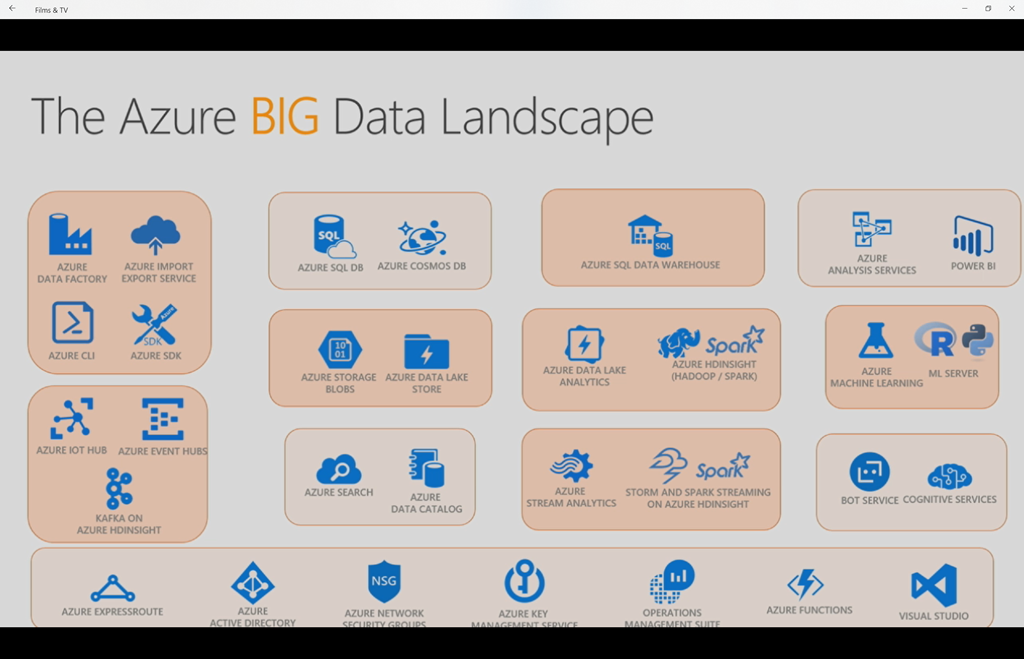
To understand what all these services are doing as a whole, and why Microsoft has gotten into Big Data, we have to step all the way back. There are 3 high-level trends that are a kind of an industrial revolution, making data a commodity:
-
Cloud
-
Data
-
AI
We are on the cusp of an era where every action produces data.
The Modern Data Estate

There are 2 principles:
-
Data on-premises and
-
Data in the cloud
Few organizations are just 1 or the other; most span both locations. Data warehouses aggregate operational databases. Data Lakes store the data used for AI, and will be used to answer the questions that we don’t even know of today.
We need three capabilities for this AI functionality:
-
The ability to reason over this data from anywhere
-
You have the flexibility to choose – MS (simplicity & ease of use), open source (wider choice), programming models, etc.
-
Security & privacy, e.g. GDPR
Microsoft has offerings for both on-premises and in Azure, spanning MS code and open source, with AI built-in as a feature.
Evolution of the Data Warehouse

There are 3 core scenarios that use Big Data:
-
Modern DW: Modernizing the old concept of a DW to consume data from lots of sources, including complexity (big data)
-
Advanced Analytics: Make predictions from data using Deep Learning (AI)
-
IoT: Get real time insights from data produced by devices
Implementing Big Data & Data Warehousing in Azure
Here is a traditional DW

Data from operational databases are fed into a single DW. Some analysis is done and information is reported/visualized for users.
SQL Server Integration services, a part of the Azure Data Factory, can allow you to consume data from your multiple operational assets and aggregate them as a DW.
Azure Analysis Services allows you yo build tabular models for your BI needs, and Power BI can be used to report and visualize those models.
If you have existing huge repositories of data that you want to bring into a DW then you can use:
- Azure CLI
- Azure Data Factory
- BCP Command Line Utility
- SQL Server Integration Services
This traditional model breaks when some of your data is unstructured. For example:

Structured operational data is coming in from Azure SQL DB as before.
Log files and media files are coming into blob storage as unstructured data – the structure of queries is unknown and the capacity is enormous. That unstructured data breaks your old system but you still need to ingest it because you know that there are insights in it.
Today, you might only know some questions that you’d like to ask of the unstructured data. But later on, you might have more queries that you’d like to create. The vast scale of economy of Azure storage makes this feasible.
ExpressRoute will be used to ingest data from an enterprise if:
-
You have security/compliance concerns
-
There is simply too much data for normal Internet connections
Back to the previous unstructured data scenario. If you are curating the data so it is filtered/clean/useful, then you can use Polybase to ingest it into the DW. Normally, that task of cleaning/filtering/curating is too huge for you to do on the fly.

HDInsight can tap into the unstructured blob storage to clean/curate/process it before it is ingested into the DW.
What does HDInsight allow you to do? You forget that the data was structured/unstructured/semi-structured. You forget the complexity of the analytical queries that you want to write. You forget the kinds of questions you would like to ask of the data. HDInsight allows you to add structure to the data using some of it’s tools. Once the data is structured, you can import it into the DW using Polybase.
Another option is to use Azure Functions instead of HDInsight:

This serverless option can suit if the required manipulation of the unstructured data is very simple. This cannot be sophisticated – why re-invent the wheel of HDInsight?
Back to HDInsight:

Analytical dashboards can tap into some of the compute engines directly, e.g. tap into raw data to identify a trend or do ad-hoc analytics using queries/dashboards.
Facilitating Advanced Analytics
So you’ve got a modern DW that aggregates structured and unstructured data. You can write queries to look for information – but we want deeper insights.

The compute engines (HDIsnight) enable you to use advanced analytics. Machine Learning can only be as good as the quality and quantity of data that you provide to it – the compute engine’s job. The more data machine learning has to learn from, the more accurate the analysis will be. If the data is clean, then garbage results won’t be produced. To do this with TBs or PBs of data, you will need the scale-out compute engine (HDInsight) – a VM just cannot do this.
Some organizations are so large or so specialized that they need even better engines to work with:

Azure Data Lake store replaces blob storage for greater scales. Azure Data Lake Analytics replaces HDInsight offers a developer-friendly T-SQL-like & C# environment. You can also write Python R models. Azure Data Lake Analytics is serverless – there are no clusters as there are in HDInsight. You can focus on your service instead of being distracted by monitoring.
Note that HDInsights works with interactive queries against streaming data. Azure Data Lake is based on batch jobs.

You have the flexibility of choice for your big data compute engines:

Returning to the HDInsight scenario:

HDInsight, via Spark, can integrate with Cosmos DB. Data can be stored in Cosmos DB for users to consume. Also, data that users are generating and storing in Cosmos DB can be consumed by HDInsight for processing by advanced analytics, with learnings being stored back in Cosmos DB.
Demo
He opens an app on an iPhone. It’s a shoe sales app. The service is (in theory) using social media, fashion trends, weather, customer location, and more to make a prediction about what shoes the customer wants. Those shoes are presented to the customer, with the hope that this will simplify the shopping experience and lead to a sale on this app. When you pick a shoe style, the app predicts your favourite colour. If you view a shoe, but don’t buy it., the app can automatically entice you with promotional offers – stock levels can be queried to see what kind of promotion is suitable – e.g. try shift less popular stock by giving you a discount to do an in-store pickup where stock levels are too high and it would cost the company money to ship stock back to the warehouse. The customer might also be tempted to buy some more stuff when in the shop.
He then switches to the dashboard that the marketing manager of the shoe sales company would use. There’s lots of data visualization from the Modern DW, combining structured and unstructured data – the latter can come from social media sentiment, geo locations, etc. This sentiment can be tied to product category sales/profits. Machine learning can use the data to recommend promotional campaigns. In this demo, choosing one of these campaigns triggers a workflow in Dynamics to launch the campaign.
Here’s the solution architecture:

There are 3 data sources:
-
Unstructured data from monitoring the social and app environments – Azure Data Factory
-
Structured data from CRM (I think) – Azure Data Factory
-
Product & customer profile data from Cosmos DB (Service Fabric in front of it servicing the mobile apps).
HDInsight is consuming that data and applying machine learning using R Server. Data is being written back out to:
-
Blob storage
-
Cosmos DB – Spark integration
The DW consumes two data sources:
-
The data produced by HDInsight from blob storage
-
The transactional data from the sales transactions (Azure SQL DB)
Azure Analysis Services then provides the ability to consume the information in the DW for the Marketing Manager.
Enabling Real-Time Processing
This is when we start getting in IoT data, e.g. sensors – another source of unstructured data that can come in big and fast. We need to capture the data, analyse it, derive insights, and potentially do machine learning analysis to take actions on those insights.

Event hubs can ingest this data and forward it to HDIngsights – stream analysis can be done using Spark Streaming or Storm. Data can be analysed by Machine Learning and reported in real-time to users.
So the IoT data is:
-
Fed into HDInsights for structuring
-
Fed into Machine Learning for live reporting
-
Stored in Blob Storage.
-
Consumed by the DW using Polybase for BI
There are alternatives to this IOT design.

You should use Azure IoT Hub if you want:
-
Device registration policies
-
Metadata about your devices to be stored
If you have some custom operations to perform, Azure HDInsight (Kafka) can scale up from millions of events per second. It can apply some custom logic that cannot be done by Event Hub or IoT Hub.
We also have flexibility of choice when it comes to processing.

Azure Stream Analytics gives you ease-of-use versus HDInsight. Instead of monitoring the health & performance of compute clusters, you can use Stream Analytics.
The Azure Platform
The platform of Azure wraps this package up:
-
ExpressRoute: Private SLA networking
-
Azure Data Factory: Orchestration of the data processing, not just ingestion.
-
Azure Key Vault: Securely storing secrets
-
Operations Management Suite: Monitoring & alerting
And now that your mind is warped, I’ll leave it there I thought it was an excellent overview session.
My Review of Microsoft Ignite 2017

Another week of Microsoft Ignite has come to an end. I’m sitting in my hotel room, thinking back on this week, and it’s time to write a review – based on past years, emails, and phone calls, some people in MS HQ are sitting up a little straighter now 
Putting Minds at Rest
Let’s let those tensed up people relax – Microsoft Ignite 2017 was an extremely well run show and the content was the best yet. Let’s dive a bit deeper.
Orlando
OK, Orlando in September is a bit of a gamble. That’s hurricane season in Florida, and Microsoft got lucky when Hurricane Irma swerved a little further west than it was originally projected to. There was a day or two when we were worried about the conference going ahead, but all was good. The venue, the OCCC, is a huge complex on International Drive, aka I-Drive. Two huge conference centres, North/South and West are connected together by a SkyBridge that passes the Hyatt Regency, which is also used. You can walk across the road, and there is also a shuttle service.

I heard that 30,000 people attended this conference, plus maybe 10,000 staff/vendors/sponsors. Imagine that crowd in one venue? At Chicago, there were 22,000 attendees and it sure felt like it. On day 1 in Orlando, it felt busy but that’s because there are fewer/larger sessions and the crowds felt oppressive. But once the keynotes were over, the crowds spread out and things were good – especially after I found a lesser used path between West and the Hyatt
What makes a city? It’s the people. My favourite TechEd (Europe and North America) was in New Orleans – yeah, even with all the walking! The people were just so friendly and appreciative of us visiting their city. The staff in Orlando were almost as amazing – please take that as a compliment because it’s meant to be. There was always a hello when you passed by, and if you had a question they did their best (including a radio call) to find the answer.
Hotels & Buses
I-Drive is the main place of accommodation for anyone doing the Universal Parks/Disney thing in Florida. There’s an abundant amount of hotels, bars, and restaurants along this road, especially within 25 minutes walk of the OCCC. My hotel, the Castle, was exactly 25 minutes walk away. I took the bus every morning, and was at the convention centre in around 10 minutes – a far cry from the 1 hour in Chicago! Every evening, bar one, I walked home – on the Friday I ordered an Uber and the 4+ star driver arrived in under 2 minutes, and I paid less than 7 dollars for the ride home – a far cry from the minimum of $60 dollars that Chicago taxi drivers demanded!
The hotels were all close by to the OCCC, and because of the nature of the area, all had plenty of services nearby. My hotel had IHOP, Dennys, many bars & restaurants, and plentiful tourist shops nearby. The hotels were all of a good quality.
The bus service was fast, and all the staff had a friendly hello. The driver on the last morning made sure to have a joke with us all after the Thursday night party, and made a big point of thanking us all for attending – she’d been driving buses for conferences for several years. These little things make a difference.
I used Uber for the first time ever in Orlando at those times/places when the conference bus service wasn’t an option. Wow! Let’s leave it there
Food
Conference food is never exactly a Michelin star experience, but I am a man of simple tastes when it comes to food. I was disappointed when the North/South hall ran out of food on the Monday – it was the venue for the keynotes so that was where most people would be. We were redirected to the West hall, but that was 20+ minutes away! I went hungry because I had a session to be at.
After that, the conference had 30 minute breaks for lunch – enough time to grab lunch to go, which was sandwiches/fruit/salad/dessert in a box to go. I was quite happy with that because I was here to learn, not to dine. One day my lunch went into my laptop bag for later, others it was scoffed down.
For breakfast, I have learned to pick up a bowl, plastic spoons, cereal, and milk (kept in the hotel room fridge) for the week. I did that and was happy, but no-one was complaining about the food in the halls. There were no turkey sausages – REPEAT – no turkey sausages. What is it with Microsoft and turkey sausages?!?! Yup, it was good ol’ pastry, eggs, and bacon.
The Content
This is the reason we attend Ignite. The main keynote, Satya Nadella, was mostly the same thing that Nadella has presented since his rise to CEO. To be honest, I’m well bored of words I know, in sentences that mean little. The highlights were they keynote by a woman who was genuinely one of the most likeable & enthusiastic people I’ve ever seen out of Redmond (boo-yah!), and a panel of scientists working on Microsoft’s quantum computing project that made us all feel stupid – in a good way.
I was here for the breakout sessions. My focus was on Azure, and I got lots of that. I also attended a pair of Windows Server sessions. For the most part, the session quality was excellent. I talked to loads of people during the week and they all said the same thing. In once conversation with a fellow MVP, he said “you know how you find yourself leaving a disappointing session, and try to find something else in that time slot …”, both he and I agreed that that hadn’t happened to us this year. The only time I thought about leaving early was during “customer stories”, which was nearly always a presentation by an Expo hall sponsor advertising their wares instead of talking about their experiences with the topic of the session. I really dislike being advertised to in a conference that I’ve (my employer, really) paid to attend. Luckily, that was only in a few sessions. Less of that please, Microsoft!
I didn’t attend any theatre sessions. Boy, have they changed since Chicago! I presented in Chicago and the organization of theatre sessions was … unorganized. This year, some of those presentations were drawing bigger crowds than the official breakout sessions by Microsoft. It seems now that a breakout is normally a subject that can be covered in 20 minutes instead of the 75 that is normal for the breakout sessions. And Microsoft presented a bunch of them too, not just community members.
I do have a bit of a downer – Friday. Friday is a dead day. Microsoft staff mostly abandon the conference on Thursday afternoon. Unless things change, book your travel to leave on Thursday night/Friday morning. I would have loved to have left on Thursday night, to spend the weekend with my family before heading off again on Sunday. It felt like, this year, that the weakest content was on Friday. Normally there were 30+ breakout sessions per time slot from Monday-Thursday, but on Friday it was 10-12, and not much got my attention. I ended up attending the first session, doing a podcast recording with a friend, and leaving early. That’s time with my family that I lost, that could have been put to good use, but was wasted. If Friday morning is dead, then I would prefer Microsoft to run a Monday-Thursday conference.
Overall Feeling
I got quite a lot out of this week. There was so much announced that it will take me weeks to digest it all. Between Monday-Thursday, there was so much that I wanted to attend that I will have to download sessions to get up to date. I came here wanting to learn lots of Azure PaaS, but so much was going on that I couldn’t attend everything – thankfully we have MyIgnite, Channel 9, and YouTube. I also missed out on the hands-on labs, but they will remain live for attendees for 6 months.
I was delighted to hear that the conference will return to Orlando next year. I’d heard a nasty rumour about Ignite merging with Microsoft’s internal MGX conference in Las Vegas, which would have been an unmitigated disaster. Orlando has been the best place so far for handling the huge audience. In my opinion, there’s not much that Microsoft has to do to improve Ignite – keep what’s there and rethink Friday. Oh – and invent a new way to absorb 4 sessions at once.
Wow, this review is sooo different to my TechEd Europe 2009 review *dodges more bullets*
The iPhone 8–After 1 Week of Ownership

I’ve been using the HTC One (M7 and then M9) for the last 4 years on the Three network in Ireland. I liked Android, but problems that both I and my wife had with the M9, and the lousy camera, convinced me to change handsets. And the awful degradation of the Three network and their rubbish outside-EU roaming offers made me want to go elsewhere.
I reviewed my phone options. The Samsung S8 and The Google Pixel are the best of Android. The Pixel isn’t officially available here, but grey market handsets can be had at a steep price. The S8 … I hate what Samsung does to Android. Prior to going Android, I had an iPhone 4. I didn’t like iTunes, but the platform was stable, and Apple puts pretty good cameras into their phones. That convinced me – I wanted a great camera for family snapshots. Along came news of the iPhone 8. My employer happens to be a distributor of Apple products, so I bought the entry level model (64 GB storage) on the first morning of release.
That was a busy day! I was packing for 2 weeks of travel in the USA (Microsoft Ignite in Orlando, FL, and then to an MS partner bootcamp in Bellevue, WA), but I wanted to change phone carriers. I went with Vodafone Ireland on a SIM-only plan and activated their €2.99 roaming package for outside the EU. With that package, for €2.99/day, I get 200 MB of data and free calls/texts home from the USA.
I loaded up apps, and hit the “road” on Saturday morning, heading to MS Ignite. Google Maps was pre-loaded with maps. I had a rental car waiting in the USA and used maps to navigate quite a bit – to my hotel, and then out west on the Sunday to visit with a friend. All week long I was navigating, listening to Audible, taking photos, tweeting, phoning, texting (SMS/iMessage), using Facetime home, and calling home. The phone is being used … and the battery is easily out-performing the HTC One M9 that I previously owned. The camera is amazing compared to the rubbish in the HTC One – whether it’s a snap, a zoomed in shot of a screen using Office Lens, or a panorama (gloriously easy to use).
The decision for Apple to start with 64 GB was a good one. I was struggling with 32 GB on the previous phone, and even though I use OneDrive, I like to keep photos offline, as well as maps, audio books, and music.
The phone is much smaller than I expected. That’s causing me some issues with getting used to the keyboard. My wife went with the iPhone 8 Plus. I feared that it would be too big for my pocket but it’s not. However, I like not having to adjust my pocket contents when I sit down – and I’m less black & blue in the nether regions!
I’m very happy with the hardware. iOS 11 … we’ve all heard the grumbling. I installed Outlook and set it up for my work and personal email, both on O365. It works well and I’ve never looked at the Apple mail app. I’ve not had any problems with the software.
The switch to Vodafone has also worked out well. I have a data signal all the way between home and work – there’s a mobile antenna at the end of the road that I live on, and I could barely get a 1 bar signal with Three in the house, which does not have the latest signal-blocking insulation. Roaming has been the real test. I love having that 200 MB per day. No; it’s not much in a modern world, but I have something. Most of the time, I’ve been near wi-fi, but hotel/conference wi-fi can suck. Only a little while ago, I wanted to see my family and the hotel wi-fi was crapping out. I jumped off the wi-fi, and had a perfect mobile signal to see my family on Facetime.
This week I’ve been repeatedly asked why I didn’t wait until November for the iPhone X. Well … I’m nether stupid nor am I a poser. There is no way on earth that I was going to pay nearly €1,300 for animated emojis, or to be that plonker that puts their phone on the bar table, waiting for people to tell them how much better they are than everyone else. Seriously!
One week is not a long time, but I’ve used the phone quite a bit this week, more than I normally would. It’s worked out well, and I’m happy with it and the carrier decision that I’ve made.