Remote Server Administration Toolkit For Windows 8.1

Microsoft has released the RSAT for Windows 8.1.  This is the toolkit you will install on administrators’ Windows 8.1 PC to manage Windows Server 2012 R2 (WS2012 R2) and older.

Remote Server Administration Tools for Windows 8.1 Preview includes Server Manager, Microsoft Management Console (MMC) snap-ins, consoles, Windows PowerShell cmdlets and providers, and command-line tools for managing roles and features that run on Windows Server 2012 and Windows Server 2012 R2 Preview. In limited cases, the tools can be used to manage roles and features that are running on Windows Server 2008 R2 or Windows Server 2008. Some of the tools work for managing roles and features on Windows Server 2003.

EDIT: The link for this package from the below support matrix still points to the RSAT Preview.  I guess it will get updated soon. The link was updated (reused) to the GA bits.

There are a few important support notes:

  • The IP Address Management (IPAM) console should not be used (not supported) to manage WS2012.
  • The WS2012 R2 and Windows 8.1 PowerShell cmdlets should not be used to manage WS2012.  It is not blocked, but it is not supported.  It is supported to manage WS2012 Hyper-V using the Hyper-V GUI tools (FCM and Hyper-V Manager) from RSAT for Windows 8.1.
  • To manage WS2012 iSCSI target using PowerShell on Windows 8.1 then you must import the WS2012 (RSAT for Windows 8) PowerShell module.

Yes, I agree; This is very messy.

A support matrix for RSAT for Windows 8 and RSAT for Windows 8.1 has also been posted.

You’ll not that some tools are not in RSAT for Windows 8.1, and some are specifically listed as deprecated:

  • SMTP Server Tools: Not included.
  • Storage Explorer Tools: Not included.
  • Storage Manager for Storage Area Network (SAN) Tools: No included.
  • Windows System Resource Manager Tools: Deprecated and not in WS2012 R2.

My BAD Experience Of Upgrading From Windows 8 to Windows 8.1

I deliberately held off from upgrading my Samsung ATIV Windows 8 Pro Atom tablet from Windows 8 to 8.1 to experience the process.  It started kind of rough.

You start, not in the Windows Store, but on Windows.com.

image

Click the link and the upgrade process should start.  Instead, I got a HTTP 403 Forbidden Access Denied error.  Whoops!  First day jitters.  I hope someone quickly deployed more Azure instances! 😉

I tried again about 2 hours later and the link opened the Windows Store where I clicked on Download.

image

Then a download starts.  For me, on a fast line, it was slow.

image

After a long wait I was informed that the machine would reboot automatically after a 15 minute wait.  I triggered it to happen immediately.  The very slow count from 1 to 100% began after the reboot.  Bear in mind that the storage in these tablets appears to be very slow.

My machine hung on a black screen during this stage and that stuffed the install.  I rebooted and it reset this stage of the upgrade.  Another power reset and the issue repeated. 

And then I was greeted by

Restoring Your Previous Version Of Windows

Yes, the upgrade failed for no reason.  So much for the upgrade process.  Looks like I’ll be doing a fresh install instead.

FYI, I saw another machine (also Windows 8 OEM but another hardware brand) even refuse to upgrade for an unknown reason.  This is what I was greeted with when Windows 8 was restored and I logged in.

Couldn’t Upgrade To Windows 8.1

Sorry, we couldn’t complete the update to Windows 8.1.  We’ve restored your previous version of Windows to this PC.

0xC1900101 – 0x40017

This is why there is value in public beta testing, unlike in the much smaller restricted private TAPs.

Windows 8.1, Windows Server & System Center 2012 R2 Go GA

Go to Windows.com (only with IE because this does not work in Firefox in my test) and you’ll get a link to allow your Windows 8 PC to upgrade to Windows 8.1.  As of 12:38 (38 minutes after GA), the upgrade link was dead for me (HTTP 403 – Forbidden: Access is Denied).

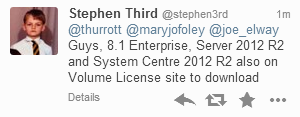
I’ve also been told by Stephen Third that Windows 8.1 Enterprise, Windows Server 2012 R2, and System Center 2012 R2 have appeared on the Microsoft Volume Licensing Service Center.

image

Note!

These are GA releases.  That’s different to an RTM release because the GA media should contain the slipstreamed fixes that Microsoft have been working on since RTM.  So make sure that you use GA media for your future deployments … you shouldn’t be using the previously available MSDN/TechNet media for production usage anyway!

EDIT:

The Microsoft Partner Network benefits have also been updated.  I see WS2012 R2, Windows 8.1 Enterprise, and System Center 2012 R2 in there.

Have fun!

A Toshiba Z10t “Convertible Ultrabook” (Pro Tablet) Just Landed On My Desk

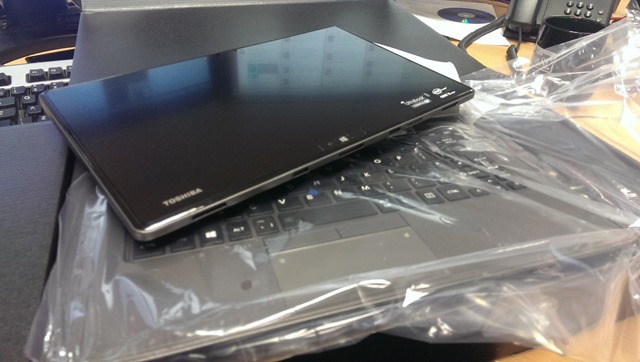
Look what just arrived:

IMAG0084

This is an Intel Core i5 processor powered Toshiba Z10t “tablet”, just like the Surface Pro is.  It docks into a clamshell rigid keyboard (no extra battery)

IMAG0086

Look Pa, no hands:

IMAG0088

And I don’t need to stand 6 foot 5 tall to get the thing to sit on my lap.  Yes, like all the pro tablets, it’s top heavy so it really needs a hand on the keyboard … but that’s where they coincidentally sit when I’m, you know, typing!

Toshiba don’t call this device a tablet.  I think that’s clever.  Say “tablet” to someone and they think $500 or less.  Put an i5, business level build, and a keyboard into a device and you’re talking $1000+.  That’s a big $500 (or more) psychological barrier to get over!

The tablet has a full-sized SD slot (handy for cameras) and USB 3.0 port.  The keyboard adds a USB 2.0 port, a full size HDMI port (they sit better than micro-HDMI), VGA (really needed for presenting at public venues), and RJ45.  It’s that last one that caught my eye when I played with one of these a while ago … that RJ45 means PXE BOOT!  And that means enterprise admin can deploy their Windows 8.1 Enterprise images to this machine using the network based tools that they are using for all other PC types.  This model that we got came with a digitizer stylus.  I find the stylus really useful for OneNote (drawing diagrams) and for using with the Isoboard app to white board via the projector (connected 99.9999% of the time via a VGA cable).

It came with Windows 8 Pro, so I’m upgrading it to Windows 8.1 Pro for demo purposes.

I reckon this is a good business offering for those looking for a hybrid tablet/laptop solution.  In my opinion, the true “lapability” of these device trounces the non-existence of this feature on Surface Pro and Surface Pro 2.

Hopefully I’ll get some time on this machine over the coming weeks/months so I can talk more about it.

Available on:

Windows 8.1 Availability For Business

Microsoft has clarified the availability situation of Windows 8.1 in businesses.

Beginning today, TechNet and MSDN subscribers will now have access to Windows 8.1 Enterprise RTM. This also includes access for Volume License (VL) customers with an active Software Assurance (SA) agreement, as you receive a TechNet subscription as part of SA.

Over and over in the article they talk about evaluation.  And that is correct, while businesses with SA on their licensing get free TechNet licenses, TechNet is for evaluation only. 

… the primary objective in making Windows 8.1 RTM bits available on TechNet and MSDN is so developers and businesses can continue testing the latest version of the operating system … And once GA bits are available, you will be ready to conduct final testing and begin your deployment of Windows 8.1.

Using TechNet media for anything other than evaluation is illegal, no matter what licensing or rights you think you have.  It is a binary thing; there is no grey area; there is no “if” or “but”; there are no ways around it no matter what your imagination might come up with.

Those with SA should be deploying the Enterprise edition of Windows 8.1 because it is the business feature-rich edition of the OS. 

For all devices currently running Windows 8 and for those of you who are testing Windows 8.1, use Windows 8.1 Enterprise RTM as another opportunity to evaluate the operating system so you can start your official migration when Windows 8.1 Enterprise GA becomes available on October 18.

EDIT: Windows 8.1 Enterprise was added to MSDN/TechNet overnight.  Please keep reading.

Microsoft reminds us again about the rights limitations of TechNet and MSDN media.  You will soon have access to the Enterprise edition via those evaluation and test/dev programs but for production usage:

… you must have active SA for the Windows desktop operating system to have rights to Windows 8.1 Enterprise licenses.

VLSC (where customers with Windows 8 licensing can download Windows 8.1) will be updated with the GA bits of Windows 8.1 (what you can deploy for production) on:

… October 18 and for new customers to purchase through Microsoft Volume License Resellers beginning November 1.

Technorati Tags: ,

First Impressions – Windows 8.1 RTM

I rebuilt the PC at work yesterday, replacing Windows 8 with Windows 8.1.  I prefer rebuilds instead of upgrades just because you get a cleaner build.  I took an indirect route because it allowed me to experience something I had never done before (that I can remember):

  1. Installed Windows 8.1 (aka “Home)
  2. Installed Office 2013 Pro Plus via the Office 365 Click-To-Run mechanism
  3. Entered the Windows 8.1 Pro product key (reboot)
  4. Joined the machine to the domain
  5. Finished installing and configuring
  6. Downloaded and installed the Windows Intune agent

Office Click-To-Run is a nice way to deploy office in a small business.  It’s quick and managed by Office 365, bringing me updates when they eventually are released – assuming that I don’t have LOB apps with specific compatibility issues.

Wave D Windows Intune (the current release) doesn’t strictly support Windows 8.1 yet.  My OS actually shows up as Windows 6.3, which looks funny when it’s side-by-side with Windows 8.

All the usual programs and apps were installed.  I decided to switch from Chrome to Firefox – I gave up on IE10 a while back and IE11 hasn’t improved enough for me.  Firefox with plugins for Lastpass and Google Translate runs nice and quickly.

I have dual monitors so it was nice to have Metro apps running on both screen.  In fact, I had 4 apps open, with flexible screen space sharing (resizing/snapping).  Skydrive automatically connected to my account.  My wallpaper and lock screen appeared.  I configured the PC to log into the desktop and to use my wallpaper as the Start Screen background.  These two things, in addition to the Start button are technically minor, but might prove psychologically significant enough to get those who are disaffected by Windows 8 to re-consider Windows 8.1.

Other than that – – it’s been all smooth.

Technorati Tags:

HVRemote Updated To Support WS2012 R2 and Hyper-V Server 2012 R2

I was just checking something and I saw that HVRemote was updated a few days ago (to v1.08) include support for Windows Server 2012 R2, Hyper-V Server 2012 R2, and Windows 8.1 Client Hyper-V.

HVRemote is a Codeplex (not supported by Microsoft) product that makes enabling remote support of workgroup machines a lot easier.  It is written by John Howard of Microsoft who works in the Hyper-V team.

Event – TechNet Conference 2013 in Berlin

Berlin is the place to be on November 12th and 13th if you’re interested in Windows 8.1, Windows Server 2012 R2, System Center 2012 R2, Windows Intune, Windows Azure, SQL Server 2014 or Office 365 … and you can speak German.

That’s because Microsoft Germany in cooperation with members of the community, including numerous European MVPs, are going to be talking tech, tech, tech, at level 300 and above, at TechNet Conference 2013.  For just a small registration fee, you’ll have access to 2 days of content, each with 3 tracks.

The keynote will be presented by  Mike Schutz, GM Product Marketing for Windows Server and Matt McSpirit, Sr Product Marketing Manager from Microsoft Corporation.  Carsten Rachfahl (MVP) will also be presenting a Best Practices session with the gold sponsor, Wortmann AG.

I’ll be there on the first day (November 12th) talking about Hyper-V Replica and networking in WS2012 R2.  Most of the content is in German.  I will be presenting in English – my ability to speak German is very limited (to asking for a beer) and offends the hearing of fluent speakers.

Other MVPs speaking include Damian Flynn, Hans Vredevoort, Thomas Maurer, Markus Klein, Torsten Meringer, Bernhard Tritsch, Martina Grom, Siggia Jagott, Samuel Zürcher, Nicki Borell, Toni Pohl, Martin Goet, Daniel Neumann, and last but certainly not least, Paula Januszkiewicz.

I wonder why those who were kicking this idea around after the usual expected speaker rejection emails from TechEd might have codenamed this as MVP-ed? Open-mouthed smile  Looking at the list of names speaking, you’re simply not going to find a Microsoft technology event to match this in Europe.  With so much change over the last 18 months and more to come, events like this are priceless, even if the admission is €149 + VAT for the first 100 registrants and €199 + VAT after that. Maybe if you can’t speak German, go learn it, because this is one heck of an agenda.  Ich muss Deutsch lernen.

Windows Server 2012 R2, System Center 2012 R2, Windows 8.1, and Windows Intune Release Dates

I was on vacation for a few days, but as was predicted by some in the media, the release date of WS2012R2, SysCtr2012R2, Win8.1, and Intune “Wave E” was announced during the week in two announcements, one for the desktop and one for the server & cloud products.

Windows 8.1 will be available online through the Windows Store to Windows 8 customers starting at 00:00 New Zealand time on October 18th – I think that is midday UK/Irish time on October 17th.  October 18th is the GA date, so that’s when you should be able to walk into stores and buy devices with Windows 8.1 already on them.  Ideally those will be designed-for-Windows 8.1 devices.  However, the Windows 8 release was underwhelming in retail stores around the world so I’m not holding my breath this time around – screw the political correctness, the manufacturers (including Microsoft Surface) did a shite job for the release of Windows 8.  The new devices listed in the Windows 8 announcement are already on the market (some less-so than others).

There is no news of TechNet & MSDN release dates for Windows 8.1 but I suspect Windows 8.1 will be made available universally on Oct 18th.  That’s because that is also the release plan for WS & SC 2012 R2 and Windows Intune “Wave E”.  Everything is happening all at once on Oct 18th.

Note that new VL purchases will be possible on November 1st when the price list is updated.

Windows 8.1 To RTM In “Late August”

As tweeted yesterday, Microsoft’s Tami Reller revealed in the WPC 2013 keynote that Windows 8.1 will RTM in late August.  All along I’ve theorized that the schedule would be similar to Windows 8, which was similar to Windows 7.  That would mean that GA would be in October.  In fact, Reller said that Windows 8.1 would be available to customers in “a few months” for the Christmas market, once again missing the lucrative back-to-school market when Apple makes a fortune.

Mary Jo Foley has reported that Windows 8.1 may in fact be available to existing Windows 8 customers soon after RTM.  That is the norm for volume license customers – but that’s because they often have agreements that allow instant access and deployment, e.g. Software Assurance.  This time around, Windows 8.1 isn’t a new purchase – it’s a built-in upgrade right for everyone with Windows 8.  So it makes sense that Microsoft would consider this.

OEMs might be pissed off with a move like this … but hey … they deserve to be pissed on because they really dropped the ball with device availability for Windows 8.  It’s 10 months later and devices are only on the shelves in the last month in these parts.  The instant availability of Windows 8.1 could be good for marketing of the OS – a lot of people will upgrade to get their Start Button (there is no Start Menu) and they’ll show customers, friends, family, etc, and that might be a very clever social (version 1) marketing technique.

No news on Windows Server and System Center 2012 R2 availability.  I would guess it’ll happen around the same time as Windows 8.1, in line with the “Blue” concept.  October (same as WS2012) would be the latest GA I think, maybe to give Windows 8.1 marketing a chance to have airtime, and then give WSSC 2012 R2 a chance to have it’s own marketing bandwidth.  But that’s all guessing.  We know that WSSC was developed together and will be released at or around the same time … the first time this will happen.