Go to Windows.com (only with IE because this does not work in Firefox in my test) and you’ll get a link to allow your Windows 8 PC to upgrade to Windows 8.1. As of 12:38 (38 minutes after GA), the upgrade link was dead for me (HTTP 403 – Forbidden: Access is Denied).
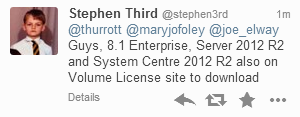
I’ve also been told by Stephen Third that Windows 8.1 Enterprise, Windows Server 2012 R2, and System Center 2012 R2 have appeared on the Microsoft Volume Licensing Service Center.
Note!
These are GA releases. That’s different to an RTM release because the GA media should contain the slipstreamed fixes that Microsoft have been working on since RTM. So make sure that you use GA media for your future deployments … you shouldn’t be using the previously available MSDN/TechNet media for production usage anyway!
EDIT:
The Microsoft Partner Network benefits have also been updated. I see WS2012 R2, Windows 8.1 Enterprise, and System Center 2012 R2 in there.
Have fun!