New, Simpler, Better Value Licensing Announced For WS2012 and Some SBS Changes
Note: I saw the announcement when it first came out and have been waiting & digesting. More information came out since then so I thought a single post would be best. Make sure you follow this post by reading my post on licensing for virtualisation of Windows Server 2012. I will not be answering any further questions on this post. Please ask your reseller, distributor, or LAR your scenario specific questions; that’s why you pay them.
In case you don’t know, I happen to work for a distributor of Microsoft licensing. My job is to work with our sales people, supporting Microsoft partners who resell product to end customers. My focus is on System Center (and that brings in Hyper-V) and Forefront, but anything that is anyway technical tends to find its way to my desk. And you know what? I’ve been amazed at the complexity that is involved. Some questions are part licensing/legal and part technical. And these issues confuse the hell out of people. And trust me; I’ve let well known executives in Microsoft know what I thought of the complexity.
The recent changes to System Center 2012 licensing simplified our conversations quite a bit. To use a Henry Ford analogy, System Center SMLs come in 2 sizes and in black:
- SML Standard: 2 CPUs in the physical server, all of System Center, licensing 2 physical CPUs in the server + 2 VMs running Windows Server on the licensed host
- SML Datacenter: 2 CPUs in the physical server, all of System Center, licensing 2 physical CPUs in the server + unlimited VMs running Windows Server on the licensed host
There is nothing to restrict you from creating hundreds of VMs on WinServ Std. The VOSE rights restrict your rights to install Windows Server. Make sure you follow this post by reading my post on licensing for virtualisation of Windows Server 2012.
Windows Server 2008 R2 SKUs
Currently on the Windows Server front it’s more like 2005 General Motors than early Ford. We have the following SKUs in Windows Server:
- Windows Server 2008 R2 Datacenter
- Windows Server 2008 R2 Enterprise
- Windows Server 2008 R2 Standard
- Windows Web Server 2008 R2
- Windows HPC Server 2008 R2 Suite
- Windows Server 2008 R2 HPS Edition
- Microsoft HPC Pack 2008 R2 Enterprise
- Windows Server 2008 R2 for Itanium-Based Systems
- Windows Small Business Server 2011 Premium
- Windows Small Business Server 2011 Standard
- Windows Small Business Server 2011 Essentials
- Windows Server 2008 R2 Foundation
- Windows Storage Server 2008 R2
- Windows Home Server 2011
Phew! No wonder people get confused.
Windows Server 2012 SKUs
This evening Microsoft released the details of Windows Server 2012 licensing. There is also a datasheet and a FAQ with more details. There will be 4 (count ‘em … four) 5 (count ‘em again … five) SKUs:
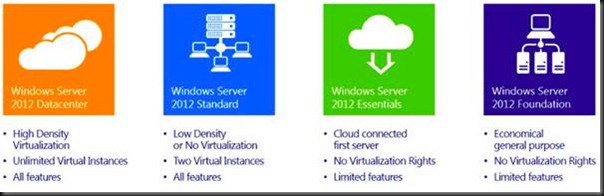
See EDIT#2 below … Windows Storage Server will also be released.
Please, do not panic if you are a HPC customer or an Enterprise customer. Here’s why:
- HPC will be a free download/add-on for Standard/Datacenter customers
- Standard will have the same scalability and features as the Datacenter edition … yes, you can build clusters with Windows Server 2012 Standard … and at a fraction of the cost that you did it with Enterprise edition (as you’ll see next)!
You see, IT Pros, not all change is bad J [Did I just say that?]
Pricing & Changes
I want to focus on the 2 computer room/data centre products for a while: Datacenter and Standard. What were the shelf prices before with 2008 R2? Bear in mind that the shown prices are the from the Open NL price list, the most expensive of the volume license types. They are shown to give an indication of past and present. What you will pay your reseller/LAR/distributor will probably be less:

So, Datacenter cost $4,809 (for 2 copies – you’ll see why in a sec) and came with unlimited virtualisation rights on the host … or in simple language you could install as many VMs on that licensed host as your hardware would allow, and then install Windows Server 2008 R2 or lower, any edition, into those VMs at no extra cost. The funny thing with Datacenter was that it was per processor, with a minimum of 2 processors … hence I’ve shown $4,809 per host with 2 procs.
Enterprise came with all the same features and scalability, with a limit of technical limit of 8 CPUs in the physical server. Licensing-wise, it allowed 4 VMs on the licensed host to run Windows for free. You could double the licensing for the host to get 8 VMs for free … but do the math and you might as well buy Datacenter edition then. However, Enterprise was $2,358 per server with no processor counting required.
Standard Edition had limited scalability and features, e.g. 32 GB RAM even for Hyper-V. At $726 you licensed a server, and it came with 1 free license for a VM on that host.
Enter Windows Server 2012 and we have:
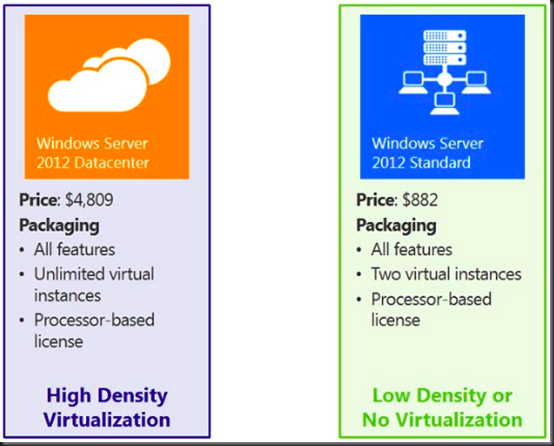
For Datacenter there is 1 change: You buy 1 copy of Datacenter and it includes 2 processors. The whole minimum-of-2-procs-per-host thing confused people. So Microsoft consolidated the 2 licenses into 1 and left the price at $4,809. We continue to have the unlimited virtualisation licensing. That means if you buy 1 copy of Datacenter for a 2 CPU host (any virtualisation) and you get unlimited installations of Windows Server 2012 or lower (any edition) for unlimited VMs on that host … no changes there!

Let’s move on to Standard before we cover the gap that was Enterprise. Standard is going from $726/server to $882 for 2 physical CPUs in a server. For that, you’re getting:
- A huge leap in capabilities and scalability in the Standard edition
- Rights to an additional copy of Windows for a second VM running on the physical box that is licensed using Windows Server 2012 Standard.
The other change for Standard is that it will match the Datacenter model. The Standard license will cover you for 2 CPUs in a server. If you want 4 CPUs, then you need 2 copies of Standard. I do not envision that being a problem because I’ve never seen Standard installed on anything more than 2 CPUs.
If you’re about to complain because you have a bunch of Standard edition physical servers, the price is going up, and you don’t need the additional features/scalability, then I will respond with: you’ve been throwing money away for years and your boss should be asking you some questions like “Why didn’t we virtualise those servers 3 years ago?” If you virtualise those Standard Edition servers now then you can merge them into Datacenter per host licensing and save on electricity, support, and lots of other costs over your 3 year cycles.
Windows Server 2012 Foundation is OEM only and therefore there is no Open NL pricing. Foundation is also for single CPU servers, such as a micro-server. More on Essentials later.
Replacing the Enterprise Edition
OK Enterprise owners, just like the old Star Trek storyline, it is g-o-n-e. Here is your replacement strategy:
- If you use to buy Enterprise for clustering, then use Standard instead. You just saved $1,476 per node!
- If you bought Enterprise to have virtualisation rights for 4 VMs on a host, then buy 2 Standards for that host … hey! 2008 R2 Enterprise cost $2,358 and 2 copies of WS2012 Standard costs $1,764. You just saved $594 per host!
Where Is Small Business Server (SBS)?
The answer to that question was posted on the SBS blog. SBS has been replaced by Windows Server 2012 Essentials. Windows Server 2012 Essentials will support up to 25 users and 50 devices. Essentials is for 1 or 2 CPU servers and cost $425 on Open NL. The idea behind Essentials is that it will be the successor to SBS. Quoting the blog, that also features a Windows Server 2012 Essentials FAQ:
Windows Server 2012 Essentials has been designed to give you the flexibility to choose which applications and services run on-premises and which run in the cloud. In contrast to Windows SBS Standard, Essentials offers lower up-front acquisition and deployment costs. It allows you to take advantage of cloud-based messaging offerings while enjoying an integrated management experience by subscribing to Office 365 or a hosted Exchange service. If you prefer a fully on-premises solution, you have the option of running Exchange Server on a second server (either as a physical or virtual machine) alongside Essentials with the same integrated management experience.
Windows Server 2012 Essentials can also be used as a platform to run line-of-business applications and other on-premises workloads, as well as to provide an integrated management experience when running cloud-based applications and services, such as email, collaboration, online backup, and more.
Windows Server 2012 Essentials can also be used as a platform to run line-of-business applications and other on-premises workloads, as well as to provide an integrated management experience when running cloud-based applications and services, such as email, collaboration, online backup, and more.
Windows SBS 2011 Standard, which includes Exchange Server and SharePoint Foundation, will be the final such Windows SBS offering. It will remain available through the OEM channel until December 31, 2013, and will remain available in all other current channels until June 30, 2013.
Long-story short, the small business customer is now getting a 25 user version of Windows that does not come with Exchange. If they want Email/collaboration/chat then Microsoft is selling Office 365. And of course, the partner is free to sell/install something else on the Essentials server, and the customer is also free to buy/install another product on the Essentials server. They are getting a very cheap server that requires no CALs, and that’s a nice first-server starting point for a cash-strapped small business.
My analysis on this: the writing has been on the wall for a long time. At least locally, Microsoft has made huge investments in trying to educate train partners on the strategy, sales, and technical levels. We have to move with the times cos the times are moving.
Some upgrade paths for SBS:
- If you have Software Assurance on Small Business Server 2011 Essentials, you will receive one Windows Server 2012 Essentials license.
- If you have Software Assurance on Small Business Server 2011 Standard edition, you will receive one Windows Server 2012 Standard edition license and one Exchange Server Standard 2010 license.
- If you have Software Assurance on Small Business Server 2011 Premium Add-on edition, you will receive one Windows Server 2012 Standard edition license and one SQL Server 2012 Standard edition license.
This upgrade right will be reflected upon your agreement renewal but you are entitled to use the granted product upon its availability.
EDIT: I’ve another post on the SBS story.
Déjà Vu
Those of you who understand System Center 2012 licensing have thought “that looks familiar!” It should because the model matches the Datacenter/Standard license model of System Center. And that makes the Enrollment for Core Infrastructure (ECI) and Core Infrastructure Suite (CIS) licenses much easier to understand:
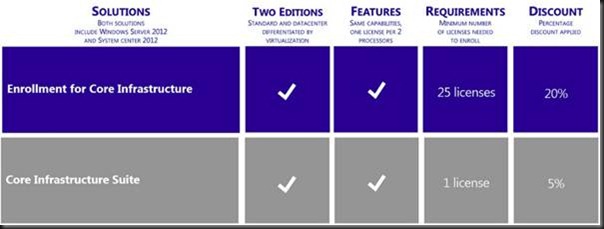
Buying Windows Server and a Standard System Center SML? Then buy a Standard edition of a CIS or ECI suite. Buying the Datacenter editions? Then buy the Datacenter edition of the ECI or CIS suites instead … and save even more money.
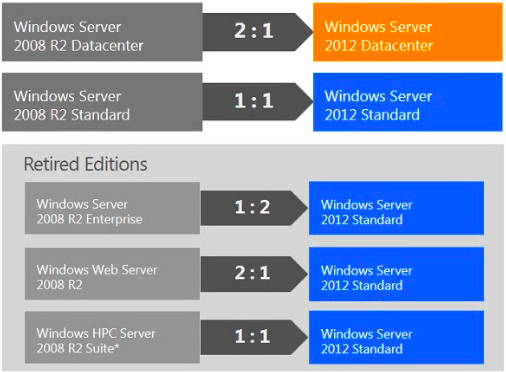
What happens if you have Software Assurance such as Open + SA, OVS, or ESA? Well there are migrations from the old SKUs to the new SKUs:
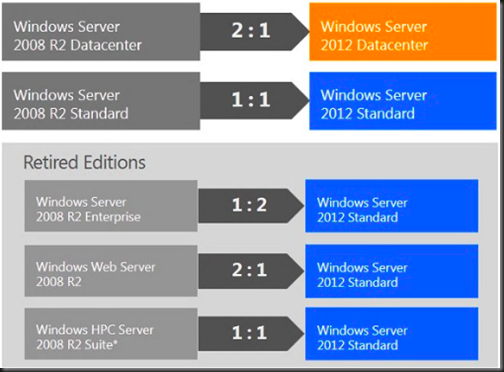
The 2:1 Datacenter edition makes sense because you’re going from 2 * 1 CPU licenses per host to 1 * 2 CPU license with no price change.
Remember that HPC is replaced by Windows Server 2012 Standard/Datacenter plus the free HPC download. And Enterprise folks don’t lose out because they get the equivalent (features + virtualisation rights) of 2 copies of Standard (4 licensed VMs + 4 CPUs in the server).
Anyone running physical installations of Windows Web Server 2008 R2: this is your prompt to join the rest of us in the 21st century and virtualize those web servers … NOW! If you put 2 web servers on to a host, your new Windows Server 2012 Standard edition covers you for your virtual web server licensing.
Editions Comparison
Here are how the Windows Server 2012 editions compare against each other:


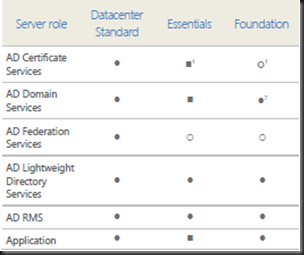
Here is a feature comparison:

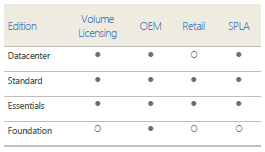
And here is how you can buy the different WS2012 editions:

Step-Up
For those of you running one edition and would like to upgrade to another (Standard -> Datacenter) then you can do that if you have Software Assurance. The cost is the price difference between the editions. Note that you can step up from 1 Enterprise 2008 R2 to 2 copies of Datacenter 2008 R2 now and then you get WS2012 Datacenter edition.
For Those Without Software Assurance
What if you don’t have Software Assurance on your servers?
- Attend my presentations more often and/or add my site to your RSS feeds because … I told you so! [Heh! I was right; I am one to say “I told you so”]
- If you bought your software in the past 90 days then still can attach it; contact your reseller/LAR for details.
You will continue to use the version and SKU that you bought, and you’ll miss all that lovely WS2012 goodness that the rest of us are salivating over. [Have I mentioned that I am a nerd?]
Client Access Licenses (CALs)
None of the rules change. You continue to license clients for the highest version of Windows Server that they use. For example, you could run 10 W2008 R2 VMs on a WS2012 host. You then use W2008 R2 CALs. If you upgrade a single one of those VMs to WS2012 then you need WS2012. Seriously, Software Assurance on CALs makes sense.
RDS CAL licensing is not changing. Anyone running either Web (only) or HPC workloads (only) on their servers do not require CALs.
Neither Window Server 2012 Essentials or Windows Server 2012 Foundation require CALs.
License Mobility
No changes to report here either. OEM is tied to the machine – that’s why it’s cheaper. And a volume license can be moved once every 90 days. And that applies to you folks who think they are able to under-license their hosts (even VMware and Xen) for VMs; you have to license for the maximum number of Windows VMs on that host, even for 1 second. You can’t license 20 VMs with Standard Edition and VMotion/DRS them about every 5 minutes – mobility rules say you can move them once every 90 days because legally you license the host and use the virtualisation rights of that Standard SKU to license the VMs. The correct way to license is to stack your Standard editions on each of the hosts (allowing for the highest possible number of VMs, even for 1 second) or buy Datacenter (which makes sense once you need more than 10 VMs per host based on this retail pricing).
EDIT#1: Windows Home Server
Mary Jo Foley confirmed that there will be no more editions of Windows Home Server. I guess I’ll be rebuilding my Microserver with Windows 8 and setting up a Storage Space.
EDIT#2: Windows Storage Server
I’ve just had it confirmed by Microsoft that there will be a Windows Storage Server 2012, giving us 5 SKUs going forward.
Summary
Watch out for the FUD that is sure to appear in blogs and forums, and the occasional “journalist” (like the ones I love to crucify on this blog from time to time). I’m sure the cynics and competitors will spin things and misquote pieces of Microsoft’s text on the changes. Before you make any decisions, read Microsoft’s original text (URL to be added) and then check with LAR or reseller … and check with another reseller if yours is a VMware fanboy because I’m sure they might have eaten the FUD.
I think the only genuine confusion will be that these changes and savings will sound too good to be true. Seriously – Windows Server licensing is changing, simplifying, and you’re saving money. I’m bringing my ice skates with me when I go to hell. It’s a win/win – with some concerns for SBS folks maybe.
The licensing couldn’t be simpler in the data centre. It comes in Standard or Datacenter. They both come with all the scalability and all the features, including Hyper-V. And the free Hyper-V Server 2012 comes with all the features and scalability of Hyper-V on Windows Server 2012 Hyper-V. I bet the competition’s licensing isn’t this simple, offer as good value, and include all the features in all the editions. [Stop it!]
Make sure you follow this post by reading my post on licensing for virtualisation of Windows Server 2012.