Azure Services For Windows Server

Microsoft likes to talk about how they are the only company offering both pubic (Azure) and private (Windows Server and System Center) cloud solutions.  What about hosting partners?  Can they implement Azure?  In the immortal words of Vicky Pollard: no but yeah.

You can’t buy Azure appliances.  They were supposed to come via the likes of Fujitsu and Dell but they never emerged.  But there is another way.  You can build a public cloud based on Azure Service For Windows Server, formerly Codename Katal.  A lot of people actually prefer to refer to ASWS as Katal.

Uh oh!  Is this yet another incomplete hosting pack from Microsoft that is forgotten almost as soon as it is released?  The answer: no.  This is something very important to Microsoft, as you can tell by the strategic reuse of the Azure name.  As for the incomplete question: this is a pretty (not 100%) complete solution.

What do you get?  Well, you get a solution that uses VMM and the Service Provider Foundation (SPF). This allows you to build a multi-tenant cloud.  Sticking Katal in front of SPF gives you tenant (customer) and management (cloud admin) portals.  You can build service plans for web hosting (IIS 8.0), database (MySQL and SQL Server) hosting, and IaaS (VM hosting).  Those plans are then made available to tenants who can register via the externally facing tenant portal (and API – both hopefully load balanced).

The tenant experience is amazingly similar to the real Azure.  This is indicative of how important this product is to Microsoft, and how it should be treated differently to past hosting “solutions”.  I’ve paid near no attention to those past offerings – and I used Hyper-V and System Center in hosting!  But I’m paying attention to this release.

Importantly for hosting companies, you can rebrand Katal to suit the company.  The solution is mostly complete.  It comes with the modular source code.  You can add on extra functionality that hosting companies usually build for themselves such as:

  • DNS reselling – there’s a built in pack for reselling GoDaddy
  • Tenant onboarding – maybe you want to capture and validate payment data before completing the new customer registration
  • Billing – you’ll need to work with a partner or develop your own add-on for automated billing

At first you might question the lack of these features.  However, most hosting companies already have these services in place and Katal will have to fit in around them.

Be careful with customization; do it on a documented and modular way so that future upgrades from Microsoft don’t break your cloud (always test before upgrades).

The Katal portals do not integrate with the real Azure.

Katal is aimed at the hosting community but I think the enterprise should pay attention too.  Katal is a superb self-service portal, providing a very user-friendly essential element to the cloud recipe.

If you want to learn more then:

MVP Summit 2013

Last week was the MVP Summit of 2013, which I attended.  I’m not going to talk about the specifics of the content because there is an NDA to consider.  It was a good week to meet up with my fellow MVPs from Hyper-V, System Center, and other groups, with Microsoft Program Managers, with my colleagues from around the world, and to give product feedback.

When wandering, three of the 4 authors of Microsoft Private Cloud Computing saw copies of their book for sale in the Redmond company store:

IMG_0789

The Summit party was held in the home of the hated (I’m a 49ers fan) Seattle Seahawks at Century Link Field.  This is a Photosynth fro my iPhone:

panorama

That party ran until late.  MVP Carsten Rachfahl took the opportunity to shoot a video interview with Hyper-V Senior PM, Ben Armstrong (aka the Virtual PC Guy):

IMG_0798

It was a good week.

You might have noticed that my blog has been pretty silent recently.  A few weeks ago I was deep in my lab working on some stuff.  The week before the Summit I flew to Florida for a week of wildlife photography with some friends.  That was early mornings and late nights, with little time spent online.  Oh – I did save my friends from being eaten by this alligator:

FV2E1742

During MVP Summit week I picked up a “cold”.  It’s the cold from hell.  I’ve been out of work most of this week.  I guess those germs were the last of the swag Smile

Office 365 Virtual Launch Event

I’m attempting to live blog this.  No promises – I’ve been sick for a week and I will probably miss quite a bit in between bouts of coughing.

Pre-Launch

We get a video of an O365 customer in Hamburg Germany.  They use an E plan by the sounds of it, with AD synch via ADFS.  It’s a big love affair with the cloud in Hamburg.

And here goes the launch … let’s hope no SSL certs expire in the next while …

John Case, Corporate VP Office Division, announces availability of #Office365.

Kurt DelBlene

President Office Division

We get the old cloud message: mobility, ad-hoc working, faster change (when is my upgrade?), less hardware and maintenance costs (partners need to evolve), and a “new role for IT to focus on strategic investments”.

Features:

  • Best on Windows 8: new look, touch.
  • Built for the cloud from the ground up.  Auto save to the cloud and available on PC and Mac equally well
  • Social is built into Office.  Context of people is shown: who/where/what
  • Built for the end user with new scenarios.  PowerPoint has a useful (first time ever) presenter mode.  Lync does HD.  You can import and edit PDF in Word.  Word is a reader that remembers the last location
  • IT control: compliance and deliverables.

Office 365 business plans are now launched.  Office 2013 Pro Plus is included (no mention of the plans), for up to 5 PCs/Macs.  Yammer is built into Office 365.

Julia White

General Manager, Office, has her Windows 8 Surface Pro out for a demo.  Word 2013 first.  New read mode with swipe support, tap to read comments, and tap again to talk to the commentator  via Lync.  New online picture option to Bing for an image and drop it straight into the Word doc.  You are asked how you want text to flow around the new picture.  By default, the doc is stored in the cloud.

SharePoint in O365 next.  Content can be cached offline. 

Windows Phone 8 Office Hub.  Same content is visible.  It even goes to the last read location in Word. 

Outlook.  It does detect if your device is touch and gives you a panel of controls on the right for easy mail manipulation. 

OneNote MX:  New touch control instead of fiddly menus.  Called a Radial Menu – very Star Trek TNG.  It is context sensitive.  You can use a stylus and draw – I’ve found this very handy to diagram within my notes. 

Excel: New flash fill feature to auto fill cells based on a predictive text algorithm that detects patterns on existing data versus what you’re doing.  Yay, more pivot tables – ick!  And a new power view based on pivot tables. 

Yammer: basically it’s an internal Facebook for the company.  It’s really a lot like Facebook.  Attach files, like, praise, run surveys, etc.  You follow people or groups like on Twitter.  You can create external networks (security and compliance officers crap themselves here). 

Out comes the 85” Perceptive Pixel touch TV for a Lync demo.  A presentation is shown and live edited.  OneNote is open and all participants can interact with it.

Customer Interviews

  • City of Chicago: 30,000 employees moved to the cloud. 
  • Toyota: Wanted to improve communications between the company and partners. “When you’re an IT person you don’t normally get applause” Smile
  • Meals On Wheels (charity): Great solution for widely dispersed charities.  Irish NGO Concern has been using O365 for it’s people scattered all over the world.

And that’s that.  Very short and not much info at all on this massive release.  I guess you’ll have to go online.  I guess download.microsoft.com will have a glut of docs.

Technorati Tags: ,

Thanks Once Again To Those Who Support My Blog

Once again I have to thank the folks who are supporting my blog.  There are so many kind people out there.

Thank you to the folks at Altaro who have been great supporters of the Hyper- V community and for sponsoring my blog.

I also need to thank the people at Veeam who have recently joined my blog as a sponsor and who are also a virtualisation community supporter.

It has been amazing to see how many of you are buying things via my Amazon links.  You’ve kept me stocked with e-books (legally too!) and this week I had a nice new walkabout camera bag for my big lens and some fast SD storage delivered to my hotel.  My bruised shoulder where I’ve carried my tripod lens thanks you!

This blog would be much lesser without the help of friends, MVP colleagues, and the folks in Microsoft who continue to help me.

I’ve been lucky enough to be quoted and linked by many people, so thank you for sending your readers to me.  The last 12 months saw another big increase in readers and it is much appreciated.

And thank you to those who read my blog, despite those occasions when I break down and erupt into a rant of some kind Smile  Every now and then, an email or comment comes in with a nice message and that can turn a crappy day into a good one. 

Coming to an event and having people say nice things … honestly … I’m amazed.  I hope I’m not appearing like a jerk … I’m amazed that someone from the USA wants a photo with me, that someone far away in Malaysia is reading my blog, or that someone in South America is reading a book that I’ve written.  Quite honestly, I’m surprised every time someone looks at my name tag and says “are you … ?”.  When I started this blog way-back-when, I did a happy dance when I hit 100 page views in a day.  I’m just a short-fat-bald dude from soggy Ireland who rants every now and then, and I really appreciate the support you’ve given and hope that I’ve been able to share something of use for you.

My Microsoft Store Experience & The Surface Pro

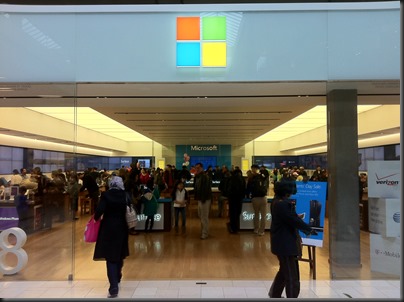
I thought I’d write about my experience of the Microsoft Store; the stores have limited presence and are just in the USA at the moment.  That means there’s nearly a whole world of people who have never visited one.  We’re also at an interesting time for devices. with Windows 8 driving a major change in interface and form types, and supply of these machines has been limited worldwide.
IMG_0780

It’s MVP Summit week.  That means some 1,200 geeks head to the Pacific northwest of the USA to visit Redmond (Microsoft global HQ) and we typically stay in nearby Bellevue, WA.  Most of the hotels are within walking distance of Lincoln Square, where you will find a Microsoft Store (and an Apple Store just up the escalator).  Every Sunday before the Summit, you’ll see hundreds of MVPs walk into this store and many of them walking out carrying a large bag.  Oh!  And don’t forget that the Surface Pro was just launched, and MVPs are in that niche that would want an ultrabook alternative tablet, with 4 GB RAM, 128 GB+ of storage, and an i5 CPU.

Sure enough, the store was busy just after opening last Sunday.  Myself and two other MVPs went in.  1 wanted to buy a Surface Pro, and the other was interested and open to the idea of a purchase.  As you can see above, the Surface (RT on left, Pro on right) were front and centre, one with a type keyboard and the other with a touch one.  All along the wall on the right were sample Surfaces for you to spend time on.  The other tables (on the right) were populated with alternative tablets and (on the left) with ultrabooks and laptops.  Either all, or close to all, devices featured multipoint touch.

We went straight to the Surface Pro.  It is as advertised.  It is solid as a tank, as is the Surface RT, has a great screen (Surface screen has excellent contrast which we photographers love), and the type keyboard is worth the extra 1.5mm for the typing experience.  The power connector is improved slightly from the RT device.  The stylus attached to this same connector.  The attachment is pretty solid and it takes a good tug to pull it out.  However, with a 4 hour battery life, I can see people needing to remove the stylus, power the device, and ordering many an expensive stylus from Microsoft over the coming years.  I had already told my colleague who wanted to buy a Pro to check out a few things:

  • The typing experience for when you’re on the go or at a conference like TechEd or MMS where you have no table to rest a kickstand
  • The battery life versus the competition

The battery life of the Surface is a serious weakness.  4 hours is very short, shorter than a modern ultrabook by 1.5-4 hours.  He got a stool from another desk and tried to use the Surface Pro keyboard on his lap: fail. 

We tried some other machines.  The Samsung ATIV Smart Pc (what I use) was there.  That “clovertrail” device gets 12 hours of real life but the CPU is limited.  The similar HP Envyx2 was there too.  I liked the feel of it, but I didn’t like the lack of ports and the use of a blank to fill the MicroSD port; that blank will get lost.  The Samsung approach with a nicely fitting flap is much better.  The Samsung ATIV XE700T1C-A01US Smart PC Pro 700T was also there:

  • Same i5m (mobile) as the Surface Pro
  • Same 4 GB RAM as the Surface Pro
  • Stylus with same functionality as Surface Pro that hides seamlessly into a dock in the chassis (so much so that 1 person who bought one of these tablets last Sunday thought he didn’t have a stylus until I showed it to him on Friday)
  • 8 hours of advertised battery life – twice that of the equivalent Surface Pro running the same operating system
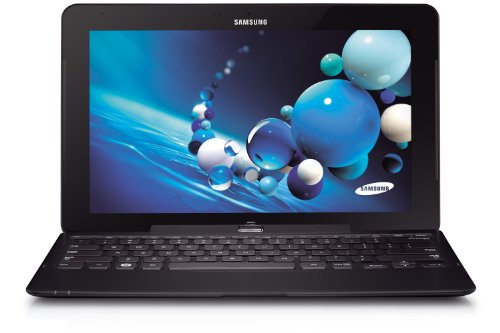
The dockable keyboard was not there to try out on the demo table.  The Microsoft Store has lots of sales people available and easy to find in their luminous t-shirts.  We asked for a keyboard to test with, and one appeared a couple of minutes later.  The clamshell (or convertible or transformer) keyboard gave 2 USB 2.0 ports in addition to the USB 3.0 port on the tablet.  My MVP colleague tried the stool test again and was happy with the laptop-like experience.  Here’s where things start to get interesting:

  1. The sales guy told us that the keyboard (clearly different to my one) had an additional 4 hours of battery life.  I was surprised, but had no material to contradict him.  He must have been briefed.
  2. Other MVPs who were trying the Surface Pro out came over and started to ask lots of questions about this Samsung tablet that could also be an ultrabook style machine.  We started to gather a crowd around us.

My colleague was sold and decided to buy the Samsung instead of the Surface Pro … and a few minutes later we saw another guy in the crowd do the same.  I decided to wander the store:

  • Lots of Windows Phone 8 handsets, all locked to networks (ick!)
  • An attractive Asus 15” thin laptop that reminded me of a MacBook Pro
  • The wafer thin Acer ultrabook that journalists have raved about … that features a keyboard with the feedback of wet lettuce.  I would hate this machine
  • Lots and lots of machines with variations to suit anyone

Two great things about buying from the Microsoft Store:

  • You get a 2 weeks, no questions asked, return policy.  You don’t like it, you can bring it back and get your money back.
  • Every machine is rebuilt with a “signature” build so you don’t get crapware that eats up disk space, RAM, and CPU.

We left and spend the day wandering, checking out the Barnes and Noble Nook (a nice machine but with severe region limitations on content availability), seeing some of our books for sale on the shelf (happy dance!).  We met more of our MVP colleagues that night, many of whom had bought the Surface Pro, and some were having buyer’s regret.  We told them that it wasn’t too late to return the device and look at alternatives, such as the Samsung.

The next day was the start of the Summit and some more Samsungs appeared where the owners had a Surface until the night before.  Hmm!  And the trend continued.  The no-questions-asked returns policy was being tested and passing with flying colours as people switched to an alternative device.  And this went on for the week.

Myself and another colleague looked into the question of the keyboard having an additional battery.  I was doubtful – and our research confirmed my suspicions.  We went back to the store when we had a free moment … my colleague with the new Samsung explained what had happened to another sales person.  We’re used to a “who give a flying f**k” attitude from sales people back home.  They’d tell us that’s our problem.  Not so in the Microsoft Store; the sales person was apologetic and gave my colleague two kick stands for his new tablet … no questions asked.

I’ve got to say that the Microsoft Store is the best PC shopping experience that I’ve had.  Great modern stock, and helpful sales staff.  I really hope they expand internationally … and soon.  Right now they have a limited presence and that allows the Best Buys of the world (we went there and it was a very different experience) to continue unchanged.

By the way: there were only 64 GB Surface Pros available until mid-week.  A discount was being given to anyone who bought one and additional expandable storage in the Microsoft Store.  I know lots of MVPs bought a Surface Pro this week, and most of the folks we talked to weren’t very happy with them.  Battery life was an issue.  Meanwhile, another VM MVP was using his machine all day long on battery to take notes, keep up with email, etc, and my original colleague from this story managed to get 9 hours with the machine sleeping here and there as a tablet does.  My lesser clovertrail machine was coming home with over 25% of available battery with constant usage – I was even leaving the charger in the hotel – who does that with a Windows machine!!!

The Surface Pro is a niche machine.  Who’s going to pay $1100 plus tax for a tablet, other than a Pro who needs an ultrabook style machine that will double as a tablet?  The Surface has name recognition … and that’s mostly all it has over the competition.  The Pro alternatives from the others are much better machines with the same internals, same touch interface, and same operating system.  I get driver and software updates made available to me almost every couple of weeks from Samsung – I have 4 queued up right now.  So that’s not an advantage for Microsoft. 

My advice is: don’t mistakenly assume that Surface is the only machine.  Go out and get the machine that suits you best … and maybe that is a Surface and maybe it is an Asus, a HP, a Lenovo, a Samsung, an Acer, a Dell … and so on … and it runs Windows 8 or Windows 8 Pro.

Technorati Tags: ,

The Windows 8 and Samsung ATIV SmartPC Battery Test

I wrote most of this blog post while flying.  The ending was written in Florida.

When I bought a Windows 8 tablet, one of the things I had in my mind was trans-Atlantic travel.  My iPad 1 barely would make it from Dublin (Ireland) to the east coast of the USA.  Then I’d have to find somewhere to charge to make it to the west coast.  Inevitably, I’d end up having to watch the awful Disney movie on the flickering tube TV with a colour channel missing on the US Airways or Delta flight.

No more.  Windows 8 devices offered great battery life.  My SmarPC survived for over 12 hours one day while I surfed and worked.  Could it do as well playing movies?  Movies hammer the battery more because there isn’t as little time for rest.

Today I am flying from Dublin to Orlando, via London.  I charged the device overnight, topped it up in Dublin Airport, and have been surviving on batter since.  I’m expect a total journey time of just under 17 hours.  Obviously the device has to be off for some of that:

  • Boarding and take-off in Dublin
  • Landing and transfer in London
  • Boarding and take-off in London
  • Lunch during the London-Orlando flight

Will the tablet make it to landing in Orlando?  Ideally, I’d like to have some juice left there … just in case I need to get online to google or book something.

My usage so far:

  • Surfing, tweeting and email for about 20 minutes in Dublin
  • 2 episodes of a 22 minute comedy while traveling to London
  • Another 22 minute comedy in London
  • Numerous 42 minute shows in flight, followed by some reading, some emails, and blogging.

We are over Quebec right now, with about 4 hours 12 minutes to go.  My battery has 33% left.  It is around 12 hours since I topped up the charge in the tablet.

In Florida:

I’m in Florida now.  The batter got down to around 4% while we were still 2 hours out of Orlando.  While I might have gotten 12-13 hours out of the device with general usage, it is quite clear that watching videos does hammer the battery.  I dimmed the screen for the last hour or so but I don’t know if this made much or any difference.

Please keep in mind that there were airplane/security mandated shutdown/reboots and they probably sucked more battery than a simple sleep/wakeup.

Technorati Tags: ,

Evaluate System Center 2012 SP1 and Windows Server 2012; And Maybe Win A Book!

You can download evaluation copies of System Center and Windows Server using the following links:

Here is the incentive (excluding the obvious opportunity to try out these exciting technologies): Prove to me that you have started a download and I’ll put you in for a draw.

Here’s how you prove it: send me a screenshot with your proof.  I’ll randomly pick a winner (the last one was in Australia) at the end of February, March, and April.  I will be posting reminders here (infrequently) and on Twitter (more frequently).

Mapping The Virtual Networking In System Center 2012 SP1 Virtual Machine Manager

I’ve spent the last few days working on the new networking in VMM 2012 SP1 to build new Windows Server 2012 hosts/clusters from bare metal and deploy virtual machines.  There are a lot of parts in this puzzle.  And the terminology is quite different to what we’re used to in Hyper-V.  In the end, I was deploying hosts with converged fabrics and creating clusters with SMB 3.0 (Scale-Out File Server) storage.

With so many pieces I thought it would be a good idea to map out everything that was required in my lab deployment.  Here’s what it looks like … note that you might need to look at the original image by clicking on it.

image

I have not gone further with the map, e.g. mapping to service templates, clouds, etc.  I’ve focused here on host and virtual machine networking deployment.


E2EVC Presentation – WS2012 Hyper-V Versus VMware vSphere 5.1 Deathmatch

This was one of the presentations that I did at the last E2EVC event in Hamburg late last year.  In it I discuss Windows Server virtualisation licensing, Windows Server 2012 Hyper-V, System Center, and vSphere.  Alex Juschin (RDS MVP) has posted the video here: