Infrastructure Planning & Design Guide For OpsMgr 2012

Microsoft has released an IPD for System Center 2012 – Operations Manager.

This guide outlines the infrastructure design elements that are crucial to a successful implementation of Operations Manager. It guides you through the process of designing components, layout, and connectivity in a logical, sequential order. You’ll find easy-to-follow steps on identification and design of the required management groups, helping you to optimize the management infrastructure.

Infrastructure Planning and Design streamlines the planning process by:

  • Defining the technical decision flow through the planning process.
  • Listing the decisions to be made and the commonly available options and considerations.
  • Relating the decisions and options to the business in terms of cost, complexity, and other characteristics.
  • Framing decisions in terms of additional questions to the business to ensure a comprehensive alignment with the appropriate business landscape.

Sinofsky Leaves Microsoft … And No One Seems Sad About It

The man who ran Windows (desktop), Steven Sinofsky, has left Microsoft, just a few weeks after the birth of his baby, Windows 8.  Mary Jo Foley reports that there might be some intrigue to this one.  Maybe Sinofsky wasn’t the easiest to work with? We have comments out there from the analysts claiming that Windows 8 will make little or no dent in the enterprise, so maybe Ballmer was upset with that?  Who knows – maybe Sinofsky did want to go skateboarding for a few years after being president of Windows?

What news to wake up to!  I checked through a night of tweets and let’s just say that there were very few tears.  I think that there was a good bit of schadenfreude in the social networks.  Certain things about Sinofsky rubbed people (the public, the media, and even Microsoft employees) the wrong way.  We expect Apple to be secretive and non-cooperative.  Microsoft has always been pretty open (too open if we judge it by the Longhorn experience) and programs such as beta and release candidate gave millions of people a chance to give input on product in the past.  The CIA-level secretive, closed, and TAP-only behaviour of the last 13 months is not what we expect from Windows in the Microsoft community.  There’s a huge eco-system of partner technologies (hardware and software) and legacy support is way more important to us, especially in the business.  The 10,000 word diatribes on the death of the start menu which boiled down to “we’re right and you’re wrong” followed by hundreds if not thousands of contradicting comments showed that Sinofsky didn’t listen, he dictated.

Maybe a strong dictator was needed.  Rome actually used to appoint dictators for the duration of a state emergency in the times before Caesar.  Perhaps Microsoft required someone strong to change the momentum of Windows that was threatened by devices that weren’t Windows PCs.  And maybe Sinofsky lived out his purpose at Microsoft.

What I do know is that a person I know predicted back in 2008 certain things about Sinofsky and how he would work that have since come true.

Does the future hold anything different?  I don’t expect that it does.  Mary Jo reports that Julie Larson-Green was “promoted to lead all Windows software and hardware engineering”.  Judging by Larson-Green’s background, she’s been a Sinofsky acolyte from his days in Office (before running Windows).  Expect the Windows 9 schedule to run as follows:

  • Announcement & Developer Preview at Build 2014
  • Customer Preview (not Beta with public feedback) in February/March 2015
  • Release Preview (not Release Candidate with public feedback) in May 2015
  • RTM in August 2015
  • GA in October 2015

Just sayin’.

Technorati Tags: ,

Enable Processor Compatibility For Legacy OSs in WS2012 Hyper-V

I read on a Windows magazine website today (Monday 12th, November 2012) that the ability to run legacy operating systems, such as Windows NT 4.0 Server or Windows 2000 Server, was removed from Windows Server 2012 Hyper-V.  I would have commented but the publisher wanted me to register.  This feature was removed from the GUI, but it was not removed from Hyper-V.

Note: Neither Windows NT 4.0 Server or Windows 2000 are supported by Microsoft, although you might want to run really old applications in VMs because you can’t get hardware for them.

You can run the following to see the processor compatibility of a particular VM for legacy operating systems using PowerShell (where VM01 is the VM in question):

PS C:> Get-VMProcessor VM01 | fl CompatibilityForOlderOperatingSystemsEnabled

CompatibilityForOlderOperatingSystemsEnabled : True

You used to configure this setting in the processor settings of a VM.  Now you can configure it as follows:

Set-VMProcessor VM01 -CompatibilityForOlderOperatingSystemsEnabled $true

You can turn it off again by running:

Set-VMProcessor VM01 -CompatibilityForOlderOperatingSystemsEnabled $false

Note that enabling this setting requires that the VM be turned off.

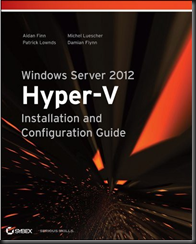
This information has been brought to you by Windows Server 2012 Hyper-V Installation and Configuration Guide (available on pre-order on Amazon):

image

KB2575625 – W2008 R2 Cluster Starts Failover After 80 Seconds When You Shutdown Active Node

Microsoft has released a hotfix for when the cluster service initiates a failover after a delay of about 80 seconds when you shutdown the active node in Windows Server 2008 R2.

Consider the following scenario:

  • You configure a failover cluster on some computers that are running Windows Server 2008 R2.
  • You add a crossover cable between two nodes of the cluster.
  • You shutdown the active node of the cluster.

In this scenario, the Cluster service initiates a failover after a delay of about 80 seconds.
Note The Cluster service usually initiates the failover within 5 seconds.

This issue occurs because the Cluster service incorrectly waits for Global Update Manager (GUM) updates.

A hotfix has been released to fix this issue.

Toshiba u920t Windows 8 Convertible Ultrabook

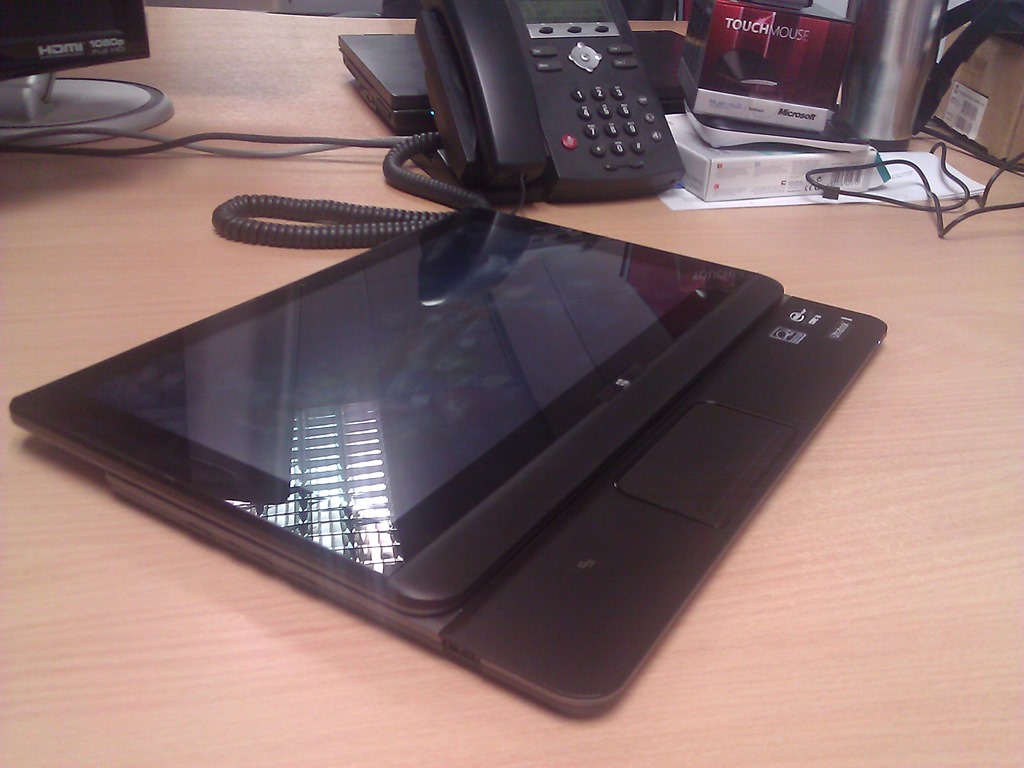
The final of the demo machines to arrive on my desk is the U920T slider ultrabook from Toshiba. This is a machine that looks like a big tablet one moment, and a classic ultrabook the next. 

When closed, the screen is facing outwards instead of in.  This is a tough, touch screen, supporting 5 touch points.  The material on the case reminds me of the grip on a DSLR camera.  It’s a kind of textured  tough rubberized plastic.  It feels nice to hold, and you feel safe that the ultrabook won’t slip from your hands when using it in “tablet mode” (it’s not a tablet).

WP_000050

The screen slide forward, pushing from the base.  There’s a notch when the trackpad is revealed.  The idea here is that you are in tablet mode, but you can access the trackpad.  The trackpad is smallish compared to ultrabooks, and does not have Windows 8 gesture support.

WP_000051

The next stopping point is when the screen is fully extended.

WP_000053

Now you can tilt the screen up.  There’s no fixed angles; you just rotate the screen until it’s at the angle you want or until it reaches the max, somewhere around 80 degrees (90 being straight up).  Here it is with the screen as vertical as it goes.  BTW, there are both front and back cameras on either side of the screen.

WP_000054

I had 2 worries about the screen tilt mechanism:

  1. How far would it rotate.  Every photo I’d seen showed it at around 70 degrees.  That’s useless for watching Netflix, TV, etc, when you’re in a hotel room.  The angle it reaches is acceptable as long as there is no overhead light.
  2. I was worried about the mechanism.  Would it be strong?  The photos I’d seen made the hinges look flimsy.  Would the screen be rigid or flapping about and rattling?

The hinges are actually nice thick looking steel.  They work with a silent ratchet to keep the screen rigid so it doesn’t bounce when you touch it.

WP_000055

The machine we got has an i3, 4GB RAM (max of 8), 128 GB SSD.  There are 2 USB 3.0 ports, SD card, and  full sized HDMI.  There is no RJ45 (use something like a Dynadock docking station) or VGA (use a HDMI to VGA converter).

There was a bit more Toshiba installed software to uninstall from this machine.  They have their own store (Toshiba Places) on there, some game store (also on the Sony T13), and a bunch of support stuff.  There were more default apps from the Windows Store too … and McAfee (uninstalled immediately).

My impressions?  This is a quality build.  It feels solid, capable of being carried about by a sales person for 3 years.  I don’t think there is a TPM chip.  The battery life is advertised as 4 hours.

I personally would like this type of machine as a presentation platform when coupled with a VGA adapter.  I’m wondering what’s going to happen to it when our run of Windows 8 presentations is over Winking smile

This machine caused quite a bit of interest in the office, even more than the Surface to be honest.  Even our Apple people had to admit it was a nice machine.

Technorati Tags: ,

I’m Getting All Touchy Feely With Windows 8

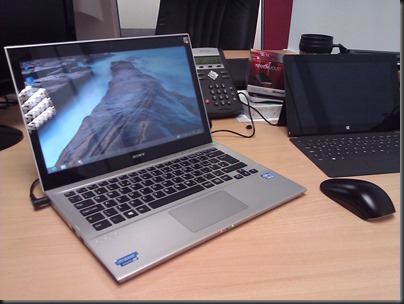
Here’s my desk as it is right now:

image

From left to right:

  • My work PC: HP Elite MicroTower with Viewsonic 22” touch monitor
  • Microsoft Surface RT 32 GB with Touch keyboard/cover
  • Sony T13 touch ultrabook
  • Toshiba u920t convertible (slider) touch ultrabook

It’s a tough job but somebody has to do it.

Technorati Tags: ,

Sony T Series 13.3” Windows 8 Touch Ultrabook

A Sony VAIO T (T13) Series SVT13124CXS 13.3-Inch Touch Ultrabook (Silver) just arrived on my desk as part of our Windows 8 demo kit. It’s a nice ultrabook.

WP_000048

The model we got has a quad core i5-3317U CPU, 4GB RAM, 10-touch point display (not just the minimum of 5), and a 500 GB hybrid drive (32 GB of which is SSD).

What I love about this machine:

  • USB 2.0 and USB 3.0
  • Full size HDMI port
  • Full size RJ45 networking port
  • Full size VGA port
  • 10 touch points which future proofs the touch
  • It’s not cluttered with default apps/programs.  There are some Sony add-ons, mainly the care stuff to maintain the machine, which is perfectly fine. And those Sony apps do update through the app store too.

Sony have sacrificed thinness to get those full size ports in there. It’s not as thin as a UX31 but it’s still ultrabook thin.  Someone who presents a lot like me will be OK with that.  That’s because there are no dongles required to connect to the typical hotel/office projector that only supports VGA … no dongles … no converters …. nothing to leave behind or lose.

Important apps like Skype and Skydrive are pre-installed. 

The touchpad supports Windows 8 gestures.  The keypad is pretty nice.  My test is to type the most common string of text that I use when working: “Windows Server 2012 Hyper-V” surprisingly enough Winking smile The keyboard is pretty nice, better than the one on my UX31 (I think most things are).

Negatives:

  • McAfee is preinstalled, but that disappeared quickly to be replaced by the default Windows Defender.
  • There isn’t TPM chip. This target market is not business, but I can see work people who travel a lot liking this machine.  It’s attractive and has that dongle-less approach which is all-too rare in the ultrabook market.
  • I’d like the screen hinge to be a tiny bit stiffer.

Overall, a nice machine IMO.  It’s got a nice spec, and comes in at a competitive price as an ultrabook.  Another machine arrive while I was setting up the Sony.  More on that later when I can pry it out of the hands of my colleagues.

Technorati Tags: ,

Smartglass Won’t Play Video To Your XBox From Windows 8

You’ve probably heard about Smartglass or seen the video.  You’ve followed the instructions (log in with common Live/Xbox ID on Xbox and Windows 8 device, install & configure the app), started playing a video, swiped up, hit Play To, and there’s no option for your Xbox.  Then you start searching and find the same result I did, and wonder if your Surface is broken. 

I verified that it wasn’t just the Surface, by recreating the scenario from a pristine virtual machine.

So what was wrong?  It appears that Microsoft missed an instruction:

  1. Hit Charms – Settings – PC Settings
  2. Go to Devices
  3. Add A Device, let it search.
  4. Add Xbox 360 (Digital media server)
  5. Wait for it to add & install

Now start a video on your Windows 8 machine, open the app bar (bottom), hit Play To –> XBox 360

Technorati Tags: ,

Microsoft Surface RT Arrives 2 Days After Order

On Monday morning, we (the company) ordered a 32 GB Surface RT (ARM processor) with touch keyboard, and an optional mini-HDMI to full HDMI adapter. Almost 48 hours later it arrived – and we didn’t expect it until next Monday.

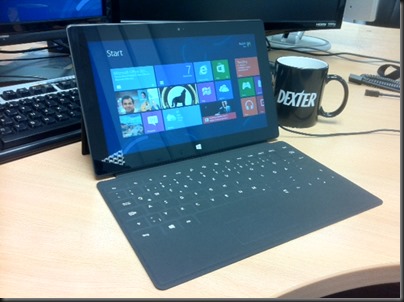
First impressions – it’s heavier than I expected (everyone’s reaction so far – we distribute a certain market leading tablet) after handling the Samsung and Asus RT tablets. I am left to guess that the VaporMG casing is partly responsible. The device feels well in the hand, but I wouldn’t give it an edge over the other RT tablets that I’ve tried.  The kickstand is solid, but (in my opinion) doesn’t have that luxury European sound when closing, as was promoted. The screen contrast is superb, as early reviews highlighted.  Photos do look well on the device.  The keyboard does have a solid click and lock – first thing I did was wave the tablet by the keyboard to the shock of my co-workers Smile

The touch keyboard is different but it works … on a table.  I give this keyboard concept a fail in the actual on-the-lap experience (see the transformer type tablets such as Asus Vivo, HP Envy x2, Dell XPS 10, or Samsung ATIV).  That’s just my opinion.  Others disagree and prefer the non-transformer tablet approach of the Surface. The great thing is that we do have device and CPU choices with Windows 8/RT and we can still share a common app platform.

An issue is that the touch cover doesn’t close flush with the edges of the tablet; it’s a matter of time until the edges fray as the tablet is put into a bag and pulled out again.  The touch keyboard is not magnetically held closed to the tablet when you close it over. You have to hold the cover to the tablet.

As was reported elsewhere, the power cable locks on magnetically; it’s a little fiddly. There is a very dim light (not visible from angles) that indicates a solid lock and charging activity.
photo

Setup was painless. My colleague and myself set up user accounts.  Importantly, the device is snappy to use.  I installed Guns 4 Hire and it played well.

I kicked off a reset from Settings.  It’s been running 15 minutes and is stuck at 1%. Ah … just as I typed that % it switched to 2% progress Smile

One nice thing to see: finally MSFT is shipping a product that is not encased in inordinate amounts of solid, waste plastic.  The packaging was almost entirely cardboard, as you get with the iPad or Kindle. Bravo!  However, Amazon still keeps the lead there by using recycled materials for the packaging. I really don’t care what a box looks like when its destiny is to end up in my recycle bin.

The first person to set it up was one of our MSFT licensing experts. He logged in with his Microsoft (Live) ID and was well impressed that his contacts, photos, and social media stuff was waiting for him to use.  That’s such a winner for Windows 8/RT.

Edit: After the reset I started updating and installing. Lots of apps were installed, including one by the GAA and some rugby (6 nations and IRFU news) apps. Lots of good games on there, some work stuff like a whiteboard and Citrix receiver. And of course, Office RT was upgraded to RTM (remember that you need to “upgrade” that to Pro for business usage).

As I said, it feels nice in the hand, it ran well in my quick test (don’t bother asking me specifics because it was a quick test), and it is the Surface, the flagship device for Windows 8, and probably the first of many versions to come.

For us, it’s a demo machine. We have to promote Windows 8 as a concept and devices such as tablets are central to that.  None of the manufacturers that we distribute have launched Windows 8 tablets so we needed something that wasn’t going to promote brands run by other distributors.  Hence we bought the Surface as a demo device.

Technorati Tags: ,