Notes–The New Hyper-V Extensible Switch in WS2012

These are my notes from VIR307 at TechEd NA 2012, with Bob Combs.

image

Cloud Demands

  • Integration of security and protection
  • Ability to add traffic tools
  • Unification of management tools
  • Blur distinction between physical and virtual networks

My experience: anything manual (setting up VLANs, firewall rules, etc) prevents self-service, and slows down deployment of traditional service.  Also adds a great deal of complexity because traditional systems not designed for the scale (networks, rules, tenants) of cloud computing.  Anything done in software is automatable and flexible, and could make self-service possible.

The Hyper-V Switch

Replaces the virtual network.  Same GUI, does the same basic role (connect virtual network cards to physical networks) … but more:

image

Remember that the switch port is an attribute of the virtual network card.  Therefore your policy moves with your VM.

  • PVLAN: Use 2 VLAN addresses to scale out with flatter networks and achieve some level of isolation
  • Trunk Mode: The ability to allow multiple VLANs to go to a single VM port.
  • Port Mirroring: Forward traffic from one NIC to another. Could be useful for virtual IDS.
  • Unified Tracing: Trap packets for analysis.

Interesting note: if you apply a policy on an SR-IOV vNIC then the channel will be rerouted via the virtual switch to apply the policy, thus disabling SR-IOV for that vNIC.

Extensibility

3rd party extensions, not replacements, add extra stuff that MSFT doesn’t do in the switch.  The extensions have to be logo tested and certified to make them reliable.  The system is “open” to encourage growth in the ecosystem.  Already more networking extensions than vSphere has replacements.

Extensions

The extensions are filters – NDIS-based Windows Filtering Platform Providers.  Configuration is unique to each instance of an extensible switch on a machine.

3 types of extension:

  • Capture: inspect traffic and generate new traffic for report purposes, but cannot modify or drop traffic.  Can have multiple capture extensions.  They can be ordered/reordered.  inMon sFlow Traffic Monitoring is an example for monitoring virtual traffic.
  • Filtering: Can inspect (everything that capture can do), drop, modify, and insert packets.  5Nine Virtual Firewall v3.0 is an example. 
  • Forwarding: Direct traffic, defining destination(s) of each packet.  Forwarding extensions can capture and filter traffic.  Think of it as all encompassing.  What if you wanted the Hyper-V switch to look like another switch?  That’s what this type allows.  NEC OpenFlow for Hyper-V is an example of this.  The Cisco Nexus 1000V is another example. 

SCVMM

VMM agent can manage the extensions via extensions to VMM.

PowerShell

image

VM Based Traffic Tools

  • Can run in VM, as a switch extension, or as a host service
  • Monitoring Port copies traffic to VM
  • Traffic trunked to VM before distributing to other VMs (trunk mode on port)
  • Capture extension echo traffic to service
  • Extension pipe/tunnel traffic to a destination

Extensible Switch ETW Tracing Example

Tracing events.

image

Extensible Switch Unified Tracing Example

Capturing packets.

image

Summary of Extensible Switch Benefits

image

There were a bunch of demo videos featuring the partner extensions that I did not take notes on.

Interesting Bits of Windows Server 2012 Essentials Information For SBS Customers

The goal of the product is to give an economic server OS for small businesses, with the flexibility to choose between on-premises (such as Exchange) and cloud (such as Office365) solutions.

SBS 2011 Essentials becomes Windows Server 2012 Essentials, a similar product that scales up to 25 users and 50 devices.  A small percentage of SBS customers had more than 25 users.

The question is: will you migrate your customers to Office 365, another cloud, or find an alternative to Exchange?

Available Roles and Features

Out of the box, the following roles/features are available in WS2012 Essentials:

  • AD Certificate Services (installed/configured)
  • AD Domain Services (installed/configured)
  • AD Lightweight Directory Services
  • AD RMS (requires RMS CALs)
  • Application (installed/configured)
  • DHCP Server
  • DNS Server
  • Fax Server
  • File Services (installed/configured)
  • Network Policy and Access Services (installed/configured)
  • Print and Doc Services
  • Remote Desktop Services (installed/configured and requires RDS CALs)
  • UDDI Services
  • Web Services (installed/configured)
  • Windows Deploy Services
  • WSUS

Normally WS2012 Essentials does not require CALs.  The only exceptions are if you choose to use Remote Desktop Services (RDS – widely used) or Rights Management Services (RMS – rarely used).

Features described in the FAQ

Here are some features of Windows Server 2012 Essentials from the WS2012 Essentials FAQ:

  • Windows Phone App: Remote Web Access provides a stream-lined, touch-friendly browser experience for accessing applications and data from virtually anywhere they have an Internet connection using almost any device. Windows Server 2012 Essentials also provides an updated Windows Phone app and a new Metro app for Windows 8 clients, allowing users to intuitively connect to, search across, and access files and folders on the server.
  • VPN: Windows Server 2012 Essentials turns setting up virtual private networking (VPN) into a painless wizard-driven process of just a few clicks, and simplifies the management of VPN access for users. Client computers can leverage a VPN connection to remotely join the Essentials environment without the need to come into the office.
  • Choose our email solution: customers can take advantage of the same integrated management experience whether they choose to run an on-premises copy of Exchange Server, subscribe to a hosted Exchange service, or subscribe to Office 365.
  • Storage Spaces: [this] feature allows customers to aggregate the physical storage capacity of disparate hard drives, dynamically add hard drives, and to create volumes with specified levels of resilience.
  • Improved Backup: Windows Server 2012 Essentials can perform complete system backups and bare-metal restores of the server itself as well as the client computers connected to the network – now with support for volumes larger than 2 terabytes [thank VHDX for that!].
  • Windows Online Backup: The Microsoft Online Backup Service can be used to protect files and folders in a cloud-based storage service that is managed by Microsoft.
  • Windows 8 File History: Essentials also centrally manages and configures the new File History feature of Windows 8 clients, helping users to recover from accidently deleted or overwritten files without requiring administrator assistance.

Some Upgrade Paths from SBS with Software Assurance

  • If you have Software Assurance on Small Business Server 2011 Essentials, you will receive one Windows Server 2012 Essentials license.
  • If you have Software Assurance on Small Business Server 2011 Standard edition, you will receive one Windows Server 2012 Standard edition license and one Exchange Server Standard 2010 license.
  • If you have Software Assurance on Small Business Server 2011 Premium Add-on edition, you will receive one Windows Server 2012 Standard edition license and one SQL Server 2012 Standard edition license.

I’m no SBS expert, but it seems to me that existing customers with SA will retain the same functionality through the upgrade.  But I can envision there being a price jump if they are on annuity licensing for SBS Standard/Premium (we’ll have to see the price lists to judge it).  They will have to choose between existing on-premises product and cloud-based product.

Opinions of the SBS Community?

It’s the MSFT partners that are this community.  Based on the online comments, let’s just say they aren’t too pleased.  It’s early days so I’ve yet to hear from local partners.

10 Months with Windows 8 (pre-RTM) on the Build Slate

In September 2011, attendees of the Build conference received a slate PC.  I thought I’d summarise my experience of Windows 8 over this time as we close in on the RTM.

It was based on the Samsung Series 7 (available as retail) but it had a different spec: i5 CPU, 4 GB RAM, 64 GB SSD, and lots of sensors that weren’t in the original.  Notice the “prototype hardware” sticker on the side.

I don’t want to talk about the hardware too much, that’s because it is not representative of what built-for-Windows 8 hardware will be.  It was a prototype built on Intel chipsets that were available last year.  For example, it has 3.5-4 hours battery life and the new Lenovo W530 with an i7 CPU and a 9 slice battery claims to get over 20 hours.  There’s no comparison.  Check out the recently announced Microsoft Surface to see what can be done now with tablets and slate PCs.  Instead, I want to focus on my Windows 8 experience.

Windows 8 Developer Preview

The name says it all; it was intended to give app/drivers something to start on.  As a user experience, the DevPrev was ropey (a term we use to describe a state of hangover).  It worked but it needed improvement.  The performance was good.  Yes, it crashed quite a bit.  I did my share of resets.  I installed the feedback tool and I remember one night of posting feedback that I’d built up over time.

There were some interesting apps to play with that were built-into the OS.  The app store was not live.  Most of the apps were built by students and were basic enough; but they existed to demonstrate the capabilities of the OS in terms of UI, design, and sensor utilisation.  We quickly got bored of the apps; we needed a store.

As a touch UI, it really only took a 10-15 minutes of trying things out to learn.  Swipe from the edges and see what’s there.  You can show a person this in less than 5 minutes.

I had a boot-from-VHD on my work laptop.  I was not a big fan of the keyboard/mouse experience at first, but I really liked having Hyper-V in an end user OS.

Windows 8 Consumer Preview

There was no traditional beta with a page on Connect.  The Consumer Preview was a smoother build, ready for IT Pros and end users to play around with.  The UI was pretty much finished, with some improvements from user feedback.

The big news was that the CP build included access to a live Microsoft Store.  Some of the apps were poor.  The Twitter apps were dreadful, making very poor use of the space.  Some apps were excellent; the Tube Rider boat racing game was a great demonstration of what could be done with the hardware.  And traditional big names appeared such as Cut The Rope.  SkyDrive was available too, and this started to show of the 3-screens-and-a-cloud concept, unifying the user’s cloud-based experience across many devices.

I upgraded the slate the day that the CP release went public, using an online updater that Build attendees could use.  It was a seriously smooth upgrade.  I guess that’s what people will experience when they avail of the $40 upgrade to Windows 8.

My work laptop VHD build also was upgraded.  I started to warm to the experience of using it via keyboard and mouse.

Windows 8 Release Preview

Now we’re cookin’ with diesel!

My work laptop was wiped and rebuilt with Windows 8 with Hyper-V enabled.  I leverage the SSD and hybrid drive to demo deployment stuff like System Center 2012 Configuration Manager.  I installed an old Samsung N150 (single core Atom CPU) netbook to Windows 8 RP and it’s pretty responsive.  By now I’m used to using the Metro UI with keyboard and mouse, and it’s started to become muscle memory.

The Build slate was upgraded too.  The UI is so snappy. The on-screen keyboard is much better than the iPad one (typing speed). The Microsoft Store was updated. Some apps were removed, and new ones were added. The list is increasing still. Of the games, there is an adventure game (can’t remember the name) that shows a blend of pretty graphics with touch UI. MetroTwit appeared as a beta and showed how to do a Twitter app on Metro; it’s similar to the ordinary desktop version but different, taking advantage of the possibilities of a touch UI.  I also like a news app called Discourse which allows you to create your own news feeds based on lots of news sites (could do with more sports stuff!).

On 2 of the 3 nights I’ve been home this week (the 3rd night I was busy blogging), I’ve found myself reaching out for the Slate PC and using it for several hours while watching TV while browsing, checking email, etc.  That’s a good sign; it means that the Metro UI works.

I have SkyDrive up and running, MetroTwit works pretty well (for a beta), and I’ve connected the People app to the various social apps that I’m on.  The only reason I go to the desktop UI is to launch VLC (I don’t like the Videos app) or to view web sites with plugins such as Netflix (a Netflix app is already announced for post-RTM).

I showed the slate with the RP build to some folks at work.  They were impressed.  The current batch of apps show off much more potential than what was in the original DevPrev build.

The Future

We know that there are more apps lined up for post-RTM.  Tube Rider is “coming soon” in one of the XBox apps.  Netflix was shown at the Surface announcement.  App availability is the key to Windows 8.  Microsoft obviously plans to make money from the apps; notice how cheap the upgrades are for new Windows 7 sales ($15) or existing Windows owners ($40).  Microsoft won’t make a profit there, but they will make a profit from games (did you know Xbox 360 is sold at cost or at a loss?). 

We think the RTM will be end of July or August and GA will be October.  That is pure speculation but Steven Sinofsky has a reputation as a stickler for predictable schedules and this would tie in with Windows 7.  Plus this what clued-in reporters like Mary Jo Foley are hearing.

I will upgrade my build slate and my work laptop as soon as I can.  My ultrabook will be another matter; I have a project going on and I might not want to rock the boat until that project completes.  I would hope that the touchpad in my UX31 can support Windows 8 gestures – there’s a chance that it will because it has basic gesture support on Windows 7.  Who knows!

Technorati Tags:

WPC Is In Toronto Next Week

The Microsoft Worldwide Partner Conference (WPC) is in Toronto next week.  I won’t be going; it’s more important for networking and sales folks.  But there are a few reasons that it is of interest to me.

  • Keynotes: Last year we got some snippets such as the early announcements on Hyper-V replica and the then scalability figures.  On Monday it is Steve Ballmer headlining and it looks like we’re getting cloud-cloud-cloud.  On Tuesday … I really can’t figure out a theme other than cloud-cloud-cloud.  On Wednesday it is the Microsoft Partner Network – maybe the website has been burned to the ground?  Kevin Turner will also be talking compete on Wednesday.  Some hippie will also be smoothing your chakras – incense optional.
  • No SBS 2012: A lot of Irish MSFT partners specialise in the SBS space so I want to hear what they thing of the move to Windows Server 2012 Essentials.
  • What’s the plan for Windows 8/Server 2012: What will MSFT be telling partners about the enterprise and retail spaces?
Technorati Tags: ,

Virtual Machine Servicing Tool 2012 Beta

Microsoft has launched the beta for VMST 2012.  This tool is used in conjunction with System Center 2012 Virtual Machine Manager (VMM) to update offline virtual machine resources from ConfigMgr/WSUS.

VMST 2012 helps you more effectively—and safely—manage the workflow of updating you offline virtualization environment. Using VMST 2012, you can now service:

– Offline virtual machines in a SCVMM library.

– Stopped and saved state virtual machines on a host.

– Virtual machine templates.

– Offline virtual hard disks in a SCVMM library by injecting update packages.

Windows Server 2012 & 2012 R2 Virtualisation Licensing Scenarios

I am not answering any more questions on this post – to be honest, there have been too many for me to have the time to deal with them. Don’t bother asking – I’ll ignore/delete it.  My recommendations are:

  1. Re-read this post if you do not understand it after the first or second reads. To be honest, most of the questions have been from people who are just trying to make things complicated. Just license the hosts for the maximum number of Windows Server VMs that can ever run on that host, even for 1 second. It is that simple!
  2. Ask your LAR/distributor/reseller – that’s their job and that’s why you pay them

This post follows my dissertation on Windows Server 2012 licensing, which is essential reading before proceeding with this post.

[Edit] The below is unchanged with WS2012 R2. The only difference is that WS2012 R2 Datacenter edition (only) includes Automatic Virtual Machine Activation.

I’m putting Hyper-V aside for just a few minutes to talk about how you will license virtualisation of Windows Server 2012 in virtual machines no matter what virtualisation you use, be it vSphere, Hyper-V, XenServer, or whatever tickles your fancy.  BTW, the counting here also applies to:

  • System Center 2012
  • Core Infrastructure Suite (CIS)
  • Enrolment for Core Infrastructure (ECI – minimum of 25 hosts)

Please read this post s-l-o-w-l-y and let it sink in.  Then read it again.  If you have been eating bowls full of VMware FUD then read it a third time – slowly.

FAQ

  • VOSE or virtual operating system environment is a licensing term for virtual machine (VM).  It is used when talking about licensing a VM for Windows Server.
  • When you buy a license for virtualisation you legally buy and assign it to hardware, not to VMs.  The virtualisation rights of Windows Server licenses the VMs on the licensed host for Windows Server.
  • There is no mobility with OEM.
  • You can move a volume license and it’s virtualisation rights once every 90 days.  If you want to use HA (clustering), Live Migration/vMotion, DRS/Dynamic Optimization/PRO, then you need sufficient virtualisation rights on each host to support the maximum number of VMs that is possible on that host, even for 1 second.
  • You cannot split a license or it’s virtualisation rights across hosts.
  • Virtualisation rights are 2 VOSEs for a host licensed by Windows Server 2012 Standard and unlimited VOSEs for a host licensed for Windows Server 2012 Datacenter.
  • Virtualisation rights covers the host for the assigned edition of Windows Server 2012 and lower versions/editions of Windows Server.  It does not include Windows 8/7/Vista.
  • You can assign more than 1 license to a host

In other words, you license a host for the maximum number of Windows Server VMs that it could host.

1 Host, 1 CPU, 2 VMs

image

Here you want to run a single host that has 1 CPU.  The host will run 2 Windows Server virtual machines.  You will assign a single Windows Server 2012 license to this host.  The license covers 2 CPUs (there is only 1) and provides virtualisation rights for 2 virtual operating system environments (VOSEs).  In other words, you get rights to install Windows Server 2012 Standard (or previous versions) in 2 VMs on this host.

1 Host, 2 CPUs, 4 VMs

image

The Standard edition covers 2 VOSEs, but the customer wants 4 VMs running Windows Server Standard 2008 R2.  A single copy of WS2012 Standard will not suffice.  2 copies are bought to provide the 4 (2 * 2 VOSEs) VMs with licensing.

1 Host, 2 CPUs, 10 VMs

image

There are two options; do you go with the Standard or Datacenter editions of Windows Server 2012?

The Standard edition covers 2 VOSEs, but the customer wants 10 VMs running Windows Server Standard 2008 R2. A single copy of WS2012 Standard will not suffice. 5 copies are bought to provide the 10 (5 * 2 VOSEs) VMs with licensing.  Based on USA Open NL pricing the licensing of these VMs will cost $882 * 5 = $4,410.

The Datacenter edition of WS2012 gives unlimited VOSEs and covers 2 CPUs in the host.  This solution will require a single Windows Server 2012 Datacenter license which will cost $4,809.

Decision: If you will not go over 10 VMs on this host then Windows Server 2012 Standard edition is the way to go.  If you estimate that there is a good chance of the VM numbers growing then spend an extra $399 and pick up the easier to account-for Windows Server 2012 Datacenter with it’s unlimited VOSE rights.

10 is the magic number using USA Open NL pricing. Once you reach 10 VOSEs on a 1 or 2 CPU host, you need to consider the Datacenter edition because it is cheaper once you hit 11 VOSEs.

1 Host, 4 CPUs, 4 VMs

image

It’s an unusual configuration but a valid one for the demonstration.  The WS2012 Standard/Datacenter SKUs cover 2 CPUs each.  In this case there are 4 CPUs.  This will require 2 copies of Windows Server 2012 Standard, which also covers the 4 VMs.

Let’s pretend that 300 VMs will run on this host with 4 physical CPUs.  Then we would assign 2 copies of Windows Server Datacenter on it.  2 copies will cover 2 CPUs each (4 CPUs) and unlimited VOSEs.

That Host with 320 Logical Processors – 10 CPUs with 16 Cores with Hyperthreading

image

The maximum specification for Windows Server 2012 Hyper-V is 320 logical processors in the host.  That could be 10 Intel CPUs, each with 16 cores, with Hyperthreading enabled.  We don’t count cores or logical processors when we license.  We count CPUs, sockets, or plain old processors – pick the term you prefer.  There are 10 CPUs/sockets/processors in this server.  That requires 5 copies of either Windows Server 2012 Standard or Datacenter, depending on the required number of VOSEs.

Clusters

Let’s move on to the clusters, where people usually get things wrong because they don’t understand (or don’t want to understand) the mobility rights.  VOSEs licensed by OEM cannot move.  VOSEs licensed by VL can move once every 90 days.  The correct solution is to license each host for the maximum number of VOSEs that it can have for even one second.  And when I say “correct” I mean legal.  Software Asset Management professionals (auditors) are not stupid and the “tricks” I hear people proposing are neither original or unknown to these auditors.

Reminder: This applies even to you non-Hyper-V folks.

2 Hosts, 1 CPU each, 4 VMs


image

Don’t get fooled!  This is not one host with 3 VMs and 1 host with 1 VM.  This is 2 hosts, each of which can have up to 4 VMs.  In the past we would have used Enterprise edition on each host.  That has been replaced by Windows Server 2012 Standard edition, that now has all the features and scalability of the Datacenter edition.

Take each host and size it for 4 VOSEs.  That means we need to assign 2 copies of Windows Server 2012 Standard edition to each host.  That’s 4 copies of WS2012 Standard.

2 Hosts, 2 CPUs each, 10 VMs

image

10 VMs with 2 hosts means that it is possible to have all 10 VMs on a single host.  You have two options to license each host for up to 10 VOSEs.

Firstly you could license each of the hosts with 5 copies of Windows Server 2012 Standard.  That will give you 10 (5 * 2) VOSEs.  This requires 10 (5 * 2 hosts ) copies of Standard at a cost of $8,820 using USA Open NL.

Alternatively you could license each host with 1 copy of Windows Server 2012 Datacenter, at a cost of $9,618.  The extra $798 will allow you to burst beyond 10 VOSEs to unlimited VOSEs.  Switching to licensing hosts using the Datacenter edition means we don’t have to count VOSEs and we have unrestricted mobility between hosts.

2 Hosts, 2 CPUs each, 20 VMs

image

We have exceed the magic number of 10, and now it is cheaper to license with the Datacenter edition with it’s unlimited VOSEs per host.  Each host has 2 CPUs, so each host requires 1 copy of Datacenter.  There are 2 hosts so we require 2 copies of Windows Server 2012 Datacenter.

You could add more hosts to this cluster and each could have unlimited VMs.  As long as the hosts have 1 or 2 CPUs each, each additional host requires only 1 copy of Windows Server 2012 Datacenter to license it for unlimited installs of Windows Server for the VMs on that host.

Lots of Hosts, Lots of VMs, 4 CPUs per Host

image

The magic number of 10 VOSEs is a dot in the rear view mirror.  We now have lots of hosts with lots of VMs flying all over the place.  Each host has 4 CPUs.  To license the VOSEs on each host, we will require licensing for 4 CPUs.  This will require 2 copies of Windows Server 2012 Datacenter per host, each covering 2 CPUs.

Live Migration Outside the Cluster

And new for WS2012 thanks to Live Migration living outside the cluster: you must ensure that the destination host is adequately licensed for VOSEs to accommodate the new VM. If this is an infrequent move then you could avail of the VL 90 day mobility right to reassign a license, ensuring the the old host is sufficiently licensed for remaining VOSEs and physical CPUs.

Hyper-V Server 2012

Hyper-V Server has no virtualisation rights and includes no free licensing for VOSEs.  Therefore it is irrelevant in this conversation.

Economically Speaking – Why Hyper-V Makes Sense

If you buy Windows Server licensing for a host to license your VMs, then you are a tickbox (or PowerShell cmdlet) and a reboot away from having Hyper-V.  Buying another product is just more money spent.  And let’s be honest, Windows Server 2012 Hyper-V is not what you might have used/looked at before.

Windows Server 2012 Licensing In Detail

New, Simpler, Better Value Licensing Announced For WS2012 and Some SBS Changes

Note: I saw the announcement when it first came out and have been waiting & digesting.  More information came out since then so I thought a single post would be best. Make sure you follow this post by reading my post on licensing for virtualisation of Windows Server 2012.  I will not be answering any further questions on this post. Please ask your reseller, distributor, or LAR your scenario specific questions; that’s why you pay them.

In case you don’t know, I happen to work for a distributor of Microsoft licensing. My job is to work with our sales people, supporting Microsoft partners who resell product to end customers. My focus is on System Center (and that brings in Hyper-V) and Forefront, but anything that is anyway technical tends to find its way to my desk. And you know what? I’ve been amazed at the complexity that is involved. Some questions are part licensing/legal and part technical. And these issues confuse the hell out of people. And trust me; I’ve let well known executives in Microsoft know what I thought of the complexity.

The recent changes to System Center 2012 licensing simplified our conversations quite a bit. To use a Henry Ford analogy, System Center SMLs come in 2 sizes and in black:

  • SML Standard: 2 CPUs in the physical server, all of System Center, licensing 2 physical CPUs in the server + 2 VMs running Windows Server on the licensed host
  • SML Datacenter: 2 CPUs in the physical server, all of System Center, licensing 2 physical CPUs in the server + unlimited VMs running Windows Server on the licensed host

There is nothing to restrict you from creating hundreds of VMs on WinServ Std. The VOSE rights restrict your rights to install Windows Server. Make sure you follow this post by reading my post on licensing for virtualisation of Windows Server 2012.

    Windows Server 2008 R2 SKUs

    Currently on the Windows Server front it’s more like 2005 General Motors than early Ford. We have the following SKUs in Windows Server:

    1. Windows Server 2008 R2 Datacenter
    2. Windows Server 2008 R2 Enterprise
    3. Windows Server 2008 R2 Standard
    4. Windows Web Server 2008 R2
    5. Windows HPC Server 2008 R2 Suite
    6. Windows Server 2008 R2 HPS Edition
    7. Microsoft HPC Pack 2008 R2 Enterprise
    8. Windows Server 2008 R2 for Itanium-Based Systems
    9. Windows Small Business Server 2011 Premium
    10. Windows Small Business Server 2011 Standard
    11. Windows Small Business Server 2011 Essentials
    12. Windows Server 2008 R2 Foundation
    13. Windows Storage Server 2008 R2
    14. Windows Home Server 2011

    Phew! No wonder people get confused.

    Windows Server 2012 SKUs

    This evening Microsoft released the details of Windows Server 2012 licensing. There is also a datasheet and a FAQ with more details.  There will be 4 (count ‘em … four) 5 (count ‘em again … five) SKUs:
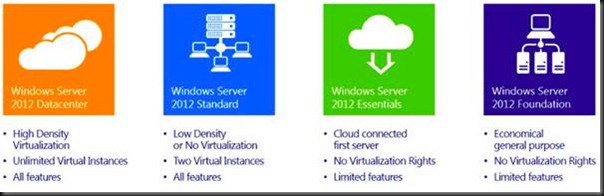
    clip_image002

    See EDIT#2 below … Windows Storage Server will also be released.

    Please, do not panic if you are a HPC customer or an Enterprise customer. Here’s why:

    • HPC will be a free download/add-on for Standard/Datacenter customers
    • Standard will have the same scalability and features as the Datacenter edition … yes, you can build clusters with Windows Server 2012 Standard … and at a fraction of the cost that you did it with Enterprise edition (as you’ll see next)!

    You see, IT Pros, not all change is bad J [Did I just say that?]

    Pricing & Changes

    I want to focus on the 2 computer room/data centre products for a while: Datacenter and Standard. What were the shelf prices before with 2008 R2?  Bear in mind that the shown prices are the from the Open NL price list, the most expensive of the volume license types.  They are shown to give an indication of past and present.  What you will pay your reseller/LAR/distributor will probably be less:

    clip_image004

    So, Datacenter cost $4,809 (for 2 copies – you’ll see why in a sec) and came with unlimited virtualisation rights on the host … or in simple language you could install as many VMs on that licensed host as your hardware would allow, and then install Windows Server 2008 R2 or lower, any edition, into those VMs at no extra cost. The funny thing with Datacenter was that it was per processor, with a minimum of 2 processors … hence I’ve shown $4,809 per host with 2 procs.

    Enterprise came with all the same features and scalability, with a limit of technical limit of 8 CPUs in the physical server. Licensing-wise, it allowed 4 VMs on the licensed host to run Windows for free. You could double the licensing for the host to get 8 VMs for free … but do the math and you might as well buy Datacenter edition then. However, Enterprise was $2,358 per server with no processor counting required.

    Standard Edition had limited scalability and features, e.g. 32 GB RAM even for Hyper-V. At $726 you licensed a server, and it came with 1 free license for a VM on that host.

    Enter Windows Server 2012 and we have:
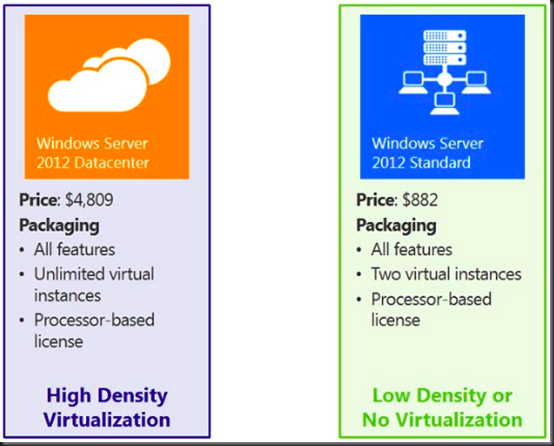
    clip_image005

    For Datacenter there is 1 change: You buy 1 copy of Datacenter and it includes 2 processors. The whole minimum-of-2-procs-per-host thing confused people. So Microsoft consolidated the 2 licenses into 1 and left the price at $4,809. We continue to have the unlimited virtualisation licensing. That means if you buy 1 copy of Datacenter for a 2 CPU host (any virtualisation) and you get unlimited installations of Windows Server 2012 or lower (any edition) for unlimited VMs on that host … no changes there!

    clip_image007

    Let’s move on to Standard before we cover the gap that was Enterprise. Standard is going from $726/server to $882 for 2 physical CPUs in a server. For that, you’re getting:

    • A huge leap in capabilities and scalability in the Standard edition
    • Rights to an additional copy of Windows for a second VM running on the physical box that is licensed using Windows Server 2012 Standard.

    The other change for Standard is that it will match the Datacenter model. The Standard license will cover you for 2 CPUs in a server. If you want 4 CPUs, then you need 2 copies of Standard. I do not envision that being a problem because I’ve never seen Standard installed on anything more than 2 CPUs.

    If you’re about to complain because you have a bunch of Standard edition physical servers, the price is going up, and you don’t need the additional features/scalability, then I will respond with: you’ve been throwing money away for years and your boss should be asking you some questions like “Why didn’t we virtualise those servers 3 years ago?”  If you virtualise those Standard Edition servers now then you can merge them into Datacenter per host licensing and save on electricity, support, and lots of other costs over your 3 year cycles.

    Windows Server 2012 Foundation is OEM only and therefore there is no Open NL pricing.  Foundation is also for single CPU servers, such as a micro-server.  More on Essentials later.

    Replacing the Enterprise Edition

    OK Enterprise owners, just like the old Star Trek storyline, it is g-o-n-e. Here is your replacement strategy:

    • If you use to buy Enterprise for clustering, then use Standard instead. You just saved $1,476 per node!
    • If you bought Enterprise to have virtualisation rights for 4 VMs on a host, then buy 2 Standards for that host … hey! 2008 R2 Enterprise cost $2,358 and 2 copies of WS2012 Standard costs $1,764. You just saved $594 per host!

    Where Is Small Business Server (SBS)?

    The answer to that question was posted on the SBS blog.  SBS has been replaced by Windows Server 2012 Essentials.   Windows Server 2012 Essentials will support up to 25 users and 50 devices.  Essentials is for 1 or 2 CPU servers and cost $425 on Open NL.  The idea behind Essentials is that it will be the successor to SBS.  Quoting the blog, that also features a Windows Server 2012 Essentials FAQ:

    Windows Server 2012 Essentials has been designed to give you the flexibility to choose which applications and services run on-premises and which run in the cloud. In contrast to Windows SBS Standard, Essentials offers lower up-front acquisition and deployment costs. It allows you to take advantage of cloud-based messaging offerings while enjoying an integrated management experience by subscribing to Office 365 or a hosted Exchange service. If you prefer a fully on-premises solution, you have the option of running Exchange Server on a second server (either as a physical or virtual machine) alongside Essentials with the same integrated management experience.

    Windows Server 2012 Essentials can also be used as a platform to run line-of-business applications and other on-premises workloads, as well as to provide an integrated management experience when running cloud-based applications and services, such as email, collaboration, online backup, and more.

    Windows Server 2012 Essentials can also be used as a platform to run line-of-business applications and other on-premises workloads, as well as to provide an integrated management experience when running cloud-based applications and services, such as email, collaboration, online backup, and more.

    Windows SBS 2011 Standard, which includes Exchange Server and SharePoint Foundation, will be the final such Windows SBS offering. It will remain available through the OEM channel until December 31, 2013, and will remain available in all other current channels until June 30, 2013.

    Long-story short, the small business customer is now getting a 25 user version of Windows that does not come with Exchange.  If they want Email/collaboration/chat then Microsoft is selling Office 365.  And of course, the partner is free to sell/install something else on the Essentials server, and the customer is also free to buy/install another product on the Essentials server.  They are getting a very cheap server that requires no CALs, and that’s a nice first-server starting point for a cash-strapped small business.

    My analysis on this: the writing has been on the wall for a long time.  At least locally, Microsoft has made huge investments in trying to educate train partners on the strategy, sales, and technical levels.  We have to move with the times cos the times are moving.

    Some upgrade paths for SBS:

    • If you have Software Assurance on Small Business Server 2011 Essentials, you will receive one Windows Server 2012 Essentials license.
    • If you have Software Assurance on Small Business Server 2011 Standard edition, you will receive one Windows Server 2012 Standard edition license and one Exchange Server Standard 2010 license.
    • If you have Software Assurance on Small Business Server 2011 Premium Add-on edition, you will receive one Windows Server 2012 Standard edition license and one SQL Server 2012 Standard edition license.

    This upgrade right will be reflected upon your agreement renewal but you are entitled to use the granted product upon its availability.

    EDIT: I’ve another post on the SBS story.

    Déjà Vu

    Those of you who understand System Center 2012 licensing have thought “that looks familiar!” It should because the model matches the Datacenter/Standard license model of System Center. And that makes the Enrollment for Core Infrastructure (ECI) and Core Infrastructure Suite (CIS) licenses much easier to understand:
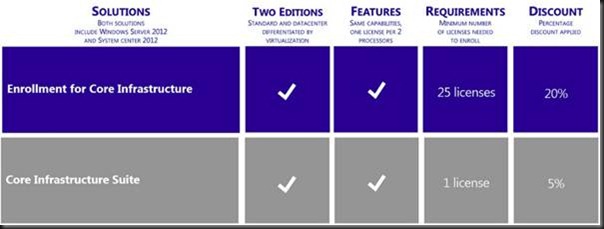
    clip_image009

    Buying Windows Server and a Standard System Center SML? Then buy a Standard edition of a CIS or ECI suite. Buying the Datacenter editions? Then buy the Datacenter edition of the ECI or CIS suites instead … and save even more money.

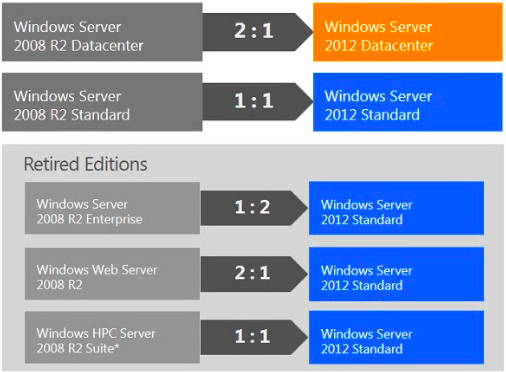
    What happens if you have Software Assurance such as Open + SA, OVS, or ESA? Well there are migrations from the old SKUs to the new SKUs:
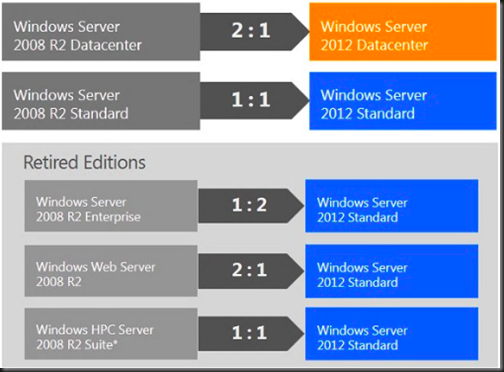
    clip_image010

    The 2:1 Datacenter edition makes sense because you’re going from 2 * 1 CPU licenses per host to 1 * 2 CPU license with no price change.

    Remember that HPC is replaced by Windows Server 2012 Standard/Datacenter plus the free HPC download. And Enterprise folks don’t lose out because they get the equivalent (features + virtualisation rights) of 2 copies of Standard (4 licensed VMs + 4 CPUs in the server).

    Anyone running physical installations of Windows Web Server 2008 R2: this is your prompt to join the rest of us in the 21st century and virtualize those web servers … NOW! If you put 2 web servers on to a host, your new Windows Server 2012 Standard edition covers you for your virtual web server licensing.

    Editions Comparison

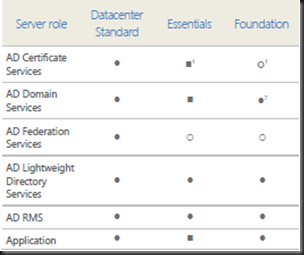
    Here are how the Windows Server 2012 editions compare against each other:

    image

    image

    Here is a feature comparison:

    image

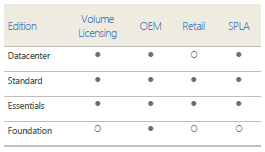
    And here is how you can buy the different WS2012 editions:

    image

    Step-Up

    For those of you running one edition and would like to upgrade to another (Standard -> Datacenter) then you can do that if you have Software Assurance. The cost is the price difference between the editions. Note that you can step up from 1 Enterprise 2008 R2 to 2 copies of Datacenter 2008 R2 now and then you get WS2012 Datacenter edition.

    For Those Without Software Assurance

    What if you don’t have Software Assurance on your servers?

    • Attend my presentations more often and/or add my site to your RSS feeds because … I told you so! [Heh! I was right; I am one to say “I told you so”]
    • If you bought your software in the past 90 days then still can attach it; contact your reseller/LAR for details.

    You will continue to use the version and SKU that you bought, and you’ll miss all that lovely WS2012 goodness that the rest of us are salivating over. [Have I mentioned that I am a nerd?]

    Client Access Licenses (CALs)

    None of the rules change. You continue to license clients for the highest version of Windows Server that they use. For example, you could run 10 W2008 R2 VMs on a WS2012 host. You then use W2008 R2 CALs. If you upgrade a single one of those VMs to WS2012 then you need WS2012. Seriously, Software Assurance on CALs makes sense.

    RDS CAL licensing is not changing.  Anyone running either Web (only) or HPC workloads (only) on their servers do not require CALs.

    Neither Window Server 2012 Essentials or Windows Server 2012 Foundation require CALs.

    License Mobility

    No changes to report here either. OEM is tied to the machine – that’s why it’s cheaper. And a volume license can be moved once every 90 days. And that applies to you folks who think they are able to under-license their hosts (even VMware and Xen) for VMs; you have to license for the maximum number of Windows VMs on that host, even for 1 second. You can’t license 20 VMs with Standard Edition and VMotion/DRS them about every 5 minutes – mobility rules say you can move them once every 90 days because legally you license the host and use the virtualisation rights of that Standard SKU to license the VMs. The correct way to license is to stack your Standard editions on each of the hosts (allowing for the highest possible number of VMs, even for 1 second) or buy Datacenter (which makes sense once you need more than 10 VMs per host based on this retail pricing).

    EDIT#1: Windows Home Server

    Mary Jo Foley confirmed that there will be no more editions of Windows Home Server.  I guess I’ll be rebuilding my Microserver with Windows 8 and setting up a Storage Space.

    EDIT#2: Windows Storage Server

    I’ve just had it confirmed by Microsoft that there will be a Windows Storage Server 2012, giving us 5 SKUs going forward.

    Summary

    Watch out for the FUD that is sure to appear in blogs and forums, and the occasional “journalist” (like the ones I love to crucify on this blog from time to time). I’m sure the cynics and competitors will spin things and misquote pieces of Microsoft’s text on the changes. Before you make any decisions, read Microsoft’s original text (URL to be added) and then check with LAR or reseller … and check with another reseller if yours is a VMware fanboy because I’m sure they might have eaten the FUD.

    I think the only genuine confusion will be that these changes and savings will sound too good to be true. Seriously – Windows Server licensing is changing, simplifying, and you’re saving money.  I’m bringing my ice skates with me when I go to hell.  It’s a win/win – with some concerns for SBS folks maybe.

    The licensing couldn’t be simpler in the data centre. It comes in Standard or Datacenter. They both come with all the scalability and all the features, including Hyper-V. And the free Hyper-V Server 2012 comes with all the features and scalability of Hyper-V on Windows Server 2012 Hyper-V. I bet the competition’s licensing isn’t this simple, offer as good value, and include all the features in all the editions. [Stop it!]

    Make sure you follow this post by reading my post on licensing for virtualisation of Windows Server 2012.

    Sale of the Century: Upgrade to Windows 8 Pro for $39.99

    This was just posted by Microsoft:

    … if your PC is running Windows XP, Windows Vista, or Windows 7 you will qualify to download an upgrade to Windows 8 Pro for just $39.99 in 131 markets.

    How could you turn down a deal like that!?

    If you prefer to shop at a local store, a packaged DVD version of the upgrade to Windows 8 Pro will be available for $69.99 during this promotion.

    This upgrade promotion for Windows 8 Pro both online and at retail runs through January 31st, 2013.

    Such a sweet deal!

    Technorati Tags:

    Year 5 As An MVP Begins

    I always love emails that start like this:

    Congratulations! We are pleased to present you with the 2012 Microsoft® MVP Award! This award is given to exceptional technical community leaders who actively share their high quality, real world expertise with others. We appreciate your outstanding contributions in Virtual Machine technical communities during the past year.

    Congratulations too to all my fellow MVPs who were renewed today.

    It’s been quite a 12 months as a “Hyper-V” (the official title is Virtual Machine) MVP.  There was all the mystery about the vNext release, the teasers at WPC last year, and then when things went public … and then the following unveil with the release candidate … oh – friggin’ – wow!

    Sure, we get access to cool information, and that’s pretty amazing!  I also got to meet lots of other community members over the last year, MVPs and otherwise.  It’s this social networking that can be a major asset.  This past week alone I’ve been party to a number of conversations both helping and being helped.  The value of the MVP/community network cannot be overestimated.

    So here goes year 5, with a launch coming up, and an interesting project that I’m working on Smile  Year 5 should be a lot of fun!

    One Project Ends, Another Begins

    That’s a wrap!  Microsoft Private Cloud Computing is finally available in paperback on Amazon

    image

    95% of the work was done by the others (Patrick Lownds, Hans Vredevoort, and Damian Flynn), and it’s great to see so much interest in it.

    Patrick (staffing the HP booth) and Damian (presenting a number of sessions) at TechEd Europe 2012 with the book.

    [tease] That writing project is over.  As the sun sets in one place, it rises in another … [/tease]

    Meanwhile I’ve spent the last few weeks assembling content for 2 one day crash courses that I’ll be delivering to Microsoft partners in Ireland on behalf of my employer (a Microsoft Value Added Distributor).  This week I deliver the first two of those, educating a partner on WS2012 Hyper-V  and the very popular System Center 2012 Configuration Manager.  And I’ve a bunch more of those lined up this month – crap!  It’s July already!

    At the moment it is 24 * 7 Microsoft.  It’s no wonder I was bloody dreaming about Windows Server 2 nights ago …