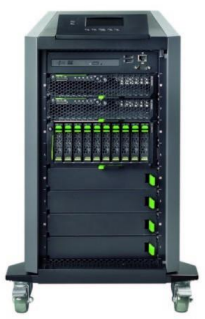
I’ve been digging around looking for Cluster-in-a-Box (CiB) solutions. I found concepts, but nothing that was actually for sale … until one of my colleagues sent me a link this morning. Meet the Fujitsu CiB:
When I first looked at the picture, I thought:
That’s just a quarter height rack!
That’s no CiB, it’s just DAS and some 2U servers!
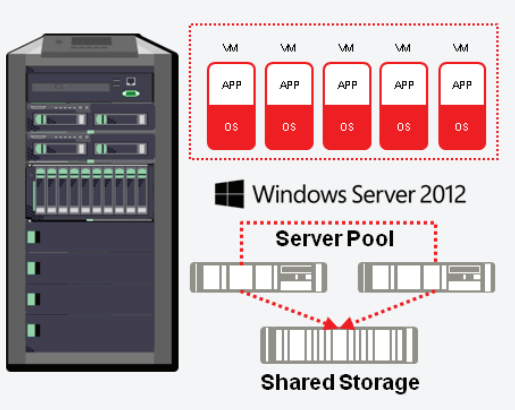
I was wrong. What you’re looking at is a blade chassis, turned on it’s end, and tidied up to make it into a self-contained appliance, fit for the small/medium business. And looking at the stats, this could be a SMB 3.0 scale-out file server (SOFS) SAN alternative, but the included memory and processor make it a real Hyper-V CiB solution where the entire Hyper-V cluster is on those 4 wheels.
There is 10 GbE networking for converged fabrics and fast throughput
The storage blade takes 10 * 900 GB SAS drives
There are 2 BX920 blade server nodes in the cluster, each with 2 * E5 Xeon CPUs, 48 GB RAM, dual 10 GbE, 2 * 300 GbE, and Windows Server 2012.
Interestingly, the BX920 S3 blade takes up to 384 GB of RAM. If this is the same blade, then this could be quite a 2 node Hyper-V cluster!
Fujtisu says that this:
… complete Microsoft Hyper-V virtualized server environment …
… will require:
… a few minutes with our self adopted configuration wizard and you are ready-to-work.
Nice! They say it is for mid-market (larger small businesses and smaller medium businesses that have or would like a Hyper-V cluster.
I like this package. For the consulting companies in this space, this is a low risk solution for their customers, unlike the usual recipe of parts that must be purchased/assembled separately. Instead, they order a single SKU, and rapidly configure it for the customer (on- or off-site), and then focus on the other value-adds.
One problem, though. The RRP of the Fujitsu CiB excluding sales tax is:
I can buy a lot of servers, lower end (more scalable) storage, and power it for a lot less than €59K ($76,866 or £47,452 using this morning’s rates) . Seriously, that has to be a typo, because if it is not, then I expect that Fujitsu will sell very, very few CiB solutions, in what is a very big market.
Other solutions I have found, that aren’t available AFAIK, are:
EDIT: Andreas Erson pointed out the HP X5000 G2 series that start at €30K for a LFF SATA storage model. You will need 10 GbE to set up the networks for converged fabrics.
I’m not expecting bigger OEM names to jump into this space (try binging and googling to see the tumbleweeds roll through your search results) with solutions that are competitive in the SME space because CiB solutions have the potential to decimate traditional storage revenues; storage is very high margin for OEMs, unlike servers, because it is a lock-in solution – try adding an IBM disk tray to your EMC SAN.
I am no longer maintaining this list. We’re at GA and it’ll be too hard to track from now on.
Here is my best effortlisting of designed-for-Windows 8 devices that will be available at or soon after Windows 8 general availability (GA). I am not including laptops or PCs that are Windows 7 machines that “can be upgraded for 15 quid”.
This is based on best effort. You’d be amazed how inconsistent some of this information is, e.g. no one was able to agree on the name of the new Toshiba “slider” … it’s actually called the U920, not the U925.
Like most of the transformers, there are batteries in the tablet and in the keyboard. Dell is claiming a 20+ hour life with this device. Nice! Pocket Lint has more information and photos of this tablet. Damn it is thin.
There will also be an XPS One 27 AiO with 10 point mutlitouch 27” screen. I reckon the home PC is shifting completely to the AiO design. Maybe the business machine will eventually – but that might be many years away because most companies buy towers and reuse existing monitors, expecting a very long life for those monitors. An XPS Duo 12 convertible laptop was also announced … I don’t like the look of the XPS converters that have been around for a while.
Samsung
They didn’t rest on their laurels yesterday. Samsung continued with the announcements with an ATIV WP8 handset and a traditional 10.1” Windows 8 tablet called the ATIV Tab, running Windows RT.
Engadget reckons it’s lower spec than the newest Android Tab from Samsung. It weighs 570g and is 8.9mm thick.
HP
Guess who is back in the tablet space!?!?! The Envy x2 is a 11.6” transformer, which is proving to be the most popular of the designs from the manufacturers. I believe I read that this has an Atom “Clover Trail” processor. If it’s like the Spectre Ultrabook, then it’ll be on the higher end of the price range. It looks like it’ll cost over $1000, pricing it out of the tablet range and putting it into a convertible laptop space.
.. is 17.9mm thick and weighs 2.16kg. The laptop also features USB 3.0, Ethernet and HDMI ports.
They also say there will be an Envy Touchsmart Ultrabook with:
14" touch screen and a choice of Intel’s latest Core processors. The ultrabook weighs 2.16kg and offers up to eight hours of battery life.
Toshiba
I love the designed-for-Windows 7 Z930 ultrabooks from Toshiba. They keyboard is way better than the one in my Asus UX31. Toshiba have opted to go for the hybrid ultrabook/tablet or slider form factor with the U925t Ultrabook. Neowin reports that it will have:
an Intel Core i5 processor inside, along with a 128 GB SSD, two USB 3.0 ports, a HDMI port, two cameras (front and rear) and a media card reader. The keyboard has an LED backlight and a CkickPad with Windows 8 gesture support While the Satellite U925t will be released when Windows 8 launches on October 26th.
It’s a nice looking device, and it appears to inherit a lot of features from the Z930.
Zenbook U500VZ, a 19.7mm-thick 15-incher with a full HD screen, full-size keyboard, Intel i7 quad-core processor and the option for Nvidia GT650M graphics and up to 512GB of SSD storage
There’s a UX21A Touch with multitouch and 256 GB SSD. It looks very like the UX31 that I own. The Asus Taichi is that awful looking dual screen laptop with a screen on the outside (tablet) and a screen on the inside (laptop with keyboard).
Asus also announced their tablets called Vivo (previously 810 Transformer) and Vivo RT (previously 600 Transformer)
The Vivo RT device is a Tegra with 2 GB RAM and 32 GB SSD. That’s OK. The Vivo is an Intel dual core Atom with 2 GB RAM and 64 GB SSD. Atom. Hmm.
Sony
Not to be left out, Sony has announced two devices at IFA 2012 as well. The Vaio Duo 11 is an 11” slider device.
It’s basically an Ultrabook with a touchscreen in an interesting new design. It lies flat and you use it as a tablet with the various sensors you’d expect. You need a keyboard? Slide up the screen and there you go, something similar to a laptop. It looks like it’s coming in i3 to i7 with up to 256 GB SSD.
Confession time: I did an NDA reveal of this one while presenting on Windows 8 and had some hands on. It got a lot of attention from those present. My #1 requirement of a device is that I can use it on my lap. I was concerned because the screen extends out so much. But this device passed the test with flying colours because the base counter balances it and makes it stable. This is a powerful machine – I played with the i7 256 GB SSD model – that cuts it both as your laptop and as your tablet.
A really interesting 20” machine called the Vaio TAP 20 was also released. I describe it as a portable AiO. 1600 * 900 resolution, up to 1 TB storage, multi-touch (10 I think), and it converts from a tabletop to a propped up monitor. And that’s where the magic is.
Yup, I also got some hands on with the TAP 20. In fact, everyone wanted to play with it. Standing up, it’s a PC, offering a nice group interaction experience. Raise the kickstand, and you can pick it up easily, bring it to another room, lay it flat and it’s a table top flat gaming platform. I demonstrated it drawing with 10 touch points so it can be a multiuser experience. Everyone who tried or saw it was intrigued by the possibilities.
One of the nice things about working for a distributor is that I sometimes get a chance to play with new toys when they come through the office.
The recent headline Wedge Touch Mouse and Wedge Keyboard from Microsoft briefly appeared on my desk this afternoon and I set them up with my Windows 8 laptop for a quick play.
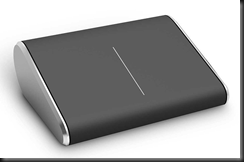
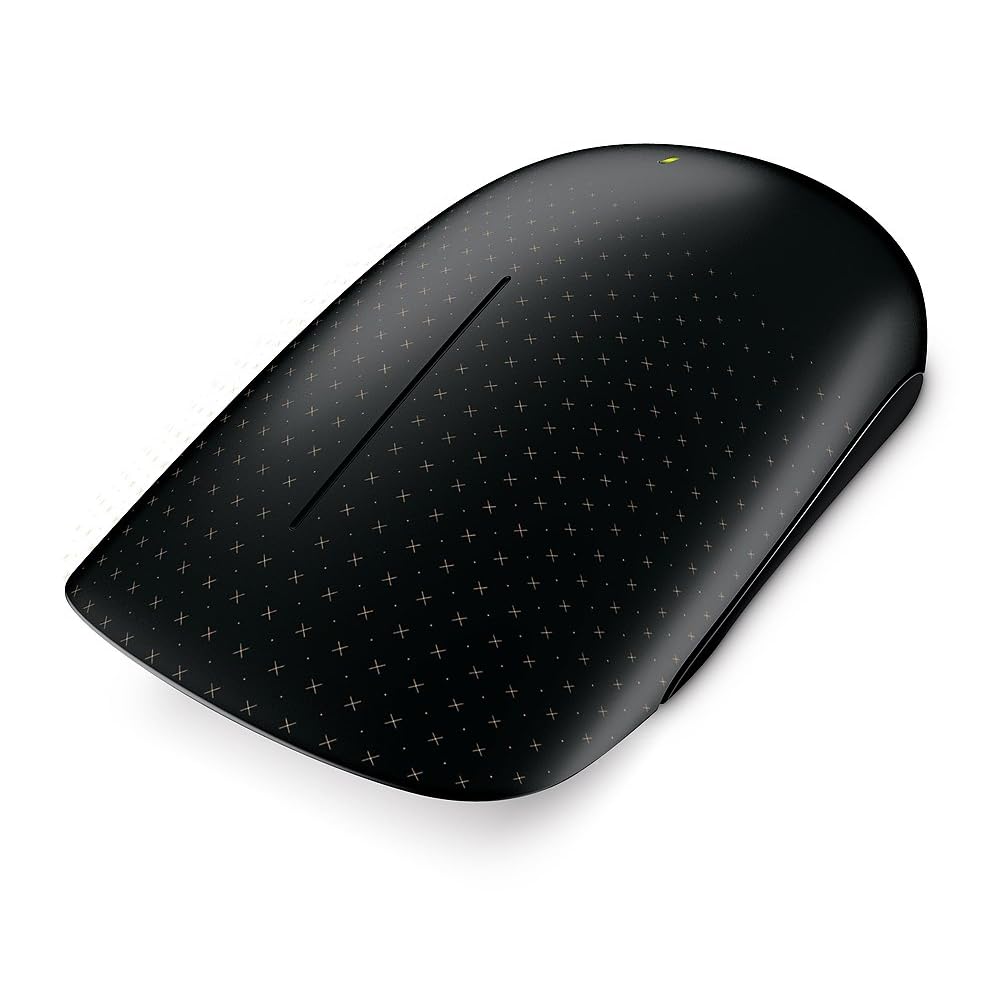
The Touch Wedge (of cheese) Mouse is an interesting design. I swear the office is 50/50 split between loving it and not being keen on it, and to be clear, this is not a male/female divide either. The thing is tiny and light. Sitting in my hand, it could fit in half the length of my fingers. I downloaded the software for the Wedge Touch Mouse and installed it. What it gives you (and it says this on the box) is 4 way touch scrolling: up/down and left/right. There was no other gesture support for Windows 8, such as pinch-zoom. The control app does allow you to add other controls by the looks of it but I didn’t have time to explore that any more.
I can’t say this is a mouse I’d like to use. I prefer the bigger and heavier Touch Mouse which I am using on a daily basis on my work laptop, and the “2000” mouse that I got recently for home. But others in the office loved it. Maybe it’s a love it or leave it thing, like Marmite. I have to warn you, the Wedge Mouse is pricey.
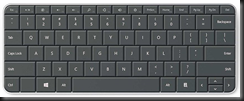
The Wedge Keyboard is an interesting solution for the pure tablet without a keyboard (cover). It comes with a hinged touch rubber cover. This cover for the keyboard has a second role, as you can see above. It folds and can be used to prop up a generic tablet. It’s a tidy little keyboard, being a little smaller than the layout of an Ultrabook. With my brief play, it felt nice to type on. I do not see it replacing keyboards like the 2000 or the 4000 for the PC, but it’s a nice tablet solution for those tablets that don’t come with or have keyboard options. When you’re done typing, you stick the cover back on the keyboard and tick it in your bag with the tablet. I’m guessing about the size of a Microsoft Surface tablet, but it appears to be around the same length.
Both devices are Bluetooth enabled. Neither the Wedge Mouse nor the Wedge Keyboard require a Bluetooth receiver dongle like the older Touch Mouse does. I really like that; those teeny tiny Bluetooth dongles are too easy to lose and I’ve always wondered why they exist when laptops come with Bluetooth receivers anyway.
Lots of people have been debating whether the Metro UI of Windows 8 can succeed on normal laptops and PCs without touch screens. Yesterday I blogged about a Logitech Wireless Touchpad that’s been around for a while. I was talking about that at work today when one of our Apple folks told me to come back when Windows was doing something new
This afternoon Brandon LeBlanc of Microsoft blogged about a series of new designed-for-Windows 8 keyboards and mice that are being launched by Microsoft … the day after I plonked down cash for a new 3000 series keyboard and mouse. Paul Thurrot also covered the story this morning (before the Microsoft blog post) of the new devices.
I personally cannot stand the look of the new wedge touch mouse. But there is a 50/50 pro/anti split in the guys who deal with consumer hardware in our office. This is no normal mouse. Besides looking weird, it offers touch and gesture support for Windows 8. I guess the unusual flat surface is to assist in the touch experience.
The Wedge is not out yet, but the Microsoft Touch Mouse is, and I have one on my desk at the moment. One of the guys just gave it to me to play with. Unlike the newly announced keyboards and mice, this one does use a dongle to connect to the computer.
The mouse has touch sensors all over the front of it. The sensors support multitouch. The mouse also uses the bluetrack motion sensor to work on “any surface”. Right now, the only gesture stuff I got when I connected the mouse to Windows 8 was the scroll wheel action. But that is changing according to Engadget. You’ll basically get gestures for app switching, charms, scroll, and Semantic Zoom. The mouse will be updated when Windows 8 “goes on sale”, so I guess that’ll happen on or after October 26th. I’m looking forward to trying the update out when it is released!
EDIT#1
I downloaded a software update for the Microsoft Touch Mouse on Windows 8 x64. It made the touch UI smoother and added the current set of Windows 7 gestures with thumb, one finger, two fingers, and three fingers. This will be updated at when Windows 8 is out for Windows 8 gestures.
Windows 8 was designed to be touch first but you can use it with a keyboard and a mouse. I do that with my work laptop, the beast, which I use to run Windows 8 Client Hyper-V for deployment demos because it has SSD storage. But what if you want that touch experience? Some apps, certainly games (Cut the Rope, Angry Birds) work best with a touch UI. You could go out and buy a replacement monitor for you PC. You could replace your laptop. Or you could go the Apple route and copy what they did for the Mac a while back when they introduced the pricey track pad.
I was just in the store picking up a new keyboard and mouse for some writing work (the real thing always beats a laptop keyboard/pad) and I saw something interesting on a display stand:
This is the Logitech Wireless Touchpad with Multitouch, coming in at $32.57 on Amazon.com. It supports single, double, triple and quad touch as well as swipe. Locally it was €49.99 in a brick store. I very nearly picked one up but I was concerned that it might not be a great Windows 8 device; I’ve seen some people having Synaptic driver issues on forums with gesture support on their laptops. I did a quick search on my iPhone but found nothing conclusive so I left it there.
I returned home but didn’t forget it. I did some more searching and found one very happy reviewer. Maybe I’ll get one for the work PC which I’m very likely to upgrade as soon as possible after RTM.
That reminds me. I love to see what’s happening in the PC world, especially to the all-in-ones. If I was buying a personal PC then that’s the type I’d want for Windows 8. I saw a very sexy looking Lenovo IdeaCenter A720.
It is around $1700 in the USA and €1200 here. It features a 27 inch 1920×1080 anti-glare 10-touch point screen with a flush bezel. The spec is i7 (3rd generation), 8 GB RAM, 2 GB NVIDIA GPU. It was a work of art in my opinion; I’d be happy for it to be placed in my sitting room.
I found myself using my iPad really only for two things:
Reading – but I since bought a more convenient smaller Kindle that I could read in a wildlife photography hide without scaring off the subject
Watching a little bit of TV when I went to bed
The reason I bought it originally was to have lots of battery life at conferences. But I couldn’t type with it. The screen keyboard is OK but not fast enough. The attachable keyboards weren’t rigid and you never have a desk at these events. So I ended up buying an Ultrabook.
So my iPad became dispensable. Even though it was an iPad 1, there were no shortage of buyers. And I didn’t even have to advertise it. So it’s not like I’m claiming it’s a dead platform or anything.
So what’s my future on the device front? In my personal lab, it’s a bunch of tower PCs. That’s tied up for a while with work.
My Ultrabook is going strong. It’ll stay on Windows 7 until Windows 8 RTM, and maybe later depending on my work schedule. My work laptop (the Beast) is already running Windows 8 so I can have a mobile Hyper-V base for demos.
My “tablet” for now is the Build slate, a revved up version of the Samsung slate that you can buy in retail at the moment. The Release Preview is running nicely on there. It’s not ideal – it runs hot and the battery life is poor for a tablet style device. Maybe I’ll sell it later in the year before I get a Windows 8 device. Or maybe I’ll sell it as a collectible on Pawn Stars
I will look at design-for-Windows 8 devices later in the year. I work for a Sony and Toshiba distributor so obviously I’ll look at what they have coming. I haven’t seen anything about Sony’s plans in that space yet. Toshiba have an interesting slider in the but I’d want to try it out. I’m not sure about it as a machine for your lap.
The Asus Transformer goes a more portable route. It’s a laptop and a tablet with an i7 CPU. I like that as an iPad and Ultrabook replacement.
The one making the headlines is the Microsoft Surface. The problem is … what do I want? If I want a tablet, then either the Pro or the RT would suffice. The Pro would be great for things like Photoshop and be dock-able as a normal PC. But I can’t let myself fall into the same trap as I did with the iPad. That keyboard isn’t rigid – so it will suck at conferences and events, constantly flopping.
Then again, why would Microsoft release Surface at all? Windows 8 is a huge play call by Microsoft. By re-imagining Windows, they are bringing in major change. And there hasn’t been anything like this amount of change since Windows 95. It’s a risk and everyone wants to mitigate risk.
What we’ve learned in the last 3 years is that the device plays as much of a role in the consumer sale as the operating system, if not more. Microsoft has always relied on hardware partners for the most part. Yes, they’ve built a better mouse, a better web cam, and the XBox. But in the PC realm, they relied on partners.
Look at some of the devices that we’ve seen announced. There have been many slate PCs and tablets that offer nothing new – just more of the same that used to run Android and would now run Windows 8 – former wannabe iPad killers. In the the Ultrabook market we have seen some rather strange device choices too … that one with the screen on the outside was ridiculous.
Not all have been silly or lacked innovation. I like the look of some of the slide-out slates/tablets where the keyboard lives under the screen and can slide out to produce a more normal looking laptop experience.
My guess is that Microsoft wanted to lead on the success of Windows 8, rather than depend on the hardware leadership of others. By creating Surface, Microsoft has built sexy, stylish, and innovative devices, something that the OEMs should have done. They have challenged the OEMs to produce something different, something better. Don’t just reinvent the same old thing with a different OS and new processor version. Be creative. Use new form factors. Take advantage of new components. Challenge each other and steal the lead from Microsoft.
By launching now instead of at Windows GA (October is my guess) it’s giving the OEMs time to get their act in gear sooner rather than later. I hope the OEMs do respond positively – I’d like to see cool devices for Windows 8 being sold outside of the USA.
So I was wrong. I was sure the big secret Microsoft announcement last night would just be some streaming media subscription service for the USA. Instead, 99% of the press got it right and Microsoft announced a Microsoft branded tablet line. Stealing the name from the table top device … welcome the Surface:
It is thin, 9.3mm, and that depends on which version of the Surface you choose:
It has a case that doubles as a keyboard and comes in different colours. The case features a built-in kickstand for when you want to prop it up. There is an audible snap when it closes which is nice. It is 0.7mm thick, thinner than a hotel room key:
Two Models
The Surface comes in two models. In broad strokes, the Windows RT (NVIDIA-made ARM-based CPU) is aimed at the consumer and competes with the iPad. It’s the thinner and lighter of the two devices. The Windows 8 Pro version is a twofer: it’s a tablet (slate PC) and a PC replacement. The Pro has an Ivy Bridge Intel i5 CPU and I’m guessing it’ll have around 10 hours battery life based on what we’ve seen from Dell’s future device.
The Body
No, I’m not talking about Elle McPherson, but sexy is what MSFT is aiming for none-the-less. The screen is Gorilla Glass 2. The chassis is made from VaporMg (pronounced Vapor-Mag), an injection moulded metal tolerant down to 0.65mm, and providing a perfectly smooth surface. The cover is snap on. It apparently has a solid snapping action which I saw being described by a present journalist as reassuring. This cover doubles as the keyboard which is flat. Size-wise, it’s thin. It’s the 1300 * 768 screen ratio you can expect of Windows 8 devices, with a landscape layout preferred over portrait.
Price
Nothing was confirmed. The Pro edition will allegedly compete in the Ultrabook price range. The RT edition will be similar to other ARM based tablets. The Pro edition will be some 90 days later.
Release Date
Good luck! Surface RT will be shortly after the Windows 8 GA. It’ll be sold via Microsoft Stores (USA only) and the Microsoft Online Store.
Apps
Windows 8 is still a Release Preview. Metro apps will be released via the Microsoft Store, built into Windows 8. Being Windows with 300+ million PC sales per year, the apps will definitely come. Already there are some big names there, and a Netflix Metro app was announced last night too. This won’t be Windows Phone. Office 2013 RT will be bundled with the RT edition. Only Metro apps and Office 2013 RT can run on the RT Surface. The Pro Surface will run any .exe or Metro app that can run on any Intel/AMD-based Windows 8 PC/laptop.
Reaction
Positive first. Wow, how the hell did MSFT keep this secret? We already know the spec for the XBox 720 and that it’ll likely have Azure integration for cloud content/games. The device is sexy. It’s got a lot of features that I like … built in kick stand for the plane, and a keyboard cover are cool.
My main concern is simple: Will Microsoft release this device outside of the USA? Will it suffer from The Curse Of Zune?
Secondly: how did the CEOs of Acer, Asus, Toshiba, Sony, etc, react when they woke up in Asia this morning? They’re allegedly being charge $85/device for Windows 8 OEM for their devices. Now they will compete with Microsoft on device sales? What will this mean?
The way the announcement was made was strange. It was 23:30 UK/IE time, 00:30 German/France time and God-knows what time in Korea/Japan. Choosing 15:30 Pacific Time said to me that this was an event for an American audience. If an International announcement was important, surely they would have gone for 09:00 or 10:00 PST? Choosing not to stream the event was strange too. I’d scream from the mountain tops if I was announcing this. Inviting 150 journalists, many of whom wouldn’t know Windows from a door, to be your single channel of communications is very strange. Yes, they want to copy Apple and have exclusivity, but this seems wrong to me. Just my independent opinion.
People are talking about this device. I’ve already had 5-6 conversations about Surface this morning in the office in the last 90 minutes. Strange, considering that it looks like only 5% of the world’s population (USA) will be able to buy one.
Summary
The Surface is a fab looking device. I’d like to have a try, and maybe consider buying the Pro version. Will it be an XBox/Kinect or a Zune/Kin? Will I end up even being able to buy one of these innovative devices? Time will tell. Have a look and make up your own mind:
EDIT #1
Some more notes. MSFT released video recordings of the event. You can stream it, or download it.
Above, you can see that the kick stand angles the Surface at 22 degrees. What if you wanted to record something at the table? Having the camera pointed downwards would be useless. The back camera is pointed upwards at 22 degrees to compensate for the kickstand angle.
The keyboard/cover snaps into a magnetically bonded spine. The Metro UI changes colour to match the colour of the Touch Cover! There are aligning and clamping magnets to organically connect correctly. You can hear it snap into place in the video. When you fold it back, the keyboard turns off, thanks to an accelerometer. Touch cover allows your fingers to touch the keyboard and it measures force to count those touches as types. Therefore you can touch type from the rest position.
The Pro edition has a wrap around vent so it’s never blocked. It is silent – I rarely even notice the vent on my Ultrabook, whereas I do on my Build slate.
The screen supports 600 DPI digital ink using a stylus pen. Zoom in and the ink is still smooth. The touch digitiser detects the pen being used and blocks touch so your hand on the screen doesn’t cause chaos for the pen digitiser. The screen is 0.7mm thick, making it the thinnest of it’s kind. The pen clicks into the side of the Surface.
TPM apparently is included. It supports HDMI and DisplayPort. They demo Adobe Lightroom on the Pro edition.
The cover comes in two models:
Touch Cover: a 3mm cover with a multi-touch keyboard.
Type Cover: designed for the touch typist wanting great speed. Key has 1.5 mm travel with full modern trackpad.
This is a beautifully designed device. But I’m told that the same was said of Zune which defined The Curse Of Zune by being only available to 5% of the world’s population – the web site wasn’t even visible to us back then! I’ve asked a person who understands channel, and he reckons it’ll allow MSFT to control the distribution with more quality. Maybe they’ll reach out to large chains like PC World (UK) and Best Buy (USA) next year, or the year after if Surface doesn’t go the way of Zune.



![sony-vaio-duo-11-pr[1]](http://www.blogcdn.com/www.engadget.com/media/2012/08/sony-vaio-duo-11-pr.jpg "sony-vaio-duo-11-pr[1]")






 Surface RT will be shortly after the Windows 8 GA. It’ll be sold via Microsoft Stores (USA only) and the Microsoft Online Store.