TechEd 2013: How To Design & Configure Networking In VMM (Part 1)

Speakers: Greg Cusanza, Serior PM, Microsoft.

Part 1 is getting things going from scratch.  Part 2 will be about Hybrid Networking (configuring network fabric for HNV, network virtualization gateways, tenant self-service).

Recap on VMM 2012 SP1

  • Connectivity: multi-tenancy, isolation, mobility, bring-your-own-IP.  Result: VM Networks.
  • Capability: QoS, security, optimizations, monitors, extensibility. Result: Logical Switch

Also worked on a partner ecosystem.  Moving on …

Step 1: Plan

  1. Design: draw your network.  Ask questions up front to get answers
  2. Hardware: use hardware that supports your design.  Iterate back on your design. Configure the hardware.
  3. VMM configuration: Create logical objects. Configure hosts. Add tenants. Deploy workloads

Network Design

picture013

Questions: How do I provide isolation?

  • Data center isolation: separation of infrastructure traffic as security boundary and for QoS
  • Tenant islotion

Can do this via:

  • Physical separation: physical switches and adapters for each type of traffic
  • Layer 2: VLAN: Tag is applied to packets to control forwarding. Very mature and well understood. Limited number (4096) and very complex after a while.
  • Layer 2: PVLAN: Primary and secondary tags are used to isolate cliens while still giving access to shared services.  Limited support in VMM 2012 SP1. 
  • HNV: Use NVGRE encapsulation to isolate tenants

picture014

You can simulate community in VMM by using network virtualization on the back end of your isolated PVLANs – a common VM Network. 

Network Virtualization: you can create networks on the fly that are abstracted from the physical VLAN that they are connected to.

picture015

No Isolation

  • Why: provides direct access to the logical network.  VMM picks the right VLAN based on placement.
  • Upgrade to SP1: Pre-SP1 VMs have direct connectivity to the logical network by default
  • Direct access to infrastructure: Think of the system center in a VM scenario

Where should you use what?

picture016

Address spaces

  • Size based on broadcasts and address utilization
  • Can be DHCP and static
  • IPv4 and IPv6: You have to choose between them when using HNV

SR-IOV

Great performance and scalability.  The trade off is that you lose vSwitch management features.  Limited support for Intelligent Placement.

RDMA

Great fast storage.  Can’t be used on Virtual Switch NICs.

Teamed Adapters

3 models:

  • Non converged.  Physical NICs for every task/role/network.  Cabling nightmare.
  • Converged: Use fewer NICs and QoS to converge roles.
  • Converged with RDMA: See my recent design

Networks in VMM

  • Logical network: models the physical network. Separates like subnets and VLANs into named objects that can be scoped to a site. Container for fabric static IP address pools. VM networks are created on logical switch.
  • Logical switch: central container for vSwitch settings. Consistent port profiles across data centre. Consistent extensions. Compliance enforcement.

Demo

It’s VMM 2012 R2.  First, create a management network in Fabric – Logical Networks.  Calls it management.  He chhoses “One connected network”.  Adds a Network Site that is scoped to a host group, and uses a DHCP subnet (and VLAN ID).  Creates a clustering “One connected network” logical network with a network site/subnet with static IP (and VLAN ID).  Creates a second network site with a static IP subnet (and VLAN ID).

Then creates IP pools for the 2 clustering network sites.

Now creates and External (name/purpose) logical network.  Sets the Network site and IP subnet/VLAN.  Then creates an IP pool for External.

For VLAN tenant isolation, he can create a logical network with lots of VLANs/subnets in a network site.  Each subnet would require an IP pool.

VM Networks are required for connecting virtual NICs.  For the tenant network (using VLANs) the VM Network will be assigned to a specific VLAN/subnet in the tenant logical network.

No HNV in this demo.  That’s in part 2.

What’s New in VMM 2012 R2?

All network devices (except load balancers) and services are now “network services” (Virtual switch extension, network manager, network virtualization policy, gateway, physical switch):. New interfaces:

  • Network manage: separation of virtual switch and network management
  • Physical switch

IPAM as a network manager:

  • Inbox plugin for Microsoft IPAM
  • Exchange logical networks, sites, and subnets.  Doesn’t use the manual/scheduled script of 2012 SP1.  Plugin is shipped in VMM 2012 R2.

Can track utilization and expand as required.

picture017

In-box plugin for the standards based (CIM) network switch profile.  Implemented and shipping with Arista EOS 4.12 – common across Arista switching platforms.

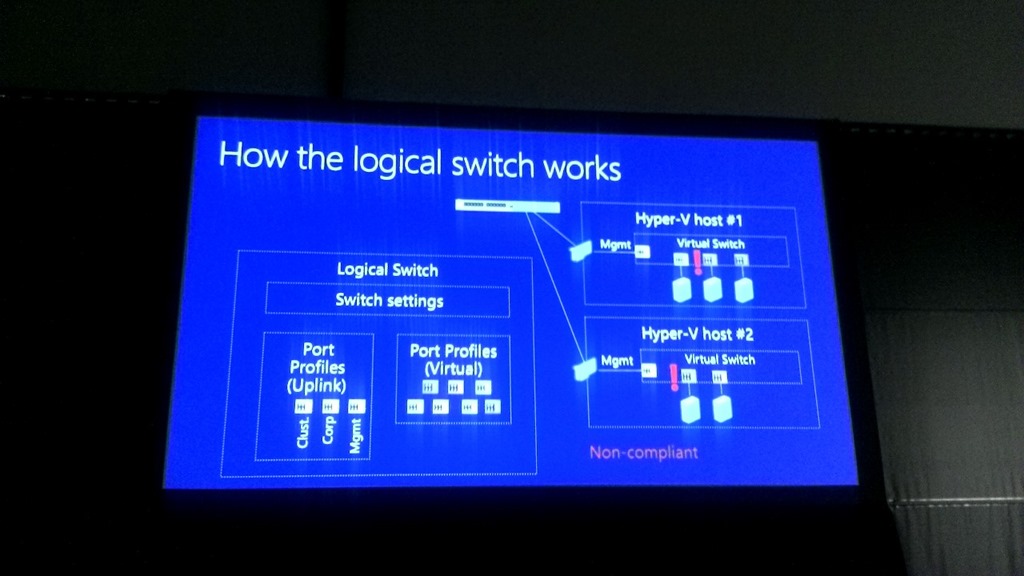
Logical Switch

Why:

  • Automatic team creation
  • Configuration for data centre on a  single object
  • Live Migration limited within a logical switch – remember that this is an abstraction so it doesn’t limit LM across a data center, etc.
picture019

picture020

VM Configuration

  • VM Networks: All vNICs now only connect to VM Networks
  • Port Classifications: Container for port profile settings.  For Hyper-V switch port settings and extions port profiles.  Reusable.  Exposed to tenants through cloud (a classification)

Demo (Logical Switch)

Everything is now called a port profile (they can be virtual or uplink, depending on what you choose in the wizard).  Creates an uplink port profile and configure the NIC teaming configuration.  You see the new Dynamic Mode there (only supports WS2012 R2).  There is a new option: Host Default.  Chooses the default for that particular OS (that is Dynamic on WS2012 R2).  Then configures the Network Sites that can use this uplink port profile.  You do not need to Enable Hyper-V Network Virtualization in this wizard if your hosts will be WS2012 R2.  Doesn’t do any harm if you do.

Now creates a logical switch.  Adds the new uplink port profile (meaning the switch will use that NIC team config).  Configures the available QoS policies (virtual ports) for the virtual switches that will be created. 

Now he creates a virtual switch on a host.  New Logical switch, select the NIC, join it to the uplink port profile.  Then add a second NIC and repeat.  This teams the NICs.  Can also use virtual network adapters here if you want to create converged networks – make sure one of them is marked for VMM management if using your default physical management NIC for the NIC team.

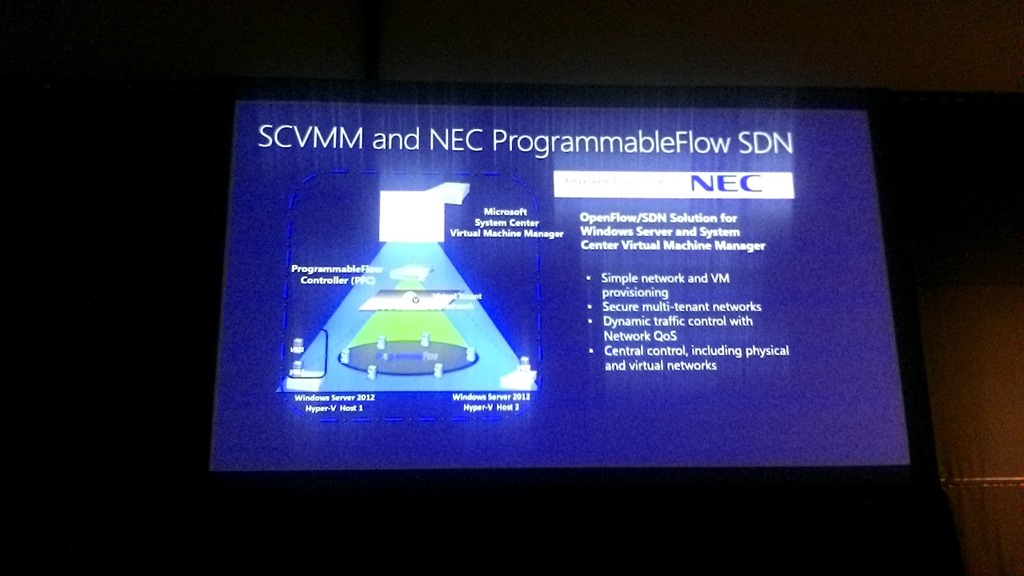
External Isolation

This is a feature you can do with a forwarding extension to the virtual switch.
picture021

Does a demo of the NEC PF1000 Programmable Flow OpenFlow forwarding extension, creating the above bits, after creating a VLAN.

Then a demo of the Cisco Nexus 1000V – which is now available for download/sale depending on the edition.

Forwarding Extensions in VMM 2012 R2

HNV and forwarding extensions can co-exist in WS2012 R2.  Can enable network virtualization in the extension.

And that’s the end of part 1.  You can find part 2 here.

TechEd 2013: System Center 2012 R2–Virtual Machine Manager

Speaker: Vijay Tewari, VMM PM.

Boostrapping a repeatable architecture

VMM becomes the heart of the data centre.  You deploy everything from VMM console/library.  For example, MSFT will be supplying service templates for deploying the reset of System Center from VMM.

Network Architecture

A sample one:

picture010

Storage

Using SOFS service templates, SMB 3.0 management, SMI-S (including fiber channel support), VMM 2012 R2 can manage the entire storage stack from bare metal to zoning/permissioning.

Demo

Host Profiles has become Physical Computer Profiles.  You can create a file server profile for a SOFS bare metal deployment.  He reaches out to the BMC (DRAC, ILO, etc) to discover, power up, and deploy the OS of the cluster nodes.  If the process completed, a new SOFS would be running and managed by VMM.  Now you can use VMM to provision and permission file shares.  Once done, you can start to place/move VMs on the file share on the permitted hosts.

Note: you don’t touch the file servers, log into them, use Server Manager, use a PoSH cmdlet.  It’s all done from the VMM console.  Very sweet.

See Datacenter Abstraction Layer (DAL).

Synthetic Fiber Channel In The Guest

VMM 2012 R2 adds support for guest fiber channel in Hyper-V.  Uses SMI-S to talk to the SAN.  Involves 2 things:

  • Project a fiber channel virtual adapter in the guest
  • You need to be able to program the fiber channel network

Simplified zone management from the VMM console.

Storage

  • Offloaded data transfer is now supported in VMM 2012 R2 to provision resources from the library.
  • VMM supports WS2012 R2 Hyper-V to create guest clusters using a shared VHDX.  Remember the VHDX is stored on shared storage (CSV or SMB).  MSFT uses this kind of SQL cluster for testing SysCtr.  It’s a check box: Share this disk across the service tier … yes, you can deploy a guest cluster from a service template.

New in Service Templates: the first node online will initialize the cluster, and additional nodes join the cluster.  Service templates understand the need for different tasks on the first and subsequent nodes.  In the demo, he talks about how SQL can be installed on the guest cluster as part of the service template.

IP Address Management

You can create networks in VMM and IPAM will detect it.  Or you can use IPAM to model your networks and VMM will pull in the configuration.

Top of Rack Switches

More DAL.  This is where VMM can configure/manage physical switches using OMI.  In the demo, a host cannot respond to a ping.  In VMM, the host is non-compliant.  The reasoning is that the required VLAN is not piped through the switch port to the host NIC.  There is a “remediate” button – press it and VMM can reach out to an OMI switch to fix the issue …. assuming you have a RunAs account for the switch.  Otherwise you beat your network admin with some Cat5 cables until he relents.

Hybrid Networking

This builds on things like virtual switch extensions, NVGRE, etc.  The ability to move a VM from one network to another without changing the IP, and the VM stays online using HNV.

Windows Azure Pack is shown in the demo.  Vijay spins up a network in a hosting company public cloud.  He configures the IP stack of the new virtual subnet (a subset of a VM network).  A site-site tunnel (VPN) is configured.  Remember, WS2012 R2 RRAS will do this for us (NGVRE gateway too). 

He configures IBGP for routing, and then configures the VPN connection properties (IP, shared key, etc).  Now he has extended his on premise network into the hosting company.

Gateway Service Templates

An out of the box SCVMM 2012 R2 service template will automate the deployment of the WS2012 R2 NVGRE gateway. 

Hyper-V Recovery Manager

This is Hyper-V Replica management via a new SaaS product in the Azure cloud (Recovery Services).  It is in preview at the moment.  A provider (an agent) is installed in the VMM servers in production and DR sites – VMM must manage the production cloud and the DR cloud, with a VMM server in each site.  This only does management; all data replication goes directly from production to DR site, never going to Azure.

He configures cloud to cloud replication policies.  Now from in the VMM console, he can enable replication on a per-VM basis using Enable Recovery or Disable Recovery in the ribbon.  Replica VMs have a slightly different icon than production VMs.

HRM can be used to create recovery plans and be used to invoke them.

Operations Manager Dashboard Monitoring

A new OpsMgr MP, with rich dashboards.  Demo: Drive down into the fabric health.  Clicks on a network node and looks at the network vicinity dashboard to browse the health of the network.  Can diagnose networking issues in the VMM console. 

Summary

Built on features of WS2012 and added support for WS2012 R2 features.

What’s New In Windows Server 2012 R2 Networking

Speakers: CJ Williams and Gabriel Silva

What was done in Windows Server 2012:

picture001

Learning’s from data centres

MSFT has some massive scale data centres:

  • Cutting costs: maximal utilization of existing resources, no specialized equipment
  • Choice and flexibility: no vendor locking, any tenant VM deployed in the cloud
  • Agility and automation are key: automation for the hoster and tenant networks, including core infrastructure services

3  areas of focus

picture002

Virtual RSS (vRSS)

RSS = Receive Side Scaling.  VMs restricted to 1 CPU for network traffic processing in WS2012.

  • WS2012 R2 takes RSS and enables it in the VM.  vRSS maximises resource utilization by spreading network traffic among multiple VM processors.
  • Now possible to virtualize traditionally network intensive physical workloads.
  • Requires no hardware upgrade and works with any NICs that support VMQ.

Example usage: network intensive guest apps that need to scale out from just a single vCPU processing interrupts.

DVMQ on the host NICs (for the virtual switch) allows us to use vRSS.

NIC Teaming

There is a new Dynamic Mode in WS2012 R2.  This balances based on flowlets.  Optimized utilisation of a team on existing hardware.

You can spread your traffic inbound and outbound.  In WS2012, can only balance on outbound.  EG, 1 VM would be pinned to one pNIC.  Now “flowlets” give the OS much finer grained load balancing, across all the NICs, regardless of what workload you are running.

Extended ACLs

In WS2012 you can block/allow/measure based on source and destination address (IP or MAC).

In WS2012 R2, you can allow or block for specific worklaods:

  • Network address
  • Application port
  • Protocol type

There is now stateful packet inspection, understanding a transaction.

Remote Live Monitoring

Remote monitoring of WS2012 traffic can be done, but it is difficult.  In WS2012 R2, you can mirror and capture traffic for remote and local viewing.  GUI experience with Message Analyzer (the new NetMon).  Supports remote offline traffic captures.  Filtering based on IP addresses and VMs.

picture003


Configured using WMI, and truncated network traffic redirected ETW events.

Gabe comes up to demo.

Demo

Dynamic Mode LBFO will be first.  We see traditional WS2012 NIC teaming.  Dynamic is enabled, and we see all NICs being roughly balanced in PerfMon.

Enabling it in the demo sees throughput go up for the VM – yes, CPU utilisation goes up in the VM, but that’s why the VM was given more vCPUs to allow more networking resources – otherwise the traffic is limited by being pinned to a single vCPU.

Test-NetConnection

The goal was to make Ping better.  It’s a new PowerShell cmdlet.  It pings, but it returns back a lot of information: Soutce IP, remote IP latency, test a port, get more detailed info, route information, etc.

IMO, it’s about damned time Smile  This is a very nice tool, and a nice hook to get people into looking at some basic PowerShell scripting, to extend what the cmdlet can already do by itself.

Software Defined Networking (Hyper-V Network Virtualization)

3 promises that the network should provide:

  • Flexibility: HNV and Virtual Switch
  • Automation: VMM – SMI-S, OMI (network devices) and Datacenter Abstraction Layer Putting it all together in VMM)
  • Control: Partner extensions, e.g. Cisco Nexus 1000V

SDN should be

  • Open (DMTF standard for appliance deployment and configuration – OMI), extensible (virtual switch), and standards based (NVGRE industry standard to encapsulate virtualisation traffic).
  • Built in and production ready
  • Innovation in software and hardware (pSwitches for example).

picture004

HNV uses a 24-bit identifier meaning the thing is extremely scalable, when compared to the very limited 4096 possible VLANs.

Dynamic Learning of Customer Addresses

HNV can dynamically learn Consumer Addresses being used in the VM Network.  Allows for guest DHCP and guest clusters to be used in HNV VM Networks.

Performance

NIC teaming is supported on the host.  NVGRE Task Offload Enable NICs will be able to offload the processing associated with NVGRE.  Emulex and Mellanox are early suppliers.

Enhanced diagnostics

A host admin/operator can use a PoSH cmdlet to test connectivity to a VM, and validate that the VMs can communicate without having access to the VM (network-wise).

Hyper-V Extensible Switch

One layer is the forwarding switch.  The Cisco Nexus 100V is out.  NEC has an OpenFlow extension.  In WS2012 R2, the HNV filter is moved into the virtual switch.  3rd party extensions can now work on the Consumer Address and the Provider Address (both VM and physical addresses). 

picture006

Example, a virtual firewall extension might want to filter based on CA and/or PA.

A effect of this is that 3rd parties can bring their own network virtualization and implement it in Hyper-V.  Examples: Cisco CXLan or Open Flow network virtualization.

Standards Based Switch Management

Using PowerShell, you can manage physical switches.  Done via Open Management Infrastructure (OMI).  VMM provides automation for this.  Common management infrastructure across vendors.  Automate common network tasks.  Logo program to make switches “just work”.

Built-In Software Gateways

A WS2012 R2 gateway has 3 features:

  • Site to site multi-tenant aware VPN gateway
  • Multi-tenant aware NAT for Internet access
  • Forwarding gateway for in-datacentre physical machine access

picture007

Demo with Gabe

Site-Site g/w.

2 clients in HNV. Both using different VPN protocols, SSTP and IKEv2.  No access without VPN tunnels.  Connects the VPNs of Red.  Now Red can connect to Red VMs and Blue cannot to anything.  Connects Blue’s VPN and Blue can now connect to Blue VMs.

IP Address Management (IPAM)

Added in WS2012, primarily for auditing IP usage and planning.

In WS2012 R2, you can manage IPs in the physical and virtual spaces.  It integrates with SCVMM 2012 R2, and allows you to deploy IP pools, etc.

picture008

Improvements Summary

In my words, WS2012 innovated, and WS2012 R2 has smoothed the corners, making the huge strides in 2012 more achievable and easier to manage.  And a bunch of new features too.

picture009

Event Notes – What’s New In Windows Server 2012 R2?

Speaker Jeff Woolsey

The Cloud OS Vision

The Private Cloud is Windows Server & System Center.  Virtualisation is not cloud.  P2V didn’t’ change management.  Look at the traits of a cloud in the NIST definition.  Cloud-centric management layers change virtualisation into a cloud.  That’s what SysCtr 2012 and later do to virtualization layers: create clouds.

Microsoft’s public cloud is Azure, powered by Hyper-V, a huge stress (performance and scalability) on a hypervisor.

Hosting companies can also use Windows Azure Pack on Windows Server & System Center to create a cloud.  That closes the loop … creating 1 consistent platform across public and private, on premise, in Microsoft, and in hosting partners.  The customer can run their workload everywhere.

Performance

The absolute best way to deploy MSFT biz apps is on Hyper-V: test, support, validation, optimization, test, test, test.  They test everything on Hyper-V and Azure, every single day.  25,000 VMs are created every day to do automated unit tests of Windows Server.

In stress tests, Exchange (beyond recommended scale) tested well within Exchange requirements on Hyper-V.  Over 1,000,000 IOPS from a Hyper-V VM in a stress test.

Storage

If you own a SAN, running WS2012 or newer is a no brainer: TRIM, UNMAP, ODX. 

Datacenter without Boundaries

Goal number 1.

They wanted integrated high performance virtualization platform.  Reduce complexity, cost, and downtime.  Ease deployment.  Flexible.

Automatic VM activation.  Live VM export/cloning.  Remote Access via VMBus.  Online VHDX resize.  Live Migration compression.  Live Migration over RDMA.  More robust Linux support.

Ben Armstrong on demo patrol:

Storage QoS.  You can cap the storage IOPS of a VM, on a per hard disk basis.

Linux has full dynamic memory support on WS2012 R2.  Now we can do file system consistent backup of Linux VMs without pausing them.  Don’t confuse it with VSS – Linux does not have VSS.  It’s done using a file system freeze. 

You can do shared VHDX to create 100% virtual production ready guest clusters.  The shared VHDX appears as a SAS connected disk in the guest OSs.  Great for cloud service providers to enable 100% self service.  Store the VHDX on shared storage, e.g. CSV or SMB 3.0 to support Live Migration … best practice is that the guest cluster nodes be on different hosts Smile

End of Ben in this session.

Demystifying Storage Spaces and SOFS

I‘ll recommend you watch the session.  Jeff uses a storage appliance to explain a file server with Storage Spaces.  He’ll probably do the same with classic SAN and scale-out file server. 

Matt McSpirit comes up.

He’s using VMM to deploy a new file server cluster.  He’s not using Failover Clustering or Server Manager.  He can provision bare metal cluster members.  Like the process of deploying bare metal hosts.  The shares can be provisioned and managed through VMM, as in 2012 SP1.  You can add new bare-metal hosts.  There is a configurable thin provisioning alert in the GUI – OpsMgr with the MP for VMM will alert on this too.

Back to Jeff.

Changes of Guest Clustering

It’s a problem for service providers because you have previously needed to provide a LUN to the customer.  Hoster’s just can’t do it because of customisation.  Hoster can’t pierce the hosting boundary, and customer is unhappy.  With shared VHDX, the shared storage resides outside the hoster boundary is the tenant domain.  It’s completely virtualised and perfect for self-service.

SDN

The real question should be: Why deploy software defined networking (Hyper-V Network Virtualization).  The primary answer is “you’re a hosting company that wants multi-tenancy with abstracted networking for seamless network convergence for hybrid clouds”.  Should be a rare deployment in the private cloud – unless you’re friggin huge or in the acquisition business.

WS2012 R2 will feature a built-in multi-tenant NVGRE (Hyper-V Network Virtualisation or Software Defined Newtorking) gateway.  Now you don’t need F5’s vapourware or the Iron Networks appliance to route between VM Networks and physical networks.  You choose the gateway when creating your VM Network (create VM Network Wizard, Connectivity).  VPN, BGP and NAT are supported.

You can deploy the gateway using a VMM Service Template. 

You can use OMI based rack switches, eg. Arista, to allow VMM to configure your Top Of Rack (TOR) switches.

Hyper-V Replica

HVR broadens your replication … maybe you keep your synchronous replication for some stuff if you made the investment.  But you can use HVR for everything else – hardware agnostic (both ends).  Customers love it.  Service providers should offer it as a service.  But service providers also want to replicate.

Hyper-V Recovery Manager gives you automation and orchestration of VMM-managed HVR.  You install a provider in the VMM servers in site A and site B.  Then enable replication in VMM console.  Replication goes direct from site A to B.  Hyper-V Recovery Manager gives you the tools to create, implement, and monitor the failover plans.

You can now choose your replica interval which defaults to every 5 minutes. Alternatives as 30 seconds and 15 minutes.

Scenario 1: customer replicates from primary hosts (a) to hosts (b) across the campus.  Lots of pipe in the campus so  do 30 seconds replica intervals.  Then replicates from primary DR (b) site to secondary and remote DR site (c).  Lots of latency and bandwidth issues, so go for every 15 minutes.

Scenario 2: SME replicates to hosting company every 5 minutes.  Then the hosting company replicates to another location that is far away.

Michael Leworthy comes up to demo HRM. We get a demo of the new HVR wizards.  Then HRM is shown.  HRM workflows allow you to add manual tasks, e.g. turn on the generator. 

TechEd NA 2013: Keynote – The Post VMware Era

I am love blogging this session so please hit refresh to get the latest notes.

Pre-show, everything is running nice and smoothly.  I got in at 7am and check-in was running nicely (lots of desks) but I was even luckier by being able to register at the media desk.  One breakfast later and we were let into the keynote hall after just a few minutes’ wait, and I went into the press reserved area up to the left of the front.  We had lots of handlers there … handy when my ultrabook refused to see the TechEd network and I had to find other means to connect.

Rock music was playing, and then came out a classic New Orleans brass band to liven things up.  All we needed was some beer Smile

DSCN0022

Lots of well known media types start appearing in the press section as the band plays “The Saints Come Marching In” (at least until the 49ers D crushes them). 

TechEd 2014 is in Houston next year.  Hopefully there is a route that does not include Dallas Fort Worth airport.

Brad Anderson

A pre-video where “the bits have been stolen” and Brad goes all James Bond to get them back, chasing the baddies in an Aston Martin while wearing a tux.  The Windows USB key is being unsuccessfully uploaded (BitLocker to go)?  And he recovers his shades Smile  And he drives out onto the stage with the Aston Martin.  Best keynote entrance ever.

DSCN0027

All new versions of datacenter products:

-Devices
-Services to light up devices and enable users (BYOD)
-Azure and Visual Stuid to create great apps
-SQL Server to unlock insights into data
-The cloud platform: what enables the entire stack

Iain McDonald (Windows Core)
Makes the kernel, virtualisation, ID, security, and file system for all the products using Windows Core (Azure, Windows 8, Phone, XBoxOne, etc).  Windows is our core business, he says.  In other words, Windows lets you get your stuff.  Windows 8 is out for 8 months and sold 100,000,000 copies in that time.

DSCN0036 

A Windows 8 blurb video, and during that a table full of Windows 8 devices comes out.  Confirms that Windows 8.1 will be compatible, out this year, and free.  Preview bits out on June 26th.    Personalized background on the Start Screen.  Some biz features will be shown:

  • Start Screen control: We can lock down tile customization.  You can set up specific apps and setup.  Set up a template machine.  It’s an XML file export-startlayout.  Set a GPO: Start Screen Layout.  Paste a UNC path to the XML file. GPO refresh on the user machine, and the start screen is locked out.  Windows 8.1 Industry line (embedded) does a lot of lock down and customization stuff for hard appliances.
  • Mirrorcast: a powerpoint display technology.  He pairs a machine with a streamless wiring device.  Now he presents from a tablet.  I want this now.  I need this now.  Much better than VGA over Wifi – which just flat out doesn’t work with animated systems like Windows 8 Start Screen. 
  • Wifi Printer with NFC.  Tab the tablet and it pairs with the printer, and adds the device/printer.  The demo gods are unkind Smile  Eventually he goes into Mail and can open an attachment side-by-side (50/50 split).  And he sends the attachment to a printer.  This is why wifi in big demo rooms does not work: the air is flooded – the print doesn’t appear as expected.
  • Surface Pro is up next.  Can build VPN into apps in 8.1.  Can work with virtual smart card for multi-factor authentication.

On the security front:

  • Moving from a defensive posture to an offensive posture in the security space. 
  • 8” Atom powered Acer tablet (see below).
  • Toshiba super hi-res Kira ultrabook

DSCN0043

Back to Brad

1.2 billion consumer devices sold since last TechEd.  50% of companies told to support them.  20-somethings think BYOD is a right not a privilege.  IT budgets are not expanding to support these changes.

Identity: Windows Server AD syncs with and blends with Windows Azure Active Directory (WAAD).  Windows Intune connects to on-premise ConfigMgr (System Center).  Manage your devices where they live, with a single user ID.  Don’t try to manage BYOD or mobile devices using on-premise systems – that just flat-out doesn’t work.

Aston Martin has lots of widely distributed and small branch offices (retail).  Windows Intune is perfect to manage this, and they use it for BYOD. 

Windows Server and System Center 2012 R2 are announced, as is a new release of Windows Intune (wave E).  Get used to the name of Windows Server and System Center.  Microsoft has designed for the cloud, and brought it on-premises.  Scalability, flexibility, and dependability.

Out comes Molly Brown, Principal Development Lead.

Workplace Join: She is going to show some new solutions in 2012 R2.  Users can work on the devices they want while you remain in control  She has a Windows 8.1 tablet and logs into a TemShare site.  Her access is deined.  She can “join her workplace”.  This is like joining a domain.  Policy is applied to her identity rather than to the device.  Think of this as a modern domain join – Anderson.  She joins the workplace in Settings -Network – Workplace.  She enters her corporate email address and password, and then she has to prove herself, via multifactor authentication, e.g. a phone call.  All she has to do is press the # key when prompted.  Now she can view the Sharepoint site.

To get IT apps, she can enrol her device for management via Workplace (into Intune).  Now she can (if the demo works – wifi) access IT published apps through Intune.

Work Folders: A new feature of WS2012 R2.  Users have access to all their files across all their devices. Files replicated to file servers in the datacenter and out to all devices owned by the user.  Relies on the device being enrolled. 

You can easily leave the workplace and turn off management with 2 taps.  All your personal stuff is left untouched.  BYOD is made much easier.

Remote wipe is selective, only removing corporate assets from personal devices.

App and device management is Intune.  You brand your service to the business, and manage cross-platform devices including Apple and Android (I found IOS device management to actually the be easier than Windows!).

So you empower end users, unify the environment, and secure the business.

Back to Brad

Apps.  Devs want rapid lifecycles and flexibility.  Need support for cross-platform deployment.  And data, any size.  And make it secure while being highly available.

On to the public cloud and Azure sales pitch.  A dude from Easyjet comes out. I hope everyone has paid to use the priority lane to exit the hall.  He talks about cloud scalability. 

Scott Guthrie

Corp VP for Windows Azure.  Cloud great for dev/test because of agility without waiting on someone to do something for you.  Same hypervisor on premise in Hyper-V as in Azure, so you can choose where your app is deployed (hybrid cloud).

No charge for stopped VMs in Windows Azure from now on.  You can stop it and start it, knowing that you’ve saved money by shutting it down.  Now there is pro-rated per-minute billing.  Great for elastic workload.  You can use MSDN licenses on Azure for no charge.  Or you can deploy pre-created images in the portal.  A new rate for MSDN subscribers to run any number of VMs in Azure at up to 97% discount.  MSDN subscribers get monthly credits ($50 pro, $100 premium, $150 ultimate), and you can use these VMs for free for dev/test purposes.  The portal has been updated today to see what your remaining credit balance is.  I might finally fire up an Azure VM.

http://aka.ms/azurecontest .. MSDN competition for subscribers that deploy an Azure app.  Could win an Aston Martin.

Brian Harry

Technical Fellow – Appliance lifecycle management

Next version of Visual Studio and TFS 2013 later this year.  Preview on June 26th in line with Build.  How to help devs to get from idea-implementation-into customer hands-feedback and all over again.  New cloud load test service from the cloud.  Create the test in VS/TFS, upload it to the cloud, and it runs from there.

SQL Server 2014 is announced.  Hybrid scenarios for Azure.  Lots of memory work – transaction processing in RAM.  Edgenet is an early adopter.  They need reliable stock tracking, without human verification.  This feature has moved away from once/day stock inventory batch jobs to realtime.

PixelSense monster touch TV comes out.  And they start doing touch-driven analytics on the attendees.  A cool 3D map of the globe allows them to visualize attendees based on regions. 

Back to Brad

Windows Server 2012 R2 and System Center 2012 R2 out at the end of the year, and the previews out in June.  These are based on the learnings from Azure for you to use on-premise or to build your own public cloud.  Same Hyper-V as in Azure.  This gives us consistency across clouds – ID, data, services across all clouds with no conversion. 

Windows Azure Pack for Windows Server.  This layers on top of System Center and System Center.  This is the new name for Katal by the looks of it.  Same portal as Azure.  Get density and Service Bus on top of WSSC 2012 R2.  Users deploy services on the cloud of choice.

Clare Henry, Director of Product Management comes out.  You get a stack to build your clouds.  Demo: and we see the Katal portal, renamed to Windows Azure Pack.  Creates a VM from a gallery as a self-service user.  Can deploy different versions of a VM template.  All the usual number/scalability and network configuration options. 

The self-service empowers the end user, builds on top of WSSC for automation, and allows the admin hands-off total control.

On to the fabric and the infrastructure.  Here’s the cool stuff. 

Jeff Woolsey

WSSC 2012 R2 is about agility.  Storage Spaces.  Automated storage tiering is coming to Storage Spaces using SSD and HDD.  Bye bye EMC.  That gave 16x performance improvement from 7K to 124K IOPS. 

Deduplication.  Enabling Dedup will actually improve the performance of VDI.  We now have a special VDI mode for Hyper-V VDI.  It is NOT FOR SERVER VMs.  Dedup will actually 2x the performance of those VDI VMs.

Live Migration just got unreal.  WS2012 R2 Live Migration can use resources of the host to do compression (for 10 GbE or less).  It’ll use some resources if available … it won’t compress if there’s resource contention – to prioritise VMs.

Now LM can use SMB Direct over RDMA.  And SMB Multichannel.  You get even faster LMs over 10 GbE or faster networks using RDMA.

Hyper-V Replica now supports: Site A – Site B – Site C replication, e.g. replicate to local DR, and from local DR to remote DR.

I wonder how VMware’s Eric Gray will try to tap dance and spin that faster Live Migration isn’t needed.  They don’t have anything close to this.

Hyper-V Recovery Manager gives you orchestration via the cloud.  DR was never this easy.

Brad is back

Blue led a new development cadence.  What they’ve accomplished in 9 months is simply amazing. 

We can reduce the cost of infrastructure again, increase flexibility, and be heroes.


Post Event Press Conference

Hybrid cloud was the core design principal from day 1 – Brad Anderson.  Organizations should demand consistency – it gives flexibility to move workloads anywhere.  It’s not just virtualization – storage, Identity, networks, the whole stack.

Scott Guthrie: private cloud will probably continue forever.  But don’t make forks in the road that limit your flexibility. 

Windows Azure Pack is confirmed as the renamed next generation version of Katal.  A new feature is the ability to use Service Bus on Windows Server, with a common management portal for private and public.  No preview release date.

Thanks to Didier Van Hoye for this one.  Stockholders not too confident in VMware this morning.  Is it a coincidence that Microsoft stole their lunch money this morning?

image

To quote Thomas Maurer: we are entering the post-VMware era.

What is in Windows 8.1 for the enterprise?  It is the "next vision of Windows 8".  "No compromises to corporate IT". 

Making your PC a hotspot is a new feature.  BYOD is huge in the 8.1 release, enabled by Windows Intune.  The Workplace join and selective resets are great.  And the file sync feature controlled by the biz is also a nice one.  XP End of Life: what is the guidance… the official line will be “the easiest path to Windows 8.1 is Windows 8”.  Actually they are being realistic about Windows 7 deployment being the norm.  Mobility and touch scenarios should be future proofed with the right devices.  Windows 8 is the natural OS choice for this. 

On System Center, it is now WSSC, Windows Server and System Center as a combined solution, designed to work at data center scale.  It’s one holistic set of capabilities.  Watch for networking and storage being lit up at scale via System Center.  The new version of Orchestrator is entire based on PowerShell. 


Build 2012 – Notes From The Keynote Stream

I am not a Build. It sold out in minutes and I wasn’t quick enough Sad smile Let’s find out if everyone there is getting a free WP8 handset and/or Surface.

Out comes Steve Ballmer and his pink themed WP8 advert.  In just the last 3 days, 4 million Windows 8 upgrades have been sold – this is not the misleading Software Assurance number.  Stevo wants to show us Windows 8 on Windows 8 generation hardware. Oh if only these tablets and touch laptops were available in the stores

He demos Windows 8 on the 82” Windows “Slate”, Perceptive Pixel touch TV. Nothing new – the same keynote demos as always. Once again, Acer is highlighted. Shouting about Surface ruining life for partners really pays off Smile

And a while later Steve Guggenheimer DPE comes out. Hmm, Xbox (for PC) gaming controller plugged into USB port in a Surface and used to play a game. Lots of other stuff we’ve either seen or heard many times before.  I would not have highlighted the ESPN app at all.  It’s the same boring screen of squares and is nothing special – in fact, it’s pretty dreadful.  Plenty of nicer apps out there, such as Netflix.

Steve B is back. Twitter bringing an official app to Windows 8, along with SAP and DropBox. The big names are coming. 400,000,000 devices will be sold with Windows 8 in the next year if PC sales were to stay flat.  More marketing coming, including for Surface.  MSFT has to do that – the h/w partners have let the side down and MSFT has to pick up the device slack IMO. 

Every Build Attendee will get 100 GB Skydrive storage for free, a Surface RT (as expected). Bast*rds!

Phone stuff after that *tunes out*

Partner Webcast – Introducing Lync Server 2013 & Lync Online

These are notes from an online webcast by the Microsoft Partner Network.  I’m am far from a Lync guy so please bear with me Smile  The recording should be on MPN within 48 hours.

Note that the preview bits are out for evaluation/testing.  GA will probably be quite different.

Every Day Apps We Use

  • Lots of Office pieces
  • Lync tries to unify these for communications.  Single client for easy use and single server for easy administration.

What’s New?

image

Note the federation between Lync 2013 (online and on-premises) and Skype.  No news on 2010 federation yet.

On the DR side, they are “improving” metro-site resiliency (between data centres).  Check the docs – calling it Easy Site Recovery.  Less requirements than 2010 and more functionality offered.

VDI support: There will be some 3rd party support statements.  MSFT has worked on VDI scenarios to provide high quality experience with a small plugin on the client.  It should be much improved over 2012, e.g. not using an IP phone. 

IPv6 is supported in this version of Lync.

Lync 2010 app is forward compatible with 2013 but with 2012 features only.

Multiparty HD Video Gallery

See up t 5 live video streams.  Non-active speakers are thumbnailed below, and are promoted to video as they speak.

image

H.264 SVC should make it easier to integrate other video systems into Lync, apparently.  SVC can use codecs for different quality/resolutions for different device types.

The Presenter Is In Control

image

The presenter can tune the view to suit the content/meeting as the set up the meeting.

Devices

There is an immersive optimised Windows 8 Lync app:

image

Mobile are getting VOIP and video in the Lync app.  Mobile phones will not have full meeting content in this release.  Desktop/app sharing being added to iPad (full set of meeting content).

The Web app is being enhanced for Windows & Mac.  They are getting VOIP and Video – no need for a 50 MB download for the once-off partner/customer/supplier attendee.  IE, Safari, and FireFox offered on PC and Mac.  There is a control to default to the webapp for Mac users.

Video will not be available on Exchange OWA. 

Mobile Apps will GA some months after the server bits.  The Windows 8 app will GA the same time as the server bits.

Communicate Directly From Office

The people cards are Lync powered.  You can contact anyone from throughout Office apparently.  See what they’ve been saying recently on Social Networks, etc. 

image

OneNote Sharing

OneNote and Lync meetings are integrated.  You can associate a note with a meeting invite.  You can share OneNote as additional in-meeting content.  OneNote updates automatically with the meeting attendees (meeting minutes – see their invite acceptance status).  The notes can be shared from many places: SkyDrive, SharePoint, your PC.

Skype

Federated.  Communicate with hundreds of millions of people with presence, IM, and voice.  E.g. talk to family at home when you’re on the road or in the office.  Talk with other companies that are on Skype.  Provide support to customers on Skype.

Video is not added in this first release of the federation.  To be in a “future”, “very quick” release.  It is a “high priority”.  It won’t take 3 years.

Enterprise Benefits

image

Archiving of IM being added in the online product.  Split domain being added so you can split between on-premises and online – Lync Hybrid.

Today, UK and USA users can add PSTN to their Lync online through a Telefonica subsidiary.  The SIP trunks are to the MSFT data centre (alien speak to me – I’m allergic to phones). 

In this release, you can link your PBX into Lync Online – Lync Hybrid.  You can still use you existing contracts, PBX, etc.  More details to come from MSFT later or in preview documentation.

Persistent Chat not in online product.  Response Groups not in this release of Lync Online. 

Windows 8 Lync App Is Not Public Yet

Metro App, including Windows RT:

image

image

Note that the Lync app also uses the Windows 8 charms.

Designed for side-by-side, only possible on Windows 8:

image

image


Technorati Tags: ,,

Notes–The New Hyper-V Extensible Switch in WS2012

These are my notes from VIR307 at TechEd NA 2012, with Bob Combs.

image

Cloud Demands

  • Integration of security and protection
  • Ability to add traffic tools
  • Unification of management tools
  • Blur distinction between physical and virtual networks

My experience: anything manual (setting up VLANs, firewall rules, etc) prevents self-service, and slows down deployment of traditional service.  Also adds a great deal of complexity because traditional systems not designed for the scale (networks, rules, tenants) of cloud computing.  Anything done in software is automatable and flexible, and could make self-service possible.

The Hyper-V Switch

Replaces the virtual network.  Same GUI, does the same basic role (connect virtual network cards to physical networks) … but more:

image

Remember that the switch port is an attribute of the virtual network card.  Therefore your policy moves with your VM.

  • PVLAN: Use 2 VLAN addresses to scale out with flatter networks and achieve some level of isolation
  • Trunk Mode: The ability to allow multiple VLANs to go to a single VM port.
  • Port Mirroring: Forward traffic from one NIC to another. Could be useful for virtual IDS.
  • Unified Tracing: Trap packets for analysis.

Interesting note: if you apply a policy on an SR-IOV vNIC then the channel will be rerouted via the virtual switch to apply the policy, thus disabling SR-IOV for that vNIC.

Extensibility

3rd party extensions, not replacements, add extra stuff that MSFT doesn’t do in the switch.  The extensions have to be logo tested and certified to make them reliable.  The system is “open” to encourage growth in the ecosystem.  Already more networking extensions than vSphere has replacements.

Extensions

The extensions are filters – NDIS-based Windows Filtering Platform Providers.  Configuration is unique to each instance of an extensible switch on a machine.

3 types of extension:

  • Capture: inspect traffic and generate new traffic for report purposes, but cannot modify or drop traffic.  Can have multiple capture extensions.  They can be ordered/reordered.  inMon sFlow Traffic Monitoring is an example for monitoring virtual traffic.
  • Filtering: Can inspect (everything that capture can do), drop, modify, and insert packets.  5Nine Virtual Firewall v3.0 is an example. 
  • Forwarding: Direct traffic, defining destination(s) of each packet.  Forwarding extensions can capture and filter traffic.  Think of it as all encompassing.  What if you wanted the Hyper-V switch to look like another switch?  That’s what this type allows.  NEC OpenFlow for Hyper-V is an example of this.  The Cisco Nexus 1000V is another example. 

SCVMM

VMM agent can manage the extensions via extensions to VMM.

PowerShell

image

VM Based Traffic Tools

  • Can run in VM, as a switch extension, or as a host service
  • Monitoring Port copies traffic to VM
  • Traffic trunked to VM before distributing to other VMs (trunk mode on port)
  • Capture extension echo traffic to service
  • Extension pipe/tunnel traffic to a destination

Extensible Switch ETW Tracing Example

Tracing events.

image

Extensible Switch Unified Tracing Example

Capturing packets.

image

Summary of Extensible Switch Benefits

image

There were a bunch of demo videos featuring the partner extensions that I did not take notes on.

Notes–Enabling Disaster Recovery for Hyper-V Workloads Using Hyper-V Replica

I’m taking notes from VIR302 in this post.  I won’t be repeating stuff I’ve blogged about previously.

image

Outage Information in SMEs

Data from Symantec SMB Disaster Preparedness Survey, 2011.  1288 SMBs with 5-1000 employees worldwide.

  • Average number of outages per year? 6
  • What does this outage cost per day? $12,500

That’s an average cost of $75,000 per year!  To an SME!  That could be 2 people’s salary for a year.

  • % That do not have a recovery plan: 50%.  I think more business in this space don’t have DR.
  • What is their plan? Scream help and ask for pity.

Hyper-V Replica IS NOT Clustering And IT IS NOT a Cluster Alternative

Hyper-V Replica IS ALSO NOT Backup Replacement

It is a replication solution for replicating VMs to another site.  I just know someone is going to post a comment asking if they can use it as a cluster alternative [if this is you – it will be moderated to protect you from yourself so don’t bother.  Just re-read this section … slowly].

  • Failover Clustering HA: Single copy, automated failover within a cluster.  Corruption loses the single copy.
  • Hyper-V Replica: Dual asynchronous copy with recent changes, manual failover designed for replication between sites.  Corruption will impact original immediately and DR copy within 10 minutes.
  • Backup: Historical copy of data, stored locally and/or remotely, with the ability to restore a completely corrupted VM.

Certificates

For machines that are non-domain joined or non-trusted domain members.  Hoster should issue certs to the customer in the hosted DR scenario. 

Compression

Can disable it for WAN optimizers that don’t work well with pre-optimised traffic.

Another Recovery History Scenario

The disaster brought down VMs at different points.  So VMA died at time A and VMB died at time C.  Using this feature, you can reset all VMs back to time A to work off of a similar set of data.

You can keep up to 15 recovery points per day.  Each recovery point is an hour’s worth of data. 

The VSS option (application consistent recovery) fires every two hours.  Every 2nd hour (or whatever depending on where you set the VSS slider) in the cycle it triggers VSS.  All the writes in the guest get flushed.  That replica is then sent over.

Note that the Hyper-V VSS action will not interfere with backup VSS actions.  Interoperability testing has been done.

So if you’re keeping recovery snapshots, you’ll have standard replicas and application consistent (VSS) replicas.  They’ll all be an hour apart, and alternating (if every 2nd hour).  Every 5 minutes the changes are sent over, and every 13th one is collapsed into a snapshot (that’s where the 1 hour comes from).

Every 4 hours appears to be the sweet spot because VSS does have a performance impact on the guests.

Clusters

You can replicate to/from clusters.  You cannot replicate from one node to another inside a cluster (can’t have duplicate VM GUIDs and you have shared storage).

Alerting

If 20% of cycles in the last hour are missed then you get a warning.  This will self-close when replication is healthy again. 

PowerShell

24 Hyper-V Replica cmdlets:

  • 19 of them via get-command –Module hyper-v | where {$_.Name –like “*replication*”}
  • 5 more via get-command –Module hyper-v | where {$_.Name –like “*failover*”}

Measure-VMReplication will return status/health of Hyper-V Replica on a per-VM basis.

Measure-VMReplication | where {$_.ReplicationHealth –eq “Critical”}

Could use that as a part of a scheduled script, and then send an email with details of the problem.

Replica Mechanism

Refers to the HRL (Hyper-V Replica Log) process as a write splitter.  They use HTTP(s) for WAN traffic robustness.  It’s also hosting company friendly.  The HRL is swapped out before sending for a new HRL.

There is a threshold where the HRL cannot exceed half the VHD size.  If WAN/storage goes down and this happens then HVR goes into a “resync state” (resynchronisation).  When the problem goes away HVR automatically re-establishes replication. 

VM Mobility

HVR policy follows the VM with any kind of migration scenario.  Remember that replication is host/host.  When the VM is moved from host A to host B, replication for the VM from host A is broken.  Replication for the VM starts on host B.  Host B must be already authorized on the replica host(s) – easier with cluster Hyper-V Replica broker. 

IP Addressing VMs In DR Site

  1. Inject static address – Simplest option IMO
  2. Auto-assignment via DHCP – Worst option IMO because DHCP on servers is messy
  3. Preserve IP address via Network Virtualisation – Most scalable option for DR clouds IMO with seamless failover for customers with VMs on a corporate WAN.  Only one for seamless name resolution, I think, unless you spend lots on IP virtualisation in the WAN.

Failover Types

Planned Failover (downtime during failover sequence):

  1. Shutdown primary VM
  2. Send last log – run planned failover action from primary site VM.  That’ll do the rest for us.
  3. Failover replica VM
  4. Reverse replication

Test Failover (no downtime):

Can test any recovery point without affecting replication on isolated test network.

  1. Start test failover, selecting which copy to test with (if enabled).  It does the rest for you.
  2. Copies VM (new copy called “<original VM name> – test”) using a snapshot
  3. Connects VM to test virtual switch
  4. Starts up test VM

Network Planning

  • Capacity planning is critical.  Designed for low bandwidth
  • Estimate rate of data change
  • Estimate for peak usage and effective network bandwidth

My idea is to analyse incremental backup size, and estimate how much data is created every 5 minutes.

Use WS2012 QoS to throttle replication traffic.

image

Replicating multiple VMs in parallel:

  • Higher concurrency leads to resource contention and latency
  • Lower concurrency leads to underutilizing and less protection for the business

Manage initial replication through scheduling.  Don’t start everything at once for online initial synchronisation.

What they have designed for:

image


Server Impact of HVR

On the source server:

  • Storage space: proportional to the writes in the VM
  • IOPS is approx 1.5 times write IOPS

On the replica server:

  • Storage space: proportional to the write churn.  Each additional recovery point approx 10% of the base VHD size.
  • Storage IOPS: 0.6 times write IOPS to receive and convert.  3-5 times write IOPS to receive, apply, merge, for additional recovery points.
  • There is a price to pay for recovery points.  RECOMMENDATION by MSFT: Do not use replica servers for normal workloads if using additional recovery points because of the IOPS price.

Memory: Approx 50 MB per replicating VM

CPU impact: <3%