TEE14–Designing Scale Out File Servers, Including vNext

I am live blogging this session. Refresh to see more.

Speaker: Claus Joergensen

I arrived in 15 minutes late so the start of this is missing. Claus was finishing off a refresh on Storage Spaces.

The session so far seems to be aimed at beginners to SOFS – of which there are plenty. I will not take detailed notes on this piece unless I hear something I haven’t heard before.

FAQ

  • Can I use SOFS for IQ workloads. Not recommended. Design for the files of Hyper-V, SQL.
  • CSV Cache Size? As big as you can. e.g. 64 GB
  • Uses SOFS as file share witness for Hyper-V clusters? yes, but specific instructions
  • How many nodes? 2-4 nodes in a SOFS
  • Evaluate performance? Not file copy. Use DiskSpd
  • Disable NetBIOS? Yes. It can reduce failover times.

CPS

TEE14–Lessons From Scale

I am live blogging this so hit refresh to see more

Speaker: Mark Russinovich, CTO of Azure

Stuff Everyone Knows About Cloud Deployment

  • Automate: necessary to work at scale
  • Scout out instead of scale up. Leverage cheap compute to get capacity and fault tolerance
  • Test in production – devops
  • Deploy early, deploy often

But there are many more rules and that’s what this session is about. Case studies from “real big” customers on-boarding to Azure. He omits the names of these companies, but most are recognisable.

Customer Lessons

30-40% have tried Azure already. A few are considering Azure. The rest are here just to see Russinovich!

Election Tracking – Vote Early, Vote Often

Customer (a US state) create an election tracking system for live tally of US, state and local elections. Voters can see a live tally online. A regional election worked out well. Concerned because it was a little shaky with this light-load election. Called in MSFT to analyze the architecture/scalability. The system was PaaS based.

Each TM load balanced (A/P) view resulted in 10 SQL transactions. Expected 6,000,000 views in the peak hour or nearly 17,000 queries per sec. Azure DB scales to 5000 connects, 180 concurrent requests and 1000 requests per sec.

image

MSFT CAT put a caches between the front-end and DB with 40,000 requests per instance capability. Now the web roles hit the cache (now called Redis) and the cache hit the Results Azure DB.

At peak load, the site hit 45,000 hits/sec, well over the planned 17,000. They did a post-mortem. The original architecture would have failed BADLY. With the cache, they barely made it through the peak demand. Buffering the databases saved their bacon.

To The Cloud

A customer that does CAD for bildings, plants, cicil and geospatial engineering.

Went with PaaS: web roles on the front, app worker roles in the middles, and IaaS SQL (mirrored DB) on the backed. When they tested the Azure system had 1/3 of the work capacity of the on-premises system.

The web/app tier were on the same server on-premises. Adding a network hop and serialization of data transfer in the Azure implementation reduced performance. They merged them in Azure … web role and worker roles. They decided colocation in the same VMs was fine: they didn’t need independent scalability.

Then they found IOPS of a VHD in Azure was too slow. They used multiple VHDs to create two storage spaces pools/vdisks for logs and databases. They then created a 16 VHD pool with 1 LUN for DBs and logs. And they got 4 times the IOPS.

What Does The Data Say?

A company that does targeted advertising, and digests a huge amount of date to report to advertisers.

Data sources imported to Azure blobs. Azure worker roles sucked the data into an Azure DB. They used HDInsight to report on 7 days of data. They imported 100 CSV files between 10 MB and 1.4GB each. Average of 50 GB/day. Ingestion took 37 hours (over 1 day so fell behind in analysis).

  1. They moved to Azure DB Premium.
  2. They parallelized import/ingestion by having more worker roles.
  3. They created a DB table for each day. This allowed easy 8th day data truncation and ingestion of daily data.

This total solution solved the problem … .now an ingestion took 3 hours instead of 37.

Catch Me If You Can

A Movie Company called Link Box or something. Pure PaaS streaming. Web role, talking using WCF Binary Remotiing over TCP to a multi-instance cache worker roles tier. A Movie meta database, and the movies were in Azure blobs and cached by CDN.

If the cache role rebooted or updated, the web role would overwhelm the DB. They added a second layer of cache in the web worker roles – removed pressure from worker roles and dependency on the worker role to be “always on”.

Calling all Cars

A connected car services company did pure PaaS on Azure. A web role for admin and a web role for users.  The cars are Azure connected to Azure Service Bus – to submit data to the cloud. The bus is connected to multi-instances of message processor worker roles. This included cache, notifications, and message processor worker roles. Cache worked with a backend Azure SQL DB.

  • Problem 1: the message processing worker (retrieving messages from bus) role was synchronous – 1 message processed at a time. Changed this to asynchronous – “give me lots of messages at once”.
  • Problem 2: Still processing was one at a time. They scaled out to process asynchronously.

Let me Make You Comfortable

IoT… thermostats that would centralize data and provide a nice HVAC customer UI. Data is sent to the cloud service. Initial release failed to support more than 35K connected devices. But they needed 100K connected devices. Goal was to get to 150K devices.

Synchronous processing of messages by a web role that wrote to an Azure DB. A queue sent emails to customers via an SMTP relay. Another web role, accessing the same DB, allowed mobile devices to access the system for user admin. Synchronous HTTP processing was the bottleneck.

Changed it so interacting queries were synchronous. Normal data imports (from thermostats) switched to asynchronous. Changed DB processing from single-row to batch multi-row. Moved hot DB tables from standard Azure SQL to Premium. XML client parameters were converted into DB info to save CPU.

A result of the redesign was increase in capacity and reduced the number of VMs by 75%.

TEE14–Tiered Storage Spaces Including Some CPS Information

Speaker: Spencer Shepler

He’s a team member in the CPS solution, so this is why I am attending. Linked in says he is an architect. Maybe he’ll have some interesting information about huge scale design best practices.

A fairly large percentage of the room is already using Storage Spaces – about 30-40% I guess.

Overview

A new category of cloud storage, delivering reliability, efficiency, and scalability at dramatically lower price points.

Affordability achieved via independence: compute AND storage clusters, separate management, separate scale for compute AND storage. IE Microsoft does not believe in hyperr-convergence, e.g. Nutanix.

Resiliency: Storage Spaces enclosure awareness gives enclosure resiliency, SOFS provides controller fault tolerance, and SM3 3.0 provides path fault tolerance. vNext compute resiliency provides tolerance for brief storage path failure.

Case for Tiering

Data has a tiny current working set and a large retained data set. We combine SSD ($/IOPS) and HDDs (big/cheap) for placing data on the media that best suits the demands in scale VS performance VS price.

Tiering done at a sub file basis. A heat map tracks block usage. Admins can pin entire files. Automated transparent optimization moves blocks to the appropriate tier in a virtual disk. This is a configurable scheduled task.

SSD tier also offers a committed write persistent write-back cache to absorb spikes in write activity. It levels out the perceived performance of workloads for users.

$529/TB in a MSFT deployment. IOPS per $: 8.09. TB/rack U: 20.

Customer exaple: got 20x improvement in performance over SAN. 66% reduction in costs in MSFT internal deployment for the Windows release team.

Hardware

Check the HCL for Storage Spaces compatibility. Note, if you are a reseller in Europe then http://www.mwh.ie in Ireland can sell you DataOn h/w.

Capacity Planning

Decide your enclosure awareness (fault tolerance) and data fault tolerance (mirroring/partity). You need at least 3 enclosures for enclosure fault tolerance. Mirroring is required for VM storage. 2-way mirror gives you 50% of raw capacity as usable storage. 3-way mirroring offers 33% of raw capacity as usable storage. 3-way mirroring with enclosure awareness stores each interleave on each of 3 enclosures (2-way does it on 2 enclosures, but you still need 3 enclosures for enclosure fault tolerance).

Parity will not use SDDs in tiering. Parity should only be used for archive workloads.

Select drive capacities. You size capacity based on the amount of data in the set. Customers with large working sets will use large SSDs. Your quantity of SSDs is defined by IOPS requirements (see column count)  and the type of disk fault tolerance required.

You must have enough SSDs to match the column count of the HDDs, e.g. 4 SSDs and 8 HDDs in a 12 disk CiB gives you a 2 column 2-way mirror deployment. You would need 6 SSDs and 15 HDDs to get a 2-column 3-way mirror. And this stuff is per JBOD because you can lose a JBOD.

Leave write-back cache at the default of 1 GB. Making it too large slows down rebuilds in the event of a failuire.

Understanding Striping and Mirroring

Any drive in a pool can be used by a virtual disk in that pool. Like in a modern SAN that does disk virtualization, but very different to RAID on a server. Multiple virtual disks in a pool share physical disks. Avoid having too many competing workloads in a pool (for ultra large deployments).

Performance Scaling

Adding disks to Storage Spaces scales performance linearly. Evaluate storage latency for each workload.

Start with the default column counts and interleave settings and test performance. Modify configurations and test again.

Ensure you have the PCIe slots, SAS cards, and cable specs and quantities to achieve the necessary IOPS. 12 Gbps SAS cards offer more performance with large quantities of 6 Gbps disks (according to DataOn).

Use LB policy for MPIO. Use SMB Multichannel to aggregate NICs for network connections to a SOFS.

VDI Scenario

Pin the VDI template files to the SSD tier. Use separate user profile disks. Run optimization manually after creating a collection. Tiering gives you best of both worlds for performance and scalability. Adding dedup for non-pooled VMs reduces space consumption.

Validation

You are using off-the-shelf h/w so test it. Note: DataOn supplied disks are pre-tested.

There are scripts for validating physical disks and cluster storage.

Use DiskSpd or SQLIO to test performance of the storage.

Health Monitoring

A single disk performing poorly can affect storage. A rebuild or a single application can degrade the overall capabilities too.

If you suspect a single disk is faulty, you can use PerfMon to see latency on a per physical disk level. You can also pull this data with PowerShell.

Enclosure Health Monitoring monitors the health of the enclosure hardware (fans, power, etc). All retrievable using PowerShell.

CPS Implementation

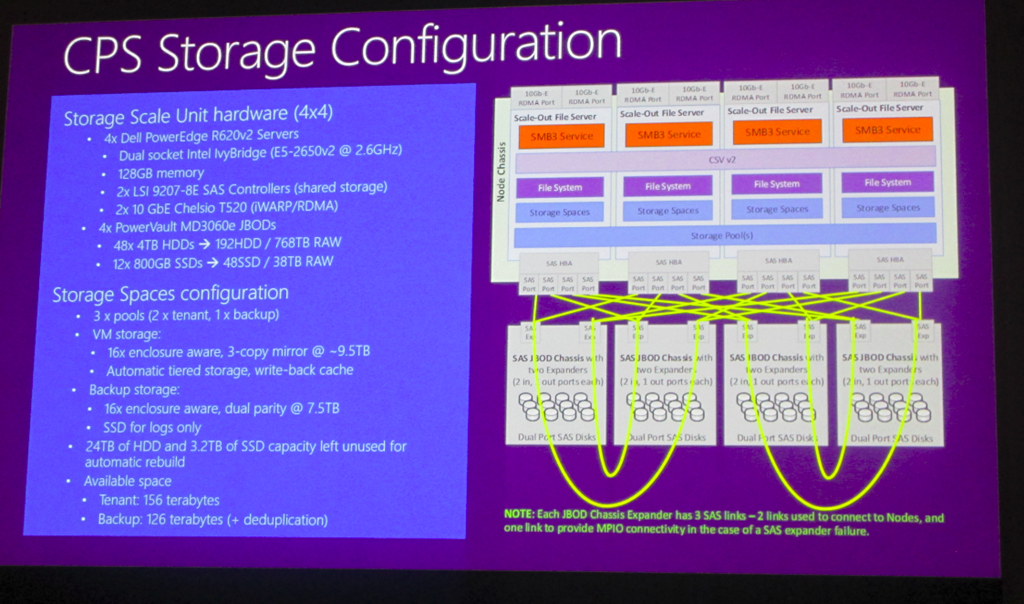
LSI HBAs and Chelsio iWARP NICs in Dell R620s with 4 enclosures:

image

Each JBOD has 60 disks with 48 x 4 TB HDDs and 12 x 800 GB SSDs. They have 3 pools to do workload separation. The 3rd pool is dual parity vDisks with dedupe enabled – used for backup.

Storage Pools should be no more an 80-90 devices on the high end – rule of thumb from MSFT.

They implement 3-way mirroring with 4 columns

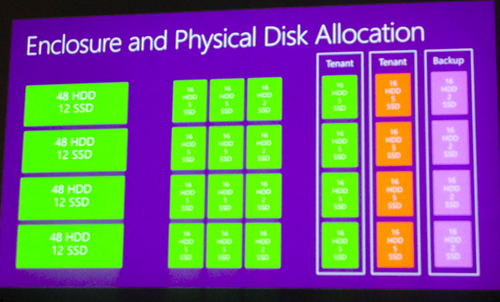
Disk Allocation

4 groups of 48 HDDs + 12 SSDs. A pool shold have equal set of disks in each enclosure.

vimage
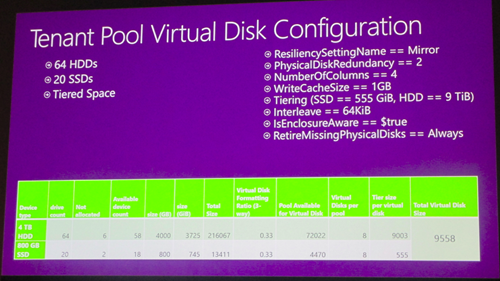
A tiered space has 64 HDDs and 20 SSs. Write cahce – 1GB Tiers = 555 GB and HDD – 9 TB. Interleave == 64 KB. Enclusre aware = $true. RetiureMissing Physical Disks = Always. Physical disk redundancy = 2 (3-way mirror). Number of columns = 2.
image

In CPS, they don’t have space for full direct connections between the SOFS servers and the JBODs. This reduces max performance. They have just 4 SAS cables instead of 8 for full MPIO. So there is some daisy chaining. They can sustain 1 or maybe 2 SAS cable failures (depending on location) before they rely on disk failover or 3-way mirroring.

Next Generation Networking–SDN, NFV & Cloud-Scale Fundamentals

I am live blogging. My battery is also low so I will blog as long as possible (hit refresh) but I will not last the session. I will photograph the slides and post later when this happens.

Speakers: Bala Rajagopalan & Rajeev Nagar.

The technology and concepts that you will see in Windows Server vNext come from vNext where they are deployed, stressed and improved at huge scales, and then we get that benefit of hyper-scale enterprise grade computing.

Traditional versus Software-Defined Data Centre

Traditional:

  • Tight coupling between infrastructure and services
  • Extensive proprietary and vertically integrated hardware
  • Siloed infrastructure and operations
  • Highly customized processes and configurations.

Software-Defined Datacenter:

  • Loosely couple
  • Commodity industry standard hardware
  • Standarized deployments
  • Lots of automation

Disruptive Technologies

Disaggerated s/w stack + disaggregation of h/w + capable merchant (commonly available) solution.

Flexibility limited by hardware defined deployments. Blocks adoption of non-proprietary solutions that can offer more speed. Slower to deploy and change. Focus is on hardware, and not on services.

Battery dying …. I’ll update this article with photos later.

Microsoft Cloud Briefing October 20th 2014

I tuned in a minute or two late to see Satya Nadella rehashing his cloud first, mobile first thing that has started to bore people. Substance, not mantras, please.

image

It’ the same small room in San Francisco as the non-streamed Windows 10 announcement.  He starts off talking about the cloud being the most complete cloud:

  • Productivity with CRM Online and Office 365
  • Hyper scale cloud with hybrid and public and private cloud offerings

image


He starts to talk about San Franciso and San Jose governments that adopted Office 365 for supporting mobile workers. Not just big enterprise, but also government sector and small businesses. NBC does encoding and live streaming of events via Azure. German company ThyssenKrupp manages over 1 million elevators using a service they built on Azure.

Azure compute power and research tools are being made available to Ebola researchers.

Paul Smith stores are using Hyper-V and are using ASR for DR. Datacenters are in a constant purchase cycle for storage – here’s the push on a non-selling StorSimple (it’s virtually an EA benefit that customers pay the shipping/import costs of – and pay for the Azure storage).

image

At this point, there is nothing new here. This is like a marketing operation for the media.

Scott Guthrie comes out wearing read (read that as announcements coming). G-Series of huge VMs are announced. A new premium storage account offering is accounted with much greater scalability and performance:

image

This is unparalleled scalability in the cloud. This is stuff that on-premises VMs cannot do.

He goes on to talk about on-premises and hybrid solutions, supporting any infrastructure including bare metal, Linux, and vSphere:

image

Microsoft provides the only consistent experience across public and private cloud, thanks to Windows Azure Pack.

Here comes a new hardware plus software solution called Cloud Platform System to bring Azure to your datacenter (San Diego codename). You get WAP, management APIs (REST) and hypervisor, similar to Azure. This is a partnership with Dell, available starting in November. This will be a flop. Dell are clueless about their current massive portfolio, and they usually prefer to sell Dell-owned management products over System Center, not to mention their general lack of knowledge of Hyper-V.

Now he talks about Docker to enable greater densities and to allow app mobility to the cloud.

CoreOS Lunix is coming to Linux, to give a memory optimized memory footprint. It’s the fifth Linux distro on Azure.

A dude from Cloudera comes on stage. Cloudeera is announced on Azure. Here’s a demo of the new Azure preview portal running Windows 10. There’s a Cloudera Enterrpsei offering in Data, Services etc.

And that was that. Event over. I bet the media were glad that they travelled across a continent for all that.

Microsoft News Summary – 17 October 2014

This is the first of these since the 8th – my life consists of constant event/tradeshow/conference preparation at the moment so there’s little time for anything else.

Hyper-V

Windows Server

clip_image001

Azure

System Center Data Protection Manager

Windows Microsoft Intune

Office 365

Security

  • Signed Malware = Expensive “Oops” for HP: HP is revoking a digital certificate because the cert was used to sign malware in 2010. Nice one, HP!
  • And every retail chain in the US has been hacked. At least that’s what it seems like. Maybe the US banks will join the rest of us in the 21st century?

Miscellaneous

On Vacation

I will be away until Sept 29th on vacation. There should be no posts between now & then – but don’t be shy of hitting the archives and the search tool.

FYI, there will be no responses to email, no answering my phone, and no alarm calls in the morning. I am chilling in a warm climate, by the sea, with not a mosquito, midge, raptor or bear to be seen.

Microsoft News Summary – 15 September 2014

And in other news, I’ve run out of stock of my super-duper Windows 9 tablets powered by i9 processors.

Hyper-V

  • The Virtualization Fabric Design Considerations Guide is now available online and for download: This guide details a series of steps and tasks that you can go through to design a virtualization fabric that best meets the requirements of your organization. Throughout the steps and tasks, the guide presents the relevant design and configuration options available to you to meet functional and service quality (such as availability, scalability, performance, manageability, and security) requirements.

System Center Data Protection Manager

Azure

clip_image001