Speaker: Spencer Shepler
He’s a team member in the CPS solution, so this is why I am attending. Linked in says he is an architect. Maybe he’ll have some interesting information about huge scale design best practices.
A fairly large percentage of the room is already using Storage Spaces – about 30-40% I guess.
Overview
A new category of cloud storage, delivering reliability, efficiency, and scalability at dramatically lower price points.
Affordability achieved via independence: compute AND storage clusters, separate management, separate scale for compute AND storage. IE Microsoft does not believe in hyperr-convergence, e.g. Nutanix.
Resiliency: Storage Spaces enclosure awareness gives enclosure resiliency, SOFS provides controller fault tolerance, and SM3 3.0 provides path fault tolerance. vNext compute resiliency provides tolerance for brief storage path failure.
Case for Tiering
Data has a tiny current working set and a large retained data set. We combine SSD ($/IOPS) and HDDs (big/cheap) for placing data on the media that best suits the demands in scale VS performance VS price.
Tiering done at a sub file basis. A heat map tracks block usage. Admins can pin entire files. Automated transparent optimization moves blocks to the appropriate tier in a virtual disk. This is a configurable scheduled task.
SSD tier also offers a committed write persistent write-back cache to absorb spikes in write activity. It levels out the perceived performance of workloads for users.
$529/TB in a MSFT deployment. IOPS per $: 8.09. TB/rack U: 20.
Customer exaple: got 20x improvement in performance over SAN. 66% reduction in costs in MSFT internal deployment for the Windows release team.
Hardware
Check the HCL for Storage Spaces compatibility. Note, if you are a reseller in Europe then http://www.mwh.ie in Ireland can sell you DataOn h/w.
Capacity Planning
Decide your enclosure awareness (fault tolerance) and data fault tolerance (mirroring/partity). You need at least 3 enclosures for enclosure fault tolerance. Mirroring is required for VM storage. 2-way mirror gives you 50% of raw capacity as usable storage. 3-way mirroring offers 33% of raw capacity as usable storage. 3-way mirroring with enclosure awareness stores each interleave on each of 3 enclosures (2-way does it on 2 enclosures, but you still need 3 enclosures for enclosure fault tolerance).
Parity will not use SDDs in tiering. Parity should only be used for archive workloads.
Select drive capacities. You size capacity based on the amount of data in the set. Customers with large working sets will use large SSDs. Your quantity of SSDs is defined by IOPS requirements (see column count) and the type of disk fault tolerance required.
You must have enough SSDs to match the column count of the HDDs, e.g. 4 SSDs and 8 HDDs in a 12 disk CiB gives you a 2 column 2-way mirror deployment. You would need 6 SSDs and 15 HDDs to get a 2-column 3-way mirror. And this stuff is per JBOD because you can lose a JBOD.
Leave write-back cache at the default of 1 GB. Making it too large slows down rebuilds in the event of a failuire.
Understanding Striping and Mirroring
Any drive in a pool can be used by a virtual disk in that pool. Like in a modern SAN that does disk virtualization, but very different to RAID on a server. Multiple virtual disks in a pool share physical disks. Avoid having too many competing workloads in a pool (for ultra large deployments).
Performance Scaling
Adding disks to Storage Spaces scales performance linearly. Evaluate storage latency for each workload.
Start with the default column counts and interleave settings and test performance. Modify configurations and test again.
Ensure you have the PCIe slots, SAS cards, and cable specs and quantities to achieve the necessary IOPS. 12 Gbps SAS cards offer more performance with large quantities of 6 Gbps disks (according to DataOn).
Use LB policy for MPIO. Use SMB Multichannel to aggregate NICs for network connections to a SOFS.
VDI Scenario
Pin the VDI template files to the SSD tier. Use separate user profile disks. Run optimization manually after creating a collection. Tiering gives you best of both worlds for performance and scalability. Adding dedup for non-pooled VMs reduces space consumption.
Validation
You are using off-the-shelf h/w so test it. Note: DataOn supplied disks are pre-tested.
There are scripts for validating physical disks and cluster storage.
Use DiskSpd or SQLIO to test performance of the storage.
Health Monitoring
A single disk performing poorly can affect storage. A rebuild or a single application can degrade the overall capabilities too.
If you suspect a single disk is faulty, you can use PerfMon to see latency on a per physical disk level. You can also pull this data with PowerShell.
Enclosure Health Monitoring monitors the health of the enclosure hardware (fans, power, etc). All retrievable using PowerShell.
CPS Implementation
LSI HBAs and Chelsio iWARP NICs in Dell R620s with 4 enclosures:
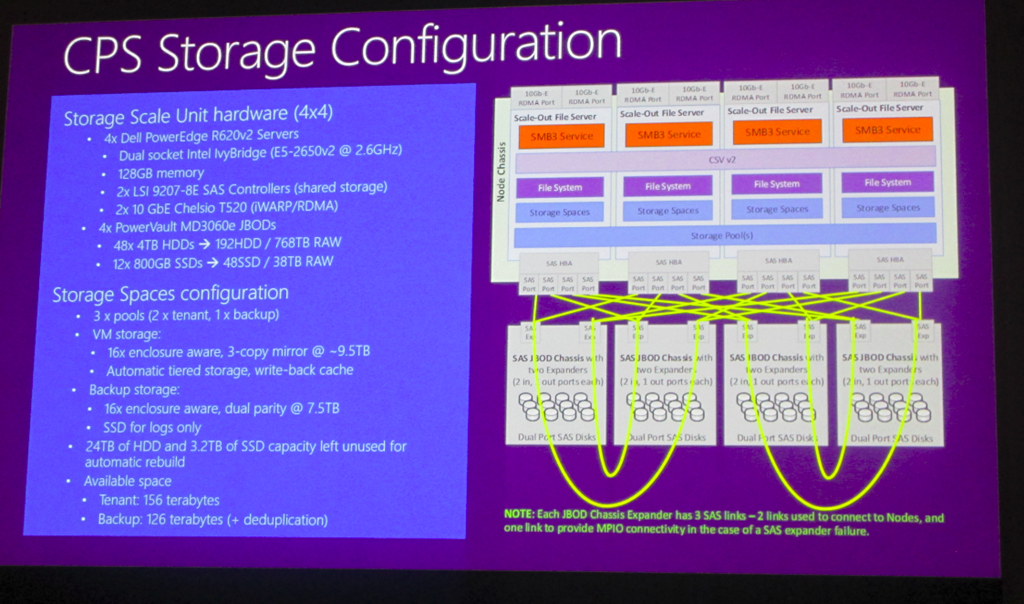
Each JBOD has 60 disks with 48 x 4 TB HDDs and 12 x 800 GB SSDs. They have 3 pools to do workload separation. The 3rd pool is dual parity vDisks with dedupe enabled – used for backup.
Storage Pools should be no more an 80-90 devices on the high end – rule of thumb from MSFT.
They implement 3-way mirroring with 4 columns
Disk Allocation
4 groups of 48 HDDs + 12 SSDs. A pool shold have equal set of disks in each enclosure.
v
A tiered space has 64 HDDs and 20 SSs. Write cahce – 1GB Tiers = 555 GB and HDD – 9 TB. Interleave == 64 KB. Enclusre aware = $true. RetiureMissing Physical Disks = Always. Physical disk redundancy = 2 (3-way mirror). Number of columns = 2.

In CPS, they don’t have space for full direct connections between the SOFS servers and the JBODs. This reduces max performance. They have just 4 SAS cables instead of 8 for full MPIO. So there is some daisy chaining. They can sustain 1 or maybe 2 SAS cable failures (depending on location) before they rely on disk failover or 3-way mirroring.