Installing Azure Backup Server (DPM) Agent Leads To 0x80990a2b Error

This post explains how to solve an issue where installing the Azure Backup Server or DPM agent to a machine fails with a 0x80990a2b error.

I was asked to deploy Azure Backup to backup content on PCs in the office (organized admins –> that’s another story). I decided to test with my Windows 10 PC. I logged onto our Azure Backup server, and used the GUI to deploy the agent and it failed:

Install protection agent on <Machine Name> failed:

Error 347: An error occurred when the agent operation attempted to create the DPM Agent Coordinator service on <Machine Name>.

Error details: Unknown error (0x80990a2b)

Recommended action: Verify that the Agent Coordinator service on <Machine Name> is responding, if it is present. Review the error details, take the appropriate action, and then retry the agent operation.

I searched my services for something called DPM Agent Coordinator and found nothing. The DPM community is full of stories about Windows Firewall causing issues – I tried to disable it but it made no difference. And the 0x80990a2b error wasn’t appearing in my search results.

Next I decided to try a manual installation on my PC. That failed with the same error, but this time there was a clue:

image

There is a log file for the installation. I opened the log and started reading. There was the error about not being able to initialize something called an AC (Agent Coordinator). I was getting frustrated but kept reading.

image

Ah!

WARNING    Failed: Hr: = [0x80990a2b] : MARS agent found. Cannot install Microsoft Azure Backup Agent

Now was exactly when I remembered that I had been backing up my OneDrive using the Azure Backup MARS agent. I remove the agent, cleaned up the backup, and re-ran the original agent deployment from the Azure Backup Server GUI. The agent installed perfectly and was added to the protection group.

Technorati Tags: ,,,

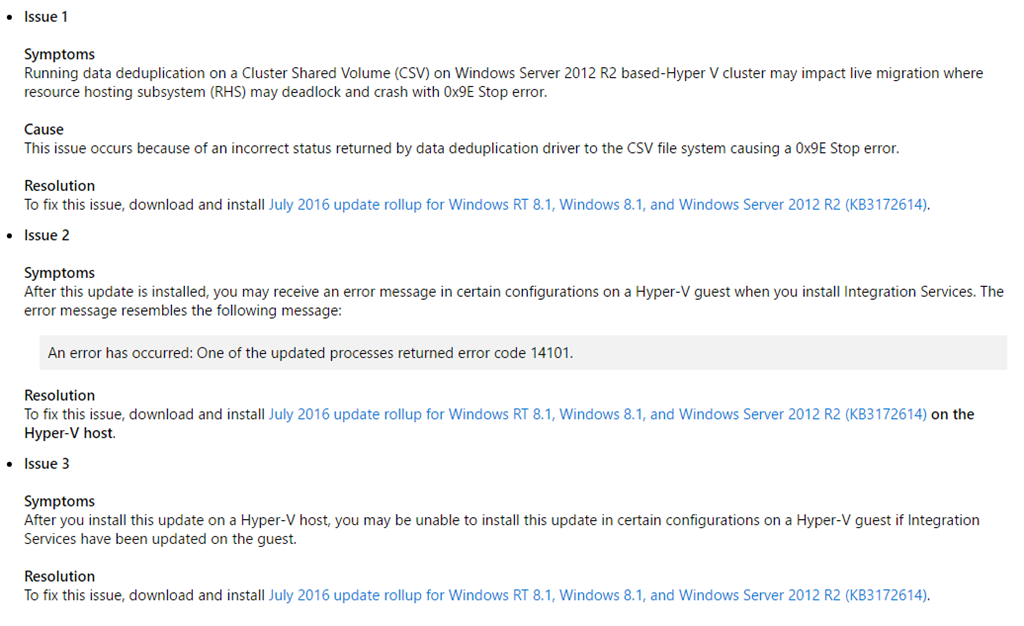
KB3172614 To Replace/Fix Hyper-V Installations Broken By KB3161606

Microsoft released a new update rollup to replace the very broken and costly (our time = our money) June rollup, KB3161606. These issues affected Hyper-V on Windows 8.1 and Windows Server 2012 R2 (WS2012 R2).

It’s sad that I have to write this post, but, unfortunately, untested updates are still being released by Microsoft. This is why I advise that updates are delayed by 2 months.

In the case of the issues in the June 2016 update rollup, the fixes are going to require human effort … customers’ human effort … and that means customers are paying for issues caused by a supplier. I’ll let you judge what you think of that (feel free to comment below).

A month after news of the issues in the update became known (the update rollup was already in the wild for a week or two), Microsoft has issued a superseding update that will fix the issues. At the same time, they finally publicly acknowledge the issues in the June update:

image

So it took 1.5 months, from the initial release, for Microsoft to get this update right. That’s why I advise a 2 month delay on approving/deploying updates, and I continue to do so.

What Microsoft needs to fix?

  • Change the way updates are created/packaged. This problem has been going on for years. Support are not good at this stuff, and it needs to move into the product groups.
  • Microsoft has successfully reacted to market pressure by making a special emphasis to change, e.g. The Internet, secure coding, The Cloud. Satya Nadella needs to do the same for quality assurance (QA), something that I learned in software engineering classes was as important as the code. I get that edge scenarios are hard to test, but installing/upgrading ICs in a Hyper-V guest OS is hardly a rare situation.
  • Start communicating. Put your hands up publicly, and say “mea culpa”, show what went wrong and follow it up with progress reports on the fix.


Webinar – Affordable Hyper-V Clustering for the Small/Medium Enterprise & Branch Office

I will be presenting another MicroWarehouse webinar on August 4th at 2PM (UK/Ireland), 3 PM (central Europe) and 9AM (Eastern). The topic of the next webinar is how to make highly available Hyper-V clusters affordable for SMEs and large enterprise branch offices. I’ll talk about the benefits of the solution, and then delve into what you get from this hardware + software offering, which includes better up-time, more affordability, and better performance than the SAN that you might have priced from HPE or Dell.

image

Interested? Then make sure that you register for our webinar.

Moving Classic Azure VMs To A Different CSP / ARM Subscription Using MigAz

This post will show you how to migrate a cloud service-based virtual machine deployment from Classic Azure (Service Management or SM) to a different Azure subscription as an Azure Resource Manager (ARM) deployment. One example might be where you want to move virtual machines from a Direct/MOSP (credit card, trial, MSDN), Open, or EA subscription to a Cloud Solution Provider (CSP) subscription.

My focus is on migrating to CSP, but you can use this process to move VMs into ARM in any different subscription. Note that Microsoft has an official solution for migrating classic machines into ARM in the same subscription, that can feature zero downtime if you have used classic VNETs.

The Old Deployment

I have deployed a collection of virtual machines in a legacy style subscription. It’s a pretty classic deployment that was managed via the classic portal at https://manage.windowsazure.com. The virtual machines are stored on a single standard LRS storage account, they are connected to a VNet, and a cloud service is used to NAT (endpoints) the virtual machines.

image

One of the machines has endpoints for SMTP, another has endpoints for HTTP and HTTPS, and all of the machines have the usual RDP and remote management endpoints.

image


If you browse this deployment in the newer Azure Portal at https://portal.azure.com you’ll see that it’s deployed in resource groups, but the classic portal has no understanding of these groups, so there’s actually a messy collection of 3 default groups.

image

Migration Strategy

I’ve decided that I’m going to move these resources to my new CSP subscription using the free (unsupported) migAz toolset. I have data transactions happening on some of my machines, so I’m worried that the disk copy will leave me with data loss after a switchover. So here’s my plan:

  1. I will leave my original system running, and let users continue to use the old system during the migration.
  2. The new CSP deployment will be on a different network address.
  3. After the copy, I will create a VNet-to-VNet connection (requires a dynamic/route-based gateway, which might be incompatible with your on-premises VPN device) between the non-CSP and the CSP deployments.
  4. I will use tools like RoboCopy and SQL sync to keep the newer system updated while I test the new system.
  5. I will switch users over to the new system when I am happy with it and can schedule a very brief maintenance window.
  6. I will remove the old deployment after I am satisfied that the migration worked.

Otherwise I could schedule a maintenance window, shut down the older deployment, and do the migration/copy, and redirect users to the new deployment as quickly as I can.

Note that my cloud service has a reserved IP address, but I cannot bring that IP address with me to the CSP subscription. At some point, I am going to have to redirect users to a new static public IP address that is assigned to an ARM load balancer – probably by changing public DNS records. Any ExpressRoute/VPN connections will also have to be rebuilt to connect to a new gateway – I will have to manually deploy the gateway.

Preparation

First thing’s first: document your deployment and see if you can find anything that isn’t compatible with ARM or that you might need to re-create afterwards. We don’t have a way to migrate an Azure Backup vault at the moment, so document your Azure VM backup policies so that you can recreate them in the CSP subscription using a recovery services vault.

Next you need to update and get some tools on your PC:

Time to start migrating!

Export ARM Template

The migAz tool creates an ARM template (JSON file) that describes how your non-ARM deployment would look if it was deployed in ARM (or CSP). This includes converting a cloud service into a load balancer, and converting endpoints and load balanced endpoints into NAT rules and load balancing rules (it really is quite clever). We can modify this file (optional). Then we import the file into CSP to create the machines, the networking components, and (importantly) the storage account – the disks aren’t copied yet, but we’ll do that later.

Browse to wherever you extracted migAz and run migAz.exe. Then:

  1. Log into your old subscription using suitable admin credentials.
  2. Select the subscription that you want to migrate from.
  3. You can click Options to tweak the export.
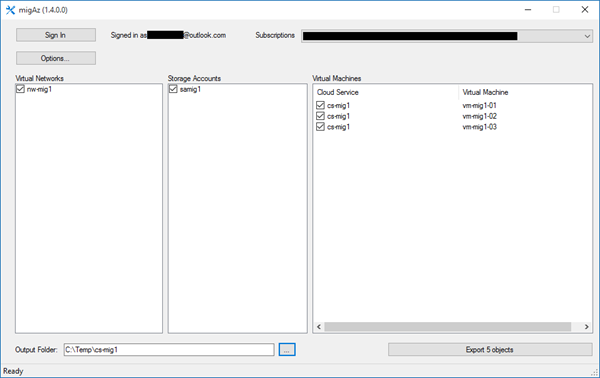
  4. Select the virtual network(s), storage account(s), and virtual machine(s) that you want to migrate.
  5. Enter an output folder where you want to store the created JSON files in.
  6. Click Export.

image

The JSON Files

It takes a few minutes for migAz to interrogate your old subscription to build up 2 JSON files:

  • CopyBlobDetails.json: This file contains details of the virtual hard disks that must be copied to the CSP subscription. This includes the source URIs and the storage access keys – so keep this file safe because anyone can use these details to download the disks!
  • Export.json: This file is the meat of the export, containing the template that will be used to redeploy diskless machines with all of their ARM dependencies.

image

We’ll return to CopyBlobDetails.json later on, so let’s focus on Export.json. If you open this file you’ll find it describes everything that will be created in ARM when you import it into your CSP subscription. You can edit this file to make changes. Maybe you want to tweak NAT rules or add machines. I want to make a few changes to my JSON file. Everything that follows in this section is optional!

Before you go anywhere near an editor, copy the two JSON files to allow you to undo edits and to have a reference to the original configuration.

When I browsed the file I noticed that the load balancer was going to be assigned a dynamic public IP address resource. I want a static IP address for external access and simple public DNS management. I also noticed that the name of the IP address will break my desired naming standard and that I want to change the domainNameLabel.

image

So I will edit the file and make two changes to the publicIPAddresses resource:

image

While I’m at it, I’m also going to rename the load balancer (under loadBalancers). Note that I also need to change the dependencies to match the new name of the public IP address:

image

There are loads of references (load balancer or NAT rules) to the name of the load balancer.

image

You need to update these references. The easy way to do a search replace. My old references were loadBalancers/cs-mig1 so I replaced them with loadBalancers/lb-mig1 to match the new name of the load balancer (above).

image

A load balancer requires an availability set so I’m renaming the new AV set to match my new naming standards:

image

There are loads of dependencies on this availability set, so do a find/replace to update those dependencies with the new name.

One possible gotcha is that the storage account won’t have a globally unique name (required). The options of migAz are configured by default to take the original storage account name and add a v2 to it for the ARM deployment. Make sure that this will still be unique. If it’s not, then you can edit the JSON file. You could also opt to change the resiliency level. Make sure that you edit CopyBlobDetails.json to make the same change.

image

I mentioned earlier that one of my plans was to change the network address of my deployment so that I could connect the non-ARM and the CSP deployments together to enable data synchronization before the production switchover. My old network is 10.0.0.0/16. I want the new network to be 10.1.0.0/16 because this will allow routing between the two VNETs if I create a VNET-to-VNET VPN. I will also need to update my subnet(s) and any DNS servers that are on the VNET.

image

My changes are:

image

All  of my machines have reserved IP addresses so I’m going to do a find/replace to change 10.0.0 with 10.1.0.

image

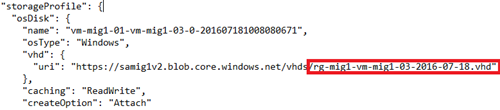
My naming stuff is almost all completely fixed up. Almost. What’s left? The virtual hard disks in the new CSP deployment are all going to be named after the original cloud service. My cloud service was called cs-mig1. I can see that the disks are called cs-mig1*.vhd.

image

I am going to change the names to match the name of my new resource group (which I will manually create later):
image

But that’s not enough for the disks. You will also need to edit CopyBlobDetails.json because that file contains instructions on how to name the virtual hard disks’ blobs when they are copied to the new CSP subscription.

image

Tweak the names to match your changes in export.json.

image

Now when I search export.json for the old cloud service name (cs-mig1) there are no more references to the cloud service, and I have configured my preferred ARM naming standard for every resource (prefix-name-optional number).

Create the ARM Deployment

Now the fun begins! Launch your Azure PowerShell window and sign into your CSP / ARM subscription using:

Login-AzureRMAccount

View the subscriptions that your account has access to:

Get-AzureRMSubscription

Copy the ID of the subscription that you want to deploy the VMs into, and run:

Select-AzureRMSubscription -SubscriptionID xxxxxxxx-yyyy-zzzz-aaaa-bbbbbbbbbbbb

You should then create a new resource group in the Azure region of your choice. My naming standard will have me create a group called rg-mig1, and I’ll create it in Dublin.

New-AzureRmResourceGroup -Location NorthEurope -Name "rg-mig1"

Now is the moment of truth. I am going to import my (heavily modified) export.json file into the CSP subscription to create all of my virtual machines and their dependencies.

New-AzureRmResourceGroupDeployment -Name "rg-mig1" -ResourceGroupName "rg-mig1" -TemplateFile "C:\Temp\cs-mig1\export.json" –Verbose

Note that the disks have not been copied yet, so there will be a bunch of errors at the end of this import. The errors refer to missing virtual hard disks.

Unable to find VHD blob with URI

We will fix those errors later.

image

Copy Virtual Hard Disks

Browse (in PowerShell) to where you extracted the migAz zip file. You are going to run a script called BlobCopy.ps1, and point it at CopyBlobDetails.json. This script will create a snapshot of the disks in the source subscription, and copy the disks (using the Azure network) directly to the new storage account in the CSP/ARM subscription.

.\BlobCopy.ps1 -ResourcegroupName "rg-mig1" -DetailsFilePath "C:\Temp\cs-mig1\copyblobdetails.json" -StartType StartBlobCopy

You can track the progress of the copy using:

.\BlobCopy.ps1 -ResourcegroupName "rg-mig1" -DetailsFilePath "C:\Temp\cs-mig1\copyblobdetails.json" -StartType MonitorBlobCopy

image

If you paid attention, you might have noticed that CopyBlobDetails.json had fields for tracking the copy. You can get a bunch of information from that file about each of the disk copy operations.
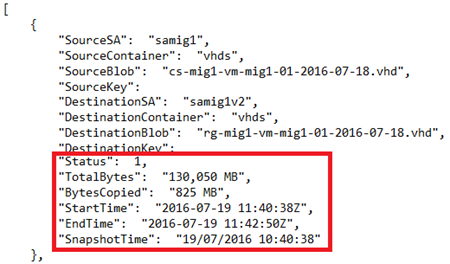
image

Fix Up Virtual Machines

The previous creation of the virtual machines had disk-related errors. The disks are in place now, so we can re-run the import to fix up the machines.

New-AzureRmResourceGroupDeployment -Name "rg-mig1" -ResourceGroupName "rg-mig1" -TemplateFile "C:\Temp\cs-mig1\export.json" –Verbose

image

Verify the CSP/ARM Deployment

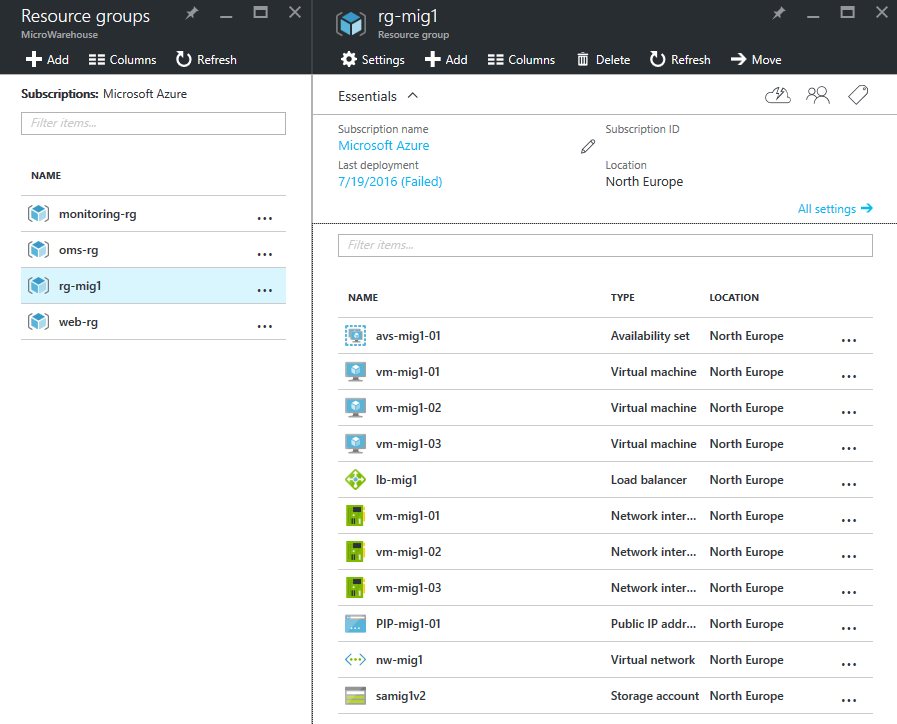
You should find that your virtual machines are now running in the ARM / CSP subscription. Note how everything is in the single eg-mig1 resource group and has my preferred naming standard:

image

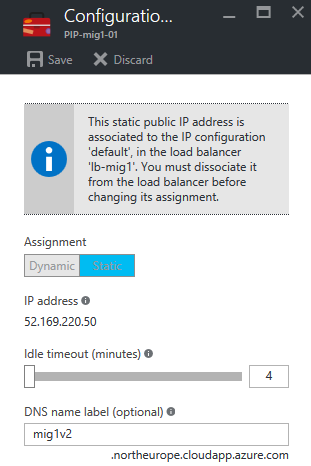
The load balancer is configured with a public IP address with static configuration:

image

The inbound NAT rules have been copied over:

image

And the network has a new network address as I required to enable a VNET-to-VNET connection with the original deployment.

image

Troubleshooting

The migAz tool creates some log files in %USERPROFILE%\appdata\Local. Look for migAz-<YYYYMMDD>.log and migAz-XML-<YYYYMMDD>.log.

If you have issues during the import of the export.json then you need to pay attention to the errors in the PowerShell screen and manually troubleshoot the export file. In my case, my heavily edited exoprt.json had a typo in one of the renamed virtual hard disks so it didn’t match what was copied (details in CopyBlobDetails.json). The fix was easy:

  1. The error was clear that the specified disk (with the wrong name) didn’t exist.
  2. I corrected the JSON file.
  3. I removed the new virtual machine from the CSP subscription.
  4. I re-ran the import, which re-created that machine and attached the disk (no duplicates of existing resources are created).

Post-Migration

So what’s next?

  1. Re-deploy Azure Backup using the recovery services vault to protect my VM workloads.
  2. Deploy a gateway subnet and gateway.
  3. Create a VNET-to-VNET VPN with the old deployment to allow data synchronization.
  4. Test the new deployment.
  5. Schedule a maintenance window to switch production over to the new deployment in CSP.
  6. Change DNS, etc, to redirect users to the CSP deployment.
  7. Optionally reverse data synchronization.
  8. Remove the old non-CSP deployment after a suitable waiting period, and remove all inter-VNET comms.

Summary

If you want migAz to be easy, then it can be – just don’t modify the json files unless your new storage account name won’t be globally unique. It’s actually a pretty simple process:

  1. Export
  2. Import
  3. Copy disks
  4. Import (fix up)

The only complexity in my migration was caused by my desire to implement naming standards across all of my ARM resources.

The migAz toolset might not be supported, but it is the only way to migrate existing virtual machine workloads to Azure. It works pretty well, so I’m happy to use and recommend it.

Technorati Tags: ,

Choosing A Strategy To Migrate Azure VMs to CSP

This post is intended to help you understand how you can migrate your classic (Service Management or SM) Azure virtual machines from an old Azure subscription to a new CSP subscription where the only API available to you is Azure Resource Manager (ARM).

Official Migration Options From Microsoft

This will be a short paragraph. There are no official migration paths to Azure in CSP. The official text that CSP resellers get from Microsoft is nearly as short!

What Options Have You?

Let’s start with the painful options:

  1. You do nothing and leave machines in an old subscription. You can migrate them to ARM within the old subscription using the official migration solution from Microsoft, but it means that you cannot avail of the customer/partner benefits of CSP.
  2. Rebuild the VMs in CSP and migrate your data (using application features), maybe over a VNET to VNET VPN. Eeeek! There’s a lot of work, but you can get into CSP with your data in sync.

And then there’s what I want to talk about: migAz, a solution that a Microsoft employee (still not supported) has shared on GitHub.

The migAz toolset will:

  1. Record your old deployment as what it would look like in ARM using a JSON file.
  2. Create a listing of disks to move in a second JSON file.
  3. Allow you to create the VMs and their dependencies in the CSP subscription.
  4. Create a one-time snapshot of the original disks and copy them (inside of the Azure network) to a new storage account in the CSP subscription.
  5. Fix up the ARM deployment and start your VMs in CSP.
  6. Then you can redirect users to your CSP deployment.

Downtime Versus Data

The disk copy is done using a one-time snapshot. So consider this:

  1. Users are using your services and making data changes.
  2. You copy the disks from old services, which are still running, to the CSP subscription.
  3. Users are continuing to use the old services and making data changes.
  4. You switch users over to the CSP deployment.

That means data changes between 1 and 3 have been lost. So you have to make a choice from the below options:

  • Switch off the virtual machines in the old subscription before the move.
  • Don’t use migAz with data machines. Find another method.
  • Leave all your machines running while copying with migAz. Deploy the CSP solution with a different network address. Connect the old deployment with the CSP one, maybe using VNET-to-VNET VPN, and use application sync features to keep data synchronized from the old system to the CSP one. Perform a switchover at a time of your choosing.

I’ll show you how to use migAz in a later post.

Technorati Tags: ,

WPC 2016 Day 3 Keynote

Welcome to the Wednesday keynote at WPC, the Microsoft partner conference. This keynote is usually very business, strategy and competition based. It was usually the stage for COO (and head of sales) Kevin Turner, who recently left Microsoft to become the CEO of a finance company. We’ll see how his replacements handle this presentation in the fuzzier warmer world of the new Satya Nadella Microsoft.

image

Gavriella Schuster

The corporate vice president worldwide partner group kicks things off by thanking repeat attendees and welcomes first-timers too.

image

Washington DC will be the venue in 2017. There’s a bunch of speakers today at the keynote. Gavriella hands over and will return later.

Brad Smith

The chief lawyer comes on stage.

image

I like him as a a blogger/speaker … very plain spoken which is unusual for a legal person, especially for someone of his rank, and strikes me as being honestly passionate.

He starts to talk about the first industrial revolution which was driven by steam power. We had mass manufacturing and transport that could start to replace the horse. In the late 1800s we had the second revolution. He shows a photo of Broadway, NY. That time, 25% of all agriculture was taken to feed horses … lots of horse drawn transport. 25 years later, Broadway is filled with trams and cars and no horses. And then we had the PC – the 3rd revolution. We are now at the start of the 4th:

  • Advances in physical computing: machines, 3D printing, etc.
  • Biology: Genomes, treatment, engineering.
  • Digital: IoT, Blockchain, disruptive business models.

Each revolution was driven by 1 or 2 techs. The 4th revolution has one connection between everything: The Cloud, which explains MIcrosoft’s investments in the last decade: over 100 data centres in 40 countries, opening the world to new possibilities.

Toni Townes-Whitley

image

While there’s economic opportunity, we also need to address societal impact. Growth of business doesn’t need to be irresponsible. 7.4 billion people can be positively impacted by digital transformation – just not by Cortana at the moment. There’s a video on how Azure data analytics is used by a school district to council kids.

Back to Smith.

What do we need to do?

  1. Build a cloud that people can trust. People need confidence that rights and protections that they’ve enjoyed will persist. Microsoft will engineer to protect customers from governments, but Microsoft will assist governments with legal searches, e.g. taking 30 minutes to do searches after the Paris attacks. More transparency. Microsoft is suing the US government to allow customers to know that their data is being seized. Protect people globally. The US believes that US law applies everywhere else. They play a video of a testimony where a questioner rips apart a government witness about the FBI/Microsoft/Ireland mailbox case.We need an Internet that is governed by good law. We need to practice what we preach. Cloud vendors need to respect people’s privacy.
  2. A responsible cloud. The environment – Azure consumes more electricity than the state of Vermont. Soon it could be the size of a mid-size European country. This is why Microsoft is going to be transparent about consumption and plans. R&D will be focused on consuming less electricity. They are going to use renewable electricity more – I think that’s where Europe North is sourced (wind).
  3. An inclusive cloud. It’s one of the defining issues of our time. Humans have been displaced from so many jobs of 100 years ago. What jobs will disappear in the next 10, 20, 50 years? Where will the new jobs come from and where will those people come from? Business needs to lead – and remember that the western population is getting older! Coding and computer science needs to start earlier in school. Broader bridges are better than higher walls – diversity is better for everyone. We need to reach every country with public cloud.

Cool videos up. One about a village in rural Kenya that gets affordable high-speed Internet via UHF whitespace. A young man there works tech support for a US start up. Next is a school where OneNote is being used for special needs teaching. A kid with dyslexia and dysgraphia goes from reading 4 words per minute and called himself stupid – one year later he reads way better and knows he’s not stupid, he just needed the right help.

Gavriella Schuster

Back to talk to us again. The only constant in life is change … welcome to IT 🙂 It is not only constant, but faster, and self-driven.

image

Cloud speeds drive the pace of change faster than ever before. Industries have changed faster than ever: Air BnB, Netflix and Uber. Customers change too. More than 1 cloud feature improvement per day last year in MSFT.

The greater cloud model will top $500B by 2020. Cloud is the new normal. IDC says that 80% of business buyers have deployed or fully embrace the cloud. You need to be quick to capture this opportunity: embrace, innovate and be agile … or be left behind.

Triple growth on Azure this year. 17,000 partners are transacting CSP. 3 million seats sold. In May alone, CSP sales exceed that of Open, Advisor, and syndication.

Microsoft asked their most profitable partners what it is that they do to be so profitable.

image

65% of buyers make their decision before talking to a sales person. I see that in the questions I get asked. Often the wrong question is being asked. Microsoft partners need to be where their customers are, and influence that decision/question earlier in the process.

In the next 2 years, customer cloud maturity will go from 10% to 50%. In the next 3 years, 60% of CIOs expect themselves to be the chief innovation (not just IT) officer. Now is the time to invest in new ways of doing business, not just “sell some cloud”.

Steve Guggenheimer

I guess he’s a fan of New Zealand’s All Blacks. I wonder if we’ll get a Microsoft Haka?

clip_image002

The chief dev evangelist and owner of the MVP program comes out. This will be dev-centric, I’m guessing, so I might tune out.

He announces Microsoft Professional Degree. Some sort of mixture of self- and class-based learning to become a data scientist (huge industry shortage).

There is an “intellectual property” 5 minute break here.

Judson Althoff

Freshly promoted to partly replace Kevin Turner as COO, now the Executive Vice President Worldwide Commercial Business.

image

He reaffirms the message that Microsoft will continue to be lead by partners. CSP is their preferred channel, and CSP is an exclusively partner-sold and -invoiced channel.

Very interesting video where MSFT partnered with a smart-glasses company to make a vision assistant for visually impaired people, that is paired with a phone, and driven by the cloud. For example, it guides him to take a photo of a menu, and then reads out the items. He can get descriptions of people around him, including facial expressions – “a 40 year old man with a surprised expression”.

6 priorities that MSFT sales force will work with partners on over the next year:

image

86% of CEOs think digital is their number 1 priority. You have to speak in the vernacular of business outcomes, not tech features.

I like a line from Judson in a video: We can’t do this stuff ourselves. This is a joint opportunity.

You have to rethink your own customer engagement, and not live on the old transactional engagement of the past. Embrace the cloud and move forward. Focus on customer lifetime value, not just a sale ( love this line, and it applies to a lot of partners who really mis-understand the capabilities of the cloud).

Now for the fun: competition 🙂 First, Azure.

image

The number 1 reason that customers are leaving AWS, not considering Google, and coming to Azure is the partner-ability with Microsoft.

Office 365:

image

True-cross platform capability. Office 2016 was out on the Apple platforms before Windows!

Microsoft is differentiating with security from the device/user to the data center (a unique selling point):

image

“Data is the new black”. Microsoft does everything from relational data on-prem to unstructured data in the cloud. Data is the ticket to the C-suite (the board).

And that’s all folks!

image

Technorati Tags: ,

Webinar: Defending Today’s Threats With Tomorrow’s Security By Microsoft

I am presenting another webinar on July 21st at 2PM Irish/UK time, 3PM CET, 9AM Eastern, hosted by my employer, MicroWarehouse. The focus of this webinar will be security solutions … and I’m not talking old style stuff like AV scanning or proxy/firewalls. No, I’m talking about modern security solutions that are designed to deal with the sorts of threats that your yellow box scanners and Cisco/SonicWall firewalls are letting right through to trash your business.

image

You can register here.

Webinar Recording – An Introduction to Enterprise Mobility + Security (EMS)

I recently presented a webinar, hosted by my employer MicroWarehouse, on an introduction to Microsoft EMS. The timing worked out pretty sweetly – Microsoft had just announced:

  • The renaming of EMS from Enterprise Mobility Suite to Enterprise Mobility + Security, emphasising that security is most of what EMS does.
  • The new E5 EMS bundle that will be released in Q4 of 2016.

image

We have posted the recording of the session on learn.mwh.ie, along with the PowerPoint deck, and some follow up links for reading and learning. EMS is a great suite to learn about, and a great package to consider adopting for securing the endpoints (devices and users) against attack. And you’d be amazed how often the elements of EMS are the answers to security questions.

Speaking of security, our next webinar is coming on July 21st at 2PM UK/Irish time, 3PM CET or 9AM Eastern:

Technorati Tags: ,,,

RunAsRadio Podcast – Hyper-V in Server 2016

I recently recorded an episode of the RunAsRadio podcast with Richard Campbell on the topic of Windows Server 2016 (WS2016) Hyper-V. We covered a number of areas, including containers, nested virtualization, networking, security, and PowerShell.

image

WPC 2016 Day 2 Keynote

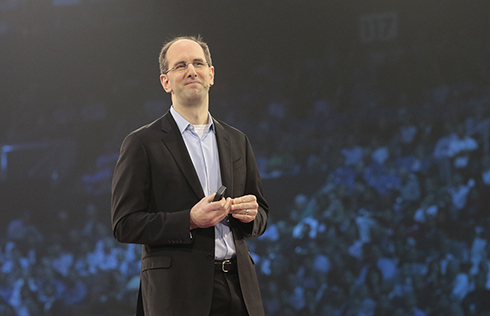
Scott Guthrie

I join this session late, and Guthrie is talking about the growth of Azure’s data platform before segwaying to EMS, renamed to Enterprise Mobility + Security.

Julia White

She is showing off features from the new E5 plan (Q4 2016).

Azure Information Protection adds classification to the protection of Azure RMS (being upgraded to AIP). Julia creates a document. AIP automatically classifies the document. She wants to reduce the classification and she’s prompted to justify this (audited). The document is secured for safe sharing, no matter who gets it or where it goes.

Cloud App Security is next. 512 cloud apps are discovered in a demo organization. Each app gets a score from 0-10, measuring the security profile of that SaaS application – 13,000 apps are profiled in CAP. She browses one and sees that files are shared publicly. She opens up policies and opens a PCI compliance one. It shows two hits in that app – and she can see where credit card info is being shared in a doc in OneDrive. She can secure it straight from the CAP portal by making the file private, without going into OneDrive.

Back to Scott Guthrie.

OMS

OMS is a server management solution, now available via the CSP program – it was restricted to EA customers only.

Kirk Koenigsbauer

Employees work on double the number of teams that they did 5 years ago. Working remotely has quadrupled. Millenials will make up 50% of all US workers – they’re biased to multi-tasking, working in teams, and working remotely .. and they work differently. 90% of the world’s data was generated in the last 2 years … making information overload worse. 87% of senior managers admit to uploading docs to personal file sharing/sync systems to get stuff done, shadow IT bypassing the restrictions of old IT.

image

The focus here is re-inventing productivity for the way we work – digital transformation. 4 pillars.

image

Office 365 is used by more than 70+ million work users, with growth being 57% year over year. The email workload has been a driver. Gartner says Microsoft has 80% share in enterprises for cloud email. With the E5 SKU, partners make 1.8x revenue … and a sustained managed service business that you’ll never get from stopping after email migration where most partners opt to stop.

Facebook uses Office 365. It makes sense, especially when you look at features like Yammer, Planner, Groups, Graph, Delve, which are all about collaborative flexi-teams, supported by information, self-service management with Azure AD Premium. “Move fast” is the most important factor in Facebook culture and Office 365 supports this.

Yusuf Mehdi

Now on to Windows and devices – the breakthrough to more personal computing. There’s a demo video of Microsoft devices in action.

image

We have challenges:

  • New security threats.
  • Pen and voice provide new user interfaces.
  • 2D screens are restrictive. Mixed reality (HoloLens) can break the barrier.

There are more than 350,000,000 monthly active Windows 10 devices. 96% of enterprises are testing Windows 10 and will need deployment skills in the next year.

Security threats are real. They take over 200 days to discover and 70 days the recover from. Hackers are targeting endpoints: weaknesses in IT processes and users. The FBI says there are two kinds of companies: those that have been hacked and those that don’t know it yet.

Windows 10 could have prevented the Home Depot, Target (both pass the hash attacks) and Sony attacks, apparently. Passwords are a problem. 1 in 9 have gone to a website and not used it because they cannot remember the password. In 2.5 weeks in the anniversary update, you will be able to log into websites and apps using Windows Hello (face or finger scan). Credential Guard protects against pass the hash attacks. We see demos of Windows 7 versus Windows 10 – Windows 7 is compromised but Windows 10 is safe. Device Guard hardens a system so that malware cannot run. In a demo, the firewall is up and Defender is running. He opens a “Contoso Expense app” and the security features are turned off, but on Windows 10, Device Guard blocks the malware from running. In the anniversary update, a new feature adds more security. Advanced Threat Protection dashboard can be used to monitor machines by security professionals. You can even go back in time to investigate penetrations.

Pen, Cortana, HoloLens, and Xbox gaming all get updates in the anniversary update. Out comes demo god, Bryan Roper, straight from the set of Dexter.

image

First, Windows Ink, a platform. Visual Studio demo – 4 lines of code to link enable an app. Now a BridgeStone demo, and he has a tyre, and drills a screw into it. Then he gets a hole in the side wall.

image

And then a larger hole.

image

He gets his surface and starts taking ink notes on the tyre inspection. He takes evidence by using the Surface camera, and starts highlighting things in the photo using the pen.

image

And he’s done. Back to Yusuf.

Windows 10 Enterprise E3 is coming to the cloud (starting in the fall). SMEs can get the latest Windows 10 security features for $7/month per user (not per device) via Cloud Service Provider (CSP) resellers.

Surface-as-a-Service will be sold by CSP Tier 2 distributors that are also authorized device distributors. This is a leasing service … so they can get cloud (Office 365, EMS, Azure, etc), Surface, Windows 10, all on a per-user per month basis.

On to HoloLens for mixed reality. The PGA is working with HoloLens. The following demo was created in 8 weeks by 3 developers using an universal app. There’s a huge hologram of a golf course that they browse around using voice and gestures. They put up a heat map of PGA player shots on a hole. They switch to showing the route to an eagle by a single player.

image

Back to Yusuf, who wraps up this keynote.