Year 10 as an MVP – Adding The Azure Expertise

Today was a stressful day – it was the annual date of my MVP renewal. The program has changed quite a bit in the last year, and this is the only renewal date from now on, so you might have seen more MVPs than usual sharing their nerves online.

I was extremely nervous, especially because my profile on the MVP directory went offline. I was sure that I was a goner. But later in the day my profile re-appeared, with a change.

NewMVPStatus

To mark year 10 as a Microsoft Valuable Professional, I have been awarded with a double expertise:

  • Cloud & Datacenter Management (Hyper-V)
  • Microsoft Azure

And a little later in the afternoon, the notification email arrived:

MVP2017Email

My eldest daughter, who is 10 years old, had noticed my stress and wanted to congratulate me. I was banished from the kitchen and later I was presented with this cake – I’m a proud Dad:

MVP10Cake


These are fun times ahead for IT pros. My double status, with on-premises virtualization and public cloud, mirrors what’s going on in many of our careers, either already or pretty soon.  My career has changed so much over the years:

  • UNIX programmer
  • Have-a-go-hero Windows consultant
  • Re-inventing myself to be a better Microsoft engineer
  • Senior sysadmin in an international company
  • MVP in SCCM
  • Virtualization engineer
  • MVP in Hyper-V
  • Author
  • Technical sales
  • Writer
  • Lead on Azure IaaS
  • MVP in Azure

And now I can see somewhat of a return to development. I don’t see myself coding, but I’m heading to Ignite with the intention of spending as much time as posisble learning PaaS stuff, while trying to figure out what’s happening in Windows Server 1709, Azure IaaS developments, and soooo much more!

Big Changes to Windows Server–Semi-Annual Channel

Microsoft has just announced that they are splitting Windows Server and System Center into two channels:

  • Long-Term Servicing Channel (aka Branch)
  • Semi-Annual Channel

Long-Term Servicing Channel

This is the program that we’ve been using for years. Going forward, we will get a new version of Windows Server every 2-3 years. This big-bang release is what we are used to. We’ll continue to get 5 years mainstream support and 5 years extended support, and recently Microsoft announced the option to pay for an extra 6 years of Premium Assurance support.

Existing installations of Windows Server will fall into this channel. This channel will continue to get the usual software updates and security updates every month.

Semi-Annual Channel

This is aimed at hosting companies, private cloud (Azure Stack), and other customers that desire the latest and greatest. In addition to the usual monthly updates, these customers will get an OS upgrade, similar to what happens with Windows 10 now, twice per year in the Spring and Autumn.  Each of these releases will have 18 months of support after the initial release. Most of the included features will be rolled up to create future Long-Term Servicing Channel builds. While the Long-Term Servicing Channel releases will probably continue to be named based on years, the Semi-Annual Channel will use build numbers. A theoretical release in September 2017 would be called version 1709, and a March release in 2018 would be called version 1803.

Customers who can avail of this option are:

  • Software Assurance customers
  • Azure marketplace
  • MSDN and similar programs

SPLA wasn’t mention but this surely would have to be included for hosters?

Impact

The first word that came to my mind was “confusion”. Customers will be baffled by all this. MS wants to push out updates to more aggressive customers, but most companies are conservative with servers. The channel had to split. But it shall be fun to explain all of this … over and over … and over … and over … and again.

Microsoft Azure Backup Server v2 Launched

Microsoft has launched version 2 of MABS, the Microsoft Azure Backup Server v2, with support for Windows Server 2016 and vSphere 6.5.

image

So far we’ve had 2 versions (v1 and v1 update 1) of MABS, the freely licensed (but your pay Azure Backup pricing) slightly modified version of System Center Data Protection Manager. MABS v1 was based on DPM 2012 R2, and MABS v2 is based on DPM 2016, with the cool features of DPM 2016:

  • Modern Storage, which improves performance and reduces consumption by leveraging ReFS Block Cloning, VHDX, and Deduplication.
  • Improves Hyper-V backup, by supporting WS2016 hosts and by using the built-in (WS2016 Hyper-V) Resilient Change Tracking (RCT) for incremental backups without 3rd party software being placed into the kernal of the host’s management OS.
  • Support for Shielded Virtual Machines, the ultra-secure platform on WS2016 Hyper-V.
  • Support for Storage Spaces Direct (S2D).
  • The ability to install MABS v2 on WS2016.

MABS v1 Update 1 added support for VMware vCenter & ESXi 5.5 and 6.0. MABS v2 adds vCenter & ESXi 6.5 to the list. Note that if you install MABS v2 on WS2016 then VMware protection will be in preview mode, while we wait for VMware to release support for VDDK 6.5 for WS2016. You can learn more on from this video.

You can download MABS v2 from here or from a recovery services vault in the Azure Portal.

The supported backup server configuration is:

  • Windows Server 2012 R2, Windows Server 2016
  • Processor: Minimum: 1 GHz, dual-core CPU. Recommended: 2.33 GHz quad-core CPU
  • RAM: Minimum: 4GB. Recommended: 8GB
  • Hard Drive Space (program files): Minimum: 3GB, Recommended: 3GB
  • Disks for backup storage pool: 1.5 times size of data to be protected

Microsoft Azure Backup MARS Agent Supports System State

Microsoft has announced that the Azure Backup MARS agent will support the protection of System State on Windows Server. This is a preview release.

I started talking about Azure Backup 3 years ago, and one of the “we’re not doing it” questions was “does it backup system state”. The answer was no. Azure Backup listened and now you can backup your system state to Azure using the MARS agent.

Scenarios discussed by the Azure Backup team include Active Directory, file server configurations, and IIS server configurations, where restoring files & folders is not enough; the metadata that makes those files & folders useful is stored in System State so the ability to restore that meta data is also important.

Supported versions of Windows Server in this preview release are:

  • W2008 R2
  • WS2012
  • WS2012 R2
  • Windows Server 2016

Do you want support for Windows Server 2003? Let me sell you some Ace of Base and Vanilla Ice cassettes!

This is good news, a part of the continuous improvement of Azure Backup driven by your feedback.

Azure Hybrid Use Benefit – Not As Beneficial As You Might Think!

This is a licensing post. I will not be answering any licensing questions. If you have any licensing questions then please send them to an account manager at your licensing supplier. No exceptions!

Microsoft has been making quite the fuss about a new benefit of Software Assurance for Windows Server called Azure Hybrid Use Benefit.

Whether you’re moving a few workloads, migrating your datacenter, or deploying new virtual machines (VMs) as part of your hybrid cloud strategy, the Azure Hybrid Use Benefit (HUB) provides big savings as you move to the cloud.

You can make use of this licensing benefit in a few technical ways when deploying VMs in Azure. You can choose the [HUB] images from the Marketplace (manually or via JSON/PowerShell) or you can check a box in the Create Virtual Machine blade:

image

The implied message is that for every machine you have covered by SA, you can get 40% (or more) savings by being charged for the VM minus the cost of Windows (Linux VM pricing). Well, that’s sort of true. When you dig a little deeper you’ll learn a few things.

Standard Versus Datacenter

The SA benefit of HUB works differently if you have Std or DC licensing. If you have a Windows Server Std license with SA then you can use this benefit when moving the licensed machine to Azure. You’re not getting anything extra here … just the ability to move your license.

If you have Windows Server DC license with SA, then you can use this benefit to deploy additional Windows VM licensing in Azure.

What Do You Get?

The devil is in the details.

For every 2-processor Windows Server license or Windows Server license with 16-cores covered with Software Assurance, you can run either of the following at the base compute rate:

  • Up to two machines with up to 8 cores or
  • One virtual machine with up to 16 cores.

Let’s assume that you have licensed a new host with Windows Server 2016 with SA. That host has 16 cores. From that license we are getting HUB licensing for Windows Server for either:

  • 2 VMs with up to 8 cores each, e.g. a pair of DS2v2s OR
  • A single VM with up to 16 cores.

If you bought WS2016 Std, then all you get is the ability to move either that physical machine or 2 VMs from that machine (AND decommission the host) to Azure.

If you bought WS2016 DC, then you think “that covers all my VMs”. Yes; it does for on-premises licensing. But HUB still only gives you the above 2 options for the physical host’s license. The VMs don’t have licenses, so you get the same amount of licensing as Std edition, but at least you can keep your on-premises stuff and add new HUB VMs in Azure.

Bigger VMs in Azure

If you need more cores in your Azure VMs then you can stack licenses. You can take 2 on-premises licenses and “stack them” to get 16 + 16 cores for an Azure VM with up to 32 cores.

Compliance

I haven’t completed a deployment of a HUB VM, so I am not 100% sure of this, but I don’t think that there is anything more than an honour system to this type of licensing. It’s up to you to verify that you have correctly licensed your Azure VMs. Azure is probably the next frontier for licensing auditors, so don’t fall into any easy traps that they can roast you in.

Don’t Buy SA for HUB

Don’t get me wrong, HUB is a nice add-on but it’s not going to make a huge difference for companies with lots of virtualization. It’s a nice perk but it’s not why you attach SA to your hosts. You do that for lots of other reasons, such as Cold Server Back UP Recovery, upgrade rights, adding mobility to OEM licenses, and more.

Got Any Questions?

I won’t be answering them. Please ask an account manager at the supplier of your licensing.

StorSimple–The Answer I Thought I’d Never Give

Lately I’ve found myself recommending StorSimple for customers on a frequent basis. That’s a complete reversal since February 28th, and I’ll explain why.

StorSimple

Microsoft acquired StorSimple, a physical appliance that is made in Mexico by a subsidiary of Seagate called Xyratex, several years ago. This physical appliance sucked for several reasons:

  • It shared storage via iSCSI only so it didn’t fit well into a virtualization stack, especially Hyper-V which has moved more to SMB 3.0.
  • The tiering engine was as dumb as a pile of bricks, working on a first in-first out basis with no measure of access frequency.
  • This was a physical appliance, requiring more rackspace, in an era when we’re virtualizing as much as possible.
  • The cost was, in theory, zero to acquire the box, but you did require a massive enterprise agreement (large enterprise only) and there were sneaky costs (transport and import duties).
  • StorSimple wasn’t Windows, so Windows concepts were just not there.

Improvements

As usual, Microsoft has Microsoft-ized StorSimple over the years. The product has improved. And thanks to Microsoft’s urge to sell more via MS partners, the biggest improvement came on March 1st.

  • Storage is shared by either SMB 3.0 or iSCSI. SMB 3.0 is the focus because you can share much larger volumes with it.
  • The tiering engine is now based on a heat map. Frequently accessed blocks are kept locally. Colder blocks are deduped, compressed, encrypted and sent to an Azure storage account, which can be cool blob storage (ultra cheap disk).
  • StorSimple is available as a virtual appliance, with up to 64 TB (hot + cold, with between 500 GB and 8 TB of that kept locally) per appliance.
  • The cost is very low …
  • … because StorSimple is available on a per-day + per GB in the cloud basis via the Microsoft Cloud Solution Provider (CSP) partner program since March 1st.

You can run a StorSimple on your Hyper-V or VMware hosts for just €3.466 (RRP) per appliance per day. The storage can be as little as €0.0085 per GB per month.

FYI, StorSimple:

  • Backs itself up automatically to the cloud with 13 years of retention.
  • Has it’s own patented DR system based on those backups. You drop in a new appliance, connect it to the storage in the cloud, the volume metadata is downloaded, and people/systems can start accessing the data within 2 minutes.
  • Requires 5 Mbps data per virtual appliance for normal usage.

Why Use StorSimple

It’s a simple thing really:

  • Archive: You need to store a lot of data that is not accessed very frequently. The scenarios I repeatedly encounter are CCTV and medical scans.
  • File storage: You can use a StorSimple appliance as a file server, instead of a classic Windows Server. The shares are the same – the appliance runs Windows Server – and you manage share permissions the same way. This is ideal for small businesses and branch offices.
  • Backup target: Veeam and Veritas support using StorSimple as a backup target. You get the benefit of automatically storing backups in the cloud with lots of long term retention.
  • It’s really easy to set up! Download the VHDX/VHD/VMDK, create the VM, attach the disk, configure networking, provision shares/LUNs from the Azure Portal, and just use the storage.


So if you have one of those scenarios, and the cost of storage, complexities of backup and DR are questions, then StorSimple might just be the answer.

I still can’t believe that I just wrote that!

Speaking At European SharePoint, Office 365 & Azure Conference 2017

I will be speaking at this year’s European SharePoint, Office 365, and Azure Conference, which is being held in the National Conference Center in Dublin between 13-16 November. I’ll be talking about Azure Site Recovery (ASR):

image

It’s a huge event with lots of tracks, content and speakers from around the world.


For those of you in Ireland, this is a rare opportunity to attend a Microsoft-focused conference of such a scale here in Ireland.

My Experience at Cloud & Datacenter Conference Germany

Last week I was in Munich for the Cloud & Datacenter Germany conference. I landed in Munich on Wednesday for a pre-conference Hyper-V community event, and 2 hours later I was talking to a packed room of over 100 people about implementing Azure Site Recovery with Windows Server 2016 Hyper-V. This talk was very different to my usual “When Disaster Strikes” talk; I wanted to do something different so instead of an hour of PowerPoint, I had 11 slides, half of which were the usual title, who I am, etc, slides. Most of my time was spent doing live demos and whiteboarding using Windows 10 Ink on my Surface Book.

image

Photo credit: Carsten Rachfahl (@hypervserver)

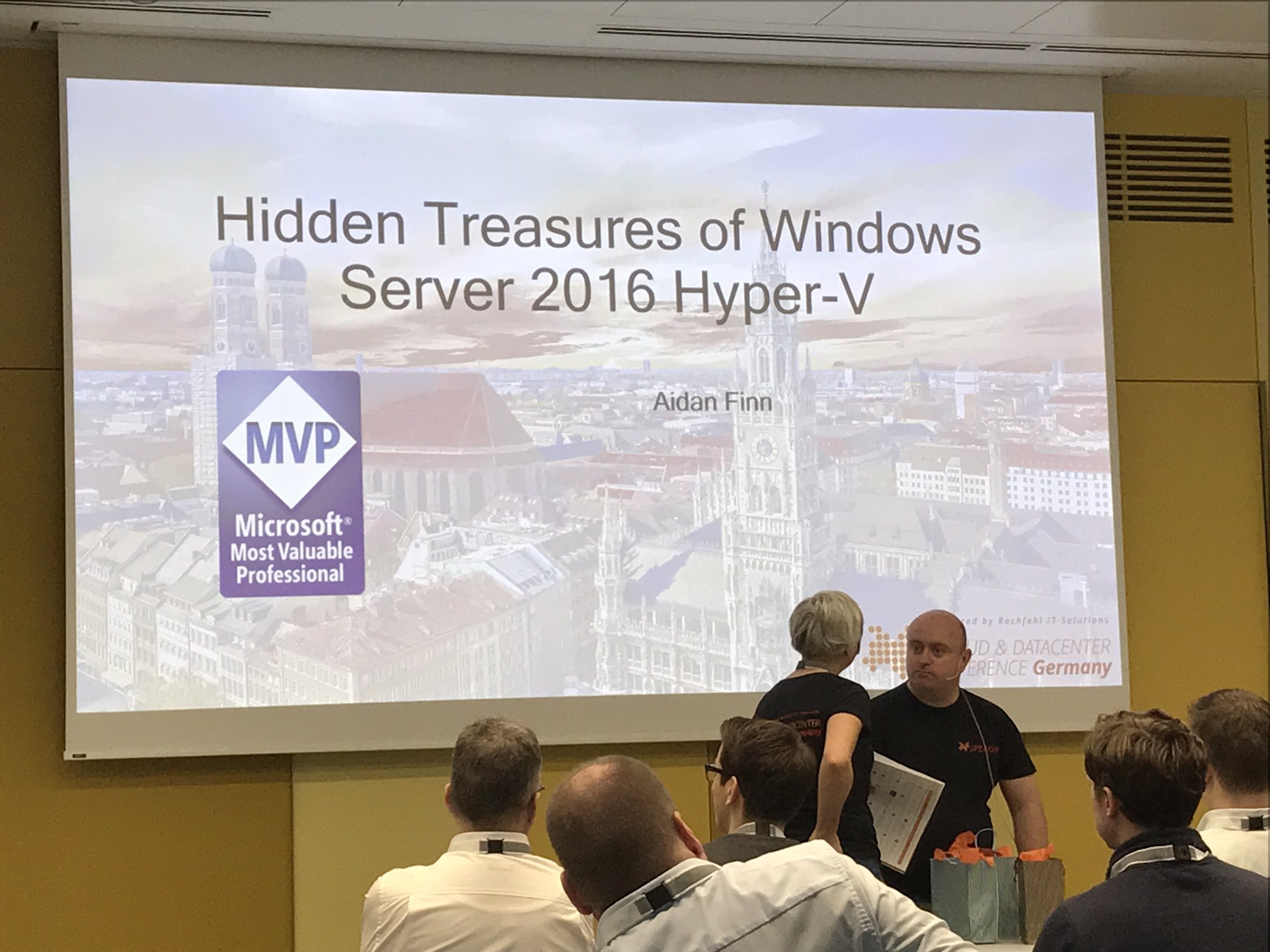
On Friday I took the stage to do my piece for the conference, and I presented my Hidden Treasures in Windows Server 2016 Hyper-V talk. This was slightly evolved from what I did last month in Amsterdam – I chopped out lots of redundant PowerPoint and spent more time on live demos. As usual with this talk, which I’d previously done on WS2012 R2 for TechEd Europe 2014 and Ignite 2015, I ran all of my demos using PowerShell scripts.

Media preview

Photo credit: Benedikt Gasch (@BenediktGasch)


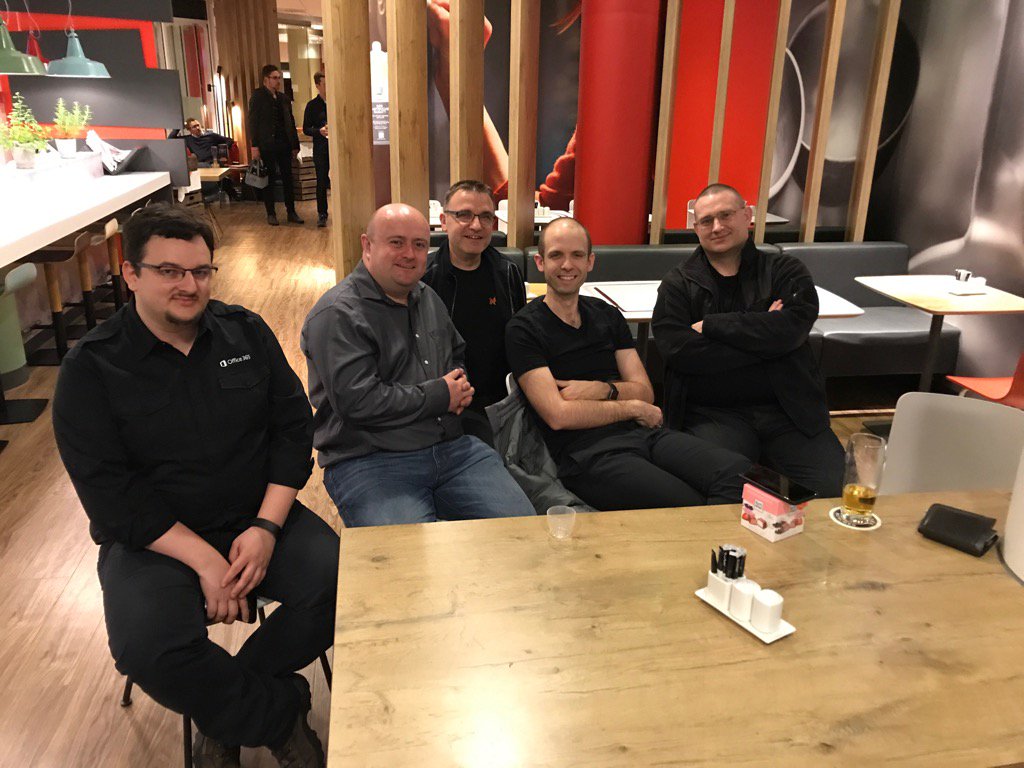
One of the great things about attending these events is that I get to meet up with some of my Hyper-V MVPs friends. It was great to sit down for dinner with them, and a few of us were still around for a quieter dinner on the Friday night. Below you can see me hanging out with Tudy Damian, Carsten Rachfahl, Ben Armstrong (Virtual PC Guy), and Didier Van Hoye.

Media preview

As expected, CDC Germany was an awesome event with lots of great speakers sharing knowledge over 2 days. Plans have already started for the next event, so if you speak German and want to stay up to speed with Hyper-V, private & public cloud in the Microsoft world, then make sure you follow the news on https://www.cdc-germany.de/

Talking Hyper-V & Azure At Upcoming Community Events

The last 12 months of my existence have been a steady diet of Azure. My focus at work has been on developing and delivering a set of bespoke Azure training courses aimed at our customers (MS partners) working in the Cloud Solutions Provider (CSP) channel. As of last week, my calendar became a lot more … reasonable. Don’t get me wrong, I’ve got meetings up the hoo-hah, but I’m not under the same deadline pressure as I was. And that frees up some time for some community stuff.

I’ve got three things coming up in April and May.

Lowlands Unite (Netherlands) – April 11th

A collection of MVPs from around Europe will be here for this 2-track event. I’ll be there presenting an updated version of the session that I did at TechEd Europe and Ignite 2015, The Hidden Treasures of Windows Server 2016 Hyper-V. This is a session where I like to talk and demonstrate the features in Hyper-V (and related) that don’t get the same coverage as the big ticket items, such as Storage Spaces Direct or Nano Server. And while these features don’t get those headlines, I often find that they are more useful for more customers.

Hyper-V Community (Munich) – May 3rd

This is a special pre-event day being organized by Hyper-V (Cloud & Datacenter Management) MVP, Carsten Rachfahl. Starting at midday, sessions will be presented by Ben Armstrong, Allesandro Pilotti, Didier Van Hoye, and myself. My session is a progression of the “When Disaster Strikes” session, moving into a more technical session on using Azure as a DR site for Hyper-V. I have a demo rig all set up, and am looking forward to showing it off with lots of practical advice.

Cloud & Datacenter Conference Germany (Munich) May 4th/5th

image

I spoke at this event last year, and it was easily the best run conference I’ve been to in Europe, the one with the best speakers & content, and the event with the best food (ever & anywhere). If you’re working in the Microsoft space (Windows, Server, Azure, Office, and more) and you can speak German then this is definitely the event for you. It’s an all-star cast of speakers, encouraged to talk and demonstrate tech, over 4 tracks spanning 2 days. I will be speaking on day 2 (Friday) and doing my new The Hidden Treasures of Windows Server 2016 Hyper-V session.

VMQ On Team Interface Breaking Hyper-V Networking

I recently had a situation where virtual machines on a Windows Server 2016 (WS2016) Hyper-V host could not communicate with each other. Ping tests were failing:

  • Extremely high latency
  • Lost packets

In this case, I was building a new Windows Server 2016 demo lab for some upcoming community events in The Netherlands and Germany, an updated version of my Hidden Treasures in Hyper-V talk that I’ve done previously at Ignite and TechEd Europe (I doubt I’ll ever do a real talk at Ignite again because I’m neither a MS employee or a conference sponsor). The machine I’m planning on using for these demos is an Intel NUC – it’s small, powerful, and is built with lots of flash storage. My lab consists of some domain controllers, storage, and some virtualized (nested) hosts, all originally connected to an external vSwitch. I built my new hosts, but could not join them to the domain. I did a ping from the new hosts to the domain controllers, and the tests resulted in massive packet loss. Some packets go through but with 3000+ MS latency.

At first I thought that I had fat-fingered some IPv4 configurations. But I double and triple checked things. No joy there. And that didn’t make sense (did I mention that this was at while having insomnia at 4am after doing a baby feed?) The usual cause of network problems is VMQ so that was my next suspect. I checked NCPA.CPL for the advanced NIC properties of the Intel NIC and there was no sign of VMQ. That’s not always a confirmation, so I ran Get-NetAdapterAdvancedProperty in PowerShell. My physical NIC did not have VMQ features at all, but the team interface of the virtual switch did.

And then I remembered reading that some people found that the team interface (virtual NIC) of the traditional Windows Server (LBFOADMIN) team (not Switch-Embedded Teaming) had VMQ enabled by default and that it caused VMQ-style issues. I ran Set-VMNetAdapterAdvancedProperty to disable the relevant RegistryKeyword for VMQ while running a ping –t and the result was immediate; my virtual switch was now working correctly. I know what you’re thinking – how can packets switching from one VM to another on the same host be affected by a NIC team? I don’t know, but they randomly are.

I cannot comment on how this affects 10 GbE networking – the jerks at Chelsio didn’t release WS2016 drivers for the T4 NICs and I cannot justify a spend on new NICs for WinServ work right now (it’s all Azure, all the time these days).  But if you are experiencing weird virtual switch packet issues, and you are using a traditional NIC team, then see if VMQ on the team interface (the one connected to your virtual switch) is causing the issue.