Global Azure BootCamp 2016 – Dublin

Microsoft and “the community” are partnering once again to run The Azure Global BootCamp. ICYMI, the boot camp is a one-day event in locations around the world, where Azure veterans share their knowledge with attendees at this free event.

This event is running in Dublin at 09:30 on Saturday April 16th at Microsoft Atrium Building B, at Carmanhall Road, in Sandyford Industrial Estate, Dublin 18.

The agenda is:

  • What’s new in Azure – Niall Moran (Microsoft)
  • Building and Deploying Azure App Services – Aidan Casey (MVP)
  • Migrating SQL to Azure, an Architectural Perspective – Bob Duffy (MVP)
  • Building Real World applications – Vikas Sahni
  • When disaster strikes – Aidan Finn (MVP)

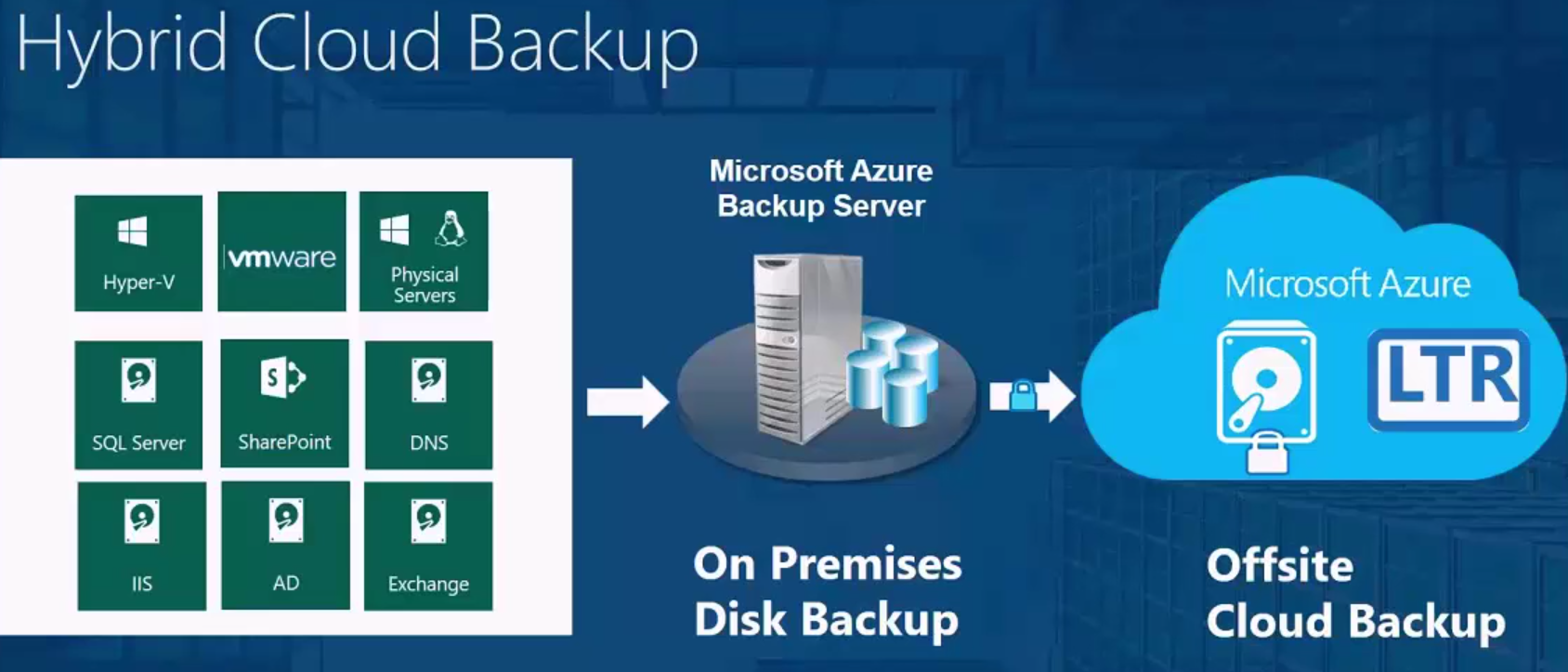
My session will be focusing on the hybrid cloud solution where Azure acts as a DR site for your on-premises servers (physical, VMware, or Hyper-V).

The event page, with agenda and registration can be found here.

Linux Integration Services 4.1 for Hyper-V

Microsoft has released a new version of the integration components for Linux guest operating systems running on Hyper-V (2008, 2008 R2, 2012, 2012 R2, and 2016 Technical Preview, Windows 8, Windows 81, and Azure).

What’s new?

  • Expanded Releases: now applicable to Red Hat Enterprise Linux, CentOS, and Oracle
  • Linux with Red Hat Compatible Kernel versions 5.2, 5.3, 5.4, and 7.2.
  • Hyper-V Sockets.
  • Manual Memory Hot Add.
  • SCSI WNN.
  • lsvmbus.
  • Uninstallation scripts.
Technorati Tags: ,

How To Force Azure Replication To Stop From Orphaned Hyper-V VM

There is a scenario when you are using Azure Site Recovery and a VM somehow becomes orphanened, no longer controlled by ASR, but you cannot remove replication from the VM on the host. I had that situation this morning with a WS2012 R2 Hyper-V VM (no VMM present).

The situation leaves you in a position where you cannot disable replication on the VM using either the UI or PowerShell, because the host continues to believe that replication is managed by Azure, even if you remove the provider (agent) from the host or remove the host from ASR. In PowerShell, you get the error:

Operation not allowed because the virtual machine ‘<name>’ is replicating to a provider other than Hyper-V”

Failed ASR Removal

Microsoft has guidance on how to clear this problem up for Hyper-V to Azure and VMM to Azure replication, which I found by accident after a difficult 30 minutes! The key for me to the solution was to run a small 4 line script that removes replication using WMI, found under the heading “Clean up protection settings manually (between Hyper-V sites and Azure)”. I copied that script into ISE (running with elevated admin rights) and replication was disabled for the VM.

DataOn CiB-9112 V12 Cluster-in-a-Box

In this post I’ll tell you about the cluster-in-a-box solution from DataOn Storage that allows you to deploy a Hyper-V cluster for a small-mid business or branch office in just 2U, at lower costs than you’ll pay to the likes of Dell/HP/EMC/etc, and with more performance.

Background

So you might have noticed on social media that my employers are distributing storage/compute solutions from both DataON and Gridstore. While some might see them as competitors, I see them as complimentary solutions in our portfolio that are for two different markets:

  • Gridstore: Their hyper-converged infrastructure (HCI) products remove fear and risk by giving you a pre-packaged solution that is easy and quick to scale out.
  • DataON: There are two offerings, in my opinion. SMEs want HA but at a budget they can afford – I’ll focus on that area in this article. And then there are the scaled-out Storage Spaces offerings, that with some engineering and knowledge, allow you to build out a huge storage system at a fraction of the cost of the competition – assuming you buy from distributors that aren’t more focused on selling EMC or NetApp 🙂

The Problem

There is a myth out there that the cloud has or will remove servers from SMEs. The category “SME” covers a huge variety of companies. Outside of the USA, it’s described as a business with 5-250 users. I know that some in Microsoft USA describe it as a company with up to 2,500 users. So, sure, a business with 5-50 users might go server-less pretty easily today (assuming broadband availability), but other organizations might continue to keep their Hyper-V (more likely in SME) or vSphere (less likely in SME) infrastructures for the foreseeable future.

These businesses have the same demands for applications, and HA is no less important to a 50 user business than it is for a giant corporation; in fact, SMEs are hurt more when systems go down because they probably have a single revenue operation that gets shut down when some system fails.

So why isn’t the Hyper-V (or vSphere) cluster the norm in an SME? It’s simple: cost. It’s one thing to go from one host to two, but throw in the cost of a modest SAS/iSCSI SAN and that solution just became unaffordable – in case you don’t know, the storage companies allegedly make 85% margin on the list price of storage. SMEs just cannot justify the cost of SAN storage.

Storage Spaces

I was at the first Build conference in LA when Microsoft announced Windows 8 and Windows Server 2012. WS2012 gave us Storage Spaces, and Microsoft implored the hardware vendors to invest in this new technology, mainly because Microsoft saw it as the future of cluster storage. A Storage Spaces-certified JBOD can be used instead of a SAN as shared cluster storage, and this could greatly bring down the cost of Hyper-V storage for customers of all sizes. Tiered storage (SSD and HDD) that combines the speed of SSD with the economy of large hard drives (now up to 10 TB) with transparent and automatic demand-based block based tiering meant that economy doesn’t mean a drop in performance – it actually increases performance!

Cluster-in-a-Box

One of the sessions, presented by Microsoft Clustering Principal PM Lead Elden Christensen, focused on a new type of hardware solution that MSFT wanted to see vendors develop. A Cluster-in-a-Box (CiB) would provide a small storage or Hyper-V cluster in a single pre-packaged and tested enclosure. That enclosure would contain:

  • Up to 2 or 4 independent blade servers
  • Shared storage in the form of a Storage Spaces “JBOD”
  • Built in cluster networking
  • Fault tolerant power supplies
  • The ability to expand via SAS connections (additional JBODs)

I loved this idea; here was a hardware solution that was perfect for a Hyper-V cluster in an SME or a remote office/branch office (ROBO), and the deployment could be really simple – there are few decisions to make about the spec, performance would be awesome via storage tiering, and deployment could be really quick.

DataON CiB-9112 V12

This is the second generation of CiBs that I have worked with from DataON, a company that specialises in building state-of-the-art and Mcirosoft-certified Storage Spaces hardware. My employers, MicroWarehouse Ltd. (an Irish company that has nothing to do with an identically named UK company) distributes DataON hardware to resellers around Europe – everywhere from Galway in west Ireland to Poland so far.

The CiB concept is simple. There are two blade servers in the 2U enclosure. Each has the following spec:

  • Dual Intel® Xeon® E5-2600v3 (Haswell-EP)
  • DDR4 Reg. ECC memory up to 512GB
  • Dual 1G SFP+ & IPMI management “KVM over IP” port
  • Two PCI-e 3.0 x8 expansion slots
  • One 12Gb/s SAS x4 HD expansion port
  • Two 2.5” 6Gb/s SATA OS drive bays

Networking wise, there are 4 NICs per blade:

  • 2 x LAN facing Intel 1 GbE NICs, which I team for a virtual switch with management OS sharing enabled (with QoS enabled).
  • 2 x internal Intel 10 GbE , which I use for cluster communications and SMB 3.0 Live Migration. These NICs are internal copper connections so you do not need an external 10 GbE switch. I do not team these NICs, and they should be on 2 different subnets for cluster compatibility.

You can use the PCI-e expandability to add more SAS or NIC interfaces, as required, e.g. DataON work closely with Mellanox for RDMA networking.

The enclosure also has:

  • 12-bay 3.5”/2.5“ shared drive slots (with caddies)
  • 1023W (1+1) redundant power

image

Typically, the 12 shared drive bays are used as a single storage pool with 4 x SSDs (performance) and 8 x 7200 RPM HDDs (capacity). Tiering in Storage Spaces works very well. Here’s an anecdote I heard while in a pre-sales meeting with one of our resellers:

They put a CiB (6 GB SAS, instead of 12 GB as on the CiB-9112)  into a customer site last year. That customer had the need to run a regular batch job that would normally takes hours, and they had gotten used to working around that dead time. Things changed when the VMs were moved onto the CiB. The batch job ran so quickly that the customer was sure that it hadn’t run correctly. The reseller double-checked everything, and found that Storage Spaces tiering and the power of the CiB blades had greatly improved the performance of the database in question, and everything was actually fine – great actually!

And here was the kicker – that customer got a 2 node Hyper-V cluster with shared storage in the form of a DataON CiB for less than the cost of a SAN, let alone the cost of the 2 Hyper-V nodes.

How well does this scale? I find that CPU/RAM are rarely the bottlenecks in the SME. There are plenty of cores/logical processors in the E5-2600v3, and 512 GB RAM is more than enough for any SME. Disk is usually the bottleneck. With a modest configuration (not the max) of 4 x 200 GB SSDs and 8 x 4 TB drives you’re looking at around 14 TB of usable 2-way mirrored (like RAID 10) storage. Or you could have 4 x 1.6 TB SSDs and 8 x 8 TB HDDs and have around 32 TB of usuable 2-way mirrored storage. That’s plenty!

And if that’s not enough, then you can expand the CiB using additional JBODs.

My Hands-On Experience

Lots of hardware goes through our warehouse that I never get to play with. But on occasion, a reseller will ask for my assistance. A couple of weeks ago, I got to do my first deployment of the 12 Gb SAS CiB-9112. We got it out of the box, and immediately I was impressed. This design indicates that engineers had designed the hardware for admins to manage. It really is a very clever and modular design.

image

The two side-bezels on the front of the 2U enclosure have a power switch and USB port for each blade server.

On the top, you can easily access the replaceable fans via a dedicated hinged panel. At the back, both fault-tolerant power supplies are in the middle, away from the clutter at the side of a rack. The blades can be removed separately from their SAS controllers. And each of the RAID1 disks for the blades’ OS (the management OS for a Hyper-C cluster) can be replaced without removing the blade.

Racking a CiB is a simple task – the entire Hyper-V cluster is a single 2U enclosure so there are no SAN controllers, SAN switches, SAN cables, and multiple servers. You slide a single 2U enclosure into it’s rail kit, plug in power, networking, and KVM, and you’re done.

Windows Server is pre-installed and you just need to modify the installation type (from eval) and enter your product key using DISM. Then you prep the cluster – DataON pre-installs MPIO, Hyper-V, and Failover Clustering to make your life easy.

My design is simple:

  • The 1 GbE NICs are teamed, connected to a weight-based QoS Hyper-V switch, and shared with the parent. A weight of 50 is assigned to the default bucket QoS rule, and 50 is assigned to the management OS virtual NIC.
  • The 10 GbE NICs are on 2 different subnets.
  • I enable SMB 3.0 Live Migration on both nodes in Hyper-V Manager.
  • MPIO is configured with the LB policy.
  • I ensure that VMQ is disabled on the 1 GbE NICs and enabled on the 10 GbE NICs.
  • I form the cluster with no disks, and configure the 10 GbE NICs for Live Migration.
  • A single clustered storage pool is created in Failover Cluster Manger.
  • A 1 GB (it’s always bigger) 2-way mirrored virtual disk is created and configured as the witness disk in the cluster.
  • I create 2 virtual disks to be used as CSVs in the cluster, with 64 KB interleaves and formatted with 64 KB allocation unit size. The CSVs are tiered with some SSD and some HDD … I always leave free space in the pool to allow expandability of one CSV over the other. HA VMs are balanced between the 2 CSVs.

What about DCs? If the customer is keeping external DCs then everything is done. If they want DCs running on the CiB then I always deploy them as non-HA DCs that are stored on the C: of each CiB blade. I know that since WS2012, we are supposed to be able to run DCs are HA VMs on the cluster, but I’ve experienced issues with that.

With some PowerShell, the above process is very quick, and to be honest, the slowest bit is always the logistics of racking the CiB. I’m usually done in the early afternoon, and that includes some show’n’tell.

Summary

If you want a tidy, quick & easy to deploy, and affordable HA solution for an SME or ROBO then the DataOn CiB-9112 V12 is an awesome option. If I was doing our IT from scratch, this is what I would use (we had existing servers and added a DataON JBOD, and recently replaced the servers while retaining the JBOD). I love how tidy the solution is, and how simple it is to set up, especially with some fairly basic PowerShell. So check it out, and see what it can do for you.

My First Hands-On With Surface Book

We’re still not able to distribute Surface Book in Ireland, but I got a very brief play with a demo unit in the office yesterday. What was it like?

Let me preface it by saying that I have owned 3 high-end ultrabooks over the last few years:

  • Asus UX31 which is a class piece of design, other than the flat keyboard. The brushed aluminium back always makes people ask “what is that?”. It’s a few years since I’ve had it out on the road, but only 2 weeks ago some people were asking me about that machine at an event I was speaking at.
  • Lenovo Yoga S1 (gen 2 Yoga laptops): I love the hybrid design, and replacing the 1 TB HDD with a 1 TB SSD made this machine fly. The keyboard is superb (my fave by far) but I wish the screen was a bit larger – the bezel is huge.
  • Toshiba KIRAbook (from work): Similar from a distance to the Asus UX31 but it has a plastic body. It’s very light and thin, and the screen is superb – it has the high res of the UX31 and better screen quality than both of the above. On the downside, this consumer machine is not made from parts that were designed for heavy use.

So how did the Surface Book compare? Straight away, the white/gray material stands out from the crowd. This is a machine that will make people ask “what is that?” and that’s certainly a big positive, especially for people that will be paying a premium for this premium machine. When you lift it up, it feels like a sing piece of nice metal (some might say heavy). But there’s a solid and quality feel about it.

The screen is a little big for a tablet, but few will use it as a tablet. I doubt I would. But it detached cleanly for me. You might be worried about compute being in the screen, but the Surface Book seems to be weighted just right to avoid topple-over which every convertible tablet I’ve tried suffers from. And the screen – wow. If you’ve tried Surface Pro then you know what Microsoft can do with a screen. If you like punchy contrast and vivid natural colours, then Surface Pro and Surface Book might be the machines for you … I am into photography so a quality screen for editing is a necessity.

The keyboard is nice -it’s not Lenovo nice but it’s better than the UX31 or KIRAbook. The track pad is lovely and big – and might be the best I’ve used on a laptop. The stylus works very nicely with a lovely sense of friction that I haven’t gotten from the Yoga or a Samsung tablet. My handwriting was as good as it gets.

I tried Windows Hello sign-in via 3D face scan. It works much better than the Lumia 950. It works from normal viewing distance and it is quick. I think I’d use that as my primary way to unlock the Surface Book.

This machine had the recent updates which appear to have resolved most of the issues so it was shutting down quickly and effectively, and start up was instant. We have not noticed any of the old issues.

I didn’t have much time to play so this isn’t what I’d call a full review – see the posts by Brad Sams and Pault Thurrott on Petri.com for that. But I will say that Surface Book, albeit at a very high price, might be the best quality laptop that I’ve tried.

My Early Experience With Azure Backup Server

In this post I want to share with you my early experience with using Microsoft Azure Backup Server (MABS) in production. I rolled it out a few weeks ago, and it’s been backing up our new Hyper-V cluster for 8 days. Lots of people are curious, so I figured I’d share information about the quality of the experience, and the amount of storage that is being used in the Azure backup vault.

What is Azure Backup Server?

Microsoft released the free (did I say free?) Microsoft Azure Backup Server last year to zero acclaim. The reason why is for another day, but the real story here is that MABS is:


  • The latest version of DPM that does not require any licensing to be purchased.
  • With the only differences being that it doesn’t do tape drives and it requires an Azure backup vault.
  • It is designed for disk-disk-cloud backup.
  • It supports Hyper-V, servers and PCs, SQL Server, SharePoint, and Exchange.
  • It is free – no; you don’t have to give yellow-box-backup vendors from the 1990s any more money for their software that was always out of date, or those blue-box companies where the job engine rarely worked once you left the building.

The key here is disk-disk-cloud. You install MABS on an on-premises machine instead of the usual server backup product. It can be a VM or a physical machine, running Windows Server (Ideally WS2012 or later to get the bandwidth management stuff).

MABS uses agents to backup your workloads to the MABS server. The backup data is kept for a short time (5 days by default) locally on disk. That disk that is used for backup must be 1.5 x the size of the data being protected … don’t be scared because RAID5 SATA or Storage Spaces parity is cheap. The disk system must appear in Disk Management on the MABS machine.

As I said, backup data is kept for a short while locally on premises. The protection policy is configured to forward data to Azure for long-term protection. By default it’ll keep 180 daily backups, a bunch of weeklies and monthlies, and 10 yearly backups – that’s all easily customized.

All management (right now) is done on the MABS server. So you do have centralized management and reporting, and you can configure an SMTP server for email alerts.

And did I mention that MABS is free? All you’re paying for here is for Azure Backup:

Please note that you do not need to buy OMS or System Center to use Azure Backup (in any of it’s forms), as some wing of Microsoft marketing is trying to incorrectly state.

The Installation

Microsoft has documented the entire setup of MABS. It’s not in depth, but it’s enough to get going. The setup is easy:

  • Create a backup vault in Azure
  • Download the backup vault credentials
  • Download MABS
  • Install MABS and supply the backup vault credentials

The setup is super easy. It’s easy to configure the local backup storage and re-configure the Azure connection. And agents are easy to deploy. There’s not much more that I can say to be honest.

Create your protection groups:

  • What you want to backup
  • When you want recovery points created
  • How long to keep stuff on-premises
  • What to send to Azure
  • How long to keep stuff in Azure
  • How to do that first backup to Azure (network or disk/courier)

My Experience

Other than one silly human error on my part on day 1, the setup of the machine was error-free. At work, we currently have 8 VMs on the new Hyper-V cluster (including 2 DCs) – more will be added.

All 8 VMs are backed up to the local disk. We create recovery points at 13:00 and 18:30, and retain 7 days of local backup. This means that I can quickly restore a lost VM across the LAN from either 13:00 or 18:30 over a span of 7 days.

The protection group forwards backup of 6 of the VMs to Azure – I excluded the DCs because we have 2 DCs running permanently in Azure via a site-site VPN (for Azure AD Connect and for future DR rollout plans).

Other than that day 1 error, everything has been easy – there’s that word again. Admittedly, we have way more bandwidth than most SMEs because we’re in the same general area as the Azure North Europe region, SunGard, and the new Google data centre.

Disk Utilization

The 8 VMs that are being protected by MABS are made up of 839 GB of VHDX files. We have 7 days of short term (local disk) retention and we’ve had 8 days of protection. Our MABS server is using 1,492.42 GB of storage. Yes, that is more than 1.5x but that is because we modified the default short-term retention policy (from 5 to 7 days) and we are creating 2 recovery points per day instead of the default of 1.

We use long-term retention (Azure backup vault) for 6 of those VMs. Those VMs are made up of 716.5 GB of VHDX files. Our Azure backup vault (GRS) currently is sitting at 344.81 GB after 8 days of retention. It’s growing at around 8 GB per day. I estimate that we’ll have 521 GB of used storage in Azure after 30 days.

image

How Much Is This Costing?

I can push the sales & marketing line by saying MABS is free (I did say this already?). But obviously I’m doing disk-disk-cloud backup and there’s a cost to the cloud element.

I’ve averaged out the instance sizes and here are the instance charges per month:

image

GRS Block Block costs $0.048 per GB per month for the first terabyte. We will have an estimate 521 GB at the end of the month so that will cost us (worst case, because you’re billed on a daily basis and we only have 344 GB today) $25.

So this month, our backup software , which includes both traditional disk-disk on-premises backup and online backup for long-term retention, will cost us $25 + $60, for a relatively small $85.

The math is easy, just like setting up and using MABS.

What About Other Backup Products?

There are some awesome backup solutions out there – I am talking about born-in-virtualization products … and not the ones designed for tape backup 20 years ago that some of you buy because that’s what you’ve always bought. Some of the great products even advertise on this site 🙂 They have their own approaches and unique selling points, which I have to applaud, and I encourage you to give their sites a visit and test their free trials. So you have choices – and that is a very good thing.

Technorati Tags: ,,

Azure in CSP

If you work for a Microsoft partner then there’s a good chance that you’ve heard of CSP. This is a new method for reselling subscription services such as Office 365, CRM Online, EMS, and Azure (and more) instead of direct billing (by Microsoft) or Open (resold) licensing agreements. The benefit of CSP is that:

  • A partner can resell Microsoft services, therefore making a margin, and ideally wrap it up in deployment/management services.
  • The customer gets the post-usage monthly invoice that they expect from the cloud instead of pre-paying for services for a year (Office 365 in Open) or pre-buying credits (Azure in Open).

My employers (MicroWarehouse Ltd in Ireland) are a Type 2 CSP reseller, meaning that we distribute CSP to “breadth” partners that do not have a CSP agreement. They, in turn, add a margin and sell CSP services to their customers. We’re fully on-board with this service, selling services like Office 365 and EMS.

But, I am not recommending that Azure is sold by our customers (resellers) via CSP. Why?

Azure Resource Manager (ARM)

Most folks still haven’t heard of or understand what ARM is. ARM is a new way for you/Azure to deploy resources in Microsoft’s cloud, and is sometimes referred to as Azure v2. Before now, we use Service Management, which is also referred to as Classic or Azure v1. The two are quite different. For example:

  • Azure Backup and Azure Site Recovery (2 of the most popular features with our customers) are fully available in Service Management but only available via PowerShell in ARM.
  • Other features like RemoteApp won’t be in ARM until the Summer (allegedly – I say “allegedly” because some features were meant to be in ARM now, but are not).
  • The designs of VMs are very different – resource providers are used, and the networking is very different. Endpoints are replaced by a PowerShell-only load balancer that is quite complex.

PowerShell fundamentalists and radicals will scream that techies should have enough there now, but the training I have run recently affirms my view on PowerShell. I love using PowerShell, but few outside of the conference-going community (a small percentage) have the first clue, and probably never will. The GUI is required still to make the product sell.

CSP and ARM

So here’s the gotcha. For some reason, Microsoft decided that customers who get a subscription in CSP will only be able to use ARM. Meanwhile, customers that have direct/trial, EA or Open subscriptions can deploy in either ARM or Service Management.

So, if your business currently or possibly will be using IaaS components, then I’m advising that you do not acquire Azure via CSP. If you’re in the SME world (less than 250 users) then stick with Azure in Open. If you’re over 250 users then go EA. And partners – avoid direct billing and trials (only convert into direct billing) because there’s nothing in it for you. You can start/continue to resell other online services via CSP, but Azure is just not ready yet, and we can blame some mysterious decision making by Microsoft for that. Hopefully we’ll get feature parity between Service Management and ARM soon, and then I’ll chance my recommendation about Azure in CSP.

Technorati Tags: ,

Are VMware Workstation & Fusion Dead?

There’s lots of bad news coming out of VMware lately. The kings of enterprise virtualization (by percentage of incumbent business only) have clung to the past, anticipating the private cloud was the only way forward, and did too little/too late with public cloud. Meanwhile Amazon, Google, and Microsoft attacked on both sides; Amazon with AWS on public cloud, Google to some extent (I reckon it’s overblown) with Apps, and Microsoft on all sides with Hyper-V, WAPack, System Center, Office 356/etc, and Azure.

The first cracks have appeared with some lesser products in the VMware portfolio – VMware made redundant the entire US-base development staff of Fusion and Workstation. To keeps sales going, VMware said:

VMware continues to offer and support all of our End-User Computing portfolio offerings …

I work in the channel (how software gets from manufacturer to reseller). I know that line. I know it very well. It’s what companies like Microsoft, VMware, etc say to keep sales going after a decision has been made to stop development of a product, and long before they announce that it is dead. They just want what little revenue there is to keep coming in. When you poke, you’ll be told something like “we continue to sell and support X”. You can hear the crickets and tumbleweeds roll when you ask about development and future versions.

It appears that vCloud Air, the public/private cloud program, was also hit with layoffs.

Meanwhile, you can:

  • Use the free/awful VirtualBox by Oracle.
  • Enable Client Hyper-V in the Pro editions of Windows 8, 8.1, or 10.
  • Use the free and fully functional Hyper-V Server on some “server”
  • Use trial/MSDN or Open/CSP accounts in Azure

In other news, Microsoft has launched the public preview of the Azure that you can download, with Microsoft Azure Stack.

What is it that they say about rolling stones and moss?

Azure Stack Preview Is Public

Microsoft has launched the public preview of Azure Stack, something that has been in TAP for several months now. You can find the download on MSDN right now.

image

This is the first time that you can run services in Azure, a hosting partner, or on premises … with the same consistent experience. ARM (Azure Resource Manager) is at the heart of that consistency. On prem, you get Azure Stack (without requiring System Center) which integrates into resource providers for storage networking, etc in WS2016. Hyper-V, storage accounts, and the network fabric (Network Controller) are all in WS2016.

I’ve been told by folks in the TAP that MAS is gooood, and much easier to deploy than Windows Azure Pack (WAPack).

I doubt I’ll ever see MAS on any of my customers’ sites, but this is still a big day. And it puts Microsoft in a unique position ahead of VMware (the failed vCloud Air), Amazon and Google (public cloud only).

Web Developers Are Anticipating Big Contracts – Java Is Dead!

Java was meant to be the foundation of a universal platform for all operating systems that would flatten applications and the Internet. It was meant to be great for all. But what Java accomplished was:

  • It was a platform of incompatibility. How many of us have dealt with users requiring 3-4 versions of Java and teaching “Hopeless John/Joan in Finance” how to switch between those versions, and getting at least 1 helpdesk call from him/her per day.
  • Becoming one of the most attacked products on the planet, thanks to it’s gaping holes and slow updates from Sun/Oracle.

So it was kind of funny that almost every Bank and every tax collection agency on the planet adopted Java as their required application runtime. Customers/tax payers around the world are running the ancient and vulnerable Java 4.x because the code requires it.

And this is why IT staffs hate, no … HATE Java.

Start partying … Oracle announced:

Oracle plans to deprecate the Java browser plugin in JDK 9. This technology will be removed from the Oracle JDK and JRE in a future Java SE release.

In other words: JAVA IS DEAD!

Woooooooooohooooooooooooooooooooooooooooo!

Two groups will be delighted:

  • Web developers are anticipating Y2K fees from Banks and government finance departments who are now in a race against end of support.
  • IT pros who are anticipating the removal of Java hack-ware and helpdesk-ticket-ware.