Lenovo Yoga Tablet 8 – 8 Months Later

It was 8 months ago when I purchased my Lenovo Yoga Tablet 8, an 8” Android tablet. I raved about the form factor, price ($206.99 on Amazon.com, £150.99 on Amazon UK, €153.06 on Amazon Germany), and all that jazz.

image

So how has the tablet worked out?

I mentioned in my previous post that I was going to test the battery life in my upcoming travels. I did:

  1. I charged up the tablet overnight in Berlin
  2. Watched video flying from Berlin to London
  3. Watched video flying from London to San Francisco
  4. The battery was at 54% when I checked into the hotel in the west coast of the USA

And that was before a firmware update that increase published battery life from 16 hours to 18 hours. I suspect that this device pulls power from dark matter in the universe. It is incredible, with only Kindle readers beating it.

The screen is not the best for viewing photos … but let’s be clear. The machine is CHEAP and works great for video.

I probably use this device more than any machine other than my PC at work. I travel with it, using it to keep myself entertained in hotels, airports, planes, etc. I keep it at my bedside locker, so I can check up on things when I hit the snooze button in the mornings. It has replaced my Kindle reader as my way of consuming books – the extra large battery doubles as a comfortable handle.

I’ve used a Micro-SD to expand the paltry 16 GB of inbuilt storage. Using a SD converter, I can quicky copy content from a PC/laptop onto the machine. Combined with the hotspot on my phone, I have easy Internet access. Throw in ProXPN and I am accessing Netflix USA while in Europe, and UK/Irish services while abroad. My Bose headphones give me perfect sound in a noisy environment.

The lightweight CPU has not been an issue for me. I don’t play many games – but Robocop, Plants VS Zombies 2, and the Angry Birds carting thing play fine.

I have a lot of good things to say about this device. I wish it was a Windows machine – I do have a Toshiba Encore tablet but the Yoga wins on battery life (against almost everything) and apps (quantity & quality VS Windows).

I strongly recommend this tablet to anyone needing an affordable mobile device, and who would like to complete their journey with some battery life left …. which is actually a big deal with airport security now.

Microsoft News Summary – 23 July 2014

Overnight Microsoft news is dominated by their Q4 2014 (MSFT  financial year is July-June and just started FY 2015) returns.

TechEd Has Become MUTEE … WTH?

In a blog post on Channel 9, Microsoft has announced that TechEd North America is no longer … and has been replaced by Microsoft’s Unified Technology Event for Enterprises. Yes Microsoft’s Unified Technology Event for Enterprises. I had to copy & paste that cos it doesn’t exactly stick in the mind. So MUTEE replaces TechEd.

Huh.

image

Now we have proof that marketing people ARE actually paid by the letter.

The reason for the rename is:

You talked, we listened… The world of IT and enterprise development and your needs are rapidly changing. In a cloud first, mobile first world you need …

And they go on to list the stuff that was present at TechEd.

And who exactly (outside of Microsoft) asked for this? Let them stand up and be counted (and knocked in the head by a flying brick).

So they’ve “re-imagined” (sigh!) TechEd as [copy & paste] Microsoft’s Unified Technology Event for Enterprises [/copy & paste] for marketing Kool-Aid.

Anywho, MUTEE TechEd North America 2015 will be on in Chicago (direct flight for me with immigration in Dublin!!!!) on May the 4th (start the Star Wars puns about a bad character called MUTEE). Note that it’s a 5 day event, not a 4 day one? I like that.

The Office blog also published a post. It appears that this will be one IT super conference, instead of the lots of conferences. That is a very positive thing, especially for people who did MEC, TechEd, etc.

By the way, I’m using the tag #StillCallingItTechEd on Twitter. I think everyone outside of Redmond will stick with the TechEd name. It stinks of marketing speak with naming for the sake of renaming, without any imagination.

EDIT 1:

OK, that was quite a … sarcastic post. If we (I mean “If I”) think about this for a moment, it means that there is one big event for IT pros to attend. And hopefully, this will be BIG, not just TechEd sized (there are bigger IT events from Oracle, VMware, etc). That is a very positive thing; we’d have one thing on the calendar – one to plan for, one to travel to, one to be away from work/family for. And it would be one event to budget for! But I’m still not calling it MUTEE.

EDIT 2:

Here is a post by the Server & Cloud blog. Nothing new there.

KB2972254 – Hyper-V VMs Sometimes Lose Connectivity When TCP Connections Reconnect on WS2012 R2 Hyper-V

Microsoft released this KB for when Hyper-V virtual machines cannot be connected to sometimes when TCP connections reconnect in Windows Server 2012 R2.

Symptoms

This article describes an issue when TCP connections reconnect in Windows Server 2012 R2. A hotfix is available to resolve this issue. This issue occurs when Hyper-V virtual machines are running on a Windows Server 2012 R2 failover cluster.

A hotfix is available to resolve this issue.

Microsoft News Summary – 21 July 2014

Not much news floating about. But the first two items in my summary makes me worry about Microsoft. V- staff (contractors) are going to be blocked from network access intermittently, making them redundant, and baldy needed human testers are being made redundant.

Supported Guest OS on WS2012 R2 Hyper-V

Microsoft recently clarified their documentation by releasing a specific page to list the supported guest or virtual machine operating systems on Windows Server 2012 R2 Hyper-V (including Hyper-V Server 2012 R2) and Windows 8.1. This page lists the supported Windows client and servers OSs. On the list you will curently (21 July 2014) find:

  • Windows Server 2012 R2
  • Windows Server 2012
  • Window Server 2008 R2 with SP1
  • Windows Server 2008 with SP2
  • Windows Home Server 2011
  • Windows Small Business Server 2011
  • Windows Server 2003 with SP1
  • Windows Server 2003 with SP2
  • Windows 8.1
  • Windows 8
  • Windows 7 with SP1
  • Windows 7
  • Windows Vista with SP2
  • Windows XP with SP3
  • Windows XP x64 with SP2

Remember: “supported” and “it works” are two very different things in the Microsoft world:

  • Supported: You call Microsoft, and they will assist, including engineering if there is a bug (subject to time/effort vs priority).
  • It works: Lots of operating systems can install and run in Hyper-V VMs, but they fall outside of the support statements. In other words, they might work fine, but Microsoft won’t support them.

Microsoft DOES support a wide array of Linux distributions/editions/architectures. There is a specific support page for Linux because of the complexity that the variety of distributions introduce. Newer releases come with the Hyper-V Linux Integration Services (LIS) as a part of the install. Older ones require you to download the LIS and install them into the guest OS. On the list you will curently (21 July 2014) find:

  • CentOS 5.5-5.6, 5.7-5.8, 5.9-5.10, 6.0-6.3, 6.4, 6.5, 7.0
  • RedHat Enterprise Linux (RHEL) 5.5-5.6, 5.7-5.8, 5.9-5.10, 6.0-6.3, 6.4, 6.5, 7.0
  • Debian 7.0-7.4
  • Oracle Linux UEK R3 QU1, UEK R3 QU2, 6.4, 6.5
  • Suse Linux Enterprise Server (SLES) 11 SP2, 11 SP3
  • Open SUSE 12.3
  • Ubuntu 12.04, 12.10, 13.04, 13.10, 14.04

The support pages (particularly the Linux ones) are subject to frequent change so I suggest that you use the links in this post as a jumping point to get to the newest release by Microsoft. I will not be updating this post to reflect the latest changes – this is a blog, not a documentation site.

Why Should You Attend TechEd Europe 2014

Other than the fact that this might be the venue of the most important product announcements in Microsoft’s recent history … hmm … let me think …

Hear what community members say about TechEd at the TechEd Roundtable

I have also recorded a video (on Instagram) that discusess how to convince your boss that you need to go to TechEd Europe.

But honestly, traditional learning mechanisms can no longer keep up with sprint development, new features out every few weeks, and RTMs every 12-18 months. TechEd is like a triple espresso shot of learning … you take 4-5 days, depending on travel, out of your regular work schedule and get immersed in new tech, from keynote, to foundation, to deep dive … and maybe throw in some hands on labs and certification while you’re at it. I learn at TechEd (as an MVP I also am lucky to have MVP sources); a lot of what I write about is sourced from TechEd sessions or materials. TechEd sessions give me access to wide amounts of information … and I can chat with the Microsoft experts in the expo hall afterwards.

There is nothing else like this learning experience in the Microsoft world for the general public. And I’m pretty sure that TechEd Europe 2014 will be a very special education opportunity. We’re on the threshold of a very interesting time.

Technorati Tags: ,

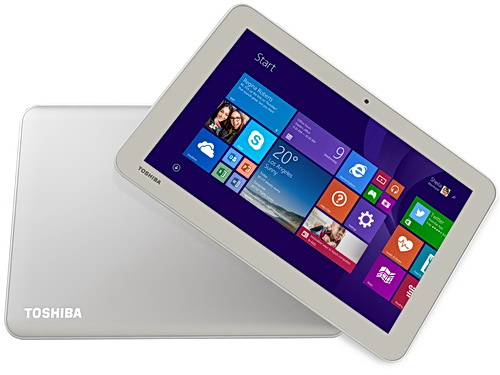
Toshiba 8” Encore 2 Windows 8.1 Tablet

I work for a Toshiba distributor so every now and then they let me put my hands on something new … or sometimes something that isn’t coming out for quite a while. A few months ago I got to hold and play with the new Toshiba 8” and 10” Encore 2 tablets. Both were pre-production models. I just got my hands on a production version of the 8” Toshiba Encore 2 (WT8-B-102), running Windows 8.1 with April 2014 Update.

To be precise, this is running Windows With Bing, the free (to OEMs) edition of Windows that is hard coded with Bing as the search engine. The idea is that instead of OEMs paying for Windows and then taking money from another search engine to set them up as the default, the OEM gets a free copy of Windows, and this brings down the cost of the h/w for the consumer.

Capture

This is a consumer tablet. It has an Atom processor so it does not run the doomed Windows RT. It’s running a 32-bit copy of Windows 8.1. There is 1GB RAM and 32 GB of storage … don’t fret! This is the April 2014 version of Windows so it features the new magic installation that consumes a lot less space. This tablet has just over 20 GB free out of the box. That’s a big improvement over the original 32 GB Encore which I own. And 1 GB is enough for the light weight consumer stuff that you’ll do with this tablet: apps.

The tablet is slimmer than the Encore 1 and has a smooth back. It is grey instead of “gold”. Also, the Windows button has moved to the top edge, instead of a capacitive button on the front-bottom; I guess that reduces costs.

image

The Micro-HDMI port of the Encore 1 is gone – cost savings for the masses, I guess. It’s not a big deal; Windows 8.1 defaults to portrait mode on 8” devices and that’s incompatible with a TV. There is an audio jack on the top and an open Micro-SD port on the side for easy access. On the base there is actually a place to tie a wrist cord if you should want one.

There is a normal micro-USB 2.0 port, unlike the dodgy one you get in a Dell Venue 8, which breaks if you do plug in a normal USB cable “upside down” – which the Dell unfortunately allows you to do. One teeny design thing I don’t like: the included power chord is angled and obstructs easy access to the Windows button. You can use any old (Windows or Android) phone charger cable and that solves the issue. The box also includes a USB dongle; with this you can plug in your USB stick/drive into the tablet and it also has an additional micro-USB port so you can continue to power the tablet while using a USB device.

The cameras are 1.2 MP on the front and 5 MP on the back. There is no 3G/LTE option – the thinking here is that people already have mobile phone plans and can enable a hotspot. There is no stylus (above you see a normal pen for a sense of scale) – this is a consumer machine.

I am told that the retail price in Ireland will be around €220 – I only see our buy price as distributors. I have seen this tablet for sale for under €250 on Irish online stores. Amazon.com has it on sale for under $240. Amazon UK has it for under £180. It’s not on Amazon.de yet.

It’s a nice tablet at an affordable price, and has made form factor improvements over the first version. The biggest improvement, though, is the additional free storage capacity in the 32 GB model, thanks to Windows 8.1 April 2014 Update. The only real concern is apps – which is outside of Toshiba’s (Lenovo, Dell, Asus, etc) control, and it’s something that Microsoft must do a better job at sorting out. Either the apps suck (Kindle reader for Windows) or don’t exist, and there are still too many cra-apps in the hard-to-navigate Windows Store.

I hopefully will get to play with the new 10” Encore 2 (under $270 on Amazon.com) in the near future.

Technorati Tags: ,

Microsoft Making 18,000 Employees Redundant

As expected, Satya Nadella announced the redundancy of 18,000 employees from Microsoft. 13,000 of those will go in the next 6 months. 12,500 will go from the Nokia businesses. And after that, it appears that Redmond (MSFT HQ) will be hit heavily. It appears that non-core businesses will be targeted, such as Xbox Entertainment Studios.

Nadella has talked about making Microsoft more agile by removing layers of decision making, i.e. management. That’s important to be able to operate at the speeds that cloud sprint development requires. It also sounds like another reorganisation is taking place; Nadella doesn’t appear to like what Ballmer did before he left. Much of this is to undo the silos between teams in the same groups that should be working closer together.

I have also read that a lot of v- contractors will be let go. This is unfortunate – these are people on very short contracts who are often filling in very important positions that a manager has not had budget for hiring a full time employee.

Hopefully, Microsoft will not be letting go the necessary people that keep the core businesses going. I know how shitty it is to be made redundant, even from a very profitable company. Best of luck to all involved.

Technorati Tags:

Azure Site Recovery & InMage Scout – And Bad Decision Making

Microsoft announced last week that they had acquired InMage, a company that specialises in replication to the cloud. Microsoft is adding InMage to Azure Site Recovery (ASR) to enable replication to Azure. ASR enables you to use Hyper-V Replica (HVR) to replicate VMs to Azure IaaS. So what does InMage Scout (the product) add?

The key piece of the list of features is:

Support for major enterprise platforms, including Windows, AIX, Linux, VMware, Solaris, XenServer and Hyper-V

Imagine being able to replicate not just Hyper-V, but also vSphere and physical (Windows and Linux) workloads to Azure. Potentially, this is a much bigger solution. Potentially.

And potential is … lost opportunity.

That’s because the decision makers in ASR are, in my opinion, disconnected from reality living way too nicely in the Microsoft ivory tower. Why?

  • ASR can only be used by customers that manage Hyper-V using SCVMM. SCVMM can only be bought as a part of the System Center SML. The SML is cheap for larger businesses, but it’s way too expensive for most SMEs.
  • Only EA customers (large businesses) can get access to InMage:

The Azure Site Recovery subscription license will be available through the Microsoft Enterprise Agreement beginning August 1, 2014 and is the only offer through which InMage Scout usage may currently be purchased.

So, SME’s cannot use ASR or the cool new features that are coming. Large enterprises typically already own or want to own their own DR. And the sweet spot market for a hosted virtual DR (DRaaS) is the SME … the market that cannot afford or get access to ASR.

Oh, the madness continues.