Microsoft News Summary – 14 July 2014

After a week’s break in Finland, I am back with news from the last 10 or so days. It was a busy period!

SQL Server Now Requires SA For A Cold Replica

When you replicate a virtual machine from site A to site B then typically the replica VM in site B is powered down. Note that I haven’t specified a hypervisor or replication method, so this article applies to Hyper-V and vSphere, and not just to Hyper-V Replica.

In the past, if you ran SQL Server in a VM in a production site, you could replicate that VM to a secondary site. If the replica VM was powered down, i.e. cold, then you were granted a free license for that cold VM. This has changed with the release of SQL Server 2014, as covered by this post. Now you must have Software Assurance (SA) to cover the cold VM’s license for SQL Server.

This brings SQL Server in line with Windows Server’s SA offsite cold replica benefit.

There are restrictions on failover in the secondary site:

  • You can perform a brief test failover (lasting 1 week) once every 90 days.
  • The production system in the primary site must be powered off to legally perform a failover.
  • You can power up the secondary site VM for a “brief time” during the disaster while the production system is running in the primary site.

Microsoft News Summary – 3 July 2014

After a month of neglect, I have finally caught up with all of my feeds via various sources. Here are the latest bits of news, mixed up with other Microsoft happenings from the last month.

Microsoft News Summary-23 May 2014

1,000,000 IOPS from Hyper-V VMs using a SOFS? Talk about nerd-vana!!! Here are the links I found interesting over the last 48 hours:

TechEd North America 204 Press Conference

James Well, Julia White, Mark Russinovich, and Brad Anderson are here for the keynote press conference, hosted by Joey Snow.

Key thing to take away: cloud can add value to everything you do – Brad Anderson. Enterprise mobility: integration across enterprise and Office 365. Cloud will manage Office on devices of all types, be that program, policy, or data. Azure Remote App will allow you to remote apps from the cloud to Windows, IOS, or Android.

Mark R: Talks about ExpressRoute for hybrid cloud. Azure Files brings consistency to hybrid cloud. Already  available in private cloud.  File sharing as a service (PaaS) in Azure so VMs can access shared files. Azure Site Recovery brings failover to the cloud for on-premise. Greatly reduces cost of DR & compliance. Manage anti-malware can deploy MSFT endpoint protection easily. Store logs in blobs. Symantec and Trend Micro have partnered with same portal and powershell. Trend Micro also allow encryption like BitLocker, with the key’s stored on your own site.

James Well: .Net stuff on cloud scale applications.

Julia: How do I secure data? New security and privacy stuff. Content categorization and security for data loss prevention. Files can be encrypted in OneDrive and SharePoint. New series of videos and blogs on the Office 365 Trust Center.

Brad: IT pros have concerns about their impact in the company. What has happend 6-2 months after adopting cloud? Their ability to contribute to the company has increased. MSFT has to help the world understand. Once a company embraces an element of cloud, the company and IT pros want to adopt more. These are “on ramps”.

Question: “Windows Server will fulfil the roles in your data center – 6 years ago. Has that changed to Azure?”. Brad – Azure is Windows Server. You deliver the best platform for your organization using a combination of on-premise and cloud. Do anything you need based on Windows Server and Azure. Mark – clarifies that it is Server and System Center. Brad – Azure is based on Hyper-V.

Question: Will Azure Site Recovery Manager require System Center? Brad – yes, it requires SCVMM.

NOTE – they lost the SME market.

Question: 3 differences between Azure RemoteApp and others. 75-80% of “VDI” is actually app remoting (session host) and not actually VDI. Reasons: costs. To build this for scale of users, you need lots of infrastructure. MSFT has that already, so you can use it with elastic demand/costs, without spending CAPEX.

Live Blogging From TechEd North America 2014 Keynote

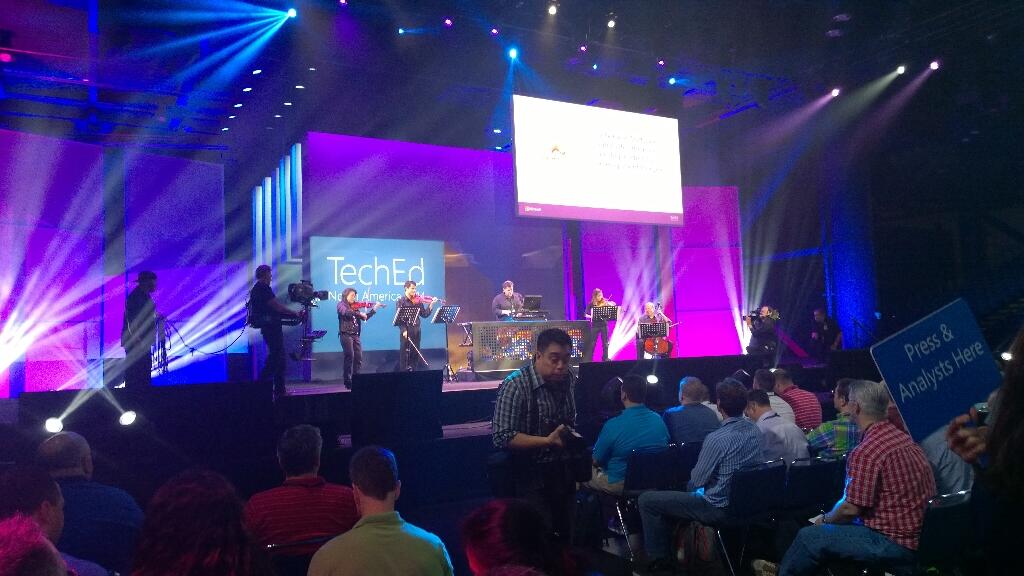
Welcome to Houston where the keynote hall is full and they’re filling the overflow rooms for the Brad Anderson-led keynote at TechEd North America 2014. I am here with Petri IT Knowledgebase, sitting in the press section at the front of the hall.

I  live blogged as the event went on. Don’t expect much if anything in the way of Windows or System Center news. This will be a cloud year, where new features come out every 6 or so weeks, thanks to a cloud development cycle. I also do not expect Satya Nadella here.

Speaking of which; Nadella courted devs at a number of events in recent months, including Build. What will Microsoft do this week to convince influential IT pros that Azure won’t steal their jobs and that they are still important to Microsoft (they don’t feel that way lately)?

Right now a classical/electrical band called Flash Drive is playing pop muzak.

After a few songs they get a good reception. Now the 2 minute long teched countdown show kicks off with Joey Snow and Rick Claus.

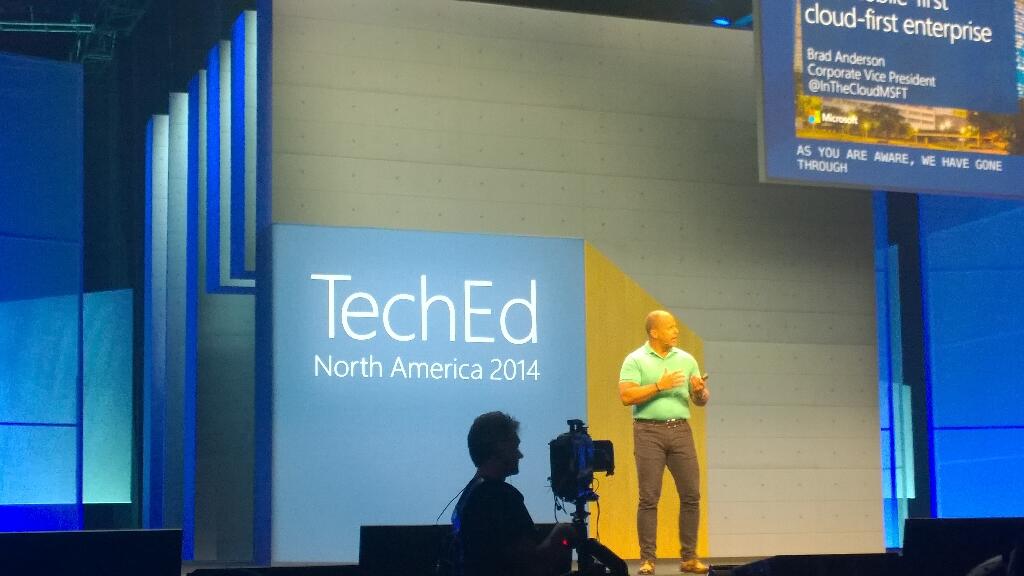
Brad Anderson comes out sans-Aston Martin. He professes love for the new reign of Satya Nadella. As expected, Brad talks about devices and data of previously unimaginable growth. Cloud will be core to everything we do to manage devices (ever connected world) to derive insights from that data. There are no more devices than people on the planet.

On comes a video with some dude in black and white. It’s a new world, with low contrast film. It’s devices-devices-devices. No monkey boy dancing. Airy fairy stuff about storing data in trees. Yes; trees. I guess these guys are from MSFT Research.

Brad wants to talk about IT Pros. “IT pros are literally at the centre of cloud first and device first clouds”. “No longer think of public cloud as seperate; it is integral to your data center from this point forward”.

Three capabilities required when you consider a cloud. Choosing a cloud vendor wisely is critical for your future:

  • Hyper-V scale: able to grow fast than you. Only 3 companies operate at this scale. This scale drives innovation in infrastructure.
  • Enterprise capabilities and enterprise grade cloud. Financially backed SLA.
  • Hybrid: Works with on premise, partner hosted cloud, and public cloud all integrated. Only MSFT does this.

Right now, only MSFT meets all three requirements.

How could we change our industry if we had unlimited computing power. Here comes Respawn’s Titanfall, an Azure-powered online-only game. It had over 100,000 VMs on day 1, powered up around the world, with clients connected to the closest data centre. No worry about location or performance. They have solid and even compute capacity. They scale up and down as required to meet customer demand. They power lots of game functionality on the server, which they could not do on a console. 150 employees company has hundreds of thousands of VMs around the world.

16 regions. A new core is deployed every 5 seconds. 2 billion authentications a day being done by Azure Active Directory. They take this functionality and trickle it down to hosting partners (WAP, Hyper-V, and System Center). Windows Server Hyper-V is the common foundation across private, hosted, and public cloud. No lock in. Flexible expansion, shrink, and mobility.

IaaS new features:

  • Cloud app discovery Preview. This looks VERY cool.
  • Compute intensive VMs – more RAM and more VMs, with RDMA Infiniband at 40 Gbps.
  • Virtual networking enhancements
  • ExpressRoute is GA for MPLS networking. 2 circuits for every connecting for fault tolerance. Note that Telecity is now a partner.
  • Azure Files Preview: SMB 3.0 sharing of files for VMs.

Software-defined storage (Storage Spaces) is used by Azure.

On to SQL 2014. In memory gives 30x increase without re-writing application, just by adding RAM to existing h/w.

Azure Redis Cache is in preview. API AManagement Preview is in preview too.

Out comes Josh Twist to talk about API Management. Wellmark is an American insurance company and Azure customer. He talks about this feature without explaining what it is. I’m lost.

Back to Brad with more announcements:

  • Anti-malware is being added to Azure. Microsoft Endpoint protection. Partnering with Symantec and Trend Micro.
  • Encrypted storage for Office 365.
  • Azure Site Recovery: Hyper-V Replica to Azure. review in June. This is BIG. Use HRM for orchestration.

Here comes Matt McSpirit to talk about the latter. Azure Site Recovery can be your secondary site if you don’t have one. Can manage replication between sites and to Azure. Centralized management of the replica VMs. VMs can be encrypted while at rest.

Site recovery makes networking easy. Can map networks between primary and secondary site. Map on-premise networks with Azure virtual networks.

A recovery plan orchestrates failover, test, planned, or unplanned. It will cleanly shut down VMs and replicate final changes in the event of a planned failover ( a flood is coming).  You can inject manual tasks into the orchestration.

We move on to identity, another MSFT USP. SaaS is powered by identity. For example, Office 365. Discover how many they are using with Cloud App Discovery. Often some 250 unmanaged SaaS apps in a company. IT has no control. IT needs to take control and manage identity and security.

Office on the 3 mobile OSs will be brought under management. Protection of files: Azure Rights Management Services (ARMS). Part of the EMS bundle for EA customers. The protection travels with the files: only the right people can access the files, even with accidental leakage.

Azure RemoteApp is Mohoro. It’s a RDS session host system designed to run in Azure. You upload LOB apps into Azure and users access them from cross-platform devices. AWS desktop as a service is a square wheel compared to Azure RemoteApp.

Demo: User signs into SaaS app using AD ID via ID federation into Azure AD.  80% of employees admit using non-approved SaaS apps. Cloud App Discovery tool allows admins to discover what apps are being used and how. Now IT can bring these apps under company control. Azure AD has 1300 templates for SaaS single-sign on.

Azure Remote App preview is GA today – note it is not live yet in the Europe regions. Publish apps over the highly performing RemoteFX protocol to devices of different OSs – Windows, iOS, Mac OS X, and Android. A little nod to Citrix.

Now on to the dev audience. I sleep.

I wake up. Now Brad is talking about users. Sadly, people have lost interest in the dev content and are leaving.

“Work like a network”.

Humans can achieve if we focus. There is a flood of information that distracts. Need to move from information to action. Information is locked within boundaries inside organizations. BI stuff now. Yawn.

Demo on BI with old content from Barcelona promo video.

Back to Brad to talk about Office. Ugh, sounds like more BI.

Julia White to talk cloud productivity with Intune and Office 365. Basic demo of doc sharing in OneDrive for Business. Tell Me in Word Online is shown to help find how to do formatting. Can share from OneDrive for Business into Yammer. Yammer: IT managed social experience.

Back to Brad. More people leaving the hall. Not nearly as bad as Elop in 2009 (that was BAD) but a section of the audience has lost interest. This will be a talking point IMO.

Back to summarise. MSFT believes in cloud and getting us to embrace it.

Microsoft News Summary-1 May 2014

Happy May Day, comrades! I was tied up with events the last couple of mornings so here is two days worth of news. Note the new beta for System Center Advisor. The security functionality looks very interesting!

Microsoft News Summary–25th April 2014

Here’s the Microsoft news from over the last 24 hours.

BTW, there’s now some thought that a Microsoft Surface Mini tablet might appear soon. Amazon accidentally put up an item for a 3rd party tablet cover for such a tablet. TechEd or the week after in May would be good timing for such a release. At TechEd they could probably have 3 hour lines and sell 5000+ of them.

Mapping The Microsoft Hybrid Cloud – Work In Progress

I am attempting to map out the infrastructure elements (not the app/dev elements) of the Microsoft hybrid cloud. This is a work in progress. If you spot any missing pieces then please comment and I will update.

You’ve heard terms like Cloud OS and hybrid cloud. What do they mean? I will attempt to map out the Microsoft hybrid cloud’s infrastructure-as-a-service (IaaS) ans software-as-a-service (SaaS) elements in this post.

The Hybrid Cloud

A private cloud is a single-tenant (but many users) service that is typically run on-premise. Note that there is a concept of a hosted private cloud; this is where a hosting company runs your single tenant infrastructure. An example of a private cloud is Hyper-V with elements of System Center (VMM, App Controller, Windows Azure Pack, etc) running in your data centre.

A public cloud is a hosted multi-tenant service that you do not own, but you consume services from. The perfect examples of this are Amazon Web Services (AWS) and Microsoft Windows Azure. The hosting company runs and hides the infrastructure from you. You subscribe to services from this shared infrastructure and have no visibility of other tenants. Those offerings are IaaS. There is platform-as-a-service (PaaS) which Windows Azure also offers for developers to run their applications without worrying about VM guest operating systems. And there is software-as-a-service (SaaS) such as Office 365 and Windows Intune where you use some software that the hosting company runs and sells to you from the cloud.

A hybrid cloud is where you mix elements of private cloud with public cloud. Microsoft is in a very unique position because they operate/sell IaaS, PaaS, and SaaS in public and private cloud. This allows you to integrate the best elements (for you) of on-premise with the public cloud offerings of Microsoft to create a hybrid offering.

The Map
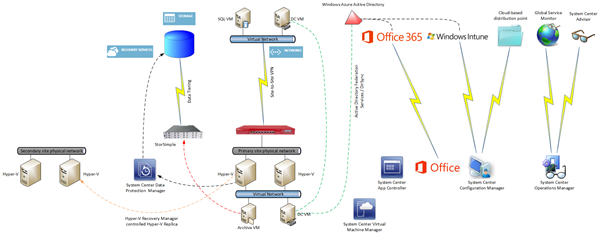
image View the image to see full size

Windows Azure Site-Site VPN

You can deploy virtual machines in Windows Azure. They are very similar to Hyper-V VMs, because at this point, Windows Azure is running WS2012 Hyper-V (not WS2012 R2, as you can tell by digging around). You can deploy Software-Defined-Networking (SDN) within Windows Azure in the form of Virtual Networks; you define a network and then you define automatically routed subnets. You can configure a remote gateway to enable site-to-site VPN connectivity between your on-premise infrastructure and the network within Windows Azure. That creates intriguing possibilities where you run some services within Windows Azure to take advantage of elasticity and instant resource availability, and take advantage of on-premise where you can customise and specialise to your heart’s content.

An MPLS alternative has gone into beta with AT&T in the USA. Basically the Windows Azure network becomes another branch office on your WAN. That would be a much nicer and more fault tolerant option than single site-to-site VPN.

Note:

You will use SCVMM to manage your on-premise cloud(s) and use System Center App Controller to enable easy deployment of VMs/services in your hybrid cloud.

Active Directory

One of the biggest historical pains in IT for users is having multiple usernames and passwords. You can have single-sign-on (SSO) across your on-premise and Microsoft public cloud services by synchronising Active Directory with Windows Azure Active Directory (WAAD). WAAD is used in a couple of ways:

  • PaaS: Developers can use synchronised IDs for their custom applications.
  • SaaS: Office 365 (Midsize [M] plan and up) and Windows Intune can use the same user names for Exchange Online, SharePoint Online, Lync Online, etc, as are entered when users sign into their PC every day.

There are two ways to synchronise AD with WAAD:

  • DirSync: Is a simple-to-install and manage solution for smaller businesses.
  • ADFS: Active Directory Federation Services is used for larger installs. It requires HA because ADFS becomes a point of dependency to sign into services.

Another interesting option is to deploy VMs into Windows Azure, promote one or more to be domain controllers, and treat that as another site in your Active Directory forest. Your on-premise DCs will replicate with the DCs running in Windows Azure. This is used to enable traditional user & computer join/login to your AD forest.

Note: You must follow specific guidelines for creating DCs in Windows Azure. For example, all domain databases must be placed on an additional data drive that you attach to the VM. This is required to avoid corruption.

Office 365

I’ve already mentioned how users can sign into Office 365 (M plan and higher) using the same username and password as they use on their PC. You can also run hybrid Office services. For example, an Exchange organisation can span on-premise Exchange servers and the cloud.

Windows Intune & System Center Configuration Manager

System Center Configuration Manager (SCCM) is Microsoft’s corporate device deployment & management solution. I believe it is best used when limited to direct management of domain-joined Windows computers. Note that SCCM does allow you to deploy a distribution point (a content library that users/computers install from) in the cloud (hosted by Windows Azure).

You can also get Windows Intune, Microsoft’s cloud-based device management solution. Being cloud based makes it easy to deploy, and better for managing remote or widely distributed devices. Intune is less AD-centric, and that also makes it a great product for dealing with bring-your-own-device (BYOD). And Intune is also designed from the ground up to manage non-Windows OSs such as Android, iOS, and Windows Phone.

You can integrate Windows Intune into SCCM so admins have a single console to manage. I see Intune as the mechanism for dealing with widely distributed devices, roaming devices, mobile devices, and BYOD. SCCM is the solution for dealing with domain-joined corporate computers.

System Center Operations Manager

SCOM is Microsoft’s service-focused monitoring solution. You can get lots of Microsoft developed (free) management packs for monitoring on-premise stuff such as Windows Server, AD, SQL Server, and much more. There are also free third-party management packs (HP, Dell, Citrix, and more), and paid-for products from the likes of Veeam (which happens to have a limited free package for vSphere monitoring).

SCOM can also be used with the cloud in a few ways:

  • Global Service Monitor: GSM allows you to monitor the availability and quality of web services from Microsoft’s data centres around the world. This accounts for the fact that the Internet is complex and localised failures can affect international service availability in unpredictable ways. You configure GSM to monitor site(s) and the results appear in SCOM.
  • System Center Advisor: Think of this as a best practices analyzer from the cloud. SCOM can monitor the results of Advisor scans.
  • Windows Azure: You can monitor the services that you deploy in Azure in two ways. You can monitor the Azure service itself for failures. You can also install SCOM agents into the guest OS of your VMs to monitor the OS and services from within the VMs.

StorSimple

Many businesses struggle with retaining archive data. Microsoft acquired StorSimple to deal with that issue. This is a on-premise installed 1 GbE iSCSI storage appliance that offers local SSD and HDD tiers with a third colder tier residing within the storage services of Windows Azure.

The appliance is not suitable for all workloads. A key requirement is that your data must have a concept of a “working set”. In other words, there is hot data that you use frequently, and cold data that your do not look at very often. VM VHD/VHDX files are not examples of this. Think of a corporate file server, an CAD library, etc. Those are good examples.

StorSimple also has a built-in backup system that uses snapshot mechanisms to backup your hot/cold data.

Windows Azure Online Backup

There are many ways to use the storage mechanisms in Azure. Another one is to use Online Backup to automate the off-site storage of your backup data. A basic system for a single server would be to let Windows Server Backup send its data directly to the cloud. Larger customers might use something like System Center Data Protection Manager or Commvault Sympana to send their backup data to Windows Azure.

The data is encrypted using your private key. Microsoft never sees this key, and therefore you must keep the key safe; they cannot rescue you if you lose it.

I’ve been told that there is a beta in the USA to assist with getting that first big backup into the data center using secure out of band couriers. This will be a much more complex service to export due to the nature of international cross-border complexities.

Hyper-V Recovery Manager

HRM is not a solution that I am convinced about, due to pricing and the fact that it lives in Azure. I prefer micro-payment and placement in the secondary site.

However, HRM is an orchestration solution that lives in Windows Azure for coordinating Hyper-V Replica between two VMM-managed Hyper-V sites. Asynchronous replication data flows directly between the two sites, never to Azure. HRM purely manages replication and failover.

SQL Server 2014

SQL  Server AlwaysOn availability groups can span on-premise and in-Azure VMs, enabling hybrid cloud HA of your relational data services.

KB2929766 – Configuring Paging File In Hyper-V VM’s SCSI Drive Fails

When enabling Hyper-V Replica for Windows VMs, it is recommended to move the guest OS paging file from the C: drive to another virtual hard disk. This allows you to deselect that paging file virtual hard disk from replication, thus saving needless bandwidth.

Microsoft has published a support article for when configuring a page file on a SCSI drive fails on Generation 1 Hyper-V virtual machine.

Symptoms

Consider the following scenario:

  • You create a virtual machine that is running on Windows Server 2008 R2 or Windows Server 2012 Hyper-V.
  • You manually configure a page file on a non-system drive, which is a virtual hard disk (VHD) attached to emulated SCSI adapter.
  • You restart the virtual machine.

In this scenario, no Pagefile.sys is created under the selected drive. Additionally, on Windows Server 2008 R2 Hyper-V, you receive the following error message

Windows created a temporary paging file on your computer because of a problem that occurred with your paging file configuration when you started your computer. The total paging file size for all disk drives may be somewhat larger than the size you specified.

Status

This behavior is by design.

In generation 1 virtual machines, you should create a virtual hard disk on the VM’s IDE controller and move the paging file to that new disk. There are no issues with the paging file being on a SCSI controller in generation 2 virtual machines; they don’t have IDE controllers.