Cloud & Datacenter Management 2016 Videos

I recently spoke at the excellent Cloud and Datacenter Management conference in Dusseldorf, Germany. There was 5 tracks full of expert speakers from around Europe, and a few Microsoft US people, talking Windows Server 2016, Azure, System Center, Office 365 and more. Most of the sessions were in German, but many of the speakers (like me, Ben Armstrong, Matt McSpirit, Damian Flynn, Didier Van Hoye and more) were international and presented in English.

image

You can find my session, Azure Backup – Microsoft’s Best Kept Secret, and all of the other videos on Channel 9.

Note: Azure Backup Server does have a cost for local backup that is not sent to Azure. You are charged for the instance being protected, but there is no storage charge if you don’t send anything to Azure.

Playing with WS2016 Hyper-V – Nested Virtualization, Nano, SET, and PowerShell Direct

I have deployed Technical Preview 5 (TP5) of Windows Server 2016 (WS2016) to most of the hardware in my lab. One of the machines, a rather old DL380 G6, is set up as a standalone host. I’m managing it using Remote Server Administration Toolkit (RSAT) for Windows 10 (another VM).

I enabled Hyper-V on that host. I then deployed a 4 x Generation 2 VMs using Nano Server (domain pre-joined using .djoin files) – this keeps the footprint tiny and the boot times are crazy fast.

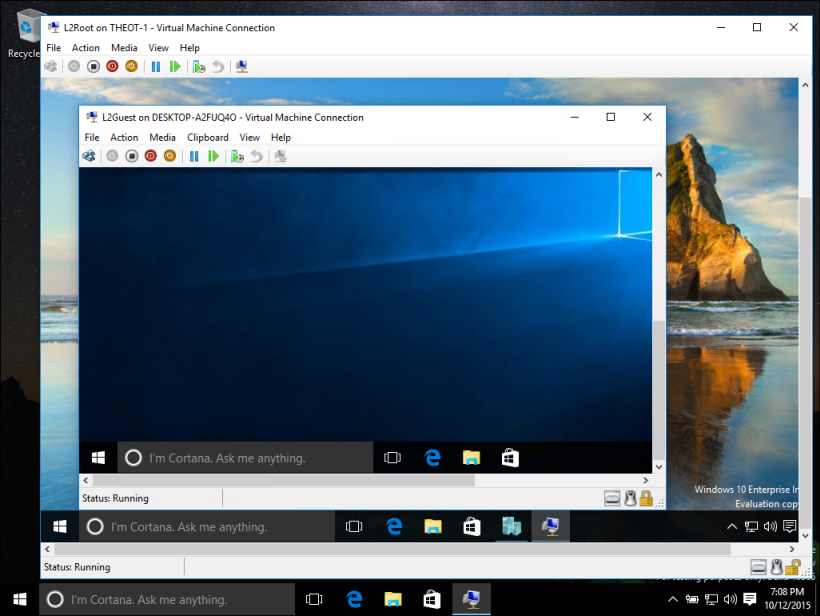
Hyper-V is enabled in the Nano VMs – thanks to the addition of nested virtualization. I’ve also clustered these machines. Networking-wise, I have given each VM 2 x vNICs, each with MAC spoofing (for nested VMs) and NIC teaming enabled.

I launched PowerShell ISE then used Enter-PSSession to connect to the host from the admin PC. And from the host, I used Enter-PSSession -VMName to use PowerShell Direct to get into each VM – this gives me connectivity without depending on the network. That’s because I wanted to deploy Switch Embedded Teaming (SET) and provision networking in the Nano VMs. This script configure the VMs each with 3 vNICs for the management OS, connected to the vSwitch that uses both of the Nano VMs vNICs as teamed uplinks:

$idx = 54

New-VMSwitch -Name External -NetAdapterName "Ethernet","Ethernet 2" -EnableEmbeddedTeaming $true -AllowManagementOS $false

Add-VMNetworkAdapter -ManagementOS -Name "Management" -SwitchName External
Add-VMNetworkAdapter -ManagementOS -Name "SMB1" -SwitchName External
Add-VMNetworkAdapter -ManagementOS -Name "SMB2" -SwitchName External

Sleep 10

New-NetIPAddress -InterfaceAlias "vEthernet (Management)" -IPAddress 172.16.2.$idx -PrefixLength 16  -DefaultGateway 172.16.1.1
Set-DnsClientServerAddress -InterfaceAlias "vEthernet (Management)" -ServerAddresses "172.16.1.40"

New-NetIPAddress -InterfaceAlias "vEthernet (SMB1)" -IPAddress 192.168.3.$idx -PrefixLength 24
New-NetIPAddress -InterfaceAlias "vEthernet (SMB2)" -IPAddress 192.168.4.$idx -PrefixLength 24

Note: there’s no mention of RDMA because I’m working in a non-RDMA scenario – a test/demo lab. Oh yes; you can learn Hyper-V, Live Migration, Failover Clustering, etc on your single PC now!

And in no time, I had myself a new Hyper-V cluster with a tiny physical footprint, thanks to 4 new features in WS2016.

Cannot Bind Parameter ‘ForegroundColor’ Error When Creating Nano Server Image

You get the following error when running New-NanoServerImage in PowerShell ISE to create a new Windows Server 2016 (WS2016) Nano Server image:

Write-W2VError : Cannot bind parameter ‘ForegroundColor’. Cannot convert the “#FFFF0000” value of type
“System.Windows.Media.Color” to type “System.ConsoleColor”.

image

The fix (during TP5) is to not use PowerShell ISE. Use an elevated PowerShell prompt instead. The reasoning is explained here by “daviwil”.

Windows Server & System Center TP5 Downloads

Here are more download links for Technical Preview releases of Windows Server 2016 and System Center. Yesterday I posted the links for downloading WS2016, but more has been made available.

My friend, John McCabe (now a PFE at the MSFT office in San Francisco), wrote a free ebook for MS Press on Windows Server 2016 Technical Preview too.

Windows Server Technical Preview 5 is Out

Microsoft has released Technical Preview 5 of Windows Server 2016 and Hyper-V Server 2016. There is also an Essentials edition preview.

image

As you can see, plans for licensing have not changed since I last spoke about this topic … and you voted … a lot.

Here is a listing of what’s new in the technical preview (this includes TP1-4). And here are the official listings for:


Technorati Tags: ,

Azure Stack Preview Is Public

Microsoft has launched the public preview of Azure Stack, something that has been in TAP for several months now. You can find the download on MSDN right now.

image

This is the first time that you can run services in Azure, a hosting partner, or on premises … with the same consistent experience. ARM (Azure Resource Manager) is at the heart of that consistency. On prem, you get Azure Stack (without requiring System Center) which integrates into resource providers for storage networking, etc in WS2016. Hyper-V, storage accounts, and the network fabric (Network Controller) are all in WS2016.

I’ve been told by folks in the TAP that MAS is gooood, and much easier to deploy than Windows Azure Pack (WAPack).

I doubt I’ll ever see MAS on any of my customers’ sites, but this is still a big day. And it puts Microsoft in a unique position ahead of VMware (the failed vCloud Air), Amazon and Google (public cloud only).

My WS2016 Hyper-V Session at Future Decoded

I had fun presenting at this Microsoft UK event in London. Here’s a recording of my session on Windows Server 2016 (WS2016) Hyper-V, featuring failover clustering, storage, and networking:


More sessions can be found here.

Windows Server 2016 Licensing is Announced

Some sales/marketing/channel type in Microsoft will get angry reading this. Good. I am an advocate of Microsoft tech, and I speak out when things are good, and I speak out when things are bad. Friends will criticise each other when one does something stupid. So don’t take criticism personally and get angry, sending off emails to moan about me. Trying to censor me won’t solve the problem. Hear the feedback. Fix the issue.

We’re still around many months away from the release of Windows Server 2016 (my guess: September, the week of Ignite 2016) but Microsoft has released the details of how licensing of WS2016 will be changing. Yes; changing; a lot.

In 2011, I predicted that the growth of cores per processor would trigger Microsoft to switching from per-socket licensing of Windows Server to per-core. Well, I was right. Wes Miller (@getwired) tweeted a link to a licensing FAQ on WS2016 – this paper confirms that WS2016 and System Center 2016 will be out in Q3 2016.

image

There are two significant changes:

  • Switch to per-core licensing
  • Standard and Datacenter editions are not the same anymore

Per-Core Licensing

The days when processors got more powerful by becoming faster are over. We are in a virtualized multi-threaded world where capacity is more important than horsepower – plus the laws of physics kicked in. Processors now grow by adding cores.

The largest processor that I’ve heard of from Intel (not claiming that it’s the largest ever) has 60 (SIXTY!) cores!!! Imaging you deploy a host with 2 of those Xeon Phi processors … you can license a huge amount of VMs with just 2 copies of WS2012 R2 Datacenter (no matter what virtualization you use). Microsoft is losing money in the upper end of the market because of the scale-out of core counts, so a change was needed.

I hoped that Microsoft would preserve the price for normal customers – it looks like they have, for many customers, but probably not all.

Note – this is per PHYSICAL CORE licensing, not virtual core, not logical processor, not hyperthread.

image

Yes, the language of this document is horrendous. The FAQ needs a FAQ.

It reads like you must purchase a minimum of 8 cores per physical proc, and then purchase incremental counts of 2 cores to meet your physical core count. The customer that is hurt most is the one with a small server, such as a micro-server – you must purchase a minimum of 16 cores.

image

One of the marketing lines on this is that on-premises licensing will align with cloud licensing – anyone deploying Windows Server in Azure or any other hosting company is used to the core model. A software assurance benefit was allegedly announced in October on the very noisy Azure blog (I can’t find it). You can move your Windows Server (with SA) license to the cloud, and deploy it with a blank VM minus the OS charge. I have no further details – it doesn’t appear on the benefits chart either. More details in Q1 2016.

CALs

The switch to core-focused licensing does not do away with CALs. You still need to buy CALs for privately owned licenses – we don’t need Windows Server CALs in hosting, e.g. Azure.

System Center

You’re switching to per-core licensing too.

image

Nano?

This is just an installation type and is not affected by licensing or editions.

Editions?

We know about the “core” editions of WS2016: Standard and Datacenter – more later in this post.

As for Azure Stack, Essentails, Storage Server, etc, we’re told to wait until Q1 2016 when someone somewhere in Redmond is going to have to eat some wormy crow. Why? Keep reading.

Standard is not the same as Datacenter

I found out about the licensing announcement after getting an email from Windows Server User Voice to tell me that my following feedback was rejected:

image

I knew that some stuff was probably going to end up in Datacenter edition only. Many of us gave feedback: “your solutions for reducing infrastructure costs make no sense if they are in Datacenter only because then your solution will be more expensive than the more mature and market-accepted original solution”.

image

The following are Datacenter Edition only:

  • Storage Spaces Direct
  • Storage Replica
  • Shielded Virtual Machines
  • Host Guardian Service
  • Network Fabric

I don’t mind the cloud stuff being Datacenter only – that’s all for densely populated virtualization hosts that Datacenter should be used on. But it’s freaking stupid to put the storage stuff only in this SKU. Let’s imagine a 12 node S2D cluster. Each node has:

  • 2 * 800 GB flash
  • 8 * 8 TB SATA

That’s 65 TB of raw capacity per node. We have roughly 786 TB raw capacity in the cluster, and we’ll guestimate 314 TB of usable capacity. If each node costs $6155 then the licensing cost alone (forget RDMA network switches, NICs, servers, and flash/HDD) will be $73,860. Licensing for storage will be $73,860. Licensing. How much will that SAN cost you? Where was the cost benefit in going with commodity hardware there, may I ask?

This is almost as bad a cock-up as VMware charging for vRAM.

As for Storage Replica, I have a hard time believing that licensing 4 storage controllers for synch replication will cost more than licensing every host/application server for Storage Replica.

S2D is dead. Storage Replica is irrelevant. How are techs that are viewed with suspicion by customers going to gain any traction if they cannot compete with the incumbent? It’s a pity that some marketing bod can’t use Excel, because the storage team did what looks like an incredible engineering job.

If you agree that this decision was stupid then VOTE here.

image

Russinovich on Hyper-V Containers

We’ve known since Ignite 2015 that Microsoft was going to have two kinds of containers in Windows Server 2016 (WS2016):

  • Windows Server Containers: Providing OS and resource virtualization and isolation.
  • Hyper-V Containers: The hypervisor adds security isolation to machine & resource isolation.

Beyond that general description, we knew almost nothing about Hyper-V Containers, other than expect them in preview during Q4 of 2015 – Technical Preview 4 (TPv4), and that it is the primary motivation for Microsoft to give us nested virtualization.

That also means that nested virtualization will come to Windows Server 2016 Hyper-V in TPv4.

We have remained in the dark since then, but Mark Russinovich appeared on Microsoft Mechanics (a YouTube webcast by Microsoft) and he explained a little more about Hyper-V Containers and he also did a short demo.

Some background first. Normally, a machine has a single user mode running on top of kernel mode. This is what restricts us to the “one app per OS” best practice/requirement, depending on the app. When you enable Containers on WS2016, an enlightenment in the kernel allows multiple user modes. This gives us isolation:

  • Namespace isolation: Each container sees it’s own file system and registry (the hives in the containers hosted files).
  • Resource isolation: How much process, memory, and CPU a container can use.

Kernel mode is already running when you start a new container, which improves the time to start up a container, and thus it’s service(s). This is great for deploying and scaling out apps because a containerised app can be deployed and started in seconds from a container image with no long term commitment, versus minutes for an app in a virtual machine with a longer term commitment.

image

But Russinovich goes on to say that while containers are great for some things that Microsoft wants to do in Azure, they also have to host “hostile multi-tenant code” – code uploaded by Microsoft customers that Microsoft cannot trust and that could be harmful or risky to other tenants. Windows Server Containers, like their Linux container cousins, do not provide security isolation.

In the past, Microsoft has placed such code into Hyper-V (Azure) virtual machines, but that comes with a management and direct cost overhead. Ideally, Microsoft wants to use lightweight containers with the security isolation of machine virtualization. And this is why Microsoft created Hyper-V Containers.

Hyper-V provides excellent security isolation (far fewer vulnerabilities found than vSphere) that leverages hardware isolation. DEP is a requirement. WS2016 is introducing IOMMU support, VSM, and Shielded Virtual Machines, with a newly hardened hypervisor architecture.

Hyper-V containers use the exact same code or container images as Windows Server Containers.That makes your code interchangeable – Russinovich shows a Windows Server Container being switched into a Hyper-V container by using PowerShell to change the run type (container attribute RuntimeType).

The big difference between the two types, other than the presence f Hyper-V, is that Hyper-V Containers get their own optimized instance of Windows running inside of them, as the host for the single container that they run.

image

The Hyper-V Container is not a virtual machine – Russinovich demonstrates this by searching for VMs with Get-VM. It is a container, and is manageable by the same commands as a Windows Server Container.

In his demos he switches a Windows Server Container to a Hyper-V Container by running:

Set-Container -Name <Container Name> -RuntimeType HyperV

And then he queries the container with:

Get-Container -Name <Container Name> | fl Name, State, RuntimeType

So the images and the commands are common across Hyper-V Containers and Windows Server Containers. Excellent.

It looked to me that starting this Hyper-V Container is a slower operation than starting a Windows Server Container. That would make sense because the Hyper-V container requires it’s own operating system.

I’m guessing that Hyper-V Containers either require or work best with Nano Server. And you can see why nested virtualization is required. A physical host will run many VM hosts. A VM host might need to run Hyper-V containers – therefore the VM Host needs to run Hyper-V and must have virtualized VT-x instructions.

Russinovich demonstrates the security isolation. Earlier in the video he queries the processes running in a Windows Server Container. There is a single CSRSS process in the container. He shows that this process instance is also visible on the VM host (same process ID). He then does the same test with a Hyper-V Container – the container’s CSRSS process is not visible on the VM host because it is contained and isolated by the child boundary of Hyper-V.

What about Azure? Microsoft wants Azure to be the best place to run containers – he didn’t limit this statement to Windows Server or Hyper-V, because Microsoft wants you to run Linux containers in Azure too. Microsoft announced the Azure Container Service, with investments in Docker and Mesospehere for deployment and automation of Linux, Windows Server, and Hyper-V containers. Russinovich mentions that Azure Automation and Machine Learning will leverage containers – this makes sense because it will allow Microsoft to scale out services very quickly, in a secure manner, but with less resource and management overhead.

That was a good video, and I recommend that you watch it.


Microsoft News – 19 October 2015

It turns out that Microsoft has been doing some things that are not Surface-related. Here’s a summary of what’s been happening in the last while …

Hyper-V

image

Windows Server

Windows Client

Azure

Office 356

Miscellaneous