Bring on the hate! (which gets *ahem* moderated but those vFanboys will attempt to post anyway). Matt McSpirit of Microsoft did his now regular comparison of the latest versions of Microsoft Windows Server 2012 R2 Hyper-V and VMware vSphere 5.1 at TechEd NA 2013 (original video & deck here). Here are my notes on the session, where I contrast the features of Microsoft’s and VMware’s hypervisors.
Before we get going, remember that the free Hyper-V Server 2012 R2, Windows Server Standard, and Windows Server Datacenter all have the exact same Hyper-V, Failover Clustering, and storage client functionality. And you license your Windows VMs on a per-host basis – and that’s that same on Hyper-V, VMware, XenServer, etc. Therefore, if you run Windows VMs, you have the right to run Hyper-V on Std/DC editions, and therefore Hyper-V is always free. Don’t bother BSing me with contradictions to the “Hyper-V is free” fact … if you disagree then send me your employer’s name and address so I can call the Business Software Alliance to make an easy $10,000 reward.
Scalability
Most of the time this information is just “Top Gear” numbers. Do I need a 1000 BHP car that can accelerate to 100 MPH in 4 seconds? Nope, but it’s still nice to know that the muscle is there if I need it. Microsoft agrees, so they haven’t done any work on this basic figures to extend maximum capacities from where they are with WS2012 Hyper-V. The focus instead is on cloud, efficiency, and manageability. But here you go anyway:

If you want to compare like with like, then the free Hyper-V crushes the free vSphere hypervisor in every way, shape, and form.
The max VM numbers per host are a bit of a stretch. But interestingly, I did encounter someone last year in London who would have used the maximum VM configuration.
Storage
Storage is the most expensive piece of the infrastructure and that has had a lot of focus from Microsoft over the past 2 releases (WS2012 and WS2012 R2).

In the physical world, WS2012 added virtual fibre channel, with support for Live Migration. MPIO is possible using the SAN vendor’s own solution in the guest OS of the VM. In the vSphere world, MPIO is only available to the most expensive versions of vSphere. VMware still does not support native 4-K sector disks. That eliminates new storage from being used, and limits them to the slow RMW process for 512E disks.
In the VM space, Microsoft dominates. WS2012 R2 allows complete resizing of VHDX attached to SCSI controllers (remember that Gen 2 VMs only use SCSI controllers, and data disks should always be on a SCSI controller in Gen 1 VMs). In the vSphere world, you can grow your storage, but that cloud customer doesn’t get elasticity … no shrink I’m afraid so keep on paying for that storage that you temporarily used!
VHDX scales out to 64 TB. Meanwhile, VMware are stuck in the 1990’s with a 2TB VMDK file. I hate passthrough disks (raw device mapping) so I’m not even bothering to mention that Microsoft wins there too … oh wait … I just did 
ODX is supported in all versions of Hyper-V (that’s the way Hyper-V rolls) but you’ll only get that support in the 2 most expensive versions of vSphere. That’ll slow down your cloud deployments, e.g. VMM 2012 R2 will deploy VMs/Services from a library via ODX and we can nearly instantly create zeroed out fixed VHD/X files on ODX enabled storage.
Both platforms support boot from USB. To be fair, this is only supported by MSFT if it is done using Hyper-V Server by an OEM. No OEM offers this option that I know of. And VMware does offer boot from SD which is offered by OEMs. VMware wins that minor one.
When you look at file based storage, SMB 3.0 versus NFS, then Microsoft’s Storage Spaces crushes not just VMware, but the block storage market too. Tiered storage is added in WS2012 R2 for read performance (hot spots promoted to SSD) and write-through performance (Write-Back Cache where data is written temporarily to SSD during write activity spikes).
Memory
The biggest work a vendor can do on hypervisor efficiency is in memory, because host RAM is normally the first bottleneck to VM:host density. VMware offers:
- Memory overcommit: closest to Hyper-V Dynamic Memory as you can get. However, DM does not overcommit – overcommitting forces hosts to do second-level paging. That requires fast disk and reduces VM performance. That’s why Hyper-V focuses on assigning memory based on demand without lying to the guest OS, and why DM does not overcommit.
- Compression
- Swapping
- Transparent Page Sharing (TPS): This deduping is not in Hyper-V. I wonder how useful this is when the guest OS is Windows 8/Server 2012 or later? Randomization and large page tables make render this feature pretty useless. This deduping also requires CPU effort (4K page deduping) … and it only occurs when host memory is under pressure.
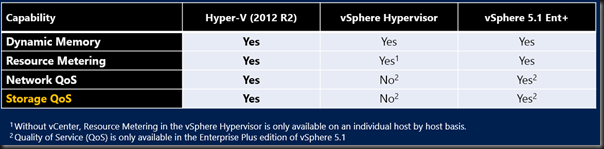
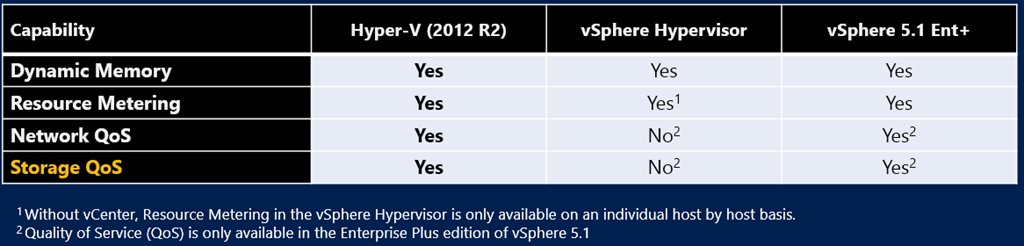
Hyper-V does do Resource Metering, and presents that data into System Center (Windows Azure Pack and Operations Manager). VMware does make the data more readily available in a simpler virtualization (versus cloud) installation via vCenter. vSphere free does not present this data because there is no vCenter, whereas that data is gathered and available in all versions of Hyper-V.
Network QoS is a key piece in the converged networks story of Hyper-V, in all editions. You’ll need the most expensive edition of vSphere to do Network QoS.
Before the vFanboys get all fired up, WS2012 R2 (all editions of Hyper-V) adds Storage QoS, configurable on a per virtual hard disk basis. vSphere Enterprise Plus is required for Storage QoS. Cha-ching!
Security & Multi-tenancy
Hyper-V is designed from the network up for multi-tenancy and tenant isolation:
- Extensible virtual switch – add (not replace as with vSphere vSwitch) 3rd party functionality (more than 1 if you want) to the Hyper-V virtual switch
- Hyper-V Network Virtualization (HNV aka Software Defined Networking aka SDN) – to be fair it requires VMM 2012 R2 to be used in production

Don’t give me guff about number of partners; WS2012 Hyper-V had more network extension partners at RTM time than vSphere did after years of support for replacing their vSwitch.

So, we keep the Hyper-V virtual switch and all of its functionality (such as QoS and HNV) if we add 3rd party network functionality, e.g. Cisco Nexus 1000v for Hyper-V. On the other hand, the vSphere vSwitch is thrown out if you add 3rd party network functionality, e.g. Cisco Nexus 1000v for vSphere.
The number of partner extensions for Hyper-V shown above is actually out of date (it’s higher now). I also think that the VMware number is now 3 – I’d heard something about IBM adding a product.
I’m not going line-by-line with this one. Long-story short on cloud/security networking:
- All versions of Hyper-V: yes
- vSphere free: no or very restricted
- vSphere: pay up for add-ons and/or the most expensive edition of vSphere
Networking Performance
Lots of asterisks for VMware on this one:

DVMQ automatically and elastically scales acceleration and hardware offload of inbound traffic to VMs beyond core 0 on the host. Meanwhile in VMware-land, you’re bottlenecked to core 0.
On a related note, WS2012 R2 leverages DVMQ on the host to give us VRSS (virtual receive side scaling) in the guest OS. That allows VMs to elastically scale processing of inbound traffic beyond just vCPU 0 in the guest OS.
IPsec Task Offload is still just a feature on Hyper-V for offloading CPU processing that is required for enabling IPsec in a guest OS for security reasons.
SR-IOV allows host scalability and low latency VM traffic. vSphere supports Single-Root IO Virtualization, but vMotion is disabled for those enabled VMs. Not so on Hyper-V; all Hyper-V features must support Live Migration.
BitLocker is supported for the storage where VM files are placed in Hyper-V, including on CSV (the Hyper-V alternative to clustered VMFS). In the VMware world, VM files are there for anyone to take if they have physical access – not great for insecure locations like branch offices or frontline military.
Linux
Let’s do myth debunking: Linux is supported on Hyper-V. There is an ever-increasing number of explicitly supported (meaning you can call MSFT support for assistance, not just works on Hyper-V) distros. And the Hyper-V Linux Integration Services are a part of the Linux kernel since v3.3. That means lots of other distros work just as well as the explicitly supported distros. Features include:
- 64 vCPU per VM
- Virtual SCSI, hot-add, and hot-resize of VHDX
- Full support Dynamic Memory
- File system consistent hot-backup of Linux VMs
- Hyper-V Linux Integration Services already in the guest OS
Flexibility
The number one reason for virtualization: flexibility. And that is heavily leveraged to enable self-service, a key trait of cloud computing. Flexibility starts with vSphere (not the free edition) vMotion and Hyper-V (all editions) Live Migration:
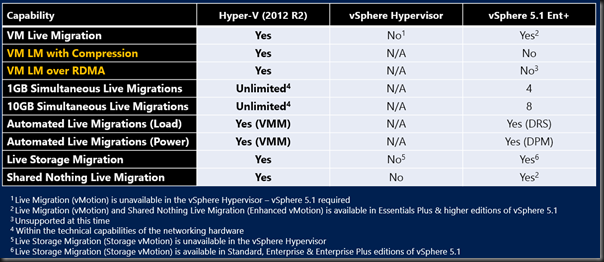
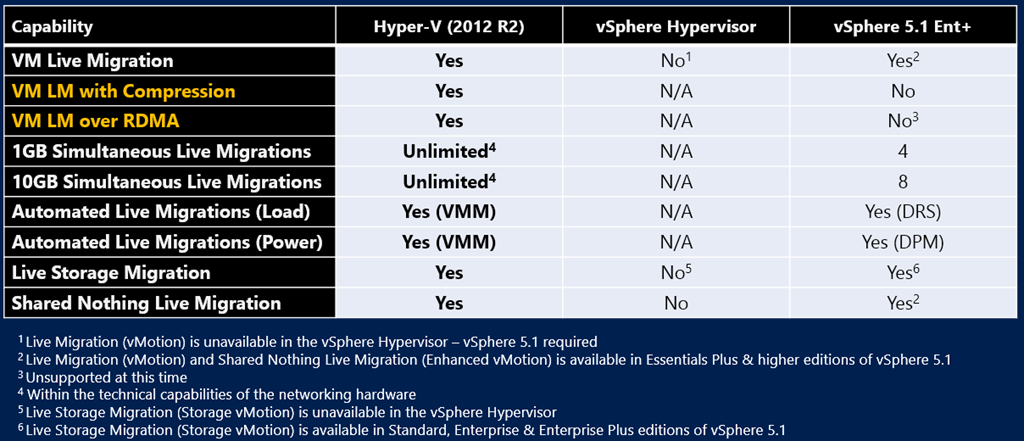
WS2012 Hyper-V added unlimited (only hardware/network limitations) simultaneous or concurrent Live Migration. vSphere has arbitrary limits of 4 (1 GbE) or 8 (10 GbE) vMotions at a time. This is where VMware’s stealth marketing asks if draining your host more quickly is really necessary. Cover your jewels you-know-who …
WS2012 R2 Hyper-V adds support for doing Live Migration even more quickly:
- Live Migration will be compressed by default, using any available CPU on the involved hosts, while prioritizing host/VM functionality.
- With RDMA enabled NICs, you can turn on SMB Live Migration. This is even quicker by offloading to RDMA, and can leverage SMB Multichannel over multiple NICs.
Neither of these are in vSphere 5.1.
vCenter has DRS. While Hyper-V does not have DRS and DPM, we have to get into the apples VS oranges debate. System Center Virtual Machine Manager (the equivalent + MORE) of vCenter does give us Dynamic Optimization and Power Optimization (OpsMgr not required).
Storage Live Migration was added in WS2012 Hyper-V. I love that feature. Shared-Nothing Live Migration allows us to move between hosts that are clustered or not – I hear that the VMware equivalent doesn’t allow you to vMotion a VM between vSphere clusters. That seems restrictive in my opinion.
And There’s More On Flexibility
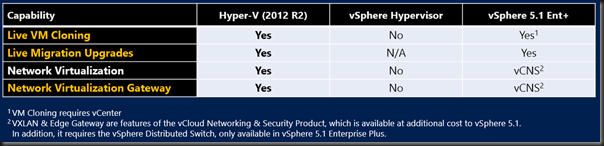
All versions of 2012 R2 Hyper-V allow us to do Live VM cloning. For example, you can clone an entire VM from a snapshot deep down in a snapshot tree. DevOps will love that feature.
Network Virtualization was added in WS2012 R2. Yes, the real world requires VMM to coordinate the lookups and the gateway. While third party NVGRE gateways now exist (F5 and Iron Networks) WS2012 R2 adds a built-in NVGRE gateway (in RRAS) that you can run in VMs that are placed in an edge network. The VMware solution requires more than just vCenter (vCloud Networking & Security) + has the same need for an NVGRE gateway.
High Availability
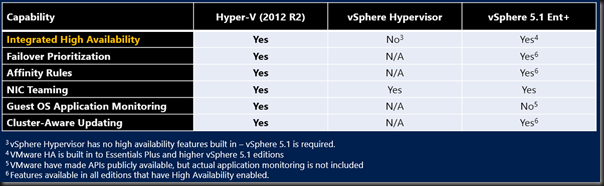
Ideally (not everyone though because of the cost of storage/redundant hosts), you want your hosts to be fault tolerant. This HA is done by HA in vSphere (paid only) and Failover Clustering in Hyper-V (all versions).
Failover Prioritization, Affinity, and NIC teaming are elements to be found in vSphere and Hyper-V.
Hyper-V can do guest OS application monitoring. To me, this is a small feature because it’s not a cloud feature … the boundary between physical and virtual is crossed (not just blurred). Moving on …
Cluster-Aware Updating is there in both vSphere (paid) and Hyper-V to live migrate VMs on a cluster to allow zero service downtime maintenance of hosts. Note that Hyper-V will:
- Support third party updates. Dell in particular has done quite a bit in this space to update their hardware via CAU
- Take advantage of Live Migration enhancements to make this process very quick in even the biggest of clusters
With CAU, you don’t care that MSFT does a great job at identifying and fixing issues on a monthly basis. The host update process is quick and automated, with no impact on the business.
That’s just the start …
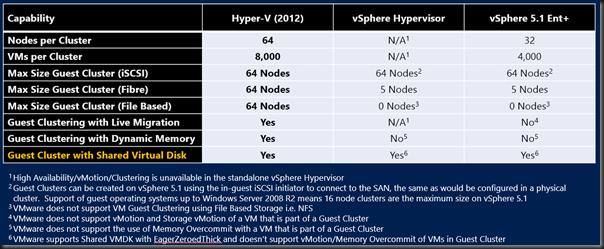
A Hyper-V cluster can scale out way beyond that of a vSphere cluster. Not many will care, but those people will like having fewer administration units. A Hyper-V cluster scales to 64 nodes and 8,000 VMs, compared to 32 nodes and 4,000 VMs in vSphere.
HA is more than a host requirement. Guest OSs fail too. Guest OSs need maintenance. So Hyper-V treats guest clusters just like physical clusters, supporting iSCSI, Fiber Channel, and SMB 3.0/NFS shared storage with up to 64 guest cluster nodes …. all with Live Migration. Meanwhile vSphere supports iSCSI as long as you use nothing newer than W2008 R2 (16 node restriction). Fibre Channel guest clusters are supported up to 5 nodes. Guest clusters with file based storage (SMB 3.0 or NFS) are not supported. Ouch!
Oh yeah … Hyper-V guest clusters do support Live Migration and vSphere does not support vMotion of guest clusters. There goes your flexibility in a vWorld! Host maintenance will impact tenant services in vSphere in this case.
Hyper-V adds support for Shared VHDX guest clusters. This comes with 2 limitations:
- No Storage Live Migration of the Shared VHDX
- You need to backup the guest cluster from within the guest OS
Sounds like VMware might be better here? Not exactly: you lose vMotion and memory overcommit (their primary memory optimization) if you use Shared VMDK. Ouch! I hope too many tenants don’t choose to deploy guest clusters or you’re going to (a) need to blur the lines of physical/virtual with block storage or (b) charge them lots for non-optimized memory usage.
DR & Backup

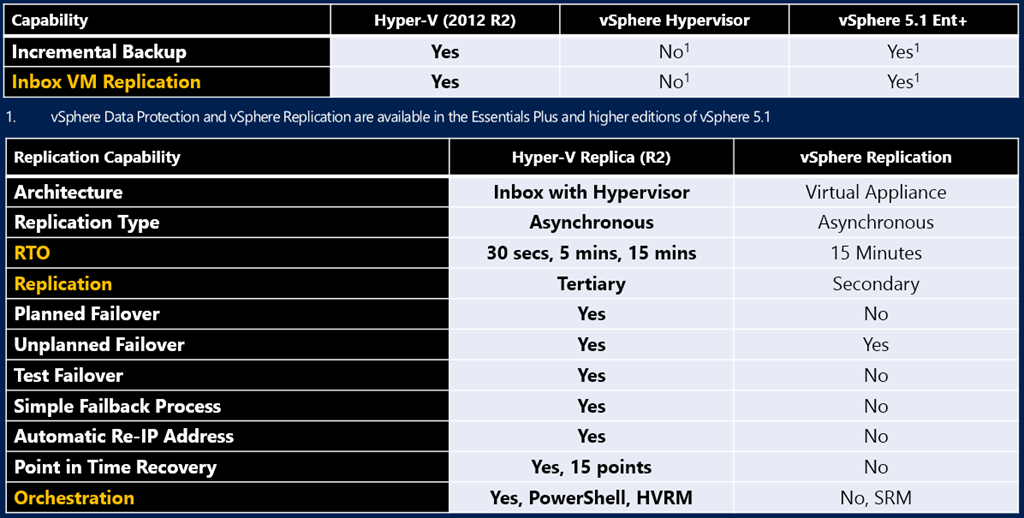
Both Hyper-V and vSphere have built-in backup and VM replication DR solutions.
In the case of 2012 R2 Hyper-V, the replication is built into the host, rather than as a virtual appliance. Asynchronous replication is every 30 seconds, 5 minutes or every 15 minutes in the case of Hyper-V, and just every 15 minutes in vSphere. Hyper-V allows A->B->C replication whereas vSphere only allows A-> replication.
Hyper-V Replica is much more flexible and usable in the real world, allowing all sorts of failover, reverse replication/failback, and IP address injection. Not so with vSphere. Hyper-V Replica also offers historical copies of VMs in the DR site, something you won’t find in vSphere. vSphere requires SRM for orchestration. Hyper-V Replica offers you a menu:
- PowerShell
- System Center Orchestrator
- Hyper-V Recovery Manager (Azure SaaS)
Cross-Premises
I’m adding this. Hyper-V offers 1 consistent platform across:
- On-premise
- Hosting company public cloud
- Windows Azure IaaS
With HNV, a company can pick and choose where to place their services, and even elements of services, in this hybrid cloud. Hyper-V is tested at scale more than any other hypervisor: it powers Windows Azure and that’s one monster footprint that even Godzilla has to respect.
Summary
Hyper-V wins, wins, wins. If I was a CIO then I’d have to question any objection to Hyper-V:
- Are my techies vFanboys and their preferences are contrary to the best needs to the business?
- Is the consultant pushing vSphere Enterprise Plus because they get a nice big cash rebate from VMware for just proposing the solution, even without a sale? Yes, this is a real thing and VMware promote it at partner events.
I think I’d want an open debate with both sides (Hyper-V and vSphere) being fairly represented at the table if I was in that position. Oh – and all that’s covered here is the highlights of Hyper-V versus the vSphere hypervisor. vCenter and the vCloud suite haven’t a hope against System Center. That’s like putting a midget wrestler up against The Rock.
Anywho, let the hate begin
Oh wait … why not check out Comparing Microsoft Cloud with VMware Cloud.