Backup Your Data With Microsoft Azure Backup

Speakers: Saurabh Sensharma & Shivam Garg

Saurabh starts. He shows a real ransomware email. The ransom was 1.7 bitcoins for 1 PC or 29 bitcoins for all PCs. Part of the process to restore was to send files to the attacker to prove decryption works. The two files the customer sent contained customer data! Stuff like this has GDPR implications, brand, etc.

Secure Backup is Your Last Line of Defense

Azure Backup – a built-in service. Lower and predictable TCO. Can be zero-infrastructure. And it offers trust-no-one encryption and secure backups.

Shivam comes up. He’s going to play the role of the customer in this session.

Question: Backup is decades old – what has changed?

Digital transformation. People using the cloud to transform on-prem IT, even if it stays on-prem.

Shivam: Backup should be like a checkbox. Customers want a seamless experience. Backup should not be a distraction.

Azure Backup releases you from the management of a backup infrastructure. Azure Backup is built on:

  • Scalability
  • Availability
  • Resilience

Shivam: What does this “built-in” mean if I have a three-tier .Net app running in the cloud?

We see a demo of restoring a SQL Server database in an Azure VM. We see the point-in-time restore will be an option because there are log backups. Saurabh shows the process to backup SQL Server in Azure VMs. He highlights “auto-protect” – if the instance is being protected then all the databases (even new ones that are created later) are backed up.

Saurabh demos creating a new VM. He highlights the option to enable backup during the VM creation – something many didn’t know was possible when this option wasn’t in the VM creation process. VMs are backed up using a snapshot in local storage. 7 of those are kept, and the incremental is sent to the recovery services vault. If you want to restore from a recent backup, you can restore very quickly from the snapshot.

A new restore option is coming soon – Replace Existing (virtual machine). They place the existing disks of the VM into a staging location – this gives them a rollback if something goes wrong. Then the disks of the VM are replaced from backup. So this solves the availability set issue.

Under the Covers – SQL

Anything that has a native backup engine is referred to as enlightened. Azure Backup talks to the SQL Backup Engine using native APIs via Azure Backup plugin for SQL (VM extension). They ask SQL Backup Engine to create the backup APIs. Data is temporarily stored in VM storage. And then there is a HTTPS transfer using incremental backups to the RSV where they are encrypted at rest using SSE.

It’s all built-in. No manual agents, no backup servers, etc.

Non-Enlightened VM Workloads

E.g. MySQL in a VM. Azure Backup can call a pre-script. This can instruct MySQL to freeze transactions to disk. When you recover, there’s no need to do a fixup. A snapshot of the disks is taken, enabling a backup. And then a post-script is called and the database is thawed. Application providers typically share these on GitHub.

VM Backup

An extension is in every Azure VM. The extension associates itself to a backup policy that you select in the RSV. A command is sent to the backup extension. This executes a snapshot (VSS for Windows). It’s an Instant Recovery Snapshot in the VM storage. A HTTPS transfer to SSE storage as incremental blocks.

Azure Disk Encryption

KEK and BEK keys are stored in Azure Keyvault. These are also protected when you backup the VM. This ensures that the files can be unlocked when restored.

Up to 1000 VMs can be protected in a single RSV now.

Azure VM Restore

VM restore options:

  • Files
  • Disks
  • VM
  • Replace Disks

Replace Disks (new):

  1. They snapshot copy the VMs disks to a staging location. This allows roll backup if the process is broken.
  2. They replace the disks by restore.

This (confirmed) is how restoring a VM will allow you to keep availability set membership.

Azure File Sync

The MS sync/tiering solution. Everything is stored in the cloud. So you can move on-prem backup for file servers to the cloud. Demo of deleting a file and restoring it. Saurabh clicks Manage Backups in the Azure File Share and clicks File Recovery and goes through the process.

When the backup API triggers a backup of Files, it pauses sync to create a snapshot. After the snapshot, the sync resumes. Now they have a means to a file consistent backup.

On-Prem Resources

There is no Azure File Sync in this scenario, but they want to use cloud backup without a backup server. This scenario is Azure Backup MARS agent with Windows Admin Center. A demo of enabling Azure Backup protection via the WAC.

Deleting Backup

  1. Malware cannot delete your backups because this task requires you to manually generate a PIN in the Azure Portal (human authentication)
  2. If a human maliciously deletes a backup, Azure Backup retains backups for 14 days. And it will send an email to the registered notification address(es).

Security

  • Security PIN for critical tasks
  • Azure Disk Encryption support
  • SSE encryption with TLS 1.2
  • RBAC for roles
  • Alerts in the portal and via notifications
  • On-server encryption (on-prem) before transport to Azure

Rich Management

Questions:

  • What’s my storage consumption?
  • Are my backups healthy?
  • Can I get insights by looking at trends?

This is the sort of stuff that normally requires a lot of on-prem infrastructure. Azure leverages Azure features, such as a Storage Account. No infrastructure, enterprise-wide, and it uses an open data model (published online on docs.microsoft.com) that anyone can use (Kusto, etc). You can also integrate with Service Manager, ServiceNow, and more (ITSM).

Custom reports.

And ….. cross-tenant support! Yay! This is a big deal for partners. It’s a PowerBI solution. It’s a content pack that you can import. It ingests Azure reporting data from a storage account.

Once you set this up, it takes up to 24 hours to get data moving, and then it’s real-time after that.

Roadmap

Cloud resources:

  • Azure VM abckup – Standard SSD, resource improvements, 16+ disks, cross-region support
  • Azure Files Backup: Premium Files, 5 TB+ shares, ACL, secondary backups.
  • Workloads: SAP Hana, SQL in Azure VM GA.

Availability Zones:

  • ZRS
  • Recovery from cross-zone backups

And more that I couldn’t grab in time.

Microsoft Ignite 2018–Azure Compute

Speaker: Corey Sanders

95% of Fortune 500 building on Azure. Adobe is building on open source – one of the biggest PostgreSQL customers. NeuroIntiative using GPUs to simulate drug tests for treatments for Alzheimer’s.

There’s no one way to use Azure. Find the bits you want to use and deploy them in a good way that suits.

Infrastructure for Every Workload

54 announced regions. Availability Zones in US, Europe, and Asia, more regions coming soon.

New VM Portfolio

NDv2: 8 x NVIDIA Tesla V100 NVLINK GPUs, 40 Intel SkyLake cores, 672 GB RAM, AI, ML, and HPC workloads.

NVv2: Tesla M60 GPU. Premium SSD suppor, up to 448 GB RAM, CAD, Gaming 3D design

HB: Highest memory bandiwidth in the cloud. 60 AMD EPYC cores, 100 Gbps Infiniband. Memory bandwidth intensive HPC workloads.

HC: Up to 3.7 Ghz clock speed. 44 Intel SkyLake cores, 100 Gbps Infiniband. CPU intensive HPC workloads.

Storage

200 trillion objects. 160 trillion transactions per month.

Standard SSD is GA. Ultra SSD in preview – sub millisecond latency, up to 160,000 IOPS and 2,000 MB/s throughput.

A demo of Ultra SSD. Opens up an E64s_v3 VM with Ultra SSD. Run IOMETER. Gets nearly 80,000 IOPS and .6 millisecond latency. That’s a single disk! Now for demo 2 with a new VM type. Runs IOMETER. Gets 161,000 IOPS on a single ultra SSD without striping or caching – durable writes. Double the performance of the competition.

There will be a single VM SLA for VMs running Ultra SSD.

Networking

100,000 miles of fibre to connect the 54 regions with 130+ edge sites.

ExpressRoute Global Reach allows you to connect your connections together to use the MS WAN as your WAN. Virtual WAN is GA. Front Door uses those edge as a globally available secure entry point to web services in Azure. And Azure ExpressRoute Direct offers 100 Gbps connections to Azure.

SAP

24 TB RAM physical machines. 12 TB RAM VMs on the way. 20+ certified solution architectures on Azure.

Containers

Reasons:

  • Agility
  • Portability
  • Density
  • Rapid Scale

A new feature in Kubernetes (K8s) to allow burst capacity based on Azure Container Instances called Virtual Node. The node is a VM that can be loaded up with ACIs when demand spikes. You get per-second billing to deal with unusual loads.

Hybrid

Microsoft offers the only true consistent hybrid experience. Azure Stack, DevOps, data, AD, and security/management.

A key piece of this is Windows Server 2019, which has hybrid built in. Hybrid: Azure Backup, ASR, Storage Migration Services, Azure Network Adapter

Erin Chapple comes out to demo Windows Admin Center.

Windows Server 2008/R2

End of life coming January 2020, and for SQL Server on July 9, 2019. If you migrate these to Azure, you’ll get 3 years of free security fixes – you’ll have to pay if you stay on-premises.

Edge

Microsoft has announced availability of the first Azure Sphere dev kit.

Data Box Edge is also announced. You can pre-process data on-prem before moving it to the cloud. It has FPGAs (or whatever) built in.

Azure Stack will support more nodes in the coming weeks. Event hubs and Blockchain deployment coming in preview this year.

Security & Management

Starts with the physical and software security of Azure and extends out to the edge and on-premises. 1.2 billion devices and 750,000 user authentications offer a lot of data for analysis.

  • 85+ compliance offerings.
  • 40+ industry specific regulated offerings
  • Trusted, responsible, and inclusive cloud

New announcements:

  • Confidential computing is a new series of VMs – DC-Series. The data is protected even from Azure when being processed by the CPU.
  • Azure Firewall is GA.
  • Azure Security Center improvements.

Governance

Governance normally restricts and slows down. Azure Policy doesn’t slow you down. A new addition, Blueprints, plans out deployments that are known and trusted. DevOps can deploy a blueprint to stay within the guardrails. It’s ARM template + Policy, resource group(s), and RBAC.

In a demo, we see a new Azure Policy feature – the ability to remediate variance.

Migration

CTO of JB Hunt, Gary Downy comes on stage. A trucking company that also does last mile and rail transport. Facing disruptive technologies such as driver-less and a shortage of drivers. They had on-prem systems but they wouldn’t scale with the business. Now they use Azure DevOps, Git, and Kubernetes for most of their systems.

Start with assessment. Then migrate. Then optimize and transition into management & security (ownership).

Tools:

  • Azure Migrate now supports Hyper-V and VMware.
  • Azure Database Migration Service which does Azure SQL, MySQL, PostreSQL, and MongoDB.


Cloud Mechanix – “Starting Azure Infrastructure” Training Coming To Frankfurt, Germany

I have great news. Today I got confirmation that our venue for the next Cloud Mechanix class has been confirmed. So on December 3-4, I will be teaching my Cloud Mechanix “Starting Azure Infrastructure” class in Frankfurt, Germany. Registration Link.

Buy Ticket

About The Event

This HANDS-ON theory + practical course is intended for IT professionals and developers that wish to start working with or improve their knowledge of Azure virtual machines. The course starts at the very beginning, explaining what Azure is (and isn’t), administrative concepts, and then works through the fundamentals of virtual machines before looking at more advanced topics such as security, high availability, storage engineering, backup, disaster recovery, management/alerting, and automation.

Aidan has been teaching and assisting Microsoft partners in Ireland about Microsoft Azure since 2014. Over this time he has learned what customers are doing in Azure, and how they best get results. Combined with his own learning, and membership of the Microsoft Valuable Professional (MVP) program for Microsoft Azure, Aidan has a great deal of knowledge to share.

We deliberately keep the class small (maximum of 20) to allow for a more intimate environment where attendees can feel free to interact and ask questions.

Agenda

This course spans two days, running on December 3-4, 2018. The agenda is below.

Day 1 (09:30 – 17:00):

  • Introducing Azure
  • Tenants & subscriptions
  • Azure administration
  • Admin tools
  • Intro to IaaS
  • Storage
  • Networking basics

Day 2 (09:30 – 17:00):

  • Virtual machines
  • Advanced networking
  • Backup
  • Disaster recovery
  • JSON
  • Diagnostics
  • Monitoring & alerting
  • Security Center

The Venue

The location is the Novotel Frankfurt City. This hotel:

  • Has very fast Wi-Fi – an essential requirement for hands-on cloud training!
  • Reasonably priced accommodation.
  • Has car parking – which we are paying for.
  • Is near the Messe (conference centre) and is beside the Kuhwaldstraße tram station and the Frankfurt Main West train station and S-Bahn.
  • Is just a 25 minute walk or 5 minutes taxi from the Hauptbahnhof (central train station).
  • It was only 15-20 minutes by taxi to/from Frankfurt Airport when we visited the hotel to scout the location.

image

Costs

The regular cost for this course is €999 per person. If you are registering more than one person, then the regular price will be €849 per person. A limited number of early bird ticks are on sale for €659 each.

You can pay for for the course by credit card (handled securely by Stripe) or PayPal on the official event site. You can also pay by invoice/bank transfer by emailing contact@cloudmechanix.com. Payment must be received within 21 days of registration – please allow 14 days for an international (to Ireland) bank transfer. We require the following information for invoice & bank transfer payment:

  • The name and contact details (email and phone) for the person attending the course.
  • Name & address of the company paying the course fee.
  • A purchase Order (PO) number, if your company require this for services & purchases.

The cost includes tea/coffee and lunch. Please inform us in advance if you have any dietary requirements.

Note: Cloud Mechanix is a registered education-only company in the Republic of Ireland and does not charge for or pay for VAT/sales tax.

See the event page for Terms and Conditions.

Buy Ticket

Azure Template DSC Never Starts

In this post, I’ll explain how I figured out a problem where I couldn’t get the Azure Resource Manager (ARM) JSON template DSC extension to execute. The problem below might explain why your DSC extension never appears to start, assuming that you have uploaded your DSC pack (zip file) to an accessible Internet location, and enter the URL and module names correctly in your template.

In my scenario, I wanted to deploy a domain controller as a VM on a virtual network. Normally, when you do this you would configure the DNS settings of the VNet to point at the desired static IP of the DC. For example, you’d create a NIC for the DC, set that NIC to have a static IP (10.0.0.4 for example), and then edit the settings of the VNet to be the IP address of the DC’s NIC. In am ARM template, the resource dependencies would order that process as below:

FailedDcDscAzureJSON

I configured my ARM template as above and everything was deploying … or so it appeared. The DSC extension appeared in the Portal and had a status of Created. However, when I used PowerShell to query things, I found it still had a status of Creating, and when I logged into the DC VM I found that nothing had happened. I don’t know how many hours I spent trying to figure out what I had done wrong. My emphasis on DNS above should give you a clue.

The virtual network has been configured to use the VM is it’s own DNS server, but the VM is still not a DNS server because the DSC extension hasn’t added the roles or done the DCPROMO. So when I tried to download the DSC pack (zip file) from the Internet, it wasn’t downloading. In fact, I couldn’t resolve any DNS names. I went looking at some of the sample ARM templates that do a DCPROMO and noticed a trend. They did the following using nested templates:

WorkingDcDscAzureJSON

What changed? A nested template is used to deploy the virtual network using the default Azure DNS addresses (no configuration required). Now the new DC VM can access Internet resources via DNS names – and the DSC pack can be downloaded from the Internet and applied – adding the roles and executing the DCPROMO to make the machine a domain controller. The final step is to fix up the virtual network – so another nested template is executed to modify the VNet’s DNS settings to use the static IP address of the DC.

Did you Find This Post Useful?

If you found this information useful, then imagine what 2 days of training might mean to you. I’m delivering a 2-day course in London on July 5-6, teaching newbies and experienced Azure admins about Azure Infrastructure. There’ll be lots of in-depth information, covering the foundations, best practices, troubleshooting, and advanced configurations. You can learn more here.

Faster & Bigger Azure Backup for Azure VMs

Azure Backup recently rolled out an update to their service for protecting Azure VMs to improve backup speed, restore performance, and to add support for larger disks.

Support for Large Disks

Azure Backup didn’t support disks that were larger than 1 TiB (1 TB is the marketing measure of 1000 GB, and 1 TiB is the computer science measure of 1024 GiB). Those large disks must be popular – I know that people couldn’t get their head around the idea of a volume being spread across disk aggregation (they never heard of RAID, I guess) and wouldn’t touch Azure VMs because of this.

Today, Azure Backup, once upgraded by you, does support the large disks that Azure can offer (over 1 TiB).

Snapshot-Based Backup

People who deploy large VMs have seen that the traditional process of protecting their machines has been slow. Historically Azure Backup would:

  1. Create a snapshot of the virtual machine.
  2. Transfer the backup data from the storage cluster to the recovery services vault (standard tier block blob storage) over a network.

The snapshot was then dispensed with.

The backup was slow (the process of calculating changes, the network transfer and the write to standard storage), and restores were just as slow. It’s one thing for a backup to be slow, but when a restore is a 12 hour job, you’ve got a problem!

Azure made some changes, and now the process of a backup is:

  1. Create a snapshot of the virtual machine and keep 7 snapshots (7 backups).
  2. Use the previous snapshot to speed up the process of identifying changes.
  3. Transfer the backup data from the storage cluster to the recovery services vault (standard tier block blob storage) over a network.

Two things to note:

  • The differencing calculation is faster, speeding up the end-to-end process.
  • But after you upgrade Azure Backup, you can do a restore once the snapshot is complete, and while the backup job (transfer) is still happening!

Capture

7 snapshots are kept, and you can restore a virtual machine from either:

  • A snapshot from the last 7 backups)
  • A recovery point in the recovery services vault from up to the last 99 years, 9999 recovery points, depending on your backup policy.

AzureVMBackupRestoreUsingSnapshot

Restoring from a snapshot should be much quicker, and this will benefit large workloads, such as database servers, where a restore is usually from as recent a backup as possible.

Distributed Disks Restore

The last new feature is that when you restore a virtual machine with un-managed disks (storage account disks) then you can opt to distribute the disks to different storage accounts.

Accessing the Features

A one-time one-way upgrade must be done in each subscription to access the new Azure Backup for IaaS VM features. When you open a (single) recovery services vault, a banner will appear at the top. Click the banner, and then read the blade that opens. When you understand the process, click Upgrade. A quick task will complete and approximately two hours later, your entire subscription will be upgraded and able to take advantage of the features described above.

Was This Post Useful?

If you found this information useful, then imagine what 2 days of training might mean to you. I’m delivering a 2-day course in Amsterdam on April 19-20, teaching newbies and experienced Azure admins about Azure Infrastructure. There’ll be lots of in-depth information, covering the foundations, best practices, troubleshooting, and advanced configurations. You can learn more here.

First Cloud Mechanix Azure Course Completed

Last week, I delivered my first ever Cloud Mechanix Azure training course, to a full room in the Lancaster Gate area of London, UK.

It was a jam-packed full 2 days of Azure storage, networking, virtual machines, backup, DR, security, and management, with lots of hands-on labs. Half the attendees were from the UK, the rest from countries such as Denmark, Netherlands, Belgium, and even Canada! I had a lot of fun teaching the class – there were lots of questions and laughs. And as often happens in these classes, the interactions lead me to picking up a couple of ideas from the attendees.

In my class, everyone gets hands-on labs a few days before the event. That allows them to get their laptops ready. On the day, they get copies of the slides so they can follow/along or make notes on their laptops – the labs and slides are updated with the latest information that I have. The goal of the class isn’t to teach you where to click, but why to click. In the cloud, things move and get renamed so detailed instructions age very quickly. But what lasts is understanding the why. Not everyone got to finish the hands-on labs, but I am available to help the attendees complete the labs.

If this course sounds interesting to you, then we have another class running in Amsterdam in April. Some tweaks are being made the labs/slides (which the London class will be getting too) and, as always, the April class will be getting the latest that I can share on Azure.

Delivering My First “Cloud Mechanix” Azure Training Course Today

I’m in London right now, preparing to deliver my first Azure training course by my very own company (co-owned/run with my wife, Nicole), Cloud Mechanix. I actually wrote this post yesterday and scheduled it for release, because I predicted that I’d be busy.

The class is sold out, 20 people from around the world are attending, from the UK, continental Europe, and from as far away as Canada! I’m blown away that our first course sold like this. I have 2 days to teach as much Azure infrastructure as I can. The goal is to give people the foundations and best practices for building, securing, managing, and protecting stable and well performing systems in the cloud. There’s lots of tips in the class, and I’ve build a set of hands-on exercises so there’s a practical side to the theory – the attendees will build a sample reference architecture for VM-based solution.

I can’t teach everything in two days, but I can teach what you need to know, so learning more is easy. As I’ve found with a different Azure VM class that I developed & teach for my employer in Dublin, this class is a foundation for Azure. Once you know this material, you have the bits to move on to other hybrid or PaaS-based solutions in Microsoft’s cloud.

I’m so excited! A certain friend of mine who retired recently has been telling me to do this for the last 5 years. Last year, Nicole told me I needed to do this. I made the decision to start writing the course. If I was up early with our youngest daughter, I’d sit down in the office once she fell back asleep and I’d write. Or when I brought my eldest daughter to gymnastics class, I’d wait outside in the car, writing. Pretty much every free moment of the last month went into updating the content – and I’ll probably still do an update or two (on managed disks) early on Thursday morning. So here I am (or will be) in London, counting down the minutes until the attendees walk in the door, we make introductions, and we sit down to start a learning experience together.

London is sold out, but we have another class running in Amsterdam on April 19-20. The venue is a hotel near Schiphol airport, making it very easy to get to – it’s not too central in Amsterdam, and Schiphol is one of the best connected airports in Europe. Half of the seats are already gone so, if you are interested, you will need to move quick.

Azure-to-Azure Site Recovery Fails – Connection Cannot Be Established

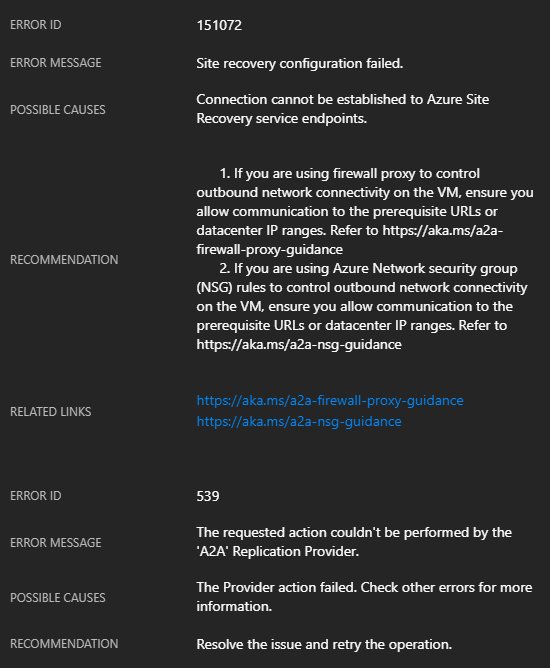
In this post, I’ll explain how to fix the following errors when you attempt to replicate an Azure virtual machine from one Azure Region to another:

Error 151072: Connection cannot be established to Azure Site Recovery service endpoints.

And:

Error 539: The requested action couldn’t be performed by the ‘A2A’ Replication Provider.

The Cause

A2ASR (the abbreviation of the ASR service for Azure VMs) uses an extension (guest OS agent) called the Mobility Service to migrate disk contents from a source virtual machine to a target (secondary) region (or DR site). The Mobility Service is using the networking of the virtual machine to talk the ASR endpoints in the secondary region. That traffic is therefore going over the NIC and virtual network of the VM, and then to the target region via the Azure backbone.

if you have restricted outbound traffic for your virtual machines, then you might have blocked this traffic:

  • Third party firewall appliances
  • Using Network Security Groups (NSGs), as I documented here

The Fix

Woops! Don’t worry, you’ve already created exceptions to allow your virtual machine to boot up. You can create more exceptions to allow the virtual machines to talk to the ASR endpoints (see the below screenshot). Let’s imagine that I am replicating from North Europe to West Europe.


image

I’ll need at least one set of rules, enabling outbound traffic from my VNet/NICs in the source region, North Europe, to the two IP addresses of the target region, West Europe.

I will also have to enable inbound traffic from my target region, West Europe, to my destination region, North Europe. Why? Isn’t all my traffic going from North Europe to West Europe? That’s true – now. But if you failover to West Europe, you will need to reverse replication afterwards, so you might as well get things right now.

A Script

It all looks messy at first. It probably isn’t too bad. But if you’d like to deploy a canned script to update NSGs, you can. Microsoft has shared a script that you can run. You will need a few pieces of information:

  • NSG name
  • NSG resource group name
  • Subscription ID
  • Source region
  • Target region

Run the script (it will prompt you to log in) from source to target, and then reverse the details, treating the target as the source, and vice versa with the NSG(s) in the DR site.

Where’s the Service Tags?

Storage accounts and Azure SQL all have service accounts, but ASR does not. I believe that ASR should have service tags to avoid all of this IP messiness. If you agree, vote here, or forever stay quiet on the subject.

Was This Kind of Information Useful?

If you found this information useful, then imagine what 2 days of training might mean to you. I’m delivering a 2-day course in Amsterdam on April 19-20, teaching newbies and experienced Azure admins about Azure Infrastructure. There’ll be lots of in-depth information, covering the foundations, best practices, troubleshooting, and advanced configurations. You can learn more here.

Replicate VM Managed Disks Between Azure Regions

Last week, Microsoft announced that Azure Site Recovery (ASR) for Azure Virtual Machines (in preview still), the system for replicating Azure virtual machines from one region to another, added support for managed disks. To this I say …

Waaahoooooo!

Managed disks are the best way to deploy Azure VM storage because they’re easier to plan for (performance), have predictable pricing (Standard), and have way more management features. Unfortunately, I still found myself advising some customers to use un-managed disks (disks in storage accounts) because those customers needed to be able to replicate VMs from one region to another, e.g. North Europe to West Europe.

But now we have support for managed disks in the preview replication service.

All is not entirely rosy. I’ve been waiting on this feature for this web server since before a “non-“hurricane hit Ireland late last year. I tried to enable the feature (nice experience in the Azure portal, btw) but the replication fails because of a weird “disk.name” error. I’ve reported the issue and hopefully it’ll be fixed.

Would You Like To Learn How To Enable This Feature?

If you found this information useful, then imagine what 2 days of training might mean to you. I’m delivering a 2-day course in Amsterdam on April 19-20, teaching newbies and experienced Azure admins about Azure Infrastructure. There’ll be lots of in-depth information, covering the foundations, best practices, troubleshooting, and advanced configurations. You can learn more here.