Speaking Today At Global Azure Virtual (ONLINE)

I am presenting at 14:00 UK/Ireland, 3PM central Europe, 9am Eastern US in the Global Azure virtual/online Bootcamp. You can find the link to the session here on Day 3. Here is the session information that is missing from the event site:

Trust No-One Architecture For Services And Data

Security is always one of the top 3 fears of Cloud customers. In The Cloud, the customer is responsible for their network security design and operation. This session will walk you through the components of Azure network security, and how to architect a secure network for Azure virtual machines or platform services, including VNets, network security groups, routing tables, Private Link, VNet peering, web application gateway, DDoS protection, and firewall appliances.

Free Online Training – Azure Network Security

On June 19th, I will be teaching a FREE online class called Securing Azure Services & Data Through Azure Networking.

I’ve run a number of Cloud Mechanix training classes and I’ve had several requests asking if I would ever consider doing something online because I wasn’t doing the classes outside of Europe. Well … here’s your opportunity. Thanks to the kind folks at European Cloud Conference, I will be doing a 1-day training course online and for free for 20 lucky attendees.

The class, relevant to PaaS and IaaS, takes the best practices from Microsoft for securing services and data in Microsoft Azure, and teaches them based on real-world experience. I’ve been designing and implementing this stuff for enterprises and have learned a lot. The class contains stuff that people who live only in labs will not know … and sadly, based on my googling/reading, a lot of bloggers & copy/pasters fall into that bucket. I’ve learned that the basics of Azure virtual networking must be thoroughly understood before you can even attempt security. So I teach that stuff – don’t assume that you know this stuff already because I know that few really do. Then I move into the fun stuff, like firewalls, WAFs, Private Link/Private Endpoint, and more. The delivery platform will allow an interactive class – this will not be a webinar – I’ve been talking to different people to get advice on choosing the best platform for delivering this class.  I’ve some testing to do, but I think I’m set.

Here’s the class description:

Security is always number 1 or 2 in any survey on the fears of cloud computing. Networking in The Cloud is very different from traditional physical networking … but in some ways, it is quite similar. The goal of this workshop is to teach you how to secure your services and data in Microsoft Azure using techniques and designs that are advocated by Microsoft Azure. Don’t fall into the trap of thinking that networking means just virtual machines; Azure networking plays a big (and getting bigger) role in offering security and compliance with platform and data services in The Cloud.

This online class takes you all the way back to the basics of Azure networking so you really understand the “wiring” of a secure network in the cloud. Only with that understanding do you understand that small is big. The topics covered in this class will secure small/mid businesses, platform deployments that require regulatory compliance, and large enterprises:

  • The Microsoft global network
  • Availability & SLA
  • Virtual network basics
  • Virtual network adapters
  • Peering
  • Service endpoints
  • Public IP Addresses
  • VNet gateways: VPN & ExpressRoute
  • Network Security Groups
  • Application Firewall
  • Route Tables
  • Platform services & data
  • Private Link & Private Endpoint
  • Third-Party Firewalls
  • Azure Firewall
  • Monitoring
  • Troubleshooting
  • Security management
  • Micro-Segmentation
  • Architectures

Level: 400

Topic: Security

Category: IT Professionals

Those of you who have seen the 1-hour (and I rarely stuck to that time limit) conference version of this class will know what to expect. An older version of the session scored 99% at NIC 2020 in Oslo in February with a room packed to capacity. Now imagine that class where I had enough time to barely mention things and give me a full day to share my experience … that’s what we’re talking about here!

This class is one of 4 classes being promoted by the European Cloud Conference:

If you’re serious about participating, register your interest and a lucky few will be selected to join the classes.

I’m Presenting Two Sessions At NIC 20/20 Vision in Oslo

I will be presenting two Azure sessions at the (NICCONF) NIC 20/20 Vision conference in Oslo on February 6th.

The content I’m presenting on is inspired by the work I have been doing with Innofactor Norway for customers in Norway. So it will be kind of cool to stand (once again) on a stage in Oslo and share what I’ve learned. I have two sessions on the afternoon of the 6th.

Secure Azure Network Architecture

Azure networking & security has become my focus area. I enjoy the organic nature of how Azure’s software-defined networking functions. I enjoy the scale, the possibilities, and the variety of options. And most of all, I appreciate how the near-universally overlooked fundamentals play a bigger role in network security than people realise. It’s a huge area to cover, but I will do my best in the hour that I have:

This session will walk you through the components of Azure network security, and how to architect a secure network for Azure virtual machines or platform services, including VNets, network security groups, routing tables, VNet peering, web application gateway, DDoS protection, and firewall appliances.

Auditing Azure – Compliance, Oversight, Governance, and Protection

An important part of governance is recording what is going on in Azure and being able to retain, query, and report on that data. This is an area I had a cool solution for this time last year, but Microsoft blew that up. Recently I revisited this space and found cool new things that I could do. And in preparing for this session, I found more stuff that I could talk about. I’ve enjoyed preparing this session and it has contributed back to my work. This session is late in the day for most Norwegians, but I hope that attendees stick around.

Auditing isn’t the most glamorous subject, but in a self-service environment, it becomes important to protect assets, the company, and even your job. In this session, you’ll learn how Azure provides auditing functionality that you can query, report on, and store securely for as long as you need it in cost-efficient ways.

Hopefully, I will see some of you there at the event!

Back Teaching – Implementing Secure Azure Networks

After a quiet 2019, I am getting back into Azure training starting in March in Brussels, Belgium, with a new hands-on course called Implementing Secure Azure Networks.

2019 was a year of (good) upheaval. I started a new job with big responsibilities and a learning curve. Family-wise, we had a lot of good things going on. So I decided to put our (my wife and I) Cloud Mechanix training on the shelf for a while. All last year, I’ve been putting a lot of cool Azure networking & security things into practice with larger enterprises so I’ve been learning … new things, good practices, what works, what doesn’t, and so on. That put the seed into my head for the next class that I would write. Then along came Workshop Summit and asked if I would like to submit a 1-day practical training course. So I did, and they accepted.

The Course

Security is always number 1 or 2 in any survey on the fears of cloud computing. Networking in The Cloud is very different to traditional physical networking … but in some ways it is quite similar. The goals of this workshop are:

  • To teach you the fundamentals, the theory, of how Azure networking functions so you can understand the practical design and application
  • Do hands-on deployments of secure networks

As a result, this workshop takes you all the way back to the basics of Azure networking so you really understand the “wiring” of a secure network in the cloud. Only with that understanding do you understand that small is big. The topics covered in this class will secure small/mid businesses, platform deployments that require regulatory compliance, and large enterprises:

  • The Microsoft global network
  • Availability & SLA
  • Virtual network basics
  • Virtual network adapters
  • Peering
  • Service endpoints
  • Private Link & Private Endpoints
  • Public IP Addresses
  • VNet gateways: VPN & ExpressRoute
  • Network Security Groups
  • Application Firewall
  • Route Tables
  • Third-Party Firewalls
  • Azure Firewall
  • Architectures

Attendees will require an Azure subscription capable of deploying multiple 4 x single-core virtual machines, 1 x Azure Firewall, 1 x Web Application Gateway, and 1 x per GB Log Analytics Workspace for 1 day.

When

Tuesday, 3rd March

Where

Venue: the Hackages Lab, located at Avenue des Arts 3-4-5 in Brussels

Organisers & Registration

This event is being run by The Workshop Summit. All registration and payments are handled by that event.

Who Should Attend

You don’t need to be a networking guru to attend this class. I always start my Azure networking training by explaining that I have never set up a VLAN; I’m proud of that! But I can out-network most people in Azure. Azure networking requires some learning, especially to do it correctly and securely, and that starts with re-learning some fundamentals. Those who understand basic concepts like a route, a firewall rule, network addressing (CIDR blocks), and so on will do fine on this course.

Who will benefit? Anyone planning on working with Azure. If you’re the person building the first “landing zone” for a migration, setting up the infrastructure for a new cloud-based service, working with IaaS VMs or platform (PaaS – yes network security plays a big role here!) then this course is for you. Get this stuff right early on and you’ll look like a genius. Or maybe you’ve already got an infrastructure and it’s time to learn how to mature it? We will start with the basics, cover them deeply, and then dive deep, focusing on security in ways that a typical Azure introduction course cannot do.

Why A Bastion Host Is Necessary For Remote VM Administration (Including Azure)

This post will explain why you should use a “Bastion Host” or a “Jump Box” to securely remote into Linux (SSH) or Windows (Remote Desktop) virtual machines. And this advice also includes machines that you run in a cloud, such as Microsoft Azure.

For the Fundamentalists on Social Media

Some people are going to make some comments like:

“This is why you should use remote Bash|PowerShell scripting”

Or maybe:

“You should be using Windows Admin Center”.

Windows Admin Center – great! Genuinely. But it does not do everything.

There are still many times when you need to directly log into a machine and do something; that’s real life, and not some blogger’s lab life.

Security Center JIT VM Access?

I was a fan of this feature. That was until they changed how the allow (RDP, SSH, etc) rules were added to an NSG. In my work, every subnet is micro-segmented. That means that the last user-defined NSG rule is Deny All from * to *. Since JIT VM Access was changed, it moves the last rule (if necessary) and puts in the allow-RDP or all-SSH (or whatever) rule after the DenyAll rule which is useless. Feedback on this has been ignored.

Why Are SSH and RDP Insecure?

I can’t comment too much on SSH because I’m allergic to penguins. But I can comment on RDP. Over the last few months, I can think of 3 security alerts that have been released about pre-authentication vulnerabilities that have been found in Remote Desktop. What does that mean?

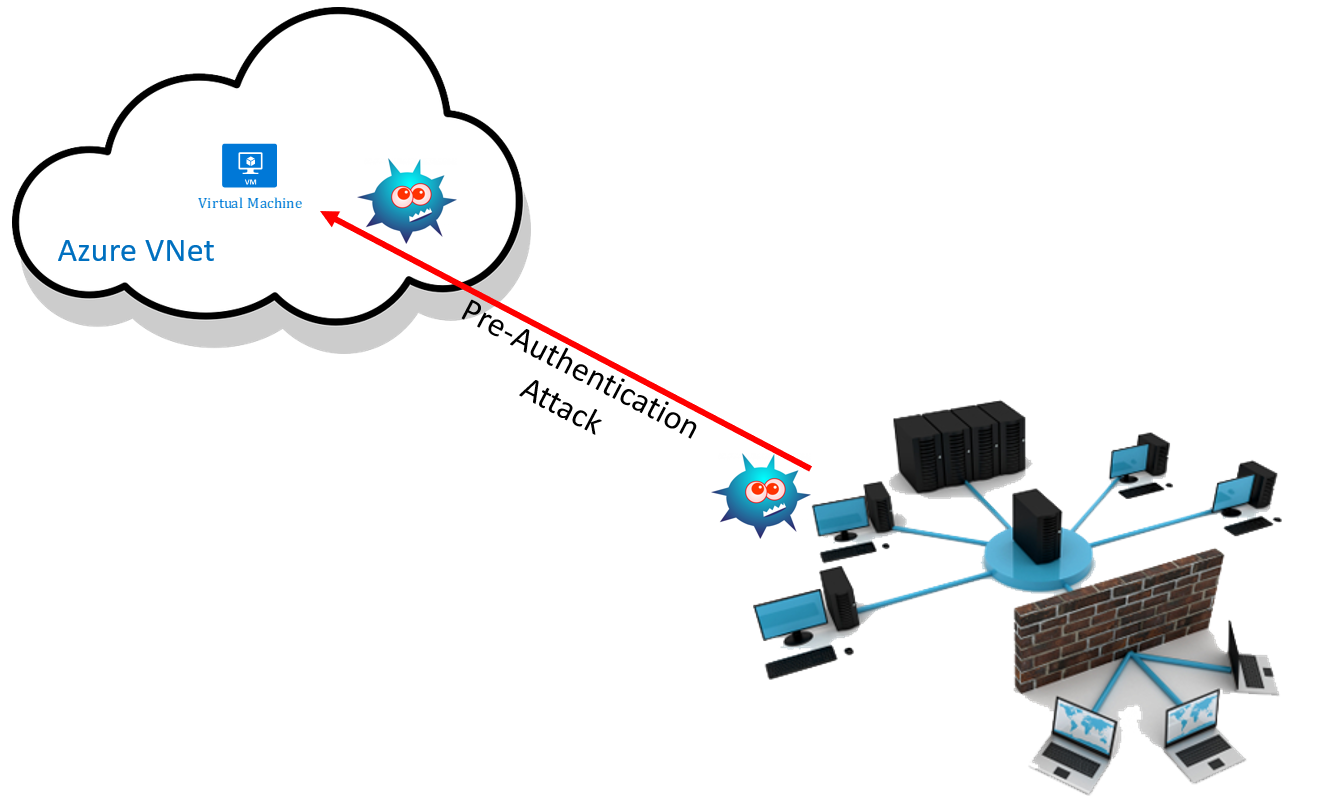
Let’s say that you have a PC on your WAN that is infected by malware that leverages a known or zero-day pre-authentication remote desktop vulnerability. If that PC has the ability to communicate with a remote VM, such as an Azure Windows/Linux VM, via SSH or RDP then that remote machine is vulnerable to a pre-authentication attack. That means that if malware gets onto your network, and that malware scans the network for open TCP 22 or TCP 3389 ports, it will attempt to use the vulnerability to compromise the remote VM. It does not require the user of the PC to SSH or RDP into the remote VM, or to even have any guest OS access! You can put a firewall in front of the remote virtual machines, but it will do no good; it’s still allowing TCP 3389 or TCP 22 directly into the virtual machines and all it will offer is logging of the attack.

A Bastion Host

You might have heard the term “bastion” in the Azure world recently. However, the terms Bastion Host or Jump Box are far from new. They’re an old concept that allows you to isolate valuable machines and services behind a firewall but still have a way to remote into them.

The valuable remote virtual machines are placed behind a firewall. In Azure, that could be a firewall appliance, such as Azure Firewall, and/or Network Security Groups. Now to connect to the remote VMs, you must first remote into the Bastion Host. And from that machine, you will remote further into the network through the isolation of the firewall/NSGs.

But that’s still not perfect, is it? If we do simple SSH or RDP to the Bastion Host, then it is vulnerable to pre-authentication attacks. And that means once that machine is compromised, it can attack further into the remote network. What we need is some kind of transformation.

Remote Desktop Gateway

My preferred solution is to deploy a Remote Desktop Gateway (RDGW) as the bastion host – this does not require RDP licensing for administrative access to the remote virtual machines! The Bastion Host is deployed as one virtual machine or 2+ load-balanced virtual machines that allow in HTTPS connections via firewall/NSG rules. When an administrator/developer/operator needs to log into a remote VM, their Remote Desktop client is configured to connect to this gateway using HTTPS instead of RDP. Once the connection is authenticated by the RDGW, it reverse proxies the connection through to the desired virtual machine, further protected by firewall/NSG rules. Now the malware that is on the WAN cannot probe any machines in the remote network; there is no opening across the network to TCP 3389 or TCP 22. Instead, the only port open for remote connections is HTTPS which requires authentication. And internally, that transforms to connections from the RDGW to the remote VMs via TCP 3389.

Some sharp-eyed observers might notice that the recently announced CVE-2020-0609  is a pre-authentication attack on RDGW! Yes, unpatched RDGW deployments are vulnerable, but they are smaller in number and easier to manage patches for than a larger number of other machines. Best practice for any secure network is to limit all external ports. Transforming the protocol in some way, like an RDGW, further reduces the threat of that single opening to a single service that forwards the connection.

If you want to add bells and whistles, you can deploy Network Policy Server(s) to centrally manage RDGW policy and even add multi-factor authentication (MFA) via Azure AD.

This is great for Windows, but what about Linux? I’m told that Guacamole does a nice job there. However, Guacamole is not suitable for recent releases of Windows because of how it must have hardcoded admin credentials for Network Layer Authentication (NLA).

Azure Bastion

Azure Bastion made lots of noise in IT news sites, and on blogs and social media when it went into preview last year, and eventually it went GA at Ignite in November of last year. Azure Bastion is a platform-based RDGW. Today (January 2020), I find it way too limited to use in anything but the simplest of Azure deployments:

  • The remote desktop authentication/connection are both driven via the Azure Portal, which assumes that the person connecting into the guest OS even has rights to the Azure resources.
  • It does not support desktop Remote Desktop/SSH clients.
  • It does not offer MFA support for the guest OS login, only for the Azure Portal login (see above).
  • VNet peering is not supported, limiting Azure Bastion to pretty simple Virtual Network designs.

If Azure Bastion adds VNet peering, it will make it usable for many more customers. If it understands that guest OS/Azure resource rights OS/Azure Portal logins can be different, then it will be ready for mid-large enterprise.


Setting Up Azure – The Three Permissions You Will Need

You need to have rights to configure certain things in Microsoft Azure when you are setting it up for the first time. I will list those three permissions and the reasons for them in this post.

1. Global Admin Rights

You are going to need rights to configure things in Azure AD. For example, you should be creating security groups and using those for role-based access control of things like management groups, subscriptions, and maybe even resource groups – the higher in the hierarchy, the better, in my opinion.

This will require that you have Global Admin Rights. This is the equivalent of being a domain admin in Azure AD, and will impact all services attached to your directory such as Office 365. This right should be limited to just a few people. In a very large organisation, someone else might be doing these tasks for you because you will not be granted the necessary rights.

This role is easily added to the user account in Azure AD, either at the time of creation or later by opening the user account and selecting Assigned Roles.

2. Access Management For Azure Resources

This is an easy right to miss! It is also known as Elevated Access. This right gives you access to all subscriptions and management groups in your directory (tenant) and therefore grants you superuser powers that should be limited to a very small group of capable people. Here’s how I learned about the right: I was cleaning up management groups that I created using a service principal. I knew the management groups were there, and I could see them, but my Global Admin user couldn’t remove them. It was only when I elevated my account that I was able to move the subscriptions and remove the management groups.

Part of the reason this right is so hidden is that it is not configured in the user account screen in the Azure Portal. Instead, sign in to the Portal with your Global Admin-enabled user, open Azure AD, and then go to Properties. Now click “Yes” under Access Management For Azure Resources. Now you will have rights to everything in Azure even if you weren’t granted them originally – this is why this superpower should be tightly controlled!

3. Role-Based Access

The typical person working with Azure should have only the rights that they need to do their job. The two big reasons are:

  • External threats: Prevent someone from compromising a dev/ops employee’s account and using their rights to compromise the entire system.
  • Internal threats: Limit access that a single employee has, either for security or compliance reasons.

For example, one should not be made a subscription owner just “because”. Typically, being made a Contributor will give you more than enough rights to do your job in a subscription. And maybe a lesser right is necessary – an auditor might only be made a Reader or you might use/create a more specialised role.

One should start the RBAC design using management groups. As with organisational units in Active Directory Domain Services, management groups should model the administrative model, not the HR org chart. Permissions and policy association should start at the top and become more granular as you work your way down. Eventually, you will grant dev/ops rights often at the subscription or even resource group level.

Another Consideration: Privileged Identity Management

PIM is a solution in the Azure AD per-user licensing SKUs that is sometimes used in large enterprises. It allows you to deploy just-in-time access to Azure resources/rights. There are a bunch of features in PIM that make it a useful feature to limit any one person’s access to what they need, when they need it, and for only as long as they need it, with MFA, oversight, and auditing.

Failed to add new rule: IpSecurityRestriction.VnetSubnetResourceId is invalid.

This post is focused on a scenario where you are creating an Access Restriction rule in an Azure App Service to allow client requests from a subnet in a Virtual Network (VNET) and you get this error:

Failed to add new rule: IpSecurityRestriction.VnetSubnetResourceId is invalid. For request GET https://management.azure.com/subscriptions/xxxxxx/resourceGroups/xxxxxx/providers/Microsoft.Network/virtualNetworks/xxxxxx/taggedTrafficConsumers?api-version=2018-01-01 with clientRequestId xxxxxx and correlationRequestId xxxxxx, received a response with status code Forbidden, error code AuthorizationFailed, and response content: {“error”:{“code”:”AuthorizationFailed”,”message”:”The client ‘xxxxxx’ with object id ‘xxxxxx’ does not have authorization to perform action ‘Microsoft.Network/virtualNetworks/taggedTrafficConsumers/read’ over scope ‘/subscriptions/xxxxxx/resourceGroups/xxxxxx/providers/Microsoft.Network/virtualNetworks/xxxxxx’ or the scope is invalid. If access was recently granted, please refresh your credentials.”}}.

The Scenario

The customer wanted to deploy Standard Tier Azure App Services with some level of security in a hub and spoke architecture. The hub is in Subscription A. There a virtual network with an Azure Application Gateway (WAG)/Web Application Firewall(WAF) is deployed into a VNET/subnet. The WAF subnet has the Microsoft.Web Service Endpoint enabled, allowing the WAF to reverse proxy web requests via the direct path of the Service Endpoint to the App Service(s).

The App Service Plan and App Services are in Subscription B. The goal is to only allow traffic to the App Services via the WAF. All the necessary DNS/SSL stuff was done and the WAF was configured to route traffic. Now, the customer wanted to prevent requests from coming in directly to the App Service – an Access Restriction rule would be created with the Virtual Network type. However, when we tried to create that rule, it failed with the above security error.

Troubleshooting

At first, we thought there was an error with Azure Privileged Identity Management (PIM), but we soon ruled that out. The customer had Contributor rights and I had Owner rights over both subscriptions and we verified access. While doing a Teams screen share the customer read an article about Azure Key Vault with a similar error that indicated an issue with Resource Providers. We both had the same idea at the same time.

Solution

In the WAF subscription, enable the Microsoft.Web resource provider. This will allow the App Service to “configure” the integration with the subnet from its own subscription and solves the security issue.

Microsoft Ignite 2019 – Top 10 Azure Governance and Adoption Best Practices

Speaker: Nathan Lasnoski, Concurrency, MVP

Prepare & Execute

Picture of a tri-athlete. Riding on perfect smooth surface with perfect picture with hands off the brakes. The person is prepared – set up well. Azure operators & devs should be like this. Ready, confident, and on a smooth road with a great experience with no sudden stops.

Preface – Getting Started

Cloud Maturity Curve.

  • Legacy: On-prem, business not enabling. IT is a blocker to innovation.
  • Legacy +: IT stagnant. Scattered cloud across the business.
  • Platform: Target today – operationalized loud. Goverened.
  • Product:
  • Innovation
  • Fusion: Technology fully business integrated.

What is an “Azure Environment”?

  • Operated by the corporation
    • Runs with standards, policies, controls
  • Diverse workload enablement, powers innovation
    • Servers, containers, serverless, PaaS, AI, digital ledger
  • Stakeholder management
    • Delegated to targeted teams, under corporate oversight
  • Representative of technology investments
    • Areas like cost should relate to intended investment areas/business value. IT is not the bucket of all IT spend – Those spending should care about the things they pay for.

Number 1 – Employee Organizational Change and Operations

Transformation of organization, tied to DevOps

  • Increased multi-skill frameworks
  • Emphasis on code, repeatability, automation

New products/projects made up of:

  • Cloud architecture & operations
  • Innovation and business enablement
  • Application and Product DevOps Teams
  • Security

Number 2 – Define an operational and leave adoption strategy

High level view of a cloud program – diagram in the slides.

  • Define an iterative cloud program whith a MVP motion on operations
    • OPERATIONAL STANDARDS, PROVISIONING PROCESS, WIKI, MOTIONS
  • Be careful about overreaching – Corporation has a bad relationship with IT.

Number 3- Be a Blueprint That is Manageable

A structure of management groups and subscriptions, with limited resource groups.

Left-hand IT, Right-side business. Top – management groups, bottom – IT. Why split corp IT and business areas should be in different subscriptions/management groups.

Using 1 overloaded sub is BAD, even is MS people recommend it (AGREED!). RBAC, cost-management, quotas, etc.

Number 4 – Approaches for provisioning short-term and long-term

Using a portal for provisioning. It’s a manual process. Azure Portal, ServiceNow, whatever – minimise their usage. Problem with portals is that all the old manual problems of on-prem follow to the cloud. No documentation on config. No repeatability. No change control.

Source Code Release (Azure DevOps) > Control Plane (ARM, Policy) > Deployment.

Subscriptions should be read-only. Only time you use the portal to deploy/config should be sandboxes. Enterprise deployments should be done as code:

  • ARM
  • Script
  • Program code

This includes 3rd party stuff you put in VMs.

This is the right way to start. And it prepares you for PaaS, e.g. AKS, App Services, etc.

Number 5 – Define Structures for Naming and Tagging

You cannot work in the cloud long-term without this.

Critical tags:

  • Owning team
  • Business unit
  • Application Name
  • Classification (security)
  • Environment moniker (dev, test, production, etc)
  • Cost Center

Number 6 – Recovery and re-deployment approaches

  • Assume re-deployment at every level, especially corp-IT.
    • The Corp IT infrastructure is code too, store it in a code repository
    • Build based on release management pipeline
  • Re-deployability such as AKS
    • Re-deployable app environments
      • AKS
      • App Services
      • Data services
      • Functions
      • OAM, RUDR, DAPR

Number 7 – Adapt Security Controls For The Cloud

Movement to vertical network design. On-prem IT is flat and horizontal and things talk directly to things. In the cloud, direct connections should be limited with micro-segmentation – see previous blog posts.

This is easier to do in the cloud, and it should be done during migration and new-builds. According to Nathan, it’s one of the reasons to migrate to the cloud at all!

Use Azure Security Center to assess the environment and monitor it from a security perspective. Leverage automated responses to react, e.g. playbooks in Azure Sentinel. Use custom policies to audit Azure too.

Admin accounts:

  • Segment addresses – don’t use admin email accounts for Azure accounts.
  • Limit owner rights. Contributor at most. Read-only ideally in production.
  • Use PIM (AAD P5) to limit access but require rights escalation for admins. Consider approval.
  • Use MFA. Less than 8% of Azure tenants have MFA enabled.

RBAC applied to applications

  • Teams only get access to necessary RGs/subscriptions.
  • Admin owner credentials are different than application credentials
  • Deployments are encouraged to be automated from source code.

Number 8 – Monitoring responsibilities change as application owners take more responsibility

  • Corp IT is responsible for “cloud IT”.
    • Standards policies, connectity – not just things that go bump in the night
    • Ensures governance is applied, monitors for aggregate issues
  • Security might be a separate group
    • Measuring security compliance, reacting to incidents
    • Runs against playbooks but moving declaratively
  • Application teams
    • Own operational monitoring and reacting to their services
    • DevOps teams operating stuff

Azure Monitor/Logs provides data access via resources now that reflects RBAC to resources.

Number 9 – What do I do with my CMDB and how does it change?

  • Original function of the CMDB was to contain configuration data
  • Modern environment is quarriable platform, declarative config, DevOps

Resource Graph and DevOps can be your living always correct CMDB.

Number 10 – Building a methodology for cost reviews and organizational discipline

  • Tags are critical to cost analysis
    • Use policy enforced tagging regimes
    • Apply tags as needed for accounting purposes
  • Be able to judge costs on:
    • Owner
    • Business unit
    • Application
    • Technology
    • Dev/Prod/QU
  • Options:
    • Azure Cost Management
    • Custom PowerBI

Controlling Costs:

  • Setting budgets
  • Analysis and improvement
  • Limit high spenders
  • Optimize sizing
  • Cost management team should pay for itself.

Microsoft Ignite 2019 – Deliver Highly Available Secure Web Application Gateway and Web Application Firewall

Speaker:

  • Amit Srivastava, Principal Program Manager, Microsoft

Mission Critical HTTP Applications

  • Always On
  • Secure
  • Scalable
  • Telemetry
  • Polygot – variety of backed, IaaS, PaaS, on-prem

Many things to think about.

What Azure Pieces Can We Use?

  • WAG
  • AFD
  • CDN
  • WAF
  • Azure Load Balancer
  • Azure Traffic Manager

WAG

Regional ADS as a service. A full reverse proxy. It terminates the incoming connection and creates a new one to the web server.

  • Platform managed: built-in HA and sclability
  • Layer 7 load balancing: URL path, host based, round robin, session affinity, redirection
  • Security and SSL management: WAF, SSL Offload, SSL re-encryption, SSL policy
  • Public or ILB: Public internet, internal or both.
  • Flexible backends: VMs, VMSS, AKS, public IP, cloud services, ALB/ILB, On-premises
  • Rich diagnostics: Azure monitor, log analytics, network watcher, RHC, more

Standard v2 SKU in GA

  • Available in 26 regions
  • Built-in zone redundancy
  • Static VIP
  • HTTP header/cookies insertion/modification
  • Increased scale limits 20 -> 100 listeners
  • Key vault integration and autorenewal of SSL certs (GA)
  • AKS ingress controller (GA)

Autoscaling and performance improvements:

  • Grow and shrink based on app traffic requirements
  • 5 x better SSL offloads performance
    • 500-50,000 connections/sec with RSA 2048 bit certs
    • 30,000, 3,000,000 persistent connections
    • 2,500 – 250,0000 HTTP req/sec
  • 75% reduction in provisioning time ~5mins

Key Vault Integration in v2 GA

  • Front end TLS cert integrated with Azure Key Vault
  • Utilizes user-assigned management identity for access control on key vault
  • Use certificate or secrets on Key Vault
  • Pools every 4 hours to enable automatic cert renewal – you can force a poll if you need to
  • Manual override or specific certificate version retrieval

WAG v2 Header Rewrites

  • Manipulate request and response headers and cookies
    • Strip port from x-forwarded-for header
    • Add security headers like HSTS and X-XSS-Protection
    • Common header manipulation ex: HOST, SERVER
  • Conditional header rewrites … something

Ingress Controller

  • Ingress controller for 1+ AKS clusters at one time
  • Deployed using HELM – newer easier options by EOY
  • Utilized pod-AAD for ARM authentication
  • Tighter integration with AKS add-on support upcoming
  • Supports URI-path based, host based, SSL termination, SSL re-encryption, redirection, custom health probes, draining, cookie affinity.
  • Support for Let’s Encrypt provided TLS certs
  • WAF fully supported with custom listener policies
  • Support for multiple AKS as backend
  • Support for mixed mode- both AKS and other backend types on the same application gateway.

http://aka.ms/appgawks

Application Gateway Wildcard Listener

  • Managed preview
  • Support for wildcard characters in listener host name
  • Supports * and ? characters in host name
  • Associate wildcard or SAN certs to serve HTTPS

Telemetry Enhancements

  • GA
  • Diagnostics Log Enhancements
    • TLS protocol version, cipher spec selected.
    • Backend target server, response code, latency.
  • Metrics Enahncements
    • Backend response status code
    • RPS/healthy node
    • End-to-end latency
    • Backend latency
    • Backend connect, first byte, and last byte latency.

Azure Monitor Insights for Application Gateway

  • Public Preview
  • Sign health and metric console for your entire cloud network#
  • No agent/configuration required
  • Visualize the structure and functional dependencies
  • More

AKS Demo

He loads a Helm YAML config to the AKS cluster. Now the AKS cluster can configure listers, backend pools, rules, etc for the containers/services running on the cluster. Pretty cool.

Azure WAF

Cloud native WAF

  • Unified WAF offering
    • Protect your apps at network edge or in region uniformly
  • Public preview:
    • Microsoft threat intelligence
      • Protect apps against automated attacks
      • Manage good/bad bots with Azure BotManager RuleSet
    • Site and URI pathc specific WAF policies
      • Customise WAF policies at regional WAF for finer grained protection at each host/listener or URI path level
    • Geo-filtering on regional WAF

WAF

  • HA, scalable fully platform managed
  • Auto-scaling support
  • New RuleSet CRS 3.1 added, will soon be the default
  • Integration with Azure Sentinel SIEM
  • Performance and concurrency enhancements
  • More

WAF Policy Enhancements

  • Assign different policies to different sites behind the same WAF
  • Increased configurability
  • Per-URI policy

Geo Filtering Public Preview

  • Block, allow, log countries.
  • Easily configurable in WAF policy
  • Geo data refreshed weekly

Only in special Portal URI at the moment – normal Azure Portal soon.

Bot Protection (Public Preview)

  • Stuff