Windows 8 Worldwide Launch

Today is the launch of Windows 8.  It will be GA tomorrow (26th October), and MSFT stores are opening at midnight to sell FPP (fully packaged product for “upgrading” existing installs) and Surface.

Steven Sinofsky, the man behind the reimagining of Windows and the way that was done, comes out to kick things off.  670 Million licenses of Windows 7 have been sold to businesses and consumers.  Temper that with half of businesses are still deploying Windows XP (end of life in April 2014) and they often downgrade from their entitled Windows 7 licenses.

16 million installs of Windows 8 pre-RTM editions were done.  650 pages of blog posts on Windows 8 were done by Microsoft.  That’s about 10 trillion words.

3 announcements:

  • Upgrade FPP of Windows 8 will be available in stores and online
  • Windows Store is “live” (it has been for a while)
  • New Windows RT devices will be available overnight for the first time (genuinely).

Windows 8 is built on the solid foundation of Windows 7.  A Windows 7 logo machine will have improvements: 36% boot time, 13% battery, up to 22% memory, and compatibility with Windows 7 logo hardware and software (if the software doesn’t do stupid checks).

I’m not counting the pre-release testing because there was no beta or RC feedback program outside of TAP.  No, the Answers forum does not count IMO.

1,000 new PCs are certified for Windows 8 – that’s counting all the variations of models.  I am not buying what he’s selling when he says many of these devices cost under $300.

Mike Angiulo comes out to demo Windows 8.  The old Windows 7 slate PC (similar to Build one) makes an appearance.  It’s very demo friendly because of the dock which features RJ45 networking (no unreliable wifi required) and full sized HDMI port (mini HDMI is loose fitting in most devices I’ve seen).

Heh … the first new Win 8 device picked up was an Acer.  Trying to make friends again?  Reconnect to wifi is an average of 1 second instead of 15 seconds in Windows 7.  The Sony TAP 20 AiO got a quick show – I got to demo it before it’s announcement.  We loved it as a family machine – it’s a portable touch PC with a 3 hour battery.

Out comes Steve Ballmer.  He’s excited, apparently.  Some repetition here, with a mix of Bing and IE10.

670,000,000 PCs out there to be upgraded or replaced.  400,000,000 a year being bought.  That’s a lot of Windows 8 PCs going to be bought next year and a big market for app developers to pay attention to.

And that was that.

Technorati Tags: ,

Microsoft Surface Suffering From A Mild Case Of The Curse Of Zune

I hope you weren’t too desperate to get a Microsoft Surface anytime Zune soon.  They are only available on pre-order in select countries (you know … the ones where Windows Phone sort of works):

  • Australia
  • France
  • Canada
  • USA
  • Germany
  • UK

image

Hmm, and $499 seems to convert into EUR479.  Strange that!?!?!

Hard luck!  Try a Dell XPS 10 or Samsung ATIV instead.  No such limitations there … and you get the option of a real keyboard with contained battery … the XPS10 has 20+ hours of video play time with the keyboard attached.

Technorati Tags: ,

Just Got to Play With Some Of The New Windows 8 Tablets

I’m in London attending distributor training by MSFT. One of the presentations was on Windows 8 devices and the presenter had 2 of the forthcoming tablets at hand. After the presentation, he invited us up to have some hands on and play.

The Samsung ATIV Tab is slim and feather light, being fairly similar to an iPad 2 in feel.  The battery had a charge and we got to play. It was snappy too.  I’d be happy to own one, and I might just do that – I did sell my iPad a few months ago.  And good news for customers, Microsoft has a policy on OEM junkware so preloaded software on Windows RT will be tightly controlled just like it is on Windows Phone.  The device has USB, SD, and Micro HDMI expansion, and possibly more.

image

The presenter also had the HP ElitePad 900 that was only announced yesterday. This is based on the new Intel Atom. First off, yes it is an Intel based machine, but this is nothing like the Build or Samsung Series 7 slate. Very honestly, it was about the same thickness as the original iPad and my non-calibrated hands didn’t feel much difference in weight to an original iPad.  It felt solid too, as it needs to be for it’s targeted enterprise market (for 3 year support contracts).  The HP ElitePad 900 device has no expansion ports but does have a docking port. This slots into the “jackets” such as a the expansion jacket that was on hand that does have HDMI (full size), USB, etc.

image

The Samsung ATIV Tab was a very nice machine.  Everyone wanted pictures that showed the thckness of it, and wanted to quickly switch apps, surf the net and pinch zoom, all going away quite happy. And the universal comment on the HP was that it felt good in the hand.  Only 24 days until we get to try these things (ElitePad 900 will be via business channel only)  in the retail outlets.

Oh – I did ask and the new UI is now just the “Windows UI”.  It’s not modern, or any other guff.  The apps are called Windows Store Apps now.

Technorati Tags: ,

Speed Up Live Migration With Power Settings

Here are some notes from the PFE Virtualization Blog on how to tweak the power settings of HP or Dell servers to speed up live migration.

Premier Field Engineers (PFE) are the uber-geeks of the customer facing parts of Microsoft.  Evangelists will talk tech and demo, MCS will design and install, but PFEs need to understand the inner workings, have contacts throughout the product groups, and have access to wonderful tools that the rest of us can only dream about.  They even have their own internal conference that is called a “university” – I’ve only heard in passing how detailed the presentations are and it sounds like it exceeds our experience of level 400 at the normal conference.

Never heard of PFE before?  Well, they are reserved for those customers who have bought the most expensive of the support contracts, and they go onsite to do some very cool work from briefings, training, to troubleshooting some nasty/interesting issues.

Fujitsu – (Hyper-V) Cluster-in-a-Box

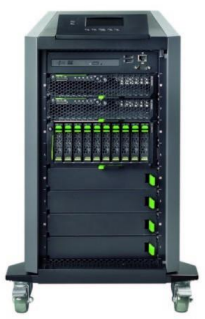
I’ve been digging around looking for Cluster-in-a-Box (CiB) solutions.  I found concepts, but nothing that was actually for sale … until one of my colleagues sent me a link this morning.  Meet the Fujitsu CiB:

image

When I first looked at the picture, I thought:

  1. That’s just a quarter height rack!
  2. That’s no CiB, it’s just DAS and some 2U servers!

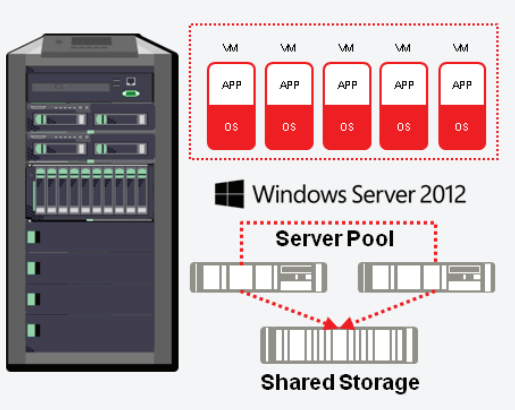
I was wrong.  What you’re looking at is a blade chassis, turned on it’s end, and tidied up to make it into a self-contained appliance, fit for the small/medium business.  And looking at the stats, this could be a SMB 3.0 scale-out file server (SOFS) SAN alternative, but the included memory and processor make it a real Hyper-V CiB solution where the entire Hyper-V cluster is on those 4 wheels.

image

  • There is 10 GbE networking for converged fabrics and fast throughput
  • The storage blade takes 10 * 900 GB SAS drives
  • There are 2 BX920 blade server nodes in the cluster, each with 2 * E5 Xeon CPUs, 48 GB RAM, dual 10 GbE, 2 * 300 GbE, and Windows Server 2012.

Interestingly, the BX920 S3 blade takes up to 384 GB of RAM.  If this is the same blade, then this could be quite a 2 node Hyper-V cluster!

Fujtisu says that this:

… complete Microsoft Hyper-V virtualized server environment …

… will require:

… a few minutes with our self adopted configuration wizard and you are ready-to-work.

Nice!  They say it is for mid-market (larger small businesses and smaller medium businesses that have or would like a Hyper-V cluster.

I like this package.  For the consulting companies in this space, this is a low risk solution for their customers, unlike the usual recipe of parts that must be purchased/assembled separately.  Instead, they order a single SKU, and rapidly configure it for the customer (on- or off-site), and then focus on the other value-adds.

One problem, though.  The RRP of the Fujitsu CiB excluding sales tax is:

image

I can buy a lot of servers, lower end (more scalable) storage, and power it for a lot less than €59K ($76,866 or £47,452 using this morning’s rates) .  Seriously, that has to be a typo, because if it is not, then I expect that Fujitsu will sell very, very few CiB solutions, in what is a very big market.

Other solutions I have found, that aren’t available AFAIK, are:

  • Quanta MESOS CB220
  • Something LSI are allegedly pitching to OEMs
  • EDIT: Andreas Erson pointed out the HP X5000 G2 series that start at €30K for a LFF SATA storage model.  You will need 10 GbE to set up the networks for converged fabrics.

I’m not expecting bigger OEM names to jump into this space (try binging and googling to see the tumbleweeds roll through your search results) with solutions that are competitive in the SME space because CiB solutions have the potential to decimate traditional storage revenues; storage is very high margin for OEMs, unlike servers, because it is a lock-in solution – try adding an IBM disk tray to your EMC SAN.

Windows 8 Devices At GA

I am no longer maintaining this list.  We’re at GA and it’ll be too hard to track from now on.

Here is my best effort listing of designed-for-Windows 8 devices that will be available at or soon after Windows 8 general availability (GA). I am not including laptops or PCs that are Windows 7 machines that “can be upgraded for 15 quid”.

This is based on best effort.  You’d be amazed how inconsistent some of this information is, e.g. no one was able to agree on the name of the new Toshiba “slider” … it’s actually called the U920, not the U925.

Technorati Tags: ,

More Windows 8 Devices At IFA 2012

The news keeps coming! Yesterdays news is here.

Dell

The Dell XPS 10 Windows RT tablet was announced.

Like most of the transformers, there are batteries in the tablet and in the keyboard.  Dell is claiming a 20+ hour life with this device. Nice!  Pocket Lint has more information and photos of this tablet.  Damn it is thin.

There will also be an XPS One 27 AiO with 10 point mutlitouch 27” screen. I reckon the home PC is shifting completely to the AiO design.  Maybe the business machine will eventually – but that might be many years away because most companies buy towers and reuse existing monitors, expecting a very long life for those monitors.  An XPS Duo 12 convertible laptop was also announced … I don’t like the look of the XPS converters that have been around for a while.

Samsung

They didn’t rest on their laurels yesterday. Samsung continued with the announcements with an ATIV WP8 handset and a traditional 10.1” Windows 8 tablet called the ATIV Tab, running Windows RT.

Engadget reckons it’s lower spec than the newest Android Tab from Samsung.  It weighs 570g and is 8.9mm thick.

HP

Guess who is back in the tablet space!?!?! The Envy x2 is a 11.6” transformer, which is proving to be the most popular of the designs from the manufacturers. I believe I read that this has an Atom “Clover Trail” processor. If it’s like the Spectre Ultrabook, then it’ll be on the higher end of the price range.  It looks like it’ll cost over $1000, pricing it out of the tablet range and putting it into a convertible laptop space.

There will be a Windows 8 Spectre XT Touchsmart Ultrabook too ($1,399.99).  This is the first Intel Ultrabook I’ve seen with Thunderbolt connectivity.  According to Techcentral.ie it

.. is 17.9mm thick and weighs 2.16kg. The laptop also features USB 3.0, Ethernet and HDMI ports.

They also say there will be an Envy Touchsmart Ultrabook with:

14" touch screen and a choice of Intel’s latest Core processors. The ultrabook weighs 2.16kg and offers up to eight hours of battery life.

Toshiba

I love the designed-for-Windows 7 Z930 ultrabooks from Toshiba.  They keyboard is way better than the one in my Asus UX31.  Toshiba have opted to go for the hybrid ultrabook/tablet or slider form factor with the U925t Ultrabook.  Neowin reports that it will have:

an Intel Core i5 processor inside, along with a 128 GB SSD, two USB 3.0 ports, a HDMI port, two cameras (front and rear) and a media card reader. The keyboard has an LED backlight and a CkickPad with Windows 8 gesture support While the Satellite U925t will be released when Windows 8 launches on October 26th.

It’s a nice looking device, and it appears to inherit a lot of features from the Z930.

Technorati Tags: ,

Windows 8 Devices Emerge At IFA 2012

IFA (pr. eefa) 2012 in Berlin is the place to be if you want to get the inside track on new Windows 8 devices. Announcements started coming out:

Samsung

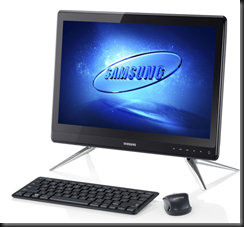
They have revealed some Series 5 and Series 7 All-In-One PCs (AiOs) that are 27”, 23.6” and 21.5”.

image

Ubergizmo has a breakdown of the specs that I’ve not seen elsewhere since the model news broke earlier this week.

Asus

They have announced four new laptops

Zenbook U500VZ, a 19.7mm-thick 15-incher with a full HD screen, full-size keyboard, Intel i7 quad-core processor and the option for Nvidia GT650M graphics and up to 512GB of SSD storage

There’s a UX21A Touch with multitouch and 256 GB SSD.  It looks very like the UX31 that I own.  The Asus Taichi is that awful looking dual screen laptop with a screen on the outside (tablet) and a screen on the inside (laptop with keyboard).

Asus also announced their tablets called Vivo (previously 810 Transformer) and Vivo RT (previously 600 Transformer)

asus vivo tab

The Vivo RT device is a Tegra with 2 GB RAM and 32 GB SSD.  That’s OK.  The Vivo is an Intel dual core Atom with 2 GB RAM and 64 GB SSD.  Atom.  Hmm.

Sony

Not to be left out, Sony has announced two devices at IFA 2012 as well.  The Vaio Duo 11 is an 11” slider device. 

sony-vaio-duo-11-pr[1]

It’s basically an Ultrabook with a touchscreen in an interesting new design. It lies flat and you use it as a tablet with the various sensors you’d expect. You need a keyboard?  Slide up the screen and there you go, something similar to a laptop. It looks like it’s coming in i3 to i7 with up to 256 GB SSD.

Confession time: I did an NDA reveal of this one while presenting on Windows 8 and had some hands on. It got a lot of attention from those present.  My #1 requirement of a device is that I can use it on my lap.  I was concerned because the screen extends out so much.  But this device passed the test with flying colours because the base counter balances it and makes it stable. This is a powerful machine – I played with the i7 256 GB SSD model – that cuts it both as your laptop and as your tablet.

photo (2)

A really interesting 20” machine called the Vaio TAP 20 was also released.  I describe it as a portable AiO. 1600 * 900 resolution, up to 1 TB storage, multi-touch (10 I think), and it converts from a tabletop to a propped up monitor.  And that’s where the magic is.

Yup, I also got some hands on with the TAP 20.  In fact, everyone wanted to play with it.  Standing up, it’s a PC, offering a nice group interaction experience. Raise the kickstand, and you can pick it up easily, bring it to another room, lay it flat and it’s a table top flat gaming platform.  I demonstrated it drawing with 10 touch points so it can be a multiuser experience.  Everyone who tried or saw it was intrigued by the possibilities.

Technorati Tags: ,

Got To Play With The New Microsoft Wedge Mouse & Keyboard On Windows 8

One of the nice things about working for a distributor is that I sometimes get a chance to play with new toys when they come through the office.

The recent headline Wedge Touch Mouse and Wedge Keyboard from Microsoft briefly appeared on my desk this afternoon and I set them up with my Windows 8 laptop for a quick play.

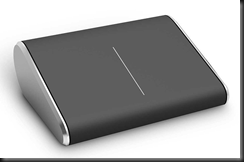
image

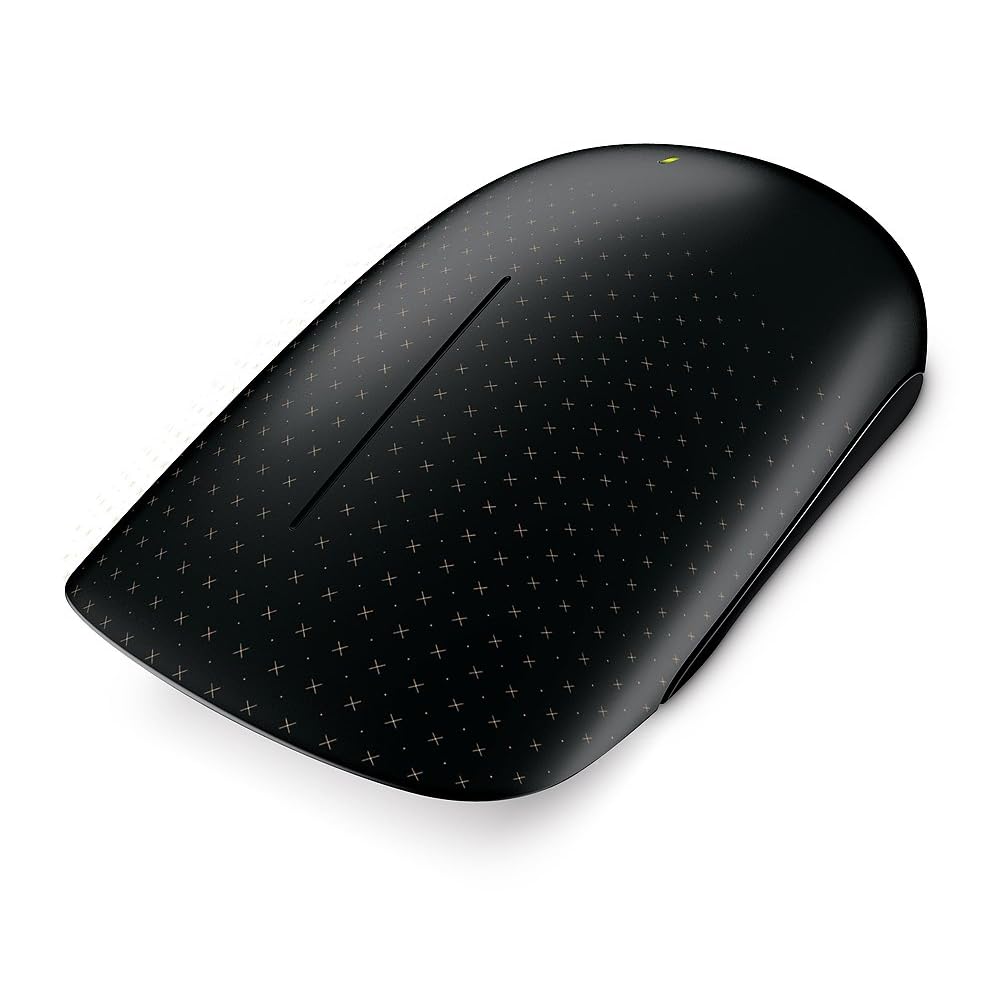
The Touch Wedge (of cheese) Mouse is an interesting design.  I swear the office is 50/50 split between loving it and not being keen on it, and to be clear, this is not a male/female divide either.  The thing is tiny and light.  Sitting in my hand, it could fit in half the length of my fingers.  I downloaded the software for the Wedge Touch Mouse and installed it.  What it gives you (and it says this on the box) is 4 way touch scrolling: up/down and left/right.  There was no other gesture support for Windows 8, such as pinch-zoom.  The control app does allow you to add other controls by the looks of it but I didn’t have time to explore that any more.

I can’t say this is a mouse I’d like to use.  I prefer the bigger and heavier Touch Mouse which I am using on a daily basis on my work laptop, and the “2000” mouse that I got recently for home.  But others in the office loved it.  Maybe it’s a love it or leave it thing, like Marmite.  I have to warn you, the Wedge Mouse is pricey.

image

The Wedge Keyboard is an interesting solution for the pure tablet without a keyboard (cover).  It comes with a hinged touch rubber cover.  This cover for the keyboard has a second role, as you can see above.  It folds and can be used to prop up a generic tablet.  It’s a tidy little keyboard, being a little smaller than the layout of an Ultrabook.  With my brief play, it felt nice to type on.  I do not see it replacing keyboards like the 2000 or the 4000 for the PC, but it’s a nice tablet solution for those tablets that don’t come with or have keyboard options.  When you’re done typing, you stick the cover back on the keyboard and tick it in your bag with the tablet.  I’m guessing about the size of a Microsoft Surface tablet, but it appears to be around the same length.

image

Both devices are Bluetooth enabled.  Neither the Wedge Mouse nor the Wedge Keyboard require a Bluetooth receiver dongle like the older Touch Mouse does.  I really like that; those teeny tiny Bluetooth dongles are too easy to lose and I’ve always wondered why they exist when laptops come with Bluetooth receivers anyway.

Technorati Tags:

New Ways To Touch Windows 8 – The Microsoft Touch Mouse

Lots of people have been debating whether the Metro UI of Windows 8 can succeed on normal laptops and PCs without touch screens. Yesterday I blogged about a Logitech Wireless Touchpad that’s been around for a while.  I was talking about that at work today when one of our Apple folks told me to come back when Windows was doing something new Smile

This afternoon Brandon LeBlanc of Microsoft blogged about a series of new designed-for-Windows 8 keyboards and mice that are being launched by Microsoft … the day after I plonked down cash for a new 3000 series keyboard and mouse.  Paul Thurrot also covered the story this morning (before the Microsoft blog post) of the new devices.

I personally cannot stand the look of the new wedge touch mouse. But there is a 50/50 pro/anti split in the guys who deal with consumer hardware in our office.  This is no normal mouse.  Besides looking weird, it offers touch and gesture support for Windows 8.  I guess the unusual flat surface is to assist in the touch experience.

The Wedge is not out yet, but the Microsoft Touch Mouse is, and I have one on my desk at the moment. One of the guys just gave it to me to play with.  Unlike the newly announced keyboards and mice, this one does use a dongle to connect to the computer.

The mouse has touch sensors all over the front of it. The sensors support multitouch.  The mouse also uses the bluetrack motion sensor to work on “any surface”. Right now, the only gesture stuff I got when I connected the mouse to Windows 8 was the scroll wheel action.  But that is changing according to Engadget.  You’ll basically get gestures for app switching, charms, scroll, and Semantic Zoom.  The mouse will be updated when Windows 8 “goes on sale”, so I guess that’ll happen on or after October 26th.  I’m looking forward to trying the update out when it is released!

EDIT#1

I downloaded a software update for the Microsoft Touch Mouse on Windows 8 x64.  It made the touch UI smoother and added the current set of Windows 7 gestures with thumb, one finger, two fingers, and three fingers. This will be updated at when Windows 8 is out for Windows 8 gestures.

Technorati Tags: ,