My Microsoft Store Experience & The Surface Pro

I thought I’d write about my experience of the Microsoft Store; the stores have limited presence and are just in the USA at the moment.  That means there’s nearly a whole world of people who have never visited one.  We’re also at an interesting time for devices. with Windows 8 driving a major change in interface and form types, and supply of these machines has been limited worldwide.

IMG_0780

It’s MVP Summit week.  That means some 1,200 geeks head to the Pacific northwest of the USA to visit Redmond (Microsoft global HQ) and we typically stay in nearby Bellevue, WA.  Most of the hotels are within walking distance of Lincoln Square, where you will find a Microsoft Store (and an Apple Store just up the escalator).  Every Sunday before the Summit, you’ll see hundreds of MVPs walk into this store and many of them walking out carrying a large bag.  Oh!  And don’t forget that the Surface Pro was just launched, and MVPs are in that niche that would want an ultrabook alternative tablet, with 4 GB RAM, 128 GB+ of storage, and an i5 CPU.

Sure enough, the store was busy just after opening last Sunday.  Myself and two other MVPs went in.  1 wanted to buy a Surface Pro, and the other was interested and open to the idea of a purchase.  As you can see above, the Surface (RT on left, Pro on right) were front and centre, one with a type keyboard and the other with a touch one.  All along the wall on the right were sample Surfaces for you to spend time on.  The other tables (on the right) were populated with alternative tablets and (on the left) with ultrabooks and laptops.  Either all, or close to all, devices featured multipoint touch.

We went straight to the Surface Pro.  It is as advertised.  It is solid as a tank, as is the Surface RT, has a great screen (Surface screen has excellent contrast which we photographers love), and the type keyboard is worth the extra 1.5mm for the typing experience.  The power connector is improved slightly from the RT device.  The stylus attached to this same connector.  The attachment is pretty solid and it takes a good tug to pull it out.  However, with a 4 hour battery life, I can see people needing to remove the stylus, power the device, and ordering many an expensive stylus from Microsoft over the coming years.  I had already told my colleague who wanted to buy a Pro to check out a few things:

  • The typing experience for when you’re on the go or at a conference like TechEd or MMS where you have no table to rest a kickstand
  • The battery life versus the competition

The battery life of the Surface is a serious weakness.  4 hours is very short, shorter than a modern ultrabook by 1.5-4 hours.  He got a stool from another desk and tried to use the Surface Pro keyboard on his lap: fail. 

We tried some other machines.  The Samsung ATIV Smart Pc (what I use) was there.  That “clovertrail” device gets 12 hours of real life but the CPU is limited.  The similar HP Envyx2 was there too.  I liked the feel of it, but I didn’t like the lack of ports and the use of a blank to fill the MicroSD port; that blank will get lost.  The Samsung approach with a nicely fitting flap is much better.  The Samsung ATIV XE700T1C-A01US Smart PC Pro 700T was also there:

  • Same i5m (mobile) as the Surface Pro
  • Same 4 GB RAM as the Surface Pro
  • Stylus with same functionality as Surface Pro that hides seamlessly into a dock in the chassis (so much so that 1 person who bought one of these tablets last Sunday thought he didn’t have a stylus until I showed it to him on Friday)
  • 8 hours of advertised battery life – twice that of the equivalent Surface Pro running the same operating system
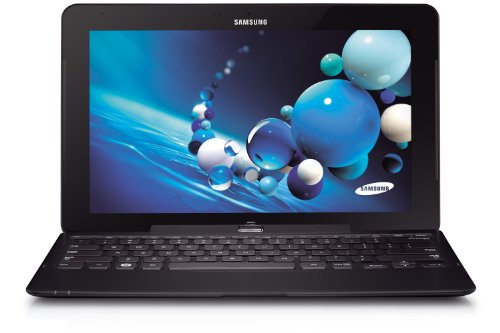
The dockable keyboard was not there to try out on the demo table.  The Microsoft Store has lots of sales people available and easy to find in their luminous t-shirts.  We asked for a keyboard to test with, and one appeared a couple of minutes later.  The clamshell (or convertible or transformer) keyboard gave 2 USB 2.0 ports in addition to the USB 3.0 port on the tablet.  My MVP colleague tried the stool test again and was happy with the laptop-like experience.  Here’s where things start to get interesting:

  1. The sales guy told us that the keyboard (clearly different to my one) had an additional 4 hours of battery life.  I was surprised, but had no material to contradict him.  He must have been briefed.
  2. Other MVPs who were trying the Surface Pro out came over and started to ask lots of questions about this Samsung tablet that could also be an ultrabook style machine.  We started to gather a crowd around us.

My colleague was sold and decided to buy the Samsung instead of the Surface Pro … and a few minutes later we saw another guy in the crowd do the same.  I decided to wander the store:

  • Lots of Windows Phone 8 handsets, all locked to networks (ick!)
  • An attractive Asus 15” thin laptop that reminded me of a MacBook Pro
  • The wafer thin Acer ultrabook that journalists have raved about … that features a keyboard with the feedback of wet lettuce.  I would hate this machine
  • Lots and lots of machines with variations to suit anyone

Two great things about buying from the Microsoft Store:

  • You get a 2 weeks, no questions asked, return policy.  You don’t like it, you can bring it back and get your money back.
  • Every machine is rebuilt with a “signature” build so you don’t get crapware that eats up disk space, RAM, and CPU.

We left and spend the day wandering, checking out the Barnes and Noble Nook (a nice machine but with severe region limitations on content availability), seeing some of our books for sale on the shelf (happy dance!).  We met more of our MVP colleagues that night, many of whom had bought the Surface Pro, and some were having buyer’s regret.  We told them that it wasn’t too late to return the device and look at alternatives, such as the Samsung.

The next day was the start of the Summit and some more Samsungs appeared where the owners had a Surface until the night before.  Hmm!  And the trend continued.  The no-questions-asked returns policy was being tested and passing with flying colours as people switched to an alternative device.  And this went on for the week.

Myself and another colleague looked into the question of the keyboard having an additional battery.  I was doubtful – and our research confirmed my suspicions.  We went back to the store when we had a free moment … my colleague with the new Samsung explained what had happened to another sales person.  We’re used to a “who give a flying f**k” attitude from sales people back home.  They’d tell us that’s our problem.  Not so in the Microsoft Store; the sales person was apologetic and gave my colleague two kick stands for his new tablet … no questions asked.

I’ve got to say that the Microsoft Store is the best PC shopping experience that I’ve had.  Great modern stock, and helpful sales staff.  I really hope they expand internationally … and soon.  Right now they have a limited presence and that allows the Best Buys of the world (we went there and it was a very different experience) to continue unchanged.

By the way: there were only 64 GB Surface Pros available until mid-week.  A discount was being given to anyone who bought one and additional expandable storage in the Microsoft Store.  I know lots of MVPs bought a Surface Pro this week, and most of the folks we talked to weren’t very happy with them.  Battery life was an issue.  Meanwhile, another VM MVP was using his machine all day long on battery to take notes, keep up with email, etc, and my original colleague from this story managed to get 9 hours with the machine sleeping here and there as a tablet does.  My lesser clovertrail machine was coming home with over 25% of available battery with constant usage – I was even leaving the charger in the hotel – who does that with a Windows machine!!!

The Surface Pro is a niche machine.  Who’s going to pay $1100 plus tax for a tablet, other than a Pro who needs an ultrabook style machine that will double as a tablet?  The Surface has name recognition … and that’s mostly all it has over the competition.  The Pro alternatives from the others are much better machines with the same internals, same touch interface, and same operating system.  I get driver and software updates made available to me almost every couple of weeks from Samsung – I have 4 queued up right now.  So that’s not an advantage for Microsoft. 

My advice is: don’t mistakenly assume that Surface is the only machine.  Go out and get the machine that suits you best … and maybe that is a Surface and maybe it is an Asus, a HP, a Lenovo, a Samsung, an Acer, a Dell … and so on … and it runs Windows 8 or Windows 8 Pro.

Technorati Tags: ,

The Windows 8 and Samsung ATIV SmartPC Battery Test

I wrote most of this blog post while flying.  The ending was written in Florida.

When I bought a Windows 8 tablet, one of the things I had in my mind was trans-Atlantic travel.  My iPad 1 barely would make it from Dublin (Ireland) to the east coast of the USA.  Then I’d have to find somewhere to charge to make it to the west coast.  Inevitably, I’d end up having to watch the awful Disney movie on the flickering tube TV with a colour channel missing on the US Airways or Delta flight.

No more.  Windows 8 devices offered great battery life.  My SmarPC survived for over 12 hours one day while I surfed and worked.  Could it do as well playing movies?  Movies hammer the battery more because there isn’t as little time for rest.

Today I am flying from Dublin to Orlando, via London.  I charged the device overnight, topped it up in Dublin Airport, and have been surviving on batter since.  I’m expect a total journey time of just under 17 hours.  Obviously the device has to be off for some of that:

  • Boarding and take-off in Dublin
  • Landing and transfer in London
  • Boarding and take-off in London
  • Lunch during the London-Orlando flight

Will the tablet make it to landing in Orlando?  Ideally, I’d like to have some juice left there … just in case I need to get online to google or book something.

My usage so far:

  • Surfing, tweeting and email for about 20 minutes in Dublin
  • 2 episodes of a 22 minute comedy while traveling to London
  • Another 22 minute comedy in London
  • Numerous 42 minute shows in flight, followed by some reading, some emails, and blogging.

We are over Quebec right now, with about 4 hours 12 minutes to go.  My battery has 33% left.  It is around 12 hours since I topped up the charge in the tablet.

In Florida:

I’m in Florida now.  The batter got down to around 4% while we were still 2 hours out of Orlando.  While I might have gotten 12-13 hours out of the device with general usage, it is quite clear that watching videos does hammer the battery.  I dimmed the screen for the last hour or so but I don’t know if this made much or any difference.

Please keep in mind that there were airplane/security mandated shutdown/reboots and they probably sucked more battery than a simple sleep/wakeup.

Technorati Tags: ,

Evaluate System Center 2012 SP1 and Windows Server 2012; And Maybe Win A Book!

You can download evaluation copies of System Center and Windows Server using the following links:

Here is the incentive (excluding the obvious opportunity to try out these exciting technologies): Prove to me that you have started a download and I’ll put you in for a draw.

Here’s how you prove it: send me a screenshot with your proof.  I’ll randomly pick a winner (the last one was in Australia) at the end of February, March, and April.  I will be posting reminders here (infrequently) and on Twitter (more frequently).

Mapping The Virtual Networking In System Center 2012 SP1 Virtual Machine Manager

I’ve spent the last few days working on the new networking in VMM 2012 SP1 to build new Windows Server 2012 hosts/clusters from bare metal and deploy virtual machines.  There are a lot of parts in this puzzle.  And the terminology is quite different to what we’re used to in Hyper-V.  In the end, I was deploying hosts with converged fabrics and creating clusters with SMB 3.0 (Scale-Out File Server) storage.

With so many pieces I thought it would be a good idea to map out everything that was required in my lab deployment.  Here’s what it looks like … note that you might need to look at the original image by clicking on it.

image

I have not gone further with the map, e.g. mapping to service templates, clouds, etc.  I’ve focused here on host and virtual machine networking deployment.


E2EVC Presentation – WS2012 Hyper-V Versus VMware vSphere 5.1 Deathmatch

This was one of the presentations that I did at the last E2EVC event in Hamburg late last year.  In it I discuss Windows Server virtualisation licensing, Windows Server 2012 Hyper-V, System Center, and vSphere.  Alex Juschin (RDS MVP) has posted the video here:


System Center Data Protection Manager CSV Serialization Tool

I recently blogged about the big changes In WS2012 Cluster Shared Volume (CSV).  The biggest changes are related to backup:

  • Single coordinated VSS snapshot
  • No more redirected IO

In Windows Server 2008 R2 CSV backup, we tried to use a hardware VSS provider to reduce the impacts of redirected IO.  But as it turns out, the multiple-snapshot-per-backup process of the past could cause problems for the hardware VSS provider and the SAN snapshot functionality.  In extreme cases, those problems could even lead to a CSV LUN “disappearing”.

If you had these problems and couldn’t get a better hardware VSS provider then you would switch to using the system VSS provider (using the VSS functionality that is built into Windows Server and does not use SAN snapshot features).  You’d be forced to use the system VSS provider if your SAN did not have support or licensing for a hardware (physical SAN) or software (software SAN) VSS provider.

If you were using the system VSS provider to backup W2008 R2 CSV then Microsoft recommended you to do something called serialization of your CSV backup (see here for DPM 2010 instructions).  This process creates (using PowerShell) and uses an XML file that is read by DPM.  Nice and simple if you have one DPM server for every W2008 R2 Hyper-V cluster.  But what if you had lots of clusters backed up by a single DPM server?  It meant you had to manually merge the XML files, and that would be a nightmare in a cloud where there is nothing but change.

Microsoft has released the System Center Data Protection Manager CSV Serialization Tool to help you in this scenario.  This tool is intended to be used when backing up Windows Server 2008 R2 Hyper-V clusters with one or more CSVs using DPM 2010 with QFE 3 and above or DPM 2012.

You do not need to use this tool with WS2012 CSV.

The downloads include the PS1 PowerShell script to create an XML file for each cluster and a tool to consolidate those XML files for DPM to use. 

Why release this tool?  Lots of people will have W2008 R2 clusters and won’t be in a position to upgrade them now or ever:

  • Change to production systems can be restricted, e.g. pharmaceuticals.
  • They might have licensed without Software Assurance and can’t upgrade their hosts until there is licensing budget.
  • They might build new clusters/hosts using WS2012 and have to leave existing VMs where they are until there is a suitable maintenance window.  For a public cloud, this could have to be scheduled well in advance.

This free tool will allow those sorts of environments to reduce DPM administrative effort.

An Interesting Use For Hyper-V Replica

I just saw a tweet that talked about using Hyper-V Replica for verification.  Huh?

Consider this: you have a production VM running.  You have a change control process that demands that you test upgrades and rollback plans to systems before you implement those changes.  Building new VMs can be time consuming – forget the template copy process – consider the time it takes to copy databases, install updates, and so on.

You could shut down the VM and copy it.  There’s some downtime there.  You could backup and restore the VM … just make sure it’s on an isolated network.

You could use Hyper-V Replica.  No downtime is required to get the copy running.  You can do the initial copy via removable (optionally encrypted) media if you need to do the test offsite, and use SSL authentication if the test environment is in a different AD forest/company.  Maybe you already have Hyper-V Replica in place and a cold offline replica of the desired VM exists on a host in the DR site.

Test Failovers will:

  • Create a test copy of the replica VM.  This is very quick because it uses a differential disk linked to the VHD/X of the replica.  This means the replica remains unchanged, even if you make substantial changes during the test.
  • Allow you to use an isolated test network.  This will fire up the test VM on a virtual switch of your choice, isolating the test VM from your production network.

Maybe you need to bring online multiple VMs via a test failover, including a virtual DC (WS2012 AD please!).

You can perform minor or major changes.  Maybe upgrade OpsMgr 2012 to 2012 SP1.  Maybe you’ll upgrade CRM and the backend SQL Server.  You can test/document the upgrade and the rollback plan (a contingency plan if all goes wrong).  When you’re done you end the test and the test VM copy (or copies) are removed, and you’re back to just having running production and offline replica VMs.

Office 365 “2013” Is Launched/Announced

The “2013” wave of “The New Office” has been launched.  You’re hearing lots of news about Office 365 (and this stuff is valid) but the launch includes all the usual on-premise server and Office client suspects.

A few days ago Microsoft launched the FPP (Full Packaged Product) of Office 365 Home Premium.  FPP means it comes in a box.  Yup a consumer can buy Office 365 from a shop (or direct online) for their family on an annual basis.  This includes up to 5 installs of Office on a PC (2013) and on a Mac (2011).  The box contains a code and setup instructions to get going, and this includes the simple process for installing the auto-updating install of Office.

The other SKUs of Office 365 are intended for the business.  If they are sold direct by Microsoft, a partner can be registered as the partner of record.  This gives that partner their recurring fees.  Partners can also use the Office 365 partner portal to send invites to their customers; this automatically configures the partner of record to ensure they get their finders fee and recurring fees.  The new Office 365 versions will be available on Feb 27.  Don’t ask me when the upgrades for existing customers will happen because I do not know.

Remember that Office 2013 is included in the price and can be delivered by:

  • Click-to-run: permanent (it is leased and activated every 30 days as long as your subscription is valid) and updated install
  • On-demand: A temporary install, e.g. for an Internet Café
  • Office Web Apps: lightweight web only Office apps

Office 365 Small Business has a target market of 1-10 users (expands up to 20) and works with Windows Server 2012 Essentials.  This will also be available direct and retail (FPP).

Office 365 Midsize Business is intended for the SME market with a target market of 11-250 (max of 300).  It is also available via Open licensing as well as the normal direct/partner of record methods.  This means that VARs can buy Office 365 Midsize Business (from March 1st) from a cloud distributor and sell it direct to their customer without Microsoft having direct billing with the customer.  This means that VARs can bundle O365 with annual support/maintenance/services contracts and price it as they see fit. 

Office 365 Enterprise is for >250 users.  It is also available via Enterprise Agreements (EAs) sold direct to the customer by a Large Account Reseller (LAR).

In summary:

  • Right now: people can buy Office 365 Home Premium, including FPP via retail
  • Feb 27th: business can buy direct and through association Office 365 Small Business, Midsize, and Enterprise SKUs
  • March 1st: Microsoft partners can buy Office 365 Midsize via Open licensing from distribution and resell it to their customers

There will be trial editions available.

The clever partners will focus on services.  The soon-to-be-extinct partners will moan about the end of SBS.  How much profit did you make last year on that SBS server hardware sale?  Hardware margins have been going down.  If you rely on selling tin then you’re not long for this world.  How much profit did you make from the license?  Maybe a few points, and once again, you won’t feed your children on profits from licensing.  Services are where the money is.

My employers have been running a series of workshops on the next version of Office 365 for the partners who registered us as their cloud distributors.  Office 365 MVP, Kerstin Rachfahl, flew over from Germany to deliver the content. Kerstin and her husband Carsten (Virtual Machine MVP like me) own a VAR company that operates in a market that is similar to the one that the typical Irish partner does, and they have made a success of Office 365.

photo

Services! Services! Services!  Set your self up as the delegated administrator for your customers and support them from your office.  Deploy Office and Lync.  Upgrade their PCs using MDT.  Maybe couple Office 365 with cloud PC management (e.g. Windows Intune) for remote PC/mobile device support and management.  Migrate users from their SBS to the cloud.  Learn some basics in SharePoint and maintain it for the customer.  Maintain their users, customise policies, and all that usual stuff.  Become the customer’s IT support staff in the cloud.  In the end, you still do the services.  Just now, you can do it from anywhere because everything is online.

Partners had a right to be upset at Office 365 before now because of the lack of a distribution model through Open.  Now the two smaller packages will be available via FPP retail and the midsize product (where most VARs business is) will be available via Open.  Don’t bother crying about Enterprise not being via Open.  All Microsoft enterprise licensing (Select and EA) goes direct to the customer via a LAR, bypassing the partner.

Any partner that continues to fight the cloud is going to be in for “interesting times” in the next 12-18 months.  Change is constant in IT.  Your ability to resell SBS ends this year.  Selling Server Standard, Server Standard per user/device CALs, Exchange Server and user CALs is a pricey business, and the stuff is complicated.  Anyone in the SBS market knows that service provider churn happens and is common.  You probably won the customer through a “site check-up” and that’ll happen to you if you cling to the traditional client/server model.  I’m seeing lots of partners interested in what Office 365 can do for their business and their customers … once you’re in you have enterprise level products (e.g. Email archival and Data Loss Prevention without Enterprise CALs), no more upgrades, and continuous Office upgrades … and no more trying to sell a SBS server with ever reducing margin on tin/licensing.  Not to mention that field engineer time becomes more efficient because the “server” is online and there is no travel to “hit the reset button”.

Resistance is futile.  Even the dinosaurs, as powerful as they were, died when change came a calling.  Do you want to be a dinosaur?

Microsoft posted a lot of information last night.  This includes release dates, information on the 4 basic SKUs of Office 365 (Exchange online is still available and can be mixed with Office 365 Enterprise [E1]), and some FAQ and presentations.

Technorati Tags: ,

Office 365 and Remote Desktop Services

This post is out of date. Please talk to your reseller or your distributor.

Great news for customers of Office 365.  When you get your free bundled Office 2013, you’ll be entitled to use it on Remote Desktop Services (aka Terminal Services).  In other words, if your company is into server-based computing, you’re going to save money.

You can find out the specifics in the Microsoft Product Usage Rights (PUR) document.  Under Office 365 ProPlus:

  1. Each user to whom you assign a User SL may activate the software for local or remote use on up to five concurrent OSEs.
  2. The Licensed User may also use the software activated by another user under a different User SL.
  3. Each user may also use one of the five activations on a network server with the Remote Desktop Services (RDS) role enabled.
  4. You may allow other users to remotely access the software solely to provide support services.

This appears to apply to:

  • Office 365 ProPlus User SL, or
  • Office 365 Enterprise E3-A4 User SL, or
  • Office Professional Plus A User SL, or
  • Office 365 Academic A3-A4 User SL, or
  • Core CAL Suite* with Office 365 Academic A3 (A4) User SL Add-on, or
  • Enterprise CAL Suite* with Office 365 Academic A3 (A4) User SL Add-on, or
  • Core CAL Suite* with Office Pro Plus* and Office 365 Academic A3 (A4) User SL Add-on, or
  • Enterprise CAL Suite* with Office Pro Plus* and Office 365 Academic A3 (A4) User SL Add-on, or
  • Office Pro Plus* with Office 365 Academic A3 (A4) User SL Add-on, or
  • Office Professional Plus G User SL, or
  • Office 365 Government G3 User SL, or
  • Office 365 Government G4 User SL, or
  • Office 365 Midsize Business User SL

*  Denotes “with current Software Assurance”

An important note, possibly related to online activation renewal:

Each user to whom you assign a User SL must connect each device upon which they have installed the software to the Internet at least once every 30 days. If a user does not comply with this requirement, the functionality of the software may be affected.