Book – Windows 8 Secrets

It’s a very different operating system and it’s one you will want to learn how to teach to your users.  “Be a leader, not a follower” is a phrase going about recently.
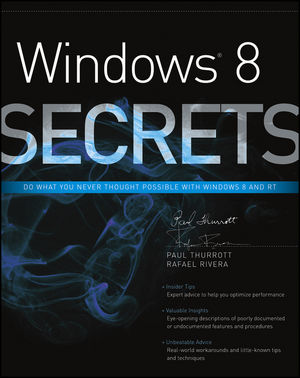
Windows 8 Secrets is a book that will be out very soon by well known Windows/Microsoft journalist Paul Thurrott and Rafael Rivera.  Yes, it’s by the same publisher that I work with, but this is a book I’m sure will be great to learn about using the OS. 

Microsoft is introducing a major new release of its Windows operating system, Windows 8, and what better way to learn all its ins and outs than from two internationally recognized Windows experts and Microsoft insiders, authors Paul Thurrott and Rafael Rivera? They cut through the hype to get at useful information you’ll not find anywhere else, including what role this new OS plays in a mobile and tablet world.

Regardless of your level of knowledge, you’ll discover little-known facts about how things work, what’s new and different, and how you can modify Windows 8 to meet what you need.

– Windows 8 is the exciting update to Microsoft’s operating system
– Authors are internationally known Windows experts and Microsoft insiders
– Reveals tips, tricks, and secrets on the new features and functionality of
– Explains best practices for customizing the system to work for you
I- nvestigates the differences between Windows 8 and previous versions of Windows
– Helps you go from Windows user to Windows expert
– Windows 8 Secrets is the ultimate insider’s guide to Microsoft’s most exciting Windows version in years.

EDIT: It’s going for just $20.65 right now!  That’s nothing for a tech book.

Technorati Tags:

Windows 8 & Windows Server 2012 RTM

I think I just pulled a Joe Namath

Microsoft has announced the RTM of Windows Server 2012 and Windows 8.

Windows Server 2012 will be GA on September 4th.  Microsoft will be having a virtual launch event, as you might have figured out already by some tweeted studio pictures Smile

image

Here are two recent blog posts on Windows Server 2012:

Windows 8 will be GA on October 26th.  The Windows Store is open for business … but I figured that out too Smile Here’s the release dates for the Windows 8 bits:

  • MSDN: August 15th
  • TechNet: August 15th
  • VLSC with Software Assurance: August 16th 
  • The Partner Network: August 16th … when my work PC will be upgraded
  • Volume License Resellers: September 1st … when we’ll be selling it to businesses

Windows Server 2012 will be “available to our volume licensing customers in the next couple of weeks”.  I guess it’s the same time frame as Windows 8.

And yes, this means that Windows Server 2012 Hyper-V and Windows 8 Client Hyper-V which are included in those operating systems, has RTMd.  Hyper-V Server 2012 has not RTMd.  It usually follows a while afterwards. My guess it will RTW on or just after September 4th.

On the Windows 8 public testing:

Over 16 million PCs actively participated in these programs, including approximately 7 million on the Release Preview that started 8 weeks ago. The depth and breadth of testing validate the readiness of Windows 8 for the market.

Congratulations to the groups and teams of program managers, designers, developers, testers, and so on.  This is a huge release.  I’m lucky because as an MVP I get direct interaction with some of the PMs.  I saw how rightly proud they were of the work that they’d done in such a short time frame.  Enjoy the celebrations and the time off, folks!

OK, so that’s done.  When is Windows 9 out?  Will it have a Start Menu Smile with tongue out

Windows 8 App Store Just Got Lots Of New Stuff

I’ve been building up an app collection for demo purposes, so I’ve been keeping track of what’s in the Windows Store on Windows 8 Release Preview. Nothing had appeared in a few days.  The calm before the storm I joke with myself.  How right I was.

I just logged in today and a lot of new stuff has appeared.  I’ve not see this much appear at once since the RP was released.

AppStore

Can you feel it?  It’s coming … the RTM that is.  I previously guess 6pm or 8pm GMT Irish time, 1st of August.  A pure guess.  I’m leaving work early today so I can be at home at 6pm Smile Nerd!

I’ve just noticed … none of the usual tech journalists are tweeting … hmm … Can a man read too much in between the lines, or can a man guess that even though we’re in the Sinofsky era, some things that happen around RTM time don’t ever change?

EDIT:

There is definitely a lot of new stuff. I’ve just been playing an “exercise” game where it uses your webcam to track your movement. A lot of new games, productivity, and social stuff.

EDIT:

And it happened at around 17:45.

Technorati Tags:

Hyper-V Host and VM Terminology

Yesterday I talked about what the names were for Hyper-V and Windows Server 2012 (WS2012).  Today I’m going to talk Hyper-V terminology.

Why am I posting this stuff?  I don’t call my car a motorbike when I talk to a mechanic.  Ever get a request for help where someone pulling virtualisation terms out of thin air.  For example, I’ve seen many people asking for help with their virtual servers. The more I read, the more I’m left wondering if they are talking about a host, a virtual machine, or a virtualisation product that Microsoft released back in September 2004.  While a tiny bit of this is Hyper-V specific, most of it is industry terminology going back 10 or more years. 

I think getting this stuff right is important. For example, I don’t like remotely helping people who can’t get the terminology right because it leaves me wondering if they are the sort of person who’ll take my help, get it very wrong, screw up royally, and then blame me for their lack of knowledge. I’m sure I’m not the only one who feels like that.

image

The Host

The physical machine is referred to as a host.  It is not called a Hyper-V server.  There is a product called Hyper-V Server that you can download and install on the host. It is absolutely not called a virtual server.

The operating system that is installed on the host and used to manage the hypervisor and host is referred to as the management OS. You will see some other terms floating about such as root partition and parent partition. Both are out-dated; yes there is new MSFT documentation that uses “root partition” and I was until recently (incorrectly) using “parent partition” but the correct term is management OS.  The generic term of host operating system (Host OS) is acceptable in my opinion seeing as it could include to many hypervisor products.

The Virtual Machines

Guess what: in virtualisation we have virtual machines. The are not called Hyper-V servers. The are definitely not called virtual servers.  It is simple: virtual machine or VM.  A VM can also be referred to as a guest

When you’re talking to a Microsoft licensing specialist they’ll talk to you about VOSEs.  That’s a Virtual Operating System Environment or a guest operating system or guest OS.  Guest OS = VOSE.

Summary

  • The host = the tin you’re hosting VMs on
  • The host OS or management OS is the OS that you enable Hyper-V in and use to manage the host
  • You run virtual machines (VMs) or guests on the host
  • A VM has a guest OS, that a licensing person calls a VOSE

Getting your terminology right will:

  1. Get you taken seriously as an engineer/consultant
  2. Help you get the help you’re asking for

RTM Week! Much Better Than Shark Week If You Ask Me

Although I would have expected the marketing people to wait for 8/8 to RTM Windows 8, they did previously announce RTM would be in the first week of August so that gives them from today (the 1st) until the 7th. And as I tweeted yesterday, Windows 8 product keys have appeared in the Microsoft Volume Licensing Service Center.

Watch for blog posts or news releases from Microsoft at 8am PST and 10am PST. I seem to remember Windows RTM meetings are usually early in the morning, but this Sinofskian release might be quite different to the past.

RTM does not mean that Windows 8/Server 2012 will appear on MSVL/MSDN/TechNet straight away. I think Vista took an age to spread out via the various networks. And I think Windows 7 was instantly available.  Developers will be critical to the success of Windows 8, so surely MSFT will give them access to RTM code on MSDN as quickly as possible?


What Windows Server 2012 and Hyper-V Are Called

There are no such things as:

  • W2012
  • Windows Server 8.  That was the old codename before the official title was announced.
  • Hyper-V v3.0
  • Hyper-V R3

The name of the server is Windows Server 2012.  The short for that is WS2012.

The name of the hypervisor is Windows Server 2012 Hyper-V.  The short for that is WS2012 Hyper-V.  There is also the free download, called Hyper-V Server 2012.

Hyper-V is available on Windows 8 Pro and Enterprise.  It’s official name is Windows 8 Client Hyper-V.

New Ways To Touch Windows 8 – The Microsoft Touch Mouse

Lots of people have been debating whether the Metro UI of Windows 8 can succeed on normal laptops and PCs without touch screens. Yesterday I blogged about a Logitech Wireless Touchpad that’s been around for a while.  I was talking about that at work today when one of our Apple folks told me to come back when Windows was doing something new Smile

This afternoon Brandon LeBlanc of Microsoft blogged about a series of new designed-for-Windows 8 keyboards and mice that are being launched by Microsoft … the day after I plonked down cash for a new 3000 series keyboard and mouse.  Paul Thurrot also covered the story this morning (before the Microsoft blog post) of the new devices.

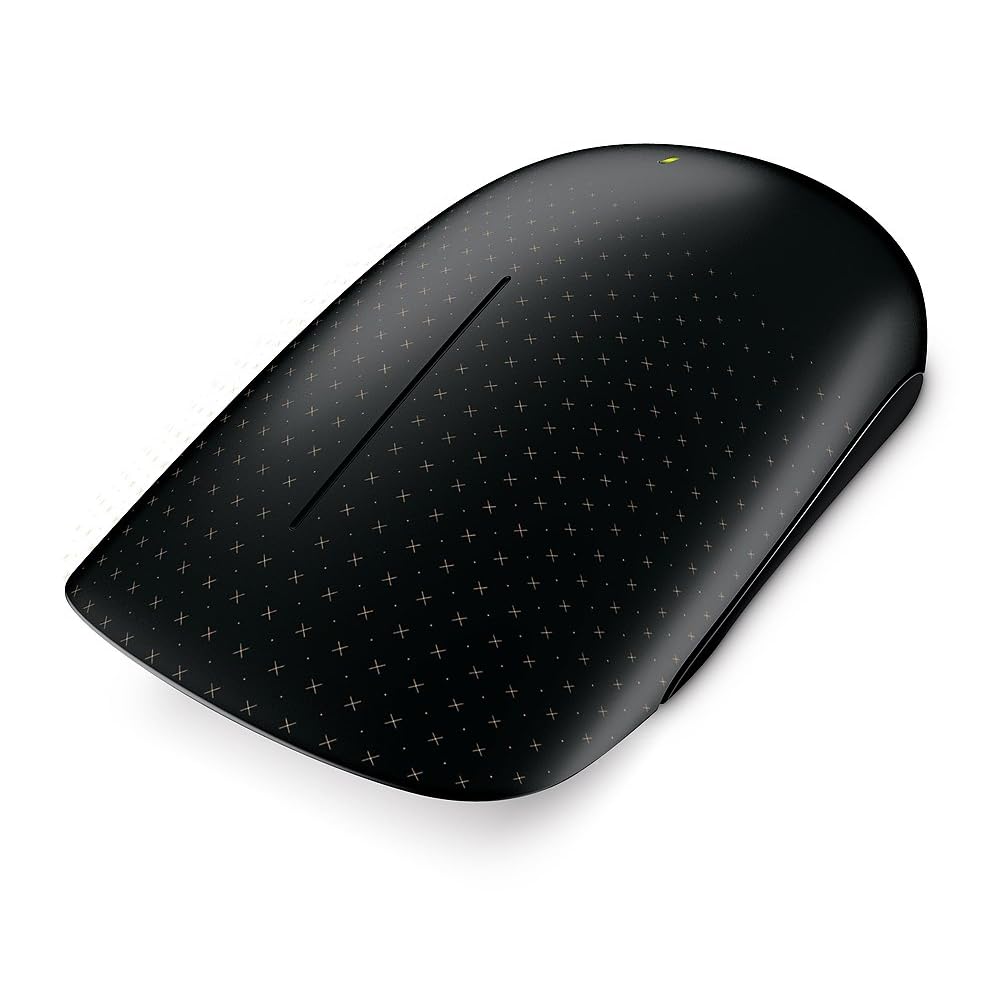
I personally cannot stand the look of the new wedge touch mouse. But there is a 50/50 pro/anti split in the guys who deal with consumer hardware in our office.  This is no normal mouse.  Besides looking weird, it offers touch and gesture support for Windows 8.  I guess the unusual flat surface is to assist in the touch experience.

The Wedge is not out yet, but the Microsoft Touch Mouse is, and I have one on my desk at the moment. One of the guys just gave it to me to play with.  Unlike the newly announced keyboards and mice, this one does use a dongle to connect to the computer.

The mouse has touch sensors all over the front of it. The sensors support multitouch.  The mouse also uses the bluetrack motion sensor to work on “any surface”. Right now, the only gesture stuff I got when I connected the mouse to Windows 8 was the scroll wheel action.  But that is changing according to Engadget.  You’ll basically get gestures for app switching, charms, scroll, and Semantic Zoom.  The mouse will be updated when Windows 8 “goes on sale”, so I guess that’ll happen on or after October 26th.  I’m looking forward to trying the update out when it is released!

EDIT#1

I downloaded a software update for the Microsoft Touch Mouse on Windows 8 x64.  It made the touch UI smoother and added the current set of Windows 7 gestures with thumb, one finger, two fingers, and three fingers. This will be updated at when Windows 8 is out for Windows 8 gestures.

Technorati Tags: ,

Logitech Touchpad with Windows 8?

Windows 8 was designed to be touch first but you can use it with a keyboard and a mouse.  I do that with my work laptop, the beast, which I use to run Windows 8 Client Hyper-V for deployment demos because it has SSD storage.  But what if you want that touch experience?  Some apps, certainly games (Cut the Rope, Angry Birds) work best with a touch UI.  You could go out and buy a replacement monitor for you PC.  You could replace your laptop.  Or you could go the Apple route and copy what they did for the Mac a while back when they introduced the pricey track pad.

I was just in the store picking up a new keyboard and mouse for some writing work (the real thing always beats a laptop keyboard/pad) and I saw something interesting on a display stand:

image

This is the Logitech Wireless Touchpad with Multitouch, coming in at $32.57 on Amazon.com.  It supports single, double, triple and quad touch as well as swipe.  Locally it was €49.99 in a brick store.  I very nearly picked one up but I was concerned that it might not be a great Windows 8 device; I’ve seen some people having Synaptic driver issues on forums with gesture support on their laptops.  I did a quick search on my iPhone but found nothing conclusive so I left it there.

I returned home but didn’t forget it.  I did some more searching and found one very happy reviewer.  Maybe I’ll get one for the work PC which I’m very likely to upgrade as soon as possible after RTM.

That reminds me.  I love to see what’s happening in the PC world, especially to the all-in-ones.  If I was buying a personal PC then that’s the type I’d want for Windows 8.  I saw a very sexy looking Lenovo IdeaCenter A720.

IdeaCentre A720

It is around $1700 in the USA and €1200 here.  It features a 27 inch 1920×1080 anti-glare 10-touch point screen with a flush bezel.  The spec is i7 (3rd generation), 8 GB RAM, 2 GB NVIDIA GPU.  It was a work of art in my opinion; I’d be happy for it to be placed in my sitting room.

Technorati Tags: ,

How to Explain Metro UI To Someone In 60 Seconds

There is so much crap out there with some people (usually bloggers) freaking out over the new UI in Windows 8.  I really don’t get it. 

Headlines flew all over the net earlier this week on every IT news site about Gartner allegedly saying Windows 8 was “bad”.  I only saw PC Pro (UK site) carry the story where Gartner corrected that.  The media love controversy and negativity but I guess corrections and positivity don’t get the same numbers of hits.  I was just forwarded a story by an executive from Steam (the online game distributor) saying Windows 8 was bad.  I’m sure the fact that the Windows Store will make his business irrelevant had nothing to do with forming his opinion.

Although my production machines (work and home) are still Windows 7, I use Windows 8 and Windows Server 2012 a lot and am doing that via touch and via traditional keyboard/mouse.  Yes, it is different.  No, it did not take me 3 days to get used to.  Sure there’s some muscle memory stuff in mouse navigation but you get over that.

So how do I explain the new Metro UI?  Simple:

  1. The pinned area of your start menu now fills the screen.  That’s called the Start Screen now.  It’s bigger, and has lots more information on screen to show you what’s going on in your apps without having to open them.
  2. You can get to anything that was in All Programs by hitting search or starting to type the name of the thing you want from the Start Screen.  I use the typing approach – Windows Key + Type, e.g. Windows Key + ISE finds me the PowerShell ISE in less than 2 seconds.
  3. The right side of the screen finds things, configures settings, and shares data.
  4. The left side switches between apps.
  5. The top/bottom of the screen interacts with the app that is open.

How many iPhones and Android handsets and iPads have been sold over the last 5 years?  This stuff is not alien to people.  I just don’t get all the negativity from the vocal minority on this one.

The last time I saw this level of anxiety was when Windows XP was released.  It was soooo different.  Many took to calling it Windows FP (Fischer Price) because of the kiddie-like interface (we thought) and we admins hated that everything had moved.  I remember having to deploy it one night in a small government office and dreading going in the following day when people had logged in.  It was my first deployment and I was sure that unhappy users would rip my head off.  They loved it.  In fact, businesses loved XP so much that we’re still trying to get them off of it.

I’m not foolish enough to thing enterprises will leap into Windows 8 straight after finishing still on-going Windows 7 deployments.  But I don’t think Windows 8 is the black death for business either.  I think some of the features in there are quite compelling for business:

  • Built-in BitLocker and BitLocker-To-Go in the Pro edition: something I wished for as a customer, but now I wish it was Enterprise edition only now I’m in the sales business Smile
  • Much better DirectAccess, with a server piece that really is SME friendly
  • Windows-To-Go for BYOD and working from home
  • Improved BranchCache
  • An app development platform that will be common across PC, laptop, tablet and phone – I actually think this is the one that will drive businesses to Windows 8.

And my Windows 7 machines?  My work PC will be upgraded ASAP, and my ultrabook will be upgraded when it fits a current project schedule.

Technorati Tags:

Is Windows Server 2012 RTM Closer Than We Think?

Oh you just know when RTM is nearby. Documents that don’t talk about beta or release candidate start to trickle out. Overnight I saw a Windows Server 2012/Windows 8 Branch Cache Deployment guide. And just now, Jose Barreto tweeted about a new version of the Performance Tuning Guidelines for Windows Server 2012 document. Can you smell it? The flavour of RTM is in the air, and it’s good!

BTW, MSFT did say first week of August, and that is next week.  But Mary Jo Foley did warn us to watch out for under-promise and over-deliver, i.e. an early RTM.  Let’s hope there are know showstopper bugs logged.